Submitted by :SHIVAM SHARMA
Submitted to: MRS.MUBINA SHEKH MAM
16-May-21
SHIVAM SHARMA
1
 IMSEC Ghaziabad is one of the top-notch
Engineering college in North India,
providing technical education and 100%
employability prospects to its students.
The IMSEC motto of imparting quality
education is reflected by its academic
results and placement.
16-May-21
SHIVAM SHARMA 2
1. 6 million Users
2. 4000 Employees world wide
3. 90 offices in 33 countries
4. Products available in 20 language
5. 1768 channels around world wide
6. 5th largest software company
7. More than 2 million students are trained in autodesk products per year
16-May-21
SHIVAM SHARMA 3
 Autodesk
 AutoCad
 2D Drafting
A. Tool used in 2D
B.Application of 2D
 3D modelling
A. Tool used in 3D
B.Application of 3D
 MATLAB
16-May-21
SHIVAM SHARMA 4
Autodesk makes software for people who
make things
Across the manufacturing, architecture, building,
construction, media and entertainment industries,
Autodesk gives you the power to make anything.
16-May-21
SHIVAM SHARMA 5
 Autodesk was initially released in 1982 .
 Autodesk is an American multinational software corporation that makes software
for architecture , ENGINEERING , construction , manufacturing , media and
entertainment industries.
 Autodesk headquarter are in San Rafael in California.
 The company was founded by John Walker.
16-May-21
SHIVAM SHARMA 6
 AutoCAD is the most popular software.
 CADD software with the highest overall job market
demand.
 To work in Industry, the workers need a strong
foundation of AutoCAD.
 Engineer are employed in every major industry
and the demand for engineers and a whole is
expected to grow by 18% between 2006 to 2020.
16-May-21
SHIVAM SHARMA 7
AutoCadsoftware to
design anything – with
time-saving toolsets, web
and mobile apps and with
laptop.
The first version of autocad
was released in 1982
and released that 27
December
16-May-21
SHIVAM SHARMA 8
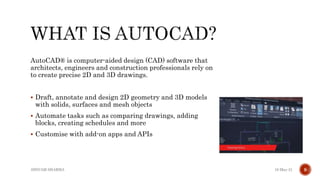
AutoCAD® is computer-aided design (CAD) software that
architects, engineers and construction professionals rely on
to create precise 2D and 3D drawings.
 Draft, annotate and design 2D geometry and 3D models
with solids, surfaces and mesh objects
 Automate tasks such as comparing drawings, adding
blocks, creating schedules and more
 Customise with add-on apps and APIs
16-May-21
SHIVAM SHARMA 9
Autocad
2D
designing
Drafting and
Annotation
Diminishing
3D
modelling
Isometric
view
16-May-21
SHIVAM SHARMA 10
 Draft design more quickly without using stencils and
technical drawing instruments.
 Develop site plans, refine concepts ,sketch technical
drawing and share your ideas.
 Customised template and more precisely.
 Collaborate with Colleagues and clients using other
compatible data file when using genuine DWG.
 File format to collaborate with client and associate.
16-May-21
SHIVAM SHARMA 11
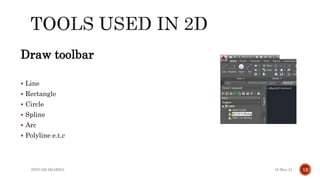
Draw toolbar
 Line
 Rectangle
 Circle
 Spline
 Arc
 Polyline e.t.c
16-May-21
SHIVAM SHARMA 12
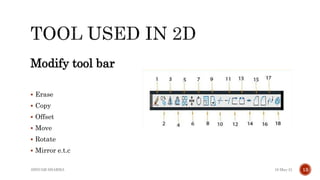
Modify tool bar
 Erase
 Copy
 Offset
 Move
 Rotate
 Mirror e.t.c
16-May-21
SHIVAM SHARMA 13
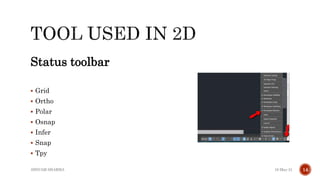
Status toolbar
 Grid
 Ortho
 Polar
 Osnap
 Infer
 Snap
 Tpy
16-May-21
SHIVAM SHARMA 14
Command toolbar
 Command toolbar is used for activating all the commands which are used in
AutoCad by typing.
 It is also the easiest way to give the command to the bar and also to activate
it.
16-May-21
SHIVAM SHARMA 15
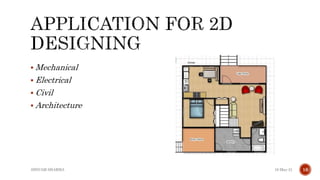
 Mechanical
 Electrical
 Civil
 Architecture
16-May-21
SHIVAM SHARMA 16
16-May-21
SHIVAM SHARMA 17
16-May-21
SHIVAM SHARMA 18
16-May-21
SHIVAM SHARMA 19
16-May-21
SHIVAM SHARMA 20
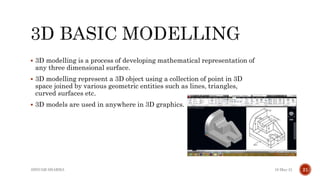
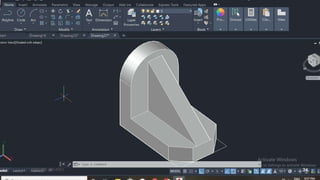
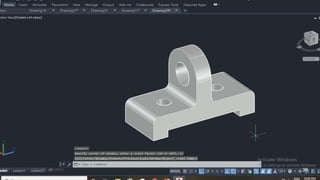
 3D modelling is a process of developing mathematical representation of
any three dimensional surface.
 3D modelling represent a 3D object using a collection of point in 3D
space joined by various geometric entities such as lines, triangles,
curved surfaces etc.
 3D models are used in anywhere in 3D graphics.
16-May-21
SHIVAM SHARMA 21
 Box
 Extruder
 PressPull
 Polysolid
 Loft
 Sweep
 Revolve
 3D mirror
16-May-21
SHIVAM SHARMA 22
 Medical industry
 Movie industry
 Video game industry
 Architecture industry
 Animation industry
 Interior design
16-May-21
SHIVAM SHARMA 23
16-May-21
SHIVAM SHARMA 24
16-May-21
SHIVAM SHARMA 25
16-May-21
SHIVAM SHARMA 26
MAT - LAB
The name MATLAB
stands for Matrix
Laboratory.
16-May-21
SHIVAM SHARMA 27
Stands for MATrix LABoratory
Interpreted language
Scientific programming environment
Very good tool for the manipulation of
matrices
Great visualisation capabilities
Loads of built-in functions
Easy to learn and simple to use
16-May-21
SHIVAM SHARMA 28
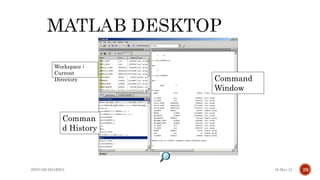
Command
Window
Workspace /
Current
Directory
Comman
d History
16-May-21
SHIVAM SHARMA 29
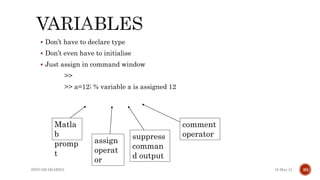
 Don’t have to declare type
 Don’t even have to initialise
 Just assign in command window
>>
>> a=12; % variable a is assigned 12
Matla
b
promp
t
assign
operat
or
suppress
comman
d output
comment
operator
16-May-21
SHIVAM SHARMA 30
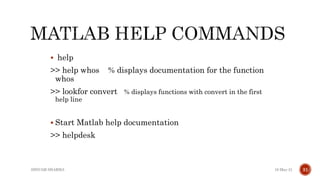
 help
>> help whos % displays documentation for the function
whos
>> lookfor convert % displays functions with convert in the first
help line
 Start Matlab help documentation
>> helpdesk
16-May-21
SHIVAM SHARMA 31
 DON’T NEED TO INITIALISE TYPE, OR DIMENSIONS
>>A = [3 2 1; 5 1 0; 2 1 7]
A = 3 2 1
5 1 0
2 1 7
>>
16-May-21
SHIVAM SHARMA 32
>> A ' % transpose
>> B*A % matrix multiplication
>> B.*A % element by element multiplication
>> B/A % matrix division
>> B./A % element by element division
>> [B A] % Join matrices (horizontally)
>> [B; A] % Join matrices (vertically)
A =
3 2 1
5 1 0
2 1 7
B =
1 3 1
4 9 5
2 7 2
16-May-21
SHIVAM SHARMA 33
 Programming in Matlab.
 Users can write functions which can be called from the command line.
 Functions can accept input variable(s)/matrice(s) and will output
variable(s)/matrice(s).
 Functions will not manipulate variable(s)/matrice(s) in the Matlab
Workspace.
 In Matlab functions closely resemble scripts and can be written in the Matlab
editor. Matlab functions have the function keyword.
 Remember that the filename of a function will be its calling function name.
 Don’t overload any built-in functions by using the same filename for your
functions or scripts!
 Functions can be opened for editing using the open command. Many built-in
Matlab functions can also be viewed using this command.
16-May-21
SHIVAM SHARMA 34
 Google
 https://www.autodesk.in/products/autocad/overview?plc=ACDIST
&term=1-YEAR&support=ADVANCED&quantity=1
 https://drive.google.com/file/d/1i-
QXNVWeSLbz5EQiWBAJHgrNkMBVY94A/view?usp=drivesdk
 A Guide to MATLAB for Beginners and Experienced Users
Brian R. Hunt Ronald L. Lipsman Jonathan M. Rosenberg
with Kevin R. Coombes, John E. Osborn, and Garrett J. Stuck
16-May-21
SHIVAM SHARMA 35
16-May-21
SHIVAM SHARMA 36
16-May-21
SHIVAM SHARMA
37

Autocad&MatLab ppt.

  • 1.
    Submitted by :SHIVAMSHARMA Submitted to: MRS.MUBINA SHEKH MAM 16-May-21 SHIVAM SHARMA 1
  • 2.
     IMSEC Ghaziabadis one of the top-notch Engineering college in North India, providing technical education and 100% employability prospects to its students. The IMSEC motto of imparting quality education is reflected by its academic results and placement. 16-May-21 SHIVAM SHARMA 2
  • 3.
    1. 6 millionUsers 2. 4000 Employees world wide 3. 90 offices in 33 countries 4. Products available in 20 language 5. 1768 channels around world wide 6. 5th largest software company 7. More than 2 million students are trained in autodesk products per year 16-May-21 SHIVAM SHARMA 3
  • 4.
     Autodesk  AutoCad 2D Drafting A. Tool used in 2D B.Application of 2D  3D modelling A. Tool used in 3D B.Application of 3D  MATLAB 16-May-21 SHIVAM SHARMA 4
  • 5.
    Autodesk makes softwarefor people who make things Across the manufacturing, architecture, building, construction, media and entertainment industries, Autodesk gives you the power to make anything. 16-May-21 SHIVAM SHARMA 5
  • 6.
     Autodesk wasinitially released in 1982 .  Autodesk is an American multinational software corporation that makes software for architecture , ENGINEERING , construction , manufacturing , media and entertainment industries.  Autodesk headquarter are in San Rafael in California.  The company was founded by John Walker. 16-May-21 SHIVAM SHARMA 6
  • 7.
     AutoCAD isthe most popular software.  CADD software with the highest overall job market demand.  To work in Industry, the workers need a strong foundation of AutoCAD.  Engineer are employed in every major industry and the demand for engineers and a whole is expected to grow by 18% between 2006 to 2020. 16-May-21 SHIVAM SHARMA 7
  • 8.
    AutoCadsoftware to design anything– with time-saving toolsets, web and mobile apps and with laptop. The first version of autocad was released in 1982 and released that 27 December 16-May-21 SHIVAM SHARMA 8
  • 9.
    AutoCAD® is computer-aideddesign (CAD) software that architects, engineers and construction professionals rely on to create precise 2D and 3D drawings.  Draft, annotate and design 2D geometry and 3D models with solids, surfaces and mesh objects  Automate tasks such as comparing drawings, adding blocks, creating schedules and more  Customise with add-on apps and APIs 16-May-21 SHIVAM SHARMA 9
  • 10.
  • 11.
     Draft designmore quickly without using stencils and technical drawing instruments.  Develop site plans, refine concepts ,sketch technical drawing and share your ideas.  Customised template and more precisely.  Collaborate with Colleagues and clients using other compatible data file when using genuine DWG.  File format to collaborate with client and associate. 16-May-21 SHIVAM SHARMA 11
  • 12.
    Draw toolbar  Line Rectangle  Circle  Spline  Arc  Polyline e.t.c 16-May-21 SHIVAM SHARMA 12
  • 13.
    Modify tool bar Erase  Copy  Offset  Move  Rotate  Mirror e.t.c 16-May-21 SHIVAM SHARMA 13
  • 14.
    Status toolbar  Grid Ortho  Polar  Osnap  Infer  Snap  Tpy 16-May-21 SHIVAM SHARMA 14
  • 15.
    Command toolbar  Commandtoolbar is used for activating all the commands which are used in AutoCad by typing.  It is also the easiest way to give the command to the bar and also to activate it. 16-May-21 SHIVAM SHARMA 15
  • 16.
     Mechanical  Electrical Civil  Architecture 16-May-21 SHIVAM SHARMA 16
  • 17.
  • 18.
  • 19.
  • 20.
  • 21.
     3D modellingis a process of developing mathematical representation of any three dimensional surface.  3D modelling represent a 3D object using a collection of point in 3D space joined by various geometric entities such as lines, triangles, curved surfaces etc.  3D models are used in anywhere in 3D graphics. 16-May-21 SHIVAM SHARMA 21
  • 22.
     Box  Extruder PressPull  Polysolid  Loft  Sweep  Revolve  3D mirror 16-May-21 SHIVAM SHARMA 22
  • 23.
     Medical industry Movie industry  Video game industry  Architecture industry  Animation industry  Interior design 16-May-21 SHIVAM SHARMA 23
  • 24.
  • 25.
  • 26.
  • 27.
    MAT - LAB Thename MATLAB stands for Matrix Laboratory. 16-May-21 SHIVAM SHARMA 27
  • 28.
    Stands for MATrixLABoratory Interpreted language Scientific programming environment Very good tool for the manipulation of matrices Great visualisation capabilities Loads of built-in functions Easy to learn and simple to use 16-May-21 SHIVAM SHARMA 28
  • 29.
  • 30.
     Don’t haveto declare type  Don’t even have to initialise  Just assign in command window >> >> a=12; % variable a is assigned 12 Matla b promp t assign operat or suppress comman d output comment operator 16-May-21 SHIVAM SHARMA 30
  • 31.
     help >> helpwhos % displays documentation for the function whos >> lookfor convert % displays functions with convert in the first help line  Start Matlab help documentation >> helpdesk 16-May-21 SHIVAM SHARMA 31
  • 32.
     DON’T NEEDTO INITIALISE TYPE, OR DIMENSIONS >>A = [3 2 1; 5 1 0; 2 1 7] A = 3 2 1 5 1 0 2 1 7 >> 16-May-21 SHIVAM SHARMA 32
  • 33.
    >> A '% transpose >> B*A % matrix multiplication >> B.*A % element by element multiplication >> B/A % matrix division >> B./A % element by element division >> [B A] % Join matrices (horizontally) >> [B; A] % Join matrices (vertically) A = 3 2 1 5 1 0 2 1 7 B = 1 3 1 4 9 5 2 7 2 16-May-21 SHIVAM SHARMA 33
  • 34.
     Programming inMatlab.  Users can write functions which can be called from the command line.  Functions can accept input variable(s)/matrice(s) and will output variable(s)/matrice(s).  Functions will not manipulate variable(s)/matrice(s) in the Matlab Workspace.  In Matlab functions closely resemble scripts and can be written in the Matlab editor. Matlab functions have the function keyword.  Remember that the filename of a function will be its calling function name.  Don’t overload any built-in functions by using the same filename for your functions or scripts!  Functions can be opened for editing using the open command. Many built-in Matlab functions can also be viewed using this command. 16-May-21 SHIVAM SHARMA 34
  • 35.
     Google  https://www.autodesk.in/products/autocad/overview?plc=ACDIST &term=1-YEAR&support=ADVANCED&quantity=1 https://drive.google.com/file/d/1i- QXNVWeSLbz5EQiWBAJHgrNkMBVY94A/view?usp=drivesdk  A Guide to MATLAB for Beginners and Experienced Users Brian R. Hunt Ronald L. Lipsman Jonathan M. Rosenberg with Kevin R. Coombes, John E. Osborn, and Garrett J. Stuck 16-May-21 SHIVAM SHARMA 35
  • 36.
  • 37.