PRESENTATION ON AUTOCAD
Presented by: Anurag Singh
[MECHANICAL] 4th Year
1902220400006
OUTLINE :
Intruduction
Latest Version
AutoCad Screen
How it works
Toolbars
Why are used to Autocad
Way to provide command
Some 2D commands
3D modeling
3D commands
Benefits of Autocad
INTRODUCTION
The word AutoCAD is made up of two Auto (logo of company ) and CAD
(computer-aided design).
AutoCAD is 2D and 3D modeling software.
It is developed by Autodesk company.
Autodesk is a U.S.A-based company.
 It is widely used in the industry for 2D drawing and 3D drawing.
In another way, AutoCAD is a design course performed with a computer’s help.
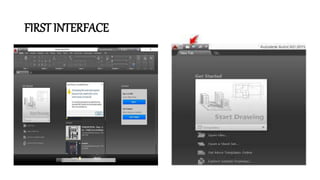
FIRST INTERFACE
LATEST VERSION
• The version history of Autocad, a commercial computer-aided
design (CAD) and drafting software application by Autodesk,
began with the release of version 1.0 in December 1982.[1] The
software has been continuously updated since its initial release.
• official name versions Date of release
• autocad 2020 23.1 2019, March 27
• autocad 2021 24.0 2020, March 25
• autocad 2022 24.1 2021, March 23
• autocad 2023 24.2 2022, March 28
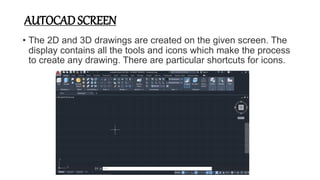
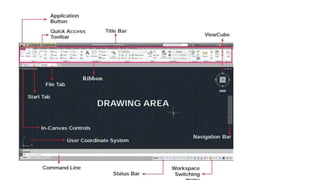
AUTOCAD SCREEN
• The 2D and 3D drawings are created on the given screen. The
display contains all the tools and icons which make the process
to create any drawing. There are particular shortcuts for icons.
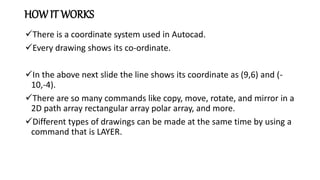
HOW IT WORKS
There is a coordinate system used in Autocad.
Every drawing shows its co-ordinate.
In the above next slide the line shows its coordinate as (9,6) and (-
10,-4).
There are so many commands like copy, move, rotate, and mirror in a
2D path array rectangular array polar array, and more.
Different types of drawings can be made at the same time by using a
command that is LAYER.
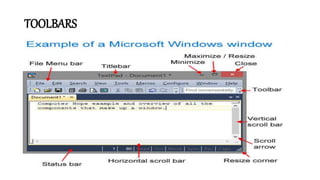
TOOLBARS
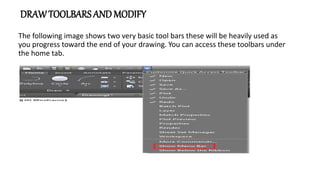
DRAWTOOLBARS ANDMODIFY
The following image shows two very basic tool bars these will be heavily used as
you progress toward the end of your drawing. You can access these toolbars under
the home tab.
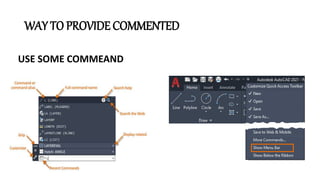
WAY TO PROVIDE COMMENTED
USE SOME COMMEAND
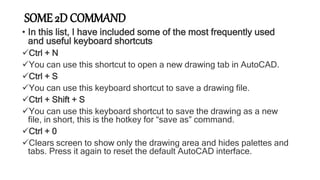
SOME 2D COMMAND
• In this list, I have included some of the most frequently used
and useful keyboard shortcuts
Ctrl + N
You can use this shortcut to open a new drawing tab in AutoCAD.
Ctrl + S
You can use this keyboard shortcut to save a drawing file.
Ctrl + Shift + S
You can use this keyboard shortcut to save the drawing as a new
file, in short, this is the hotkey for “save as” command.
Ctrl + 0
Clears screen to show only the drawing area and hides palettes and
tabs. Press it again to reset the default AutoCAD interface.
3D MODELING
• In 3D computer graphics, 3D modeling is the process of developing
a mathematical coordinate-based representation of any surface of an
object (inanimate or living) in three dimensions via specialized
software by manipulating edges, vertices, and polygons in a
simulated 3D space.
• Polygonal modeling – Points in 3D space, called vertices, are
connected by line segments to form a polygon mesh. The vast
majority of 3D models today are built as textured polygonal models,
because they are flexible, because computers can render them so
quickly. However, polygons are planar and can only approximate
curved surfaces using many polygons.
• Curve modeling – Surfaces are defined by curves, which are
influenced by weighted control points. The curve follows (but does
not necessarily interpolate) the points. Increasing the weight for a
point will pull the curve closer to that point. Curve types
include nonuniform rational B-spline (NURBS), splines, patches,
and geometric primitives
Benefits of Autocad
· Provides accuracy and reduces errors.
· Saves money and time.
· Offers an easy data transfer.
· Helps in creating and managing a comprehensive
manufacturing database
· Allows easy import and export of files.
· Can use Point Clouds.
· Lets you quickly calculate mass, area, volume, and
center of gravity.
· It supports image tracing features and PDF import
enhancements.
autocad.pptx

autocad.pptx

  • 1.
    PRESENTATION ON AUTOCAD Presentedby: Anurag Singh [MECHANICAL] 4th Year 1902220400006
  • 2.
    OUTLINE : Intruduction Latest Version AutoCadScreen How it works Toolbars Why are used to Autocad Way to provide command Some 2D commands 3D modeling 3D commands Benefits of Autocad
  • 3.
    INTRODUCTION The word AutoCADis made up of two Auto (logo of company ) and CAD (computer-aided design). AutoCAD is 2D and 3D modeling software. It is developed by Autodesk company. Autodesk is a U.S.A-based company.  It is widely used in the industry for 2D drawing and 3D drawing. In another way, AutoCAD is a design course performed with a computer’s help.
  • 4.
  • 5.
    LATEST VERSION • Theversion history of Autocad, a commercial computer-aided design (CAD) and drafting software application by Autodesk, began with the release of version 1.0 in December 1982.[1] The software has been continuously updated since its initial release. • official name versions Date of release • autocad 2020 23.1 2019, March 27 • autocad 2021 24.0 2020, March 25 • autocad 2022 24.1 2021, March 23 • autocad 2023 24.2 2022, March 28
  • 6.
    AUTOCAD SCREEN • The2D and 3D drawings are created on the given screen. The display contains all the tools and icons which make the process to create any drawing. There are particular shortcuts for icons.
  • 8.
    HOW IT WORKS Thereis a coordinate system used in Autocad. Every drawing shows its co-ordinate. In the above next slide the line shows its coordinate as (9,6) and (- 10,-4). There are so many commands like copy, move, rotate, and mirror in a 2D path array rectangular array polar array, and more. Different types of drawings can be made at the same time by using a command that is LAYER.
  • 9.
  • 10.
    DRAWTOOLBARS ANDMODIFY The followingimage shows two very basic tool bars these will be heavily used as you progress toward the end of your drawing. You can access these toolbars under the home tab.
  • 11.
    WAY TO PROVIDECOMMENTED USE SOME COMMEAND
  • 12.
    SOME 2D COMMAND •In this list, I have included some of the most frequently used and useful keyboard shortcuts Ctrl + N You can use this shortcut to open a new drawing tab in AutoCAD. Ctrl + S You can use this keyboard shortcut to save a drawing file. Ctrl + Shift + S You can use this keyboard shortcut to save the drawing as a new file, in short, this is the hotkey for “save as” command. Ctrl + 0 Clears screen to show only the drawing area and hides palettes and tabs. Press it again to reset the default AutoCAD interface.
  • 13.
    3D MODELING • In3D computer graphics, 3D modeling is the process of developing a mathematical coordinate-based representation of any surface of an object (inanimate or living) in three dimensions via specialized software by manipulating edges, vertices, and polygons in a simulated 3D space. • Polygonal modeling – Points in 3D space, called vertices, are connected by line segments to form a polygon mesh. The vast majority of 3D models today are built as textured polygonal models, because they are flexible, because computers can render them so quickly. However, polygons are planar and can only approximate curved surfaces using many polygons. • Curve modeling – Surfaces are defined by curves, which are influenced by weighted control points. The curve follows (but does not necessarily interpolate) the points. Increasing the weight for a point will pull the curve closer to that point. Curve types include nonuniform rational B-spline (NURBS), splines, patches, and geometric primitives
  • 14.
    Benefits of Autocad ·Provides accuracy and reduces errors. · Saves money and time. · Offers an easy data transfer. · Helps in creating and managing a comprehensive manufacturing database · Allows easy import and export of files. · Can use Point Clouds. · Lets you quickly calculate mass, area, volume, and center of gravity. · It supports image tracing features and PDF import enhancements.