Submitted by:
MD. SHIHAB HOSSAIN
ID: 1237206
What is firewall?
• A firewall is a software program that protects a computer or a network by
allowing certain types of network traffic in and out of the system while blocking
others.
Basic Understanding On Windows Firewall settings
IP addresses
We can use IP addresses to configure a firewall to only allow traffic from specific computers or
networks in and out.
Protocol numbers
It specifies whether the packet contains TCP or User Datagram Protocol (UDP) traffic. We can filter
protocol numbers to block packets containing certain types of traffic.
Port numbers
Port numbers identify specific applications running on the computer.
The most common firewall rules use port numbers to specify the types of application
traffic the computer is allowed to send and receive. For example, a web server usually
receives its incoming packets to port number 80.
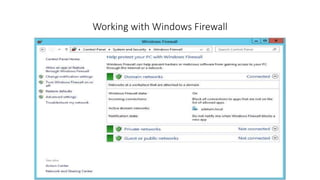
Working with Windows Firewall
Easy access for applying Security
• Allow An App Or Feature Through Windows Firewall
• Change Notification Settings Turn Windows Firewall On Or Off
• Restore Defaults
• Advanced Settings
• Troubleshoot My Network
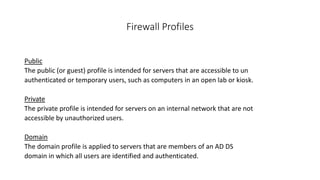
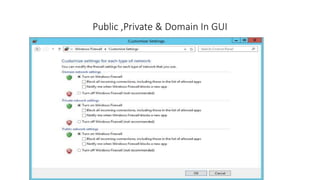
Firewall Profiles
Public
The public (or guest) profile is intended for servers that are accessible to un
authenticated or temporary users, such as computers in an open lab or kiosk.
Private
The private profile is intended for servers on an internal network that are not
accessible by unauthorized users.
Domain
The domain profile is applied to servers that are members of an AD DS
domain in which all users are identified and authenticated.
Public ,Private & Domain In GUI
Allowing applications
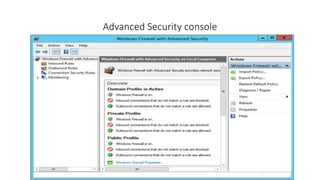
Advanced Security console
Default Windows Firewall configuration
• The firewall is turned on.
• Incoming traffic is blocked unless it matches a rule.
• traffic is allowed unless it matches a rule
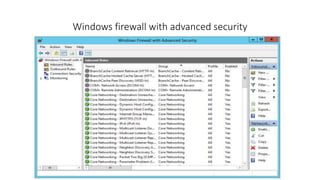
Windows firewall with advanced security
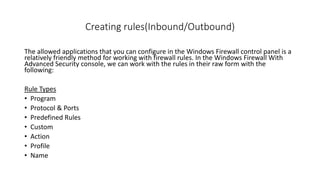
Creating rules(Inbound/Outbound)
The allowed applications that you can configure in the Windows Firewall control panel is a
relatively friendly method for working with firewall rules. In the Windows Firewall With
Advanced Security console, we can work with the rules in their raw form with the
following:
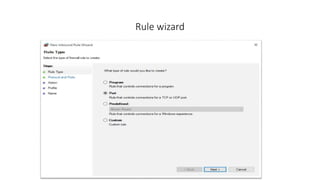
Rule Types
• Program
• Protocol & Ports
• Predefined Rules
• Custom
• Action
• Profile
• Name
Rule wizard
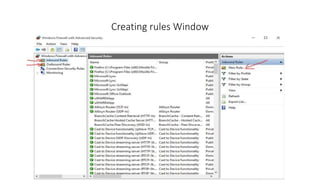
Creating rules Window
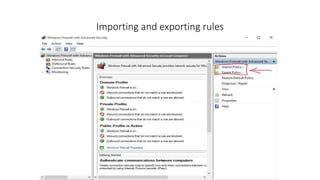
Importing and exporting rules
Creating rules by using Group Policy
Creating connection security rules(Ipsec)
The IP Security (IPsec) standards are a collection of documents that
define a method for securing data while it is in transit over a TCP/IP
network. IPsec includes a connection establishment routine, during
which computers authenticate each other before transmitting data ,
and a technique called tunneling, in which data packets are
encapsulated within other packets for their protection.
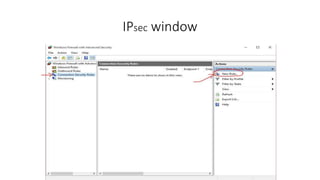
IPsec window
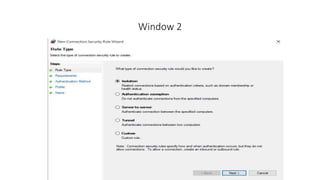
Window 2
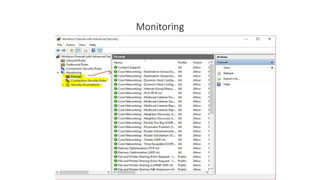
Monitoring

Assignment on windows firewall

  • 1.
    Submitted by: MD. SHIHABHOSSAIN ID: 1237206
  • 2.
    What is firewall? •A firewall is a software program that protects a computer or a network by allowing certain types of network traffic in and out of the system while blocking others.
  • 3.
    Basic Understanding OnWindows Firewall settings IP addresses We can use IP addresses to configure a firewall to only allow traffic from specific computers or networks in and out. Protocol numbers It specifies whether the packet contains TCP or User Datagram Protocol (UDP) traffic. We can filter protocol numbers to block packets containing certain types of traffic. Port numbers Port numbers identify specific applications running on the computer. The most common firewall rules use port numbers to specify the types of application traffic the computer is allowed to send and receive. For example, a web server usually receives its incoming packets to port number 80.
  • 4.
  • 5.
    Easy access forapplying Security • Allow An App Or Feature Through Windows Firewall • Change Notification Settings Turn Windows Firewall On Or Off • Restore Defaults • Advanced Settings • Troubleshoot My Network
  • 6.
    Firewall Profiles Public The public(or guest) profile is intended for servers that are accessible to un authenticated or temporary users, such as computers in an open lab or kiosk. Private The private profile is intended for servers on an internal network that are not accessible by unauthorized users. Domain The domain profile is applied to servers that are members of an AD DS domain in which all users are identified and authenticated.
  • 7.
    Public ,Private &Domain In GUI
  • 8.
  • 9.
  • 10.
    Default Windows Firewallconfiguration • The firewall is turned on. • Incoming traffic is blocked unless it matches a rule. • traffic is allowed unless it matches a rule
  • 11.
    Windows firewall withadvanced security
  • 12.
    Creating rules(Inbound/Outbound) The allowedapplications that you can configure in the Windows Firewall control panel is a relatively friendly method for working with firewall rules. In the Windows Firewall With Advanced Security console, we can work with the rules in their raw form with the following: Rule Types • Program • Protocol & Ports • Predefined Rules • Custom • Action • Profile • Name
  • 13.
  • 14.
  • 15.
  • 16.
    Creating rules byusing Group Policy
  • 17.
    Creating connection securityrules(Ipsec) The IP Security (IPsec) standards are a collection of documents that define a method for securing data while it is in transit over a TCP/IP network. IPsec includes a connection establishment routine, during which computers authenticate each other before transmitting data , and a technique called tunneling, in which data packets are encapsulated within other packets for their protection.
  • 18.
  • 19.
  • 20.