Assignment-2
SUBMITTED TO SUBMITTED BY
PRANOB NATH BANDHU NAME : MAHFUJUR
RAHMAN
LECTURER ID:1834902162
CITY UNIVERSITY BATCH:49(B)
B.SC. IN CSE
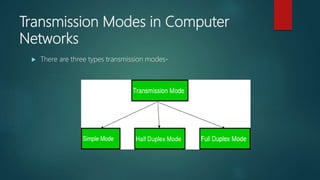
Transmission Modes in Computer
Networks
 There are three types transmission modes-
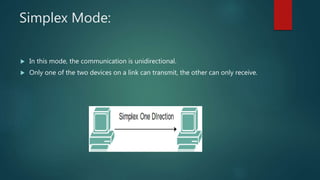
Simplex Mode:
 In this mode, the communication is unidirectional.
 Only one of the two devices on a link can transmit, the other can only receive.
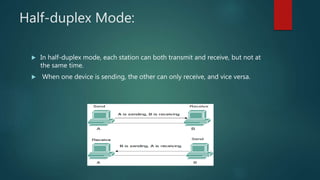
Half-duplex Mode:
 In half-duplex mode, each station can both transmit and receive, but not at
the same time.
 When one device is sending, the other can only receive, and vice versa.
Full-duplex Mode:
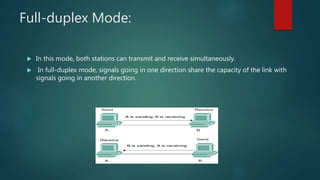
 In this mode, both stations can transmit and receive simultaneously.
 In full-duplex mode, signals going in one direction share the capacity of the link with
signals going in another direction.
Internet:
 It is used to connect different network of computers simultaneously.
 In internet, there are multiple users and it provides unlimited number of information to
the users.
 It is a public network therefore anyone can access the internet.
Intranet:
 Intranet is the type of internet which is used by privately.
 In intranet, there are limited number of users and it provides limited number of
information to its users.
 It is a private network therefore anyone can’t access intranet.
Network Interface Card (NIC):
 It is used to connect different networking devices such as computers and servers to
share data over the connected network.
 It offers both wired (using cables) and wireless (using Wi-Fi) data communication
techniques.
 NIC is a middleware between a computer/server and a data network.
MAC Address:
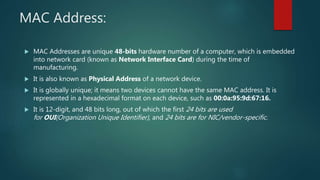
 MAC Addresses are unique 48-bits hardware number of a computer, which is embedded
into network card (known as Network Interface Card) during the time of
manufacturing.
 It is also known as Physical Address of a network device.
 It is globally unique; it means two devices cannot have the same MAC address. It is
represented in a hexadecimal format on each device, such as 00:0a:95:9d:67:16.
 It is 12-digit, and 48 bits long, out of which the first 24 bits are used
for OUI(Organization Unique Identifier), and 24 bits are for NIC/vendor-specific.
IP Address:
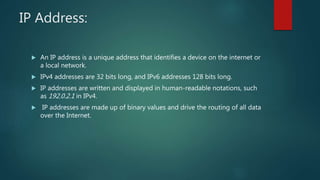
 An IP address is a unique address that identifies a device on the internet or
a local network.
 IPv4 addresses are 32 bits long, and IPv6 addresses 128 bits long.
 IP addresses are written and displayed in human-readable notations, such
as 192.0.2.1 in IPv4.
 IP addresses are made up of binary values and drive the routing of all data
over the Internet.
Classify of IP Address:
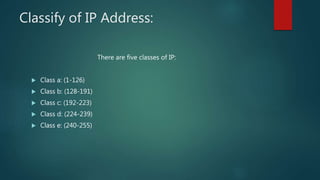
There are five classes of IP:
 Class a: (1-126)
 Class b: (128-191)
 Class c: (192-223)
 Class d: (224-239)
 Class e: (240-255)
Types of area networks – LAN, MAN and WAN
LAN (Local Area Network):
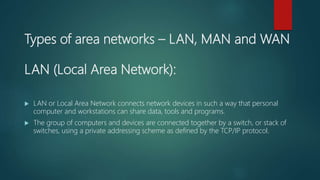
 LAN or Local Area Network connects network devices in such a way that personal
computer and workstations can share data, tools and programs.
 The group of computers and devices are connected together by a switch, or stack of
switches, using a private addressing scheme as defined by the TCP/IP protocol.
MAN (Metropolitan Area Network):
 MAN or Metropolitan area Network covers a larger area than that of a LAN and smaller
area as compared to WAN.
 It is designed for customers who need a high-speed connectivity.
 It connects two or more computers that are apart but resides in the same or different
cities.
 It covers a large geographical area and may serve as an ISP (Internet Service Provider).
WAN (Wide Area Network):
 WAN or Wide Area Network is a computer network that extends over a large
geographical area, although it might be confined within the bounds of a state or country.
 A WAN could be a connection of LAN connecting to other LAN’s via telephone lines and
radio waves and may be limited to an enterprise (a corporation or an organization) or
accessible to the public.
 The technology is high speed and relatively expensive.
Analog Signal:
 An analog signal signifies a continuous signal that keeps changes with a
time period.
 Analog signals are continuous sine waves.
 It describe the behavior of the wave with respect to amplitude, time
period, & phase of the signal.
 Analog signal medium of transmission is wire or wireless
Digital Signal:
 A digital signal signifies a discrete signal that carries binary data and has discrete values.
 Digital signal is square waves.
 Digital signals describe the behavior of the signal with respect to the rate of a bit as well
as bit interval.
 Digital signal is limited as well as ranges from 0 to 1.
Hub:
 A hub connects multiple wires coming from different branches, for example, the
connector in star topology which connects different stations.
 Hubs cannot filter data, so data packets are sent to all connected devices.
Switch:
 A switch is a multiport bridge with a buffer and a design that can boost its efficiency(a
large number of ports imply less traffic) and performance.
 The switch can perform error checking before forwarding data, which makes it very
efficient as it does not forward packets that have errors and forward good packets
selectively to the correct port only.
Router:
 A router is a device like a switch that routes data packets based on their IP addresses.
 Routers normally connect LANs and WANs together and have a dynamically updating
routing table based on which they make decisions on routing the data packets.

Assignment 2

  • 1.
    Assignment-2 SUBMITTED TO SUBMITTEDBY PRANOB NATH BANDHU NAME : MAHFUJUR RAHMAN LECTURER ID:1834902162 CITY UNIVERSITY BATCH:49(B) B.SC. IN CSE
  • 2.
    Transmission Modes inComputer Networks  There are three types transmission modes-
  • 3.
    Simplex Mode:  Inthis mode, the communication is unidirectional.  Only one of the two devices on a link can transmit, the other can only receive.
  • 4.
    Half-duplex Mode:  Inhalf-duplex mode, each station can both transmit and receive, but not at the same time.  When one device is sending, the other can only receive, and vice versa.
  • 5.
    Full-duplex Mode:  Inthis mode, both stations can transmit and receive simultaneously.  In full-duplex mode, signals going in one direction share the capacity of the link with signals going in another direction.
  • 6.
    Internet:  It isused to connect different network of computers simultaneously.  In internet, there are multiple users and it provides unlimited number of information to the users.  It is a public network therefore anyone can access the internet.
  • 7.
    Intranet:  Intranet isthe type of internet which is used by privately.  In intranet, there are limited number of users and it provides limited number of information to its users.  It is a private network therefore anyone can’t access intranet.
  • 8.
    Network Interface Card(NIC):  It is used to connect different networking devices such as computers and servers to share data over the connected network.  It offers both wired (using cables) and wireless (using Wi-Fi) data communication techniques.  NIC is a middleware between a computer/server and a data network.
  • 9.
    MAC Address:  MACAddresses are unique 48-bits hardware number of a computer, which is embedded into network card (known as Network Interface Card) during the time of manufacturing.  It is also known as Physical Address of a network device.  It is globally unique; it means two devices cannot have the same MAC address. It is represented in a hexadecimal format on each device, such as 00:0a:95:9d:67:16.  It is 12-digit, and 48 bits long, out of which the first 24 bits are used for OUI(Organization Unique Identifier), and 24 bits are for NIC/vendor-specific.
  • 10.
    IP Address:  AnIP address is a unique address that identifies a device on the internet or a local network.  IPv4 addresses are 32 bits long, and IPv6 addresses 128 bits long.  IP addresses are written and displayed in human-readable notations, such as 192.0.2.1 in IPv4.  IP addresses are made up of binary values and drive the routing of all data over the Internet.
  • 11.
    Classify of IPAddress: There are five classes of IP:  Class a: (1-126)  Class b: (128-191)  Class c: (192-223)  Class d: (224-239)  Class e: (240-255)
  • 12.
    Types of areanetworks – LAN, MAN and WAN LAN (Local Area Network):  LAN or Local Area Network connects network devices in such a way that personal computer and workstations can share data, tools and programs.  The group of computers and devices are connected together by a switch, or stack of switches, using a private addressing scheme as defined by the TCP/IP protocol.
  • 13.
    MAN (Metropolitan AreaNetwork):  MAN or Metropolitan area Network covers a larger area than that of a LAN and smaller area as compared to WAN.  It is designed for customers who need a high-speed connectivity.  It connects two or more computers that are apart but resides in the same or different cities.  It covers a large geographical area and may serve as an ISP (Internet Service Provider).
  • 14.
    WAN (Wide AreaNetwork):  WAN or Wide Area Network is a computer network that extends over a large geographical area, although it might be confined within the bounds of a state or country.  A WAN could be a connection of LAN connecting to other LAN’s via telephone lines and radio waves and may be limited to an enterprise (a corporation or an organization) or accessible to the public.  The technology is high speed and relatively expensive.
  • 15.
    Analog Signal:  Ananalog signal signifies a continuous signal that keeps changes with a time period.  Analog signals are continuous sine waves.  It describe the behavior of the wave with respect to amplitude, time period, & phase of the signal.  Analog signal medium of transmission is wire or wireless
  • 16.
    Digital Signal:  Adigital signal signifies a discrete signal that carries binary data and has discrete values.  Digital signal is square waves.  Digital signals describe the behavior of the signal with respect to the rate of a bit as well as bit interval.  Digital signal is limited as well as ranges from 0 to 1.
  • 17.
    Hub:  A hubconnects multiple wires coming from different branches, for example, the connector in star topology which connects different stations.  Hubs cannot filter data, so data packets are sent to all connected devices.
  • 18.
    Switch:  A switchis a multiport bridge with a buffer and a design that can boost its efficiency(a large number of ports imply less traffic) and performance.  The switch can perform error checking before forwarding data, which makes it very efficient as it does not forward packets that have errors and forward good packets selectively to the correct port only.
  • 19.
    Router:  A routeris a device like a switch that routes data packets based on their IP addresses.  Routers normally connect LANs and WANs together and have a dynamically updating routing table based on which they make decisions on routing the data packets.