Department of CSE
City University
Class note-2
Course Title: Data Communication
Course Code:CSE-313
Submition To:
Pranab Bondhu Nath
Senior Lecturer
Department of CSE
City University
Submitted by
Name: Nazmun Nahar
Id:1834902176
Department:CSE(Day)
Batch:49th
Section:B
Data Flow in Communication :
Communication means the transfer or exchange of data between two different
devices.In Communication process whenever data transfers it depends on the
condition or depends on devices that through which type data will transfer.
Data Flow in communication have the following types:
1.Simplex
2.Half duplex
3.Full duplex
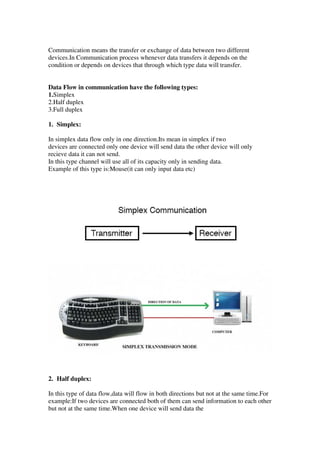
1. Simplex:
In simplex data flow only in one direction.Its mean in simplex if two
devices are connected only one device will send data the other device will only
recieve data it can not send.
In this type channel will use all of its capacity only in sending data.
Example of this type is:Mouse(it can only input data etc)
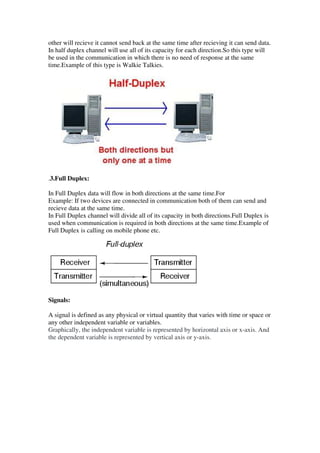
2. Half duplex:
In this type of data flow,data will flow in both directions but not at the same time.For
example:If two devices are connected both of them can send information to each other
but not at the same time.When one device will send data the
other will recieve it cannot send back at the same time after recieving it can send data.
In half duplex channel will use all of its capacity for each direction.So this type will
be used in the communication in which there is no need of response at the same
time.Example of this type is Walkie Talkies.
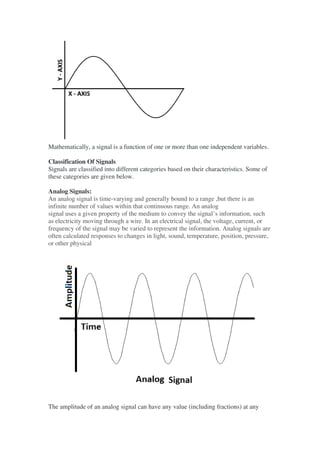
.3.Full Duplex:
In Full Duplex data will flow in both directions at the same time.For
Example: If two devices are connected in communication both of them can send and
recieve data at the same time.
In Full Duplex channel will divide all of its capacity in both directions.Full Duplex is
used when communication is required in both directions at the same time.Example of
Full Duplex is calling on mobile phone etc.
Signals:
A signal is defined as any physical or virtual quantity that varies with time or space or
any other independent variable or variables.
Graphically, the independent variable is represented by horizontal axis or x-axis. And
the dependent variable is represented by vertical axis or y-axis.
Mathematically, a signal is a function of one or more than one independent variables.
Classification Of Signals
Signals are classified into different categories based on their characteristics. Some of
these categories are given below.
Analog Signals:
An analog signal is time-varying and generally bound to a range ,but there is an
infinite number of values within that continuous range. An analog
signal uses a given property of the medium to convey the signal’s information, such
as electricity moving through a wire. In an electrical signal, the voltage, current, or
frequency of the signal may be varied to represent the information. Analog signals are
often calculated responses to changes in light, sound, temperature, position, pressure,
or other physical
The amplitude of an analog signal can have any value (including fractions) at any
point in time. That means analog signal have infinite values.
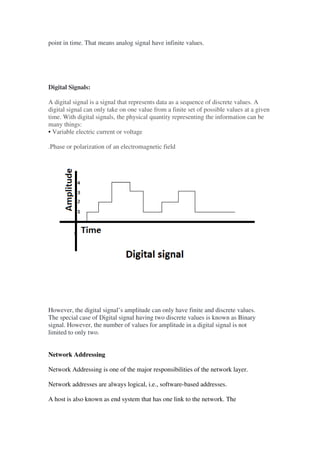
Digital Signals:
A digital signal is a signal that represents data as a sequence of discrete values. A
digital signal can only take on one value from a finite set of possible values at a given
time. With digital signals, the physical quantity representing the information can be
many things:
• Variable electric current or voltage
.Phase or polarization of an electromagnetic field
However, the digital signal’s amplitude can only have finite and discrete values.
The special case of Digital signal having two discrete values is known as Binary
signal. However, the number of values for amplitude in a digital signal is not
limited to only two.
Network Addressing
Network Addressing is one of the major responsibilities of the network layer.
Network addresses are always logical, i.e., software-based addresses.
A host is also known as end system that has one link to the network. The
boundary between the host and link is known as an interface. Therefore, the host can
have only one interface.
A router is different from the host in that it has two or more links that connect
to it. When a router forwards the datagram, then it forwards the packet to one
of the links. The boundary between the router and link is known as an
interface, and the router can have multiple interfaces, one for each of its links.
Each interface is capable of sending and receiving the IP packets, so IP
requires each interface to have an address.
Classful Addressing
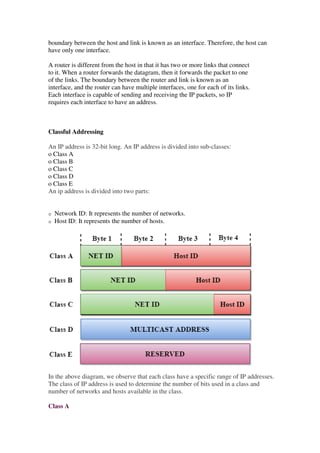
An IP address is 32-bit long. An IP address is divided into sub-classes:
o Class A
o Class B
o Class C
o Class D
o Class E
An ip address is divided into two parts:
o Network ID: It represents the number of networks.
o Host ID: It represents the number of hosts.
In the above diagram, we observe that each class have a specific range of IP addresses.
The class of IP address is used to determine the number of bits used in a class and
number of networks and hosts available in the class.
Class A
In Class A, an IP address is assigned to those networks that contain a large number of
hosts.
History of Java
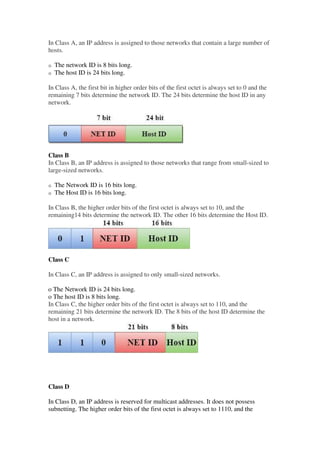
o The network ID is 8 bits long.
o The host ID is 24 bits long.
In Class A, the first bit in higher order bits of the first octet is always set to 0 and the
remaining 7 bits determine the network ID. The 24 bits determine the host ID in any
network.
Class B
In Class B, an IP address is assigned to those networks that range from small-sized to
large-sized networks.
o The Network ID is 16 bits long.
o The Host ID is 16 bits long.
In Class B, the higher order bits of the first octet is always set to 10, and the
remaining14 bits determine the network ID. The other 16 bits determine the Host ID.
Class C
In Class C, an IP address is assigned to only small-sized networks.
o The Network ID is 24 bits long.
o The host ID is 8 bits long.
In Class C, the higher order bits of the first octet is always set to 110, and the
remaining 21 bits determine the network ID. The 8 bits of the host ID determine the
host in a network.
Class D
In Class D, an IP address is reserved for multicast addresses. It does not possess
subnetting. The higher order bits of the first octet is always set to 1110, and the
remaining bits determines the host ID in any network.
Class E
In Class E, an IP address is used for the future use or for the research and
development purposes. It does not possess any subnetting. The higher order bits of the
first octet is always set to 1111, and the remaining bits determines the host ID in any
network.
Internet:
By this two physical pc can communicate.
The Internet is a globally-connected network of computers that enables people to
share information and communicate with each other.
Intranet:
An intranet, on the other hand, is a local or restricted network that enables people to
store, organize, and share information within an organization.
And by this two virtual pc can communicate.
Types of area networks – LAN, MAN and WAN
The Network allows computers to connect and communicate with different computers
via any medium. LAN, MAN and WAN are the three major types of the network
designed to operate over the area they cover. There are some similarities and
dissimilarities between them. One of the major differences is the geographical area
they cover, i.e. LAN covers the smallest area; MAN covers an area larger than LAN
and WAN comprises the largest of all.
There are other types of Computer Networks also, like :
• PAN (Personal Area Network)
• SAN (Storage Area Network)
• EPN (Enterprise Private Network)
• VPN (Virtual Private Network)
Local Area Network (LAN) –
LAN or Local Area Network connects network devices in such a way that personal
computer and workstations can share data, tools and programs. The group of
computers and devices are connected together by a switch, or stack of switches, using
a private addressing scheme as defined by the TCP/IP protocol. Private addresses are
unique in relation to other computers on the local network. Routers are found at the
boundary of a LAN, connecting them to the larger WAN.
Metropolitan Area Network (MAN) –
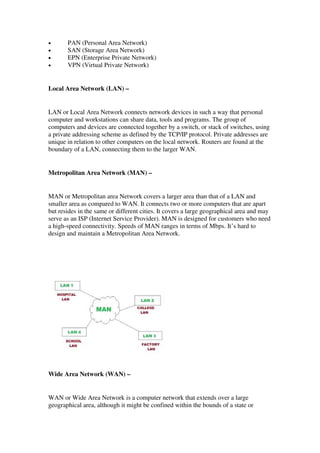
MAN or Metropolitan area Network covers a larger area than that of a LAN and
smaller area as compared to WAN. It connects two or more computers that are apart
but resides in the same or different cities. It covers a large geographical area and may
serve as an ISP (Internet Service Provider). MAN is designed for customers who need
a high-speed connectivity. Speeds of MAN ranges in terms of Mbps. It’s hard to
design and maintain a Metropolitan Area Network.
Wide Area Network (WAN) –
WAN or Wide Area Network is a computer network that extends over a large
geographical area, although it might be confined within the bounds of a state or
country. A WAN could be a connection of LAN connecting to other LAN’s via
telephone lines and radio waves and may be limited to an enterprise (a corporation or
an organization) or accessible to the public. The technology is high speed and
relatively expensive.
Network devices:
What are network devices?
Network devices, or networking hardware, are physical devices that are required for
communication and interaction between hardware on a computer networ
Types of network devices:
Here is the common network device list:
• Hub
• Switch
• Router
• Modem
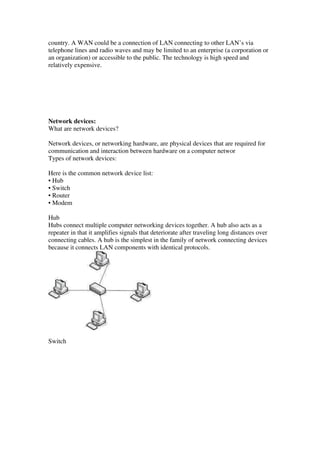
Hub
Hubs connect multiple computer networking devices together. A hub also acts as a
repeater in that it amplifies signals that deteriorate after traveling long distances over
connecting cables. A hub is the simplest in the family of network connecting devices
because it connects LAN components with identical protocols.
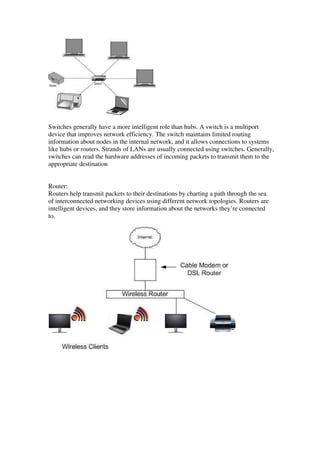
Switch
Switches generally have a more intelligent role than hubs. A switch is a multiport
device that improves network efficiency. The switch maintains limited routing
information about nodes in the internal network, and it allows connections to systems
like hubs or routers. Strands of LANs are usually connected using switches. Generally,
switches can read the hardware addresses of incoming packets to transmit them to the
appropriate destination
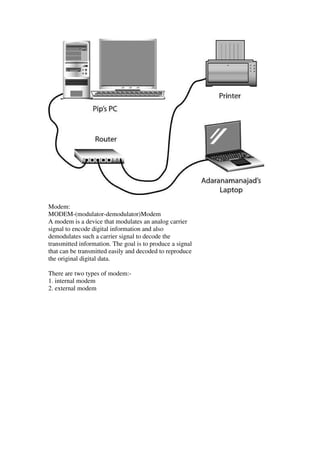
Router:
Routers help transmit packets to their destinations by charting a path through the sea
of interconnected networking devices using different network topologies. Routers are
intelligent devices, and they store information about the networks they’re connected
to.
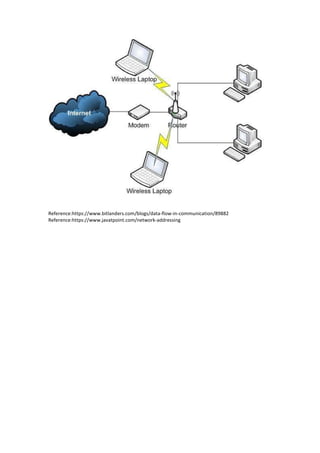
Modem:
MODEM-(modulator-demodulator)Modem
A modem is a device that modulates an analog carrier
signal to encode digital information and also
demodulates such a carrier signal to decode the
transmitted information. The goal is to produce a signal
that can be transmitted easily and decoded to reproduce
the original digital data.
There are two types of modem:-
1. internal modem
2. external modem
Reference:https://www.bitlanders.com/blogs/data-flow-in-communication/89882
Reference:https://www.javatpoint.com/network-addressing

Class note.2.....nazmun nahar 1834902176

  • 1.
    Department of CSE CityUniversity Class note-2 Course Title: Data Communication Course Code:CSE-313 Submition To: Pranab Bondhu Nath Senior Lecturer Department of CSE City University Submitted by Name: Nazmun Nahar Id:1834902176 Department:CSE(Day) Batch:49th Section:B Data Flow in Communication :
  • 2.
    Communication means thetransfer or exchange of data between two different devices.In Communication process whenever data transfers it depends on the condition or depends on devices that through which type data will transfer. Data Flow in communication have the following types: 1.Simplex 2.Half duplex 3.Full duplex 1. Simplex: In simplex data flow only in one direction.Its mean in simplex if two devices are connected only one device will send data the other device will only recieve data it can not send. In this type channel will use all of its capacity only in sending data. Example of this type is:Mouse(it can only input data etc) 2. Half duplex: In this type of data flow,data will flow in both directions but not at the same time.For example:If two devices are connected both of them can send information to each other but not at the same time.When one device will send data the
  • 3.
    other will recieveit cannot send back at the same time after recieving it can send data. In half duplex channel will use all of its capacity for each direction.So this type will be used in the communication in which there is no need of response at the same time.Example of this type is Walkie Talkies. .3.Full Duplex: In Full Duplex data will flow in both directions at the same time.For Example: If two devices are connected in communication both of them can send and recieve data at the same time. In Full Duplex channel will divide all of its capacity in both directions.Full Duplex is used when communication is required in both directions at the same time.Example of Full Duplex is calling on mobile phone etc. Signals: A signal is defined as any physical or virtual quantity that varies with time or space or any other independent variable or variables. Graphically, the independent variable is represented by horizontal axis or x-axis. And the dependent variable is represented by vertical axis or y-axis.
  • 4.
    Mathematically, a signalis a function of one or more than one independent variables. Classification Of Signals Signals are classified into different categories based on their characteristics. Some of these categories are given below. Analog Signals: An analog signal is time-varying and generally bound to a range ,but there is an infinite number of values within that continuous range. An analog signal uses a given property of the medium to convey the signal’s information, such as electricity moving through a wire. In an electrical signal, the voltage, current, or frequency of the signal may be varied to represent the information. Analog signals are often calculated responses to changes in light, sound, temperature, position, pressure, or other physical The amplitude of an analog signal can have any value (including fractions) at any
  • 5.
    point in time.That means analog signal have infinite values. Digital Signals: A digital signal is a signal that represents data as a sequence of discrete values. A digital signal can only take on one value from a finite set of possible values at a given time. With digital signals, the physical quantity representing the information can be many things: • Variable electric current or voltage .Phase or polarization of an electromagnetic field However, the digital signal’s amplitude can only have finite and discrete values. The special case of Digital signal having two discrete values is known as Binary signal. However, the number of values for amplitude in a digital signal is not limited to only two. Network Addressing Network Addressing is one of the major responsibilities of the network layer. Network addresses are always logical, i.e., software-based addresses. A host is also known as end system that has one link to the network. The
  • 6.
    boundary between thehost and link is known as an interface. Therefore, the host can have only one interface. A router is different from the host in that it has two or more links that connect to it. When a router forwards the datagram, then it forwards the packet to one of the links. The boundary between the router and link is known as an interface, and the router can have multiple interfaces, one for each of its links. Each interface is capable of sending and receiving the IP packets, so IP requires each interface to have an address. Classful Addressing An IP address is 32-bit long. An IP address is divided into sub-classes: o Class A o Class B o Class C o Class D o Class E An ip address is divided into two parts: o Network ID: It represents the number of networks. o Host ID: It represents the number of hosts. In the above diagram, we observe that each class have a specific range of IP addresses. The class of IP address is used to determine the number of bits used in a class and number of networks and hosts available in the class. Class A
  • 7.
    In Class A,an IP address is assigned to those networks that contain a large number of hosts. History of Java o The network ID is 8 bits long. o The host ID is 24 bits long. In Class A, the first bit in higher order bits of the first octet is always set to 0 and the remaining 7 bits determine the network ID. The 24 bits determine the host ID in any network. Class B In Class B, an IP address is assigned to those networks that range from small-sized to large-sized networks. o The Network ID is 16 bits long. o The Host ID is 16 bits long. In Class B, the higher order bits of the first octet is always set to 10, and the remaining14 bits determine the network ID. The other 16 bits determine the Host ID. Class C In Class C, an IP address is assigned to only small-sized networks. o The Network ID is 24 bits long. o The host ID is 8 bits long. In Class C, the higher order bits of the first octet is always set to 110, and the remaining 21 bits determine the network ID. The 8 bits of the host ID determine the host in a network. Class D In Class D, an IP address is reserved for multicast addresses. It does not possess subnetting. The higher order bits of the first octet is always set to 1110, and the
  • 8.
    remaining bits determinesthe host ID in any network. Class E In Class E, an IP address is used for the future use or for the research and development purposes. It does not possess any subnetting. The higher order bits of the first octet is always set to 1111, and the remaining bits determines the host ID in any network. Internet: By this two physical pc can communicate. The Internet is a globally-connected network of computers that enables people to share information and communicate with each other. Intranet: An intranet, on the other hand, is a local or restricted network that enables people to store, organize, and share information within an organization. And by this two virtual pc can communicate. Types of area networks – LAN, MAN and WAN The Network allows computers to connect and communicate with different computers via any medium. LAN, MAN and WAN are the three major types of the network designed to operate over the area they cover. There are some similarities and dissimilarities between them. One of the major differences is the geographical area they cover, i.e. LAN covers the smallest area; MAN covers an area larger than LAN and WAN comprises the largest of all. There are other types of Computer Networks also, like :
  • 9.
    • PAN (PersonalArea Network) • SAN (Storage Area Network) • EPN (Enterprise Private Network) • VPN (Virtual Private Network) Local Area Network (LAN) – LAN or Local Area Network connects network devices in such a way that personal computer and workstations can share data, tools and programs. The group of computers and devices are connected together by a switch, or stack of switches, using a private addressing scheme as defined by the TCP/IP protocol. Private addresses are unique in relation to other computers on the local network. Routers are found at the boundary of a LAN, connecting them to the larger WAN. Metropolitan Area Network (MAN) – MAN or Metropolitan area Network covers a larger area than that of a LAN and smaller area as compared to WAN. It connects two or more computers that are apart but resides in the same or different cities. It covers a large geographical area and may serve as an ISP (Internet Service Provider). MAN is designed for customers who need a high-speed connectivity. Speeds of MAN ranges in terms of Mbps. It’s hard to design and maintain a Metropolitan Area Network. Wide Area Network (WAN) – WAN or Wide Area Network is a computer network that extends over a large geographical area, although it might be confined within the bounds of a state or
  • 10.
    country. A WANcould be a connection of LAN connecting to other LAN’s via telephone lines and radio waves and may be limited to an enterprise (a corporation or an organization) or accessible to the public. The technology is high speed and relatively expensive. Network devices: What are network devices? Network devices, or networking hardware, are physical devices that are required for communication and interaction between hardware on a computer networ Types of network devices: Here is the common network device list: • Hub • Switch • Router • Modem Hub Hubs connect multiple computer networking devices together. A hub also acts as a repeater in that it amplifies signals that deteriorate after traveling long distances over connecting cables. A hub is the simplest in the family of network connecting devices because it connects LAN components with identical protocols. Switch
  • 11.
    Switches generally havea more intelligent role than hubs. A switch is a multiport device that improves network efficiency. The switch maintains limited routing information about nodes in the internal network, and it allows connections to systems like hubs or routers. Strands of LANs are usually connected using switches. Generally, switches can read the hardware addresses of incoming packets to transmit them to the appropriate destination Router: Routers help transmit packets to their destinations by charting a path through the sea of interconnected networking devices using different network topologies. Routers are intelligent devices, and they store information about the networks they’re connected to.
  • 12.
    Modem: MODEM-(modulator-demodulator)Modem A modem isa device that modulates an analog carrier signal to encode digital information and also demodulates such a carrier signal to decode the transmitted information. The goal is to produce a signal that can be transmitted easily and decoded to reproduce the original digital data. There are two types of modem:- 1. internal modem 2. external modem
  • 13.