



www.netways.de
Bernd Erk
19.05.2013 | Workshop Hamburg
Software-Defined Data Center
und Monitoring
VORSTELLUNG NETWAYS
www.netways.de
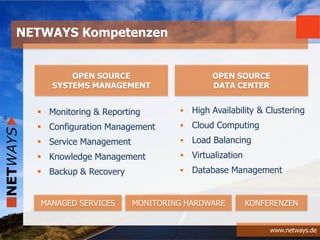
 High Availability & Clustering
 Cloud Computing
 Load Balancing
 Virtualization
 Database Management
NETWAYS Kompetenzen
OPEN SOURCE
SYSTEMS MANAGEMENT
OPEN SOURCE
DATA CENTER
MANAGED SERVICES MONITORING HARDWARE KONFERENZEN
 Monitoring & Reporting
 Configuration Management
 Service Management
 Knowledge Management
 Backup & Recovery
www.netways.de
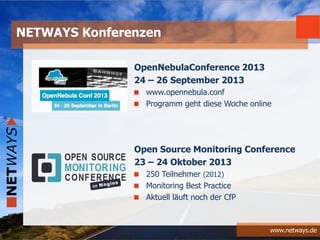
OpenNebulaConference 2013
24 – 26 September 2013
www.opennebula.conf
Programm geht diese Woche online
Open Source Monitoring Conference
23 – 24 Oktober 2013
250 Teilnehmer (2012)
Monitoring Best Practice
Aktuell läuft noch der CfP
NETWAYS Konferenzen
EINFÜHRUNG
www.netways.de
Last Big Things
CLOUD
BIG DATA
PRISM
www.netways.de
Software-Defined Data Center
SDDC
www.netways.de
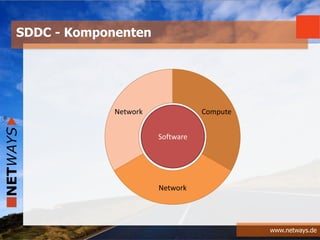
SDDC - Komponenten
Compute
Network
Network
Software
www.netways.de
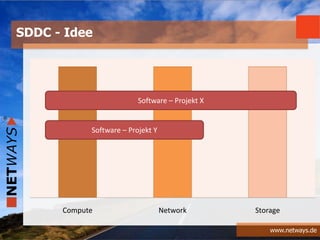
SDDC - Idee
Compute Network Storage
Software – Projekt X
Software – Projekt Y
www.netways.de
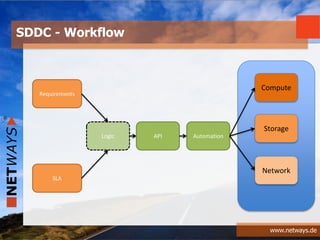
SDDC - Workflow
Logic API Automation
Compute
Storage
Network
Requirements
SLA
DEVOPS
www.netways.de
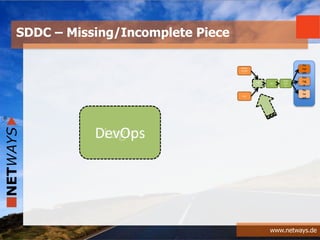
SDDC – Missing/Incomplete Piece
LogicDevOps
Logi
c
API
Auto
mati
on
Co
mp
ute
Sto
rag
e
Ne
tw
ork
Requir
ement
s
SLA
www.netways.de
“DevOps is a cultural and professional movement”
(Adam Jacob)
Was ist DevOps?
+
www.netways.de
+
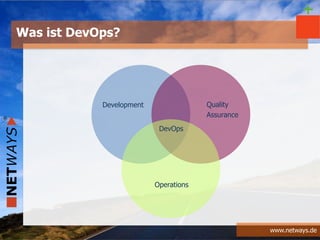
DevOps
Development
Operations
Quality
Assurance
Was ist DevOps?
www.netways.de
+
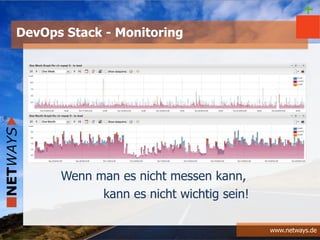
Wenn man es nicht messen kann,
kann es nicht wichtig sein!
DevOps Stack - Monitoring
www.netways.de
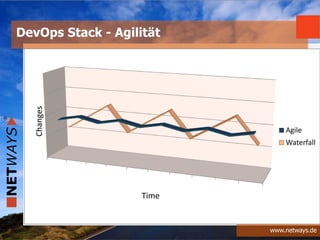
DevOps Stack - Agilität
Agile
Waterfall
Time
Changes
www.netways.de
-
DevOps Portal
DevOps Builder
Was ist DevOps nicht?
www.netways.de
-
HIghest Paid Persons Opinion
NO HIPPO
www.netways.de
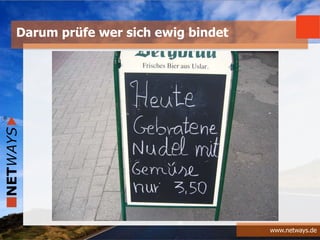
Darum prüfe wer sich ewig bindet
KOMPONENTEN
www.netways.de
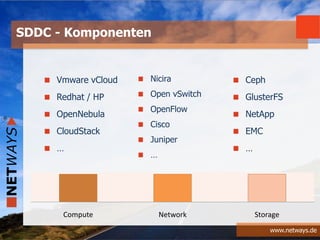
SDDC - Komponenten
Compute Network Storage
Vmware vCloud
Redhat / HP
OpenNebula
CloudStack
…
Ceph
GlusterFS
NetApp
EMC
…
Nicira
Open vSwitch
OpenFlow
Cisco
Juniper
…
www.netways.de
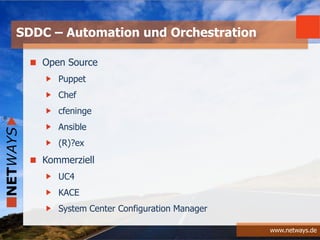
Open Source
Puppet
Chef
cfeninge
Ansible
(R)?ex
Kommerziell
UC4
KACE
System Center Configuration Manager
SDDC – Automation und Orchestration
www.netways.de
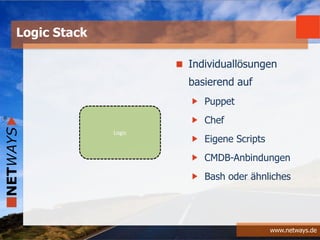
Logic Stack
Logic
Individuallösungen
basierend auf
Puppet
Chef
Eigene Scripts
CMDB-Anbindungen
Bash oder ähnliches
MOTIVATION
www.netways.de
Die Technologie die Möglichkeiten bieten
Reine Virtualisierung an ihre Grenzen kommt
Unterschiedliche Anforderungen innerhalb eines
Datacenters erfüllt werden müssen
Server, Netz und Storage auch in “kleineren” Firmen
Standardleistungen werden
Warum SDDC – Technisch
www.netways.de
Warum nicht?
Etwas Neues am Markt benötigt wird
Mit Virtualisierung allein zu wenig Geld zu verdienen ist
Die geänderten Anforderungen der Kunden eine Lösung
benötigen
Warum SDDC – Marketing
www.netways.de
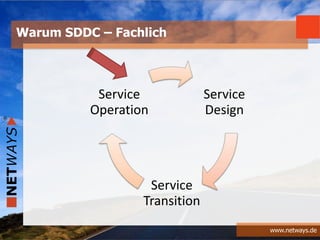
Warum SDDC – Fachlich
Service
Design
Service
Transition
Service
Operation
TECHNISCHER ÜBERBLICK
www.netways.de
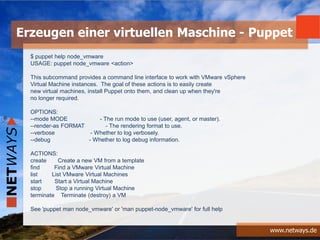
$ puppet help node_vmware
USAGE: puppet node_vmware <action>
This subcommand provides a command line interface to work with VMware vSphere
Virtual Machine instances. The goal of these actions is to easily create
new virtual machines, install Puppet onto them, and clean up when they're
no longer required.
OPTIONS:
--mode MODE - The run mode to use (user, agent, or master).
--render-as FORMAT - The rendering format to use.
--verbose - Whether to log verbosely.
--debug - Whether to log debug information.
ACTIONS:
create Create a new VM from a template
find Find a VMware Virtual Machine
list List VMware Virtual Machines
start Start a Virtual Machine
stop Stop a running Virtual Machine
terminate Terminate (destroy) a VM
See 'puppet man node_vmware' or 'man puppet-node_vmware' for full help
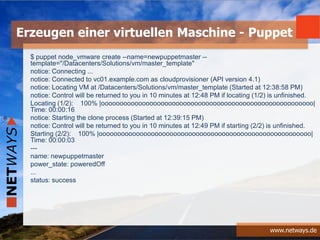
Erzeugen einer virtuellen Maschine - Puppet
www.netways.de
$ puppet node_vmware create --name=newpuppetmaster --
template="/Datacenters/Solutions/vm/master_template"
notice: Connecting ...
notice: Connected to vc01.example.com as cloudprovisioner (API version 4.1)
notice: Locating VM at /Datacenters/Solutions/vm/master_template (Started at 12:38:58 PM)
notice: Control will be returned to you in 10 minutes at 12:48 PM if locating (1/2) is unfinished.
Locating (1/2): 100% |ooooooooooooooooooooooooooooooooooooooooooooooooooooooooo|
Time: 00:00:16
notice: Starting the clone process (Started at 12:39:15 PM)
notice: Control will be returned to you in 10 minutes at 12:49 PM if starting (2/2) is unfinished.
Starting (2/2): 100% |ooooooooooooooooooooooooooooooooooooooooooooooooooooooooo|
Time: 00:00:03
---
name: newpuppetmaster
power_state: poweredOff
...
status: success
Erzeugen einer virtuellen Maschine - Puppet
www.netways.de
### Kick off HP iLO provisioning
- local_action: hpilo_boot host='${cmdb_parent}' login='${ilologin}' password='${ilopassword}'
media='cdrom' image='http://${ansible_server}/iso/ks/${inventory_hostname_short}.iso'
state='boot_once'
only_if: "'${cmdb_hwtype}'.startswith('HP ')"
### Kick off vSphere provisioning
- local_action: vsphere_boot host='${cmdb_parent}' login='${esxlogin}' password='${esxpassword}'
guest='${cmdb_uuid}' media='cdrom' image='[nfs-datastore] /iso/ks/${inventory_hostname_short}.iso'
state='boot_once'
only_if: "'${cmdb_hwtype}'.startswith('VMWare ')"
### Kick off KVM provisioning
- local_action: virt_boot guest='${cmdb_uuid}' media='cdrom'
image='/iso/ks/${inventory_hostname_short}.iso' state='boot_once'
delegate_to: '${cmdb_parent}'
only_if: "'${cmdb_hwtype}'.startswith('KVM')"
Erzeugen einer virtuellen Maschine - Ansible
www.netways.de
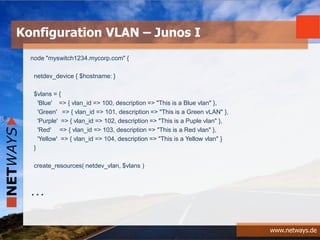
node "myswitch1234.mycorp.com" {
netdev_device { $hostname: }
$vlans = {
'Blue' => { vlan_id => 100, description => "This is a Blue vlan" },
'Green' => { vlan_id => 101, description => "This is a Green vLAN" },
'Purple' => { vlan_id => 102, description => "This is a Puple vlan" },
'Red' => { vlan_id => 103, description => "This is a Red vlan" },
'Yellow' => { vlan_id => 104, description => "This is a Yellow vlan" }
}
create_resources( netdev_vlan, $vlans )
…
Konfiguration VLAN – Junos I
www.netways.de
$access_ports = [
'ge-0/0/0',
'ge-0/0/1',
'ge-0/0/2'
]
$uplink_ports = [
'xe-0/0/0',
'xe-0/0/2'
]
netdev_l2_interface { $access_ports:
untagged_vlan => Blue
}
netdev_l2_interface { $uplink_ports:
tagged_vlans => keys( $vlans )
}
}
Konfiguration VLAN – Junos II
www.netways.de
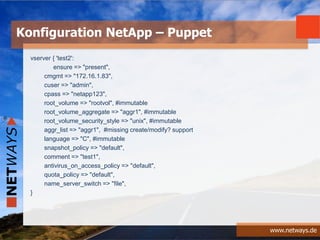
vserver { 'test2':
ensure => "present",
cmgmt => "172.16.1.83",
cuser => "admin",
cpass => "netapp123",
root_volume => "rootvol", #immutable
root_volume_aggregate => "aggr1", #immutable
root_volume_security_style => "unix", #immutable
aggr_list => "aggr1", #missing create/modify? support
language => "C", #immutable
snapshot_policy => "default",
comment => "test1",
antivirus_on_access_policy => "default",
quota_policy => "default",
name_server_switch => "file",
}
Konfiguration NetApp – Puppet
MONITORING
www.netways.de
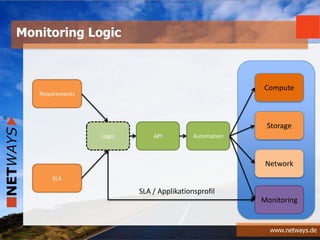
Monitoring Logic
Logic API Automation
Compute
Storage
Network
Requirements
SLA
Monitoring
SLA / Applikationsprofil
www.netways.de
% cat roles/monitoring.rb
name "monitoring"
description "Monitoring server"
run_list(
"recipe[nagios::server]"
)
default_attributes(
"nagios" => {
"server_auth_method" => "htauth"
}
)
% knife role from file monitoring.rb
Konfiguration Nagios/Icinga – Chef I
www.netways.de
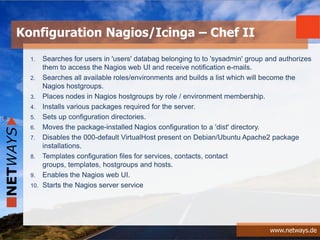
1. Searches for users in 'users' databag belonging to to 'sysadmin' group and authorizes
them to access the Nagios web UI and receive notification e-mails.
2. Searches all available roles/environments and builds a list which will become the
Nagios hostgroups.
3. Places nodes in Nagios hostgroups by role / environment membership.
4. Installs various packages required for the server.
5. Sets up configuration directories.
6. Moves the package-installed Nagios configuration to a 'dist' directory.
7. Disables the 000-default VirtualHost present on Debian/Ubuntu Apache2 package
installations.
8. Templates configuration files for services, contacts, contact
groups, templates, hostgroups and hosts.
9. Enables the Nagios web UI.
10. Starts the Nagios server service
Konfiguration Nagios/Icinga – Chef II
www.netways.de
.....
node['nagios']['home'] - Nagios main home directory, default "/usr/lib/nagios3"
node['nagios']['conf_dir'] - location where main Nagios config lives, default "/etc/nagios3"
node['nagios']['config_dir'] - location where included configuration files live, default
"/etc/nagios3/conf.d"
node['nagios']['log_dir'] - location of Nagios logs, default "/var/log/nagios3"
node['nagios']['cache_dir'] - location of cached data, default "/var/cache/nagios3"
node['nagios']['state_dir'] - Nagios runtime state information, default "/var/lib/nagios3"
node['nagios']['run_dir'] - where pidfiles are stored, default "/var/run/nagios3”
.....
Konfiguration Nagios/Icinga – Chef III
www.netways.de
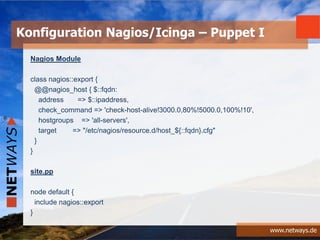
Nagios Module
class nagios::export {
@@nagios_host { $::fqdn:
address => $::ipaddress,
check_command => 'check-host-alive!3000.0,80%!5000.0,100%!10',
hostgroups => 'all-servers',
target => "/etc/nagios/resource.d/host_${::fqdn}.cfg"
}
}
site.pp
node default {
include nagios::export
}
Konfiguration Nagios/Icinga – Puppet I
www.netways.de
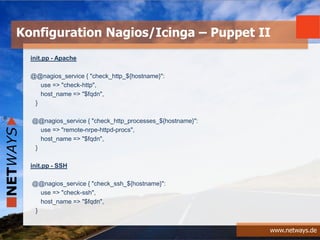
init.pp - Apache
@@nagios_service { "check_http_${hostname}":
use => "check-http",
host_name => "$fqdn",
}
@@nagios_service { "check_http_processes_${hostname}":
use => "remote-nrpe-httpd-procs",
host_name => "$fqdn",
}
init.pp - SSH
@@nagios_service { "check_ssh_${hostname}":
use => "check-ssh",
host_name => "$fqdn",
}
Konfiguration Nagios/Icinga – Puppet II
ZUSAMMENFASSUNG
www.netways.de
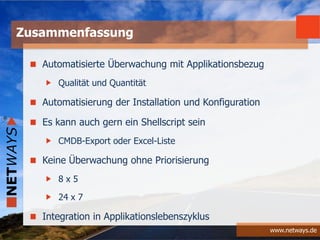
Automatisierte Überwachung mit Applikationsbezug
Qualität und Quantität
Automatisierung der Installation und Konfiguration
Es kann auch gern ein Shellscript sein
CMDB-Export oder Excel-Liste
Keine Überwachung ohne Priorisierung
8 x 5
24 x 7
Integration in Applikationslebenszyklus
Zusammenfassung
FRAGEN & ANTWORTEN
www.netways.de
NETWAYS GmbH
Deutschherrnstrasse 15-19
90429 Nürnberg
Tel: +49 911 92885-0
Fax: +49 911 92885-77
Email: info@netways.de
Twitter: twitter.com/netways
Blog: blog.netways.de
?Fragen
&
Antworten

Software Defined Datacenter

  • 1.
    www.netways.de Bernd Erk 19.05.2013 |Workshop Hamburg Software-Defined Data Center und Monitoring
  • 3.
  • 4.
    www.netways.de  High Availability& Clustering  Cloud Computing  Load Balancing  Virtualization  Database Management NETWAYS Kompetenzen OPEN SOURCE SYSTEMS MANAGEMENT OPEN SOURCE DATA CENTER MANAGED SERVICES MONITORING HARDWARE KONFERENZEN  Monitoring & Reporting  Configuration Management  Service Management  Knowledge Management  Backup & Recovery
  • 5.
    www.netways.de OpenNebulaConference 2013 24 –26 September 2013 www.opennebula.conf Programm geht diese Woche online Open Source Monitoring Conference 23 – 24 Oktober 2013 250 Teilnehmer (2012) Monitoring Best Practice Aktuell läuft noch der CfP NETWAYS Konferenzen
  • 6.
  • 7.
  • 8.
  • 9.
  • 10.
    www.netways.de SDDC - Idee ComputeNetwork Storage Software – Projekt X Software – Projekt Y
  • 11.
    www.netways.de SDDC - Workflow LogicAPI Automation Compute Storage Network Requirements SLA
  • 12.
  • 13.
    www.netways.de SDDC – Missing/IncompletePiece LogicDevOps Logi c API Auto mati on Co mp ute Sto rag e Ne tw ork Requir ement s SLA
  • 14.
    www.netways.de “DevOps is acultural and professional movement” (Adam Jacob) Was ist DevOps? +
  • 15.
  • 16.
    www.netways.de + Wenn man esnicht messen kann, kann es nicht wichtig sein! DevOps Stack - Monitoring
  • 17.
    www.netways.de DevOps Stack -Agilität Agile Waterfall Time Changes
  • 18.
  • 19.
  • 20.
  • 21.
  • 22.
    www.netways.de SDDC - Komponenten ComputeNetwork Storage Vmware vCloud Redhat / HP OpenNebula CloudStack … Ceph GlusterFS NetApp EMC … Nicira Open vSwitch OpenFlow Cisco Juniper …
  • 23.
  • 24.
  • 25.
  • 26.
    www.netways.de Die Technologie dieMöglichkeiten bieten Reine Virtualisierung an ihre Grenzen kommt Unterschiedliche Anforderungen innerhalb eines Datacenters erfüllt werden müssen Server, Netz und Storage auch in “kleineren” Firmen Standardleistungen werden Warum SDDC – Technisch
  • 27.
    www.netways.de Warum nicht? Etwas Neuesam Markt benötigt wird Mit Virtualisierung allein zu wenig Geld zu verdienen ist Die geänderten Anforderungen der Kunden eine Lösung benötigen Warum SDDC – Marketing
  • 28.
    www.netways.de Warum SDDC –Fachlich Service Design Service Transition Service Operation
  • 29.
  • 30.
    www.netways.de $ puppet helpnode_vmware USAGE: puppet node_vmware <action> This subcommand provides a command line interface to work with VMware vSphere Virtual Machine instances. The goal of these actions is to easily create new virtual machines, install Puppet onto them, and clean up when they're no longer required. OPTIONS: --mode MODE - The run mode to use (user, agent, or master). --render-as FORMAT - The rendering format to use. --verbose - Whether to log verbosely. --debug - Whether to log debug information. ACTIONS: create Create a new VM from a template find Find a VMware Virtual Machine list List VMware Virtual Machines start Start a Virtual Machine stop Stop a running Virtual Machine terminate Terminate (destroy) a VM See 'puppet man node_vmware' or 'man puppet-node_vmware' for full help Erzeugen einer virtuellen Maschine - Puppet
  • 31.
    www.netways.de $ puppet node_vmwarecreate --name=newpuppetmaster -- template="/Datacenters/Solutions/vm/master_template" notice: Connecting ... notice: Connected to vc01.example.com as cloudprovisioner (API version 4.1) notice: Locating VM at /Datacenters/Solutions/vm/master_template (Started at 12:38:58 PM) notice: Control will be returned to you in 10 minutes at 12:48 PM if locating (1/2) is unfinished. Locating (1/2): 100% |ooooooooooooooooooooooooooooooooooooooooooooooooooooooooo| Time: 00:00:16 notice: Starting the clone process (Started at 12:39:15 PM) notice: Control will be returned to you in 10 minutes at 12:49 PM if starting (2/2) is unfinished. Starting (2/2): 100% |ooooooooooooooooooooooooooooooooooooooooooooooooooooooooo| Time: 00:00:03 --- name: newpuppetmaster power_state: poweredOff ... status: success Erzeugen einer virtuellen Maschine - Puppet
  • 32.
    www.netways.de ### Kick offHP iLO provisioning - local_action: hpilo_boot host='${cmdb_parent}' login='${ilologin}' password='${ilopassword}' media='cdrom' image='http://${ansible_server}/iso/ks/${inventory_hostname_short}.iso' state='boot_once' only_if: "'${cmdb_hwtype}'.startswith('HP ')" ### Kick off vSphere provisioning - local_action: vsphere_boot host='${cmdb_parent}' login='${esxlogin}' password='${esxpassword}' guest='${cmdb_uuid}' media='cdrom' image='[nfs-datastore] /iso/ks/${inventory_hostname_short}.iso' state='boot_once' only_if: "'${cmdb_hwtype}'.startswith('VMWare ')" ### Kick off KVM provisioning - local_action: virt_boot guest='${cmdb_uuid}' media='cdrom' image='/iso/ks/${inventory_hostname_short}.iso' state='boot_once' delegate_to: '${cmdb_parent}' only_if: "'${cmdb_hwtype}'.startswith('KVM')" Erzeugen einer virtuellen Maschine - Ansible
  • 33.
    www.netways.de node "myswitch1234.mycorp.com" { netdev_device{ $hostname: } $vlans = { 'Blue' => { vlan_id => 100, description => "This is a Blue vlan" }, 'Green' => { vlan_id => 101, description => "This is a Green vLAN" }, 'Purple' => { vlan_id => 102, description => "This is a Puple vlan" }, 'Red' => { vlan_id => 103, description => "This is a Red vlan" }, 'Yellow' => { vlan_id => 104, description => "This is a Yellow vlan" } } create_resources( netdev_vlan, $vlans ) … Konfiguration VLAN – Junos I
  • 34.
    www.netways.de $access_ports = [ 'ge-0/0/0', 'ge-0/0/1', 'ge-0/0/2' ] $uplink_ports= [ 'xe-0/0/0', 'xe-0/0/2' ] netdev_l2_interface { $access_ports: untagged_vlan => Blue } netdev_l2_interface { $uplink_ports: tagged_vlans => keys( $vlans ) } } Konfiguration VLAN – Junos II
  • 35.
    www.netways.de vserver { 'test2': ensure=> "present", cmgmt => "172.16.1.83", cuser => "admin", cpass => "netapp123", root_volume => "rootvol", #immutable root_volume_aggregate => "aggr1", #immutable root_volume_security_style => "unix", #immutable aggr_list => "aggr1", #missing create/modify? support language => "C", #immutable snapshot_policy => "default", comment => "test1", antivirus_on_access_policy => "default", quota_policy => "default", name_server_switch => "file", } Konfiguration NetApp – Puppet
  • 36.
  • 37.
    www.netways.de Monitoring Logic Logic APIAutomation Compute Storage Network Requirements SLA Monitoring SLA / Applikationsprofil
  • 38.
    www.netways.de % cat roles/monitoring.rb name"monitoring" description "Monitoring server" run_list( "recipe[nagios::server]" ) default_attributes( "nagios" => { "server_auth_method" => "htauth" } ) % knife role from file monitoring.rb Konfiguration Nagios/Icinga – Chef I
  • 39.
    www.netways.de 1. Searches forusers in 'users' databag belonging to to 'sysadmin' group and authorizes them to access the Nagios web UI and receive notification e-mails. 2. Searches all available roles/environments and builds a list which will become the Nagios hostgroups. 3. Places nodes in Nagios hostgroups by role / environment membership. 4. Installs various packages required for the server. 5. Sets up configuration directories. 6. Moves the package-installed Nagios configuration to a 'dist' directory. 7. Disables the 000-default VirtualHost present on Debian/Ubuntu Apache2 package installations. 8. Templates configuration files for services, contacts, contact groups, templates, hostgroups and hosts. 9. Enables the Nagios web UI. 10. Starts the Nagios server service Konfiguration Nagios/Icinga – Chef II
  • 40.
    www.netways.de ..... node['nagios']['home'] - Nagiosmain home directory, default "/usr/lib/nagios3" node['nagios']['conf_dir'] - location where main Nagios config lives, default "/etc/nagios3" node['nagios']['config_dir'] - location where included configuration files live, default "/etc/nagios3/conf.d" node['nagios']['log_dir'] - location of Nagios logs, default "/var/log/nagios3" node['nagios']['cache_dir'] - location of cached data, default "/var/cache/nagios3" node['nagios']['state_dir'] - Nagios runtime state information, default "/var/lib/nagios3" node['nagios']['run_dir'] - where pidfiles are stored, default "/var/run/nagios3” ..... Konfiguration Nagios/Icinga – Chef III
  • 41.
    www.netways.de Nagios Module class nagios::export{ @@nagios_host { $::fqdn: address => $::ipaddress, check_command => 'check-host-alive!3000.0,80%!5000.0,100%!10', hostgroups => 'all-servers', target => "/etc/nagios/resource.d/host_${::fqdn}.cfg" } } site.pp node default { include nagios::export } Konfiguration Nagios/Icinga – Puppet I
  • 42.
    www.netways.de init.pp - Apache @@nagios_service{ "check_http_${hostname}": use => "check-http", host_name => "$fqdn", } @@nagios_service { "check_http_processes_${hostname}": use => "remote-nrpe-httpd-procs", host_name => "$fqdn", } init.pp - SSH @@nagios_service { "check_ssh_${hostname}": use => "check-ssh", host_name => "$fqdn", } Konfiguration Nagios/Icinga – Puppet II
  • 43.
  • 44.
    www.netways.de Automatisierte Überwachung mitApplikationsbezug Qualität und Quantität Automatisierung der Installation und Konfiguration Es kann auch gern ein Shellscript sein CMDB-Export oder Excel-Liste Keine Überwachung ohne Priorisierung 8 x 5 24 x 7 Integration in Applikationslebenszyklus Zusammenfassung
  • 45.
  • 46.
    www.netways.de NETWAYS GmbH Deutschherrnstrasse 15-19 90429Nürnberg Tel: +49 911 92885-0 Fax: +49 911 92885-77 Email: info@netways.de Twitter: twitter.com/netways Blog: blog.netways.de ?Fragen & Antworten

Editor's Notes

  • #8 VMware&apos;s CTO, Dr. Steve Herrod
  • #9 VMware&apos;s CTO, Dr. Steve Herrod – 2012IBM – Software Defined Environment
  • #43 Init.pp of module