DevOps (2)

Vagrant
Mulodo Vietnam Co., Ltd.
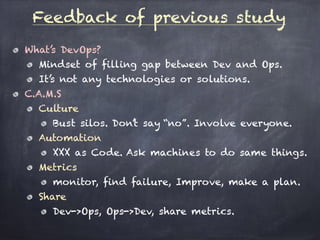
What’s DevOps?
Mindset of filling gap between Dev and Ops.
It’s not any technologies or solutions.
C.A.M.S
Culture
Bust silos. Don’t say “no”. Involve everyone.
Automation
XXX as Code. Ask machines to do same things.
Metrics
monitor, find failure, Improve, make a plan.
Share
Dev->Ops, Ops->Dev, share metrics.
Feedback of previous study
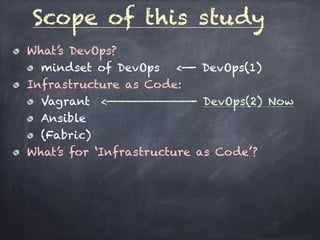
What’s DevOps?
mindset of DevOps <—- DevOps(1)
Infrastructure as Code:
Vagrant <———————————- DevOps(2) Now
Ansible
(Fabric)
What’s for ‘Infrastructure as Code’?
Scope of this study
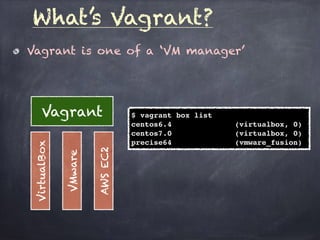
Vagrant is one of a ‘VM manager’
What’s Vagrant?
VirtualBox
VMware
AWSEC2
Vagrant $ vagrant box list
centos6.4 (virtualbox, 0)
centos7.0 (virtualbox, 0)
precise64 (vmware_fusion)
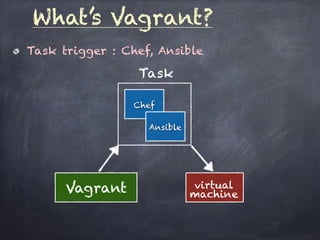
Task trigger : Chef, Ansible
What’s Vagrant?
Vagrant virtual
machine
Task
Chef
Ansible
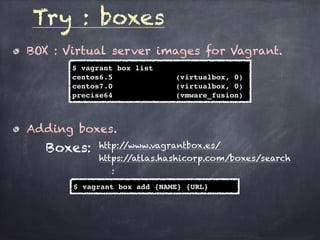
BOX : Virtual server images for Vagrant.
Try : boxes
$ vagrant box list
centos6.5 (virtualbox, 0)
centos7.0 (virtualbox, 0)
precise64 (vmware_fusion)
Adding boxes.
$ vagrant box add {NAME} {URL}
Boxes: http://www.vagrantbox.es/
https://atlas.hashicorp.com/boxes/search
:
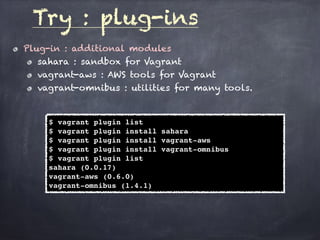
Plug-in : additional modules
sahara : sandbox for Vagrant
vagrant-aws : AWS tools for Vagrant
vagrant-omnibus : utilities for many tools.
Try : plug-ins
$ vagrant plugin list
$ vagrant plugin install sahara
$ vagrant plugin install vagrant-aws
$ vagrant plugin install vagrant-omnibus
$ vagrant plugin list
sahara (0.0.17)
vagrant-aws (0.6.0)
vagrant-omnibus (1.4.1)
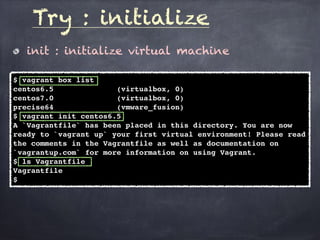
init : initialize virtual machine
Try : initialize
$ vagrant box list
centos6.5 (virtualbox, 0)
centos7.0 (virtualbox, 0)
precise64 (vmware_fusion)
$ vagrant init centos6.5
A `Vagrantfile` has been placed in this directory. You are now
ready to `vagrant up` your first virtual environment! Please read
the comments in the Vagrantfile as well as documentation on
`vagrantup.com` for more information on using Vagrant.
$ ls Vagrantfile
Vagrantfile
$
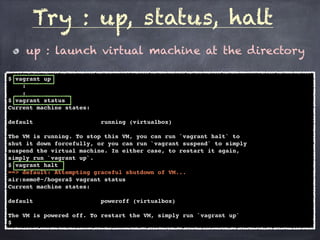
up : launch virtual machine at the directory
Try : up, status, halt
$ vagrant up
:
:
$ vagrant status
Current machine states:
default running (virtualbox)
The VM is running. To stop this VM, you can run `vagrant halt` to
shut it down forcefully, or you can run `vagrant suspend` to simply
suspend the virtual machine. In either case, to restart it again,
simply run `vagrant up`.
$ vagrant halt
==> default: Attempting graceful shutdown of VM...
air:nemo@~/hogera$ vagrant status
Current machine states:
default poweroff (virtualbox)
The VM is powered off. To restart the VM, simply run `vagrant up`
$
ssh : ssh login to virtual machine
Try: ssh
$ vagrant ssh
Last login: Wed Nov 18 09:09:04 2015 from 10.0.2.2
[vagrant@vagrant-centos64 ~]$
login by yourself
$ vagrant ssh-config
Host default
HostName 127.0.0.1
User vagrant
Port 2222
UserKnownHostsFile /dev/null
StrictHostKeyChecking no
PasswordAuthentication no
IdentityFile /XXXXXXX/.vagrant/machines/default/virtualbox/private_key
IdentitiesOnly yes
LogLevel FATAL
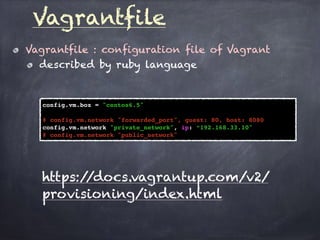
Vagrantfile : configuration file of Vagrant
described by ruby language
Vagrantfile
config.vm.box = "centos6.5"
# config.vm.network "forwarded_port", guest: 80, host: 8080
config.vm.network "private_network", ip: “192.168.33.10"
# config.vm.network "public_network"
https://docs.vagrantup.com/v2/
provisioning/index.html
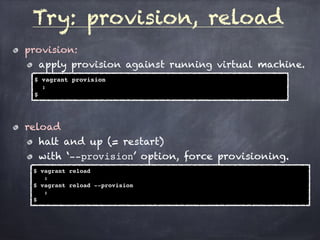
Try: provision, reload
provision:
apply provision against running virtual machine.
$ vagrant provision
:
$
reload
halt and up (= restart)
with ‘--provision’ option, force provisioning.
$ vagrant reload
:
$ vagrant reload --provision
:
$
Trouble?
Do same things inside the virtual machine (up):
/etc/init.d/vboxadd
[vagrant@vagrant-centos65 vagrant]$ sudo /etc/init.d/vboxadd setup
Removing existing VirtualBox non-DKMS kernel modules [ OK ]
Building the VirtualBox Guest Additions kernel modules
The headers for the current running kernel were not found. If the following
module compilation fails then this could be the reason.
The missing package can be probably installed with
yum install kernel-devel-2.6.32-431.3.1.el6.x86_64
Building the main Guest Additions module [FAILED]
(Look at /var/log/vboxadd-install.log to find out what went wrong)
Doing non-kernel setup of the Guest Additions [ OK ]
[vagrant@vagrant-centos65 vagrant]$
You don’t know about ‘init.d’ ?
If not, please study by myself.
Next
Ansible
What’s Ansible?
Basic usage
Target machine:
Apache + PHP server with MySQL.

DevOps(2) : Vagrant - (MOSG)

  • 1.
  • 2.
    What’s DevOps? Mindset offilling gap between Dev and Ops. It’s not any technologies or solutions. C.A.M.S Culture Bust silos. Don’t say “no”. Involve everyone. Automation XXX as Code. Ask machines to do same things. Metrics monitor, find failure, Improve, make a plan. Share Dev->Ops, Ops->Dev, share metrics. Feedback of previous study
  • 3.
    What’s DevOps? mindset ofDevOps <—- DevOps(1) Infrastructure as Code: Vagrant <———————————- DevOps(2) Now Ansible (Fabric) What’s for ‘Infrastructure as Code’? Scope of this study
  • 4.
    Vagrant is oneof a ‘VM manager’ What’s Vagrant? VirtualBox VMware AWSEC2 Vagrant $ vagrant box list centos6.4 (virtualbox, 0) centos7.0 (virtualbox, 0) precise64 (vmware_fusion)
  • 5.
    Task trigger :Chef, Ansible What’s Vagrant? Vagrant virtual machine Task Chef Ansible
  • 6.
    BOX : Virtualserver images for Vagrant. Try : boxes $ vagrant box list centos6.5 (virtualbox, 0) centos7.0 (virtualbox, 0) precise64 (vmware_fusion) Adding boxes. $ vagrant box add {NAME} {URL} Boxes: http://www.vagrantbox.es/ https://atlas.hashicorp.com/boxes/search :
  • 7.
    Plug-in : additionalmodules sahara : sandbox for Vagrant vagrant-aws : AWS tools for Vagrant vagrant-omnibus : utilities for many tools. Try : plug-ins $ vagrant plugin list $ vagrant plugin install sahara $ vagrant plugin install vagrant-aws $ vagrant plugin install vagrant-omnibus $ vagrant plugin list sahara (0.0.17) vagrant-aws (0.6.0) vagrant-omnibus (1.4.1)
  • 8.
    init : initializevirtual machine Try : initialize $ vagrant box list centos6.5 (virtualbox, 0) centos7.0 (virtualbox, 0) precise64 (vmware_fusion) $ vagrant init centos6.5 A `Vagrantfile` has been placed in this directory. You are now ready to `vagrant up` your first virtual environment! Please read the comments in the Vagrantfile as well as documentation on `vagrantup.com` for more information on using Vagrant. $ ls Vagrantfile Vagrantfile $
  • 9.
    up : launchvirtual machine at the directory Try : up, status, halt $ vagrant up : : $ vagrant status Current machine states: default running (virtualbox) The VM is running. To stop this VM, you can run `vagrant halt` to shut it down forcefully, or you can run `vagrant suspend` to simply suspend the virtual machine. In either case, to restart it again, simply run `vagrant up`. $ vagrant halt ==> default: Attempting graceful shutdown of VM... air:nemo@~/hogera$ vagrant status Current machine states: default poweroff (virtualbox) The VM is powered off. To restart the VM, simply run `vagrant up` $
  • 10.
    ssh : sshlogin to virtual machine Try: ssh $ vagrant ssh Last login: Wed Nov 18 09:09:04 2015 from 10.0.2.2 [vagrant@vagrant-centos64 ~]$ login by yourself $ vagrant ssh-config Host default HostName 127.0.0.1 User vagrant Port 2222 UserKnownHostsFile /dev/null StrictHostKeyChecking no PasswordAuthentication no IdentityFile /XXXXXXX/.vagrant/machines/default/virtualbox/private_key IdentitiesOnly yes LogLevel FATAL
  • 11.
    Vagrantfile : configurationfile of Vagrant described by ruby language Vagrantfile config.vm.box = "centos6.5" # config.vm.network "forwarded_port", guest: 80, host: 8080 config.vm.network "private_network", ip: “192.168.33.10" # config.vm.network "public_network" https://docs.vagrantup.com/v2/ provisioning/index.html
  • 12.
    Try: provision, reload provision: applyprovision against running virtual machine. $ vagrant provision : $ reload halt and up (= restart) with ‘--provision’ option, force provisioning. $ vagrant reload : $ vagrant reload --provision : $
  • 13.
    Trouble? Do same thingsinside the virtual machine (up): /etc/init.d/vboxadd [vagrant@vagrant-centos65 vagrant]$ sudo /etc/init.d/vboxadd setup Removing existing VirtualBox non-DKMS kernel modules [ OK ] Building the VirtualBox Guest Additions kernel modules The headers for the current running kernel were not found. If the following module compilation fails then this could be the reason. The missing package can be probably installed with yum install kernel-devel-2.6.32-431.3.1.el6.x86_64 Building the main Guest Additions module [FAILED] (Look at /var/log/vboxadd-install.log to find out what went wrong) Doing non-kernel setup of the Guest Additions [ OK ] [vagrant@vagrant-centos65 vagrant]$ You don’t know about ‘init.d’ ? If not, please study by myself.
  • 14.
    Next Ansible What’s Ansible? Basic usage Targetmachine: Apache + PHP server with MySQL.