Downloaded 29 times

















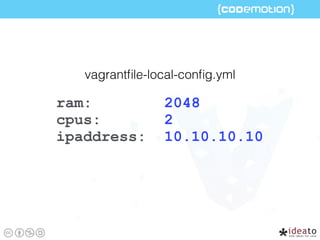
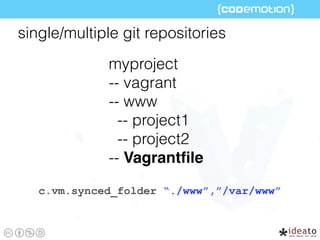
![require ‘yaml'
_config =
YAML.load(File.open(File.join(File.dirname(__FILE__),
“vagrantfile-local-config.yml”), File::RDONLY).read)
CONF = _config
config.vm.provider "virtualbox" do |vb|
vb.customize["modifyvm",:id,“--memory", CONF["ram"]]
vb.customize ["modifyvm",:id,"--cpus", CONF[“cpus"]]
…
end](https://image.slidesharecdn.com/vagrantforrealcodemotionrome2016-160318180449/85/Vagrant-for-real-codemotion-rome-2016-23-320.jpg)


![ENV['VAGRANT_DEFAULT_PROVIDER'] = 'virtualbox'](https://image.slidesharecdn.com/vagrantforrealcodemotionrome2016-160318180449/85/Vagrant-for-real-codemotion-rome-2016-26-320.jpg)

![config.vm.provider "virtualbox" do |vb|
vb.customize ["modifyvm",:id, "--memory", CONF["ram"]]
vb.customize ["modifyvm",:id, "--cpus", CONF["cpus"]]
end
config.vm.provider "vmware_fusion" do |v|
v.vmx["memsize"] = CONF["ram"]
v.vmx["numvcpus"] = CONF["cpus"]
end](https://image.slidesharecdn.com/vagrantforrealcodemotionrome2016-160318180449/85/Vagrant-for-real-codemotion-rome-2016-28-320.jpg)

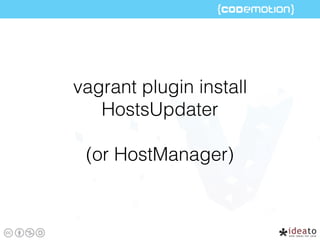
![if Vagrant.has_plugin?("HostsUpdater")
config.hostsupdater.aliases = ["host1.lo"]
else
puts "--- WARNING ---"
puts “You should install HostsUpdater”
end](https://image.slidesharecdn.com/vagrantforrealcodemotionrome2016-160318180449/85/Vagrant-for-real-codemotion-rome-2016-35-320.jpg)

![config.vm.define "web" do |web|
web.vm.network :private_network, ip: "10.0.0.2"
web.vm.provider :virtualbox do |v|
v.customize ["modifyvm", :id, "--memory", 2048]
end
web.vm.synced_folder "../", “/var/www"
end
config.vm.define "db" do |db|
db.vm.network :private_network, ip: "10.0.0.3"
db.vm.provision :shell, :path => 'vagrant/db.sh'
end](https://image.slidesharecdn.com/vagrantforrealcodemotionrome2016-160318180449/85/Vagrant-for-real-codemotion-rome-2016-37-320.jpg)








![if Vagrant.has_plugin?("vagrant-cachier")
config.cache.scope = :box
config.cache.synced_folder_opts = {
type: :nfs,
mount_options: ['rw','vers=3','tcp','nolock']
}
end
Vagrantfile](https://image.slidesharecdn.com/vagrantforrealcodemotionrome2016-160318180449/85/Vagrant-for-real-codemotion-rome-2016-62-320.jpg)
![if Vagrant.has_plugin?("vagrant-cachier")
config.cache.scope = :box
config.cache.synced_folder_opts = {
type: :nfs,
mount_options: ['rw','vers=3','tcp','nolock']
}
end
Vagrantfile
+30%for reprovisioning a box with git, php apache, mysql](https://image.slidesharecdn.com/vagrantforrealcodemotionrome2016-160318180449/85/Vagrant-for-real-codemotion-rome-2016-63-320.jpg)

![config.vm.synced_folder "../", "/var/www",
id: “vagrant-root”,
type: “nfs”,
mount_options: ['rw','vers=3','tcp','fsc']
Vagrantfile](https://image.slidesharecdn.com/vagrantforrealcodemotionrome2016-160318180449/85/Vagrant-for-real-codemotion-rome-2016-66-320.jpg)
![config.vm.synced_folder "../", "/var/www",
id: “vagrant-root”,
type: “nfs”,
mount_options: ['rw','vers=3','tcp','fsc']
Vagrantfile
-15%
+10%](https://image.slidesharecdn.com/vagrantforrealcodemotionrome2016-160318180449/85/Vagrant-for-real-codemotion-rome-2016-67-320.jpg)




![config.vm.synced_folder "../", "/var/www", id:
"vagrant-root", owner: "vagrant", group: "vagrant",
mount_options: ["dmode=777,fmode=777"]](https://image.slidesharecdn.com/vagrantforrealcodemotionrome2016-160318180449/85/Vagrant-for-real-codemotion-rome-2016-74-320.jpg)

![config.vm.synced_folder "../", "/var/www",
id: “vagrant-root”,
type: “nfs”,
mount_options: [‘rw’,'vers=3','tcp','fsc',
'actimeo=1']](https://image.slidesharecdn.com/vagrantforrealcodemotionrome2016-160318180449/85/Vagrant-for-real-codemotion-rome-2016-79-320.jpg)


![if which('ansible-playbook')
config.vm.provision "ansible" do |ansible|
ansible.playbook = "ansible/playbook.yml"
ansible.inventory_path = "ansible/inventories/dev"
ansible.limit = 'all'
ansible.extra_vars = {
private_interface: "192.168.33.99",
hostname: "default"
}
end
else
config.vm.provision :shell,
path: "ansible/windows.sh", args: ["default"]
end](https://image.slidesharecdn.com/vagrantforrealcodemotionrome2016-160318180449/85/Vagrant-for-real-codemotion-rome-2016-83-320.jpg)

![if which('ansible-playbook')
config.vm.provision "ansible" do |ansible|
ansible.playbook = "ansible/playbook.yml"
ansible.inventory_path = "ansible/inventories/dev"
ansible.limit = 'all'
ansible.extra_vars = {
private_interface: "192.168.33.99",
hostname: "default"
}
end
else
config.vm.provision :shell,
path: "ansible/windows.sh", args: ["default"]
end](https://image.slidesharecdn.com/vagrantforrealcodemotionrome2016-160318180449/85/Vagrant-for-real-codemotion-rome-2016-85-320.jpg)

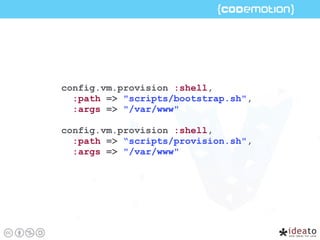


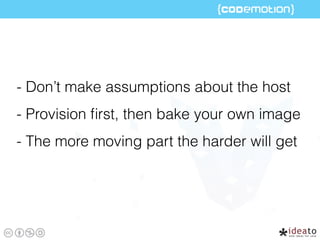



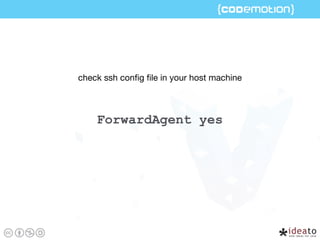
The document provides a comprehensive guide on using Vagrant, including setup instructions, configuration tips for virtual machines, and performance optimization strategies. It covers aspects like managing boxes, shared folders, multi-VM configurations, and provisioning tools, along with best practices for memory and CPU allocation. The document emphasizes the importance of organizing project directories, utilizing specific plugins, and creating immutable VMs for efficient development workflows.


![Vagrant + Docker provider [+Puppet]](https://cdn.slidesharecdn.com/ss_thumbnails/npoggivagrant-docker-140725100147-phpapp02-thumbnail.jpg?width=640&height=640&fit=bounds)


![20260201 [FOSDEM] gomodjail - library sandboxing for Go modules.pdf](https://cdn.slidesharecdn.com/ss_thumbnails/20260201fosdemgomodjail-librarysandboxingforgomodules-260201225659-76609ec4-thumbnail.jpg?width=640&height=640&fit=bounds)


