Preparation study
of Docker
2016/03/24
Mulodo Vietnam Co., Ltd.
“Docker”
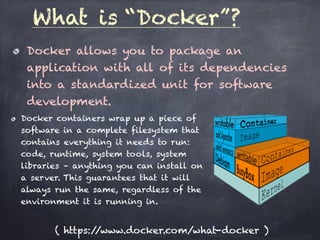
Docker allows you to package an
application with all of its dependencies
into a standardized unit for software
development.
What is “Docker”?
Docker containers wrap up a piece of
software in a complete filesystem that
contains everything it needs to run:
code, runtime, system tools, system
libraries – anything you can install on
a server. This guarantees that it will
always run the same, regardless of the
environment it is running in.
( https://www.docker.com/what-docker )
Docker VS Vagrant ??
Alternatively ?? NO!!
Docker : a kind of Linux container
Vagrant: Virtual machine manager
Docker VS Vagrant ??
Alternatively ?? NO!!
Docker : a kind of Linux container
Vagrant: Virtual machine manager
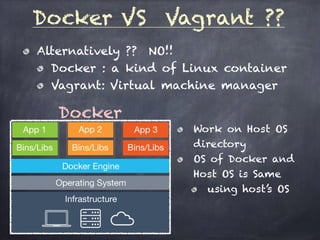
Docker
Work on Host OS
directory
OS of Docker and
Host OS is Same
using host’s OS
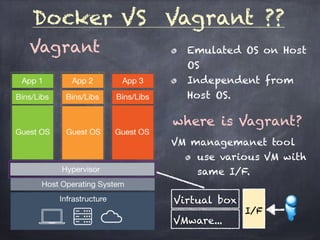
Docker VS Vagrant ??
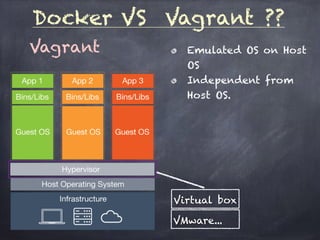
Vagrant Emulated OS on Host
OS
Independent from
Host OS.
Virtual box
VMware...
Docker VS Vagrant ??
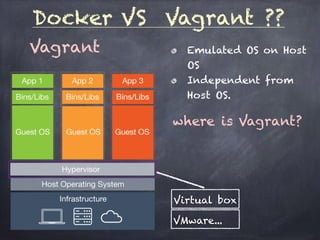
Vagrant Emulated OS on Host
OS
Independent from
Host OS.
where is Vagrant?
Virtual box
VMware...
Docker VS Vagrant ??
Vagrant Emulated OS on Host
OS
Independent from
Host OS.
where is Vagrant?
VM managemanet tool
use various VM with
same I/F.
Virtual box
VMware...
I/F
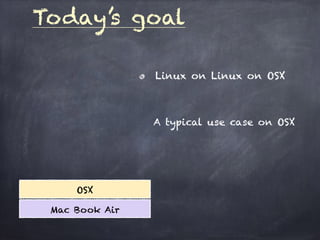
Today’s goal
OSX
Mac Book Air
Linux on Linux on OSX
A typical use case on OSX
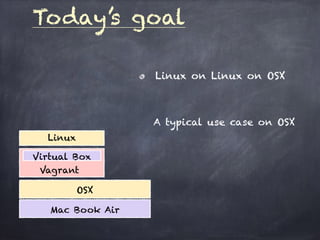
Today’s goal
Linux on Linux on OSX
OSX
Mac Book Air
Vagrant
Virtual Box
Linux
A typical use case on OSX
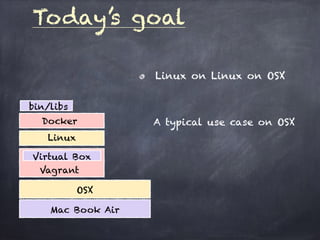
Today’s goal
Linux on Linux on OSX
OSX
Mac Book Air
Vagrant
Virtual Box
Linux
Docker
bin/libs
A typical use case on OSX
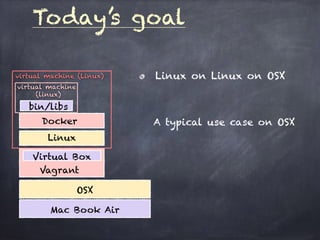
Today’s goal
Linux on Linux on OSX
A typical use case on OSX
OSX
Mac Book Air
Vagrant
Virtual Box
Linux
Docker
bin/libs
virtual machine (Linux)
virtual machine
(linux)
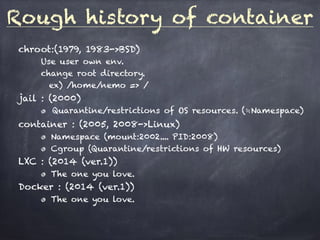
Rough history of container
chroot:(1979, 1983->BSD)
Use user own env.
change root directory.
ex) /home/nemo => /
jail : (2000)
Quarantine/restrictions of OS resources. (≒Namespace)
container : (2005, 2008->Linux)
Namespace (mount:2002.... PID:2008)
Cgroup (Quarantine/restrictions of HW resources)
LXC : (2014 (ver.1))
The one you love.
Docker : (2014 (ver.1))
The one you love.
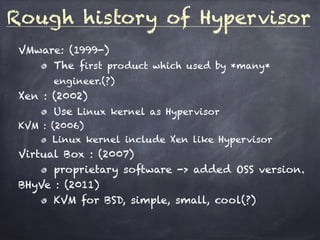
Rough history of Hypervisor
VMware: (1999-)
The first product which used by *many*
engineer.(?)
Xen : (2002)
Use Linux kernel as Hypervisor
KVM : (2006)
Linux kernel include Xen like Hypervisor
Virtual Box : (2007)
proprietary software -> added OSS version.
BHyVe : (2011)
KVM for BSD, simple, small, cool(?)
get tired a bit...
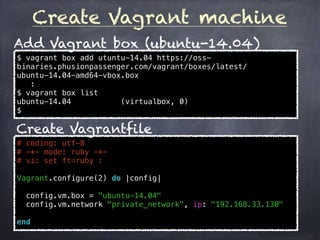
Create Vagrant machine
# coding: utf-8
# -*- mode: ruby -*-
# vi: set ft=ruby :
Vagrant.configure(2) do |config|
config.vm.box = "ubuntu-14.04"
config.vm.network "private_network", ip: "192.168.33.130"
end
$ vagrant box add utuntu-14.04 https://oss-
binaries.phusionpassenger.com/vagrant/boxes/latest/
ubuntu-14.04-amd64-vbox.box
:
$ vagrant box list
ubuntu-14.04 (virtualbox, 0)
$
Add Vagrant box (ubuntu-14.04)
Create Vagrantfile
Setup Docker machine
$ cat hosts
[Docker-server]
192.168.33.130 (virtualbox, 0)
$ cat setup.yml
# setup docker server (base apps)
- include: playbooks/server.yml
# setup docker server
- include: playbooks/docker.yml
$ mkdir playbooks
$
Create hosts, setup.yml, playbooks/
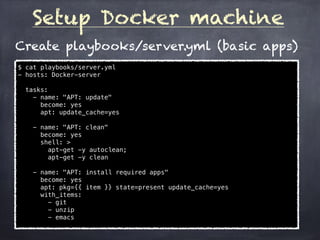
Setup Docker machine
$ cat playbooks/server.yml
- hosts: Docker-server
tasks:
- name: "APT: update"
become: yes
apt: update_cache=yes
- name: "APT: clean"
become: yes
shell: >
apt-get -y autoclean;
apt-get -y clean
- name: "APT: install required apps"
become: yes
apt: pkg={{ item }} state=present update_cache=yes
with_items:
- git
- unzip
- emacs
Create playbooks/server.yml (basic apps)
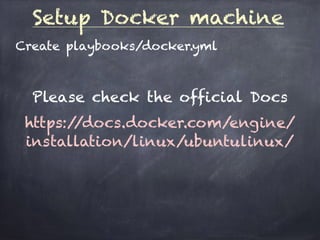
Setup Docker machine
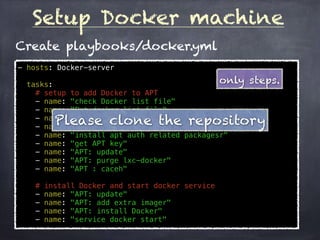
Create playbooks/docker.yml
Please check the official Docs
https://docs.docker.com/engine/
installation/linux/ubuntulinux/
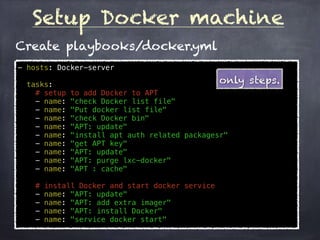
Setup Docker machine
- hosts: Docker-server
tasks:
# setup to add Docker to APT
- name: "check Docker list file"
- name: "Put docker list file"
- name: "check Docker bin"
- name: "APT: update"
- name: "install apt auth related packagesr"
- name: "get APT key"
- name: "APT: update"
- name: "APT: purge lxc-docker"
- name: "APT : cache"
# install Docker and start docker service
- name: "APT: update"
- name: "APT: add extra imager"
- name: "APT: install Docker"
- name: "service docker start"
Create playbooks/docker.yml
only steps.
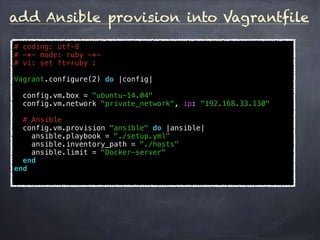
add Ansible provision into Vagrantfile
# coding: utf-8
# -*- mode: ruby -*-
# vi: set ft=ruby :
Vagrant.configure(2) do |config|
config.vm.box = "ubuntu-14.04"
config.vm.network "private_network", ip: "192.168.33.130"
# Ansible
config.vm.provision "ansible" do |ansible|
ansible.playbook = "./setup.yml"
ansible.inventory_path = "./hosts"
ansible.limit = "Docker-server"
end
end
Setup Docker machine
- hosts: Docker-server
tasks:
# setup to add Docker to APT
- name: "check Docker list file"
- name: "Put docker list file"
- name: "check Docker bin"
- name: "APT: update"
- name: "install apt auth related packagesr"
- name: "get APT key"
- name: "APT: update"
- name: "APT: purge lxc-docker"
- name: "APT : caceh"
# install Docker and start docker service
- name: "APT: update"
- name: "APT: add extra imager"
- name: "APT: install Docker"
- name: "service docker start"
Create playbooks/docker.yml
only steps.
Please clone the repository
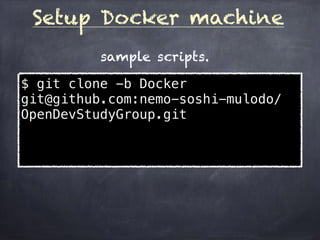
Setup Docker machine
$ git clone -b Docker
git@github.com:nemo-soshi-mulodo/
OpenDevStudyGroup.git
sample scripts.
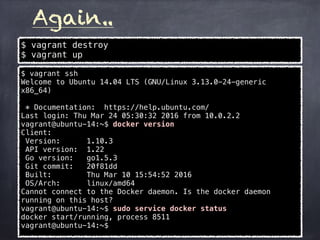
Again..
$ vagrant destroy
$ vagrant up
$ vagrant ssh
Welcome to Ubuntu 14.04 LTS (GNU/Linux 3.13.0-24-generic
x86_64)
* Documentation: https://help.ubuntu.com/
Last login: Thu Mar 24 05:30:32 2016 from 10.0.2.2
vagrant@ubuntu-14:~$ docker version
Client:
Version: 1.10.3
API version: 1.22
Go version: go1.5.3
Git commit: 20f81dd
Built: Thu Mar 10 15:54:52 2016
OS/Arch: linux/amd64
Cannot connect to the Docker daemon. Is the docker daemon
running on this host?
vagrant@ubuntu-14:~$ sudo service docker status
docker start/running, process 8511
vagrant@ubuntu-14:~$
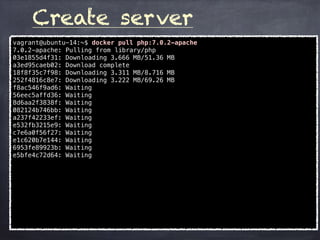
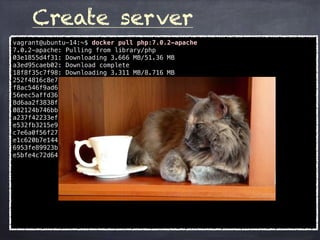
Create server
vagrant@ubuntu-14:~$ docker pull php:7.0.2-apache
7.0.2-apache: Pulling from library/php
03e1855d4f31: Downloading 3.666 MB/51.36 MB
a3ed95caeb02: Download complete
18f8f35c7f98: Downloading 3.311 MB/8.716 MB
252f4816c8e7: Downloading 3.222 MB/69.26 MB
f8ac546f9ad6: Waiting
56eec5affd36: Waiting
8d6aa2f3838f: Waiting
082124b746bb: Waiting
a237f42233ef: Waiting
e532fb3215e9: Waiting
c7e6a0f56f27: Waiting
e1c620b7e144: Waiting
6953fe89923b: Waiting
e5bfe4c72d64: Waiting
Create server
vagrant@ubuntu-14:~$ docker pull php:7.0.2-apache
7.0.2-apache: Pulling from library/php
03e1855d4f31: Downloading 3.666 MB/51.36 MB
a3ed95caeb02: Download complete
18f8f35c7f98: Downloading 3.311 MB/8.716 MB
252f4816c8e7: Downloading 3.222 MB/69.26 MB
f8ac546f9ad6: Waiting
56eec5affd36: Waiting
8d6aa2f3838f: Waiting
082124b746bb: Waiting
a237f42233ef: Waiting
e532fb3215e9: Waiting
c7e6a0f56f27: Waiting
e1c620b7e144: Waiting
6953fe89923b: Waiting
e5bfe4c72d64: Waiting
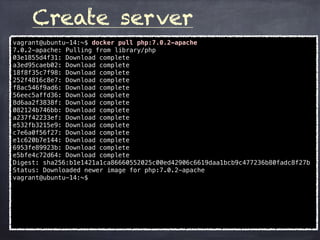
Create server
vagrant@ubuntu-14:~$ docker pull php:7.0.2-apache
7.0.2-apache: Pulling from library/php
03e1855d4f31: Download complete
a3ed95caeb02: Download complete
18f8f35c7f98: Download complete
252f4816c8e7: Download complete
f8ac546f9ad6: Download complete
56eec5affd36: Download complete
8d6aa2f3838f: Download complete
082124b746bb: Download complete
a237f42233ef: Download complete
e532fb3215e9: Download complete
c7e6a0f56f27: Download complete
e1c620b7e144: Download complete
6953fe89923b: Download complete
e5bfe4c72d64: Download complete
Digest: sha256:b1e1421a1ca86660552025c00ed42906c6619daa1bcb9c477236b80fadc8f27b
Status: Downloaded newer image for php:7.0.2-apache
vagrant@ubuntu-14:~$
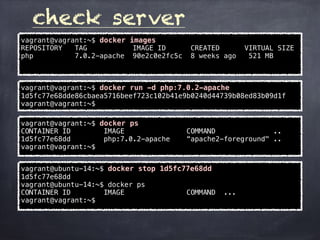
check server
vagrant@vagrant:~$ docker images
REPOSITORY TAG IMAGE ID CREATED VIRTUAL SIZE
php 7.0.2-apache 90e2c0e2fc5c 8 weeks ago 521 MB
vagrant@vagrant:~$ docker run -d php:7.0.2-apache
1d5fc77e68dde86cbaea5716beef723c102b41e9b0240d44739b08ed83b09d1f
vagrant@vagrant:~$
vagrant@vagrant:~$ docker ps
CONTAINER ID IMAGE COMMAND ..
1d5fc77e68dd php:7.0.2-apache “apache2-foreground" ..
vagrant@vagrant:~$
vagrant@ubuntu-14:~$ docker stop 1d5fc77e68dd
1d5fc77e68dd
vagrant@ubuntu-14:~$ docker ps
CONTAINER ID IMAGE COMMAND ...
vagrant@vagrant:~$
check server (2)
vagrant@ubuntu-14:~$ docker run -it php:7.0.2-apache /bin/bash
root@3399320f814e:/var/www/html# ps ax
PID TTY STAT TIME COMMAND
1 ? Ss 0:00 /bin/bash
7 ? R+ 0:00 ps ax
root@3399320f814e:/var/www/html# /etc/init.d/apache2 start
[....] Starting web server: apache2AH00558: apache2: Could not
reliably determine the server's fully qualified domain name, using
172.17.0.2. Set the 'ServerName' directive globally to suppress
this message
. ok
root@3399320f814e:/var/www/html# ps -ax | grep apache
24 ? Ss 0:00 /usr/sbin/apache2 -k start
27 ? S 0:00 /usr/sbin/apache2 -k start
28 ? S 0:00 /usr/sbin/apache2 -k start
29 ? S 0:00 /usr/sbin/apache2 -k start
30 ? S 0:00 /usr/sbin/apache2 -k start
31 ? S 0:00 /usr/sbin/apache2 -k start
55 ? S+ 0:00 grep apache
root@3399320f814e:/var/www/html# exit
exit
vagrant@ubuntu-14:~$ docker ps
CONTAINER ID IMAGE ....
vagrant@ubuntu-14:~$
Finished..
I'm looking forward to the event.
Finished..
I'm looking forward to the event.
Meow
(Thank you)

Preparation study of_docker - (MOSG)

  • 1.
  • 2.
  • 3.
    Docker allows youto package an application with all of its dependencies into a standardized unit for software development. What is “Docker”? Docker containers wrap up a piece of software in a complete filesystem that contains everything it needs to run: code, runtime, system tools, system libraries – anything you can install on a server. This guarantees that it will always run the same, regardless of the environment it is running in. ( https://www.docker.com/what-docker )
  • 4.
    Docker VS Vagrant?? Alternatively ?? NO!! Docker : a kind of Linux container Vagrant: Virtual machine manager
  • 5.
    Docker VS Vagrant?? Alternatively ?? NO!! Docker : a kind of Linux container Vagrant: Virtual machine manager Docker Work on Host OS directory OS of Docker and Host OS is Same using host’s OS
  • 6.
    Docker VS Vagrant?? Vagrant Emulated OS on Host OS Independent from Host OS. Virtual box VMware...
  • 7.
    Docker VS Vagrant?? Vagrant Emulated OS on Host OS Independent from Host OS. where is Vagrant? Virtual box VMware...
  • 8.
    Docker VS Vagrant?? Vagrant Emulated OS on Host OS Independent from Host OS. where is Vagrant? VM managemanet tool use various VM with same I/F. Virtual box VMware... I/F
  • 9.
    Today’s goal OSX Mac BookAir Linux on Linux on OSX A typical use case on OSX
  • 10.
    Today’s goal Linux onLinux on OSX OSX Mac Book Air Vagrant Virtual Box Linux A typical use case on OSX
  • 11.
    Today’s goal Linux onLinux on OSX OSX Mac Book Air Vagrant Virtual Box Linux Docker bin/libs A typical use case on OSX
  • 12.
    Today’s goal Linux onLinux on OSX A typical use case on OSX OSX Mac Book Air Vagrant Virtual Box Linux Docker bin/libs virtual machine (Linux) virtual machine (linux)
  • 13.
    Rough history ofcontainer chroot:(1979, 1983->BSD) Use user own env. change root directory. ex) /home/nemo => / jail : (2000) Quarantine/restrictions of OS resources. (≒Namespace) container : (2005, 2008->Linux) Namespace (mount:2002.... PID:2008) Cgroup (Quarantine/restrictions of HW resources) LXC : (2014 (ver.1)) The one you love. Docker : (2014 (ver.1)) The one you love.
  • 14.
    Rough history ofHypervisor VMware: (1999-) The first product which used by *many* engineer.(?) Xen : (2002) Use Linux kernel as Hypervisor KVM : (2006) Linux kernel include Xen like Hypervisor Virtual Box : (2007) proprietary software -> added OSS version. BHyVe : (2011) KVM for BSD, simple, small, cool(?)
  • 15.
  • 16.
    Create Vagrant machine #coding: utf-8 # -*- mode: ruby -*- # vi: set ft=ruby : Vagrant.configure(2) do |config| config.vm.box = "ubuntu-14.04" config.vm.network "private_network", ip: "192.168.33.130" end $ vagrant box add utuntu-14.04 https://oss- binaries.phusionpassenger.com/vagrant/boxes/latest/ ubuntu-14.04-amd64-vbox.box : $ vagrant box list ubuntu-14.04 (virtualbox, 0) $ Add Vagrant box (ubuntu-14.04) Create Vagrantfile
  • 17.
    Setup Docker machine $cat hosts [Docker-server] 192.168.33.130 (virtualbox, 0) $ cat setup.yml # setup docker server (base apps) - include: playbooks/server.yml # setup docker server - include: playbooks/docker.yml $ mkdir playbooks $ Create hosts, setup.yml, playbooks/
  • 18.
    Setup Docker machine $cat playbooks/server.yml - hosts: Docker-server tasks: - name: "APT: update" become: yes apt: update_cache=yes - name: "APT: clean" become: yes shell: > apt-get -y autoclean; apt-get -y clean - name: "APT: install required apps" become: yes apt: pkg={{ item }} state=present update_cache=yes with_items: - git - unzip - emacs Create playbooks/server.yml (basic apps)
  • 19.
    Setup Docker machine Createplaybooks/docker.yml Please check the official Docs https://docs.docker.com/engine/ installation/linux/ubuntulinux/
  • 20.
    Setup Docker machine -hosts: Docker-server tasks: # setup to add Docker to APT - name: "check Docker list file" - name: "Put docker list file" - name: "check Docker bin" - name: "APT: update" - name: "install apt auth related packagesr" - name: "get APT key" - name: "APT: update" - name: "APT: purge lxc-docker" - name: "APT : cache" # install Docker and start docker service - name: "APT: update" - name: "APT: add extra imager" - name: "APT: install Docker" - name: "service docker start" Create playbooks/docker.yml only steps.
  • 21.
    add Ansible provisioninto Vagrantfile # coding: utf-8 # -*- mode: ruby -*- # vi: set ft=ruby : Vagrant.configure(2) do |config| config.vm.box = "ubuntu-14.04" config.vm.network "private_network", ip: "192.168.33.130" # Ansible config.vm.provision "ansible" do |ansible| ansible.playbook = "./setup.yml" ansible.inventory_path = "./hosts" ansible.limit = "Docker-server" end end
  • 22.
    Setup Docker machine -hosts: Docker-server tasks: # setup to add Docker to APT - name: "check Docker list file" - name: "Put docker list file" - name: "check Docker bin" - name: "APT: update" - name: "install apt auth related packagesr" - name: "get APT key" - name: "APT: update" - name: "APT: purge lxc-docker" - name: "APT : caceh" # install Docker and start docker service - name: "APT: update" - name: "APT: add extra imager" - name: "APT: install Docker" - name: "service docker start" Create playbooks/docker.yml only steps. Please clone the repository
  • 23.
    Setup Docker machine $git clone -b Docker git@github.com:nemo-soshi-mulodo/ OpenDevStudyGroup.git sample scripts.
  • 24.
    Again.. $ vagrant destroy $vagrant up $ vagrant ssh Welcome to Ubuntu 14.04 LTS (GNU/Linux 3.13.0-24-generic x86_64) * Documentation: https://help.ubuntu.com/ Last login: Thu Mar 24 05:30:32 2016 from 10.0.2.2 vagrant@ubuntu-14:~$ docker version Client: Version: 1.10.3 API version: 1.22 Go version: go1.5.3 Git commit: 20f81dd Built: Thu Mar 10 15:54:52 2016 OS/Arch: linux/amd64 Cannot connect to the Docker daemon. Is the docker daemon running on this host? vagrant@ubuntu-14:~$ sudo service docker status docker start/running, process 8511 vagrant@ubuntu-14:~$
  • 25.
    Create server vagrant@ubuntu-14:~$ dockerpull php:7.0.2-apache 7.0.2-apache: Pulling from library/php 03e1855d4f31: Downloading 3.666 MB/51.36 MB a3ed95caeb02: Download complete 18f8f35c7f98: Downloading 3.311 MB/8.716 MB 252f4816c8e7: Downloading 3.222 MB/69.26 MB f8ac546f9ad6: Waiting 56eec5affd36: Waiting 8d6aa2f3838f: Waiting 082124b746bb: Waiting a237f42233ef: Waiting e532fb3215e9: Waiting c7e6a0f56f27: Waiting e1c620b7e144: Waiting 6953fe89923b: Waiting e5bfe4c72d64: Waiting
  • 26.
    Create server vagrant@ubuntu-14:~$ dockerpull php:7.0.2-apache 7.0.2-apache: Pulling from library/php 03e1855d4f31: Downloading 3.666 MB/51.36 MB a3ed95caeb02: Download complete 18f8f35c7f98: Downloading 3.311 MB/8.716 MB 252f4816c8e7: Downloading 3.222 MB/69.26 MB f8ac546f9ad6: Waiting 56eec5affd36: Waiting 8d6aa2f3838f: Waiting 082124b746bb: Waiting a237f42233ef: Waiting e532fb3215e9: Waiting c7e6a0f56f27: Waiting e1c620b7e144: Waiting 6953fe89923b: Waiting e5bfe4c72d64: Waiting
  • 27.
    Create server vagrant@ubuntu-14:~$ dockerpull php:7.0.2-apache 7.0.2-apache: Pulling from library/php 03e1855d4f31: Download complete a3ed95caeb02: Download complete 18f8f35c7f98: Download complete 252f4816c8e7: Download complete f8ac546f9ad6: Download complete 56eec5affd36: Download complete 8d6aa2f3838f: Download complete 082124b746bb: Download complete a237f42233ef: Download complete e532fb3215e9: Download complete c7e6a0f56f27: Download complete e1c620b7e144: Download complete 6953fe89923b: Download complete e5bfe4c72d64: Download complete Digest: sha256:b1e1421a1ca86660552025c00ed42906c6619daa1bcb9c477236b80fadc8f27b Status: Downloaded newer image for php:7.0.2-apache vagrant@ubuntu-14:~$
  • 28.
    check server vagrant@vagrant:~$ dockerimages REPOSITORY TAG IMAGE ID CREATED VIRTUAL SIZE php 7.0.2-apache 90e2c0e2fc5c 8 weeks ago 521 MB vagrant@vagrant:~$ docker run -d php:7.0.2-apache 1d5fc77e68dde86cbaea5716beef723c102b41e9b0240d44739b08ed83b09d1f vagrant@vagrant:~$ vagrant@vagrant:~$ docker ps CONTAINER ID IMAGE COMMAND .. 1d5fc77e68dd php:7.0.2-apache “apache2-foreground" .. vagrant@vagrant:~$ vagrant@ubuntu-14:~$ docker stop 1d5fc77e68dd 1d5fc77e68dd vagrant@ubuntu-14:~$ docker ps CONTAINER ID IMAGE COMMAND ... vagrant@vagrant:~$
  • 29.
    check server (2) vagrant@ubuntu-14:~$docker run -it php:7.0.2-apache /bin/bash root@3399320f814e:/var/www/html# ps ax PID TTY STAT TIME COMMAND 1 ? Ss 0:00 /bin/bash 7 ? R+ 0:00 ps ax root@3399320f814e:/var/www/html# /etc/init.d/apache2 start [....] Starting web server: apache2AH00558: apache2: Could not reliably determine the server's fully qualified domain name, using 172.17.0.2. Set the 'ServerName' directive globally to suppress this message . ok root@3399320f814e:/var/www/html# ps -ax | grep apache 24 ? Ss 0:00 /usr/sbin/apache2 -k start 27 ? S 0:00 /usr/sbin/apache2 -k start 28 ? S 0:00 /usr/sbin/apache2 -k start 29 ? S 0:00 /usr/sbin/apache2 -k start 30 ? S 0:00 /usr/sbin/apache2 -k start 31 ? S 0:00 /usr/sbin/apache2 -k start 55 ? S+ 0:00 grep apache root@3399320f814e:/var/www/html# exit exit vagrant@ubuntu-14:~$ docker ps CONTAINER ID IMAGE .... vagrant@ubuntu-14:~$
  • 30.
  • 31.
    Finished.. I'm looking forwardto the event. Meow (Thank you)