ASP.NET VALIDATION CONTROLS
ASP.NET validation controls validate the user input
data to ensure that useless, unauthenticated, or
contradictory data don't get stored.
ASP.NET provides the following validation controls:
• Required Field Validator
• Range Validator
• Compare Validator
• Regular Expression Validator
• Custom Validator
• Validation Summary
BASE VALIDATOR CLASS
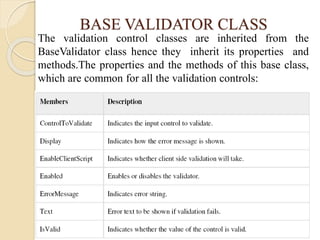
The validation control classes are inherited from the
BaseValidator class hence they inherit its properties and
methods.The properties and the methods of this base class,
which are common for all the validation controls:
BASE VALIDATOR CLASS
REQUIRED FIELD VALIDATOR
CONTROL
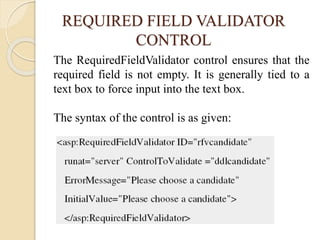
The RequiredFieldValidator control ensures that the
required field is not empty. It is generally tied to a
text box to force input into the text box.
The syntax of the control is as given:
RANGE VALIDATOR CONTROL
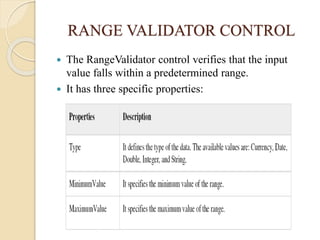
 The RangeValidator control verifies that the input
value falls within a predetermined range.
 It has three specific properties:
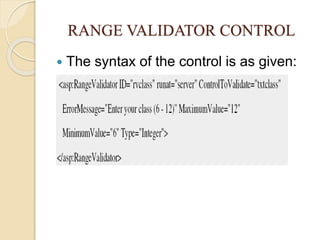
 The syntax of the control is as given:
RANGE VALIDATOR CONTROL
COMPARE VALIDATOR CONTROL
 The CompareValidator control compares a value in one
control with a fixed value or a value in another control.
 It has the following specific properties:
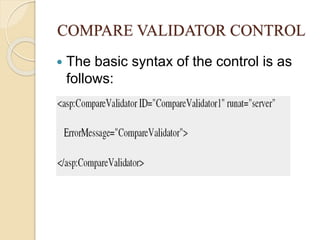
 The basic syntax of the control is as
follows:
COMPARE VALIDATOR CONTROL
REGULAR EXPRESSION VALIDATOR
 The RegularExpressionValidator allows validating the
input text by matching against a pattern of a regular
expression. The regular expression is set in the
ValidationExpression property.
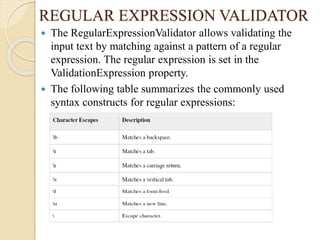
 The following table summarizes the commonly used
syntax constructs for regular expressions:
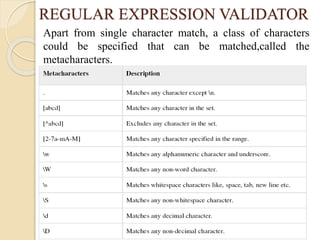
Apart from single character match, a class of characters
could be specified that can be matched,called the
metacharacters.
REGULAR EXPRESSION VALIDATOR
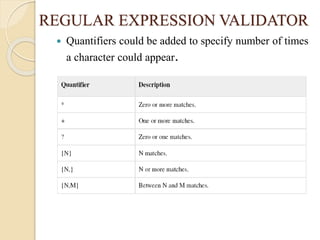
 Quantifiers could be added to specify number of times
a character could appear.
REGULAR EXPRESSION VALIDATOR
 The syntax of the control is as given:
REGULAR EXPRESSION VALIDATOR
CUSTOM VALIDATOR
 The CustomValidator control allows writing
application specific custom validation routines for
both the client side and the server side validation.
 The client side validation is accomplished
through the ClientValidationFunction property.
The client side validation routine should be
written in a scripting language, such as JavaScript
or VBScript, which the browser can understand.
 The server side validation routine must be called
from the control's ServerValidate event handler.
The server side validation routine should be
written in any .Net language, like C# or VB.Net.
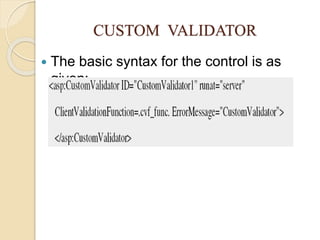
 The basic syntax for the control is as
given:
CUSTOM VALIDATOR
VALIDATION SUMMARY
 The ValidationSummary control does not perform any
validation but shows a summary of all errors in the page.
The summary displays the values of the ErrorMessage
property of all validation controls that failed validation.
 The following two mutually inclusive properties list out
the error message:
◦ ShowSummary : shows the error messages in specified
format.
◦ ShowMessageBox : shows the error messages in a separate
window.
 The syntax for the control is as given:
VALIDATION GROUPS
 Complex pages have different groups of information
provided in different panels. In such situation, a need
might arise for performing validation separately for
separate group. This kind of situation is handled using
validation groups.
 To create a validation group, you should put the input
controls and the validation controls into the same logical
group by setting their ValidationGroupproperty.

Asp.net validation

  • 1.
    ASP.NET VALIDATION CONTROLS ASP.NETvalidation controls validate the user input data to ensure that useless, unauthenticated, or contradictory data don't get stored. ASP.NET provides the following validation controls: • Required Field Validator • Range Validator • Compare Validator • Regular Expression Validator • Custom Validator • Validation Summary
  • 2.
    BASE VALIDATOR CLASS Thevalidation control classes are inherited from the BaseValidator class hence they inherit its properties and methods.The properties and the methods of this base class, which are common for all the validation controls:
  • 3.
  • 4.
    REQUIRED FIELD VALIDATOR CONTROL TheRequiredFieldValidator control ensures that the required field is not empty. It is generally tied to a text box to force input into the text box. The syntax of the control is as given:
  • 5.
    RANGE VALIDATOR CONTROL The RangeValidator control verifies that the input value falls within a predetermined range.  It has three specific properties:
  • 6.
     The syntaxof the control is as given: RANGE VALIDATOR CONTROL
  • 7.
    COMPARE VALIDATOR CONTROL The CompareValidator control compares a value in one control with a fixed value or a value in another control.  It has the following specific properties:
  • 8.
     The basicsyntax of the control is as follows: COMPARE VALIDATOR CONTROL
  • 9.
    REGULAR EXPRESSION VALIDATOR The RegularExpressionValidator allows validating the input text by matching against a pattern of a regular expression. The regular expression is set in the ValidationExpression property.  The following table summarizes the commonly used syntax constructs for regular expressions:
  • 10.
    Apart from singlecharacter match, a class of characters could be specified that can be matched,called the metacharacters. REGULAR EXPRESSION VALIDATOR
  • 11.
     Quantifiers couldbe added to specify number of times a character could appear. REGULAR EXPRESSION VALIDATOR
  • 12.
     The syntaxof the control is as given: REGULAR EXPRESSION VALIDATOR
  • 13.
    CUSTOM VALIDATOR  TheCustomValidator control allows writing application specific custom validation routines for both the client side and the server side validation.  The client side validation is accomplished through the ClientValidationFunction property. The client side validation routine should be written in a scripting language, such as JavaScript or VBScript, which the browser can understand.  The server side validation routine must be called from the control's ServerValidate event handler. The server side validation routine should be written in any .Net language, like C# or VB.Net.
  • 14.
     The basicsyntax for the control is as given: CUSTOM VALIDATOR
  • 15.
    VALIDATION SUMMARY  TheValidationSummary control does not perform any validation but shows a summary of all errors in the page. The summary displays the values of the ErrorMessage property of all validation controls that failed validation.  The following two mutually inclusive properties list out the error message: ◦ ShowSummary : shows the error messages in specified format. ◦ ShowMessageBox : shows the error messages in a separate window.  The syntax for the control is as given:
  • 16.
    VALIDATION GROUPS  Complexpages have different groups of information provided in different panels. In such situation, a need might arise for performing validation separately for separate group. This kind of situation is handled using validation groups.  To create a validation group, you should put the input controls and the validation controls into the same logical group by setting their ValidationGroupproperty.