Prepared by-
Paneliya Prince (150120116047)
Guided by – Prof.Prashant Jani
Gandhinagar Institute of Technology
SUBJECT-AJAVA(2160707)
Creating JDBC connection
2
• JDBC: Java Database Connectivity kit
• Package: java.sql
• DriverManager: class for making connection to
databases
• Connection: interface for communicating with databases
once connection has been established.
• Other interfaces: Statement, ResultSet,
DatabaseMetaData, ResultSetMetaData,
SQLException, ….etc.
3
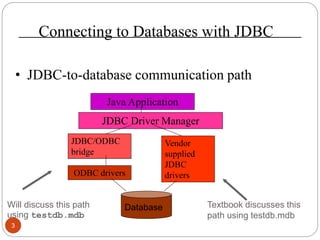
Connecting to Databases with JDBC
• JDBC-to-database communication path
Will discuss this path
using testdb.mdb
Textbook discusses this
path using testdb.mdb
Java Application
JDBC Driver Manager
JDBC/ODBC
bridge
Vendor
supplied
JDBC
driversODBC drivers
Database
4
• Register testdb.mdb with the ODBC Datasource Administer
on your PC. Instructions:
– Open Control Panel and select ODBC Data Sources
[32bit] (on XP under Administrative Tools). You will
get the window shown on the right. Click on Add.
5
– Select Microsoft Access Driver and then click on Finish.
You will get the window shown on the right.
– Provide a name for the data source, say TestDB.
– Click and Select and select testdb.mdb from file system
(picture on the next page)
6
– Then you see the picture on the right. Simply click on OK
and the registration is complete.
– Thereafter the database testdb.mdb is known as TestDB
to the ODBC Datasource Adminstrator.
– For JDBC, URL for the database is: jdbc:odbc:TestDB
7
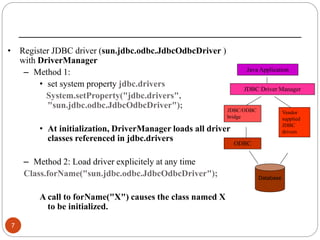
• Register JDBC driver (sun.jdbc.odbc.JdbcOdbcDriver )
with DriverManager
– Method 1:
• set system property jdbc.drivers
System.setProperty("jdbc.drivers",
"sun.jdbc.odbc.JdbcOdbcDriver");
• At initialization, DriverManager loads all driver
classes referenced in jdbc.drivers
– Method 2: Load driver explicitely at any time
Class.forName("sun.jdbc.odbc.JdbcOdbcDriver");
A call to forName("X") causes the class named X
to be initialized.
Java Application
JDBC Driver Manager
JDBC/ODBC
bridge
Vendor
supplied
JDBC
drivers
ODBC
Database
8
• Connection examples
– ConnectMe.java: register JDBC driver using the second
method
– ConnectMe1.java: register JDBC driver using the first
method
• Note. Examples (including testdb.mdb) in this topic are
packaged in the zip. See the code page
THANK YOU
9

creating jdbc connection

  • 1.
    Prepared by- Paneliya Prince(150120116047) Guided by – Prof.Prashant Jani Gandhinagar Institute of Technology SUBJECT-AJAVA(2160707) Creating JDBC connection
  • 2.
    2 • JDBC: JavaDatabase Connectivity kit • Package: java.sql • DriverManager: class for making connection to databases • Connection: interface for communicating with databases once connection has been established. • Other interfaces: Statement, ResultSet, DatabaseMetaData, ResultSetMetaData, SQLException, ….etc.
  • 3.
    3 Connecting to Databaseswith JDBC • JDBC-to-database communication path Will discuss this path using testdb.mdb Textbook discusses this path using testdb.mdb Java Application JDBC Driver Manager JDBC/ODBC bridge Vendor supplied JDBC driversODBC drivers Database
  • 4.
    4 • Register testdb.mdbwith the ODBC Datasource Administer on your PC. Instructions: – Open Control Panel and select ODBC Data Sources [32bit] (on XP under Administrative Tools). You will get the window shown on the right. Click on Add.
  • 5.
    5 – Select MicrosoftAccess Driver and then click on Finish. You will get the window shown on the right. – Provide a name for the data source, say TestDB. – Click and Select and select testdb.mdb from file system (picture on the next page)
  • 6.
    6 – Then yousee the picture on the right. Simply click on OK and the registration is complete. – Thereafter the database testdb.mdb is known as TestDB to the ODBC Datasource Adminstrator. – For JDBC, URL for the database is: jdbc:odbc:TestDB
  • 7.
    7 • Register JDBCdriver (sun.jdbc.odbc.JdbcOdbcDriver ) with DriverManager – Method 1: • set system property jdbc.drivers System.setProperty("jdbc.drivers", "sun.jdbc.odbc.JdbcOdbcDriver"); • At initialization, DriverManager loads all driver classes referenced in jdbc.drivers – Method 2: Load driver explicitely at any time Class.forName("sun.jdbc.odbc.JdbcOdbcDriver"); A call to forName("X") causes the class named X to be initialized. Java Application JDBC Driver Manager JDBC/ODBC bridge Vendor supplied JDBC drivers ODBC Database
  • 8.
    8 • Connection examples –ConnectMe.java: register JDBC driver using the second method – ConnectMe1.java: register JDBC driver using the first method • Note. Examples (including testdb.mdb) in this topic are packaged in the zip. See the code page
  • 9.