Introduction to Custom
Form Control
Presented By:
Neha Kumari & Paras Jain
Lack of etiquette and manners is a huge turn off.
KnolX Etiquettes
Punctuality
Join the session 5 minutes prior to
the session start time. We start on
time and conclude on time!
Feedback
Make sure to submit a constructive
feedback for all sessions as it is
very helpful for the presenter.
Silent Mode
Keep your mobile devices in silent
mode, feel free to move out of
session in case you need to attend
an urgent call.
Avoid Disturbance
Avoid unwanted chit chat during
the session.
Our Agenda
01 How Standard Form Controls Work?
02 Introduction about controlValueAccessor?
03 Create Custom Form Control with CVA
04 Create Custom Form Control without CVA
05 Demo
How do standard form controls work?
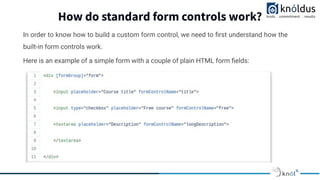
In order to know how to build a custom form control, we need to first understand how the
built-in form controls work.
Here is an example of a simple form with a couple of plain HTML form fields:
What is controlValueAccessor?
Introduction
ControlValueAccessor is an interface working as a mediator b/w a FormControl and
the native element.
Defines an interface that acts as a bridge between the Angular forms API and a native
element in the DOM.
It abstracts the operations of writing a value and listening for changes in the DOM
element representing an input control.
As we can see, we have here a couple of standard form controls, with the
formControlName property applied to it. And this is how the HTML element gets
binded to the form.
Whenever the user interacts with the form inputs, the form value and validity state
will be automatically re-calculated.
So how does this all work under the hood then?
Brief
What happens is that, under the hood, the Angular forms module is
applying to each native HTML element a built-in Angular directive,
which will be responsible for tracking the value of the field, and
communicate it back to the parent form.
This type of special directive is known as a controlValueAccessor
directive.
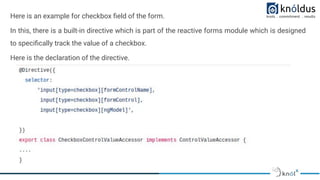
Here is an example for checkbox field of the form.
In this, there is a built-in directive which is part of the reactive forms module which is designed
to specifically track the value of a checkbox.
Here is the declaration of the directive.
As we can see by the selector, this value tracking directive specifically targets HTML
inputs of type checkbox only,
But only if the ngModel, formControl or formControlName properties are applied to it.
Question
If this directive only targets checkboxes, then what about all the other types of form
controls, like text inputs or text areas?
Answer
● Well, each of those control types has their own value accessor directive, which is different
than CheckboxControlValueAccessor.
● All of those directives are built-in into the Angular Forms module and cover only the
standard HTML form controls.
● This means that if we want to implement our own custom form control, we are going to
have to implement a custom value accessor for it as well.
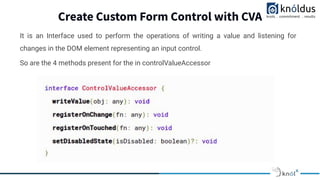
Create Custom Form Control with CVA
It is an Interface used to perform the operations of writing a value and listening for
changes in the DOM element representing an input control.
So are the 4 methods present for the in controlValueAccessor
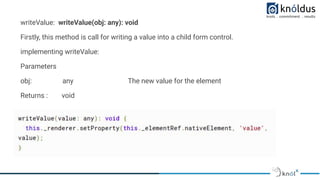
writeValue: writeValue(obj: any): void
Firstly, this method is call for writing a value into a child form control.
implementing writeValue:
Parameters
obj: any The new value for the element
Returns : void
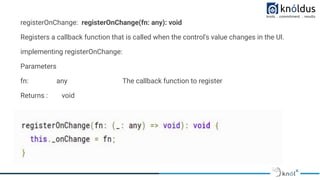
registerOnChange: registerOnChange(fn: any): void
Registers a callback function that is called when the control's value changes in the UI.
implementing registerOnChange:
Parameters
fn: any The callback function to register
Returns : void
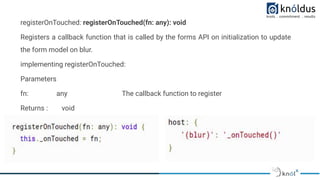
registerOnTouched: registerOnTouched(fn: any): void
Registers a callback function that is called by the forms API on initialization to update
the form model on blur.
implementing registerOnTouched:
Parameters
fn: any The callback function to register
Returns : void
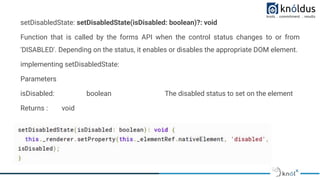
setDisabledState: setDisabledState(isDisabled: boolean)?: void
Function that is called by the forms API when the control status changes to or from
'DISABLED'. Depending on the status, it enables or disables the appropriate DOM element.
implementing setDisabledState:
Parameters
isDisabled: boolean The disabled status to set on the element
Returns : void
Create Custom Form Control without CVA
As we come across that we can make custom form controls by utilizing the
ControlValueAccessor interface.
Likewise we can also make a custom form control by utilizing @Input() decorator and
make your structure dynamic.
While using the controlValueAccessor we need to implement a heavy-weight business
logic.
But we can reduce it by using property binding.
i.e Use of @Input() decorator
● With the use of controlValueAccessor to make form field dynamic we need to
implement a heavy-weight business logic. we can reduce it with the help of property
binding.
● In ControlValueAccessor we need to write their 4 methods and also need to provide
NG_VALUE_ACCESSOR to access the value of that control and changes.
● In ControlValueAccessor we only get the value of that form field and we need to write
validation logic separately
but if we use property binding then we get value and validation both at the same time.
● So by using the property binding approach, we can reduce validation logic too.
Advantage of Property binding over ControlValueAccessor
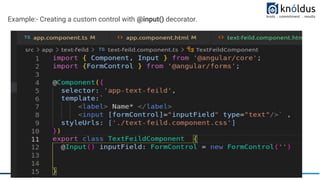
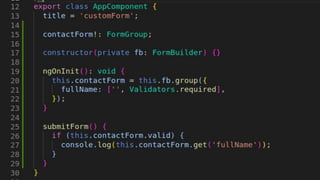
Example:- Creating a custom control with @input() decorator.
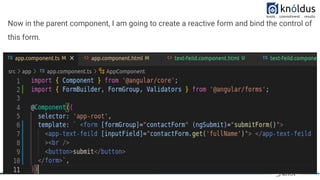
Now in the parent component, I am going to create a reactive form and bind the control of
this form.
DEMO
References
Workaround for sharing States
● https://blog.knoldus.com/how-to-create-custom-form-control-in-angular/
● https://blog.knoldus.com/how-to-create-custom-controls-without-using-controlv
alueaccessor/
● https://blog.angular-university.io/angular-custom-form-controls/
● https://angular.io/api/forms/ControlValueAccessor
Thank You !
Get in touch with us:
Lorem Studio, Lord Building
D4456, LA, USA

Introduction to Custom Form Control

  • 1.
    Introduction to Custom FormControl Presented By: Neha Kumari & Paras Jain
  • 2.
    Lack of etiquetteand manners is a huge turn off. KnolX Etiquettes Punctuality Join the session 5 minutes prior to the session start time. We start on time and conclude on time! Feedback Make sure to submit a constructive feedback for all sessions as it is very helpful for the presenter. Silent Mode Keep your mobile devices in silent mode, feel free to move out of session in case you need to attend an urgent call. Avoid Disturbance Avoid unwanted chit chat during the session.
  • 3.
    Our Agenda 01 HowStandard Form Controls Work? 02 Introduction about controlValueAccessor? 03 Create Custom Form Control with CVA 04 Create Custom Form Control without CVA 05 Demo
  • 4.
    How do standardform controls work? In order to know how to build a custom form control, we need to first understand how the built-in form controls work. Here is an example of a simple form with a couple of plain HTML form fields:
  • 5.
    What is controlValueAccessor? Introduction ControlValueAccessoris an interface working as a mediator b/w a FormControl and the native element. Defines an interface that acts as a bridge between the Angular forms API and a native element in the DOM. It abstracts the operations of writing a value and listening for changes in the DOM element representing an input control.
  • 6.
    As we cansee, we have here a couple of standard form controls, with the formControlName property applied to it. And this is how the HTML element gets binded to the form. Whenever the user interacts with the form inputs, the form value and validity state will be automatically re-calculated. So how does this all work under the hood then?
  • 7.
    Brief What happens isthat, under the hood, the Angular forms module is applying to each native HTML element a built-in Angular directive, which will be responsible for tracking the value of the field, and communicate it back to the parent form. This type of special directive is known as a controlValueAccessor directive.
  • 8.
    Here is anexample for checkbox field of the form. In this, there is a built-in directive which is part of the reactive forms module which is designed to specifically track the value of a checkbox. Here is the declaration of the directive.
  • 9.
    As we cansee by the selector, this value tracking directive specifically targets HTML inputs of type checkbox only, But only if the ngModel, formControl or formControlName properties are applied to it. Question If this directive only targets checkboxes, then what about all the other types of form controls, like text inputs or text areas?
  • 10.
    Answer ● Well, eachof those control types has their own value accessor directive, which is different than CheckboxControlValueAccessor. ● All of those directives are built-in into the Angular Forms module and cover only the standard HTML form controls. ● This means that if we want to implement our own custom form control, we are going to have to implement a custom value accessor for it as well.
  • 11.
    Create Custom FormControl with CVA It is an Interface used to perform the operations of writing a value and listening for changes in the DOM element representing an input control. So are the 4 methods present for the in controlValueAccessor
  • 12.
    writeValue: writeValue(obj: any):void Firstly, this method is call for writing a value into a child form control. implementing writeValue: Parameters obj: any The new value for the element Returns : void
  • 13.
    registerOnChange: registerOnChange(fn: any):void Registers a callback function that is called when the control's value changes in the UI. implementing registerOnChange: Parameters fn: any The callback function to register Returns : void
  • 14.
    registerOnTouched: registerOnTouched(fn: any):void Registers a callback function that is called by the forms API on initialization to update the form model on blur. implementing registerOnTouched: Parameters fn: any The callback function to register Returns : void
  • 15.
    setDisabledState: setDisabledState(isDisabled: boolean)?:void Function that is called by the forms API when the control status changes to or from 'DISABLED'. Depending on the status, it enables or disables the appropriate DOM element. implementing setDisabledState: Parameters isDisabled: boolean The disabled status to set on the element Returns : void
  • 16.
    Create Custom FormControl without CVA As we come across that we can make custom form controls by utilizing the ControlValueAccessor interface. Likewise we can also make a custom form control by utilizing @Input() decorator and make your structure dynamic. While using the controlValueAccessor we need to implement a heavy-weight business logic. But we can reduce it by using property binding. i.e Use of @Input() decorator
  • 17.
    ● With theuse of controlValueAccessor to make form field dynamic we need to implement a heavy-weight business logic. we can reduce it with the help of property binding. ● In ControlValueAccessor we need to write their 4 methods and also need to provide NG_VALUE_ACCESSOR to access the value of that control and changes. ● In ControlValueAccessor we only get the value of that form field and we need to write validation logic separately but if we use property binding then we get value and validation both at the same time. ● So by using the property binding approach, we can reduce validation logic too. Advantage of Property binding over ControlValueAccessor
  • 18.
    Example:- Creating acustom control with @input() decorator.
  • 19.
    Now in theparent component, I am going to create a reactive form and bind the control of this form.
  • 21.
  • 22.
    References Workaround for sharingStates ● https://blog.knoldus.com/how-to-create-custom-form-control-in-angular/ ● https://blog.knoldus.com/how-to-create-custom-controls-without-using-controlv alueaccessor/ ● https://blog.angular-university.io/angular-custom-form-controls/ ● https://angular.io/api/forms/ControlValueAccessor
  • 23.
    Thank You ! Getin touch with us: Lorem Studio, Lord Building D4456, LA, USA