Validation of asp.net
VALIDATION
INDEX :
• What is Validation
• Types of validation
VALIDATION
Validation is important part of any web application.
User’s input must always be validated before sending
across different layers of the application.
TYPES OF VALIDATION CONTROLS :
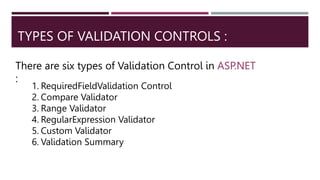
There are six types of Validation Control in ASP.NET
:
1. RequiredFieldValidation Control
2. Compare Validator
3. Range Validator
4. RegularExpression Validator
5. Custom Validator
6. Validation Summary
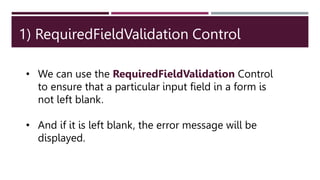
1) RequiredFieldValidation Control
• We can use the RequiredFieldValidation Control
to ensure that a particular input field in a form is
not left blank.
• And if it is left blank, the error message will be
displayed.
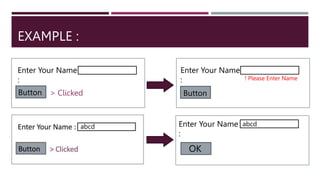
EXAMPLE :
Enter Your Name
:
Button
Enter Your Name
:
Button
! Please Enter Name
> Clicked
abcd Enter Your Name
:
OK
abcd
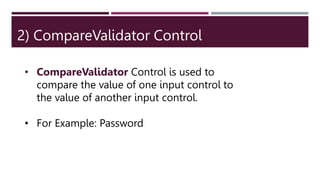
2) CompareValidator Control
• CompareValidator Control is used to
compare the value of one input control to
the value of another input control.
• For Example: Password
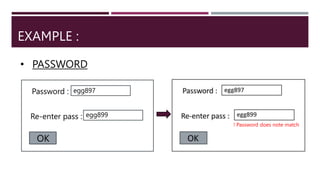
EXAMPLE :
• PASSWORD
Password :
Re-enter pass :
OK
egg897
egg899
! Password does note match
3) RangeValidator Control
• RangeValidator Control evaluates the
value of an input control to check that the
valued lies between specified range.
Control
• This can be a number , an alphabet or a
Date.
4) RegularExpressionValidator
Control
• The RegularExpressionValidator Control helps ensure
that user input matches a defined pattern using regular
expression.
• For Example: Email ID, Phone Number.
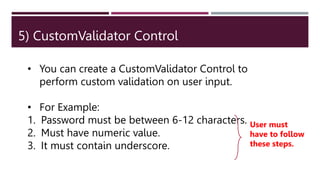
5) CustomValidator Control
• You can create a CustomValidator Control to
perform custom validation on user input.
• For Example:
1. Password must be between 6-12 characters.
2. Must have numeric value.
3. It must contain underscore.
User must
have to follow
these steps.
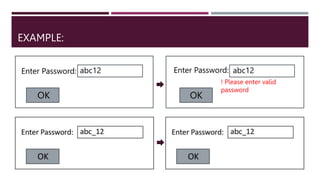
EXAMPLE:
Enter Password: Enter Password:
abc12 abc12
OK OK
! Please enter valid
password
6) Validation Summary
A Validation summary is used to display summary of
all validation error in the web form.

validation of aap.net

  • 1.
  • 2.
    VALIDATION INDEX : • Whatis Validation • Types of validation
  • 3.
    VALIDATION Validation is importantpart of any web application. User’s input must always be validated before sending across different layers of the application.
  • 4.
    TYPES OF VALIDATIONCONTROLS : There are six types of Validation Control in ASP.NET : 1. RequiredFieldValidation Control 2. Compare Validator 3. Range Validator 4. RegularExpression Validator 5. Custom Validator 6. Validation Summary
  • 5.
    1) RequiredFieldValidation Control •We can use the RequiredFieldValidation Control to ensure that a particular input field in a form is not left blank. • And if it is left blank, the error message will be displayed.
  • 6.
    EXAMPLE : Enter YourName : Button Enter Your Name : Button ! Please Enter Name > Clicked abcd Enter Your Name : OK abcd
  • 7.
    2) CompareValidator Control •CompareValidator Control is used to compare the value of one input control to the value of another input control. • For Example: Password
  • 8.
    EXAMPLE : • PASSWORD Password: Re-enter pass : OK egg897 egg899 ! Password does note match
  • 9.
    3) RangeValidator Control •RangeValidator Control evaluates the value of an input control to check that the valued lies between specified range. Control • This can be a number , an alphabet or a Date.
  • 10.
    4) RegularExpressionValidator Control • TheRegularExpressionValidator Control helps ensure that user input matches a defined pattern using regular expression. • For Example: Email ID, Phone Number.
  • 11.
    5) CustomValidator Control •You can create a CustomValidator Control to perform custom validation on user input. • For Example: 1. Password must be between 6-12 characters. 2. Must have numeric value. 3. It must contain underscore. User must have to follow these steps.
  • 12.
    EXAMPLE: Enter Password: EnterPassword: abc12 abc12 OK OK ! Please enter valid password
  • 13.
    6) Validation Summary AValidation summary is used to display summary of all validation error in the web form.