Data Binding
2015-OCTOBER-2ND
LAY Leangsros
Outline
I. Introduction
II. Using
III. Features
IV. Problems
2
Introduction
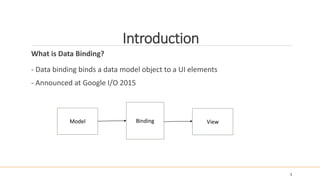
What is Data Binding?
- Data binding binds a data model object to a UI elements
- Announced at Google I/O 2015
Model Binding View
3
Introduction
Why do we need it?
- Remove unnecessary code ( add…Listener, findViewById, setText)
- Aid Memory Management
- Value code quality
4
Introduction
Why do we need it?
- Remove unnecessary code ( add..Listener, findViewById, setText)
5
@Override
public void onBindViewHolder(MyViewHolder holder, final int position) {
holder.getmItemBinding().setUser(mUserList.get(position));
holder.getmItemBinding().executePendingBindings();
}
@Override
public void onBindViewHolder(MyViewHolder holder, final int position) {
holder.name.setText(..);
holder.age.setText(..);
...
}
N
1
Introduction
Why do we need it?
- Aid Memory Management
- Value code quality
6
Using
What do we need?
- Minimum API-level 7 (2.1)
- Android Studio 1.3.0 or higher
- Add library in root build.gradle
- Apply plugin in build.gradle app
dependencies {
..
classpath "com.android.databinding:dataBinder:1.0-rc1"
}
apply plugin: 'com.android.databinding'
7
Using
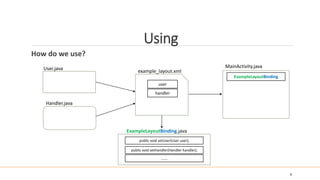
How do we use?
- Preparing the Model
- Preparing the Layout
- Connect Model and Layout in your activity
8
Using
How do we use?
9
User.java MainActivity.java
ExampleLayoutBinding
Handler.java
ExampleLayoutBinding.java
public void setHandler(Handler handler);
public void setUser(User user);
…….
example_layout.xml
handler
user
Using
How do we use?
10
public class User extends BaseObservable{
public String name;
public int age;
//Setter and Getter
}
<layout xmlns:android="http://schemas.android.com/apk/res/android">
<data>
<variable name="user" type="com.dmi.bindingview.User"/>
</data>
<RelativeLayout
......
<TextView
......
android:text="@{user.name}"/>
</RelativeLayout>
</layout>
private ActivityMainBinding mBinding;
public class MainActivity extends AppCompatActivity {
@Override
protected void onCreate(Bundle savedInstanceState) {
super.onCreate(savedInstanceState);
mBinding = DataBindingUtil.setContentView(this, R.layout.activity_main);
mBinding.setUser(mUser);
}
}
User.java
activity_main.xml
MainActivity.class
Features
More Features
- Imports Classes
- Supporting Resources
- Expression Languages
11
Features
More Features
- Imports Classes
12
..
<layout
..
<data>
<import type="android.view.View"/>
<variable name="user" type="com.dmi.bindingview.User"/>
</data>
<LinearLayout
.. >
<TextView
..
android:visibility="@{user.age>20 ? View.VISIBLE : View.GONE}"/>
</LinearLayout>
</layout>
Features
More Features
- Supporting Resources
13
android:text="@{@string/nameFormat(firstName, lastName)}"
android:text="@{@plurals/banana(bananaCount)}"
android:padding="@{@dimen/largePadding}"
android:textColor="@{@color/red}"
Features
More Features
- Expression Languages
14
• Mathematical + - / * %
• String concatenation +
• Logical && ||
• Binary & | ^
• Unary + - ! ~
• Shift >> >>> <<
• Comparison == > < >= <=
• instanceof
• Grouping ()
• Literals - character, String, numeric, null
• Cast
• Method calls
• Field access
• Array access []
• Ternary operator ?:
It is like Java expressions
Problems
Current Problems
- IDE-Support currently poor
* Error indicated, but it compiles and works
* No code completion in layout
- API not stable, it is in beta.
15
Demo
16
References
17
- Documentation: https://developer.android.com/tools/data-binding/guide.html
- Android Data Binding - Christopher Schott / Florian Fetzer: https://droidcon.gitbooks.io/2015-berlin-
barcamp/content/android_data_binding_-_christopher_schott__florian_fetzer.html
- Import : http://catinean.com/2015/05/31/how-you-can-go-wrong-with-the-new-data-binding-api/
- Google I/O 2015 - What's new in Android (13th min) : https://www.youtube.com/watch?v=ndBdf1_oOGA

Data Binding

  • 1.
  • 2.
  • 3.
    Introduction What is DataBinding? - Data binding binds a data model object to a UI elements - Announced at Google I/O 2015 Model Binding View 3
  • 4.
    Introduction Why do weneed it? - Remove unnecessary code ( add…Listener, findViewById, setText) - Aid Memory Management - Value code quality 4
  • 5.
    Introduction Why do weneed it? - Remove unnecessary code ( add..Listener, findViewById, setText) 5 @Override public void onBindViewHolder(MyViewHolder holder, final int position) { holder.getmItemBinding().setUser(mUserList.get(position)); holder.getmItemBinding().executePendingBindings(); } @Override public void onBindViewHolder(MyViewHolder holder, final int position) { holder.name.setText(..); holder.age.setText(..); ... } N 1
  • 6.
    Introduction Why do weneed it? - Aid Memory Management - Value code quality 6
  • 7.
    Using What do weneed? - Minimum API-level 7 (2.1) - Android Studio 1.3.0 or higher - Add library in root build.gradle - Apply plugin in build.gradle app dependencies { .. classpath "com.android.databinding:dataBinder:1.0-rc1" } apply plugin: 'com.android.databinding' 7
  • 8.
    Using How do weuse? - Preparing the Model - Preparing the Layout - Connect Model and Layout in your activity 8
  • 9.
    Using How do weuse? 9 User.java MainActivity.java ExampleLayoutBinding Handler.java ExampleLayoutBinding.java public void setHandler(Handler handler); public void setUser(User user); ……. example_layout.xml handler user
  • 10.
    Using How do weuse? 10 public class User extends BaseObservable{ public String name; public int age; //Setter and Getter } <layout xmlns:android="http://schemas.android.com/apk/res/android"> <data> <variable name="user" type="com.dmi.bindingview.User"/> </data> <RelativeLayout ...... <TextView ...... android:text="@{user.name}"/> </RelativeLayout> </layout> private ActivityMainBinding mBinding; public class MainActivity extends AppCompatActivity { @Override protected void onCreate(Bundle savedInstanceState) { super.onCreate(savedInstanceState); mBinding = DataBindingUtil.setContentView(this, R.layout.activity_main); mBinding.setUser(mUser); } } User.java activity_main.xml MainActivity.class
  • 11.
    Features More Features - ImportsClasses - Supporting Resources - Expression Languages 11
  • 12.
    Features More Features - ImportsClasses 12 .. <layout .. <data> <import type="android.view.View"/> <variable name="user" type="com.dmi.bindingview.User"/> </data> <LinearLayout .. > <TextView .. android:visibility="@{user.age>20 ? View.VISIBLE : View.GONE}"/> </LinearLayout> </layout>
  • 13.
    Features More Features - SupportingResources 13 android:text="@{@string/nameFormat(firstName, lastName)}" android:text="@{@plurals/banana(bananaCount)}" android:padding="@{@dimen/largePadding}" android:textColor="@{@color/red}"
  • 14.
    Features More Features - ExpressionLanguages 14 • Mathematical + - / * % • String concatenation + • Logical && || • Binary & | ^ • Unary + - ! ~ • Shift >> >>> << • Comparison == > < >= <= • instanceof • Grouping () • Literals - character, String, numeric, null • Cast • Method calls • Field access • Array access [] • Ternary operator ?: It is like Java expressions
  • 15.
    Problems Current Problems - IDE-Supportcurrently poor * Error indicated, but it compiles and works * No code completion in layout - API not stable, it is in beta. 15
  • 16.
  • 17.
    References 17 - Documentation: https://developer.android.com/tools/data-binding/guide.html -Android Data Binding - Christopher Schott / Florian Fetzer: https://droidcon.gitbooks.io/2015-berlin- barcamp/content/android_data_binding_-_christopher_schott__florian_fetzer.html - Import : http://catinean.com/2015/05/31/how-you-can-go-wrong-with-the-new-data-binding-api/ - Google I/O 2015 - What's new in Android (13th min) : https://www.youtube.com/watch?v=ndBdf1_oOGA