ARDUINO ENVIRONMENT
TUTORIAL
LAST PICKS
INTRODUCTION TO ARDUINO
• Open-source electronics platform (original source
code is freely available to be redistributed and
modified)
• Arduino Boards: microcontroller that reads input
and turns into outputs (i.e. finger on button turns
on an LED light)
• Instruct Arduino Board using Arduino Programming
Language and Arduino Software (IDE) communicating
through the board’s microcontroller
• Void setup() & Void Loop();
[1]
ARDUINO UNO
• Microcontroller with:
• 14 digital inputs
• 6 analog inputs with 10-bit resolution
• Can be:
• Purchased on eBay for $6
• Programmed in C
• Interfaced to a computer through USB
• Interfaced to many sensors
[3]
TUTORIAL: SETUP
• Buy Arduino UNO board from Adafruit, Element14, or another
Arduino Distributor
• Download the software in this link:
https://www.arduino.cc/en/Main/Software
• Buy a starter electronics kit for building circuits (Optional):
https://www.amazon.com/16Hertz-Electronics-Breadboard-
Resistors-Raspberry/dp/B00J4RN61A
• Launch downloaded software - Arduino IDE
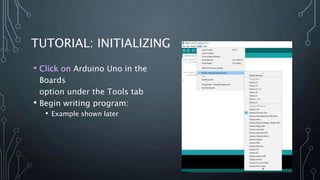
TUTORIAL: INITIALIZING
• Click on Arduino Uno in the
Boards
option under the Tools tab
• Begin writing program:
• Example shown later
TUTORIAL: UPLOADING TO BOARD
• Save your code
• Connect the board to the PC through the microcontroller and USB
port
• Upload to Arduino board by clicking the arrow
• Provide Power to the Arduino board to run indefinitely
TUTORIAL: SHUTTING DOWN
• Remove Power Source to stop the program
• Exit software anytime after upload to board
AN ARDUINO EXAMPLE
Stoplight
[2]
CODE
int red = 10;
int yellow = 9;
int green = 8;
void setup() {
pinMode(red,OUTPUT);
pinMode(yellow,OUTPUT);
pinMode(green,OUTPUT);
digitalWrite(green,HIGH);
Serial.begin(9600);
digitalWrite(green,HIGH);
Serial.println("Begin green
light");
delay(2000);
}
void loop() {
changeLights();
delay(3000);
}
[2]
void changeLights(){
Serial.println("Light Changes");
Serial.println("Yellow");
digitalWrite(green,LOW);
digitalWrite(yellow,HIGH);
delay(3000);
Serial.println("Red");
digitalWrite(yellow,LOW);
digitalWrite(red,HIGH);
delay(5000);
Serial.println("Green");
digitalWrite(yellow,LOW);
digitalWrite(red,LOW);
digitalWrite(green,HIGH);
delay(3000);
}
ARDUINO IN INDUSTRIAL ENGINEERING
• Arduino-based data acquisition
• Interfacing Arduino to Excel, MATLAB, and
LabVIEW
• Arduino-based tensile tester
• Tensile testing done to measure
mechanical properties
• Two parameters measured
• Load applied to sample
• Sample’s extension
• Reprogramming the robotic arm using
Arduino
• Project designed to sort glass and non-
glass waste
• Arm controlled by Arduino microcontroller
• Optical sensor used to distinguish between
parts
Tensile tester wiring
configuration for 5 kg load
cell and ultrasonic sensor
OTHER ARDUINO APPLICATIONS
• Break timer using a Mac computer
• Macs can’t communicate with motors, robots, sensors, etc without
something acting as a translator
• BreakTimer enables Mac to tell whether someone is sitting and if he/she
has been sitting for too long
• Real-time location systems
• GPS continually takes input data from satellite and stores longitude and
latitude
• Arduino Uno takes last received coordinates from GpsGate and sends
message to Google Earth
• Current location can then be shown on platform of choice
• Processing and image compression
• Arduino used as control element to integrate proposed algorithms
• Arduino enables further adjustments
[4], [5], [7]
REFERENCES
[1] Getting Started | Foundation - Introduction. (n.d.). Retrieved November 27, 2017, from
https://www.arduino.cc/en/Guide/Introduction
[2] Lee, J., Stegner, B., & Coburn, J. (2017, January 06). Arduino Programming For Beginners: The Traffic Light
Controller. Retrieved November 27, 2017, from http://www.makeuseof.com/tag/arduino-traffic-light-
controller/
[3] Nichols, D. (2017). Arduino-Based Data Acquisition into Excel, LabVIEW, and MATLAB. Physics Teacher,
55(4), 226-227. doi:10.1119/1.4978720
[4] Jepson, B. (2008). Control the World. Macworld, 25(6), 88-90.
[5] Ibrahim, M. M., & Audah, L. (2017). Real-Time Bus Location Monitoring Using Arduino. AIP Conference
Proceedings, 1883(1), 1-10. doi:10.1063/1.5002034
[6] Arrizabalaga, J. H., Simmons, A. D., & Nollert, M. U. (2017). Fabrication of an Economical Arduino-Based
Uniaxial Tensile Tester. Journal Of Chemical Education, 94(4), 530-533.
doi:10.1021/acs.jchemed.6b00639
[7] Lazar, J., Kostolanyova, K., & Bradac, V. (2017). Processing and Image Compression Based on the Platform
Arduino. AIP Conference Proceedings, 1863(1), 1-4. doi:10.1063/1.4992247
[8] Razali, Z. B., Mohamed Mydin M. Abdul, K., Akmal Kadir, M. A., & Daud, M. H. (2017). Reprogramming the

Arduino Environment Tutorial

  • 1.
  • 2.
    INTRODUCTION TO ARDUINO •Open-source electronics platform (original source code is freely available to be redistributed and modified) • Arduino Boards: microcontroller that reads input and turns into outputs (i.e. finger on button turns on an LED light) • Instruct Arduino Board using Arduino Programming Language and Arduino Software (IDE) communicating through the board’s microcontroller • Void setup() & Void Loop(); [1]
  • 3.
    ARDUINO UNO • Microcontrollerwith: • 14 digital inputs • 6 analog inputs with 10-bit resolution • Can be: • Purchased on eBay for $6 • Programmed in C • Interfaced to a computer through USB • Interfaced to many sensors [3]
  • 4.
    TUTORIAL: SETUP • BuyArduino UNO board from Adafruit, Element14, or another Arduino Distributor • Download the software in this link: https://www.arduino.cc/en/Main/Software • Buy a starter electronics kit for building circuits (Optional): https://www.amazon.com/16Hertz-Electronics-Breadboard- Resistors-Raspberry/dp/B00J4RN61A • Launch downloaded software - Arduino IDE
  • 5.
    TUTORIAL: INITIALIZING • Clickon Arduino Uno in the Boards option under the Tools tab • Begin writing program: • Example shown later
  • 6.
    TUTORIAL: UPLOADING TOBOARD • Save your code • Connect the board to the PC through the microcontroller and USB port • Upload to Arduino board by clicking the arrow • Provide Power to the Arduino board to run indefinitely TUTORIAL: SHUTTING DOWN • Remove Power Source to stop the program • Exit software anytime after upload to board
  • 7.
  • 8.
    CODE int red =10; int yellow = 9; int green = 8; void setup() { pinMode(red,OUTPUT); pinMode(yellow,OUTPUT); pinMode(green,OUTPUT); digitalWrite(green,HIGH); Serial.begin(9600); digitalWrite(green,HIGH); Serial.println("Begin green light"); delay(2000); } void loop() { changeLights(); delay(3000); } [2] void changeLights(){ Serial.println("Light Changes"); Serial.println("Yellow"); digitalWrite(green,LOW); digitalWrite(yellow,HIGH); delay(3000); Serial.println("Red"); digitalWrite(yellow,LOW); digitalWrite(red,HIGH); delay(5000); Serial.println("Green"); digitalWrite(yellow,LOW); digitalWrite(red,LOW); digitalWrite(green,HIGH); delay(3000); }
  • 9.
    ARDUINO IN INDUSTRIALENGINEERING • Arduino-based data acquisition • Interfacing Arduino to Excel, MATLAB, and LabVIEW • Arduino-based tensile tester • Tensile testing done to measure mechanical properties • Two parameters measured • Load applied to sample • Sample’s extension • Reprogramming the robotic arm using Arduino • Project designed to sort glass and non- glass waste • Arm controlled by Arduino microcontroller • Optical sensor used to distinguish between parts Tensile tester wiring configuration for 5 kg load cell and ultrasonic sensor
  • 10.
    OTHER ARDUINO APPLICATIONS •Break timer using a Mac computer • Macs can’t communicate with motors, robots, sensors, etc without something acting as a translator • BreakTimer enables Mac to tell whether someone is sitting and if he/she has been sitting for too long • Real-time location systems • GPS continually takes input data from satellite and stores longitude and latitude • Arduino Uno takes last received coordinates from GpsGate and sends message to Google Earth • Current location can then be shown on platform of choice • Processing and image compression • Arduino used as control element to integrate proposed algorithms • Arduino enables further adjustments [4], [5], [7]
  • 11.
    REFERENCES [1] Getting Started| Foundation - Introduction. (n.d.). Retrieved November 27, 2017, from https://www.arduino.cc/en/Guide/Introduction [2] Lee, J., Stegner, B., & Coburn, J. (2017, January 06). Arduino Programming For Beginners: The Traffic Light Controller. Retrieved November 27, 2017, from http://www.makeuseof.com/tag/arduino-traffic-light- controller/ [3] Nichols, D. (2017). Arduino-Based Data Acquisition into Excel, LabVIEW, and MATLAB. Physics Teacher, 55(4), 226-227. doi:10.1119/1.4978720 [4] Jepson, B. (2008). Control the World. Macworld, 25(6), 88-90. [5] Ibrahim, M. M., & Audah, L. (2017). Real-Time Bus Location Monitoring Using Arduino. AIP Conference Proceedings, 1883(1), 1-10. doi:10.1063/1.5002034 [6] Arrizabalaga, J. H., Simmons, A. D., & Nollert, M. U. (2017). Fabrication of an Economical Arduino-Based Uniaxial Tensile Tester. Journal Of Chemical Education, 94(4), 530-533. doi:10.1021/acs.jchemed.6b00639 [7] Lazar, J., Kostolanyova, K., & Bradac, V. (2017). Processing and Image Compression Based on the Platform Arduino. AIP Conference Proceedings, 1863(1), 1-4. doi:10.1063/1.4992247 [8] Razali, Z. B., Mohamed Mydin M. Abdul, K., Akmal Kadir, M. A., & Daud, M. H. (2017). Reprogramming the

Editor's Notes

  • #3 Void setup – initialize all variables (goes through once during setup) Void loop – infinite loop of code that will run the entire time