
ArduinoTHE OPEN-SOURCE ELECTRONICS PROTOTYPING
PLATFORM
BY: NIKET CHANDRAWANSHI
HTTP://WWW.NIKETCHANDRAWANSHI.ME/
What is an Arduino
Programming environment
Advantage of arduino
Features of arduino
Applications of arduino
Arduino v/s other environment
What is an Arduino ?
The Arduino is an …
single-board microcontroller, intended to make the application of interactive
objects or environments more accessible .
Designed to make the process of using electronics multidisciplinary projects
more accesible
Arduino can…
Sense the environment by receiving input from variety of sensors.
Affect its surroundings by controlling lights, motors, and other actuators.
Brief History of Arduino
In 2005, a project was initiated to make a device for controlling student-built interactive design
projects that was less expensive than other prototyping systems available at the time.
Founders Massimo Banzi and David Cuartielles named the project after Arduin of Ivrea and
began producing boards in a small factory located in Ivrea.
Programming Environment
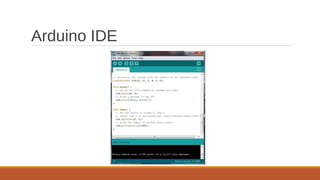
The Arduino Uno can be programmed with the Arduino software IDE(integrated
development environment) .
The Atmega328 on the Arduino Uno comes preburned with a Bootloader that allows you
to upload new code to it without the use of an external hardware programmer.
You can also bypass the Bootloader and program the microcontroller through the ICSP
(In-Circuit Serial Programming) header.
Arduino IDE works on windows , linux as well as Mac lion X platforms.
Arduino IDE
Advantages of Aurdino
Open source
Simplified and user-friendly programming language
No additional programmer/burner hardware required for programming board
Portable
Low power consumption
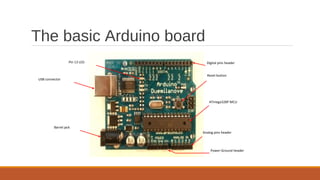
The basic Arduino board
ATmega328P MCU
Reset button
Analog pins header
Digital pins header
Power-Ground header
Pin 13 LED
USB connector
Barrel jack
Features of Arduino UN0
Microcontroller ATmega328
Operating Voltage 5V and 3.3 V
Input Voltage (recommended) 7-12V
Input Voltage (limits) 6-20V
Digital I/O Pins 14 (of which 6 provide PWM output)
Analog Input Pins 6
DC Current per I/O Pin 40 mA
DC Current for 3.3V Pin 50 mA
Flash Memory 32 KB (ATmega328) of which 0.5 KB used by Bootloader
SRAM 2 KB (ATmega328)
EEPROM 1 KB (ATmega328)
Clock Speed 16 MHz
Most popular Arduino Boards
1. Arduino Uno
2. Arduino Leonardo
3. Arduino Mega
4. Arduino Due
5. Arduino Micro
6. Arduino LilyPad
7. Arduino Yun
Applications of Arduino
Home Automations
Sensor prototyping
Robotics
ISP programming
Easy Wifi ,Gsm ,Ethernet , Bluetooth , zigbee Conectivity
a
w e r t y u i o p ⌫
s fd g h j k l ‘ Enter
q
z x c v b n m ., ?
Ctrl &123 < > ⌨
Other prototyping platforms
Raspberry pie
Beagle board
Panda board
Cotton candy
CubieBoard
APC Rock
Hackberry
Gooseberry
Arduino vs other environments
Support for analog input
Limited Computing power
Comparatively cheap
No GPU unit
Limited memory
PWM output available
Open source
Final thoughts
Arduino is a cheap and versatile open source prototyping environment
It is basically designed for novice , non technical people
Programming language is simple
Arduino has a terrific community support and documentation
Technical people can use Arduino for testing sensors or other prototyping work
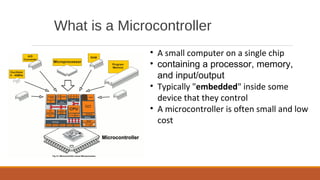
What is a Microcontroller
• A small computer on a single chip
• containing a processor, memory,
and input/output
• Typically "embedded" inside some
device that they control
• A microcontroller is often small and low
cost
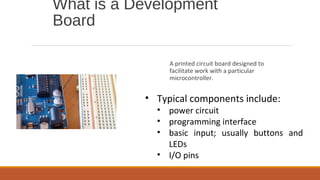
What is a Development
Board
A printed circuit board designed to
facilitate work with a particular
microcontroller.
• Typical components include:
• power circuit
• programming interface
• basic input; usually buttons and
LEDs
• I/O pins
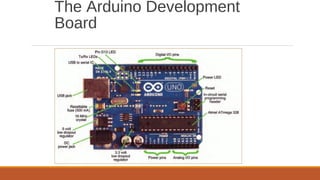
The Arduino Development
Board
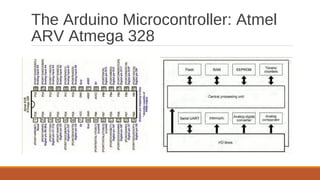
The Arduino Microcontroller: Atmel
ARV Atmega 328
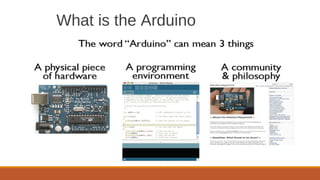
What is the Arduino
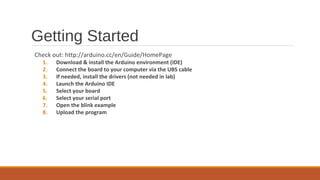
Getting Started
Check out: http://arduino.cc/en/Guide/HomePage
1. Download & install the Arduino environment (IDE)
2. Connect the board to your computer via the UBS cable
3. If needed, install the drivers (not needed in lab)
4. Launch the Arduino IDE
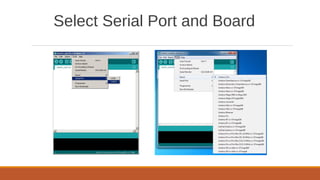
5. Select your board
6. Select your serial port
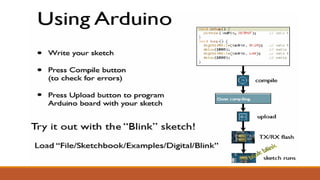
7. Open the blink example
8. Upload the program
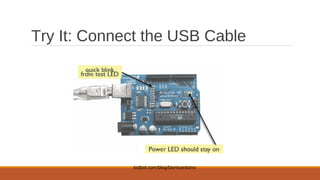
Try It: Connect the USB Cable
todbot.com/blog/bionicarduino
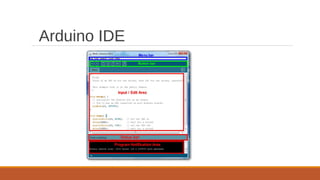
Arduino IDE
Select Serial Port and Board
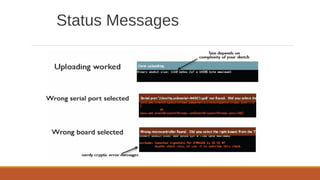
Status Messages
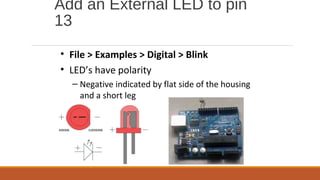
Add an External LED to pin
13
• File > Examples > Digital > Blink
• LED’s have polarity
– Negative indicated by flat side of the housing
and a short leg
A Little Bit About
Programming
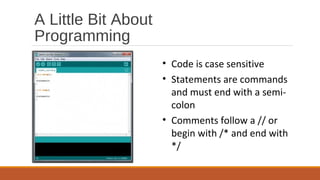
• Code is case sensitive
• Statements are commands
and must end with a semi-
colon
• Comments follow a // or
begin with /* and end with
*/
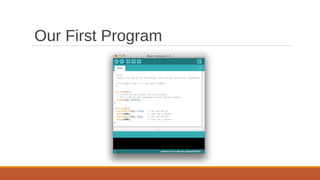
Our First Program
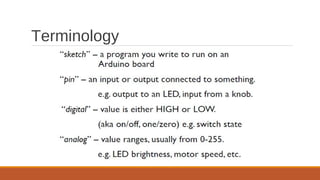
Terminology
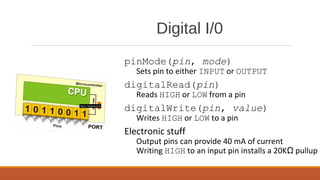
Digital I/0
pinMode(pin, mode)
Sets pin to either INPUT or OUTPUT
digitalRead(pin)
Reads HIGH or LOW from a pin
digitalWrite(pin, value)
Writes HIGH or LOW to a pin
Electronic stuff
Output pins can provide 40 mA of current
Writing HIGH to an input pin installs a 20KΩ pullup
Arduino Timing
• delay(ms)
– Pauses for a few milliseconds
• delayMicroseconds(us)
– Pauses for a few microseconds
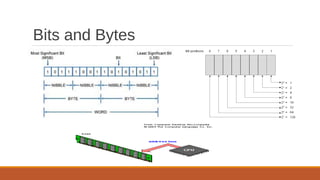
Bits and Bytes
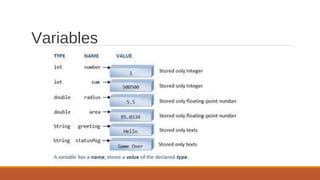
Variables
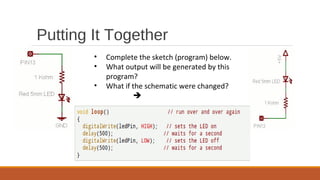
Putting It Together
• Complete the sketch (program) below.
• What output will be generated by this
program?
• What if the schematic were changed?

Thank You
Niket Chandrawanshi
Contact: +91-7415045756
niket.chandrawanshi@outlook.com
To know more: http://www.niketchandrawanshi.me/

What is Arduino ?

  • 1.
    ArduinoTHE OPEN-SOURCE ELECTRONICSPROTOTYPING PLATFORM BY: NIKET CHANDRAWANSHI HTTP://WWW.NIKETCHANDRAWANSHI.ME/
  • 2.
    What is anArduino Programming environment Advantage of arduino Features of arduino Applications of arduino Arduino v/s other environment
  • 3.
    What is anArduino ?
  • 4.
    The Arduino isan … single-board microcontroller, intended to make the application of interactive objects or environments more accessible . Designed to make the process of using electronics multidisciplinary projects more accesible
  • 5.
    Arduino can… Sense theenvironment by receiving input from variety of sensors. Affect its surroundings by controlling lights, motors, and other actuators.
  • 6.
    Brief History ofArduino In 2005, a project was initiated to make a device for controlling student-built interactive design projects that was less expensive than other prototyping systems available at the time. Founders Massimo Banzi and David Cuartielles named the project after Arduin of Ivrea and began producing boards in a small factory located in Ivrea.
  • 7.
    Programming Environment The ArduinoUno can be programmed with the Arduino software IDE(integrated development environment) . The Atmega328 on the Arduino Uno comes preburned with a Bootloader that allows you to upload new code to it without the use of an external hardware programmer. You can also bypass the Bootloader and program the microcontroller through the ICSP (In-Circuit Serial Programming) header. Arduino IDE works on windows , linux as well as Mac lion X platforms.
  • 8.
  • 9.
    Advantages of Aurdino Opensource Simplified and user-friendly programming language No additional programmer/burner hardware required for programming board Portable Low power consumption
  • 10.
    The basic Arduinoboard ATmega328P MCU Reset button Analog pins header Digital pins header Power-Ground header Pin 13 LED USB connector Barrel jack
  • 11.
    Features of ArduinoUN0 Microcontroller ATmega328 Operating Voltage 5V and 3.3 V Input Voltage (recommended) 7-12V Input Voltage (limits) 6-20V Digital I/O Pins 14 (of which 6 provide PWM output) Analog Input Pins 6 DC Current per I/O Pin 40 mA DC Current for 3.3V Pin 50 mA Flash Memory 32 KB (ATmega328) of which 0.5 KB used by Bootloader SRAM 2 KB (ATmega328) EEPROM 1 KB (ATmega328) Clock Speed 16 MHz
  • 12.
    Most popular ArduinoBoards 1. Arduino Uno 2. Arduino Leonardo 3. Arduino Mega 4. Arduino Due 5. Arduino Micro 6. Arduino LilyPad 7. Arduino Yun
  • 13.
    Applications of Arduino HomeAutomations Sensor prototyping Robotics ISP programming Easy Wifi ,Gsm ,Ethernet , Bluetooth , zigbee Conectivity a w e r t y u i o p ⌫ s fd g h j k l ‘ Enter q z x c v b n m ., ? Ctrl &123 < > ⌨
  • 14.
    Other prototyping platforms Raspberrypie Beagle board Panda board Cotton candy CubieBoard APC Rock Hackberry Gooseberry
  • 15.
    Arduino vs otherenvironments Support for analog input Limited Computing power Comparatively cheap No GPU unit Limited memory PWM output available Open source
  • 16.
    Final thoughts Arduino isa cheap and versatile open source prototyping environment It is basically designed for novice , non technical people Programming language is simple Arduino has a terrific community support and documentation Technical people can use Arduino for testing sensors or other prototyping work
  • 17.
    What is aMicrocontroller • A small computer on a single chip • containing a processor, memory, and input/output • Typically "embedded" inside some device that they control • A microcontroller is often small and low cost
  • 18.
    What is aDevelopment Board A printed circuit board designed to facilitate work with a particular microcontroller. • Typical components include: • power circuit • programming interface • basic input; usually buttons and LEDs • I/O pins
  • 19.
  • 20.
    The Arduino Microcontroller:Atmel ARV Atmega 328
  • 21.
    What is theArduino
  • 22.
    Getting Started Check out:http://arduino.cc/en/Guide/HomePage 1. Download & install the Arduino environment (IDE) 2. Connect the board to your computer via the UBS cable 3. If needed, install the drivers (not needed in lab) 4. Launch the Arduino IDE 5. Select your board 6. Select your serial port 7. Open the blink example 8. Upload the program
  • 23.
    Try It: Connectthe USB Cable todbot.com/blog/bionicarduino
  • 24.
  • 25.
  • 26.
  • 28.
    Add an ExternalLED to pin 13 • File > Examples > Digital > Blink • LED’s have polarity – Negative indicated by flat side of the housing and a short leg
  • 29.
    A Little BitAbout Programming • Code is case sensitive • Statements are commands and must end with a semi- colon • Comments follow a // or begin with /* and end with */
  • 30.
  • 31.
  • 32.
    Digital I/0 pinMode(pin, mode) Setspin to either INPUT or OUTPUT digitalRead(pin) Reads HIGH or LOW from a pin digitalWrite(pin, value) Writes HIGH or LOW to a pin Electronic stuff Output pins can provide 40 mA of current Writing HIGH to an input pin installs a 20KΩ pullup
  • 33.
    Arduino Timing • delay(ms) –Pauses for a few milliseconds • delayMicroseconds(us) – Pauses for a few microseconds
  • 34.
  • 35.
  • 36.
    Putting It Together •Complete the sketch (program) below. • What output will be generated by this program? • What if the schematic were changed? 
  • 37.
    Thank You Niket Chandrawanshi Contact:+91-7415045756 niket.chandrawanshi@outlook.com To know more: http://www.niketchandrawanshi.me/