ROBOTICS
BUILD YOUR IMAGINATION
WHAT IS A ROBOT
A reprogrammable multifunctional manipulator designed to
move material, parts, tools or specialized devices through
various programmed motions for the performance of a variety of
Tasks.
-Robot Institute of America.
WORD ROBOT
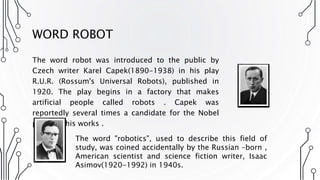
The word robot was introduced to the public by
Czech writer Karel Capek(1890-1938) in his play
R.U.R. (Rossum's Universal Robots), published in
1920. The play begins in a factory that makes
artificial people called robots . Capek was
reportedly several times a candidate for the Nobel
prize for his works .
The word "robotics", used to describe this field of
study, was coined accidentally by the Russian –born ,
American scientist and science fiction writer, Isaac
Asimov(1920-1992) in 1940s.
WHAT IS ROBOTICS
Robotics is science of designing or building an application of robots. Simply
,Robotics may be defines as “The Study of Robots”. The aim of robotics is to
design an efficient robot.
Why we need them
• Speed
• Can work in hazardous/dangerous temperature
• Can do repetitive tasks
• Can do work with accuracy
• Fast calculations
HISTORY OF ROBOTICS
• Mechanical Automata
• Ancient Greece & Egypt
• Water powered for ceremonies
• 14th – 19th century Europe
• Clockwork driven for entertainment
• Motor driven Robots
• 1928: First motor driven automata
• 1961: Unimate
• First industrial robot
• 1967: Shakey
• Autonomous mobile research robot
• 1969: Stanford Arm
• Dextrous, electric motor driven robot arm
TYPES OF ROBOT
• Domestic Robots
• Industrial Robots
• Medical Robots
• Space Robots
• Military Robots
• Entertainment Robots
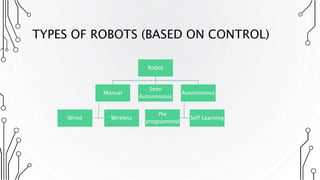
TYPES OF ROBOTS (BASED ON CONTROL)
Robot
Manual
WirelessWired
Semi
Autonomous
Autonomous
Self Learning
Pre
programmed
CLASSES OF ROBOTS
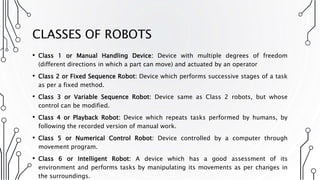
• Class 1 or Manual Handling Device: Device with multiple degrees of freedom
(different directions in which a part can move) and actuated by an operator
• Class 2 or Fixed Sequence Robot: Device which performs successive stages of a task
as per a fixed method.
• Class 3 or Variable Sequence Robot: Device same as Class 2 robots, but whose
control can be modified.
• Class 4 or Playback Robot: Device which repeats tasks performed by humans, by
following the recorded version of manual work.
• Class 5 or Numerical Control Robot: Device controlled by a computer through
movement program.
• Class 6 or Intelligent Robot: A device which has a good assessment of its
environment and performs tasks by manipulating its movements as per changes in
the surroundings.
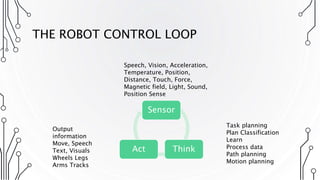
THE ROBOT CONTROL LOOP
Sensor
ThinkAct
Speech, Vision, Acceleration,
Temperature, Position,
Distance, Touch, Force,
Magnetic field, Light, Sound,
Position Sense
Task planning
Plan Classification
Learn
Process data
Path planning
Motion planning
Output
information
Move, Speech
Text, Visuals
Wheels Legs
Arms Tracks
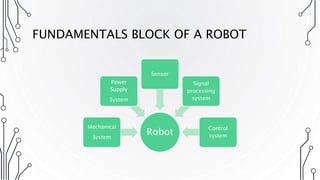
FUNDAMENTALS BLOCK OF A ROBOT
Robot
Mechanical
System
Power
Supply
System
Sensor
Signal
processing
system
Control
system
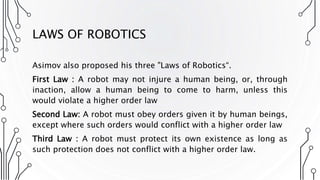
LAWS OF ROBOTICS
Asimov also proposed his three "Laws of Robotics“.
First Law : A robot may not injure a human being, or, through
inaction, allow a human being to come to harm, unless this
would violate a higher order law
Second Law: A robot must obey orders given it by human beings,
except where such orders would conflict with a higher order law
Third Law : A robot must protect its own existence as long as
such protection does not conflict with a higher order law.
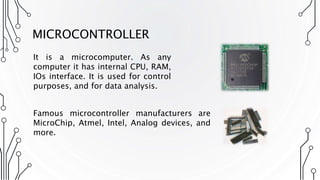
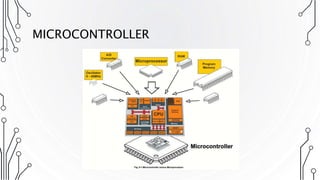
MICROCONTROLLER
It is a microcomputer. As any
computer it has internal CPU, RAM,
IOs interface. It is used for control
purposes, and for data analysis.
Famous microcontroller manufacturers are
MicroChip, Atmel, Intel, Analog devices, and
more.
MICROCONTROLLER
MICROCONTROLLER VS MICROPROCESSOR
MICROCONTROLLER
A Microcontroller (8 bit) does one
task very fast and very well, like a cell
phone, microwave etc. It's does one
program over and over again and
never changes, programed stored in
ROM and has all I/O support
hardware onboard the chip. Can be
very low power ie. Thermostat and
embedded system devices - Nano
Watts!
MICROPROCESSOR
A microprocessor (32/64 Bit) on the
other hand can run multiple
programs and change programs, just
like your PC. Does very large complex
programs and very complex math
and has external I/O support like
video cards, audio, lan, etc. and
storage on large disk. Is a power hog!
500Watts!
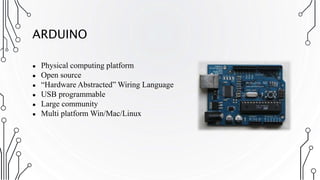
ARDUINO
● Physical computing platform
● Open source
● “Hardware Abstracted” Wiring Language
● USB programmable
● Large community
● Multi platform Win/Mac/Linux
WHAT DO THESE DO?
• Digital IO (LEDs, switches)
• Analog IO (resistive sensor data)
• Serial Connection (Sensors, GPS, etc)
• Program from your computer
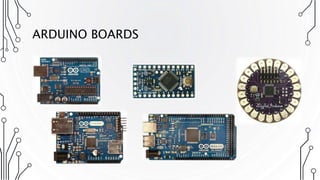
ARDUINO BOARDS
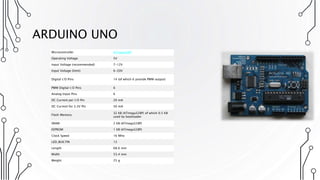
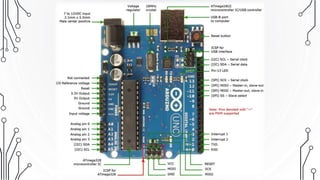
ARDUINO UNO
Microcontroller ATmega328P
Operating Voltage 5V
Input Voltage (recommended) 7-12V
Input Voltage (limit) 6-20V
Digital I/O Pins 14 (of which 6 provide PWM output)
PWM Digital I/O Pins 6
Analog Input Pins 6
DC Current per I/O Pin 20 mA
DC Current for 3.3V Pin 50 mA
Flash Memory
32 KB (ATmega328P) of which 0.5 KB
used by bootloader
SRAM 2 KB (ATmega328P)
EEPROM 1 KB (ATmega328P)
Clock Speed 16 MHz
LED_BUILTIN 13
Length 68.6 mm
Width 53.4 mm
Weight 25 g
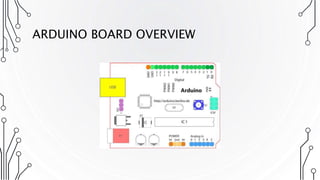
ARDUINO BOARD OVERVIEW
TERMINOLOGY
● I/O Board - main microcontroller
● Shield - add-on boards
● Sketch - the program
● Sensor - components (thermistors, etc.)
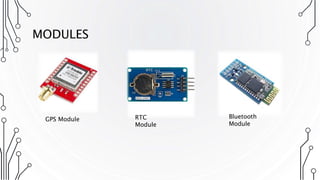
● Modules - serial data (GPS module, etc.)
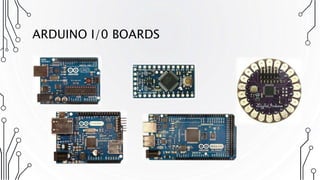
ARDUINO I/0 BOARDS
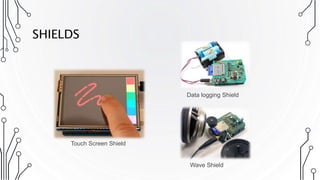
SHIELDS
Data logging Shield
Wave Shield
Touch Screen Shield
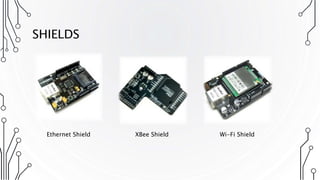
SHIELDS
Ethernet Shield XBee Shield Wi-Fi Shield
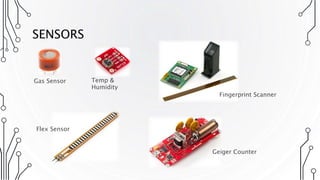
SENSORS
Gas Sensor Temp &
Humidity
Flex Sensor
Fingerprint Scanner
Geiger Counter
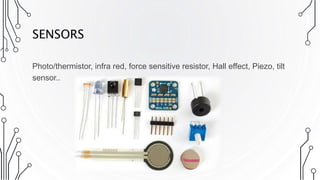
SENSORS
Photo/thermistor, infra red, force sensitive resistor, Hall effect, Piezo, tilt
sensor..
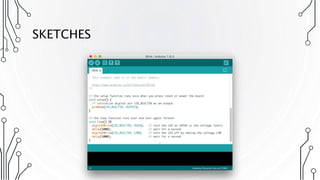
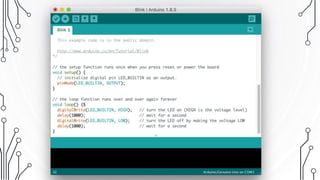
SKETCHES
MODULES
GPS Module RTC
Module
Bluetooth
Module
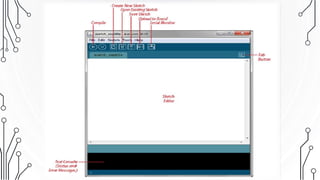
ARDUINO IDE
• The open-source Arduino Software (IDE) makes it easy to write
code and upload it to the board.
• It runs on Windows, Mac OS X, and Linux.
• The environment is written in Java and based on Processing and
other open-source software.
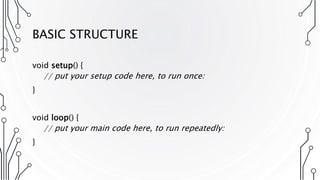
BASIC STRUCTURE
void setup() {
// put your setup code here, to run once:
}
void loop() {
// put your main code here, to run repeatedly:
}
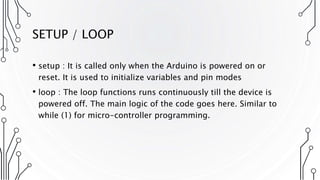
SETUP / LOOP
• setup : It is called only when the Arduino is powered on or
reset. It is used to initialize variables and pin modes
• loop : The loop functions runs continuously till the device is
powered off. The main logic of the code goes here. Similar to
while (1) for micro-controller programming.
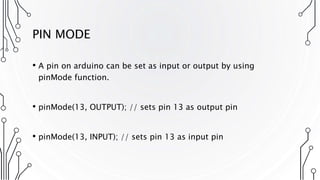
PIN MODE
• A pin on arduino can be set as input or output by using
pinMode function.
• pinMode(13, OUTPUT); // sets pin 13 as output pin
• pinMode(13, INPUT); // sets pin 13 as input pin
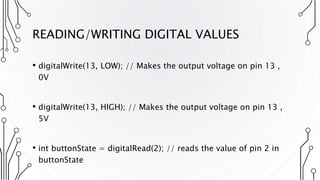
READING/WRITING DIGITAL VALUES
• digitalWrite(13, LOW); // Makes the output voltage on pin 13 ,
0V
• digitalWrite(13, HIGH); // Makes the output voltage on pin 13 ,
5V
• int buttonState = digitalRead(2); // reads the value of pin 2 in
buttonState
FLOW CONTROL
• If
• If...else
• For
• While
• Do…while
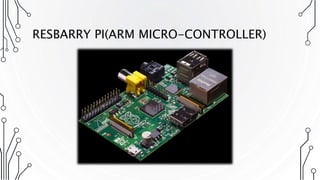
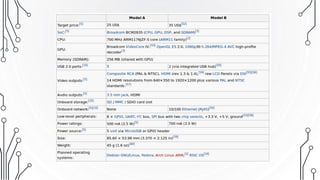
RESBARRY PI(ARM MICRO-CONTROLLER)
THANKS

Robotics and microcontroller (Introduction to Arduino)

  • 1.
  • 2.
    WHAT IS AROBOT A reprogrammable multifunctional manipulator designed to move material, parts, tools or specialized devices through various programmed motions for the performance of a variety of Tasks. -Robot Institute of America.
  • 3.
    WORD ROBOT The wordrobot was introduced to the public by Czech writer Karel Capek(1890-1938) in his play R.U.R. (Rossum's Universal Robots), published in 1920. The play begins in a factory that makes artificial people called robots . Capek was reportedly several times a candidate for the Nobel prize for his works . The word "robotics", used to describe this field of study, was coined accidentally by the Russian –born , American scientist and science fiction writer, Isaac Asimov(1920-1992) in 1940s.
  • 4.
    WHAT IS ROBOTICS Roboticsis science of designing or building an application of robots. Simply ,Robotics may be defines as “The Study of Robots”. The aim of robotics is to design an efficient robot. Why we need them • Speed • Can work in hazardous/dangerous temperature • Can do repetitive tasks • Can do work with accuracy • Fast calculations
  • 5.
    HISTORY OF ROBOTICS •Mechanical Automata • Ancient Greece & Egypt • Water powered for ceremonies • 14th – 19th century Europe • Clockwork driven for entertainment • Motor driven Robots • 1928: First motor driven automata • 1961: Unimate • First industrial robot • 1967: Shakey • Autonomous mobile research robot • 1969: Stanford Arm • Dextrous, electric motor driven robot arm
  • 6.
    TYPES OF ROBOT •Domestic Robots • Industrial Robots • Medical Robots • Space Robots • Military Robots • Entertainment Robots
  • 7.
    TYPES OF ROBOTS(BASED ON CONTROL) Robot Manual WirelessWired Semi Autonomous Autonomous Self Learning Pre programmed
  • 8.
    CLASSES OF ROBOTS •Class 1 or Manual Handling Device: Device with multiple degrees of freedom (different directions in which a part can move) and actuated by an operator • Class 2 or Fixed Sequence Robot: Device which performs successive stages of a task as per a fixed method. • Class 3 or Variable Sequence Robot: Device same as Class 2 robots, but whose control can be modified. • Class 4 or Playback Robot: Device which repeats tasks performed by humans, by following the recorded version of manual work. • Class 5 or Numerical Control Robot: Device controlled by a computer through movement program. • Class 6 or Intelligent Robot: A device which has a good assessment of its environment and performs tasks by manipulating its movements as per changes in the surroundings.
  • 9.
    THE ROBOT CONTROLLOOP Sensor ThinkAct Speech, Vision, Acceleration, Temperature, Position, Distance, Touch, Force, Magnetic field, Light, Sound, Position Sense Task planning Plan Classification Learn Process data Path planning Motion planning Output information Move, Speech Text, Visuals Wheels Legs Arms Tracks
  • 10.
    FUNDAMENTALS BLOCK OFA ROBOT Robot Mechanical System Power Supply System Sensor Signal processing system Control system
  • 11.
    LAWS OF ROBOTICS Asimovalso proposed his three "Laws of Robotics“. First Law : A robot may not injure a human being, or, through inaction, allow a human being to come to harm, unless this would violate a higher order law Second Law: A robot must obey orders given it by human beings, except where such orders would conflict with a higher order law Third Law : A robot must protect its own existence as long as such protection does not conflict with a higher order law.
  • 12.
    MICROCONTROLLER It is amicrocomputer. As any computer it has internal CPU, RAM, IOs interface. It is used for control purposes, and for data analysis. Famous microcontroller manufacturers are MicroChip, Atmel, Intel, Analog devices, and more.
  • 13.
  • 14.
    MICROCONTROLLER VS MICROPROCESSOR MICROCONTROLLER AMicrocontroller (8 bit) does one task very fast and very well, like a cell phone, microwave etc. It's does one program over and over again and never changes, programed stored in ROM and has all I/O support hardware onboard the chip. Can be very low power ie. Thermostat and embedded system devices - Nano Watts! MICROPROCESSOR A microprocessor (32/64 Bit) on the other hand can run multiple programs and change programs, just like your PC. Does very large complex programs and very complex math and has external I/O support like video cards, audio, lan, etc. and storage on large disk. Is a power hog! 500Watts!
  • 15.
    ARDUINO ● Physical computingplatform ● Open source ● “Hardware Abstracted” Wiring Language ● USB programmable ● Large community ● Multi platform Win/Mac/Linux
  • 16.
    WHAT DO THESEDO? • Digital IO (LEDs, switches) • Analog IO (resistive sensor data) • Serial Connection (Sensors, GPS, etc) • Program from your computer
  • 17.
  • 18.
    ARDUINO UNO Microcontroller ATmega328P OperatingVoltage 5V Input Voltage (recommended) 7-12V Input Voltage (limit) 6-20V Digital I/O Pins 14 (of which 6 provide PWM output) PWM Digital I/O Pins 6 Analog Input Pins 6 DC Current per I/O Pin 20 mA DC Current for 3.3V Pin 50 mA Flash Memory 32 KB (ATmega328P) of which 0.5 KB used by bootloader SRAM 2 KB (ATmega328P) EEPROM 1 KB (ATmega328P) Clock Speed 16 MHz LED_BUILTIN 13 Length 68.6 mm Width 53.4 mm Weight 25 g
  • 19.
  • 21.
    TERMINOLOGY ● I/O Board- main microcontroller ● Shield - add-on boards ● Sketch - the program ● Sensor - components (thermistors, etc.) ● Modules - serial data (GPS module, etc.)
  • 22.
  • 23.
    SHIELDS Data logging Shield WaveShield Touch Screen Shield
  • 24.
    SHIELDS Ethernet Shield XBeeShield Wi-Fi Shield
  • 25.
    SENSORS Gas Sensor Temp& Humidity Flex Sensor Fingerprint Scanner Geiger Counter
  • 26.
    SENSORS Photo/thermistor, infra red,force sensitive resistor, Hall effect, Piezo, tilt sensor..
  • 27.
  • 28.
  • 29.
    ARDUINO IDE • Theopen-source Arduino Software (IDE) makes it easy to write code and upload it to the board. • It runs on Windows, Mac OS X, and Linux. • The environment is written in Java and based on Processing and other open-source software.
  • 32.
    BASIC STRUCTURE void setup(){ // put your setup code here, to run once: } void loop() { // put your main code here, to run repeatedly: }
  • 33.
    SETUP / LOOP •setup : It is called only when the Arduino is powered on or reset. It is used to initialize variables and pin modes • loop : The loop functions runs continuously till the device is powered off. The main logic of the code goes here. Similar to while (1) for micro-controller programming.
  • 34.
    PIN MODE • Apin on arduino can be set as input or output by using pinMode function. • pinMode(13, OUTPUT); // sets pin 13 as output pin • pinMode(13, INPUT); // sets pin 13 as input pin
  • 35.
    READING/WRITING DIGITAL VALUES •digitalWrite(13, LOW); // Makes the output voltage on pin 13 , 0V • digitalWrite(13, HIGH); // Makes the output voltage on pin 13 , 5V • int buttonState = digitalRead(2); // reads the value of pin 2 in buttonState
  • 36.
    FLOW CONTROL • If •If...else • For • While • Do…while
  • 37.
  • 39.