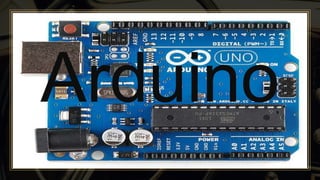
Arduino
Contents
ADD A FOOTER
2
Ardunio
Types
Ardunio Hardware
Arduino Software
What is Arduino???
ADD A FOOTER
3
A single Board Micro-Controller / Processor kit, Intended to make the
application of interactive objects or Environments more accessible using
the Arduino IDE (Integrated Development Environment).
The Arduino project started in 2003 as a program for students at the
Interaction Design Institute Ivrea in Ivrea, Italy, aiming to provide a
low-cost and easy way for novices and professionals to create devices
that interact with their environment using sensors and actuators.
Types
ADD A FOOTER
4
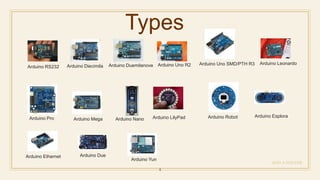
Arduino RS232 Arduino Diecimila Arduino Duemilanove Arduino Uno R2 Arduino Uno SMD/PTH R3 Arduino Leonardo
Arduino Pro Arduino Mega Arduino Nano Arduino LilyPad Arduino Robot Arduino Esplora
Arduino Ethernet
Arduino Yun
Arduino Due
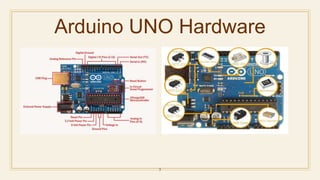
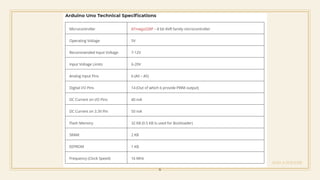
Arduino UNO Hardware
5
ADD A FOOTER
6
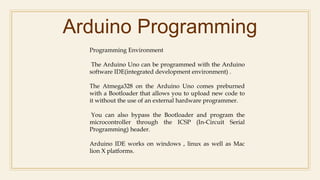
Arduino Programming
Programming Environment
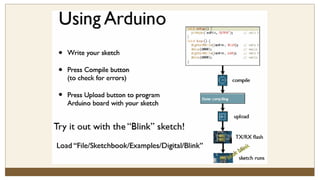
The Arduino Uno can be programmed with the Arduino
software IDE(integrated development environment) .
The Atmega328 on the Arduino Uno comes preburned
with a Bootloader that allows you to upload new code to
it without the use of an external hardware programmer.
You can also bypass the Bootloader and program the
microcontroller through the ICSP (In-Circuit Serial
Programming) header.
Arduino IDE works on windows , linux as well as Mac
lion X platforms.
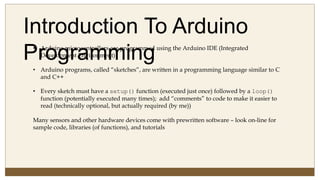
Introduction To Arduino
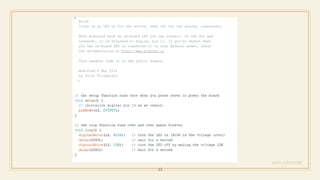
Programming• Arduino microcontrollers are programmed using the Arduino IDE (Integrated
Development Environment)
• Arduino programs, called “sketches”, are written in a programming language similar to C
and C++
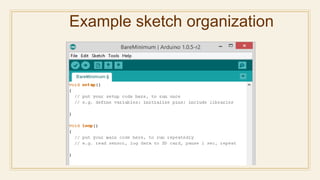
• Every sketch must have a setup() function (executed just once) followed by a loop()
function (potentially executed many times); add “comments” to code to make it easier to
read (technically optional, but actually required (by me))
Many sensors and other hardware devices come with prewritten software – look on-line for
sample code, libraries (of functions), and tutorials
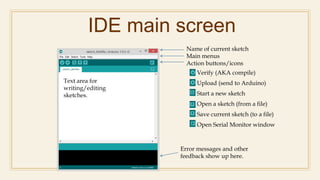
IDE main screen
Text area for
writing/editing
sketches.
Error messages and other
feedback show up here.
Name of current sketch
Main menus
Action buttons/icons
Verify (AKA compile)
Upload (send to Arduino)
Start a new sketch
Open a sketch (from a file)
Save current sketch (to a file)
Open Serial Monitor window
Example sketch organization
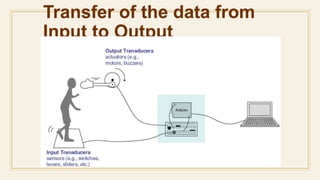
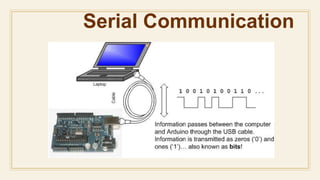
Transfer of the data from
Input to Output
ADD A FOOTER
13
Serial Communication
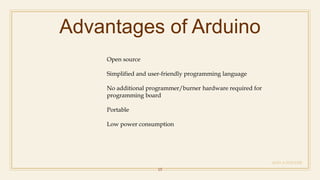
Advantages of Arduino
ADD A FOOTER
15
Open source
Simplified and user-friendly programming language
No additional programmer/burner hardware required for
programming board
Portable
Low power consumption
Other prototyping platforms
ADD A FOOTER
16
Raspberry pie
Beagle board
Panda board
Cotton candy
CubieBoard
APC Rock
Hackberry
Gooseberry
Reference
ADD A FOOTER
17
• https://en.wikipedia.org/wiki/Arduino#cite_note-50
Presented by
Madugula saikumar
Mail id: madugulasaikumar@gmail.com
Linked in: https://www.linkedin.com/in/saikumar-
madugula-88b130113?
Slide Share:
https://www.slideshare.net/saikumarmadugula

Arduino

  • 1.
  • 2.
  • 3.
    What is Arduino??? ADDA FOOTER 3 A single Board Micro-Controller / Processor kit, Intended to make the application of interactive objects or Environments more accessible using the Arduino IDE (Integrated Development Environment). The Arduino project started in 2003 as a program for students at the Interaction Design Institute Ivrea in Ivrea, Italy, aiming to provide a low-cost and easy way for novices and professionals to create devices that interact with their environment using sensors and actuators.
  • 4.
    Types ADD A FOOTER 4 ArduinoRS232 Arduino Diecimila Arduino Duemilanove Arduino Uno R2 Arduino Uno SMD/PTH R3 Arduino Leonardo Arduino Pro Arduino Mega Arduino Nano Arduino LilyPad Arduino Robot Arduino Esplora Arduino Ethernet Arduino Yun Arduino Due
  • 5.
  • 6.
  • 7.
    Arduino Programming Programming Environment TheArduino Uno can be programmed with the Arduino software IDE(integrated development environment) . The Atmega328 on the Arduino Uno comes preburned with a Bootloader that allows you to upload new code to it without the use of an external hardware programmer. You can also bypass the Bootloader and program the microcontroller through the ICSP (In-Circuit Serial Programming) header. Arduino IDE works on windows , linux as well as Mac lion X platforms.
  • 8.
    Introduction To Arduino Programming•Arduino microcontrollers are programmed using the Arduino IDE (Integrated Development Environment) • Arduino programs, called “sketches”, are written in a programming language similar to C and C++ • Every sketch must have a setup() function (executed just once) followed by a loop() function (potentially executed many times); add “comments” to code to make it easier to read (technically optional, but actually required (by me)) Many sensors and other hardware devices come with prewritten software – look on-line for sample code, libraries (of functions), and tutorials
  • 9.
    IDE main screen Textarea for writing/editing sketches. Error messages and other feedback show up here. Name of current sketch Main menus Action buttons/icons Verify (AKA compile) Upload (send to Arduino) Start a new sketch Open a sketch (from a file) Save current sketch (to a file) Open Serial Monitor window
  • 10.
  • 12.
    Transfer of thedata from Input to Output
  • 13.
  • 14.
  • 15.
    Advantages of Arduino ADDA FOOTER 15 Open source Simplified and user-friendly programming language No additional programmer/burner hardware required for programming board Portable Low power consumption
  • 16.
    Other prototyping platforms ADDA FOOTER 16 Raspberry pie Beagle board Panda board Cotton candy CubieBoard APC Rock Hackberry Gooseberry
  • 17.
    Reference ADD A FOOTER 17 •https://en.wikipedia.org/wiki/Arduino#cite_note-50
  • 18.
    Presented by Madugula saikumar Mailid: madugulasaikumar@gmail.com Linked in: https://www.linkedin.com/in/saikumar- madugula-88b130113? Slide Share: https://www.slideshare.net/saikumarmadugula