Download as PDF, PPTX



![Kernel Compilation
[Boot Options] Default kernel command string =
mem=32M console=ttySAC0 root=/dev/ram
initrd=0xC0800000,0x00800000 ramdisk_size=10240 rw
[Kernel Features] → enable Use the ARM EABI to
compile the kernel
[Device Drivers] → [Network device support] →
[Ethernet (10 or 100Mbit)] Select EISA, VLB, PCI
and on board controllers
[Device Drivers] → [Network device support] →
[Ethernet (10 or 100Mbit)] ensure that “CS89x0
support” option is not selected
[Device Drivers] → [Character Devices] → [Serial
Driver] ensure that "8250/16550 and compatible
serial support" option is not selected](https://image.slidesharecdn.com/005skyeye-121229013138-phpapp02/85/005-skyeye-6-320.jpg)

![Shared libs
cd ~/arm2009q3/armnonelinuxgnueabi/libc/armv4t/lib
for file in libc libcrypt libdl libm libpthread
libresolv libutil
do
cp $file*.so <rootfsdir>/lib
cp d $file.so.[*09] <rootfsdir>/lib
done
cp d ld*.so* <rootfsdir>/lib
cp d libgcc_s.so* <rootfsdir>/lib
chmod +x <rootfsdir>/lib/libgcc_s.so.1](https://image.slidesharecdn.com/005skyeye-121229013138-phpapp02/85/005-skyeye-10-320.jpg)


![Busybox
http://busybox.net/downloads/busybox
1.14.1.tar.bz2
untar
make defconfig
make menuconfig
[BusyBox Settings] → [Building Options] → Set
Cross Compiler Prefix to:
“armnonelinuxgnueabi”
[BusyBox Settings] → [Building Options] → Set
Additional CFLAGS to “march=armv4t”
make ARCH=arm CONFIG_PREFIX=<rootfsdir>
install](https://image.slidesharecdn.com/005skyeye-121229013138-phpapp02/85/005-skyeye-13-320.jpg)


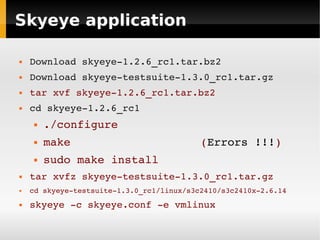
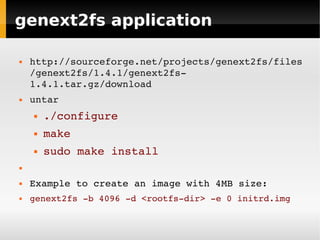
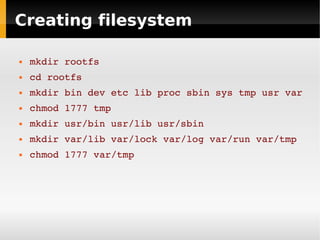
This document provides instructions for setting up and running a Linux system simulation using the Skyeye simulator for ARM architectures. The steps include: 1) Installing Skyeye and a cross-compiler toolchain; 2) Compiling a Linux kernel and filesystem utilities; 3) Creating a root filesystem image; 4) Configuring and running Skyeye with the kernel and filesystem image. This allows testing a complete Linux system without requiring dedicated ARM hardware.


![Linuxdd[1]](https://cdn.slidesharecdn.com/ss_thumbnails/linuxdd1-110927015846-phpapp01-thumbnail.jpg?width=640&height=640&fit=bounds)


