ArcGIS
     ®


         for Server


         Understanding our World
ArcGIS for Server
             ®


Create, Distribute, and Manage GIS Services


You can use ArcGIS® for Server to create services from
your mapping and geographic information system
(GIS) content, centrally administer those services, and
distribute them throughout your organization and on
the web. These services can be easily optimized for and
integrated with web, mobile, and desktop applications,
as well as other services.
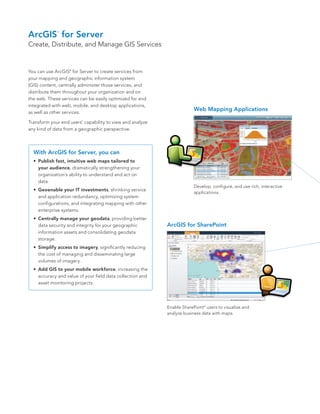
                                                                         Web Mapping Applications

Transform your end users’ capability to view and analyze
any kind of data from a geographic perspective.


  With ArcGIS for Server, you can
  •	 Publish fast, intuitive web maps tailored to
     your audience, dramatically strengthening your
     organization’s ability to understand and act on
     data.
                                                                         Develop, configure, and use rich, interactive
  •	 Geoenable your IT investments, shrinking service
                                                                         applications.
     and application redundancy, optimizing system
     configurations, and integrating mapping with other
     enterprise systems.
  •	 Centrally manage your geodata, providing better
     data security and integrity for your geographic        ArcGIS for SharePoint
     information assets and consolidating geodata
     storage.
  •	 Simplify access to imagery, significantly reducing
     the cost of managing and disseminating large
     volumes of imagery.
  •	 Add GIS to your mobile workforce, increasing the
     accuracy and value of your field data collection and
     asset monitoring projects.


                                                            Enable SharePoint ® users to visualize and
                                                            analyze business data with maps.
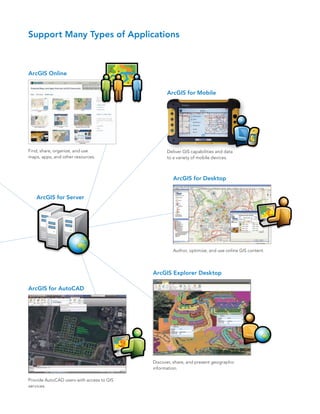
Support Many Types of Applications


ArcGIS Online


                                                 ArcGIS for Mobile


Find, share, organize, and use                   Deliver GIS capabilities and data
maps, apps, and other resources.                 to a variety of mobile devices.


                                                    ArcGIS for Desktop


   ArcGIS for Server


                                                    Author, optimize, and use online GIS content.


                                           ArcGIS Explorer Desktop

ArcGIS for AutoCAD


                                           Discover, share, and present geographic
                                           information.

Provide AutoCAD users with access to GIS
services.
Connect People with GIS Services


ArcGIS for Server services simplify a variety of user
experiences for accessing and interacting with
geographic information. End users are provided with
unparalleled tools to understand, question, interpret,
and visualize data based on geography. As a result,
they can make more informed decisions, improve           GIS Professionals
communication across business units and disciplines,     GIS professionals use ArcGIS for Server to publish and
increase efficiency, and share knowledge with others.    distribute the GIS content they create and manage, such
                                                         as maps and geoprocessing models, across organization
                                                         networks, to mobile devices, and on the open web.


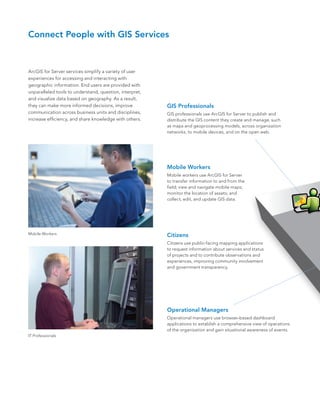
                                                         Mobile Workers
                                                         Mobile workers use ArcGIS for Server
                                                         to transfer information to and from the
                                                         field; view and navigate mobile maps;
                                                         monitor the location of assets; and
                                                         collect, edit, and update GIS data.


Mobile Workers                                           Citizens
                                                         Citizens use public-facing mapping applications
                                                         to request information about services and status
                                                         of projects and to contribute observations and
                                                         experiences, improving community involvement
                                                         and government transparency.


                                                         Operational Managers
                                                         Operational managers use browser-based dashboard
                                                         applications to establish a comprehensive view of operations
                                                         of the organization and gain situational awareness of events.
IT Professionals
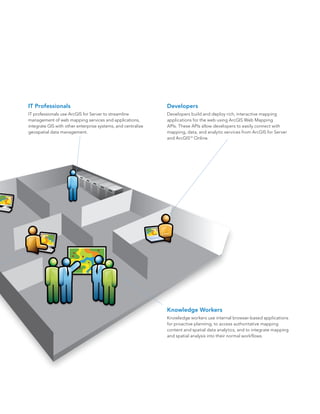
IT Professionals                                              Developers
IT professionals use ArcGIS for Server to streamline          Developers build and deploy rich, interactive mapping
management of web mapping services and applications,          applications for the web using ArcGIS Web Mapping
integrate GIS with other enterprise systems, and centralize   APIs. These APIs allow developers to easily connect with
geospatial data management.                                   mapping, data, and analytic services from ArcGIS for Server
                                                              and ArcGISSM Online.


                                                              Knowledge Workers
                                                              Knowledge workers use internal browser-based applications
                                                              for proactive planning, to access authoritative mapping
                                                              content and spatial data analytics, and to integrate mapping
                                                              and spatial analysis into their normal workflows.
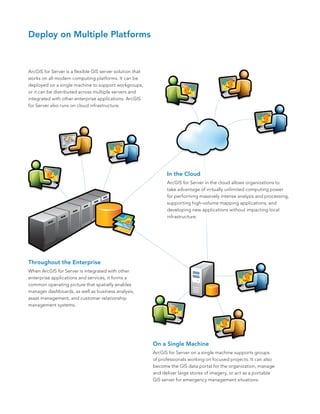
Deploy on Multiple Platforms


ArcGIS for Server is a flexible GIS server solution that
works on all modern computing platforms. It can be
deployed on a single machine to support workgroups,
or it can be distributed across multiple servers and
integrated with other enterprise applications. ArcGIS
for Server also runs on cloud infrastructure.


                                                                 In the Cloud
                                                                 ArcGIS for Server in the cloud allows organizations to
                                                                 take advantage of virtually unlimited computing power
                                                                 for performing massively intense analysis and processing,
                                                                 supporting high-volume mapping applications, and
                                                                 developing new applications without impacting local
                                                                 infrastructure.


Throughout the Enterprise
When ArcGIS for Server is integrated with other
enterprise applications and services, it forms a
common operating picture that spatially enables
manager dashboards, as well as business analysis,
asset management, and customer relationship
management systems.


                                                           On a Single Machine
                                                           ArcGIS for Server on a single machine supports groups
                                                           of professionals working on focused projects. It can also
                                                           become the GIS data portal for the organization, manage
                                                           and deliver large stores of imagery, or act as a portable
                                                           GIS server for emergency management situations.
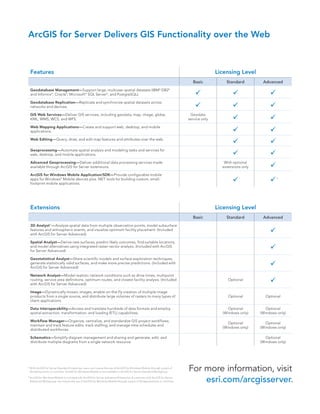
ArcGIS for Server Delivers GIS Functionality over the Web


    Features                                                                                                                              Licensing Level
                                                                                                                             Basic            Standard         Advanced
    Geodatabase Management—Support large, multiuser spatial datasets (IBM DB2                                ®       ®


    and Informix ®, Oracle ®, Microsoft ® SQL Server ®, and PostgreSQL).                                                                                         
    Geodatabase Replication—Replicate and synchronize spatial datasets across
    networks and devices.                                                                                                                                        
    GIS Web Services—Deliver GIS services, including geodata, map, image, globe,                                            Geodata
    KML, WMS, WCS, and WFS.                                                                                                service only                           
    Web Mapping Applications—Create and support web, desktop, and mobile
    applications.                                                                                                                                                 
    Web Editing—Query, draw, and edit map features and attributes over the web.
                                                                                                                                                                  
    Geoprocessing—Automate spatial analysis and modeling tasks and services for
    web, desktop, and mobile applications.                                                                                                                        
    Advanced Geoprocessing—Deliver additional data processing services made                                                                  With optional
    available through ArcGIS for Server extensions.                                                                                         extensions only        
    ArcGIS for Windows Mobile Application/SDK—Provide configurable mobile
    apps for Windows ® Mobile devices plus .NET tools for building custom, small-
    footprint mobile applications.
                                                                                                                                                    1

                                                                                                                                                                      2


    Extensions                                                                                                                            Licensing Level
                                                                                                                             Basic            Standard         Advanced
    3D Analyst —Analyze spatial data from multiple observation points, model subsurface
                    ™


    features and atmospheric events, and visualize optimum facility placement. (Included
    with ArcGIS for Server Advanced)
                                                                                                                                                                   
    Spatial Analyst—Derive new surfaces, predict likely outcomes, find suitable locations,
    and model alternatives using integrated raster-vector analysis. (Included with ArcGIS
    for Server Advanced)
                                                                                                                                                                   
    Geostatistical Analyst—Share scientific models and surface exploration techniques,
    generate statistically valid surfaces, and make more precise predictions. (Included with
    ArcGIS for Server Advanced)
                                                                                                                                                                   
    Network Analyst—Model realistic network conditions such as drive times, multipoint
    routing, service area definitions, optimum routes, and closest facility analysis. (Included
    with ArcGIS for Server Advanced)
                                                                                                                                               Optional
                                                                                                                                                                   
    Image—Dynamically mosaic images, enable on-the-fly creation of multiple image
    products from a single source, and distribute large volumes of rasters to many types of                                                    Optional         Optional
    client applications.

    Data Interoperability—Access and translate hundreds of data formats and employ                                                             Optional          Optional
    spatial extraction, transformation, and loading (ETL) capabilities.                                                                     (Windows only)    (Windows only)

    Workflow Manager—Organize, centralize, and standardize GIS project workflows;
                                                                                                                                               Optional          Optional
    maintain and track feature edits; track staffing; and manage time schedules and
                                                                                                                                            (Windows only)    (Windows only)
    distributed workforces.

    Schematics—Simplify diagram management and sharing and generate, edit, and                                                                                   Optional
    distribute multiple diagrams from a single network resource.                                                                                              (Windows only)


1
    With ArcGIS for Server Standard Enterprise, users can license the use of ArcGIS for Windows Mobile through a pack of
    50 deployments or runtimes. ArcGIS for Windows Mobile is not available in ArcGIS for Server Standard Workgroup.
                                                                                                                           For more information, visit
                                                                                                                               esri.com/arcgisserver.
2
    ArcGIS for Windows Mobile is included with ArcGIS for Server Advanced Enterprise. A customer with ArcGIS for Server
    Advanced Workgroup can license the use of ArcGIS for Windows Mobile through a pack of 50 deployments or runtimes.
About Esri                                                                                     Our Focus                                                                                Contact Esri

Since 1969, Esri has been helping                                                              Esri software is used by hundreds                                                        1 800 GIS XPRT (1 800 447 9778)
organizations map and model our                                                                of thousands of organizations that                                                       t   909 793 2853
world. Esri’s GIS software tools                                                               apply GIS to solve problems and                                                          f   909 793 5953
and methodologies enable these                                                                 make our world a better place to                                                         info@esri.com
organizations to effectively analyze                                                           live. We pay close attention to our                                                      esri.com
and manage their geographic                                                                    users to ensure they have the best
                                                                                                                                                                                        Offices worldwide
information and make better                                                                    tools possible to accomplish their
                                                                                                                                                                                        esri.com/locations
decisions. They are supported by our                                                           missions. A comprehensive suite of
experienced and knowledgeable staff                                                            training options offered worldwide
and extensive network of business                                                              helps our users fully leverage their
partners and international distributors.                                                       GIS applications.

A full-service GIS company, Esri                                                               Esri is a socially conscious business,
supports the implementation of GIS                                                             actively supporting organizations
technology on desktops, servers,                                                               involved in education, conservation,
online services, and mobile devices.                                                           sustainable development, and
These GIS solutions are flexible,                                                              humanitarian affairs.
customizable, and easy to use.


                                                                      380 New York Street
                                                                      Redlands, California 92373-8100                                          usa


Copyright © 2011 Esri. All rights reserved. Esri, the Esri globe logo, 3D Analyst, ArcGIS, ArcEditor, ArcInfo, ArcMap, ArcToolbox, @esri.com, and esri.com are trademarks, registered
trademarks, or service marks of Esri in the United States, the European Community, or certain other jurisdictions. Other companies and products mentioned herein may be trademarks
or registered trademarks of their respective trademark owners.

121729
INLD30M6/11dh                                                                                                                                                                                                             Printed in USA

Arcgis for Server

  • 1.
    ArcGIS ® for Server Understanding our World
  • 2.
    ArcGIS for Server ® Create, Distribute, and Manage GIS Services You can use ArcGIS® for Server to create services from your mapping and geographic information system (GIS) content, centrally administer those services, and distribute them throughout your organization and on the web. These services can be easily optimized for and integrated with web, mobile, and desktop applications, as well as other services. Web Mapping Applications Transform your end users’ capability to view and analyze any kind of data from a geographic perspective. With ArcGIS for Server, you can • Publish fast, intuitive web maps tailored to your audience, dramatically strengthening your organization’s ability to understand and act on data. Develop, configure, and use rich, interactive • Geoenable your IT investments, shrinking service applications. and application redundancy, optimizing system configurations, and integrating mapping with other enterprise systems. • Centrally manage your geodata, providing better data security and integrity for your geographic ArcGIS for SharePoint information assets and consolidating geodata storage. • Simplify access to imagery, significantly reducing the cost of managing and disseminating large volumes of imagery. • Add GIS to your mobile workforce, increasing the accuracy and value of your field data collection and asset monitoring projects. Enable SharePoint ® users to visualize and analyze business data with maps.
  • 3.
    Support Many Typesof Applications ArcGIS Online ArcGIS for Mobile Find, share, organize, and use Deliver GIS capabilities and data maps, apps, and other resources. to a variety of mobile devices. ArcGIS for Desktop ArcGIS for Server Author, optimize, and use online GIS content. ArcGIS Explorer Desktop ArcGIS for AutoCAD Discover, share, and present geographic information. Provide AutoCAD users with access to GIS services.
  • 4.
    Connect People withGIS Services ArcGIS for Server services simplify a variety of user experiences for accessing and interacting with geographic information. End users are provided with unparalleled tools to understand, question, interpret, and visualize data based on geography. As a result, they can make more informed decisions, improve GIS Professionals communication across business units and disciplines, GIS professionals use ArcGIS for Server to publish and increase efficiency, and share knowledge with others. distribute the GIS content they create and manage, such as maps and geoprocessing models, across organization networks, to mobile devices, and on the open web. Mobile Workers Mobile workers use ArcGIS for Server to transfer information to and from the field; view and navigate mobile maps; monitor the location of assets; and collect, edit, and update GIS data. Mobile Workers Citizens Citizens use public-facing mapping applications to request information about services and status of projects and to contribute observations and experiences, improving community involvement and government transparency. Operational Managers Operational managers use browser-based dashboard applications to establish a comprehensive view of operations of the organization and gain situational awareness of events. IT Professionals
  • 5.
    IT Professionals Developers IT professionals use ArcGIS for Server to streamline Developers build and deploy rich, interactive mapping management of web mapping services and applications, applications for the web using ArcGIS Web Mapping integrate GIS with other enterprise systems, and centralize APIs. These APIs allow developers to easily connect with geospatial data management. mapping, data, and analytic services from ArcGIS for Server and ArcGISSM Online. Knowledge Workers Knowledge workers use internal browser-based applications for proactive planning, to access authoritative mapping content and spatial data analytics, and to integrate mapping and spatial analysis into their normal workflows.
  • 6.
    Deploy on MultiplePlatforms ArcGIS for Server is a flexible GIS server solution that works on all modern computing platforms. It can be deployed on a single machine to support workgroups, or it can be distributed across multiple servers and integrated with other enterprise applications. ArcGIS for Server also runs on cloud infrastructure. In the Cloud ArcGIS for Server in the cloud allows organizations to take advantage of virtually unlimited computing power for performing massively intense analysis and processing, supporting high-volume mapping applications, and developing new applications without impacting local infrastructure. Throughout the Enterprise When ArcGIS for Server is integrated with other enterprise applications and services, it forms a common operating picture that spatially enables manager dashboards, as well as business analysis, asset management, and customer relationship management systems. On a Single Machine ArcGIS for Server on a single machine supports groups of professionals working on focused projects. It can also become the GIS data portal for the organization, manage and deliver large stores of imagery, or act as a portable GIS server for emergency management situations.
  • 7.
    ArcGIS for ServerDelivers GIS Functionality over the Web Features Licensing Level Basic Standard Advanced Geodatabase Management—Support large, multiuser spatial datasets (IBM DB2 ® ® and Informix ®, Oracle ®, Microsoft ® SQL Server ®, and PostgreSQL).    Geodatabase Replication—Replicate and synchronize spatial datasets across networks and devices.    GIS Web Services—Deliver GIS services, including geodata, map, image, globe, Geodata KML, WMS, WCS, and WFS. service only   Web Mapping Applications—Create and support web, desktop, and mobile applications.   Web Editing—Query, draw, and edit map features and attributes over the web.   Geoprocessing—Automate spatial analysis and modeling tasks and services for web, desktop, and mobile applications.   Advanced Geoprocessing—Deliver additional data processing services made With optional available through ArcGIS for Server extensions. extensions only  ArcGIS for Windows Mobile Application/SDK—Provide configurable mobile apps for Windows ® Mobile devices plus .NET tools for building custom, small- footprint mobile applications.  1  2 Extensions Licensing Level Basic Standard Advanced 3D Analyst —Analyze spatial data from multiple observation points, model subsurface ™ features and atmospheric events, and visualize optimum facility placement. (Included with ArcGIS for Server Advanced)  Spatial Analyst—Derive new surfaces, predict likely outcomes, find suitable locations, and model alternatives using integrated raster-vector analysis. (Included with ArcGIS for Server Advanced)  Geostatistical Analyst—Share scientific models and surface exploration techniques, generate statistically valid surfaces, and make more precise predictions. (Included with ArcGIS for Server Advanced)  Network Analyst—Model realistic network conditions such as drive times, multipoint routing, service area definitions, optimum routes, and closest facility analysis. (Included with ArcGIS for Server Advanced) Optional  Image—Dynamically mosaic images, enable on-the-fly creation of multiple image products from a single source, and distribute large volumes of rasters to many types of Optional Optional client applications. Data Interoperability—Access and translate hundreds of data formats and employ Optional Optional spatial extraction, transformation, and loading (ETL) capabilities. (Windows only) (Windows only) Workflow Manager—Organize, centralize, and standardize GIS project workflows; Optional Optional maintain and track feature edits; track staffing; and manage time schedules and (Windows only) (Windows only) distributed workforces. Schematics—Simplify diagram management and sharing and generate, edit, and Optional distribute multiple diagrams from a single network resource. (Windows only) 1 With ArcGIS for Server Standard Enterprise, users can license the use of ArcGIS for Windows Mobile through a pack of 50 deployments or runtimes. ArcGIS for Windows Mobile is not available in ArcGIS for Server Standard Workgroup. For more information, visit esri.com/arcgisserver. 2 ArcGIS for Windows Mobile is included with ArcGIS for Server Advanced Enterprise. A customer with ArcGIS for Server Advanced Workgroup can license the use of ArcGIS for Windows Mobile through a pack of 50 deployments or runtimes.
  • 8.
    About Esri Our Focus Contact Esri Since 1969, Esri has been helping Esri software is used by hundreds 1 800 GIS XPRT (1 800 447 9778) organizations map and model our of thousands of organizations that t 909 793 2853 world. Esri’s GIS software tools apply GIS to solve problems and f 909 793 5953 and methodologies enable these make our world a better place to info@esri.com organizations to effectively analyze live. We pay close attention to our esri.com and manage their geographic users to ensure they have the best Offices worldwide information and make better tools possible to accomplish their esri.com/locations decisions. They are supported by our missions. A comprehensive suite of experienced and knowledgeable staff training options offered worldwide and extensive network of business helps our users fully leverage their partners and international distributors. GIS applications. A full-service GIS company, Esri Esri is a socially conscious business, supports the implementation of GIS actively supporting organizations technology on desktops, servers, involved in education, conservation, online services, and mobile devices. sustainable development, and These GIS solutions are flexible, humanitarian affairs. customizable, and easy to use. 380 New York Street Redlands, California 92373-8100 usa Copyright © 2011 Esri. All rights reserved. Esri, the Esri globe logo, 3D Analyst, ArcGIS, ArcEditor, ArcInfo, ArcMap, ArcToolbox, @esri.com, and esri.com are trademarks, registered trademarks, or service marks of Esri in the United States, the European Community, or certain other jurisdictions. Other companies and products mentioned herein may be trademarks or registered trademarks of their respective trademark owners. 121729 INLD30M6/11dh Printed in USA