Collector for ArcGIS 
Out-of-the-box Field Solution Driving Major Value
Informal Poll 
 How many folks are using ArcGIS Online? 
 How many have tried Collector? 
 How many are using Collector for a production use 
case?
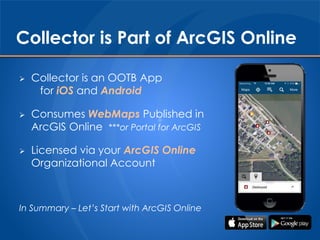
Collector is Part of ArcGIS Online 
 Collector is an OOTB App 
for iOS and Android 
 Consumes WebMaps Published in 
ArcGIS Online ***or Portal for ArcGIS 
 Licensed via your ArcGIS Online 
Organizational Account 
In Summary – Let’s Start with ArcGIS Online
ArcGIS Online – GIS Evolving 
The Landscape of GIS is Changing 
 ArcGIS – A Complete GIS Platform 
 Mapping, Analyzing, and Managing 
Geographic Information 
Desktop Web Device 
Server Online Content 
and Services
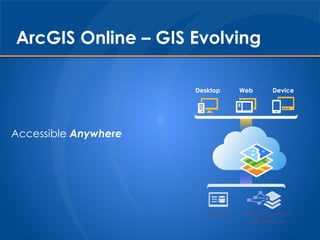
ArcGIS Online – GIS Evolving 
Accessible Anywhere 
Desktop Web Device
ArcGIS Online – GIS Evolving 
Powered by Services 
Server Online Content 
and Services
What it Means to ArcFM Utilities 
 Leverage your existing investment in: 
 ArcSDE 
 ArcGIS Server 
 ArcFM 
 Keep your On-Premise GIS Data Secure 
Behind Your Firewall 
 Create New Field Workflows – Quickly! 
 Integrate/Automate/Empower Field Data 
in the Back Office
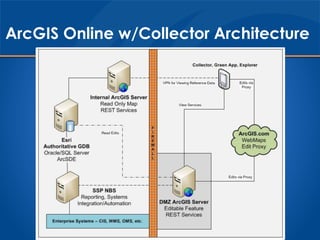
ArcGIS Online w/Collector Architecture
Publishing Feature Services for Collector 
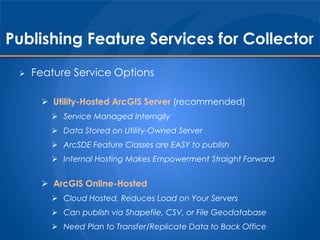
 Feature Service Options 
 Utility-Hosted ArcGIS Server (recommended) 
 Service Managed Internally 
 Data Stored on Utility-Owned Server 
 ArcSDE Feature Classes are EASY to publish 
 Internal Hosting Makes Empowerment Straight Forward 
 ArcGIS Online-Hosted 
 Cloud Hosted, Reduces Load on Your Servers 
 Can publish via Shapefile, CSV, or File Geodatabase 
 Need Plan to Transfer/Replicate Data to Back Office
Publishing Feature Services for Collector 
 Create New Feature Class 
 Non-Versioned Feature Class 
 Points, Lines, or Polygons 
 No ArcFM Classes 
 Best Practices 
 Create a dedicated AGOL dataset to contain all editable classes 
 Set Projection on AGOL dataset to WGS 84 Web Mercator (auxiliary 
sphere) for optimized speed in Collector 
 Use Domains wherever possible for easy field data entry 
 Apply Defaults to any applicable fields to minimize field interaction
Publishing Feature Services for Collector 
 Enable Attachments 
 Collector has Native Attachment Support 
 Creates related _ATTACH table 
 Stores Attachments in DB 
 Best Practices 
 Review and determine permanent storage options for back office 
photos 
 Default is in GDB but table space can get HUGE 
 Can create an app to export pics to a linked share drive
Publishing Feature Services for Collector 
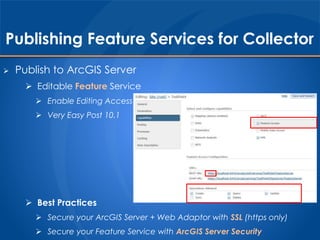
 Publish to ArcGIS Server 
 Editable Feature Service 
 Enable Editing Access 
 Very Easy Post 10.1 
 Best Practices 
 Secure your ArcGIS Server + Web Adaptor with SSL (https only) 
 Secure your Feature Service with ArcGIS Server Security
Publishing Feature Services for Collector 
 Service Must Be Available Over the Internet (DMZ)
Creating your AGOL WebMap 
 Within Your ArcGIS Online Account 
 Add Feature Service to AGOL 
 Use Https Url 
 Enter Credentials 
 Add good Tags for searching 
 Best Practices 
 Add the item to My Content, not directly to a map 
 Save the Username/Password with the Service Item
Creating your AGOL WebMap 
 Create a New WebMap 
 Add Backdrop Data Map Services 
 Add Feature Service from Org 
 Save & Share WebMap w/Groups 
 Best Practices 
 Test adding collection points in the ArcGIS.com WebMap 
 Fix Issues on ArcGIS.com before testing Collector
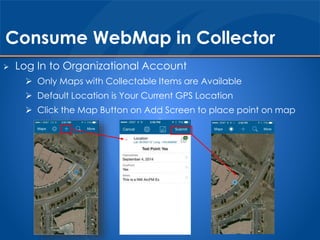
Consume WebMap in Collector 
 Log In to Organizational Account 
 Only Maps with Collectable Items are Available 
 Default Location is Your Current GPS Location 
 Click the Map Button on Add Screen to place point on map
Consume WebMap in Collector 
 Collected Data is Instantaneously Saved to Server / SDE 
 Available in ArcGIS.com, ArcMap, Dashboard, any AGOL App 
 Will include attachment data
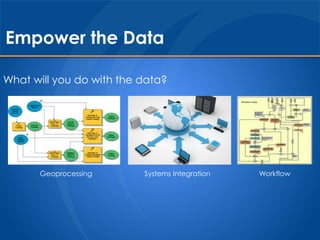
Empower the Data 
What will you do with the data? 
Geoprocessing Systems Integration Workflow
Empower New Data Use Case 
Expose Public 
WebMap 
Show Streetlights 
Combine w/GPS 
Capture Outages 
Include Photo
Empower New Data Use Case 
Email Customer 
Auto-Generate 
Service Request
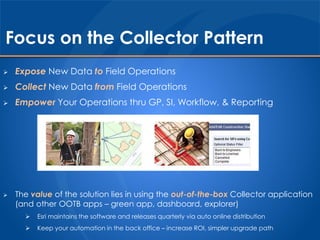
Focus on the Collector Pattern 
 Expose New Data to Field Operations 
 Collect New Data from Field Operations 
 Empower Your Operations thru GP, SI, Workflow, & Reporting 
 The value of the solution lies in using the out-of-the-box Collector application 
(and other OOTB apps – green app, dashboard, explorer) 
 Esri maintains the software and releases quarterly via auto online distribution 
 Keep your automation in the back office – increase ROI, simpler upgrade path
What About Disconnected Access? 
 Previous Patterns were focused on connected access 
 In March 2014, Esri released first offline support 
 Utilities have been using disconnected ArcEngine apps for a long time 
 ArcFM Viewer, TC GoSync, OneView, etc. 
 Sets the expectation pretty high 
 Good News – Esri is thinking about it 
 Bad News – I don’t think it will support most utility workflows… yet
Disconnected Collector Support 
 Supports three map service types: 
 Feature Services w/Editing Operations 
 Tiled Map Services 
 Esri Basemap Services 
 What’s Missing? 
 Dynamic Map Services 
 Why do we care? 
 The utility backdrop data is crucial to field operations & decision making 
 Dynamic map data cannot be downloaded to the Collector device
Disconnected - What Can We Do 
 Enable Feature Services for Offline Access in AGOL 
 Allows for Map to be Downloaded to the Device & Edits 
to be Synched Back to Feature Service
Disconnected - What Can We Do 
 Downloading the Map: 
 Defines a specified spatial extent (my work area for today) 
 Defines a zoom level for the cache 
 Caches the tiled basemap 
 Caches the Feature Service 
 Collects Features Locally Just as If Connected 
 After Establishing Network Connectivity, Syncing the Map: 
 Passes the local features back into the Feature Service 
 Feature Service doesn’t know about the offline collection
Disconnected – Limiting Factors 
 No Dynamic Map Service: 
 No ArcFM utility data (poles, valves, splices, etc.) 
 This data is critical to our operations… 
 What are the Options?
Disconnected – Limiting Factors, Option #1 
 Create a custom tiled basemap 
 Custom hosted basemap with our utility data 
 Tile the map 
 ArcGIS Online Credits can be used to tile your map ($) 
 How often do you need to refresh the tiles??? 
 Tiled basemaps are not interactive (no clicking, no attributes)
Disconnected – Limiting Factors, Option #2 
 Create a tile package (tpk) with our utility data 
 Data can be side loaded onto device 
(iTunes for iOS, network/external hard drive for Android) 
 How often do you need to refresh the side loaded data??? 
 Tiled basemaps are not interactive (no clicking, no attributes) 
 Back to regularly synching data to our devices 
(now a tpk instead of gdb)
Disconnected – My Editorial Thoughts 
Neither backdrop option is great 
 When compared to the Engine environment 
 Still transferring/publishing static data stores 
 Not much different than ArcFM Replication or GoSync MIMS 
This is a good first step for Esri 
 Not ready for prime time disconnected utility use cases 
 Connected is absolutely ready for use! 
 Esri wants to make disconnected usage a replacement for 
ArcPad so they are headed in the right direction 
In the short term utilities requiring disconnected 
access should stay with Engine or consider other 
solutions…
SSP Research, Blogs, Case Studies 
We prototype ArcGIS applications and write about them… 
• www.sspinnovations.com/blog/category/arcgis-online 
• www.sspinnovations.com/case-studies/category/arcgis-online 
Example Past ArcGIS Online Articles: 
• Pole Inspections on Your iPad via ArcGIS Online 
• Powerful Utility Reporting with ArcGIS Online 
• Customer Engagement Using ArcGIS Online 
• Creating ArcGIS Online Outage Maps 
• HEMC Implements ArcGIS Online Inspections 
• Esri Maps for Office with ArcGIS Online 
• Exploring Tabular Data with ArcGIS Online 
• Filtering Your Data with ArcGIS Online 
• Searching Your Data with ArcGIS Online 
• MLGW Meter Collection with ArcGIS Online 
• ArcGIS Online Credits Estimator 
• ArcFM Feeder Map for ArcGIS Online 
• Electric Asset Locator in ArcGIS Online 
• Our Look at Offline Access with Collector for ArcGIS Online
SSP Research, Blogs, Case Studies 
We’re Always Looking for New Topics 
….Send us your ArcGIS Online Ideas 
www.sspinnovations.com/contact-us
Questions? 
Enabling Utility Operations 
with ArcGIS Online 
Skye Perry 
Principal Consultant 
skye.perry@sspinnovations.com

Collector for ArcGIS

  • 1.
    Collector for ArcGIS Out-of-the-box Field Solution Driving Major Value
  • 2.
    Informal Poll How many folks are using ArcGIS Online?  How many have tried Collector?  How many are using Collector for a production use case?
  • 3.
    Collector is Partof ArcGIS Online  Collector is an OOTB App for iOS and Android  Consumes WebMaps Published in ArcGIS Online ***or Portal for ArcGIS  Licensed via your ArcGIS Online Organizational Account In Summary – Let’s Start with ArcGIS Online
  • 4.
    ArcGIS Online –GIS Evolving The Landscape of GIS is Changing  ArcGIS – A Complete GIS Platform  Mapping, Analyzing, and Managing Geographic Information Desktop Web Device Server Online Content and Services
  • 5.
    ArcGIS Online –GIS Evolving Accessible Anywhere Desktop Web Device
  • 6.
    ArcGIS Online –GIS Evolving Powered by Services Server Online Content and Services
  • 7.
    What it Meansto ArcFM Utilities  Leverage your existing investment in:  ArcSDE  ArcGIS Server  ArcFM  Keep your On-Premise GIS Data Secure Behind Your Firewall  Create New Field Workflows – Quickly!  Integrate/Automate/Empower Field Data in the Back Office
  • 8.
  • 9.
    Publishing Feature Servicesfor Collector  Feature Service Options  Utility-Hosted ArcGIS Server (recommended)  Service Managed Internally  Data Stored on Utility-Owned Server  ArcSDE Feature Classes are EASY to publish  Internal Hosting Makes Empowerment Straight Forward  ArcGIS Online-Hosted  Cloud Hosted, Reduces Load on Your Servers  Can publish via Shapefile, CSV, or File Geodatabase  Need Plan to Transfer/Replicate Data to Back Office
  • 10.
    Publishing Feature Servicesfor Collector  Create New Feature Class  Non-Versioned Feature Class  Points, Lines, or Polygons  No ArcFM Classes  Best Practices  Create a dedicated AGOL dataset to contain all editable classes  Set Projection on AGOL dataset to WGS 84 Web Mercator (auxiliary sphere) for optimized speed in Collector  Use Domains wherever possible for easy field data entry  Apply Defaults to any applicable fields to minimize field interaction
  • 11.
    Publishing Feature Servicesfor Collector  Enable Attachments  Collector has Native Attachment Support  Creates related _ATTACH table  Stores Attachments in DB  Best Practices  Review and determine permanent storage options for back office photos  Default is in GDB but table space can get HUGE  Can create an app to export pics to a linked share drive
  • 12.
    Publishing Feature Servicesfor Collector  Publish to ArcGIS Server  Editable Feature Service  Enable Editing Access  Very Easy Post 10.1  Best Practices  Secure your ArcGIS Server + Web Adaptor with SSL (https only)  Secure your Feature Service with ArcGIS Server Security
  • 13.
    Publishing Feature Servicesfor Collector  Service Must Be Available Over the Internet (DMZ)
  • 14.
    Creating your AGOLWebMap  Within Your ArcGIS Online Account  Add Feature Service to AGOL  Use Https Url  Enter Credentials  Add good Tags for searching  Best Practices  Add the item to My Content, not directly to a map  Save the Username/Password with the Service Item
  • 15.
    Creating your AGOLWebMap  Create a New WebMap  Add Backdrop Data Map Services  Add Feature Service from Org  Save & Share WebMap w/Groups  Best Practices  Test adding collection points in the ArcGIS.com WebMap  Fix Issues on ArcGIS.com before testing Collector
  • 16.
    Consume WebMap inCollector  Log In to Organizational Account  Only Maps with Collectable Items are Available  Default Location is Your Current GPS Location  Click the Map Button on Add Screen to place point on map
  • 17.
    Consume WebMap inCollector  Collected Data is Instantaneously Saved to Server / SDE  Available in ArcGIS.com, ArcMap, Dashboard, any AGOL App  Will include attachment data
  • 18.
    Empower the Data What will you do with the data? Geoprocessing Systems Integration Workflow
  • 19.
    Empower New DataUse Case Expose Public WebMap Show Streetlights Combine w/GPS Capture Outages Include Photo
  • 20.
    Empower New DataUse Case Email Customer Auto-Generate Service Request
  • 21.
    Focus on theCollector Pattern  Expose New Data to Field Operations  Collect New Data from Field Operations  Empower Your Operations thru GP, SI, Workflow, & Reporting  The value of the solution lies in using the out-of-the-box Collector application (and other OOTB apps – green app, dashboard, explorer)  Esri maintains the software and releases quarterly via auto online distribution  Keep your automation in the back office – increase ROI, simpler upgrade path
  • 22.
    What About DisconnectedAccess?  Previous Patterns were focused on connected access  In March 2014, Esri released first offline support  Utilities have been using disconnected ArcEngine apps for a long time  ArcFM Viewer, TC GoSync, OneView, etc.  Sets the expectation pretty high  Good News – Esri is thinking about it  Bad News – I don’t think it will support most utility workflows… yet
  • 23.
    Disconnected Collector Support  Supports three map service types:  Feature Services w/Editing Operations  Tiled Map Services  Esri Basemap Services  What’s Missing?  Dynamic Map Services  Why do we care?  The utility backdrop data is crucial to field operations & decision making  Dynamic map data cannot be downloaded to the Collector device
  • 24.
    Disconnected - WhatCan We Do  Enable Feature Services for Offline Access in AGOL  Allows for Map to be Downloaded to the Device & Edits to be Synched Back to Feature Service
  • 25.
    Disconnected - WhatCan We Do  Downloading the Map:  Defines a specified spatial extent (my work area for today)  Defines a zoom level for the cache  Caches the tiled basemap  Caches the Feature Service  Collects Features Locally Just as If Connected  After Establishing Network Connectivity, Syncing the Map:  Passes the local features back into the Feature Service  Feature Service doesn’t know about the offline collection
  • 26.
    Disconnected – LimitingFactors  No Dynamic Map Service:  No ArcFM utility data (poles, valves, splices, etc.)  This data is critical to our operations…  What are the Options?
  • 27.
    Disconnected – LimitingFactors, Option #1  Create a custom tiled basemap  Custom hosted basemap with our utility data  Tile the map  ArcGIS Online Credits can be used to tile your map ($)  How often do you need to refresh the tiles???  Tiled basemaps are not interactive (no clicking, no attributes)
  • 28.
    Disconnected – LimitingFactors, Option #2  Create a tile package (tpk) with our utility data  Data can be side loaded onto device (iTunes for iOS, network/external hard drive for Android)  How often do you need to refresh the side loaded data???  Tiled basemaps are not interactive (no clicking, no attributes)  Back to regularly synching data to our devices (now a tpk instead of gdb)
  • 29.
    Disconnected – MyEditorial Thoughts Neither backdrop option is great  When compared to the Engine environment  Still transferring/publishing static data stores  Not much different than ArcFM Replication or GoSync MIMS This is a good first step for Esri  Not ready for prime time disconnected utility use cases  Connected is absolutely ready for use!  Esri wants to make disconnected usage a replacement for ArcPad so they are headed in the right direction In the short term utilities requiring disconnected access should stay with Engine or consider other solutions…
  • 30.
    SSP Research, Blogs,Case Studies We prototype ArcGIS applications and write about them… • www.sspinnovations.com/blog/category/arcgis-online • www.sspinnovations.com/case-studies/category/arcgis-online Example Past ArcGIS Online Articles: • Pole Inspections on Your iPad via ArcGIS Online • Powerful Utility Reporting with ArcGIS Online • Customer Engagement Using ArcGIS Online • Creating ArcGIS Online Outage Maps • HEMC Implements ArcGIS Online Inspections • Esri Maps for Office with ArcGIS Online • Exploring Tabular Data with ArcGIS Online • Filtering Your Data with ArcGIS Online • Searching Your Data with ArcGIS Online • MLGW Meter Collection with ArcGIS Online • ArcGIS Online Credits Estimator • ArcFM Feeder Map for ArcGIS Online • Electric Asset Locator in ArcGIS Online • Our Look at Offline Access with Collector for ArcGIS Online
  • 31.
    SSP Research, Blogs,Case Studies We’re Always Looking for New Topics ….Send us your ArcGIS Online Ideas www.sspinnovations.com/contact-us
  • 32.
    Questions? Enabling UtilityOperations with ArcGIS Online Skye Perry Principal Consultant skye.perry@sspinnovations.com

Editor's Notes

  • #20 STREETLIGHT USE CASE Another quick use case starts with us exposing a public web map via ArcGIS Online. This webmap will allow our end customers to view and interact with our utility data. A customer is jogging at dusk and notices a streetlight is out. This web map allows them to GPS the location and capture the streetlight outage very easily. They can even include a photo of the location. This data is transmitted instantaneously to the back office. But how can we empower this data?
  • #21 STREETLIGHT USE CASE We can easily generate an email back to the customer acknowledging the outage – HUGE from the customer perspective. And why not also automatically generate a new service request for the outage within our work management system that can then dispatch a crew to fix the issue. This simple, but integrated, workflow will save the utility money while increasing customer satisfaction. And in the end this results in real business for partners to design, develop, and deploy these solutions.