ArcGIS
®
GeoEvent Extension
for Server
Monitor All Your Assets in Real Time
ArcGIS®
GeoEvent Extension for Server allows you to connect with virtually any type of streaming data and automatically
alert personnel when specified conditions occur—all in real time. GeoEvent Extension changes your everyday geographic
information system (GIS) applications into frontline decision applications, helping you respond faster and with remarkable
accuracy whenever and wherever change happens.
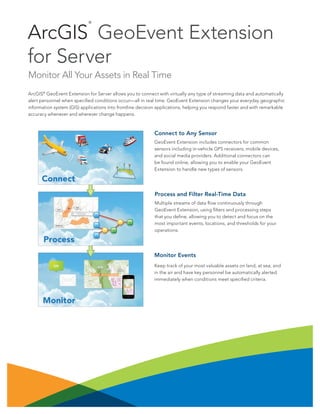
Monitor Events
Keep track of your most valuable assets on land, at sea, and
in the air and have key personnel be automatically alerted
immediately when conditions meet specified criteria.
Process and Filter Real-Time Data
Multiple streams of data flow continuously through
GeoEvent Extension, using filters and processing steps
that you define, allowing you to detect and focus on the
most important events, locations, and thresholds for your
operations.
Connect to Any Sensor
GeoEvent Extension includes connectors for common
sensors including in-vehicle GPS receivers, mobile devices,
and social media providers. Additional connectors can
be found online, allowing you to enable your GeoEvent
Extension to handle new types of sensors.
Key Benefits
GeoEvent Extension lets you incorporate real-time
information streams with existing GIS data and ArcGIS
applications.
• Connect sensors to features hosted on ArcGIS
SM
Online or
ArcGIS for Server so they represent the most up-to-date
information happening in the real world.
• Filter streams using spatial and/or attribute conditions to
view only the most important features.
• Enrich incoming event information with additional fields
joined in from a feature service.
• Use existing features as the basis for detecting geofence
events. You can even create geofences on the fly without
interrupting the stream.
• View the latest feature status using any ArcGIS viewer,
such as Operations Dashboard for ArcGIS.
• Store historical events using feature services.
Add Real-Time GIS to Applications
GeoEvent Extension can be integrated with critical
decision-support tools and applications:
• Asset monitoring for fleet management, public transit,
railway, aviation, and maritime applications
• Route monitoring for facilities management,
transportation, and utilities
• Tactical monitoring for homeland security, law
enforcement, and military applications
• Environmental monitoring for resource management and
health and safety oversight
• Social media monitoring for sales and marketing and
business applications
Create Custom Connectors
Developers can create new connectors using the GeoEvent
Software Development Kit (SDK).
Deployment on Premises or in the Cloud
GeoEvent Extension can be deployed on your local
infrastructure, in a virtualized environment, or in the cloud.
System Requirements
GeoEvent Extension requires ArcGIS for Server—Standard
or Advanced.
ArcGIS for Server supports the following operating systems:
• Microsoft Windows Server
• Red Hat Enterprise Linux AS/ES
• SUSE Linux Enterprise Server
• Ubuntu (when deployed on Amazon Web Services)
Your starting point is
esri.com/GeoEvent
Copyright © 2013 Esri. All rights reserved. Esri, the Esri globe logo, ArcGIS, and esri.com are trademarks, service marks, or registered
marks of Esri in the United States, the European Community, or certain other jurisdictions. Other companies and products or services
mentioned herein may be trademarks, service marks, or registered marks of their respective mark owners.
142959
ESRI2M8/14kp-ca

ArcGIS GeoEvent Extension for Server

  • 1.
    ArcGIS ® GeoEvent Extension for Server MonitorAll Your Assets in Real Time ArcGIS® GeoEvent Extension for Server allows you to connect with virtually any type of streaming data and automatically alert personnel when specified conditions occur—all in real time. GeoEvent Extension changes your everyday geographic information system (GIS) applications into frontline decision applications, helping you respond faster and with remarkable accuracy whenever and wherever change happens. Monitor Events Keep track of your most valuable assets on land, at sea, and in the air and have key personnel be automatically alerted immediately when conditions meet specified criteria. Process and Filter Real-Time Data Multiple streams of data flow continuously through GeoEvent Extension, using filters and processing steps that you define, allowing you to detect and focus on the most important events, locations, and thresholds for your operations. Connect to Any Sensor GeoEvent Extension includes connectors for common sensors including in-vehicle GPS receivers, mobile devices, and social media providers. Additional connectors can be found online, allowing you to enable your GeoEvent Extension to handle new types of sensors.
  • 2.
    Key Benefits GeoEvent Extensionlets you incorporate real-time information streams with existing GIS data and ArcGIS applications. • Connect sensors to features hosted on ArcGIS SM Online or ArcGIS for Server so they represent the most up-to-date information happening in the real world. • Filter streams using spatial and/or attribute conditions to view only the most important features. • Enrich incoming event information with additional fields joined in from a feature service. • Use existing features as the basis for detecting geofence events. You can even create geofences on the fly without interrupting the stream. • View the latest feature status using any ArcGIS viewer, such as Operations Dashboard for ArcGIS. • Store historical events using feature services. Add Real-Time GIS to Applications GeoEvent Extension can be integrated with critical decision-support tools and applications: • Asset monitoring for fleet management, public transit, railway, aviation, and maritime applications • Route monitoring for facilities management, transportation, and utilities • Tactical monitoring for homeland security, law enforcement, and military applications • Environmental monitoring for resource management and health and safety oversight • Social media monitoring for sales and marketing and business applications Create Custom Connectors Developers can create new connectors using the GeoEvent Software Development Kit (SDK). Deployment on Premises or in the Cloud GeoEvent Extension can be deployed on your local infrastructure, in a virtualized environment, or in the cloud. System Requirements GeoEvent Extension requires ArcGIS for Server—Standard or Advanced. ArcGIS for Server supports the following operating systems: • Microsoft Windows Server • Red Hat Enterprise Linux AS/ES • SUSE Linux Enterprise Server • Ubuntu (when deployed on Amazon Web Services) Your starting point is esri.com/GeoEvent Copyright © 2013 Esri. All rights reserved. Esri, the Esri globe logo, ArcGIS, and esri.com are trademarks, service marks, or registered marks of Esri in the United States, the European Community, or certain other jurisdictions. Other companies and products or services mentioned herein may be trademarks, service marks, or registered marks of their respective mark owners. 142959 ESRI2M8/14kp-ca