
Mac OS
File Management
Submitted by : Andam Omar anwar
Submitted to : Prof. Dr. Hasan balik
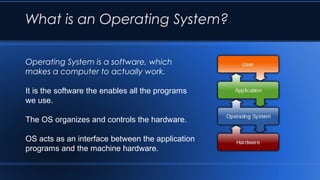
What is an Operating System?
Operating System is a software, which
makes a computer to actually work.
It is the software the enables all the programs
we use.
The OS organizes and controls the hardware.
OS acts as an interface between the application
programs and the machine hardware.
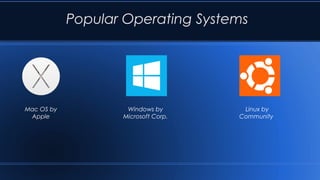
Popular Operating Systems
Mac OS by
Apple
Windows by
Microsoft Corp.
Linux by
Community
Mac OS
Mac OS is a series of graphical user interface-based
operating systems developed by Apple Inc. for their Macintosh
line of computer systems.
Mac OS was designed only to run on Apple Computers.
In 1984, Apple introduced the Macintosh PC with the
Macintosh Operating System.
Apple names its OS as “Mac OS”, beginning in 1997 which
was previously known as “System”.
Advantages & Disadvantages of
Mac OS
 Easy to Use
 Integration With Apple and Other Products
 Mac OS can run Windows at the same time
 Design
Disadvantage
 Gaming
 Price
 Fewer Software Options
 Cannot be upgraded/customized
File Management
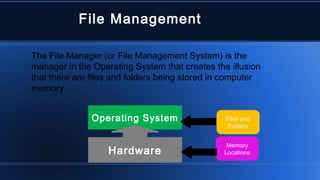
The File Manager (or File Management System) is the
manager in the Operating System that creates the illusion
that there are files and folders being stored in computer
memory.
Operating System Files and
Folders
Memory
LocationsHardware
A. Frank - P. Weisberg
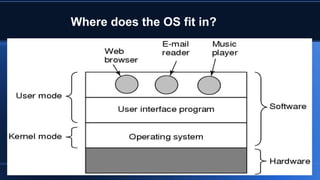
Where does the OS fit in?
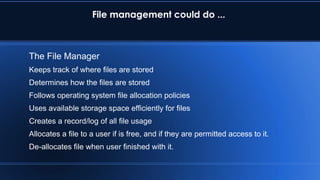
File management could do ...
The File Manager
Keeps track of where files are stored
Determines how the files are stored
Follows operating system file allocation policies
Uses available storage space efficiently for files
Creates a record/log of all file usage
Allocates a file to a user if is free, and if they are permitted access to it.
De-allocates file when user finished with it.
 Typical things you can do with a file are:
◦ CREATE
◦ OPEN
◦ DELETE
◦ RENAME
◦ COPY
◦ etc.
File Management
14
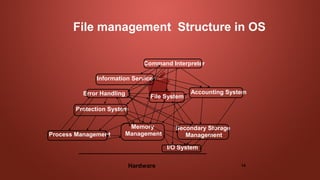
File management Structure in OS
Hardware
Memory
Management
I/O System
Secondary Storage
Management
File System
Protection System
Accounting System
Process Management
Command Interpreter
Information Services
Error Handling
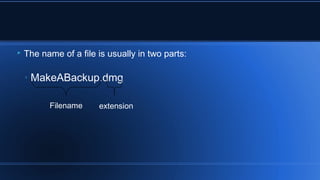
 The name of a file is usually in two parts:
◦ MakeABackup.dmg
Filename extension
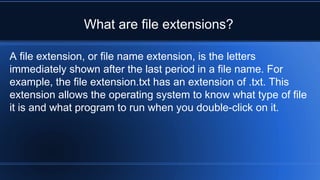
A file extension, or file name extension, is the letters
immediately shown after the last period in a file name. For
example, the file extension.txt has an extension of .txt. This
extension allows the operating system to know what type of file
it is and what program to run when you double-click on it.
What are file extensions?
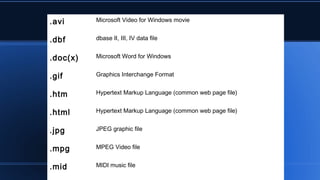
.avi Microsoft Video for Windows movie
.dbf dbase II, III, IV data file
.doc(x) Microsoft Word for Windows
.gif Graphics Interchange Format
.htm Hypertext Markup Language (common web page file)
.html Hypertext Markup Language (common web page file)
.jpg JPEG graphic file
.mpg MPEG Video file
.mid MIDI music file
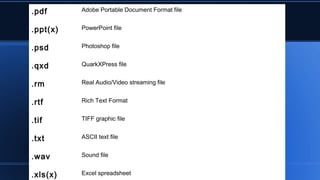
.pdf Adobe Portable Document Format file
.ppt(x) PowerPoint file
.psd Photoshop file
.qxd QuarkXPress file
.rm Real Audio/Video streaming file
.rtf Rich Text Format
.tif TIFF graphic file
.txt ASCII text file
.wav Sound file
.xls(x) Excel spreadsheet
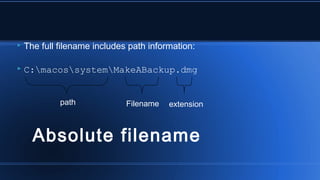
 The full filename includes path information:
 C:macossystemMakeABackup.dmg
Filename extensionpath
Absolute filename
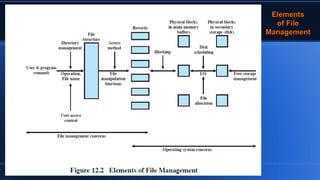
ElementsElements
of Fileof File
ManagementManagement
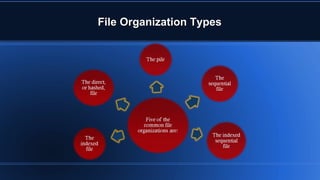
File Organization TypesFile Organization Types
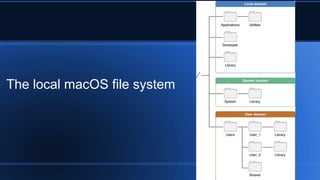
The local macOS file system
 Where Files Reside on Mac os
/Applications
Library
/Network
/System
/Users
Mac os  file managment

Mac os file managment

  • 1.
    Mac OS File Management Submittedby : Andam Omar anwar Submitted to : Prof. Dr. Hasan balik
  • 2.
    What is anOperating System? Operating System is a software, which makes a computer to actually work. It is the software the enables all the programs we use. The OS organizes and controls the hardware. OS acts as an interface between the application programs and the machine hardware.
  • 3.
    Popular Operating Systems MacOS by Apple Windows by Microsoft Corp. Linux by Community
  • 4.
    Mac OS Mac OSis a series of graphical user interface-based operating systems developed by Apple Inc. for their Macintosh line of computer systems. Mac OS was designed only to run on Apple Computers. In 1984, Apple introduced the Macintosh PC with the Macintosh Operating System. Apple names its OS as “Mac OS”, beginning in 1997 which was previously known as “System”.
  • 5.
    Advantages & Disadvantagesof Mac OS  Easy to Use  Integration With Apple and Other Products  Mac OS can run Windows at the same time  Design Disadvantage  Gaming  Price  Fewer Software Options  Cannot be upgraded/customized
  • 6.
    File Management The FileManager (or File Management System) is the manager in the Operating System that creates the illusion that there are files and folders being stored in computer memory. Operating System Files and Folders Memory LocationsHardware
  • 7.
    A. Frank -P. Weisberg Where does the OS fit in?
  • 8.
    File management coulddo ... The File Manager Keeps track of where files are stored Determines how the files are stored Follows operating system file allocation policies Uses available storage space efficiently for files Creates a record/log of all file usage Allocates a file to a user if is free, and if they are permitted access to it. De-allocates file when user finished with it.
  • 9.
     Typical thingsyou can do with a file are: ◦ CREATE ◦ OPEN ◦ DELETE ◦ RENAME ◦ COPY ◦ etc. File Management
  • 10.
    14 File management Structurein OS Hardware Memory Management I/O System Secondary Storage Management File System Protection System Accounting System Process Management Command Interpreter Information Services Error Handling
  • 11.
     The nameof a file is usually in two parts: ◦ MakeABackup.dmg Filename extension
  • 12.
    A file extension,or file name extension, is the letters immediately shown after the last period in a file name. For example, the file extension.txt has an extension of .txt. This extension allows the operating system to know what type of file it is and what program to run when you double-click on it. What are file extensions?
  • 13.
    .avi Microsoft Videofor Windows movie .dbf dbase II, III, IV data file .doc(x) Microsoft Word for Windows .gif Graphics Interchange Format .htm Hypertext Markup Language (common web page file) .html Hypertext Markup Language (common web page file) .jpg JPEG graphic file .mpg MPEG Video file .mid MIDI music file
  • 14.
    .pdf Adobe PortableDocument Format file .ppt(x) PowerPoint file .psd Photoshop file .qxd QuarkXPress file .rm Real Audio/Video streaming file .rtf Rich Text Format .tif TIFF graphic file .txt ASCII text file .wav Sound file .xls(x) Excel spreadsheet
  • 15.
     The fullfilename includes path information:  C:macossystemMakeABackup.dmg Filename extensionpath Absolute filename
  • 16.
  • 17.
    File Organization TypesFileOrganization Types
  • 18.
    The local macOSfile system
  • 19.