Presented By Vyas Pratik
I.T. Dep.
090570116066
Introduction to iOS
iOSTechnology Layers
Features of iOS5
Applications
Advantages
iOS was designed to meet the needs of a mobile environment, the
technologies are available only on iOS, such as the Multi-Touch
interface, Excellent Graphic.
It not only manages power efficiently but also delivers outstanding
battery life. iOS even ensures that performance and battery life
don’t suffer even if you are multitasking.
Apple makes both the iPhone hardware and the operating system,
everything works together seamlessly and intelligently.
iPhone and iOS are made to be used around the world.The user
interface is localized into over 30 languages, and you can easily
switch between them.
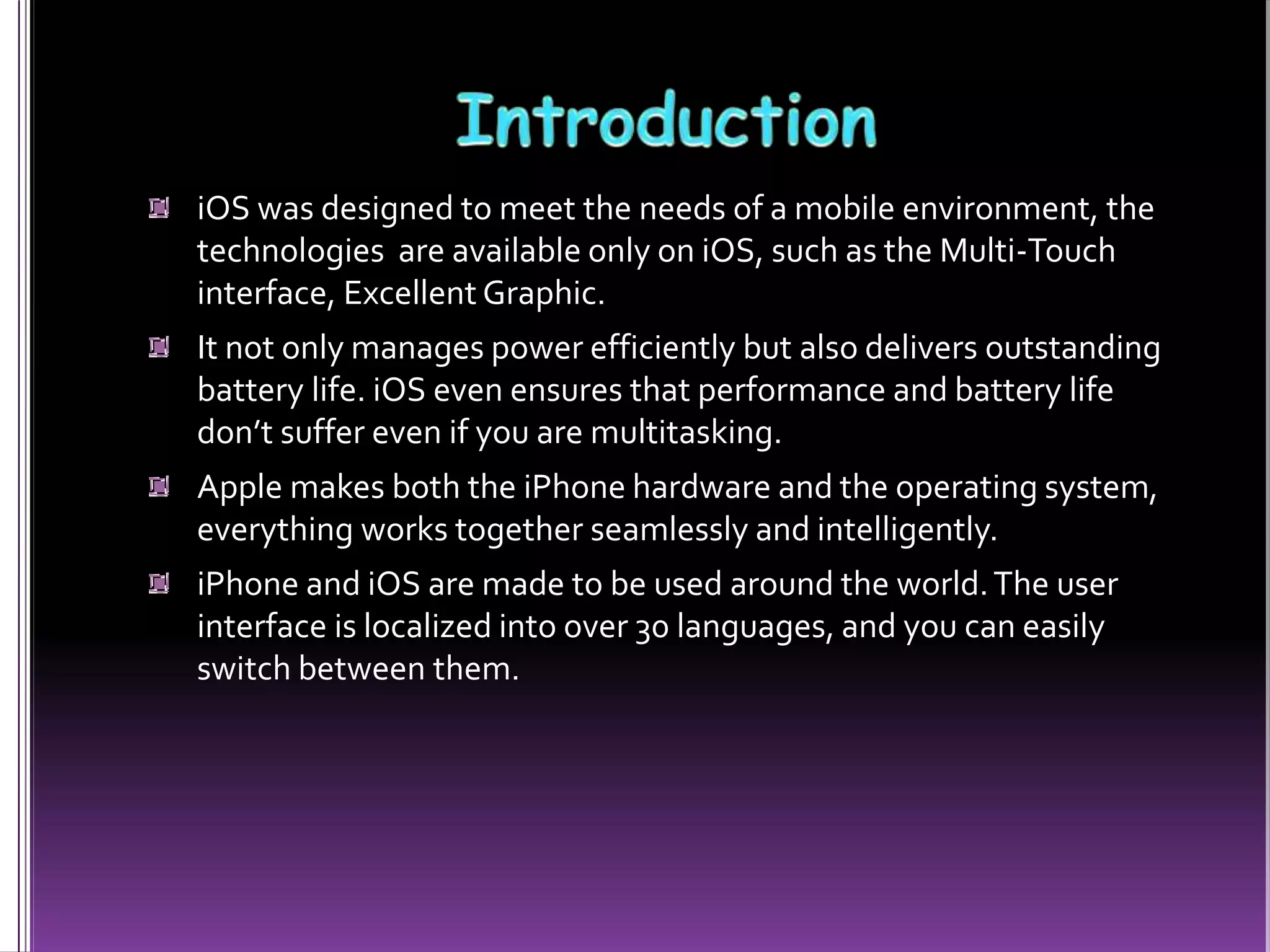
Initially, third-party applications were not supported. Later with the
efforts of Steve Jobs, On October 17, 2007,Apple announced that a
native Software Development Kit (SDK) was under development
On January 27, 2010, Apple announced the iPad, featuring a larger
screen than the iPhone and iPod touch, and designed for web
browsing, media Entertainment, and reading iBooks.
In June 2010,Apple rebranded iPhoneOS as "iOS".
The operating
system was unveiled
with the iPhone on
Jun 29, 2007. not
specify a separate
name for the
operating system
GameCenter: The most significant feature in iOS4.1 is the Apple’s
new Game Center social gaming service.
Folders: IOS4 came with the introduction of a simple folder system.
Camera & Photos: iOS4.1 also makes some enhancements to the
iPhoneCamera and Photos apps, providing support for High
Definition photos, HD video uploads and improved camera controls
on the iPhone 4 and 4G iPod touch.
Bluetooth AVRCP Support : iOS 4.1 provide full AVRCP support for
Bluetooth accessories, allowing for not only play/pause control but
also track navigation
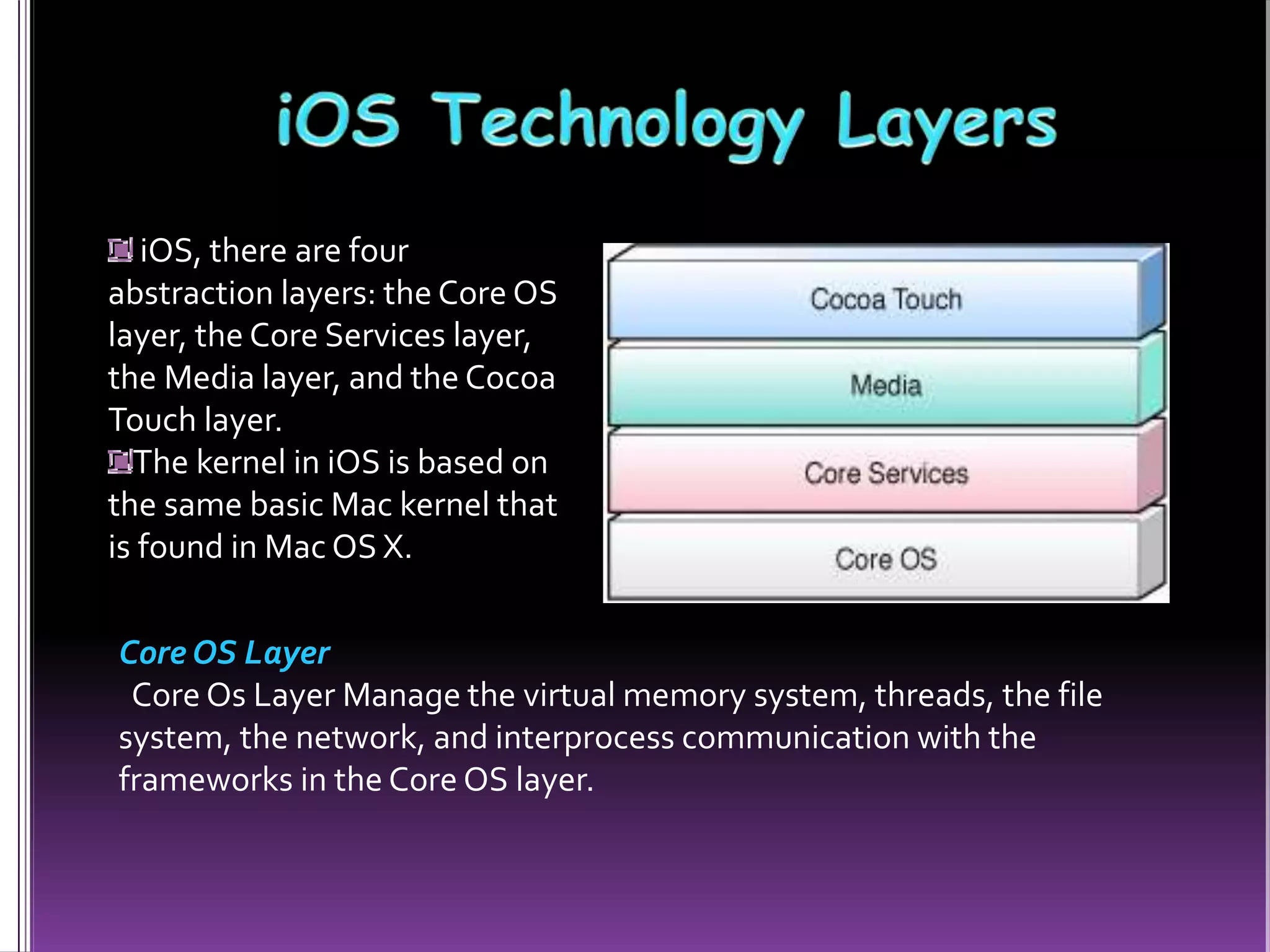
iOS, there are four
abstraction layers: the Core OS
layer, the Core Services layer,
the Media layer, and the Cocoa
Touch layer.
The kernel in iOS is based on
the same basic Mac kernel that
is found in Mac OS X.
Core OS Layer
Core Os Layer Manage the virtual memory system, threads, the file
system, the network, and interprocess communication with the
frameworks in the Core OS layer.
Core Services Layer
Core Services layers contain the fundamental interfaces for iOS,
including those used for accessing files, low-level data types,
network sockets, and so on.These interfaces are mostly C-based .
Media Layer
Media Layer allows you to create the best multimedia experience
available on a mobile device with the frameworks in the Media layer.
CocoaTouch Layer
Implementation of a graphical, event-driven application in iOS with
the frameworks is performed in the CocoaTouch Layer.The
frameworks at these layers provide the fundamental infrastructure
used by your application.
iOS 5 introduced the iCloud service and the NotificationCenter, as
well as improvements to native apps such as Camera.
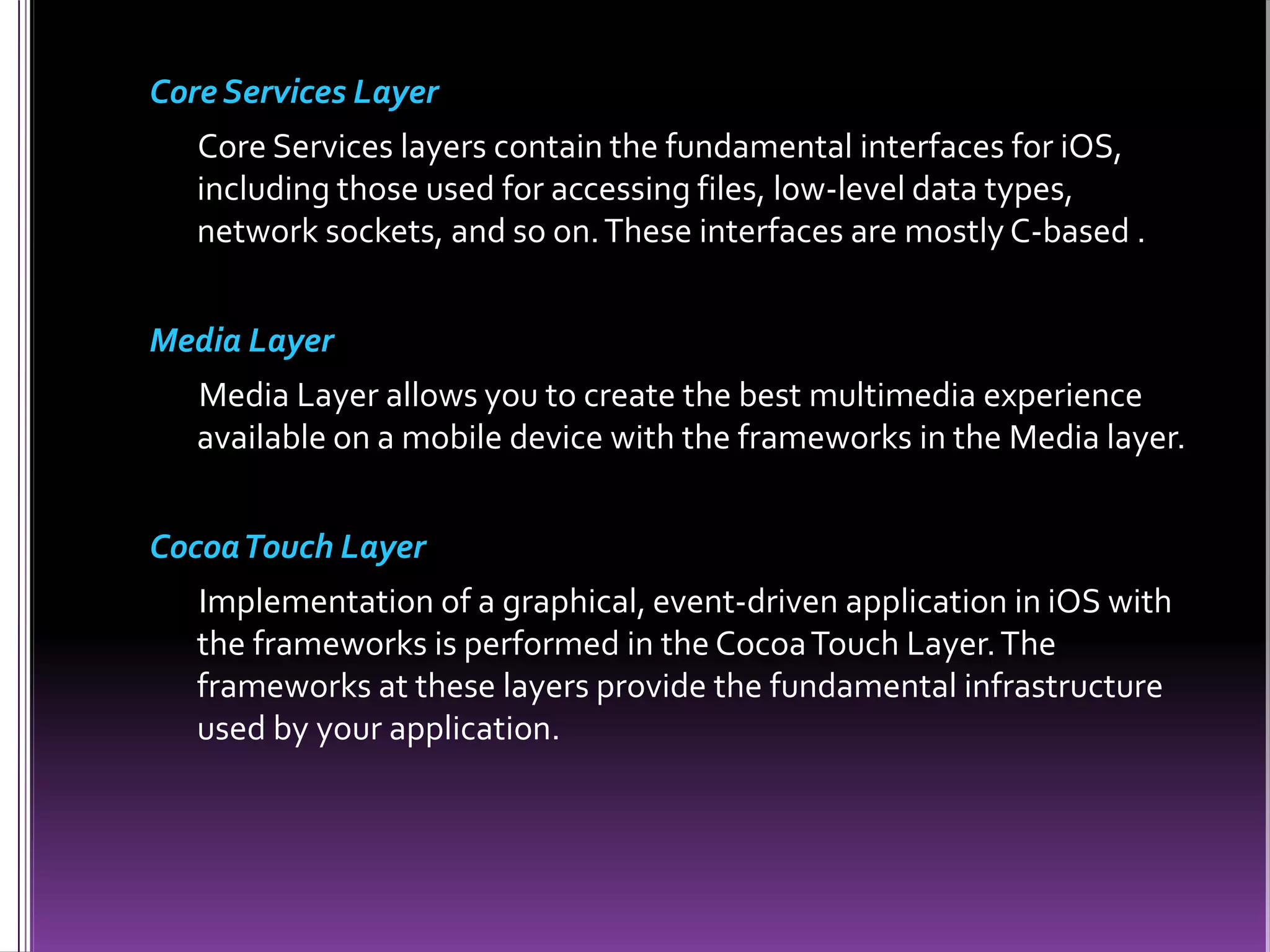
Notification Center
All Your Alerts at one Place.
You get all kinds of notifications on your iOS device: new email,
texts, friend requests, and more.
iMessage
iPod and iPad touch join the conversation
You can send unlimited text messages viaWi-Fi or 3G from
your iPad, iPhone or iPod touch to anyone with one of those
devices.
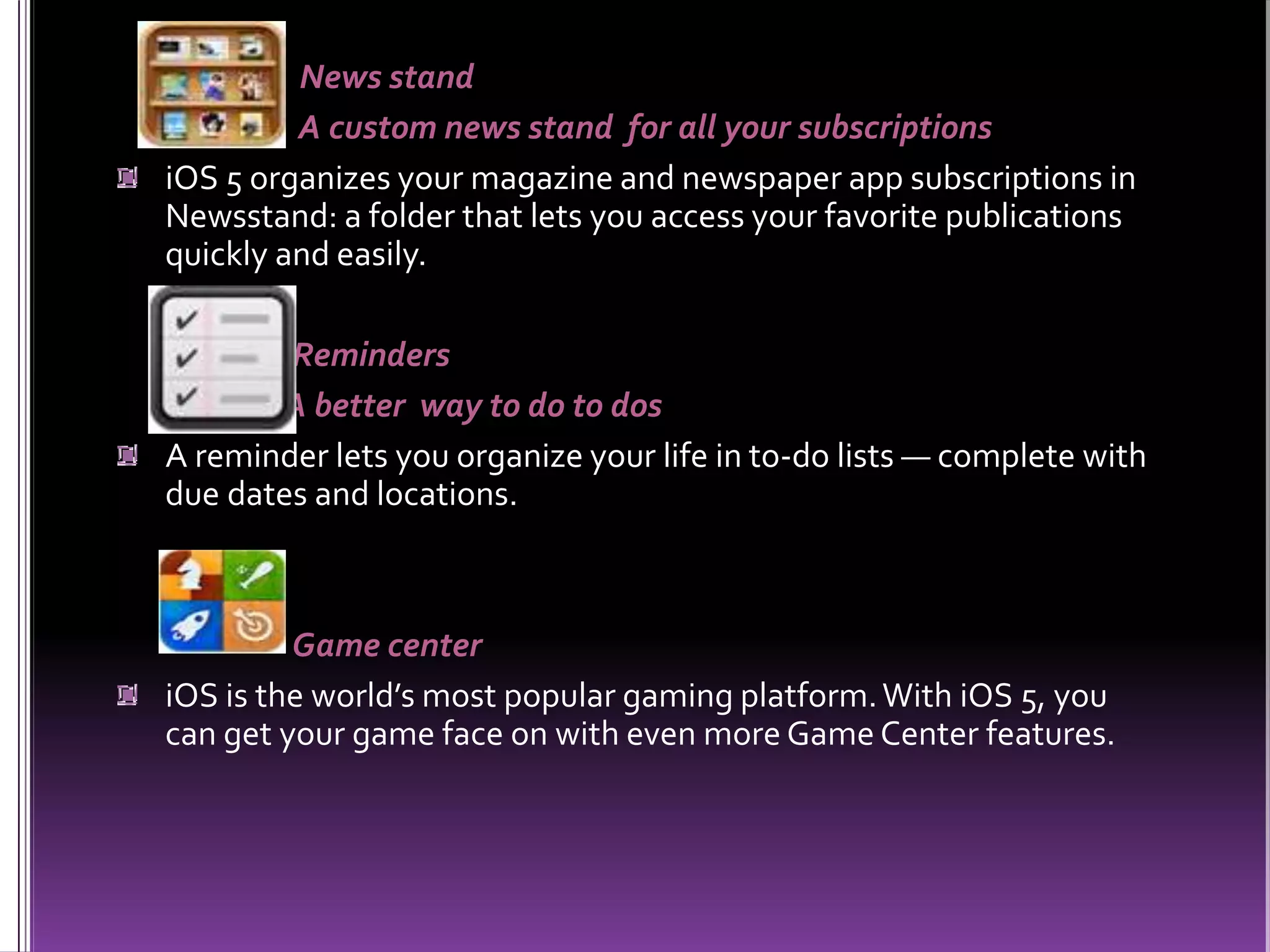
News stand
A custom news stand for all your subscriptions
iOS 5 organizes your magazine and newspaper app subscriptions in
Newsstand: a folder that lets you access your favorite publications
quickly and easily.
Reminders
A better way to do to dos
A reminder lets you organize your life in to-do lists — complete with
due dates and locations.
Game center
iOS is the world’s most popular gaming platform.With iOS 5, you
can get your game face on with even more Game Center features.
Wi-Fi Sync
Wirelessly sync your iOS device to your Mac or PC over a sharedWi-Fi
connection.
AirPlay Mirroring
AirPlay now supports video mirroring. Everyone in the room sees
exactly what’s on your iPad or iPhone display up on the big screen
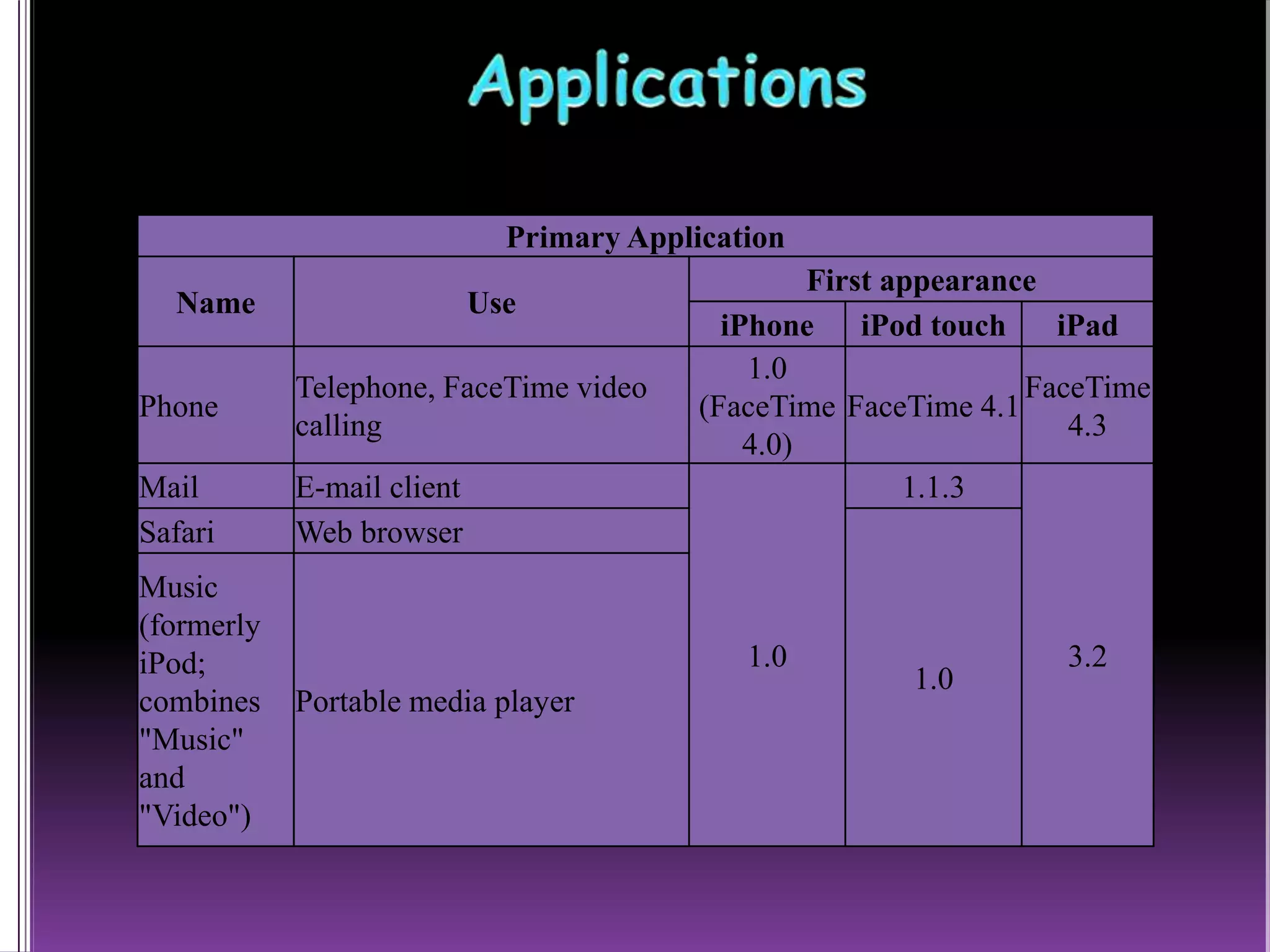
Primary Application
Name Use
First appearance
iPhone iPod touch iPad
Phone
Telephone, FaceTime video
calling
1.0
(FaceTime
4.0)
FaceTime 4.1
FaceTime
4.3
Mail E-mail client
1.0
1.1.3
3.2
Safari Web browser
1.0
Music
(formerly
iPod;
combines
"Music"
and
"Video")
Portable media player
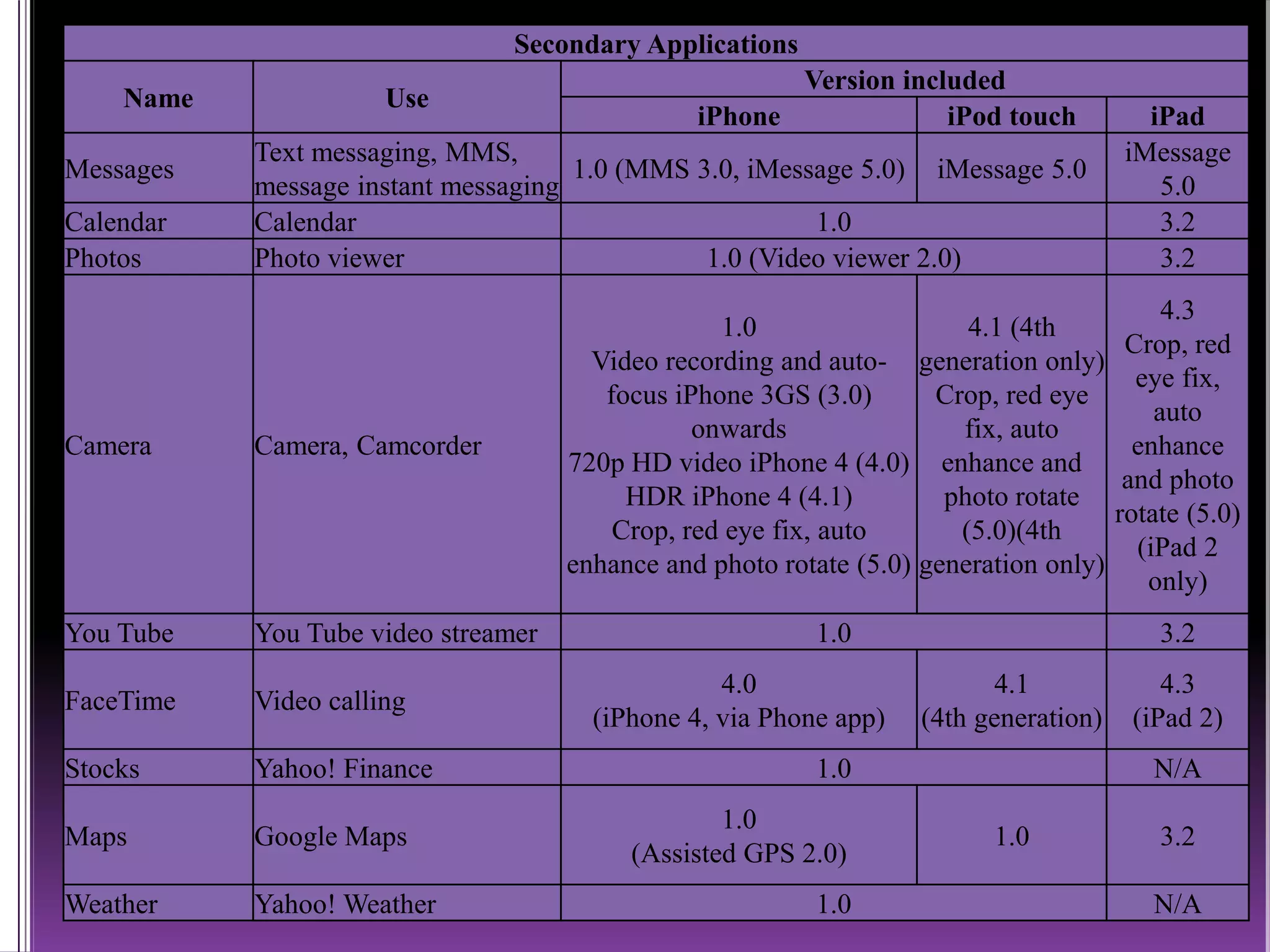
Secondary Applications
Name Use
Version included
iPhone iPod touch iPad
Messages
Text messaging, MMS,
message instant messaging
1.0 (MMS 3.0, iMessage 5.0) iMessage 5.0
iMessage
5.0
Calendar Calendar 1.0 3.2
Photos Photo viewer 1.0 (Video viewer 2.0) 3.2
Camera Camera, Camcorder
1.0
Video recording and auto-
focus iPhone 3GS (3.0)
onwards
720p HD video iPhone 4 (4.0)
HDR iPhone 4 (4.1)
Crop, red eye fix, auto
enhance and photo rotate (5.0)
4.1 (4th
generation only)
Crop, red eye
fix, auto
enhance and
photo rotate
(5.0)(4th
generation only)
4.3
Crop, red
eye fix,
auto
enhance
and photo
rotate (5.0)
(iPad 2
only)
You Tube You Tube video streamer 1.0 3.2
FaceTime Video calling
4.0
(iPhone 4, via Phone app)
4.1
(4th generation)
4.3
(iPad 2)
Stocks Yahoo! Finance 1.0 N/A
Maps Google Maps
1.0
(Assisted GPS 2.0)
1.0 3.2
Weather Yahoo! Weather 1.0 N/A
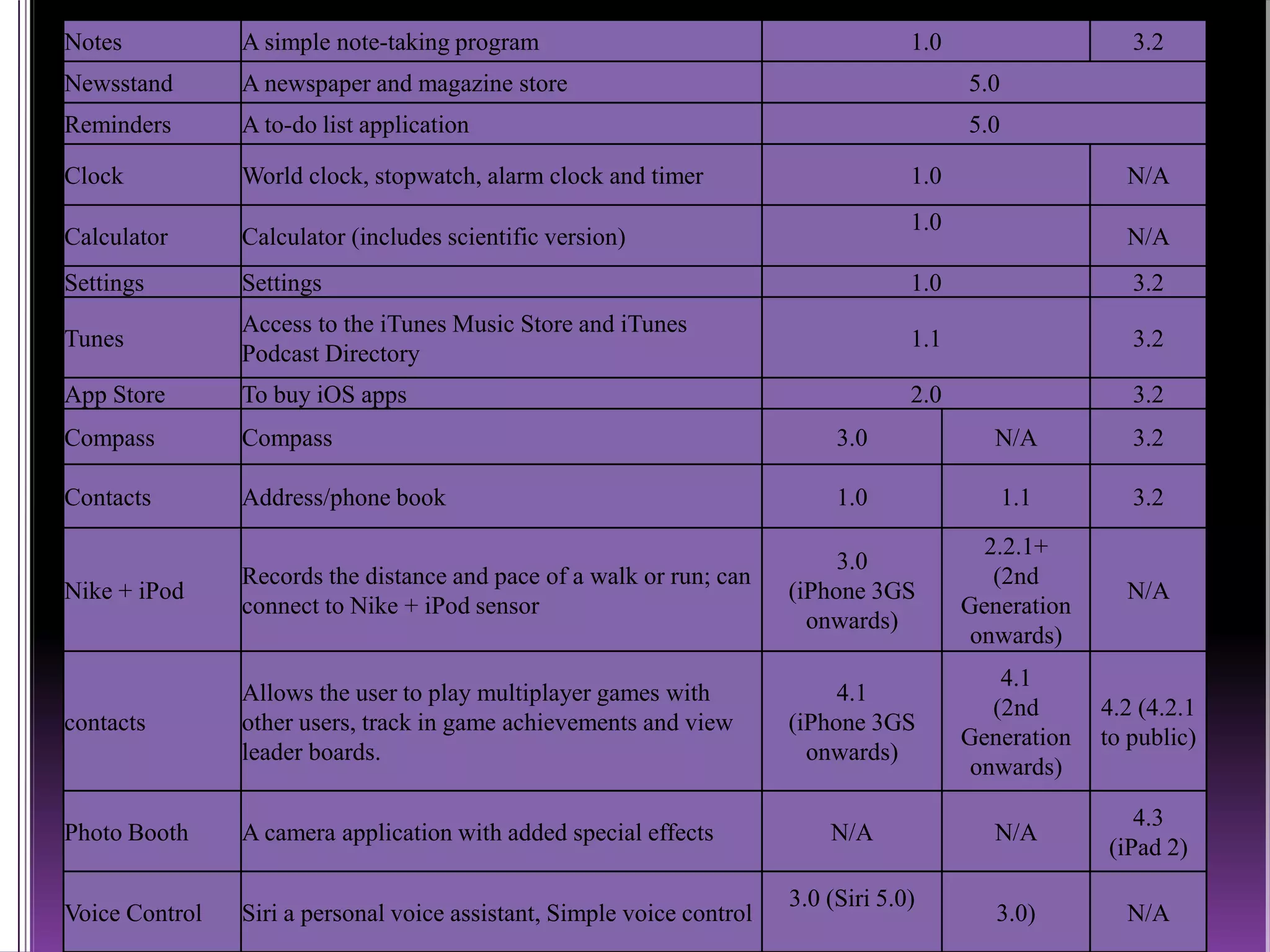
Notes A simple note-taking program 1.0 3.2
Newsstand A newspaper and magazine store 5.0
Reminders A to-do list application 5.0
Clock World clock, stopwatch, alarm clock and timer 1.0 N/A
Calculator Calculator (includes scientific version)
1.0
N/A
Settings Settings 1.0 3.2
Tunes
Access to the iTunes Music Store and iTunes
Podcast Directory
1.1 3.2
App Store To buy iOS apps 2.0 3.2
Compass Compass 3.0 N/A 3.2
Contacts Address/phone book 1.0 1.1 3.2
Nike + iPod
Records the distance and pace of a walk or run; can
connect to Nike + iPod sensor
3.0
(iPhone 3GS
onwards)
2.2.1+
(2nd
Generation
onwards)
N/A
contacts
Allows the user to play multiplayer games with
other users, track in game achievements and view
leader boards.
4.1
(iPhone 3GS
onwards)
4.1
(2nd
Generation
onwards)
4.2 (4.2.1
to public)
Photo Booth A camera application with added special effects N/A N/A
4.3
(iPad 2)
Voice Control Siri a personal voice assistant, Simple voice control
3.0 (Siri 5.0)
3.0) N/A
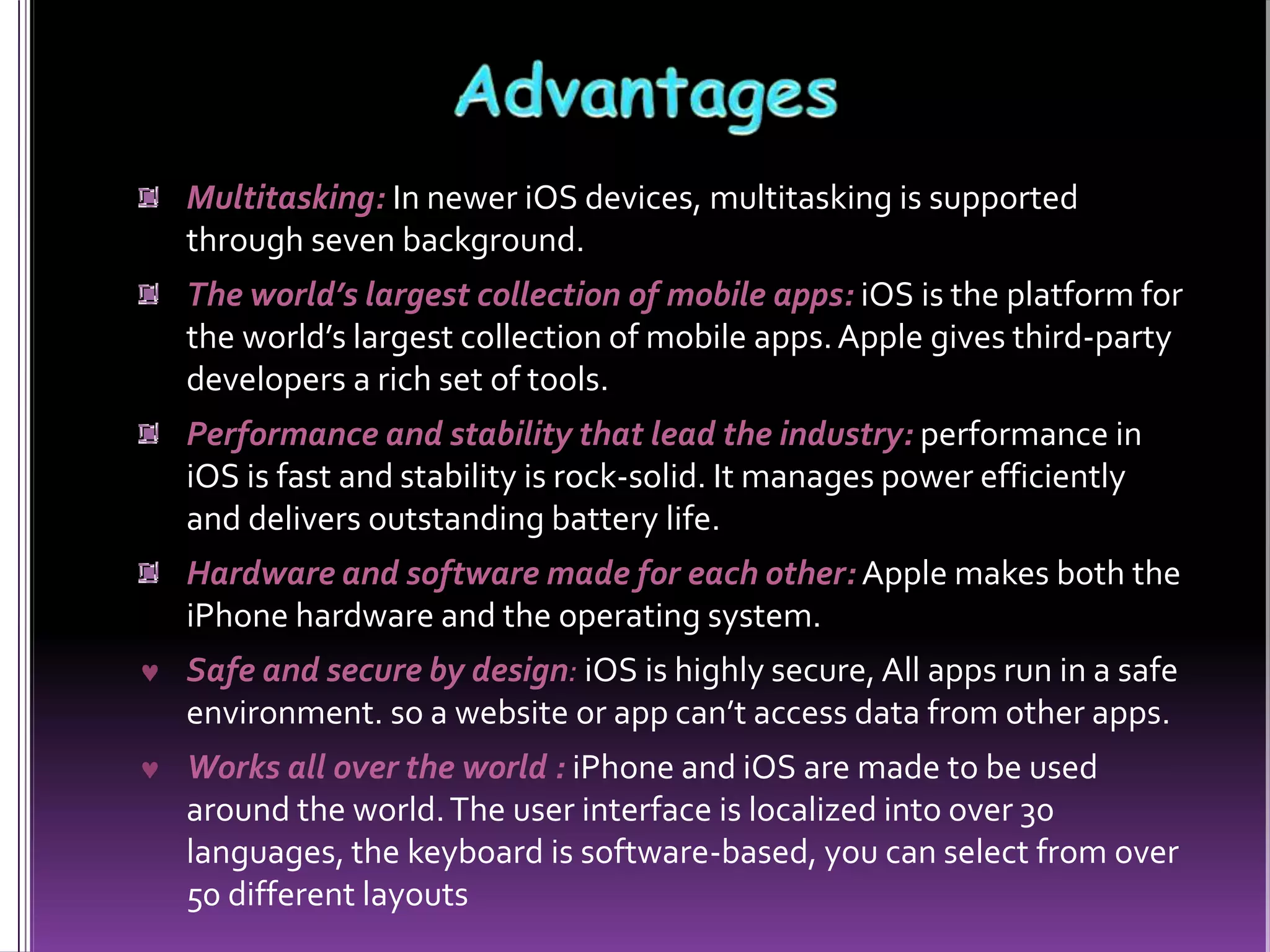
Multitasking: In newer iOS devices, multitasking is supported
through seven background.
The world’s largest collection of mobile apps: iOS is the platform for
the world’s largest collection of mobile apps.Apple gives third-party
developers a rich set of tools.
Performance and stability that lead the industry: performance in
iOS is fast and stability is rock-solid. It manages power efficiently
and delivers outstanding battery life.
Hardware and software made for each other: Apple makes both the
iPhone hardware and the operating system.
 Safe and secure by design: iOS is highly secure, All apps run in a safe
environment. so a website or app can’t access data from other apps.
 Works all over the world : iPhone and iOS are made to be used
around the world.The user interface is localized into over 30
languages, the keyboard is software-based, you can select from over
50 different layouts

Apple iOS Introduction

  • 1.
    Presented By VyasPratik I.T. Dep. 090570116066
  • 2.
    Introduction to iOS iOSTechnologyLayers Features of iOS5 Applications Advantages
  • 3.
    iOS was designedto meet the needs of a mobile environment, the technologies are available only on iOS, such as the Multi-Touch interface, Excellent Graphic. It not only manages power efficiently but also delivers outstanding battery life. iOS even ensures that performance and battery life don’t suffer even if you are multitasking. Apple makes both the iPhone hardware and the operating system, everything works together seamlessly and intelligently. iPhone and iOS are made to be used around the world.The user interface is localized into over 30 languages, and you can easily switch between them.
  • 4.
    Initially, third-party applicationswere not supported. Later with the efforts of Steve Jobs, On October 17, 2007,Apple announced that a native Software Development Kit (SDK) was under development On January 27, 2010, Apple announced the iPad, featuring a larger screen than the iPhone and iPod touch, and designed for web browsing, media Entertainment, and reading iBooks. In June 2010,Apple rebranded iPhoneOS as "iOS". The operating system was unveiled with the iPhone on Jun 29, 2007. not specify a separate name for the operating system
  • 5.
    GameCenter: The mostsignificant feature in iOS4.1 is the Apple’s new Game Center social gaming service. Folders: IOS4 came with the introduction of a simple folder system. Camera & Photos: iOS4.1 also makes some enhancements to the iPhoneCamera and Photos apps, providing support for High Definition photos, HD video uploads and improved camera controls on the iPhone 4 and 4G iPod touch. Bluetooth AVRCP Support : iOS 4.1 provide full AVRCP support for Bluetooth accessories, allowing for not only play/pause control but also track navigation
  • 6.
    iOS, there arefour abstraction layers: the Core OS layer, the Core Services layer, the Media layer, and the Cocoa Touch layer. The kernel in iOS is based on the same basic Mac kernel that is found in Mac OS X. Core OS Layer Core Os Layer Manage the virtual memory system, threads, the file system, the network, and interprocess communication with the frameworks in the Core OS layer.
  • 7.
    Core Services Layer CoreServices layers contain the fundamental interfaces for iOS, including those used for accessing files, low-level data types, network sockets, and so on.These interfaces are mostly C-based . Media Layer Media Layer allows you to create the best multimedia experience available on a mobile device with the frameworks in the Media layer. CocoaTouch Layer Implementation of a graphical, event-driven application in iOS with the frameworks is performed in the CocoaTouch Layer.The frameworks at these layers provide the fundamental infrastructure used by your application.
  • 8.
    iOS 5 introducedthe iCloud service and the NotificationCenter, as well as improvements to native apps such as Camera. Notification Center All Your Alerts at one Place. You get all kinds of notifications on your iOS device: new email, texts, friend requests, and more. iMessage iPod and iPad touch join the conversation You can send unlimited text messages viaWi-Fi or 3G from your iPad, iPhone or iPod touch to anyone with one of those devices.
  • 9.
    News stand A customnews stand for all your subscriptions iOS 5 organizes your magazine and newspaper app subscriptions in Newsstand: a folder that lets you access your favorite publications quickly and easily. Reminders A better way to do to dos A reminder lets you organize your life in to-do lists — complete with due dates and locations. Game center iOS is the world’s most popular gaming platform.With iOS 5, you can get your game face on with even more Game Center features.
  • 10.
    Wi-Fi Sync Wirelessly syncyour iOS device to your Mac or PC over a sharedWi-Fi connection. AirPlay Mirroring AirPlay now supports video mirroring. Everyone in the room sees exactly what’s on your iPad or iPhone display up on the big screen
  • 11.
    Primary Application Name Use Firstappearance iPhone iPod touch iPad Phone Telephone, FaceTime video calling 1.0 (FaceTime 4.0) FaceTime 4.1 FaceTime 4.3 Mail E-mail client 1.0 1.1.3 3.2 Safari Web browser 1.0 Music (formerly iPod; combines "Music" and "Video") Portable media player
  • 12.
    Secondary Applications Name Use Versionincluded iPhone iPod touch iPad Messages Text messaging, MMS, message instant messaging 1.0 (MMS 3.0, iMessage 5.0) iMessage 5.0 iMessage 5.0 Calendar Calendar 1.0 3.2 Photos Photo viewer 1.0 (Video viewer 2.0) 3.2 Camera Camera, Camcorder 1.0 Video recording and auto- focus iPhone 3GS (3.0) onwards 720p HD video iPhone 4 (4.0) HDR iPhone 4 (4.1) Crop, red eye fix, auto enhance and photo rotate (5.0) 4.1 (4th generation only) Crop, red eye fix, auto enhance and photo rotate (5.0)(4th generation only) 4.3 Crop, red eye fix, auto enhance and photo rotate (5.0) (iPad 2 only) You Tube You Tube video streamer 1.0 3.2 FaceTime Video calling 4.0 (iPhone 4, via Phone app) 4.1 (4th generation) 4.3 (iPad 2) Stocks Yahoo! Finance 1.0 N/A Maps Google Maps 1.0 (Assisted GPS 2.0) 1.0 3.2 Weather Yahoo! Weather 1.0 N/A
  • 13.
    Notes A simplenote-taking program 1.0 3.2 Newsstand A newspaper and magazine store 5.0 Reminders A to-do list application 5.0 Clock World clock, stopwatch, alarm clock and timer 1.0 N/A Calculator Calculator (includes scientific version) 1.0 N/A Settings Settings 1.0 3.2 Tunes Access to the iTunes Music Store and iTunes Podcast Directory 1.1 3.2 App Store To buy iOS apps 2.0 3.2 Compass Compass 3.0 N/A 3.2 Contacts Address/phone book 1.0 1.1 3.2 Nike + iPod Records the distance and pace of a walk or run; can connect to Nike + iPod sensor 3.0 (iPhone 3GS onwards) 2.2.1+ (2nd Generation onwards) N/A contacts Allows the user to play multiplayer games with other users, track in game achievements and view leader boards. 4.1 (iPhone 3GS onwards) 4.1 (2nd Generation onwards) 4.2 (4.2.1 to public) Photo Booth A camera application with added special effects N/A N/A 4.3 (iPad 2) Voice Control Siri a personal voice assistant, Simple voice control 3.0 (Siri 5.0) 3.0) N/A
  • 14.
    Multitasking: In neweriOS devices, multitasking is supported through seven background. The world’s largest collection of mobile apps: iOS is the platform for the world’s largest collection of mobile apps.Apple gives third-party developers a rich set of tools. Performance and stability that lead the industry: performance in iOS is fast and stability is rock-solid. It manages power efficiently and delivers outstanding battery life. Hardware and software made for each other: Apple makes both the iPhone hardware and the operating system.  Safe and secure by design: iOS is highly secure, All apps run in a safe environment. so a website or app can’t access data from other apps.  Works all over the world : iPhone and iOS are made to be used around the world.The user interface is localized into over 30 languages, the keyboard is software-based, you can select from over 50 different layouts