Protecting Windows networks from Malware MadhurVermaMCSA, MCSE, MCTS, CIW Security Analyst, CEH, MVP (Consumer Security)
AgendaIntroduction and BackgroundCurrent TrendsCase StudiesDefense ArsenalBest Practices
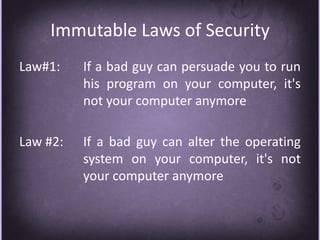
Immutable Laws of SecurityLaw#1:	If a bad guy can persuade you to run 		his program on your computer, it's 		not your computer anymoreLaw #2: 	If a bad guy can alter the operating 		system on your computer, it's not 		your computer anymore
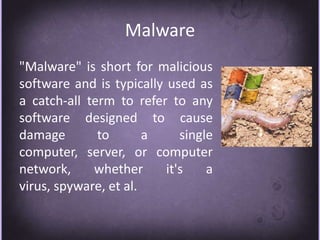
Malware"Malware" is short for malicious software and is typically used as a catch-all term to refer to any software designed to cause damage to a single computer, server, or computer network, whether it's a virus, spyware, et al.
ImplicationsTheft of usernames & passwordsTheft of corporate secretsLost network bandwidthHelp desk overheadLost worker productivityLegal Liabilities
RationalesNot using security devices Mis-configuration of servers and network devicesInstallation of unwanted applications and servicesPoor coding practicesUsing outdated Antivirus definitions
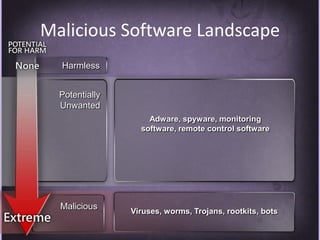
Malicious Software LandscapeHarmlessPotentially UnwantedAdware, spyware, monitoring software, remote control softwareMaliciousViruses, worms, Trojans, rootkits, bots
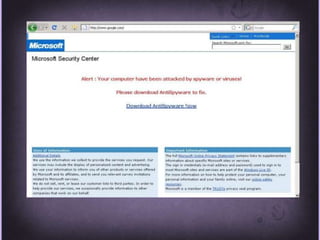
Distribution MethodsPropagation through E-mail attachments, Pirated software and free shareware programsMechanism: web pages can use to install software is ActiveXMechanism of “Drive By download”Deceptive technique of “Pop under exploit”choice of clicking Yes/Ok or No/cancelFaux Security Alert
Changing EraIncreased propagation vectorsComplexity of malicious code, payload and obfuscationMotivation changed from fun, curiosity or fame to moneyDestruction malware decreasing and information stealing malware increasingRise in targeted attacks through social engineeringRise in Malware ToolkitsRise in exploitation of Web 2.0
Current TrendsCompromising trusted and popular websites and embedding malicious code or links to malicious sitesPublishing malicious links in search engines, discussion forums etcDevelopment of web-attack toolkitsExploiting client side vulnerabilities
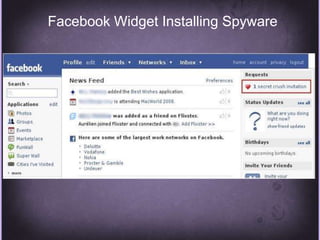
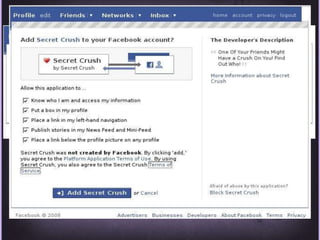
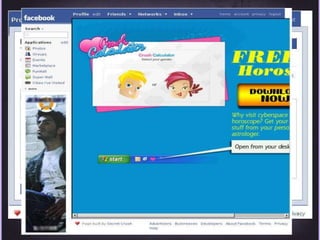
Case Study I - Facebook
Facebook Widget Installing Spyware
Case Study II - Google
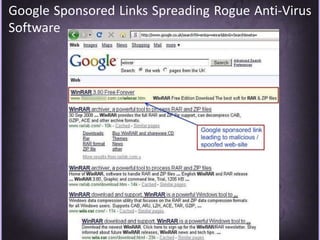
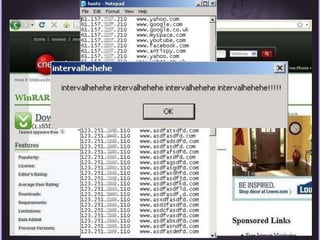
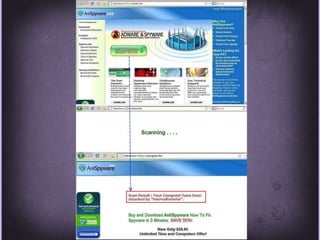
Google Sponsored Links Spreading Rogue Anti-Virus Software
Case Study III - Toolkits
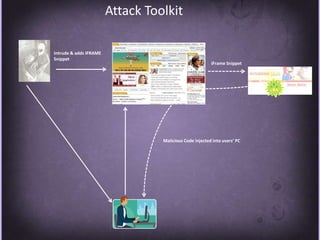
Attack ToolkitIntrude & adds IFRAME SnippetiFrame SnippetMalicious Code injected into users’ PC
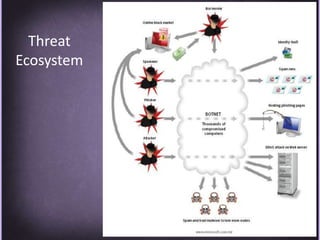
Threat Ecosystem
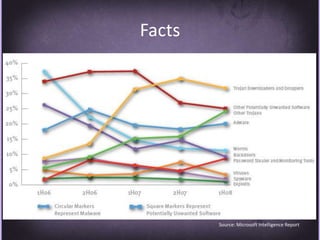
FactsSource: Microsoft Intelligence Report
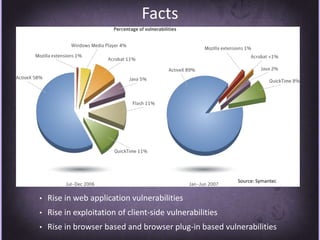
FactsSource: SymantecRise in web application vulnerabilities
Rise in exploitation of client-side vulnerabilities
Rise in browser based and browser plug-in based vulnerabilitiesDefensive Arsenal
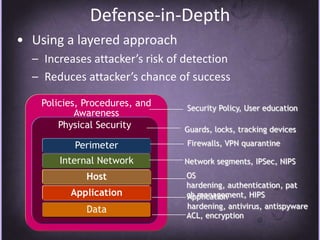
Defense-in-DepthUsing a layered approach
Increases attacker’s risk of detection
Reduces attacker’s chance of successPolicies, Procedures, and AwarenessSecurity Policy, User educationPhysical SecurityGuards, locks, tracking devicesFirewalls, VPN quarantinePerimeterInternal NetworkNetwork segments, IPSec, NIPSOS hardening, authentication, patch management, HIPSHostApplicationApplication hardening, antivirus, antispywareDataACL, encryption
Implementing Application Layer FilteringWeb browsing and e-mail can be scanned to ensure that content specific to each does not contain illegitimate dataDeep content analyses, including the ability to detect, inspect and validate traffic using any port and protocol
Protecting the Network: Best PracticesHave a proactive antivirus response team monitoring early warning sites such as antivirus vendor Web sitesHave an incident response planImplement automated monitoring and report policiesImplement intrusion- detection or intrusion-prevention capabilities
Protecting Servers: Best PracticesConsider each server role implemented in your organization to implement specific host protection solutionsStage all updates through a test environment before releasing into productionDeploy regular security and antivirus updates as requiredImplement a self-managed host protection solution to decrease management costs
Protecting Client Computers: Best PracticesIdentify threats within the host, application, and data layers of the defense-in-depth strategyImplement an effective security update management policyImplement an effective antivirus management policyUse Active Directory Group Policy to manage application security requirementsImplement software restriction policies to control applications
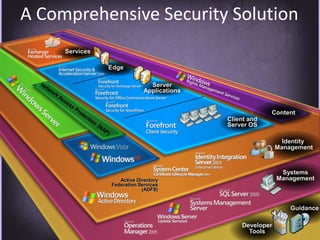
A Comprehensive Security SolutionServicesEdgeServer ApplicationsNetwork Access Protection (NAP)ContentClient and Server OSIdentity ManagementSystemsManagementActive Directory Federation Services (ADFS)GuidanceDeveloper Tools
Best PracticesAlways run up-to-date softwareUninstall unnecessary services and applicationsUse antivirus and antispyware that offers real-time protection and continually updated definition files to detect and block exploitsEnable Data Execution Prevention (DEP) in compatible versions of Windows, which can help prevent a common class of exploits called buffer overflows
Best PracticesEnable Structured Exception Handling Overwrite Protection (SEHOP) in Windows Vista SP1 and Windows Server 2008, which is designed to block exploits that use the Structured Exception Handler (SEH) overwrite techniqueSet Internet and local intranet security zone settings in Internet Explorer to High, which will cause Internet Explorer to prompt the user before running scripts and ActiveX controls in these zones

Protecting Windows Networks From Malware

  • 1.
    Protecting Windows networksfrom Malware MadhurVermaMCSA, MCSE, MCTS, CIW Security Analyst, CEH, MVP (Consumer Security)
  • 2.
    AgendaIntroduction and BackgroundCurrentTrendsCase StudiesDefense ArsenalBest Practices
  • 3.
    Immutable Laws ofSecurityLaw#1: If a bad guy can persuade you to run his program on your computer, it's not your computer anymoreLaw #2: If a bad guy can alter the operating system on your computer, it's not your computer anymore
  • 4.
    Malware"Malware" is shortfor malicious software and is typically used as a catch-all term to refer to any software designed to cause damage to a single computer, server, or computer network, whether it's a virus, spyware, et al.
  • 5.
    ImplicationsTheft of usernames& passwordsTheft of corporate secretsLost network bandwidthHelp desk overheadLost worker productivityLegal Liabilities
  • 6.
    RationalesNot using securitydevices Mis-configuration of servers and network devicesInstallation of unwanted applications and servicesPoor coding practicesUsing outdated Antivirus definitions
  • 7.
    Malicious Software LandscapeHarmlessPotentiallyUnwantedAdware, spyware, monitoring software, remote control softwareMaliciousViruses, worms, Trojans, rootkits, bots
  • 8.
    Distribution MethodsPropagation throughE-mail attachments, Pirated software and free shareware programsMechanism: web pages can use to install software is ActiveXMechanism of “Drive By download”Deceptive technique of “Pop under exploit”choice of clicking Yes/Ok or No/cancelFaux Security Alert
  • 9.
    Changing EraIncreased propagationvectorsComplexity of malicious code, payload and obfuscationMotivation changed from fun, curiosity or fame to moneyDestruction malware decreasing and information stealing malware increasingRise in targeted attacks through social engineeringRise in Malware ToolkitsRise in exploitation of Web 2.0
  • 10.
    Current TrendsCompromising trustedand popular websites and embedding malicious code or links to malicious sitesPublishing malicious links in search engines, discussion forums etcDevelopment of web-attack toolkitsExploiting client side vulnerabilities
  • 11.
    Case Study I- Facebook
  • 12.
  • 15.
  • 16.
    Google Sponsored LinksSpreading Rogue Anti-Virus Software
  • 20.
    Case Study III- Toolkits
  • 21.
    Attack ToolkitIntrude &adds IFRAME SnippetiFrame SnippetMalicious Code injected into users’ PC
  • 22.
  • 23.
  • 24.
    FactsSource: SymantecRise inweb application vulnerabilities
  • 25.
    Rise in exploitationof client-side vulnerabilities
  • 26.
    Rise in browserbased and browser plug-in based vulnerabilitiesDefensive Arsenal
  • 27.
  • 28.
  • 29.
    Reduces attacker’s chanceof successPolicies, Procedures, and AwarenessSecurity Policy, User educationPhysical SecurityGuards, locks, tracking devicesFirewalls, VPN quarantinePerimeterInternal NetworkNetwork segments, IPSec, NIPSOS hardening, authentication, patch management, HIPSHostApplicationApplication hardening, antivirus, antispywareDataACL, encryption
  • 30.
    Implementing Application LayerFilteringWeb browsing and e-mail can be scanned to ensure that content specific to each does not contain illegitimate dataDeep content analyses, including the ability to detect, inspect and validate traffic using any port and protocol
  • 31.
    Protecting the Network:Best PracticesHave a proactive antivirus response team monitoring early warning sites such as antivirus vendor Web sitesHave an incident response planImplement automated monitoring and report policiesImplement intrusion- detection or intrusion-prevention capabilities
  • 32.
    Protecting Servers: BestPracticesConsider each server role implemented in your organization to implement specific host protection solutionsStage all updates through a test environment before releasing into productionDeploy regular security and antivirus updates as requiredImplement a self-managed host protection solution to decrease management costs
  • 33.
    Protecting Client Computers:Best PracticesIdentify threats within the host, application, and data layers of the defense-in-depth strategyImplement an effective security update management policyImplement an effective antivirus management policyUse Active Directory Group Policy to manage application security requirementsImplement software restriction policies to control applications
  • 34.
    A Comprehensive SecuritySolutionServicesEdgeServer ApplicationsNetwork Access Protection (NAP)ContentClient and Server OSIdentity ManagementSystemsManagementActive Directory Federation Services (ADFS)GuidanceDeveloper Tools
  • 35.
    Best PracticesAlways runup-to-date softwareUninstall unnecessary services and applicationsUse antivirus and antispyware that offers real-time protection and continually updated definition files to detect and block exploitsEnable Data Execution Prevention (DEP) in compatible versions of Windows, which can help prevent a common class of exploits called buffer overflows
  • 36.
    Best PracticesEnable StructuredException Handling Overwrite Protection (SEHOP) in Windows Vista SP1 and Windows Server 2008, which is designed to block exploits that use the Structured Exception Handler (SEH) overwrite techniqueSet Internet and local intranet security zone settings in Internet Explorer to High, which will cause Internet Explorer to prompt the user before running scripts and ActiveX controls in these zones