Meet windows powershell!(no matter who you are)
This slide deck was used in one of our many conference presentations. We hope you enjoy it, and invite you to use it within your own organization however you like.For more information on our company, including information on private classes and upcoming conference appearances, please visit our Web site, www.ConcentratedTech.com. For links to newly-posted decks, follow us on Twitter:@concentrateddon or @concentratdgregThis work is copyright ©Concentrated Technology, LLC
introductionsDon JonesSenior Partner and Principal Technologist, Concentrated Technologywww.ConcentratedTech.comWindows PowerShell MVP Award RecipientBlogger at WindowsITPro.comColumnist for Microsoft TechNet Magazine and Redmond Magazinewww.TechNetMagazine.com • www.RedmondMag.comWindows PowerShell instructor and enthusiast
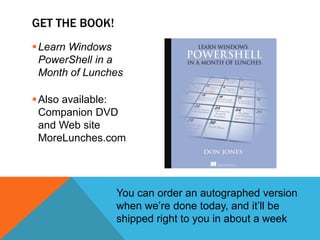
Learn Windows PowerShell in a Month of LunchesAlso available: Companion DVD and Web siteMoreLunches.comGet the book!You can order an autographed version when we’re done today, and it’ll be shipped right to you in about a week
Memes we’ll coverWhat is PowerShell, and Why Should You Care?PowerShell: Command-Line Interface or Scripting Language?PowerShell Patterns and Practices(Learn these and you’ll never need another class)Turning Commands into Reusable Tools
Our goalTo expose you to many of PowerShell’s core patterns and practicesWith this information, you can start to “figure out” PowerShell largely on your own!This is definitely a “crash course,” so prepare your airbags for rapid deploymentWe will be covering a good amount of material very quickly – the goal is to give you an idea of what PowerShell does and how it does it, not to make you an expertIf you’d like a somewhat slower-paced, methodical introduction… Learn Windows PowerShell in a Month of Lunches!Or consider an instructor-led class (MOC 10325A or have me on-site)
Before we get started…Ask Questions!Challenge Assumptions!Share Your Experiences!This is going to mostly involve demos, not slides. You can get a recorded full-day workshop on DVD from http://ConcentratedTech.com/DVDGoPack.php if you miss anything or need a reminderIf you lose any of the URLs, just visit ShellHub.com – I have them all listed thereThis deck is downloadable at ConcentratedTech.com/download
What is Windows PowerShell, and Why Should You Care?
The strategic outlookMicrosoft produced PowerShell because of customer demand for better administrative automation capabilities.In other words, management cares about efficiency. Who knew?Learn PowerShell = Be Efficient = Keep JobIgnore PowerShell = Keep Clicking Through Dialog Boxes = Fries With That?
System requirementsWindows 7 / Windows Server 2008 R2 (incl Core): Installed by defaultWindows Vista / Windows Server 2008: Has v1; Needs v2Windows XP / Windows Server 2003: Has nothing, Needs v2Requires .NET Framework v2 (v3.51 is better; can live side by side with v4)To get PowerShell v2: Search for “Download Management Framework Core”
Caution / gotcha alertOn 64-bit operating systems, you get four PowerShells:Console and ISE in 64-bit form
Console and ISE in 32-bit form - window says “(x86”)Shell extensions can only run in a matching architecture (e.g., 32-bit extension runs in x86 shell). Don’t mess this up.Also make sure window title bar says “Administrator,” or you aren’t administrator.
Is it a CLI?Or a Scripting Language?Hint: If you can run Dir | More,you can use PowerShell.
Really, it’s this easyGet-Mailbox | Sort Size –descending | Select –first 100 | Move-Mailbox –Server FOOOk, that isn’t the 100% syntax… but it’s close, and it gives you an idea of what PowerShell is. Sure, you can treat it like a VBScript replacement… but isn’t this much more cool?The tricky bit is that different audiences tend to approach PowerShell in different ways. Scripters use it to write scripts. Devs use it like “C# lite.” Admins shouldn’t be distracted by those approaches if they’re not appropriate – use it like a shell.
Let the demos beginEnough with the slides. Let’s do this.Start thinking: What would you like to be able to do in Windows PowerShell?Ask me how – I’ll at least tell you, and if I can, I’ll show you. Right now.
Patterns and practicesFinding commands by using Help and Get-CommandLoading new commands (extending the shell)Cmdlet naming conventionsWhy (almost) everything is a disk driveParameters and Interpreting the HelpCore cmdlets: Sorting, Filtering, Selecting, and MorePipeline Parameter Binding (ByValue and ByPropertyName)Working with Windows Management InstrumentationAdding custom columns (properties)Ways of feeding computer names to a –computerName parameter
Building reusable toolsWhile cmdlets are written in C# or Visual Basic……you can do something awfully close in an advanced function using PowerShell’s scripting languageLet’s take a fairly simple pair of commands and turn them into the ultimate re-usable tool, all from scratch. We’ll inventory OS, service back, and BIOS information from multiple computersThen we’ll do it with a command that clears the application log on one or more computers – and implements some more PowerShell patterns and best practices
summaryStart learning PowerShell. Find a task to automate and dive right in.Focus on patterns and practices to teach yourself.We really did cover a lot of stuff, didn’t we?
Thank you!Thanks to all the local folks who helped make this seminar happen……and thanks to Microsoft IT Pro Evangelist Harold Wong, who had the idea!Remember, you can get this deck at ConcentratedTech.com/downloadAny last questions????
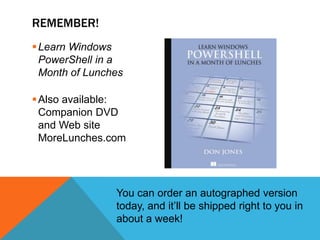
Learn Windows PowerShell in a Month of LunchesAlso available: Companion DVD and Web siteMoreLunches.comRemember!You can order an autographed version today, and it’ll be shipped right to you in about a week!
My contact informationQ&A: http://connect.ConcentratedTech.comTwitter: @concentrateddonLinkedIn: http://linkedin.com/in/concentratedDonOr send a text message containing   DONJ   to 50500 – you’ll get a reply with my contact info and a vCard linkPrivate On-Site Training Available – contact sales@concentratedtech.com.Flat-rate pricing includes travel expenses (3-5 day classes)Get this deck from ConcentratedTech.com/downloadLook for “Jones-2011WestCoastTour.zip”
Go forth and shell!(before v3 comes out and adds a bunch of stuff)

Meet Windows PowerShell

  • 1.
    Meet windows powershell!(nomatter who you are)
  • 2.
    This slide deckwas used in one of our many conference presentations. We hope you enjoy it, and invite you to use it within your own organization however you like.For more information on our company, including information on private classes and upcoming conference appearances, please visit our Web site, www.ConcentratedTech.com. For links to newly-posted decks, follow us on Twitter:@concentrateddon or @concentratdgregThis work is copyright ©Concentrated Technology, LLC
  • 3.
    introductionsDon JonesSenior Partnerand Principal Technologist, Concentrated Technologywww.ConcentratedTech.comWindows PowerShell MVP Award RecipientBlogger at WindowsITPro.comColumnist for Microsoft TechNet Magazine and Redmond Magazinewww.TechNetMagazine.com • www.RedmondMag.comWindows PowerShell instructor and enthusiast
  • 4.
    Learn Windows PowerShellin a Month of LunchesAlso available: Companion DVD and Web siteMoreLunches.comGet the book!You can order an autographed version when we’re done today, and it’ll be shipped right to you in about a week
  • 5.
    Memes we’ll coverWhatis PowerShell, and Why Should You Care?PowerShell: Command-Line Interface or Scripting Language?PowerShell Patterns and Practices(Learn these and you’ll never need another class)Turning Commands into Reusable Tools
  • 6.
    Our goalTo exposeyou to many of PowerShell’s core patterns and practicesWith this information, you can start to “figure out” PowerShell largely on your own!This is definitely a “crash course,” so prepare your airbags for rapid deploymentWe will be covering a good amount of material very quickly – the goal is to give you an idea of what PowerShell does and how it does it, not to make you an expertIf you’d like a somewhat slower-paced, methodical introduction… Learn Windows PowerShell in a Month of Lunches!Or consider an instructor-led class (MOC 10325A or have me on-site)
  • 7.
    Before we getstarted…Ask Questions!Challenge Assumptions!Share Your Experiences!This is going to mostly involve demos, not slides. You can get a recorded full-day workshop on DVD from http://ConcentratedTech.com/DVDGoPack.php if you miss anything or need a reminderIf you lose any of the URLs, just visit ShellHub.com – I have them all listed thereThis deck is downloadable at ConcentratedTech.com/download
  • 8.
    What is WindowsPowerShell, and Why Should You Care?
  • 9.
    The strategic outlookMicrosoftproduced PowerShell because of customer demand for better administrative automation capabilities.In other words, management cares about efficiency. Who knew?Learn PowerShell = Be Efficient = Keep JobIgnore PowerShell = Keep Clicking Through Dialog Boxes = Fries With That?
  • 10.
    System requirementsWindows 7/ Windows Server 2008 R2 (incl Core): Installed by defaultWindows Vista / Windows Server 2008: Has v1; Needs v2Windows XP / Windows Server 2003: Has nothing, Needs v2Requires .NET Framework v2 (v3.51 is better; can live side by side with v4)To get PowerShell v2: Search for “Download Management Framework Core”
  • 11.
    Caution / gotchaalertOn 64-bit operating systems, you get four PowerShells:Console and ISE in 64-bit form
  • 12.
    Console and ISEin 32-bit form - window says “(x86”)Shell extensions can only run in a matching architecture (e.g., 32-bit extension runs in x86 shell). Don’t mess this up.Also make sure window title bar says “Administrator,” or you aren’t administrator.
  • 13.
    Is it aCLI?Or a Scripting Language?Hint: If you can run Dir | More,you can use PowerShell.
  • 14.
    Really, it’s thiseasyGet-Mailbox | Sort Size –descending | Select –first 100 | Move-Mailbox –Server FOOOk, that isn’t the 100% syntax… but it’s close, and it gives you an idea of what PowerShell is. Sure, you can treat it like a VBScript replacement… but isn’t this much more cool?The tricky bit is that different audiences tend to approach PowerShell in different ways. Scripters use it to write scripts. Devs use it like “C# lite.” Admins shouldn’t be distracted by those approaches if they’re not appropriate – use it like a shell.
  • 15.
    Let the demosbeginEnough with the slides. Let’s do this.Start thinking: What would you like to be able to do in Windows PowerShell?Ask me how – I’ll at least tell you, and if I can, I’ll show you. Right now.
  • 16.
    Patterns and practicesFindingcommands by using Help and Get-CommandLoading new commands (extending the shell)Cmdlet naming conventionsWhy (almost) everything is a disk driveParameters and Interpreting the HelpCore cmdlets: Sorting, Filtering, Selecting, and MorePipeline Parameter Binding (ByValue and ByPropertyName)Working with Windows Management InstrumentationAdding custom columns (properties)Ways of feeding computer names to a –computerName parameter
  • 17.
    Building reusable toolsWhilecmdlets are written in C# or Visual Basic……you can do something awfully close in an advanced function using PowerShell’s scripting languageLet’s take a fairly simple pair of commands and turn them into the ultimate re-usable tool, all from scratch. We’ll inventory OS, service back, and BIOS information from multiple computersThen we’ll do it with a command that clears the application log on one or more computers – and implements some more PowerShell patterns and best practices
  • 18.
    summaryStart learning PowerShell.Find a task to automate and dive right in.Focus on patterns and practices to teach yourself.We really did cover a lot of stuff, didn’t we?
  • 19.
    Thank you!Thanks toall the local folks who helped make this seminar happen……and thanks to Microsoft IT Pro Evangelist Harold Wong, who had the idea!Remember, you can get this deck at ConcentratedTech.com/downloadAny last questions????
  • 20.
    Learn Windows PowerShellin a Month of LunchesAlso available: Companion DVD and Web siteMoreLunches.comRemember!You can order an autographed version today, and it’ll be shipped right to you in about a week!
  • 21.
    My contact informationQ&A:http://connect.ConcentratedTech.comTwitter: @concentrateddonLinkedIn: http://linkedin.com/in/concentratedDonOr send a text message containing DONJ to 50500 – you’ll get a reply with my contact info and a vCard linkPrivate On-Site Training Available – contact sales@concentratedtech.com.Flat-rate pricing includes travel expenses (3-5 day classes)Get this deck from ConcentratedTech.com/downloadLook for “Jones-2011WestCoastTour.zip”
  • 22.
    Go forth andshell!(before v3 comes out and adds a bunch of stuff)