Malware Fall 2006
Overview Malware Specific problems Computer virus, worms, trojan horses Adware, spyware Web bugs Cookies Phishing Email spoofing Solutions/Precautions
What’s Malware? Mal icious soft ware Software with malicious intent Different from software with bugs
Viruses Programs that attach themselves to another program to gain access to your machine May do nothing on your machine or may destroy all your files Seek to use your machine as a launching point to infect other machines Expand exponentially through recursion
Worms Like a virus but they are self-contained programs (they don’t need a host)  Copy themselves from machine-to-machine Scan for other vulnerable machines
Adware Some programs are “free” but they support their costs by sending ads to your machine i.e. Kazaa
Spyware You download a music player The music player includes an additional program that is installed and runs continuously This program records the websites you visit and sends them to a database
How Bad is The Threat? (Bad!) 2006 Internet Security Emerging Threat List (2/15/06)  (http://www.safetyonline.org) Hackers use Instant Messaging to spread viruses and worms  Phishing fraud becomes more prevalent and sophisticated  Viruses attack cell phones and PDAs  Hackers target online brokerage accounts  Internet crimes go unreported
What You Can (and Should) Do Install and run antivirus software Update virus definitions weekly UVA: free Norton Anti-virus Keep your computer’s operating system and programs updated Example: MS Windows, run Windows Update, weekly Run anti-spyware software Run regular sweeps/scans UVA: free SpySweeper
E-mail spoofing You receive e-mail appearing to be from one source….  But it's actually from another source Sender’s goal?  To trick you into: Sending secure info (password, account number) Running an attachment Clicking on a link that runs a program
What enables spoofing? Life was simpler once upon a time… Expensive and difficult to put a mail-server on the net (and have administrator privileges on it) Managed by responsible admins: business, government, universities Open standards Today: Easy, cheap, well-understood by everyone
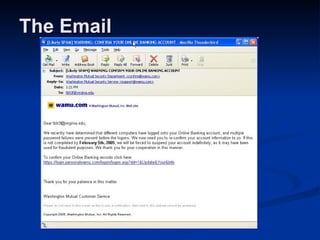
The Email
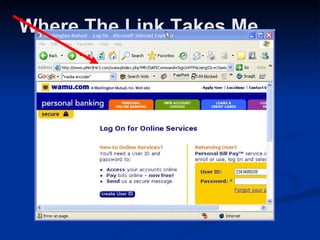
Where The Link Takes Me
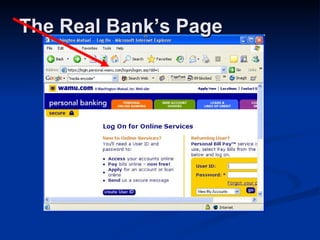
The Real Bank’s Page
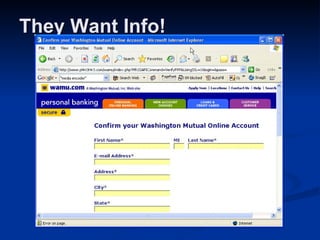
They Want Info!
Phishing A attempt to gain personal information for purposes of identity theft, etc. Faked e-mail messages appear to come from legitimate, official source Fool you into divulging personal data such as account numbers passwords credit card numbers Social Security numbers No company will ever ask you for such info by e-mail.   If in doubt, call them or contact them directly (not by replying)
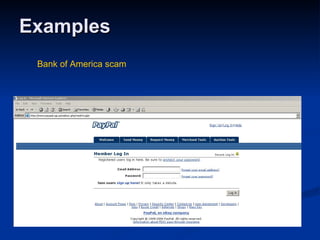
Examples Bank of America scam
E-mail Lessons Do not open attachments unless you know what they are Antivirus software checks attachments as you open them! Suspect spoofing Look for anything odd in the message Double-check with sender Phishing: don’t get caught Be suspicious. Look for your name, account number, etc. in an e-mail Don’t click on links, go directly to the site.
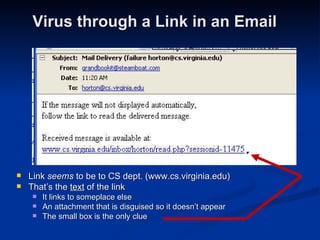
Virus through a Link in an Email Link  seems  to be to CS dept. (www.cs.virginia.edu) That’s the  text  of the link It links to someplace else An attachment that is disguised so it doesn’t appear The small box is the only clue
What Is a Cookie? A small piece of information stored by your web-browser on your PC when you visit a site What’s stored: A URL related to the site you visited A name/value pair (the information content) (Optional) An expiration date Why is it a “cookie”?  An old CS term for a chunk of data used obscurely
Cookies: Web-servers Store Some Info on your PC When sending back a page, server also sends a cookie Your browser stores it on your PC Later, visit same site You request a page  and  your browser has a cookie matching that URL on your PC Browser sends URL  and  cookie to web-server Web-server processes cookie May return updated cookies with page
Cookies Can Be Beneficial Shopping Carts Server creates a cart, stored on server You visit other pages, but a cookie lets the server know you’re the person who created that cart Other personalization “Welcome back, Jane User!” “Items you viewed recently are…” Recognizing legitimate users for a site Register and log-in, but then a cookie means you don’t have to log-in every time
What’s a Web Bug? Graphic image on a Web page or in an Email message Links to an external site, not an image embedded in your message Designed to monitor who is reading the Web page or Email message May be invisible (size 1 pixel by 1 pixel) or not Sometimes knowns as a "clear GIFs", "1-by-1 GIFs" or "invisible GIFs“ (More info:  http:// www.eff.org/Privacy/Marketing/web_bug.html )
How Does This Work? Web bug: on some other server Remember: when a server delivers a HTML file or an image file, it logs this A page or an email can have an image that’s stored on some external site Thus the server there logs delivery of that image (even if it’s invisible to you)
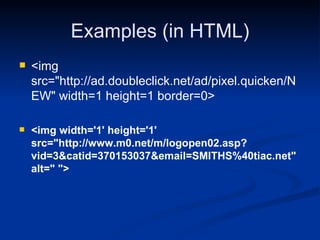
Examples (in HTML) <img src=&quot;http://ad.doubleclick.net/ad/pixel.quicken/NEW&quot; width=1 height=1 border=0> <img width='1' height='1' src=&quot;http://www.m0.net/m/logopen02.asp? vid=3&catid=370153037&email=SMITHS%40tiac.net&quot; alt=&quot; &quot;>
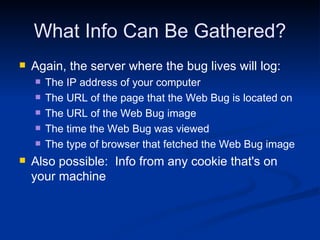
What Info Can Be Gathered? Again, the server where the bug lives will log: The IP address of your computer  The URL of the page that the Web Bug is located on The URL of the Web Bug image The time the Web Bug was viewed The type of browser that fetched the Web Bug image Also possible:  Info from any cookie that's on your machine
Web Bugs: What Can You Do? Not easy to identify web bugs New email clients disable image display
Browser Hijack An extremely nasty adware Resets homepage to a particular site Ads, porn – something you don’t want Any change you make doesn’t affect it Software running on your machine Does the usual adware/spyware stuff Also changes your browser settings Runs when system starts – changes the settings back
Protecting Your Computer Practice the core three protections  Install Configure Regularly update  Do not open unexpected emails  Do not download attachments in unsolicited emails  Take precautions to protect your mobile devices  Reporter Internet crimes to proper authorities
Passwords Use strong passwords At least 8 characters with numbers and symbols Don’t use real words Don’t use the same password for every online account Vary your passwords for each site, and use a password profiler tool
Resources Top 8 Cyber Security Practices  http:// www.staysafeonline.info/practices/index.html
Review Midterm next Wednesday Another review session Tuesday 11AM Short answer and multiple choice.
Outline Ethics: no ethics on exam Internet history:  what’s the difference between the web and the Internet Packet switching HTML Be able to translate some basic HTML into output (formatting, links, images) CSS: what is the purpose
Outline II JavaScript: no JavaScript code Difference between dynamic and static pages Spreadsheets Why use them? Why use referencing?  Produce output from sample formulas PowerPoint Terms Search Engines What do spiders do?  MetaTags?
Outline III Digital audio What is sampling?  Compression? Malware Know types and some good practices Not on midterm: Ethics, binary & hex, JavaScript code

Introduction to Malware

  • 1.
  • 2.
    Overview Malware Specificproblems Computer virus, worms, trojan horses Adware, spyware Web bugs Cookies Phishing Email spoofing Solutions/Precautions
  • 3.
    What’s Malware? Malicious soft ware Software with malicious intent Different from software with bugs
  • 4.
    Viruses Programs thatattach themselves to another program to gain access to your machine May do nothing on your machine or may destroy all your files Seek to use your machine as a launching point to infect other machines Expand exponentially through recursion
  • 5.
    Worms Like avirus but they are self-contained programs (they don’t need a host) Copy themselves from machine-to-machine Scan for other vulnerable machines
  • 6.
    Adware Some programsare “free” but they support their costs by sending ads to your machine i.e. Kazaa
  • 7.
    Spyware You downloada music player The music player includes an additional program that is installed and runs continuously This program records the websites you visit and sends them to a database
  • 8.
    How Bad isThe Threat? (Bad!) 2006 Internet Security Emerging Threat List (2/15/06) (http://www.safetyonline.org) Hackers use Instant Messaging to spread viruses and worms Phishing fraud becomes more prevalent and sophisticated Viruses attack cell phones and PDAs Hackers target online brokerage accounts Internet crimes go unreported
  • 9.
    What You Can(and Should) Do Install and run antivirus software Update virus definitions weekly UVA: free Norton Anti-virus Keep your computer’s operating system and programs updated Example: MS Windows, run Windows Update, weekly Run anti-spyware software Run regular sweeps/scans UVA: free SpySweeper
  • 10.
    E-mail spoofing Youreceive e-mail appearing to be from one source…. But it's actually from another source Sender’s goal? To trick you into: Sending secure info (password, account number) Running an attachment Clicking on a link that runs a program
  • 11.
    What enables spoofing?Life was simpler once upon a time… Expensive and difficult to put a mail-server on the net (and have administrator privileges on it) Managed by responsible admins: business, government, universities Open standards Today: Easy, cheap, well-understood by everyone
  • 12.
  • 13.
  • 14.
  • 15.
  • 16.
    Phishing A attemptto gain personal information for purposes of identity theft, etc. Faked e-mail messages appear to come from legitimate, official source Fool you into divulging personal data such as account numbers passwords credit card numbers Social Security numbers No company will ever ask you for such info by e-mail. If in doubt, call them or contact them directly (not by replying)
  • 17.
    Examples Bank ofAmerica scam
  • 18.
    E-mail Lessons Donot open attachments unless you know what they are Antivirus software checks attachments as you open them! Suspect spoofing Look for anything odd in the message Double-check with sender Phishing: don’t get caught Be suspicious. Look for your name, account number, etc. in an e-mail Don’t click on links, go directly to the site.
  • 19.
    Virus through aLink in an Email Link seems to be to CS dept. (www.cs.virginia.edu) That’s the text of the link It links to someplace else An attachment that is disguised so it doesn’t appear The small box is the only clue
  • 20.
    What Is aCookie? A small piece of information stored by your web-browser on your PC when you visit a site What’s stored: A URL related to the site you visited A name/value pair (the information content) (Optional) An expiration date Why is it a “cookie”? An old CS term for a chunk of data used obscurely
  • 21.
    Cookies: Web-servers StoreSome Info on your PC When sending back a page, server also sends a cookie Your browser stores it on your PC Later, visit same site You request a page and your browser has a cookie matching that URL on your PC Browser sends URL and cookie to web-server Web-server processes cookie May return updated cookies with page
  • 22.
    Cookies Can BeBeneficial Shopping Carts Server creates a cart, stored on server You visit other pages, but a cookie lets the server know you’re the person who created that cart Other personalization “Welcome back, Jane User!” “Items you viewed recently are…” Recognizing legitimate users for a site Register and log-in, but then a cookie means you don’t have to log-in every time
  • 23.
    What’s a WebBug? Graphic image on a Web page or in an Email message Links to an external site, not an image embedded in your message Designed to monitor who is reading the Web page or Email message May be invisible (size 1 pixel by 1 pixel) or not Sometimes knowns as a &quot;clear GIFs&quot;, &quot;1-by-1 GIFs&quot; or &quot;invisible GIFs“ (More info: http:// www.eff.org/Privacy/Marketing/web_bug.html )
  • 24.
    How Does ThisWork? Web bug: on some other server Remember: when a server delivers a HTML file or an image file, it logs this A page or an email can have an image that’s stored on some external site Thus the server there logs delivery of that image (even if it’s invisible to you)
  • 25.
    Examples (in HTML)<img src=&quot;http://ad.doubleclick.net/ad/pixel.quicken/NEW&quot; width=1 height=1 border=0> <img width='1' height='1' src=&quot;http://www.m0.net/m/logopen02.asp? vid=3&catid=370153037&email=SMITHS%40tiac.net&quot; alt=&quot; &quot;>
  • 26.
    What Info CanBe Gathered? Again, the server where the bug lives will log: The IP address of your computer The URL of the page that the Web Bug is located on The URL of the Web Bug image The time the Web Bug was viewed The type of browser that fetched the Web Bug image Also possible: Info from any cookie that's on your machine
  • 27.
    Web Bugs: WhatCan You Do? Not easy to identify web bugs New email clients disable image display
  • 28.
    Browser Hijack Anextremely nasty adware Resets homepage to a particular site Ads, porn – something you don’t want Any change you make doesn’t affect it Software running on your machine Does the usual adware/spyware stuff Also changes your browser settings Runs when system starts – changes the settings back
  • 29.
    Protecting Your ComputerPractice the core three protections Install Configure Regularly update Do not open unexpected emails Do not download attachments in unsolicited emails Take precautions to protect your mobile devices Reporter Internet crimes to proper authorities
  • 30.
    Passwords Use strongpasswords At least 8 characters with numbers and symbols Don’t use real words Don’t use the same password for every online account Vary your passwords for each site, and use a password profiler tool
  • 31.
    Resources Top 8Cyber Security Practices http:// www.staysafeonline.info/practices/index.html
  • 32.
    Review Midterm nextWednesday Another review session Tuesday 11AM Short answer and multiple choice.
  • 33.
    Outline Ethics: noethics on exam Internet history: what’s the difference between the web and the Internet Packet switching HTML Be able to translate some basic HTML into output (formatting, links, images) CSS: what is the purpose
  • 34.
    Outline II JavaScript:no JavaScript code Difference between dynamic and static pages Spreadsheets Why use them? Why use referencing? Produce output from sample formulas PowerPoint Terms Search Engines What do spiders do? MetaTags?
  • 35.
    Outline III Digitalaudio What is sampling? Compression? Malware Know types and some good practices Not on midterm: Ethics, binary & hex, JavaScript code