
Microsoft Windows 7  Security Ronen Gottlib, CISSP Information Security Lead Microsoft
Enhance Security & Control  Protect Users  & Infrastructure AppLocker™ (Windows 7 Enterprise) controls what applications run Internet Explorer 8 helps keep users safe online Protect Data on PCs  & Devices BitLocker To Go™ (Windows 7 Enterprise) protects data  on removable drives BitLocker™ simplifies encryptions and key management for all drives Build on Windows Vista Security Foundation  User Account Control prompts less Security Development Lifecycle for defense in depth
Data Protection Protect data on internal and removable drives Mandate the use of encryption with Group Policies Store recovery information in Active Directory for manageability  Simplify BitLocker setup and configuration of primary hard drive BitLocker To Go™  (Windows 7 Enterprise) Worldwide Shipments (000s) Gartner “Forecast: USB Flash Drives, Worldwide, 2001-2011” 24 September 2007, Joseph Unsworth   Gartner “Dataquest Insight: PC Forecast Analysis, Worldwide, 1H08” 18 April 2008, Mikako Kitagawa, George Shiffler III  +
Application Control Eliminate unwanted/unknown applications in your network Enforce application standardization within your organization Easily create and manage flexible rules using Group Policy AppLocker™ (Windows 7 Enterprise) Users can install and run unapproved applications Even standard users can install some types of software Unauthorized applications may: Introduce malware Increase helpdesk calls Reduce user productivity Undermine compliance efforts
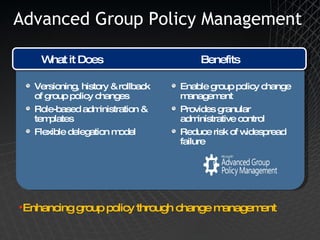
Advanced Group Policy Management Enable group policy change management Provides granular administrative control Reduce risk of widespread failure Versioning, history & rollback of group policy changes Role-based administration & templates Flexible delegation model What it Does Benefits Enhancing group policy through change management
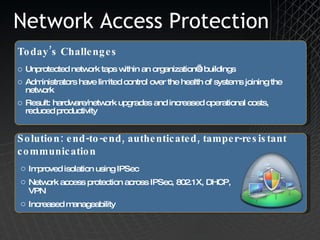
Network Access Protection Unprotected network taps within an organization’s buildings Administrators have limited control over the health of systems joining the network Result: hardware/network upgrades and increased operational costs, reduced productivity Today’s Challenges Solution: end-to-end, authenticated, tamper-resistant communication Improved isolation using IPSec Network access protection across IPSec, 802.1X, DHCP, VPN Increased manageability
Forefront UAG 2010 DirectAccess and RDG Idan Plotnik Security Engineer Forefront MVP
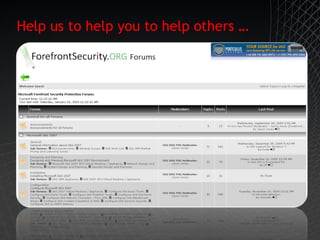
Help us to help you to help others …
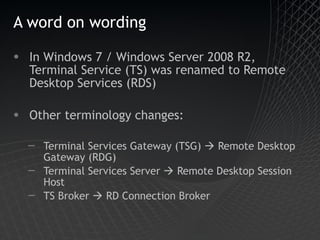
A word on wording In Windows 7 / Windows Server 2008 R2, Terminal Service (TS) was renamed to Remote Desktop Services (RDS) Other terminology changes: Terminal Services Gateway (TSG)    Remote Desktop Gateway (RDG) Terminal Services Server    Remote Desktop Session Host TS Broker    RD Connection Broker
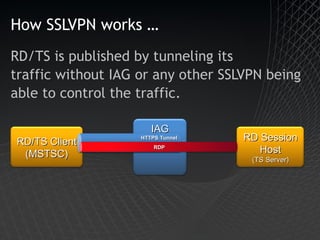
How SSLVPN works … RD/TS is published by tunneling its traffic without IAG or any other SSLVPN being  able to control the traffic. IAG RD/TS Client (MSTSC) RD Session Host (TS Server) HTTPS Tunnel RDP
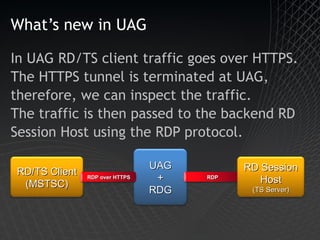
What’s new in UAG In UAG RD/TS client traffic goes over HTTPS. The HTTPS tunnel is terminated at UAG, therefore, we can inspect the traffic. The traffic is then passed to the backend RD Session Host using the RDP protocol. UAG + RDG RD/TS Client (MSTSC) RDP over HTTPS RDP RD Session Host (TS Server)
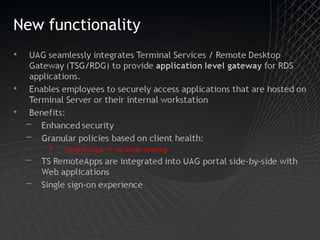
New functionality
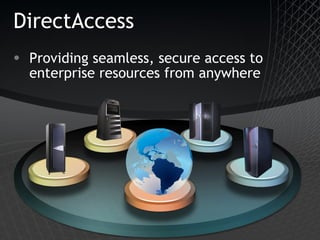
DirectAccess Providing seamless, secure access to enterprise resources from anywhere
Always On Always connected No user action required Adapts to changing networks
Secure Encrypted by default 2 Factor AuthN Strong Authentication! Computer AuthN User AuthN Granular access control Coexists with existing edge, health, and access policies
Manageable Reach out to previously untouchable machines Allows remote clients to process Group Policies Ongoing updates (AV/WSUS etc …) from the internal infrastructure NAP integration for health compliance Consolidate Edge Infrastructure
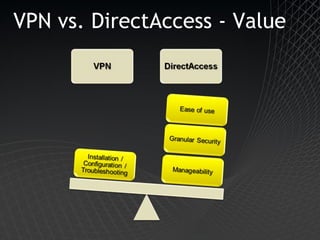
VPN vs. DirectAccess - Value
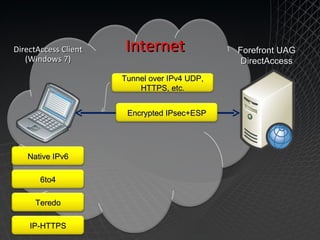
Forefront UAG DirectAccess DirectAccess Client (Windows 7) Internet Native IPv6 6to4 Teredo IP-HTTPS Tunnel over IPv4 UDP, HTTPS, etc. Encrypted IPsec+ESP
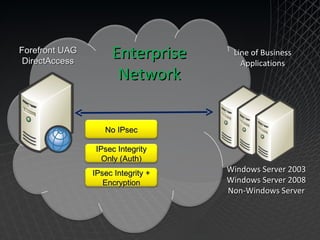
Enterprise Network Forefront UAG DirectAccess Line of Business Applications No IPsec IPsec Integrity Only (Auth) IPsec Integrity + Encryption Windows Server 2003 Windows Server 2008 Non-Windows Server
3 Deployment Models
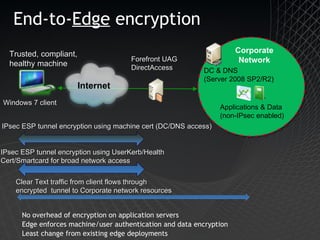
End-to- Edge  encryption  No overhead of encryption on application servers Edge enforces machine/user authentication and data encryption Least change from existing edge deployments Trusted, compliant, healthy machine Windows 7 client Applications & Data (non-IPsec enabled) DC & DNS (Server 2008 SP2/R2) Forefront UAG DirectAccess IPsec ESP tunnel encryption using machine cert (DC/DNS access) Clear Text traffic from client flows through encrypted  tunnel to Corporate network resources IPsec ESP tunnel encryption using UserKerb/Health Cert/Smartcard for broad network access Corporate Network Internet
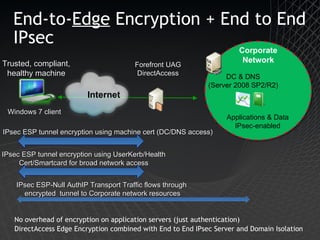
End-to- Edge  Encryption + End to End IPsec No overhead of encryption on application servers (just authentication) DirectAccess Edge Encryption combined with End to End IPsec Server and Domain Isolation Trusted, compliant, healthy machine Windows 7 client Corporate Network Applications & Data IPsec-enabled IPsec ESP-Null AuthIP Transport Traffic flows through  encrypted  tunnel to Corporate network resources Forefront UAG DirectAccess IPsec ESP tunnel encryption using UserKerb/Health Cert/Smartcard for broad network access IPsec ESP tunnel encryption using machine cert (DC/DNS access) DC & DNS (Server 2008 SP2/R2) Internet
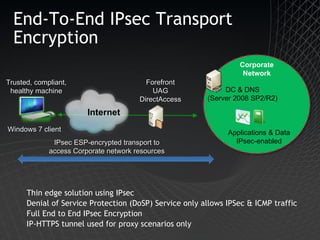
End-To-End IPsec Transport Encryption Thin edge solution using IPsec Denial of Service Protection (DoSP) Service only allows IPSec & ICMP traffic Full End to End IPsec Encryption IP-HTTPS tunnel used for proxy scenarios only Trusted, compliant, healthy machine Windows 7 client Corporate Network Applications & Data IPsec-enabled IPsec ESP-encrypted transport to access Corporate network resources Forefront UAG DirectAccess DC & DNS (Server 2008 SP2/R2) Internet
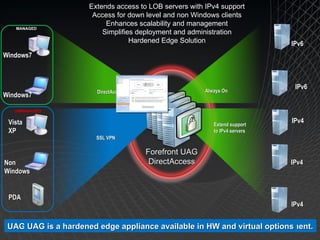
IPv6 IPv6 Always On Windows7 IPv4 IPv4 IPv4 Forefront UAG DirectAccess Extend support to IPv4 servers UAG improves adoption and extends access to existing infrastructure Extends access to LOB servers with IPv4 support Access for down level and non Windows clients Enhances scalability and management Simplifies deployment and administration Hardened Edge Solution MANAGED Vista XP UNMANAGED Non Windows PDA DirectAccess SSL VPN UAG provides access for down level and non Windows clients UAG enhances scale and management with integrated LB and array capabilities. UAG uses wizards and tools to simplify deployments and ongoing management. UAG is a hardened edge appliance available in HW and virtual options Windows7
DEMO

Windows 7 by microsoft

  • 1.
    Microsoft Windows 7 Security Ronen Gottlib, CISSP Information Security Lead Microsoft
  • 2.
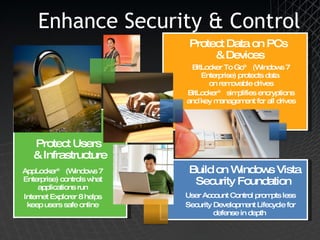
    Enhance Security &Control Protect Users & Infrastructure AppLocker™ (Windows 7 Enterprise) controls what applications run Internet Explorer 8 helps keep users safe online Protect Data on PCs & Devices BitLocker To Go™ (Windows 7 Enterprise) protects data on removable drives BitLocker™ simplifies encryptions and key management for all drives Build on Windows Vista Security Foundation User Account Control prompts less Security Development Lifecycle for defense in depth
  • 3.
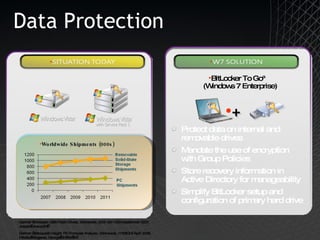
    Data Protection Protectdata on internal and removable drives Mandate the use of encryption with Group Policies Store recovery information in Active Directory for manageability Simplify BitLocker setup and configuration of primary hard drive BitLocker To Go™ (Windows 7 Enterprise) Worldwide Shipments (000s) Gartner “Forecast: USB Flash Drives, Worldwide, 2001-2011” 24 September 2007, Joseph Unsworth   Gartner “Dataquest Insight: PC Forecast Analysis, Worldwide, 1H08” 18 April 2008, Mikako Kitagawa, George Shiffler III  +
  • 4.
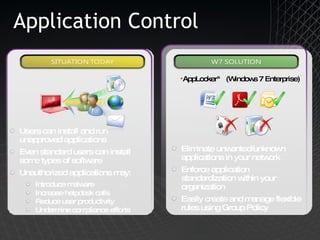
    Application Control Eliminateunwanted/unknown applications in your network Enforce application standardization within your organization Easily create and manage flexible rules using Group Policy AppLocker™ (Windows 7 Enterprise) Users can install and run unapproved applications Even standard users can install some types of software Unauthorized applications may: Introduce malware Increase helpdesk calls Reduce user productivity Undermine compliance efforts
  • 5.
    Advanced Group PolicyManagement Enable group policy change management Provides granular administrative control Reduce risk of widespread failure Versioning, history & rollback of group policy changes Role-based administration & templates Flexible delegation model What it Does Benefits Enhancing group policy through change management
  • 6.
    Network Access ProtectionUnprotected network taps within an organization’s buildings Administrators have limited control over the health of systems joining the network Result: hardware/network upgrades and increased operational costs, reduced productivity Today’s Challenges Solution: end-to-end, authenticated, tamper-resistant communication Improved isolation using IPSec Network access protection across IPSec, 802.1X, DHCP, VPN Increased manageability
  • 7.
    Forefront UAG 2010DirectAccess and RDG Idan Plotnik Security Engineer Forefront MVP
  • 8.
    Help us tohelp you to help others …
  • 9.
    A word onwording In Windows 7 / Windows Server 2008 R2, Terminal Service (TS) was renamed to Remote Desktop Services (RDS) Other terminology changes: Terminal Services Gateway (TSG)  Remote Desktop Gateway (RDG) Terminal Services Server  Remote Desktop Session Host TS Broker  RD Connection Broker
  • 10.
    How SSLVPN works… RD/TS is published by tunneling its traffic without IAG or any other SSLVPN being able to control the traffic. IAG RD/TS Client (MSTSC) RD Session Host (TS Server) HTTPS Tunnel RDP
  • 11.
    What’s new inUAG In UAG RD/TS client traffic goes over HTTPS. The HTTPS tunnel is terminated at UAG, therefore, we can inspect the traffic. The traffic is then passed to the backend RD Session Host using the RDP protocol. UAG + RDG RD/TS Client (MSTSC) RDP over HTTPS RDP RD Session Host (TS Server)
  • 12.
  • 13.
    DirectAccess Providing seamless,secure access to enterprise resources from anywhere
  • 14.
    Always On Alwaysconnected No user action required Adapts to changing networks
  • 15.
    Secure Encrypted bydefault 2 Factor AuthN Strong Authentication! Computer AuthN User AuthN Granular access control Coexists with existing edge, health, and access policies
  • 16.
    Manageable Reach outto previously untouchable machines Allows remote clients to process Group Policies Ongoing updates (AV/WSUS etc …) from the internal infrastructure NAP integration for health compliance Consolidate Edge Infrastructure
  • 17.
  • 18.
    Forefront UAG DirectAccessDirectAccess Client (Windows 7) Internet Native IPv6 6to4 Teredo IP-HTTPS Tunnel over IPv4 UDP, HTTPS, etc. Encrypted IPsec+ESP
  • 19.
    Enterprise Network ForefrontUAG DirectAccess Line of Business Applications No IPsec IPsec Integrity Only (Auth) IPsec Integrity + Encryption Windows Server 2003 Windows Server 2008 Non-Windows Server
  • 20.
  • 21.
    End-to- Edge encryption No overhead of encryption on application servers Edge enforces machine/user authentication and data encryption Least change from existing edge deployments Trusted, compliant, healthy machine Windows 7 client Applications & Data (non-IPsec enabled) DC & DNS (Server 2008 SP2/R2) Forefront UAG DirectAccess IPsec ESP tunnel encryption using machine cert (DC/DNS access) Clear Text traffic from client flows through encrypted tunnel to Corporate network resources IPsec ESP tunnel encryption using UserKerb/Health Cert/Smartcard for broad network access Corporate Network Internet
  • 22.
    End-to- Edge Encryption + End to End IPsec No overhead of encryption on application servers (just authentication) DirectAccess Edge Encryption combined with End to End IPsec Server and Domain Isolation Trusted, compliant, healthy machine Windows 7 client Corporate Network Applications & Data IPsec-enabled IPsec ESP-Null AuthIP Transport Traffic flows through encrypted tunnel to Corporate network resources Forefront UAG DirectAccess IPsec ESP tunnel encryption using UserKerb/Health Cert/Smartcard for broad network access IPsec ESP tunnel encryption using machine cert (DC/DNS access) DC & DNS (Server 2008 SP2/R2) Internet
  • 23.
    End-To-End IPsec TransportEncryption Thin edge solution using IPsec Denial of Service Protection (DoSP) Service only allows IPSec & ICMP traffic Full End to End IPsec Encryption IP-HTTPS tunnel used for proxy scenarios only Trusted, compliant, healthy machine Windows 7 client Corporate Network Applications & Data IPsec-enabled IPsec ESP-encrypted transport to access Corporate network resources Forefront UAG DirectAccess DC & DNS (Server 2008 SP2/R2) Internet
  • 24.
    IPv6 IPv6 AlwaysOn Windows7 IPv4 IPv4 IPv4 Forefront UAG DirectAccess Extend support to IPv4 servers UAG improves adoption and extends access to existing infrastructure Extends access to LOB servers with IPv4 support Access for down level and non Windows clients Enhances scalability and management Simplifies deployment and administration Hardened Edge Solution MANAGED Vista XP UNMANAGED Non Windows PDA DirectAccess SSL VPN UAG provides access for down level and non Windows clients UAG enhances scale and management with integrated LB and array capabilities. UAG uses wizards and tools to simplify deployments and ongoing management. UAG is a hardened edge appliance available in HW and virtual options Windows7
  • 25.

Editor's Notes

  • #3 Windows 7 Partner Event © 2009 Microsoft Corporation. All rights reserved. Microsoft, Windows, Windows Vista and other product names are or may be registered trademarks and/or trademarks in the U.S. and/or other countries. The information herein is for informational purposes only and represents the current view of Microsoft Corporation as of the date of this presentation. Because Microsoft must respond to changing market conditions, it should not be interpreted to be a commitment on the part of Microsoft, and Microsoft cannot guarantee the accuracy of any information provided after the date of this presentation. MICROSOFT MAKES NO WARRANTIES, EXPRESS, IMPLIED OR STATUTORY, AS TO THE INFORMATION IN THIS PRESENTATION.
  • #4 Microsoft Confiential: Preliminary Information: NDA Only
  • #5 Microsoft Confiential: Preliminary Information: NDA Only
  • #6 Microsoft Confiential: Preliminary Information: NDA Only