Introduction to
  Apache Pig
      Adam Kawa
The 3rd Meeting of WHUG
     June 21, 2012
What can I tell about Apache
Hadoop?
Apache Hadoop is GREAT!


Image from http://gigaom2.files.wordpress.com/2012/06/shutterstock_60414424.jpg
What can I tell about MapReduce?
Developing MapReduce jobs can be
challenging


Image from http://www.scotclimb.org.uk/images/big_nightfall.jpg
What can I tell about MapReduce?
Developing MapReduce jobs can be
challenging
● Jobs are written (mainly) in Java


Image from http://www.cssbreeze.com/wp-content/uploads/2011/05/angry-computer-large.jpg
What can I tell about MapReduce?
Developing MapReduce jobs can be
challenging
● Jobs are written (mainly) in Java
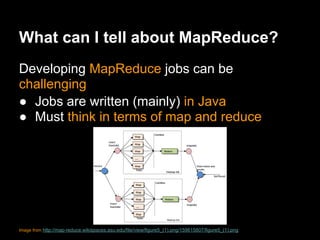
● Must think in terms of map and reduce


Image from http://map-reduce.wikispaces.asu.edu/file/view/figure5_(1).png/159615807/figure5_(1).png
What can I tell about MapReduce?
Developing MapReduce jobs can be
challenging
● Jobs are written (mainly) in Java
● Must think in terms of map and reduce
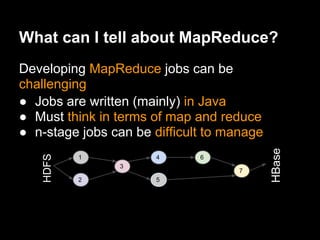
● n-stage jobs can be difficult to manage


                                            HBase
    HDFS


           1           4      6
                3
                                    7
           2           5
What can I tell about MapReduce?
Developing MapReduce jobs can be
challenging
● Jobs are written (mainly) in Java
● Must think in terms of map and reduce
● n-stage jobs can be difficult to manage
● Many common operations (e.g. filters,
  projections, joins) requires a custom code


                          Image from
                          http://kmonadollaraday.files.wordpress.
                          com/2011/05/wheelsel6.gif
What can I tell about MapReduce?
Developing MapReduce jobs can be
challenging
● Jobs are written (mainly) in Java
● Must think in terms of map and reduce
● n-stage jobs can be difficult to manage
● Many common operations (e.g. filters,
  projections, joins) requires a custom code
● Rich data types also require a custom code


                            Image from the Internet
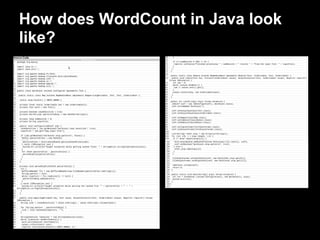
How does WordCount in Java look
like?
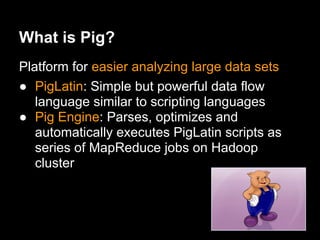
What is Pig?
Platform for easier analyzing large data sets
● PigLatin: Simple but powerful data flow
   language similar to scripting languages
● Pig Engine: Parses, optimizes and
   automatically executes PigLatin scripts as
   series of MapReduce jobs on Hadoop
   cluster
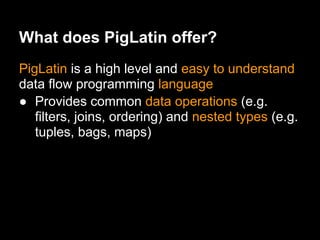
What does PigLatin offer?
PigLatin is a high level and easy to understand
data flow programming language
● Provides common data operations (e.g.
   filters, joins, ordering) and nested types (e.g.
   tuples, bags, maps)
What does PigLatin offer?
PigLatin is a high level and easy to understand
data flow programming language
● Provides common data operations (e.g.
   filters, joins, ordering) and nested types (e.g.
   tuples, bags, maps)
● More natural for analysts
   than MapReduce


Image form http://www.funpeak.com/funnypics/kid-and-pig.jpg
What does PigLatin offer?
PigLatin is a high level and easy to understand
data flow programming language
● Provides common data operations (e.g.
   filters, joins, ordering) and nested types (e.g.
   tuples, bags, maps)
● More natural for analysts
   than MapReduce
● Opens Hadoop to
   non-Java programmers
Image form http://www.funpeak.com/funnypics/kid-and-pig.jpg
How does WordCount in PigLatin
look like?
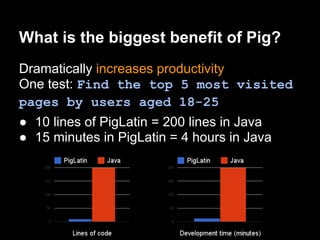
What is the biggest benefit of Pig?
Dramatically increases productivity
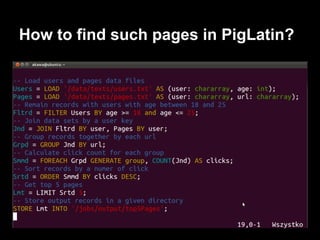
One test: Find the top 5 most visited
pages by users aged 18-25
● 10 lines of PigLatin = 200 lines in Java
● 15 minutes in PigLatin = 4 hours in Java
How to find such pages in PigLatin?
What are other Pig benefits?
● Manages all details of submitting jobs and
  running complex data flows
● Insulates from changes in Hadoop Java API

● Easy extensible by UDFs
● Embeddable in
  Python and JavaScript
● Integrated with HBase
● Actively supported by
  the community
Image from http://www.funpeak.com/funnypics/happy-pig.jpg
Who uses Pig?
● Yahoo! was the creator and the first big user
  of Apache Pig
● Other users - AOL, LinkedIn, Mendeley,
  Nokia (Ovi Maps), Realweb, Stanford
  University, Twitter, ICM UW
What is Pig used for?
● ICM UW - discover knowledge from large
  collections of documents (academic papers)
● LinkedIn - e.g. discovering "People You May
  Know"
● Mendeley - e.g. finding trending keyword over
  time
● Nokia (Ovi Maps) - exploring unstructured data
  sets from logs, database dumps and data feeds
● Realweb - computing statistics on banner
  views, clicks and user behaviour on target
  websites after click
Where does Pig live?
● Pig is installed on user machine
● No need to install anything on the Hadoop
  cluster
       ○ Pig and Hadoop versions must be compatible
● Pig submits and executes jobs to the Hadoop
  cluster

                                                                                   Hadoop
                                                                                   cluster
 Client
 machine with Pig
Images from: http://www.nicknz.co.nz/content/3797/BB-pig.png and http://www.pcorganise.com/images/laptop.png and http://www.clker.
com/cliparts/d/R/C/l/z/E/blue-cloud-md.png
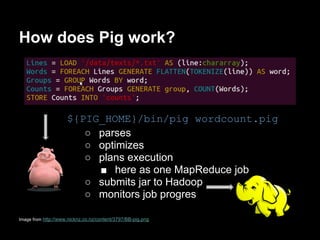
How does Pig work?


                     ${PIG_HOME}/bin/pig wordcount.pig
                        ○ parses
                        ○ optimizes
                        ○ plans execution
                          ■ here as one MapReduce job
                        ○ submits jar to Hadoop
                        ○ monitors job progres

Image from http://www.nicknz.co.nz/content/3797/BB-pig.png
How to develop PigLatin scripts?
● Eclipse plugins
  ● PigEditor
             ○ syntax/errors highlighting
             ○ check of alias name existence
             ○ auto completion of keywords,
               UDF names
      ● PigPen
             ○ graphical visualization of scripts (box and arrows)
      ● Pig-Eclipse

● Plugins for Vim, Emacs, TextMate
       ● Usually provide syntax highlighting and code
         completion
Image from https://encrypted-tbn0.google.com/images?q=tbn:ANd9GcT3SNLShaWKn3kY4KMk0Gj_f-
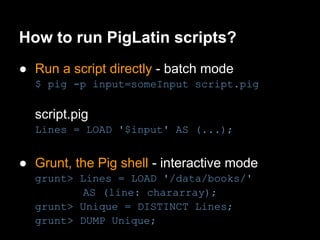
How to run PigLatin scripts?
● Local mode
  ○ Neither Hadoop nor HDFS is required
  ○ Local host and local filesystem is used
  ○ Useful for prototyping and debugging


● Hadoop mode
  ○ Take advantage of a
    Hadoop cluster and HDFS
How to run PigLatin scripts?
● Run a script directly - batch mode
  $ pig -p input=someInput script.pig

  script.pig
  Lines = LOAD '$input' AS (...);


● Grunt, the Pig shell - interactive mode
  grunt> Lines = LOAD '/data/books/'
          AS (line: chararray);
  grunt> Unique = DISTINCT Lines;
  grunt> DUMP Unique;
How to run PigLatin scripts?
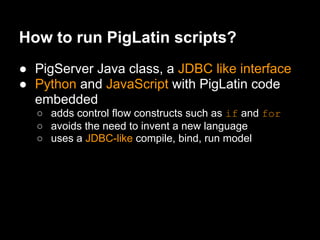
● PigServer Java class, a JDBC like interface
● Python and JavaScript with PigLatin code
  embedded
  ○ adds control flow constructs such as if and for
  ○ avoids the need to invent a new language
  ○ uses a JDBC-like compile, bind, run model
Where to find useful PigLatin
scripts?
● PiggyBank - Pig’s repository of user-
  contributed functions
        ○ load/store functions (e.g. from XML)
        ○ datetime, text functions
math, stats functions

● DataFu - LinkedIn's collection
  of Pig UDFs
        ○ statistics functions (quantiles, variance etc.)
        ○ convenient bag functions (intersection, union etc.)
        ○ utility functions (assertions, random numbers, MD5,
          distance between lat/long pair), PageRank
Image from http://files.softicons.com/download/internet-cons/fliraneo-icons-by-artdesigner.lv/png/256/piggybank.png
How fast is Pig?
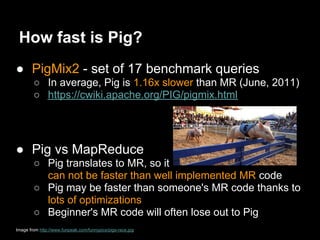
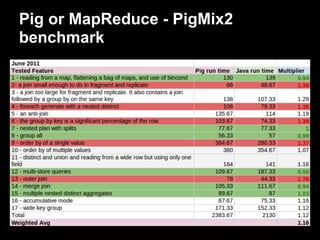
● PigMix2 - set of 17 benchmark queries
        ○ In average, Pig is 1.16x slower than MR (June, 2011)
        ○ https://cwiki.apache.org/PIG/pigmix.html


● Pig vs MapReduce
        ○ Pig translates to MR, so it
          can not be faster than well implemented MR code
        ○ Pig may be faster than someone's MR code thanks to
          lots of optimizations
        ○ Beginner's MR code will often lose out to Pig
Image from http://www.funpeak.com/funnypics/pigs-race.jpg
Basic Pig Tutorial
PigLatin Data Types
● Scalar types
  ○ int, long, float, double, chararray, bytearray, boolean
    (since Pig 0.10.0)


● Complex types
  ○ tuple - sequence of fields of any type
     ■ ('Poland', 2, 0.66)
  ○ bag - an unordered collection of tuples, possibly with
    duplicates
     ■ {('Poland', 2), ('Greece'), (3.14)}
  ○ map - a set of key-value pairs. Keys must be a
    chararray, values may be any type
     ■ ['Poland'#'Euro2012']
PigLatin
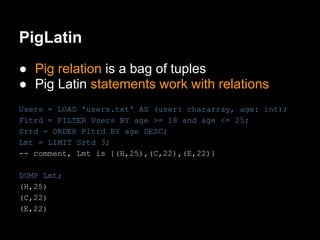
● Pig relation is a bag of tuples
● Pig Latin statements work with relations
Users = LOAD 'users.txt' AS (user: chararray, age: int);
Fltrd = FILTER Users BY age >= 18 and age <= 25;
Srtd = ORDER Fltrd BY age DESC;
Lmt = LIMIT Srtd 3;
-- comment, Lmt is {(H,25),(C,22),(E,22)}

DUMP Lmt;
(H,25)
(C,22)
(E,22)
Last.fm music recommendation
dataset
Last.fm Dataset - 1K users
● Data contained in two tab-separated files
  ○ tracks listened to by nearly 1000 users
  ○ users profiles
● ~2.35GB of total size (uncompressed)
● Publicly available for download
  ○ http://bit.ly/bsVBK3
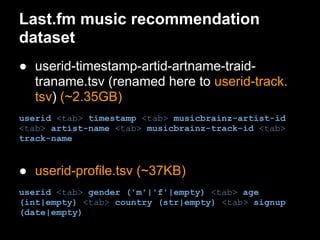
Last.fm music recommendation
dataset
● userid-timestamp-artid-artname-traid-
  traname.tsv (renamed here to userid-track.
  tsv) (~2.35GB)
userid <tab> timestamp <tab> musicbrainz-artist-id
<tab> artist-name <tab> musicbrainz-track-id <tab>
track-name


● userid-profile.tsv (~37KB)
userid <tab> gender ('m'|'f'|empty) <tab> age
(int|empty) <tab> country (str|empty) <tab> signup
(date|empty)
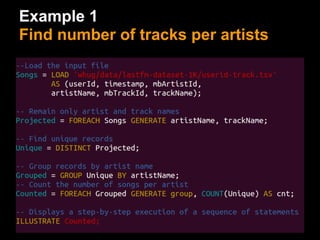
Example 1
Find number of tracks per artists
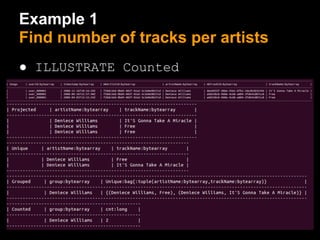
Example 1
Find number of tracks per artists
● ILLUSTRATE Counted
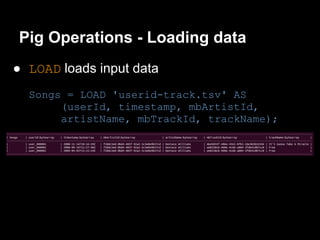
Pig Operations - Loading data
● LOAD loads input data
  Songs = LOAD 'userid-track.tsv' AS
       (userId, timestamp, mbArtistId,
       artistName, mbTrackId, trackName);
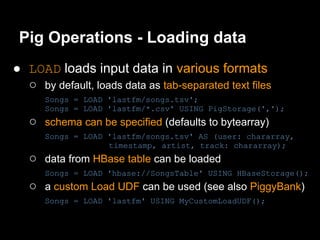
Pig Operations - Loading data
● LOAD loads input data in various formats
  ○ by default, loads data as tab-separated text files
      Songs = LOAD 'lastfm/songs.tsv';
      Songs = LOAD 'lastfm/*.csv' USING PigStorage(',');
   ○ schema can be specified (defaults to bytearray)
      Songs = LOAD 'lastfm/songs.tsv' AS (user: chararray,
                   timestamp, artist, track: chararray);
   ○ data from HBase table can be loaded
      Songs = LOAD 'hbase://SongsTable' USING HBaseStorage();
   ○ a custom Load UDF can be used (see also PiggyBank)
      Songs = LOAD 'lastfm' USING MyCustomLoadUDF();
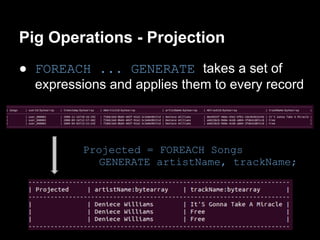
Pig Operations - Projection
● FOREACH ... GENERATE takes a set of
  expressions and applies them to every record


          Projected = FOREACH Songs
             GENERATE artistName, trackName;
Pig Operations - Projection
● FOREACH ... GENERATE
  ○ field referenced by name or by position (starting from
       0)
   ○   all fields (*) or a range of field can be referenced (..)
   ○   BinCond (the ternary operator) is supported
   ○   a custom UDF can be invoked

Users = LOAD 'userid-profile.tsv'
   AS (userId, gender, age: int, country, signup);

FOREACH Users GENERATE $0,
   gender..country,
   (age >= 18 ? true : false) as isAdult,
   YEAR(signup) AS signupYear,
   (country IS NOT NULL AND country == 'Poland'
       ? 'compatriot' : 'foreigner') AS nationalityStatus;
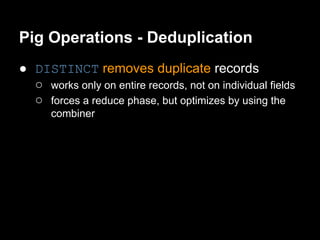
Pig Operations - Deduplication
● DISTINCT removes duplicate records


         Unique = DISTINCT Projected;
Pig Operations - Deduplication
● DISTINCT removes duplicate records
  ○ works only on entire records, not on individual fields
  ○ forces a reduce phase, but optimizes by using the
      combiner
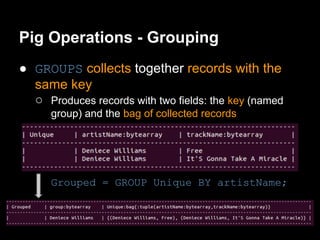
Pig Operations - Grouping
● GROUPS collects together records with the
  same key
  ○ Produces records with two fields: the key (named
      group) and the bag of collected records


      Grouped = GROUP Unique BY artistName;
Pig Operations - Grouping
● GROUP collects together records with the same
  key
  ○ Support of an expression or user-defined function as the
       group key
   ○   Support of grouping on multiple keys
   ○   Special versions
       ■ USING 'collected' - avoids a reduce phase
       ■ GROUP ALL - groups together all of the records into a
          single group
       GroupedAll = GROUP Users ALL;
       CountedAll = FOREACH GroupedAll GENERATE COUNT
       (Users);
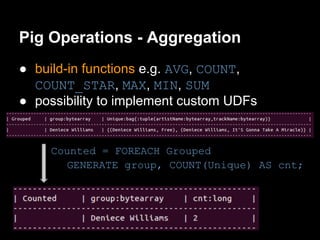
Pig Operations - Aggregation
● build-in functions e.g. AVG, COUNT,
  COUNT_STAR, MAX, MIN, SUM
● possibility to implement custom UDFs


     Counted = FOREACH Grouped
       GENERATE group, COUNT(Unique) AS cnt;
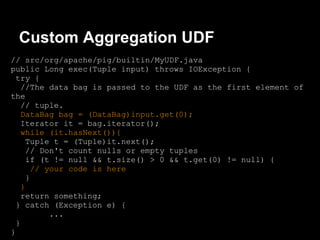
Custom Aggregation UDF
// src/org/apache/pig/builtin/MyUDF.java
public Long exec(Tuple input) throws IOException {
 try {
   //The data bag is passed to the UDF as the first element of
the
   // tuple.
   DataBag bag = (DataBag)input.get(0);
   Iterator it = bag.iterator();
   while (it.hasNext()){
    Tuple t = (Tuple)it.next();
    // Don't count nulls or empty tuples
    if (t != null && t.size() > 0 && t.get(0) != null) {
      // your code is here
    }
   }
   return something;
 } catch (Exception e) {
          ...
 }
}
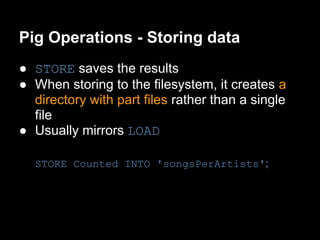
Pig Operations - Storing data
● STORE saves the results
● When storing to the filesystem, it creates a
  directory with part files rather than a single
  file
● Usually mirrors LOAD

  STORE Counted INTO 'songsPerArtists';
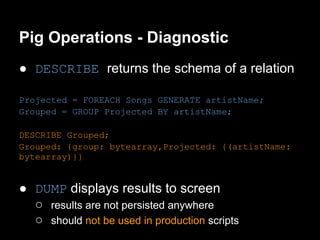
Pig Operations - Diagnostic
● DESCRIBE returns the schema of a relation

Projected = FOREACH Songs GENERATE artistName;
Grouped = GROUP Projected BY artistName;

DESCRIBE Grouped;
Grouped: {group: bytearray,Projected: {(artistName:
bytearray)}}


● DUMP displays results to screen
  ○ results are not persisted anywhere
  ○ should not be used in production scripts
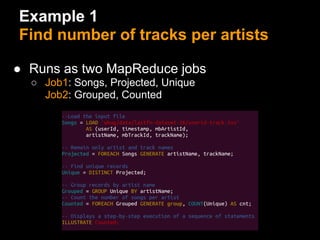
Example 1
Find number of tracks per artists

● Runs as two MapReduce jobs
  ○ Job1: Songs, Projected, Unique
   ○ Job2: Grouped, Counted
Pig Optimizer Example
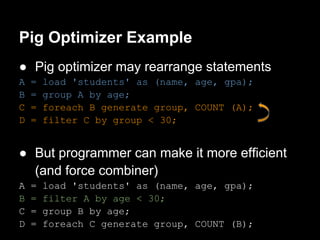
● Pig optimizer may rearrange statements
A   =   load 'students' as (name, age, gpa);
B   =   group A by age;
C   =   foreach B generate group, COUNT (A);
D   =   filter C by group < 30;


● But programmer can make it more efficient
  (and force combiner)
A   =   load 'students' as (name, age, gpa);
B   =   filter A by age < 30;
C   =   group B by age;
D   =   foreach C generate group, COUNT (B);
Pig Optimizer Example
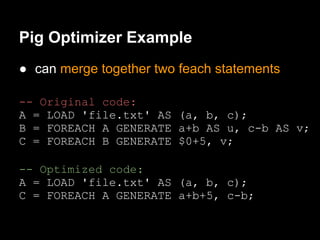
● can merge together two feach statements

-- Original code:
A = LOAD 'file.txt' AS (a, b, c);
B = FOREACH A GENERATE a+b AS u, c-b AS v;
C = FOREACH B GENERATE $0+5, v;

-- Optimized code:
A = LOAD 'file.txt' AS (a, b, c);
C = FOREACH A GENERATE a+b+5, c-b;
Pig Optimizer Example
● can simplify the expression in filter statement

-- Orginal code
B = FILTER A BY ((a0 > 5)
  OR (a0 > 6 AND a1 > 15);

-- Optimized code
B = FILTER C BY a0 > 5;
Pig Multi-Query Execution
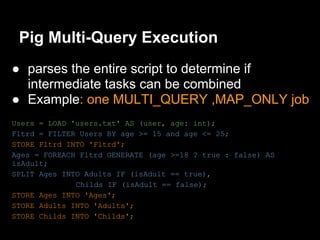
● parses the entire script to determine if
  intermediate tasks can be combined
● Example: one MULTI_QUERY ,MAP_ONLY job
Users = LOAD 'users.txt' AS (user, age: int);
Fltrd = FILTER Users BY age >= 15 and age <= 25;
STORE Fltrd INTO 'Fltrd';
Ages = FOREACH Fltrd GENERATE (age >=18 ? true : false) AS
isAdult;
SPLIT Ages INTO Adults IF (isAdult == true),
              Childs IF (isAdult == false);
STORE Ages INTO 'Ages';
STORE Adults INTO 'Adults';
STORE Childs INTO 'Childs';
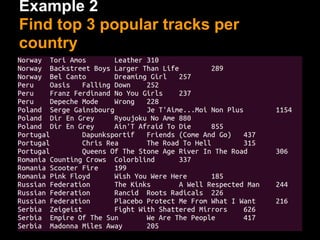
Example 2
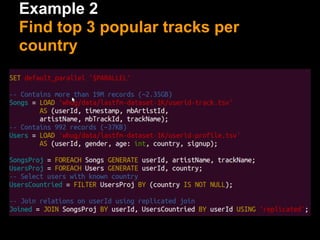
Find top 3 popular tracks per
country
Example 2
Find top 3 popular tracks per
country
Example 2
Find top 3 popular tracks per
country
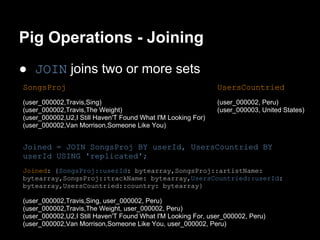
Pig Operations - Joining
● JOIN joins two or more sets
SongsProj                                                     UsersCountried
(user_000002,Travis,Sing)                                     (user_000002, Peru)
(user_000002,Travis,The Weight)                               (user_000003, United States)
(user_000002,U2,I Still Haven'T Found What I'M Looking For)
(user_000002,Van Morrison,Someone Like You)


Joined = JOIN SongsProj BY userId, UsersCountried BY
userId USING 'replicated';
Joined: {SongsProj::userId: bytearray,SongsProj::artistName:
bytearray,SongsProj::trackName: bytearray,UsersCountried::userId:
bytearray,UsersCountried::country: bytearray}

(user_000002,Travis,Sing, user_000002, Peru)
(user_000002,Travis,The Weight, user_000002, Peru)
(user_000002,U2,I Still Haven'T Found What I'M Looking For, user_000002, Peru)
(user_000002,Van Morrison,Someone Like You, user_000002, Peru)
Pig Operations - Joining
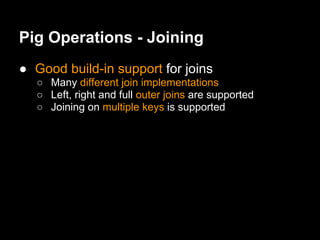
● Good build-in support for joins
  ○ Many different join implementations
  ○ Left, right and full outer joins are supported
  ○ Joining on multiple keys is supported
Pig Operations - Joining
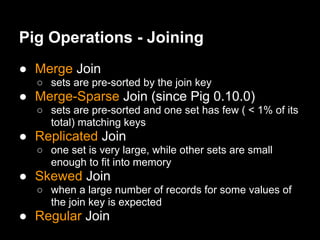
● Merge Join
  ○ sets are pre-sorted by the join key
● Merge-Sparse Join (since Pig 0.10.0)
  ○ sets are pre-sorted and one set has few ( < 1% of its
    total) matching keys
● Replicated Join
  ○ one set is very large, while other sets are small
    enough to fit into memory
● Skewed Join
  ○ when a large number of records for some values of
    the join key is expected
● Regular Join
Pig Operations - Flattening
● FLATTEN un-nest a tuple or a bag

Grouped = GROUP Joined
      BY (country, artistName, trackName);

((Malta,Radiohead,I Can'T), {
    (user_000440,Radiohead,I Can'T,user_000440,Malta),
    (user_000440,Radiohead,I Can'T,user_000440,Malta)
})

Counted = FOREACH Grouped
      GENERATE FLATTEN(group), COUNT(Joined) AS count;
(Malta,Radiohead,I Can'T, 2)
Pig Operations - Flattening
(a,(b,c))
GENERATE $0,FLATTEN($1)
(a,b,c)

({(a,b),(c,d)})
GENERATE FLATTEN($0)
(a,b)
(c,d)

(Rihanna,{(Disturbia),(We ride),(Sos)})
GENERATE $0, FLATTEN($1)
(Rihanna, Disturbia)
(Rihanna, We ride)
(Rihanna, Sos)
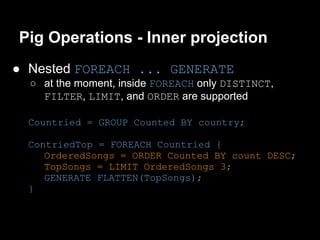
Pig Operations - Inner projection
● Nested FOREACH ... GENERATE
  ○ at the moment, inside FOREACH only DISTINCT,
    FILTER, LIMIT, and ORDER are supported

  Countried = GROUP Counted BY country;

  ContriedTop = FOREACH Countried {
     OrderedSongs = ORDER Counted BY count DESC;
     TopSongs = LIMIT OrderedSongs 3;
     GENERATE FLATTEN(TopSongs);
  }
Pig Operations - Ordering
● ORDER sorts relation by one or more fields
  ○ Sorting by maps, tuples or bags produces errors
  ○ Null is taken to be smaller than any possible value
    for a given type
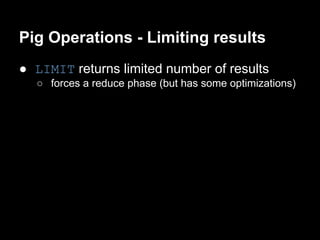
Pig Operations - Limiting results
● LIMIT returns limited number of results
  ○ forces a reduce phase (but has some optimizations)
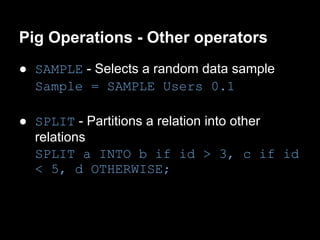
Pig Operations - Other operators
● SAMPLE - Selects a random data sample
  Sample = SAMPLE Users 0.1

● SPLIT - Partitions a relation into other
  relations
  SPLIT a INTO b if id > 3, c if id
  < 5, d OTHERWISE;
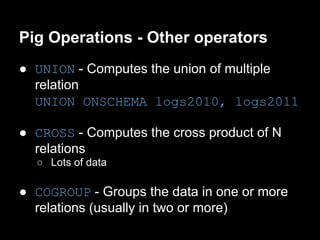
Pig Operations - Other operators
● UNION - Computes the union of multiple
  relation
  UNION ONSCHEMA logs2010, logs2011

● CROSS - Computes the cross product of N
  relations
  ○ Lots of data

● COGROUP - Groups the data in one or more
  relations (usually in two or more)
Basic Optimization Rules
● Filter early and often
   ○ apply filters as early as possible to reduce the
     amount of data processed
   ○ do not apply filter, if the cost of applying filter is very
     high and only a small amount of data is filtered out
   ○ remove NULLs before JOIN


● Based on Example 2
   ○ With filter and removing NULLs before JOIN - 2m32.
     819s
   ○ No filter and no removing NULLs before JOIN - 2m37.
     961s
Basic Optimization Rules
● Project early and often
  ○ Pig does not (yet) determine whether a field is no
    longer needed and drop the field from the record
Basic Optimization Rules
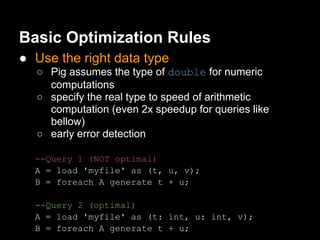
● Use the right data type
  ○ Pig assumes the type of double for numeric
    computations
  ○ specify the real type to speed of arithmetic
    computation (even 2x speedup for queries like
    bellow)
  ○ early error detection

  --Query 1 (NOT optimal)
  A = load 'myfile' as (t, u, v);
  B = foreach A generate t + u;

  --Query 2 (optimal)
  A = load 'myfile' as (t: int, u: int, v);
  B = foreach A generate t + u;
Basic Optimization Rules
● Use the right JOIN implementation

● Based on Example 2
  ○   Replicated Join - 2m32.819s
  ○   Merge Join - 2m53.051s
  ○   Regular Join - 3m8.193s
  ○   Skewed Join - 4m11.849s
Basic Optimization Rules
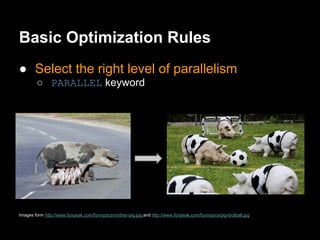
● Select the right level of parallelism
        ○ PARALLEL keyword


Images form http://www.funpeak.com/funnypics/mother-pig.jpg and http://www.funpeak.com/funnypics/pig-football.jpg
Basic Optimization Rules
● Select the right level of parallelism
   ○ Specify number of reducers explicitly
     ■ the SET default_parallel command (the
        script level)
     ■ the PARALLEL clause (the operator level)
   ○ Let Pig set the number of reducers (since Pig 0.8)
     ■ based on the size of the input data (assumes no
        data size change)
     ■ by default allocates a reducer for every 1GB of
        data
   ○ COGROUP*, GROUP*, JOIN*, CROSS, DISTINCT,
     LIMIT and ORDER start a reduce phase
     ■ (*) some implementation will force a reducer, but some will
          do not
Basic Optimization Rules
● Select the right level of parallelism
● Based on Example 2
   ○   SET   default_parallel   1 - 3m8.033s
   ○   SET   default_parallel   2 - 2m52.972s
   ○   SET   default_parallel   6 - 2m42.771s
   ○   SET   default_parallel   10 - 2m32.819s
   ○   SET   default_parallel   20 - 2m38.023s
   ○   SET   default_parallel   50 - 2m48.035s

   ○ Pig 1GB-heuristic - 2m58.204s
Basic Optimization Rules
● Combine small input files
        ○ separate map is created for each file
        ○ may be inefficient if there are many small files


Image from http://www.funpeak.com/funnypics/little-pigs.jpg
Basic Optimization Rules
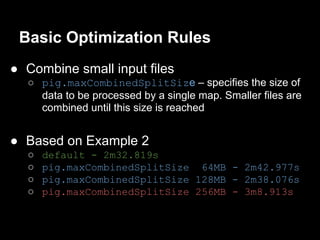
● Combine small input files
  ○ pig.maxCombinedSplitSize – specifies the size of
    data to be processed by a single map. Smaller files are
    combined until this size is reached


● Based on Example 2
  ○   default - 2m32.819s
  ○   pig.maxCombinedSplitSize 64MB - 2m42.977s
  ○   pig.maxCombinedSplitSize 128MB - 2m38.076s
  ○   pig.maxCombinedSplitSize 256MB - 3m8.913s
Basic Optimization Rules
● Use LIMIT operator
● Compress the results of intermediate jobs
● Tune MapReduce and Pig parameters


Image from http://2.bp.blogspot.com/-owXmQcwu-l0/Tj5UHJHNPfI/AAAAAAAAARE/Q_wCWTxAank/s1600/PigRace.JPG
Testing and Diagnostics
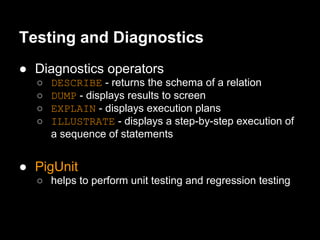
● Diagnostics operators
  ○   DESCRIBE - returns the schema of a relation
  ○   DUMP - displays results to screen
  ○   EXPLAIN - displays execution plans
  ○   ILLUSTRATE - displays a step-by-step execution of
      a sequence of statements


● PigUnit
  ○ helps to perform unit testing and regression testing
Testing and Diagnostics
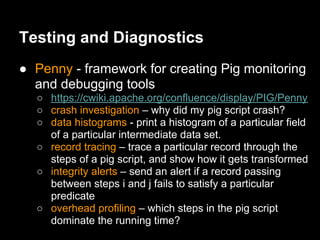
● Penny - framework for creating Pig monitoring
  and debugging tools
  ○ https://cwiki.apache.org/confluence/display/PIG/Penny
  ○ crash investigation – why did my pig script crash?
  ○ data histograms - print a histogram of a particular field
    of a particular intermediate data set.
  ○ record tracing – trace a particular record through the
    steps of a pig script, and show how it gets transformed
  ○ integrity alerts – send an alert if a record passing
    between steps i and j fails to satisfy a particular
    predicate
  ○ overhead profiling – which steps in the pig script
    dominate the running time?
Pig or MapReduce - PigMix2
benchmark
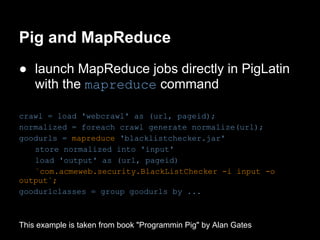
Pig and MapReduce
● launch MapReduce jobs directly in PigLatin
  with the mapreduce command

crawl = load 'webcrawl' as (url, pageid);
normalized = foreach crawl generate normalize(url);
goodurls = mapreduce 'blacklistchecker.jar'
   store normalized into 'input'
   load 'output' as (url, pageid)
   `com.acmeweb.security.BlackListChecker -i input -o
output`;
goodurlclasses = group goodurls by ...


This example is taken from book "Programmin Pig" by Alan Gates
Special Thanks
● All calculations are performed on the Hadoop
  cluster that belongs to ICM UW
  ○ icm.edu.pl
Thank you!
  Q&A
Upcoming Meeting
Hadoop Ecosystem overview and
   more details about HBase
         Kai Voigt (Cloudera)
     July 12th, 2012 @6:00 PM @MIMUW (3180)

Introduction To Apache Pig at WHUG

  • 1.
    Introduction to Apache Pig Adam Kawa The 3rd Meeting of WHUG June 21, 2012
  • 2.
    What can Itell about Apache Hadoop? Apache Hadoop is GREAT! Image from http://gigaom2.files.wordpress.com/2012/06/shutterstock_60414424.jpg
  • 3.
    What can Itell about MapReduce? Developing MapReduce jobs can be challenging Image from http://www.scotclimb.org.uk/images/big_nightfall.jpg
  • 4.
    What can Itell about MapReduce? Developing MapReduce jobs can be challenging ● Jobs are written (mainly) in Java Image from http://www.cssbreeze.com/wp-content/uploads/2011/05/angry-computer-large.jpg
  • 5.
    What can Itell about MapReduce? Developing MapReduce jobs can be challenging ● Jobs are written (mainly) in Java ● Must think in terms of map and reduce Image from http://map-reduce.wikispaces.asu.edu/file/view/figure5_(1).png/159615807/figure5_(1).png
  • 6.
    What can Itell about MapReduce? Developing MapReduce jobs can be challenging ● Jobs are written (mainly) in Java ● Must think in terms of map and reduce ● n-stage jobs can be difficult to manage HBase HDFS 1 4 6 3 7 2 5
  • 7.
    What can Itell about MapReduce? Developing MapReduce jobs can be challenging ● Jobs are written (mainly) in Java ● Must think in terms of map and reduce ● n-stage jobs can be difficult to manage ● Many common operations (e.g. filters, projections, joins) requires a custom code Image from http://kmonadollaraday.files.wordpress. com/2011/05/wheelsel6.gif
  • 8.
    What can Itell about MapReduce? Developing MapReduce jobs can be challenging ● Jobs are written (mainly) in Java ● Must think in terms of map and reduce ● n-stage jobs can be difficult to manage ● Many common operations (e.g. filters, projections, joins) requires a custom code ● Rich data types also require a custom code Image from the Internet
  • 9.
    How does WordCountin Java look like?
  • 10.
    What is Pig? Platformfor easier analyzing large data sets ● PigLatin: Simple but powerful data flow language similar to scripting languages ● Pig Engine: Parses, optimizes and automatically executes PigLatin scripts as series of MapReduce jobs on Hadoop cluster
  • 11.
    What does PigLatinoffer? PigLatin is a high level and easy to understand data flow programming language ● Provides common data operations (e.g. filters, joins, ordering) and nested types (e.g. tuples, bags, maps)
  • 12.
    What does PigLatinoffer? PigLatin is a high level and easy to understand data flow programming language ● Provides common data operations (e.g. filters, joins, ordering) and nested types (e.g. tuples, bags, maps) ● More natural for analysts than MapReduce Image form http://www.funpeak.com/funnypics/kid-and-pig.jpg
  • 13.
    What does PigLatinoffer? PigLatin is a high level and easy to understand data flow programming language ● Provides common data operations (e.g. filters, joins, ordering) and nested types (e.g. tuples, bags, maps) ● More natural for analysts than MapReduce ● Opens Hadoop to non-Java programmers Image form http://www.funpeak.com/funnypics/kid-and-pig.jpg
  • 14.
    How does WordCountin PigLatin look like?
  • 15.
    What is thebiggest benefit of Pig? Dramatically increases productivity One test: Find the top 5 most visited pages by users aged 18-25 ● 10 lines of PigLatin = 200 lines in Java ● 15 minutes in PigLatin = 4 hours in Java
  • 16.
    How to findsuch pages in PigLatin?
  • 17.
    What are otherPig benefits? ● Manages all details of submitting jobs and running complex data flows ● Insulates from changes in Hadoop Java API ● Easy extensible by UDFs ● Embeddable in Python and JavaScript ● Integrated with HBase ● Actively supported by the community Image from http://www.funpeak.com/funnypics/happy-pig.jpg
  • 18.
    Who uses Pig? ●Yahoo! was the creator and the first big user of Apache Pig ● Other users - AOL, LinkedIn, Mendeley, Nokia (Ovi Maps), Realweb, Stanford University, Twitter, ICM UW
  • 19.
    What is Pigused for? ● ICM UW - discover knowledge from large collections of documents (academic papers) ● LinkedIn - e.g. discovering "People You May Know" ● Mendeley - e.g. finding trending keyword over time ● Nokia (Ovi Maps) - exploring unstructured data sets from logs, database dumps and data feeds ● Realweb - computing statistics on banner views, clicks and user behaviour on target websites after click
  • 20.
    Where does Piglive? ● Pig is installed on user machine ● No need to install anything on the Hadoop cluster ○ Pig and Hadoop versions must be compatible ● Pig submits and executes jobs to the Hadoop cluster Hadoop cluster Client machine with Pig Images from: http://www.nicknz.co.nz/content/3797/BB-pig.png and http://www.pcorganise.com/images/laptop.png and http://www.clker. com/cliparts/d/R/C/l/z/E/blue-cloud-md.png
  • 21.
    How does Pigwork? ${PIG_HOME}/bin/pig wordcount.pig ○ parses ○ optimizes ○ plans execution ■ here as one MapReduce job ○ submits jar to Hadoop ○ monitors job progres Image from http://www.nicknz.co.nz/content/3797/BB-pig.png
  • 22.
    How to developPigLatin scripts? ● Eclipse plugins ● PigEditor ○ syntax/errors highlighting ○ check of alias name existence ○ auto completion of keywords, UDF names ● PigPen ○ graphical visualization of scripts (box and arrows) ● Pig-Eclipse ● Plugins for Vim, Emacs, TextMate ● Usually provide syntax highlighting and code completion Image from https://encrypted-tbn0.google.com/images?q=tbn:ANd9GcT3SNLShaWKn3kY4KMk0Gj_f-
  • 23.
    How to runPigLatin scripts? ● Local mode ○ Neither Hadoop nor HDFS is required ○ Local host and local filesystem is used ○ Useful for prototyping and debugging ● Hadoop mode ○ Take advantage of a Hadoop cluster and HDFS
  • 24.
    How to runPigLatin scripts? ● Run a script directly - batch mode $ pig -p input=someInput script.pig script.pig Lines = LOAD '$input' AS (...); ● Grunt, the Pig shell - interactive mode grunt> Lines = LOAD '/data/books/' AS (line: chararray); grunt> Unique = DISTINCT Lines; grunt> DUMP Unique;
  • 25.
    How to runPigLatin scripts? ● PigServer Java class, a JDBC like interface ● Python and JavaScript with PigLatin code embedded ○ adds control flow constructs such as if and for ○ avoids the need to invent a new language ○ uses a JDBC-like compile, bind, run model
  • 26.
    Where to finduseful PigLatin scripts? ● PiggyBank - Pig’s repository of user- contributed functions ○ load/store functions (e.g. from XML) ○ datetime, text functions math, stats functions ● DataFu - LinkedIn's collection of Pig UDFs ○ statistics functions (quantiles, variance etc.) ○ convenient bag functions (intersection, union etc.) ○ utility functions (assertions, random numbers, MD5, distance between lat/long pair), PageRank Image from http://files.softicons.com/download/internet-cons/fliraneo-icons-by-artdesigner.lv/png/256/piggybank.png
  • 27.
    How fast isPig? ● PigMix2 - set of 17 benchmark queries ○ In average, Pig is 1.16x slower than MR (June, 2011) ○ https://cwiki.apache.org/PIG/pigmix.html ● Pig vs MapReduce ○ Pig translates to MR, so it can not be faster than well implemented MR code ○ Pig may be faster than someone's MR code thanks to lots of optimizations ○ Beginner's MR code will often lose out to Pig Image from http://www.funpeak.com/funnypics/pigs-race.jpg
  • 28.
  • 29.
    PigLatin Data Types ●Scalar types ○ int, long, float, double, chararray, bytearray, boolean (since Pig 0.10.0) ● Complex types ○ tuple - sequence of fields of any type ■ ('Poland', 2, 0.66) ○ bag - an unordered collection of tuples, possibly with duplicates ■ {('Poland', 2), ('Greece'), (3.14)} ○ map - a set of key-value pairs. Keys must be a chararray, values may be any type ■ ['Poland'#'Euro2012']
  • 30.
    PigLatin ● Pig relationis a bag of tuples ● Pig Latin statements work with relations Users = LOAD 'users.txt' AS (user: chararray, age: int); Fltrd = FILTER Users BY age >= 18 and age <= 25; Srtd = ORDER Fltrd BY age DESC; Lmt = LIMIT Srtd 3; -- comment, Lmt is {(H,25),(C,22),(E,22)} DUMP Lmt; (H,25) (C,22) (E,22)
  • 31.
    Last.fm music recommendation dataset Last.fmDataset - 1K users ● Data contained in two tab-separated files ○ tracks listened to by nearly 1000 users ○ users profiles ● ~2.35GB of total size (uncompressed) ● Publicly available for download ○ http://bit.ly/bsVBK3
  • 32.
    Last.fm music recommendation dataset ●userid-timestamp-artid-artname-traid- traname.tsv (renamed here to userid-track. tsv) (~2.35GB) userid <tab> timestamp <tab> musicbrainz-artist-id <tab> artist-name <tab> musicbrainz-track-id <tab> track-name ● userid-profile.tsv (~37KB) userid <tab> gender ('m'|'f'|empty) <tab> age (int|empty) <tab> country (str|empty) <tab> signup (date|empty)
  • 33.
    Example 1 Find numberof tracks per artists
  • 34.
    Example 1 Find numberof tracks per artists ● ILLUSTRATE Counted
  • 35.
    Pig Operations -Loading data ● LOAD loads input data Songs = LOAD 'userid-track.tsv' AS (userId, timestamp, mbArtistId, artistName, mbTrackId, trackName);
  • 36.
    Pig Operations -Loading data ● LOAD loads input data in various formats ○ by default, loads data as tab-separated text files Songs = LOAD 'lastfm/songs.tsv'; Songs = LOAD 'lastfm/*.csv' USING PigStorage(','); ○ schema can be specified (defaults to bytearray) Songs = LOAD 'lastfm/songs.tsv' AS (user: chararray, timestamp, artist, track: chararray); ○ data from HBase table can be loaded Songs = LOAD 'hbase://SongsTable' USING HBaseStorage(); ○ a custom Load UDF can be used (see also PiggyBank) Songs = LOAD 'lastfm' USING MyCustomLoadUDF();
  • 37.
    Pig Operations -Projection ● FOREACH ... GENERATE takes a set of expressions and applies them to every record Projected = FOREACH Songs GENERATE artistName, trackName;
  • 38.
    Pig Operations -Projection ● FOREACH ... GENERATE ○ field referenced by name or by position (starting from 0) ○ all fields (*) or a range of field can be referenced (..) ○ BinCond (the ternary operator) is supported ○ a custom UDF can be invoked Users = LOAD 'userid-profile.tsv' AS (userId, gender, age: int, country, signup); FOREACH Users GENERATE $0, gender..country, (age >= 18 ? true : false) as isAdult, YEAR(signup) AS signupYear, (country IS NOT NULL AND country == 'Poland' ? 'compatriot' : 'foreigner') AS nationalityStatus;
  • 39.
    Pig Operations -Deduplication ● DISTINCT removes duplicate records Unique = DISTINCT Projected;
  • 40.
    Pig Operations -Deduplication ● DISTINCT removes duplicate records ○ works only on entire records, not on individual fields ○ forces a reduce phase, but optimizes by using the combiner
  • 41.
    Pig Operations -Grouping ● GROUPS collects together records with the same key ○ Produces records with two fields: the key (named group) and the bag of collected records Grouped = GROUP Unique BY artistName;
  • 42.
    Pig Operations -Grouping ● GROUP collects together records with the same key ○ Support of an expression or user-defined function as the group key ○ Support of grouping on multiple keys ○ Special versions ■ USING 'collected' - avoids a reduce phase ■ GROUP ALL - groups together all of the records into a single group GroupedAll = GROUP Users ALL; CountedAll = FOREACH GroupedAll GENERATE COUNT (Users);
  • 43.
    Pig Operations -Aggregation ● build-in functions e.g. AVG, COUNT, COUNT_STAR, MAX, MIN, SUM ● possibility to implement custom UDFs Counted = FOREACH Grouped GENERATE group, COUNT(Unique) AS cnt;
  • 44.
    Custom Aggregation UDF //src/org/apache/pig/builtin/MyUDF.java public Long exec(Tuple input) throws IOException { try { //The data bag is passed to the UDF as the first element of the // tuple. DataBag bag = (DataBag)input.get(0); Iterator it = bag.iterator(); while (it.hasNext()){ Tuple t = (Tuple)it.next(); // Don't count nulls or empty tuples if (t != null && t.size() > 0 && t.get(0) != null) { // your code is here } } return something; } catch (Exception e) { ... } }
  • 45.
    Pig Operations -Storing data ● STORE saves the results ● When storing to the filesystem, it creates a directory with part files rather than a single file ● Usually mirrors LOAD STORE Counted INTO 'songsPerArtists';
  • 46.
    Pig Operations -Diagnostic ● DESCRIBE returns the schema of a relation Projected = FOREACH Songs GENERATE artistName; Grouped = GROUP Projected BY artistName; DESCRIBE Grouped; Grouped: {group: bytearray,Projected: {(artistName: bytearray)}} ● DUMP displays results to screen ○ results are not persisted anywhere ○ should not be used in production scripts
  • 47.
    Example 1 Find numberof tracks per artists ● Runs as two MapReduce jobs ○ Job1: Songs, Projected, Unique ○ Job2: Grouped, Counted
  • 48.
    Pig Optimizer Example ●Pig optimizer may rearrange statements A = load 'students' as (name, age, gpa); B = group A by age; C = foreach B generate group, COUNT (A); D = filter C by group < 30; ● But programmer can make it more efficient (and force combiner) A = load 'students' as (name, age, gpa); B = filter A by age < 30; C = group B by age; D = foreach C generate group, COUNT (B);
  • 49.
    Pig Optimizer Example ●can merge together two feach statements -- Original code: A = LOAD 'file.txt' AS (a, b, c); B = FOREACH A GENERATE a+b AS u, c-b AS v; C = FOREACH B GENERATE $0+5, v; -- Optimized code: A = LOAD 'file.txt' AS (a, b, c); C = FOREACH A GENERATE a+b+5, c-b;
  • 50.
    Pig Optimizer Example ●can simplify the expression in filter statement -- Orginal code B = FILTER A BY ((a0 > 5) OR (a0 > 6 AND a1 > 15); -- Optimized code B = FILTER C BY a0 > 5;
  • 51.
    Pig Multi-Query Execution ●parses the entire script to determine if intermediate tasks can be combined ● Example: one MULTI_QUERY ,MAP_ONLY job Users = LOAD 'users.txt' AS (user, age: int); Fltrd = FILTER Users BY age >= 15 and age <= 25; STORE Fltrd INTO 'Fltrd'; Ages = FOREACH Fltrd GENERATE (age >=18 ? true : false) AS isAdult; SPLIT Ages INTO Adults IF (isAdult == true), Childs IF (isAdult == false); STORE Ages INTO 'Ages'; STORE Adults INTO 'Adults'; STORE Childs INTO 'Childs';
  • 52.
    Example 2 Find top3 popular tracks per country
  • 53.
    Example 2 Find top3 popular tracks per country
  • 54.
    Example 2 Find top3 popular tracks per country
  • 55.
    Pig Operations -Joining ● JOIN joins two or more sets SongsProj UsersCountried (user_000002,Travis,Sing) (user_000002, Peru) (user_000002,Travis,The Weight) (user_000003, United States) (user_000002,U2,I Still Haven'T Found What I'M Looking For) (user_000002,Van Morrison,Someone Like You) Joined = JOIN SongsProj BY userId, UsersCountried BY userId USING 'replicated'; Joined: {SongsProj::userId: bytearray,SongsProj::artistName: bytearray,SongsProj::trackName: bytearray,UsersCountried::userId: bytearray,UsersCountried::country: bytearray} (user_000002,Travis,Sing, user_000002, Peru) (user_000002,Travis,The Weight, user_000002, Peru) (user_000002,U2,I Still Haven'T Found What I'M Looking For, user_000002, Peru) (user_000002,Van Morrison,Someone Like You, user_000002, Peru)
  • 56.
    Pig Operations -Joining ● Good build-in support for joins ○ Many different join implementations ○ Left, right and full outer joins are supported ○ Joining on multiple keys is supported
  • 57.
    Pig Operations -Joining ● Merge Join ○ sets are pre-sorted by the join key ● Merge-Sparse Join (since Pig 0.10.0) ○ sets are pre-sorted and one set has few ( < 1% of its total) matching keys ● Replicated Join ○ one set is very large, while other sets are small enough to fit into memory ● Skewed Join ○ when a large number of records for some values of the join key is expected ● Regular Join
  • 58.
    Pig Operations -Flattening ● FLATTEN un-nest a tuple or a bag Grouped = GROUP Joined BY (country, artistName, trackName); ((Malta,Radiohead,I Can'T), { (user_000440,Radiohead,I Can'T,user_000440,Malta), (user_000440,Radiohead,I Can'T,user_000440,Malta) }) Counted = FOREACH Grouped GENERATE FLATTEN(group), COUNT(Joined) AS count; (Malta,Radiohead,I Can'T, 2)
  • 59.
    Pig Operations -Flattening (a,(b,c)) GENERATE $0,FLATTEN($1) (a,b,c) ({(a,b),(c,d)}) GENERATE FLATTEN($0) (a,b) (c,d) (Rihanna,{(Disturbia),(We ride),(Sos)}) GENERATE $0, FLATTEN($1) (Rihanna, Disturbia) (Rihanna, We ride) (Rihanna, Sos)
  • 60.
    Pig Operations -Inner projection ● Nested FOREACH ... GENERATE ○ at the moment, inside FOREACH only DISTINCT, FILTER, LIMIT, and ORDER are supported Countried = GROUP Counted BY country; ContriedTop = FOREACH Countried { OrderedSongs = ORDER Counted BY count DESC; TopSongs = LIMIT OrderedSongs 3; GENERATE FLATTEN(TopSongs); }
  • 61.
    Pig Operations -Ordering ● ORDER sorts relation by one or more fields ○ Sorting by maps, tuples or bags produces errors ○ Null is taken to be smaller than any possible value for a given type
  • 62.
    Pig Operations -Limiting results ● LIMIT returns limited number of results ○ forces a reduce phase (but has some optimizations)
  • 63.
    Pig Operations -Other operators ● SAMPLE - Selects a random data sample Sample = SAMPLE Users 0.1 ● SPLIT - Partitions a relation into other relations SPLIT a INTO b if id > 3, c if id < 5, d OTHERWISE;
  • 64.
    Pig Operations -Other operators ● UNION - Computes the union of multiple relation UNION ONSCHEMA logs2010, logs2011 ● CROSS - Computes the cross product of N relations ○ Lots of data ● COGROUP - Groups the data in one or more relations (usually in two or more)
  • 65.
    Basic Optimization Rules ●Filter early and often ○ apply filters as early as possible to reduce the amount of data processed ○ do not apply filter, if the cost of applying filter is very high and only a small amount of data is filtered out ○ remove NULLs before JOIN ● Based on Example 2 ○ With filter and removing NULLs before JOIN - 2m32. 819s ○ No filter and no removing NULLs before JOIN - 2m37. 961s
  • 66.
    Basic Optimization Rules ●Project early and often ○ Pig does not (yet) determine whether a field is no longer needed and drop the field from the record
  • 67.
    Basic Optimization Rules ●Use the right data type ○ Pig assumes the type of double for numeric computations ○ specify the real type to speed of arithmetic computation (even 2x speedup for queries like bellow) ○ early error detection --Query 1 (NOT optimal) A = load 'myfile' as (t, u, v); B = foreach A generate t + u; --Query 2 (optimal) A = load 'myfile' as (t: int, u: int, v); B = foreach A generate t + u;
  • 68.
    Basic Optimization Rules ●Use the right JOIN implementation ● Based on Example 2 ○ Replicated Join - 2m32.819s ○ Merge Join - 2m53.051s ○ Regular Join - 3m8.193s ○ Skewed Join - 4m11.849s
  • 69.
    Basic Optimization Rules ●Select the right level of parallelism ○ PARALLEL keyword Images form http://www.funpeak.com/funnypics/mother-pig.jpg and http://www.funpeak.com/funnypics/pig-football.jpg
  • 70.
    Basic Optimization Rules ●Select the right level of parallelism ○ Specify number of reducers explicitly ■ the SET default_parallel command (the script level) ■ the PARALLEL clause (the operator level) ○ Let Pig set the number of reducers (since Pig 0.8) ■ based on the size of the input data (assumes no data size change) ■ by default allocates a reducer for every 1GB of data ○ COGROUP*, GROUP*, JOIN*, CROSS, DISTINCT, LIMIT and ORDER start a reduce phase ■ (*) some implementation will force a reducer, but some will do not
  • 71.
    Basic Optimization Rules ●Select the right level of parallelism ● Based on Example 2 ○ SET default_parallel 1 - 3m8.033s ○ SET default_parallel 2 - 2m52.972s ○ SET default_parallel 6 - 2m42.771s ○ SET default_parallel 10 - 2m32.819s ○ SET default_parallel 20 - 2m38.023s ○ SET default_parallel 50 - 2m48.035s ○ Pig 1GB-heuristic - 2m58.204s
  • 72.
    Basic Optimization Rules ●Combine small input files ○ separate map is created for each file ○ may be inefficient if there are many small files Image from http://www.funpeak.com/funnypics/little-pigs.jpg
  • 73.
    Basic Optimization Rules ●Combine small input files ○ pig.maxCombinedSplitSize – specifies the size of data to be processed by a single map. Smaller files are combined until this size is reached ● Based on Example 2 ○ default - 2m32.819s ○ pig.maxCombinedSplitSize 64MB - 2m42.977s ○ pig.maxCombinedSplitSize 128MB - 2m38.076s ○ pig.maxCombinedSplitSize 256MB - 3m8.913s
  • 74.
    Basic Optimization Rules ●Use LIMIT operator ● Compress the results of intermediate jobs ● Tune MapReduce and Pig parameters Image from http://2.bp.blogspot.com/-owXmQcwu-l0/Tj5UHJHNPfI/AAAAAAAAARE/Q_wCWTxAank/s1600/PigRace.JPG
  • 75.
    Testing and Diagnostics ●Diagnostics operators ○ DESCRIBE - returns the schema of a relation ○ DUMP - displays results to screen ○ EXPLAIN - displays execution plans ○ ILLUSTRATE - displays a step-by-step execution of a sequence of statements ● PigUnit ○ helps to perform unit testing and regression testing
  • 76.
    Testing and Diagnostics ●Penny - framework for creating Pig monitoring and debugging tools ○ https://cwiki.apache.org/confluence/display/PIG/Penny ○ crash investigation – why did my pig script crash? ○ data histograms - print a histogram of a particular field of a particular intermediate data set. ○ record tracing – trace a particular record through the steps of a pig script, and show how it gets transformed ○ integrity alerts – send an alert if a record passing between steps i and j fails to satisfy a particular predicate ○ overhead profiling – which steps in the pig script dominate the running time?
  • 77.
    Pig or MapReduce- PigMix2 benchmark
  • 78.
    Pig and MapReduce ●launch MapReduce jobs directly in PigLatin with the mapreduce command crawl = load 'webcrawl' as (url, pageid); normalized = foreach crawl generate normalize(url); goodurls = mapreduce 'blacklistchecker.jar' store normalized into 'input' load 'output' as (url, pageid) `com.acmeweb.security.BlackListChecker -i input -o output`; goodurlclasses = group goodurls by ... This example is taken from book "Programmin Pig" by Alan Gates
  • 79.
    Special Thanks ● Allcalculations are performed on the Hadoop cluster that belongs to ICM UW ○ icm.edu.pl
  • 80.
  • 81.
    Upcoming Meeting Hadoop Ecosystemoverview and more details about HBase Kai Voigt (Cloudera) July 12th, 2012 @6:00 PM @MIMUW (3180)