SQL
Sharafat Ibn Mollah Mosharraf
Software Engineer,
Therap (BD) Ltd.
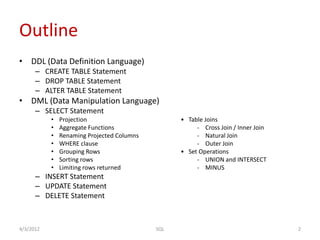
Outline
• DDL (Data Definition Language)
– CREATE TABLE Statement
– DROP TABLE Statement
– ALTER TABLE Statement
• DML (Data Manipulation Language)
– SELECT Statement
• Projection • Table Joins
• Aggregate Functions - Cross Join / Inner Join
• Renaming Projected Columns - Natural Join
• WHERE clause - Outer Join
• Grouping Rows • Set Operations
• Sorting rows - UNION and INTERSECT
• Limiting rows returned - MINUS
– INSERT Statement
– UPDATE Statement
– DELETE Statement
4/3/2012 2SQL
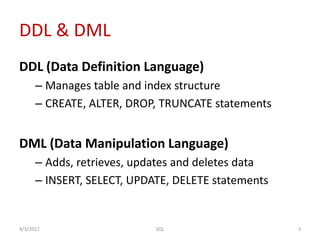
DDL & DML
DDL (Data Definition Language)
– Manages table and index structure
– CREATE, ALTER, DROP, TRUNCATE statements
DML (Data Manipulation Language)
– Adds, retrieves, updates and deletes data
– INSERT, SELECT, UPDATE, DELETE statements
4/3/2012 3SQL
Where We Are
• DML (Data Manipulation Language)
– SELECT Statement
• Projection
– Projecting All Columns: *
– Projecting Specific Columns
– Generalized Projection
– DISTINCT keyword for selecting unique values
• Aggregate Functions
4/3/2012 4SQL
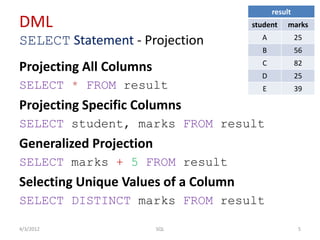
DML
SELECT Statement - Projection
Projecting All Columns
SELECT * FROM result
Projecting Specific Columns
SELECT student, marks FROM result
Generalized Projection
SELECT marks + 5 FROM result
Selecting Unique Values of a Column
SELECT DISTINCT marks FROM result
4/3/2012 5SQL
result
student marks
A 25
B 56
C 82
D 25
E 39
Where We Are
• DML (Data Manipulation Language)
– SELECT Statement
• Projection
• Aggregate Functions
– count()
– min()
– max()
– avg()
– sum()
• Renaming Projected Columns
4/3/2012 6SQL
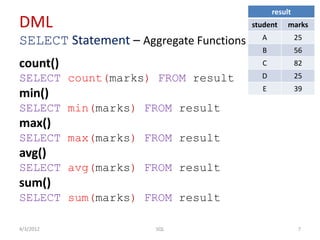
DML
SELECT Statement – Aggregate Functions
count()
SELECT count(marks) FROM result
min()
SELECT min(marks) FROM result
max()
SELECT max(marks) FROM result
avg()
SELECT avg(marks) FROM result
sum()
SELECT sum(marks) FROM result
4/3/2012 7SQL
result
student marks
A 25
B 56
C 82
D 25
E 39
Where We Are
• DML (Data Manipulation Language)
– SELECT Statement
• Projection
• Aggregate Functions
• Renaming Projected Columns
• WHERE clause
4/3/2012 8SQL
DML
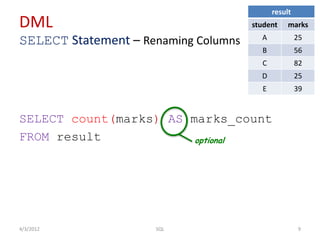
SELECT Statement – Renaming Columns
SELECT count(marks) AS marks_count
FROM result
4/3/2012 9SQL
result
student marks
A 25
B 56
C 82
D 25
E 39
optional
Where We Are
• DML (Data Manipulation Language)
– SELECT Statement
• Projection
• Aggregate Functions
• Renaming Projected Columns
• WHERE clause
– Comparison Operators: =, <>, >, >=, <, <=
– Logical Connectives: AND, OR, NOT
– BETWEEN and NOT BETWEEN Predicates
– IN Predicate
– IS NULL and IS NOT NULL Predicates
– LIKE Predicate
• Grouping Rows
4/3/2012 10SQL
DML
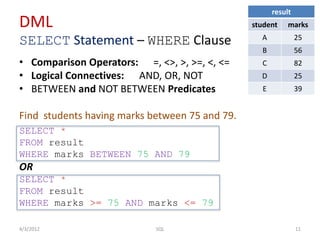
SELECT Statement – WHERE Clause
• Comparison Operators: =, <>, >, >=, <, <=
• Logical Connectives: AND, OR, NOT
• BETWEEN and NOT BETWEEN Predicates
Find students having marks between 75 and 79.
SELECT *
FROM result
WHERE marks BETWEEN 75 AND 79
OR
SELECT *
FROM result
WHERE marks >= 75 AND marks <= 79
4/3/2012 11SQL
result
student marks
A 25
B 56
C 82
D 25
E 39
DML
SELECT Statement – WHERE Clause
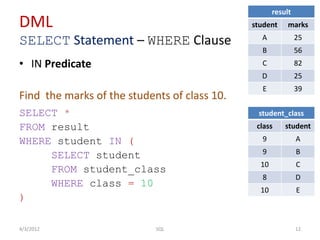
• IN Predicate
Find the marks of the students of class 10.
SELECT *
FROM result
WHERE student IN (
SELECT student
FROM student_class
WHERE class = 10
)
4/3/2012 12SQL
result
student marks
A 25
B 56
C 82
D 25
E 39
student_class
class student
9 A
9 B
10 C
8 D
10 E
DML
SELECT Statement – WHERE Clause
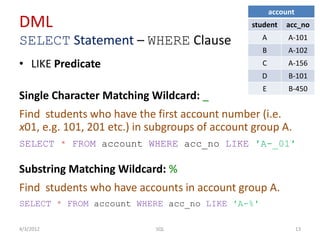
• LIKE Predicate
Single Character Matching Wildcard: _
Find students who have the first account number (i.e.
x01, e.g. 101, 201 etc.) in subgroups of account group A.
SELECT * FROM account WHERE acc_no LIKE ′A-_01′
Substring Matching Wildcard: %
Find students who have accounts in account group A.
SELECT * FROM account WHERE acc_no LIKE ′A-%′
4/3/2012 13SQL
account
student acc_no
A A-101
B A-102
C A-156
D B-101
E B-450
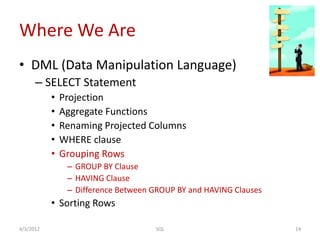
Where We Are
• DML (Data Manipulation Language)
– SELECT Statement
• Projection
• Aggregate Functions
• Renaming Projected Columns
• WHERE clause
• Grouping Rows
– GROUP BY Clause
– HAVING Clause
– Difference Between GROUP BY and HAVING Clauses
• Sorting Rows
4/3/2012 14SQL
DML
SELECT Statement – Grouping Rows
4/3/2012 15SQL
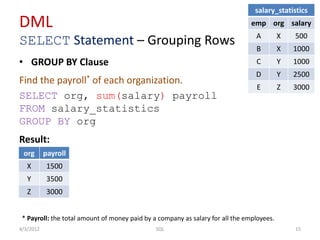
salary_statistics
emp org salary
A X 500
B X 1000
C Y 1000
D Y 2500
E Z 3000
• GROUP BY Clause
Find the payroll* of each organization.
SELECT org, sum(salary) payroll
FROM salary_statistics
GROUP BY org
Result:
* Payroll: the total amount of money paid by a company as salary for all the employees.
org payroll
X 1500
Y 3500
Z 3000
DML
SELECT Statement – Grouping Rows
4/3/2012 16SQL
salary_statistics
emp org salary
A X 500
B X 1000
C Y 1000
D Y 2500
E Z 3000
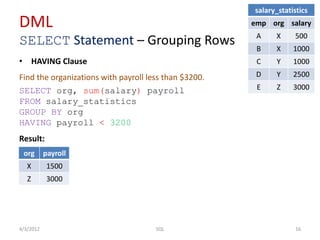
• HAVING Clause
Find the organizations with payroll less than $3200.
SELECT org, sum(salary) payroll
FROM salary_statistics
GROUP BY org
HAVING payroll < 3200
Result:
org payroll
X 1500
Z 3000
DML
SELECT Statement – Grouping Rows…
4/3/2012 17SQL
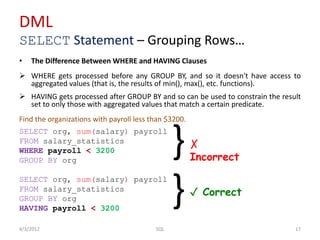
• The Difference Between WHERE and HAVING Clauses
 WHERE gets processed before any GROUP BY, and so it doesn't have access to
aggregated values (that is, the results of min(), max(), etc. functions).
 HAVING gets processed after GROUP BY and so can be used to constrain the result
set to only those with aggregated values that match a certain predicate.
Find the organizations with payroll less than $3200.
SELECT org, sum(salary) payroll
FROM salary_statistics
WHERE payroll < 3200
GROUP BY org
SELECT org, sum(salary) payroll
FROM salary_statistics
GROUP BY org
HAVING payroll < 3200
}
}
✗
Incorrect
✓ Correct
Where We Are
• DML (Data Manipulation Language)
– SELECT Statement
• Projection
• Aggregate Functions
• Renaming Projected Columns
• WHERE clause
• Grouping Rows
• Sorting Rows
– ORDER BY Clause
• Limiting Rows
4/3/2012 18SQL
DML
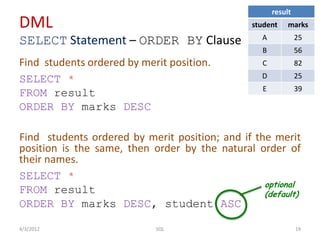
SELECT Statement – ORDER BY Clause
Find students ordered by merit position.
SELECT *
FROM result
ORDER BY marks DESC
Find students ordered by merit position; and if the merit
position is the same, then order by the natural order of
their names.
SELECT *
FROM result
ORDER BY marks DESC, student ASC
4/3/2012 19SQL
result
student marks
A 25
B 56
C 82
D 25
E 39
optional
(default)
Where We Are
• DML (Data Manipulation Language)
– SELECT Statement
• Projection
• Aggregate Functions
• Renaming Projected Columns
• WHERE clause
• Grouping Rows
• Sorting Rows
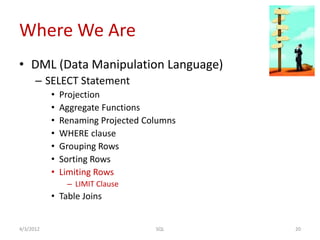
• Limiting Rows
– LIMIT Clause
• Table Joins
4/3/2012 20SQL
DML
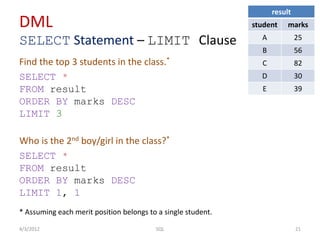
SELECT Statement – LIMIT Clause
Find the top 3 students in the class.*
SELECT *
FROM result
ORDER BY marks DESC
LIMIT 3
Who is the 2nd boy/girl in the class?*
SELECT *
FROM result
ORDER BY marks DESC
LIMIT 1, 1
4/3/2012 21SQL
result
student marks
A 25
B 56
C 82
D 30
E 39
* Assuming each merit position belongs to a single student.
Where We Are
• DML (Data Manipulation Language)
– SELECT Statement
• Projection
• Aggregate Functions
• Renaming Projected Columns
• WHERE clause
• Grouping Rows
• Sorting Rows
• Limiting Rows
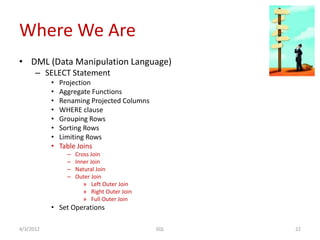
• Table Joins
– Cross Join
– Inner Join
– Natural Join
– Outer Join
» Left Outer Join
» Right Outer Join
» Full Outer Join
• Set Operations
4/3/2012 22SQL
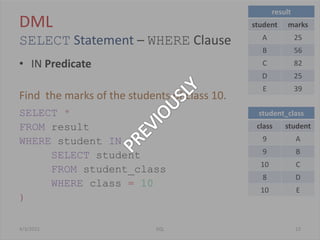
DML
SELECT Statement – WHERE Clause
• IN Predicate
Find the marks of the students of class 10.
SELECT *
FROM result
WHERE student IN (
SELECT student
FROM student_class
WHERE class = 10
)
4/3/2012 23SQL
result
student marks
A 25
B 56
C 82
D 25
E 39
student_class
class student
9 A
9 B
10 C
8 D
10 E
DML
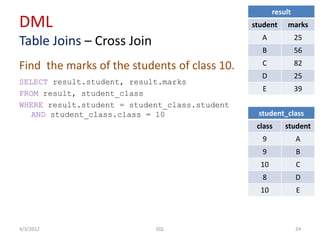
Table Joins – Cross Join
Find the marks of the students of class 10.
SELECT result.student, result.marks
FROM result, student_class
WHERE result.student = student_class.student
AND student_class.class = 10
4/3/2012 24SQL
result
student marks
A 25
B 56
C 82
D 25
E 39
student_class
class student
9 A
9 B
10 C
8 D
10 E
DML
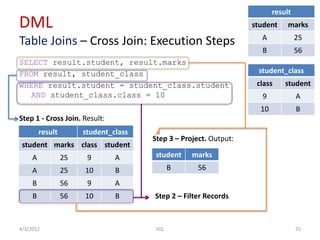
Table Joins – Cross Join: Execution Steps
SELECT result.student, result.marks
FROM result, student_class
WHERE result.student = student_class.student
AND student_class.class = 10
Step 1 - Cross Join. Result:
4/3/2012 25SQL
result
student marks
A 25
B 56
student_class
class student
9 A
10 B
result student_class
student marks class student
A 25 9 A
A 25 10 B
B 56 9 A
B 56 10 B Step 2 – Filter Records
Step 3 – Project. Output:
student marks
B 56
DML
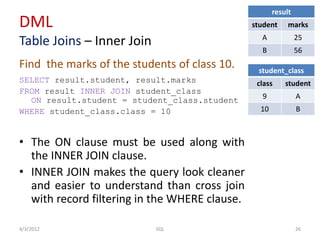
Table Joins – Inner Join
Find the marks of the students of class 10.
SELECT result.student, result.marks
FROM result INNER JOIN student_class
ON result.student = student_class.student
WHERE student_class.class = 10
• The ON clause must be used along with
the INNER JOIN clause.
• INNER JOIN makes the query look cleaner
and easier to understand than cross join
with record filtering in the WHERE clause.
4/3/2012 26SQL
result
student marks
A 25
B 56
student_class
class student
9 A
10 B
DML
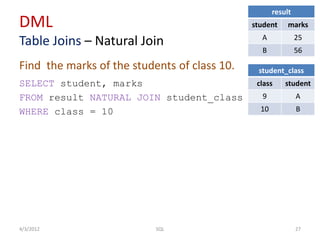
Table Joins – Natural Join
Find the marks of the students of class 10.
SELECT student, marks
FROM result NATURAL JOIN student_class
WHERE class = 10
4/3/2012 27SQL
result
student marks
A 25
B 56
student_class
class student
9 A
10 B
DML
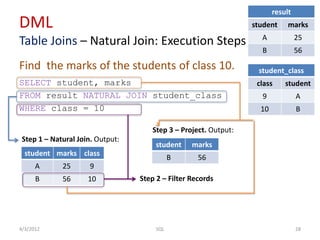
Table Joins – Natural Join: Execution Steps
Find the marks of the students of class 10.
SELECT student, marks
FROM result NATURAL JOIN student_class
WHERE class = 10
4/3/2012 28SQL
student marks class
A 25 9
B 56 10
Step 1 – Natural Join. Output:
result
student marks
A 25
B 56
student_class
class student
9 A
10 B
Step 2 – Filter Records
Step 3 – Project. Output:
student marks
B 56

SQL

  • 1.
    SQL Sharafat Ibn MollahMosharraf Software Engineer, Therap (BD) Ltd.
  • 2.
    Outline • DDL (DataDefinition Language) – CREATE TABLE Statement – DROP TABLE Statement – ALTER TABLE Statement • DML (Data Manipulation Language) – SELECT Statement • Projection • Table Joins • Aggregate Functions - Cross Join / Inner Join • Renaming Projected Columns - Natural Join • WHERE clause - Outer Join • Grouping Rows • Set Operations • Sorting rows - UNION and INTERSECT • Limiting rows returned - MINUS – INSERT Statement – UPDATE Statement – DELETE Statement 4/3/2012 2SQL
  • 3.
    DDL & DML DDL(Data Definition Language) – Manages table and index structure – CREATE, ALTER, DROP, TRUNCATE statements DML (Data Manipulation Language) – Adds, retrieves, updates and deletes data – INSERT, SELECT, UPDATE, DELETE statements 4/3/2012 3SQL
  • 4.
    Where We Are •DML (Data Manipulation Language) – SELECT Statement • Projection – Projecting All Columns: * – Projecting Specific Columns – Generalized Projection – DISTINCT keyword for selecting unique values • Aggregate Functions 4/3/2012 4SQL
  • 5.
    DML SELECT Statement -Projection Projecting All Columns SELECT * FROM result Projecting Specific Columns SELECT student, marks FROM result Generalized Projection SELECT marks + 5 FROM result Selecting Unique Values of a Column SELECT DISTINCT marks FROM result 4/3/2012 5SQL result student marks A 25 B 56 C 82 D 25 E 39
  • 6.
    Where We Are •DML (Data Manipulation Language) – SELECT Statement • Projection • Aggregate Functions – count() – min() – max() – avg() – sum() • Renaming Projected Columns 4/3/2012 6SQL
  • 7.
    DML SELECT Statement –Aggregate Functions count() SELECT count(marks) FROM result min() SELECT min(marks) FROM result max() SELECT max(marks) FROM result avg() SELECT avg(marks) FROM result sum() SELECT sum(marks) FROM result 4/3/2012 7SQL result student marks A 25 B 56 C 82 D 25 E 39
  • 8.
    Where We Are •DML (Data Manipulation Language) – SELECT Statement • Projection • Aggregate Functions • Renaming Projected Columns • WHERE clause 4/3/2012 8SQL
  • 9.
    DML SELECT Statement –Renaming Columns SELECT count(marks) AS marks_count FROM result 4/3/2012 9SQL result student marks A 25 B 56 C 82 D 25 E 39 optional
  • 10.
    Where We Are •DML (Data Manipulation Language) – SELECT Statement • Projection • Aggregate Functions • Renaming Projected Columns • WHERE clause – Comparison Operators: =, <>, >, >=, <, <= – Logical Connectives: AND, OR, NOT – BETWEEN and NOT BETWEEN Predicates – IN Predicate – IS NULL and IS NOT NULL Predicates – LIKE Predicate • Grouping Rows 4/3/2012 10SQL
  • 11.
    DML SELECT Statement –WHERE Clause • Comparison Operators: =, <>, >, >=, <, <= • Logical Connectives: AND, OR, NOT • BETWEEN and NOT BETWEEN Predicates Find students having marks between 75 and 79. SELECT * FROM result WHERE marks BETWEEN 75 AND 79 OR SELECT * FROM result WHERE marks >= 75 AND marks <= 79 4/3/2012 11SQL result student marks A 25 B 56 C 82 D 25 E 39
  • 12.
    DML SELECT Statement –WHERE Clause • IN Predicate Find the marks of the students of class 10. SELECT * FROM result WHERE student IN ( SELECT student FROM student_class WHERE class = 10 ) 4/3/2012 12SQL result student marks A 25 B 56 C 82 D 25 E 39 student_class class student 9 A 9 B 10 C 8 D 10 E
  • 13.
    DML SELECT Statement –WHERE Clause • LIKE Predicate Single Character Matching Wildcard: _ Find students who have the first account number (i.e. x01, e.g. 101, 201 etc.) in subgroups of account group A. SELECT * FROM account WHERE acc_no LIKE ′A-_01′ Substring Matching Wildcard: % Find students who have accounts in account group A. SELECT * FROM account WHERE acc_no LIKE ′A-%′ 4/3/2012 13SQL account student acc_no A A-101 B A-102 C A-156 D B-101 E B-450
  • 14.
    Where We Are •DML (Data Manipulation Language) – SELECT Statement • Projection • Aggregate Functions • Renaming Projected Columns • WHERE clause • Grouping Rows – GROUP BY Clause – HAVING Clause – Difference Between GROUP BY and HAVING Clauses • Sorting Rows 4/3/2012 14SQL
  • 15.
    DML SELECT Statement –Grouping Rows 4/3/2012 15SQL salary_statistics emp org salary A X 500 B X 1000 C Y 1000 D Y 2500 E Z 3000 • GROUP BY Clause Find the payroll* of each organization. SELECT org, sum(salary) payroll FROM salary_statistics GROUP BY org Result: * Payroll: the total amount of money paid by a company as salary for all the employees. org payroll X 1500 Y 3500 Z 3000
  • 16.
    DML SELECT Statement –Grouping Rows 4/3/2012 16SQL salary_statistics emp org salary A X 500 B X 1000 C Y 1000 D Y 2500 E Z 3000 • HAVING Clause Find the organizations with payroll less than $3200. SELECT org, sum(salary) payroll FROM salary_statistics GROUP BY org HAVING payroll < 3200 Result: org payroll X 1500 Z 3000
  • 17.
    DML SELECT Statement –Grouping Rows… 4/3/2012 17SQL • The Difference Between WHERE and HAVING Clauses  WHERE gets processed before any GROUP BY, and so it doesn't have access to aggregated values (that is, the results of min(), max(), etc. functions).  HAVING gets processed after GROUP BY and so can be used to constrain the result set to only those with aggregated values that match a certain predicate. Find the organizations with payroll less than $3200. SELECT org, sum(salary) payroll FROM salary_statistics WHERE payroll < 3200 GROUP BY org SELECT org, sum(salary) payroll FROM salary_statistics GROUP BY org HAVING payroll < 3200 } } ✗ Incorrect ✓ Correct
  • 18.
    Where We Are •DML (Data Manipulation Language) – SELECT Statement • Projection • Aggregate Functions • Renaming Projected Columns • WHERE clause • Grouping Rows • Sorting Rows – ORDER BY Clause • Limiting Rows 4/3/2012 18SQL
  • 19.
    DML SELECT Statement –ORDER BY Clause Find students ordered by merit position. SELECT * FROM result ORDER BY marks DESC Find students ordered by merit position; and if the merit position is the same, then order by the natural order of their names. SELECT * FROM result ORDER BY marks DESC, student ASC 4/3/2012 19SQL result student marks A 25 B 56 C 82 D 25 E 39 optional (default)
  • 20.
    Where We Are •DML (Data Manipulation Language) – SELECT Statement • Projection • Aggregate Functions • Renaming Projected Columns • WHERE clause • Grouping Rows • Sorting Rows • Limiting Rows – LIMIT Clause • Table Joins 4/3/2012 20SQL
  • 21.
    DML SELECT Statement –LIMIT Clause Find the top 3 students in the class.* SELECT * FROM result ORDER BY marks DESC LIMIT 3 Who is the 2nd boy/girl in the class?* SELECT * FROM result ORDER BY marks DESC LIMIT 1, 1 4/3/2012 21SQL result student marks A 25 B 56 C 82 D 30 E 39 * Assuming each merit position belongs to a single student.
  • 22.
    Where We Are •DML (Data Manipulation Language) – SELECT Statement • Projection • Aggregate Functions • Renaming Projected Columns • WHERE clause • Grouping Rows • Sorting Rows • Limiting Rows • Table Joins – Cross Join – Inner Join – Natural Join – Outer Join » Left Outer Join » Right Outer Join » Full Outer Join • Set Operations 4/3/2012 22SQL
  • 23.
    DML SELECT Statement –WHERE Clause • IN Predicate Find the marks of the students of class 10. SELECT * FROM result WHERE student IN ( SELECT student FROM student_class WHERE class = 10 ) 4/3/2012 23SQL result student marks A 25 B 56 C 82 D 25 E 39 student_class class student 9 A 9 B 10 C 8 D 10 E
  • 24.
    DML Table Joins –Cross Join Find the marks of the students of class 10. SELECT result.student, result.marks FROM result, student_class WHERE result.student = student_class.student AND student_class.class = 10 4/3/2012 24SQL result student marks A 25 B 56 C 82 D 25 E 39 student_class class student 9 A 9 B 10 C 8 D 10 E
  • 25.
    DML Table Joins –Cross Join: Execution Steps SELECT result.student, result.marks FROM result, student_class WHERE result.student = student_class.student AND student_class.class = 10 Step 1 - Cross Join. Result: 4/3/2012 25SQL result student marks A 25 B 56 student_class class student 9 A 10 B result student_class student marks class student A 25 9 A A 25 10 B B 56 9 A B 56 10 B Step 2 – Filter Records Step 3 – Project. Output: student marks B 56
  • 26.
    DML Table Joins –Inner Join Find the marks of the students of class 10. SELECT result.student, result.marks FROM result INNER JOIN student_class ON result.student = student_class.student WHERE student_class.class = 10 • The ON clause must be used along with the INNER JOIN clause. • INNER JOIN makes the query look cleaner and easier to understand than cross join with record filtering in the WHERE clause. 4/3/2012 26SQL result student marks A 25 B 56 student_class class student 9 A 10 B
  • 27.
    DML Table Joins –Natural Join Find the marks of the students of class 10. SELECT student, marks FROM result NATURAL JOIN student_class WHERE class = 10 4/3/2012 27SQL result student marks A 25 B 56 student_class class student 9 A 10 B
  • 28.
    DML Table Joins –Natural Join: Execution Steps Find the marks of the students of class 10. SELECT student, marks FROM result NATURAL JOIN student_class WHERE class = 10 4/3/2012 28SQL student marks class A 25 9 B 56 10 Step 1 – Natural Join. Output: result student marks A 25 B 56 student_class class student 9 A 10 B Step 2 – Filter Records Step 3 – Project. Output: student marks B 56