
ANDROID CONTENT
PROVIDER EXPLAINED
Usages and examples
By: Shady Yehia Selim
1
IN FEW WORDS
 ‘do something’ Filters
2
THE BEST DESCRIPTION
 When the android system or another application wants to do a specific
task, it will broadcast an intent saying “can anyone do this for me“
3
SO IT NEEDS
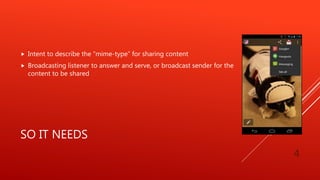
 Intent to describe the “mime-type” for sharing content
 Broadcasting listener to answer and serve, or broadcast sender for the
content to be shared
4
IT CAN BE USED TO ….
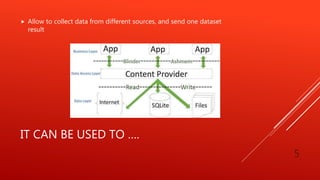
 Allow to collect data from different sources, and send one dataset
result
5
IT CAN BE USED TO ….
 Support other apps, widgets, search, and others, with the same results
6
IT CAN BE USED TO ….
 Control single app roles access
 Control different apps access permissions to the same data source
 Control apps data source, so if the host data server was changed, you
won’t have to update all the apps, only the content provider data
source
 Help implementing new trends and security controls like, Android for
Work, Android for Education, BYOD, MDM, MAM, and MCM.
7
IN THE LATEST ANDROID VERSION
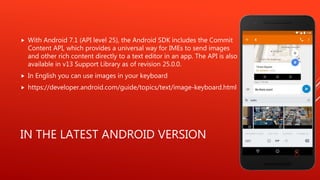
 With Android 7.1 (API level 25), the Android SDK includes the Commit
Content API, which provides a universal way for IMEs to send images
and other rich content directly to a text editor in an app. The API is also
available in v13 Support Library as of revision 25.0.0.
 In English you can use images in your keyboard
 https://developer.android.com/guide/topics/text/image-keyboard.html
8
RESOURCES
 http://blog.blundellapps.co.uk/add-your-app-to-the-android-menu/
 https://developer.android.com/guide/topics/providers/content-providers.html
 https://developer.android.com/guide/topics/providers/content-provider-basics.html
 https://developer.android.com/reference/android/content/ContentProvider.html
 https://developer.android.com/guide/topics/providers/content-provider-creating.html
 https://developer.android.com/training/sharing/shareaction.html
9
RESOURCES
 https://developer.android.com/training/sharing/send.html
 https://developer.android.com/training/testing/integration-testing/content-provider-
testing.html
 https://www.tutorialspoint.com/android/android_content_providers.htm
 http://www.vogella.com/tutorials/AndroidSQLite/article.html
 http://www.grokkingandroid.com/android-tutorial-writing-your-own-content-provider/
 https://code.tutsplus.com/tutorials/android-fundamentals-working-with-content-providers--
mobile-5549
10

Android content provider explained

  • 1.
    ANDROID CONTENT PROVIDER EXPLAINED Usagesand examples By: Shady Yehia Selim 1
  • 2.
    IN FEW WORDS ‘do something’ Filters 2
  • 3.
    THE BEST DESCRIPTION When the android system or another application wants to do a specific task, it will broadcast an intent saying “can anyone do this for me“ 3
  • 4.
    SO IT NEEDS Intent to describe the “mime-type” for sharing content  Broadcasting listener to answer and serve, or broadcast sender for the content to be shared 4
  • 5.
    IT CAN BEUSED TO ….  Allow to collect data from different sources, and send one dataset result 5
  • 6.
    IT CAN BEUSED TO ….  Support other apps, widgets, search, and others, with the same results 6
  • 7.
    IT CAN BEUSED TO ….  Control single app roles access  Control different apps access permissions to the same data source  Control apps data source, so if the host data server was changed, you won’t have to update all the apps, only the content provider data source  Help implementing new trends and security controls like, Android for Work, Android for Education, BYOD, MDM, MAM, and MCM. 7
  • 8.
    IN THE LATESTANDROID VERSION  With Android 7.1 (API level 25), the Android SDK includes the Commit Content API, which provides a universal way for IMEs to send images and other rich content directly to a text editor in an app. The API is also available in v13 Support Library as of revision 25.0.0.  In English you can use images in your keyboard  https://developer.android.com/guide/topics/text/image-keyboard.html 8
  • 9.
    RESOURCES  http://blog.blundellapps.co.uk/add-your-app-to-the-android-menu/  https://developer.android.com/guide/topics/providers/content-providers.html https://developer.android.com/guide/topics/providers/content-provider-basics.html  https://developer.android.com/reference/android/content/ContentProvider.html  https://developer.android.com/guide/topics/providers/content-provider-creating.html  https://developer.android.com/training/sharing/shareaction.html 9
  • 10.
    RESOURCES  https://developer.android.com/training/sharing/send.html  https://developer.android.com/training/testing/integration-testing/content-provider- testing.html https://www.tutorialspoint.com/android/android_content_providers.htm  http://www.vogella.com/tutorials/AndroidSQLite/article.html  http://www.grokkingandroid.com/android-tutorial-writing-your-own-content-provider/  https://code.tutsplus.com/tutorials/android-fundamentals-working-with-content-providers-- mobile-5549 10