Android Development
      - the basics


    Tomáš Kypta
      @TomasKypta
Outline
●   Android platform
●   Android ecosystem
●   Android SDK and development tools
●   Hello World
●   building blocks & the manifest file
●   activities, widgets, intents
●   dialog, toasts, notifications
●   fragments
Android platform
●   Linux-based operating system
●   open-source
●   originally phone OS
●   tablet (since Honeycomb, Android 3.0)
●   Google TV
●   hundreds of devices
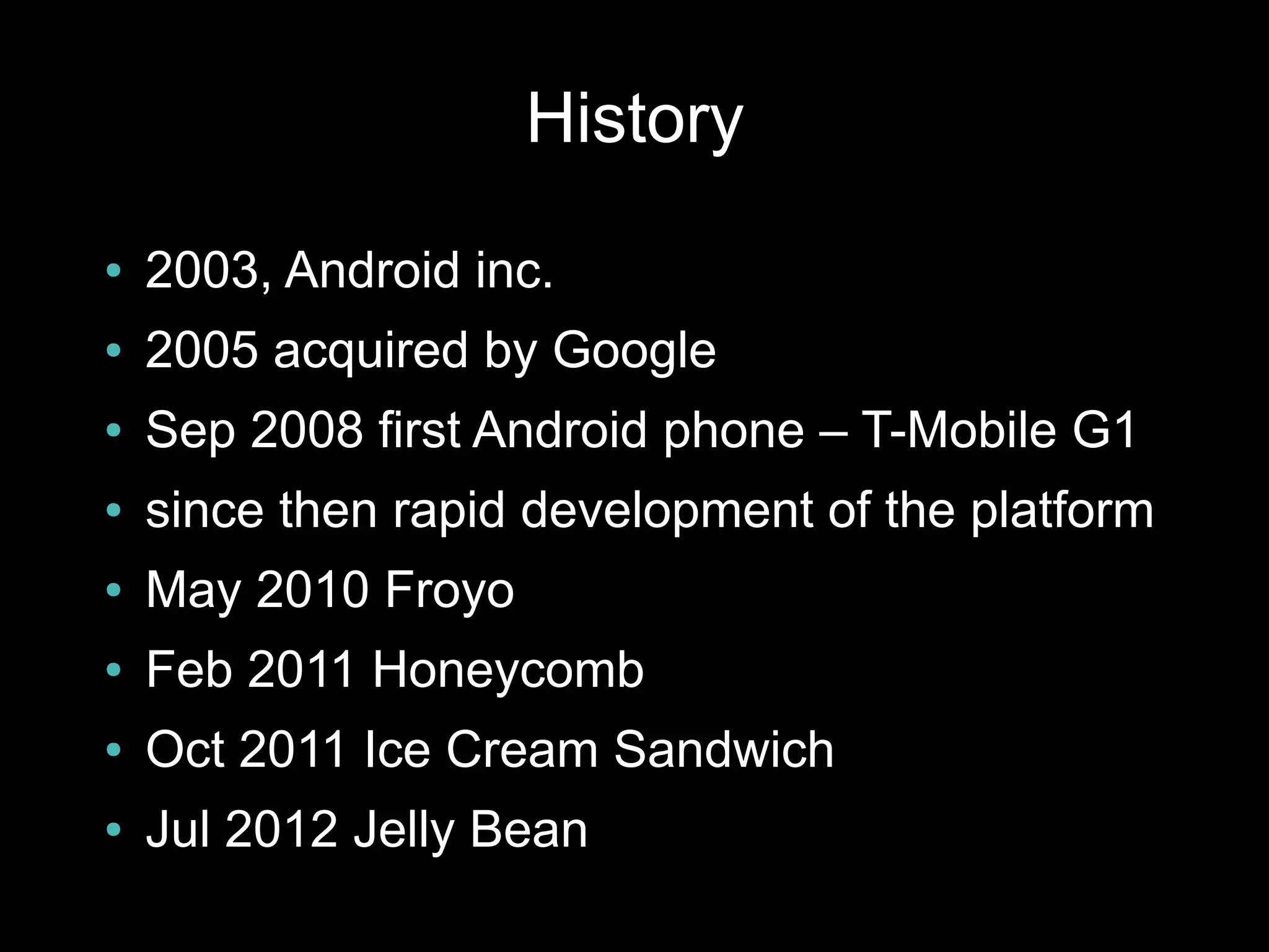
History
●   2003, Android inc.
●   2005 acquired by Google
●   Sep 2008 first Android phone – T-Mobile G1
●   since then rapid development of the platform
●   May 2010 Froyo
●   Feb 2011 Honeycomb
●   Oct 2011 Ice Cream Sandwich
●   Jul 2012 Jelly Bean
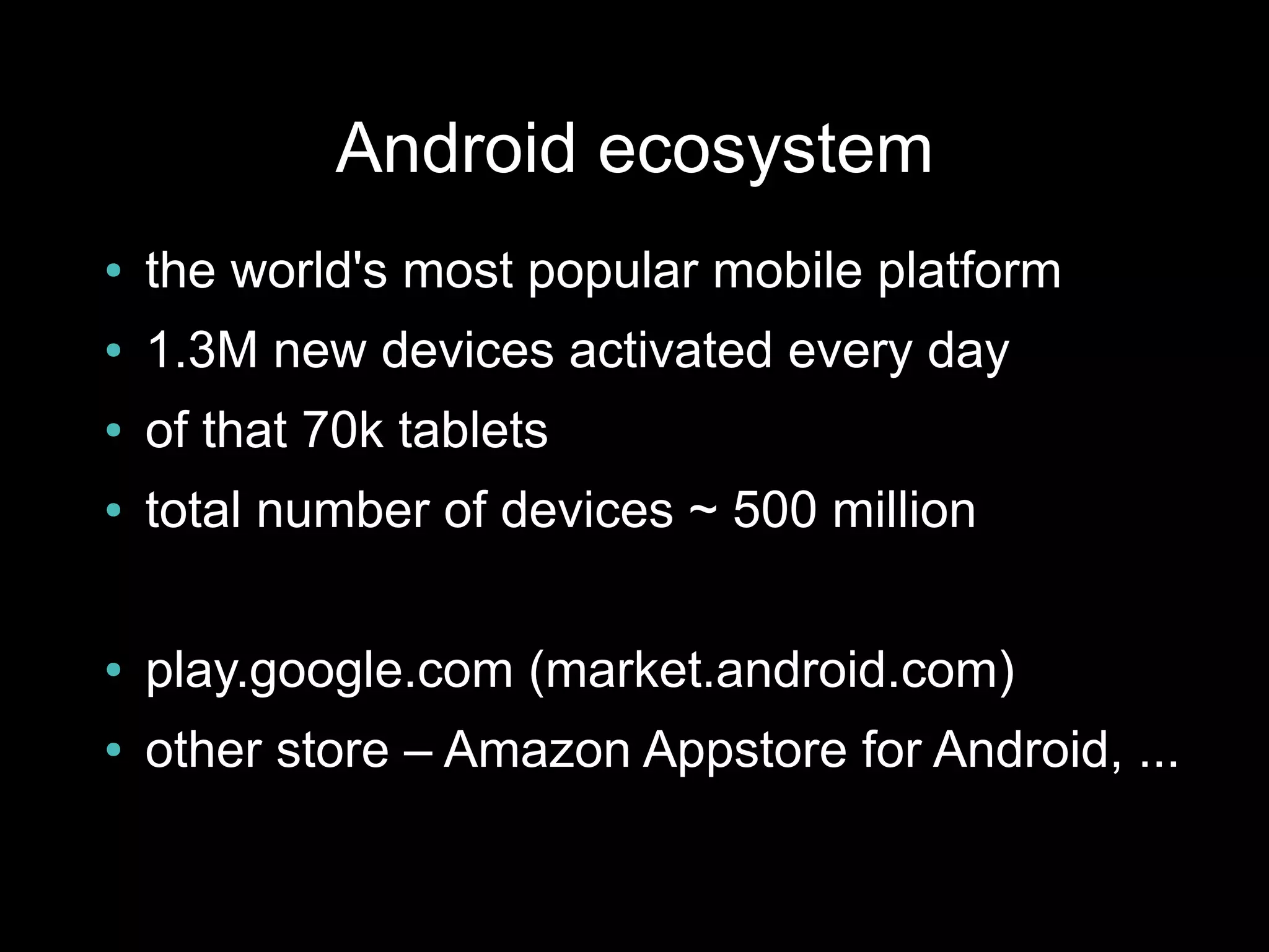
Android ecosystem
●   the world's most popular mobile platform
●   1.3M new devices activated every day
●   of that 70k tablets
●   total number of devices ~ 500 million

●   play.google.com (market.android.com)
●   other store – Amazon Appstore for Android, ...
Google Play
●   ~ 675 000 apps in the market
●   total downloads > 25 billion
●   ~ 70% free apps
●   ads, in-app billing
●   selling – 15 min return period
●   buy – ČR, SR
●   sell – ČR
●   Google Play contains also music, books
        –   not available in ČR, SR
Android problems
●   fragmentation
●   manufacturer/carrier enhancements
●   updates & support
●   openness – low quality apps in Google Play
●   malware - users
Permissions
●   users accept when installing or updating the
    app
●   apps can be installed directly from .apk file
Sources
●   developer.android.com
●   android-developers.blogspot.com
●   source.android.com
●   stackoverflow.com
●   youtube.com/androiddevelopers
●   svetandroida.cz
Development
●   programming in “Java”
●   native apps possible (C++)

●   development tools platform friendly
●   Windows, Linux, Mac OS X
●   IDE support – ADT plugin for Eclipse,
    Netbeans, IntelliJ IDEA, ...
●   you can freely develop on your device
Android SDK
●   android – Android SDK and AVD Manager
●   adb – Android Debug Bridge
●   ddms – Dalvik Debug Monitor
●   emulator
●   lint, hierarchyviewer, Traceview
●   ProGuard
●   docs, samples
Libraries
●   compatibility libraries
        – v4 – backports lots of newer
            functionality to android 1.6+
●   licensing, billing libraries

●   AdMob
●   Google Analytics, Flurry, Crittercism, ...
●   C2DM
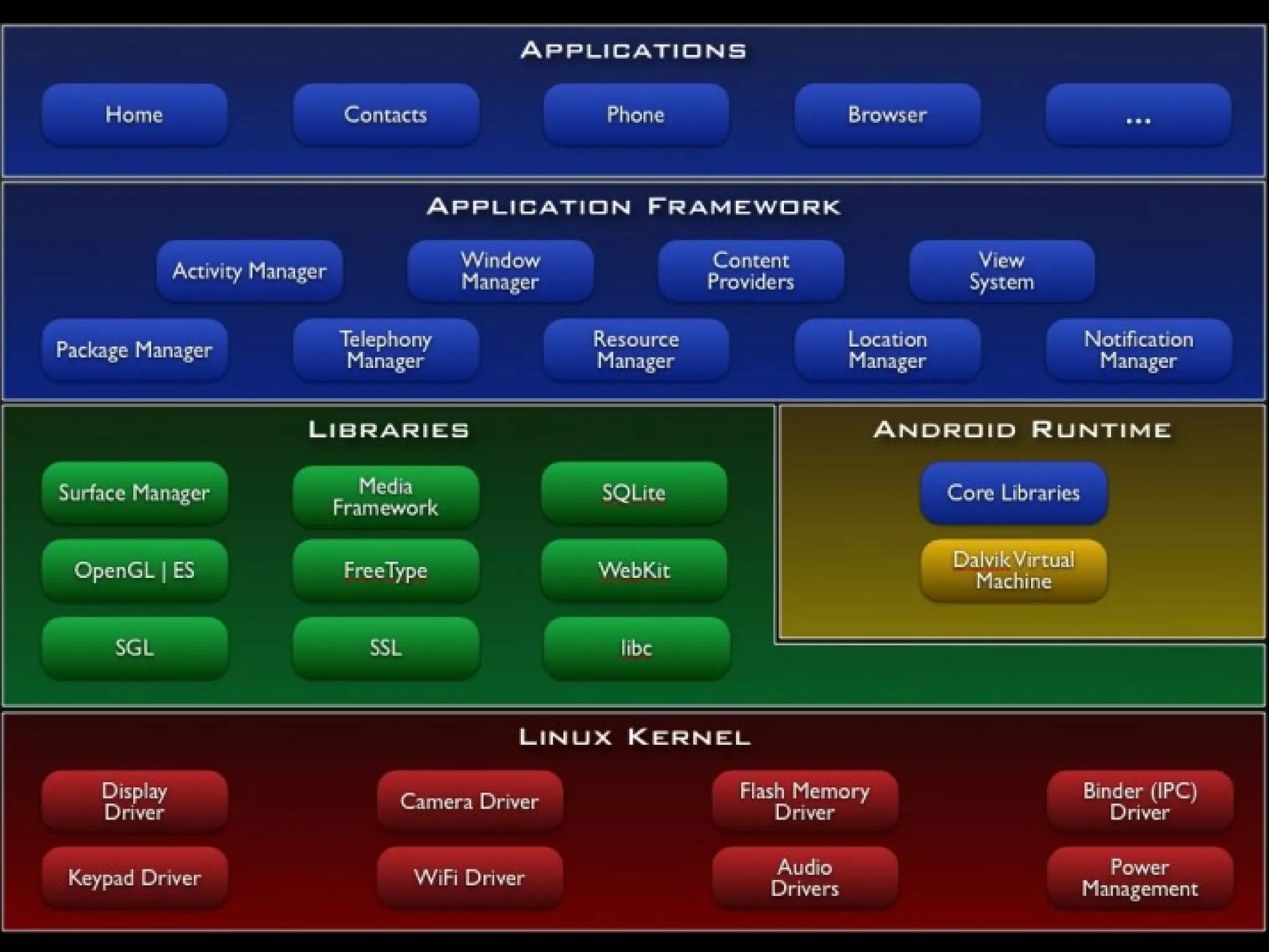
Android internals
Hello World
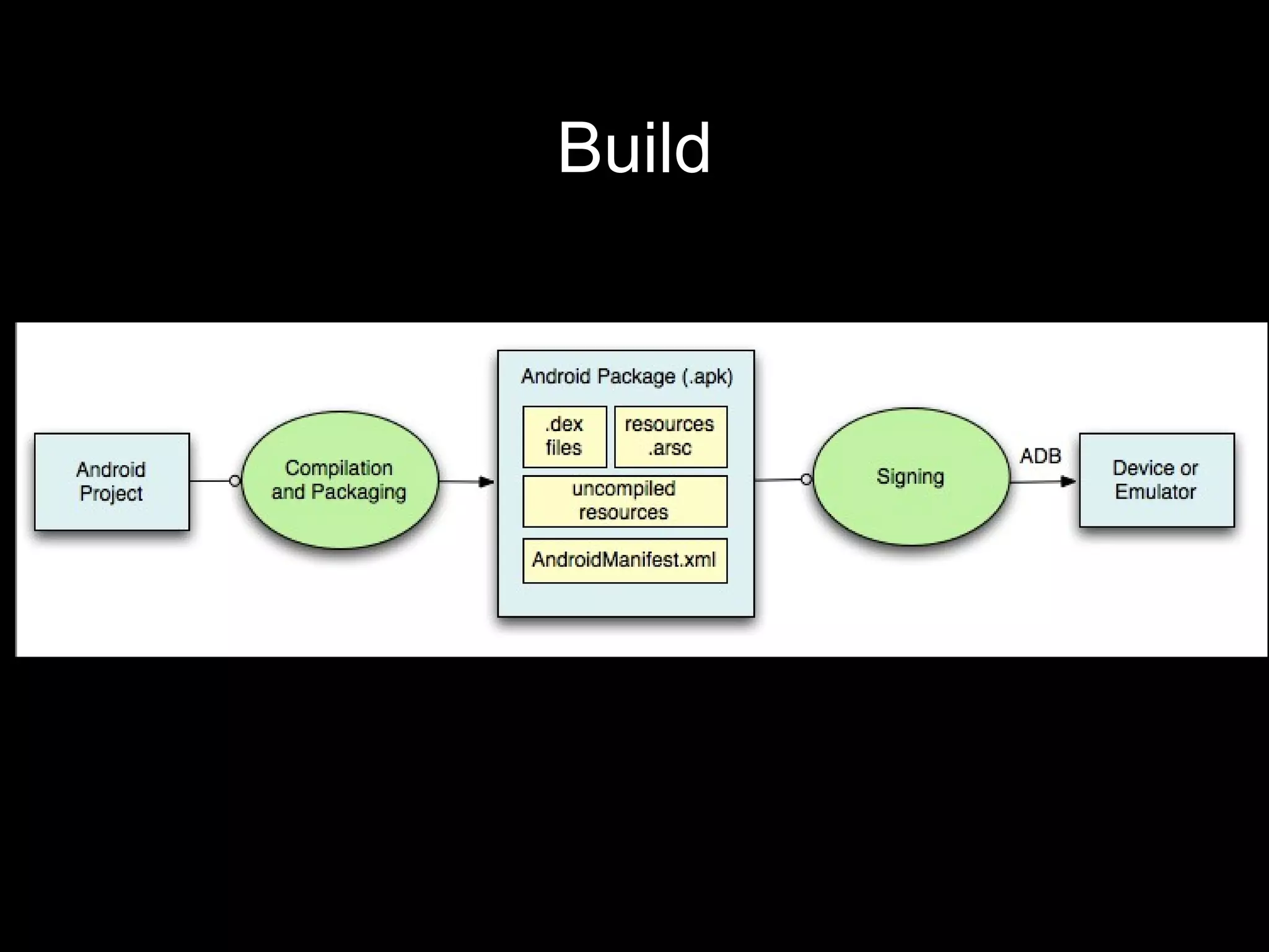
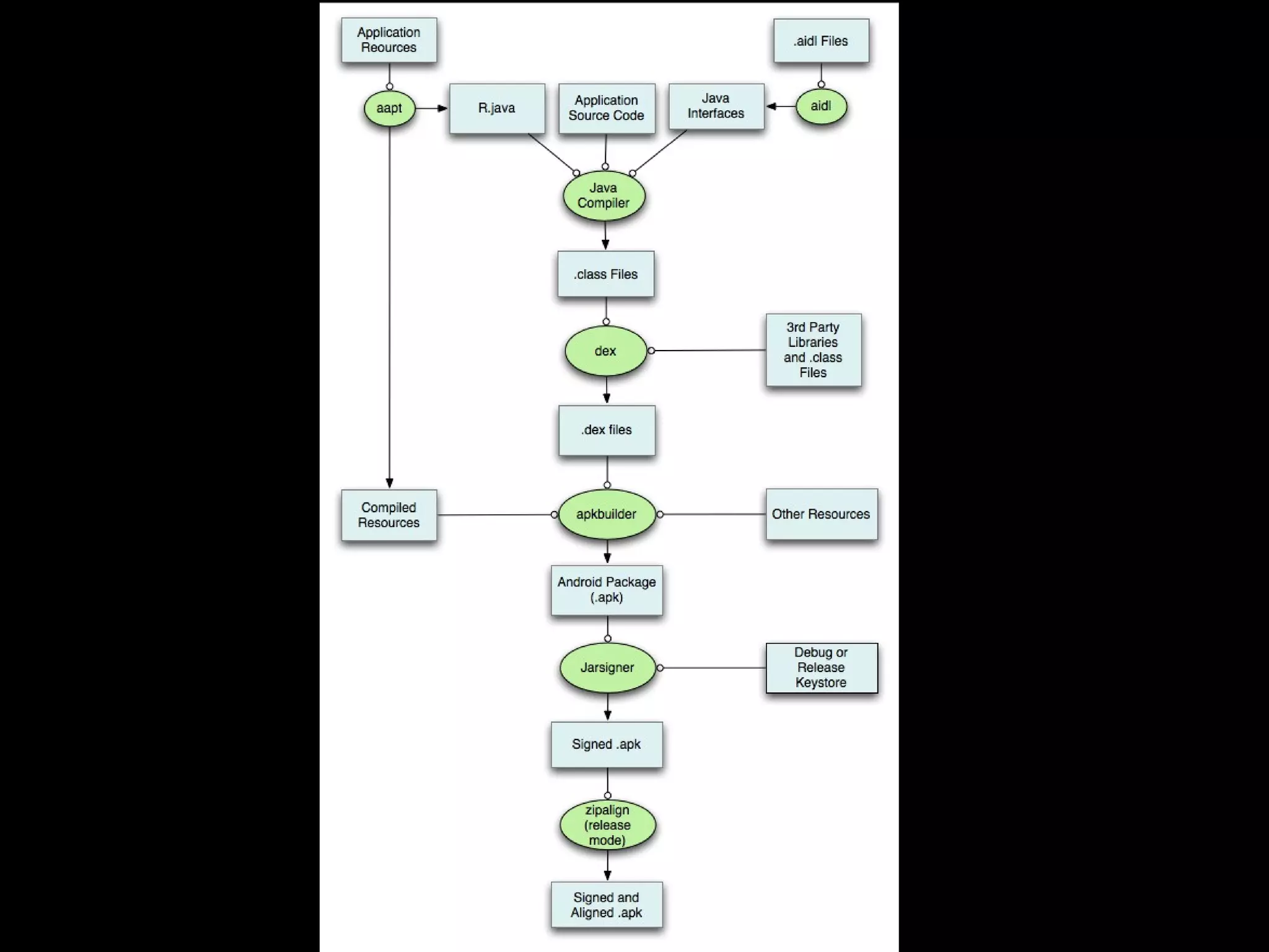
Build
Android Building Blocks
●   Activity
●   Service
●   Content provider
●   Broadcast receiver

●   AndroidManifest.xml
Activity
●   screen with user interface
●   the only visual component

●   example – an email app can contain:
        –   list of emails
        –   email detail
        –   email composition
        –   preference screen
        –   ...
Service
●   has no UI
●   long-running tasks

●   examples:
       –   music playback service
       –   download service
       –   sync service
Content Provider
●   manages and shares application data
●   data storage doesn't matter – database, web,
    filesystem
●   apps can query and modify data through
    content provider
●   read/write permissions can be defined
●   examples:
       –   all system databases
       –   contacts
       –   SMS
Broadcast Receiver
●   responds to broadcasts
●   broadcasts are system wide
●   can be registered statically or dynamically
●   system or custom messages
●   examples:
        –   incoming SMS, incoming call
        –   screen turned off
        –   low baterry
        –   removed SD card
AndroidManifest.xml
●   defines what parts the app have
●   defines which endpoints are exposed
●   minimum/maximum API level
●   permissions
●   declare hardware and software features
●   required configuration
Intent
●   asynchronous message
●   binds components together (all of them
    except ContentProvider)
●   starting activities
●   starting services and binding to services
●   sending broadcasts
Activity
●   a subclass of android.app.Activity
●   app usually has many activities
●   activities managed in activity stack
        –   newly started activity is place on the top of
             the stack
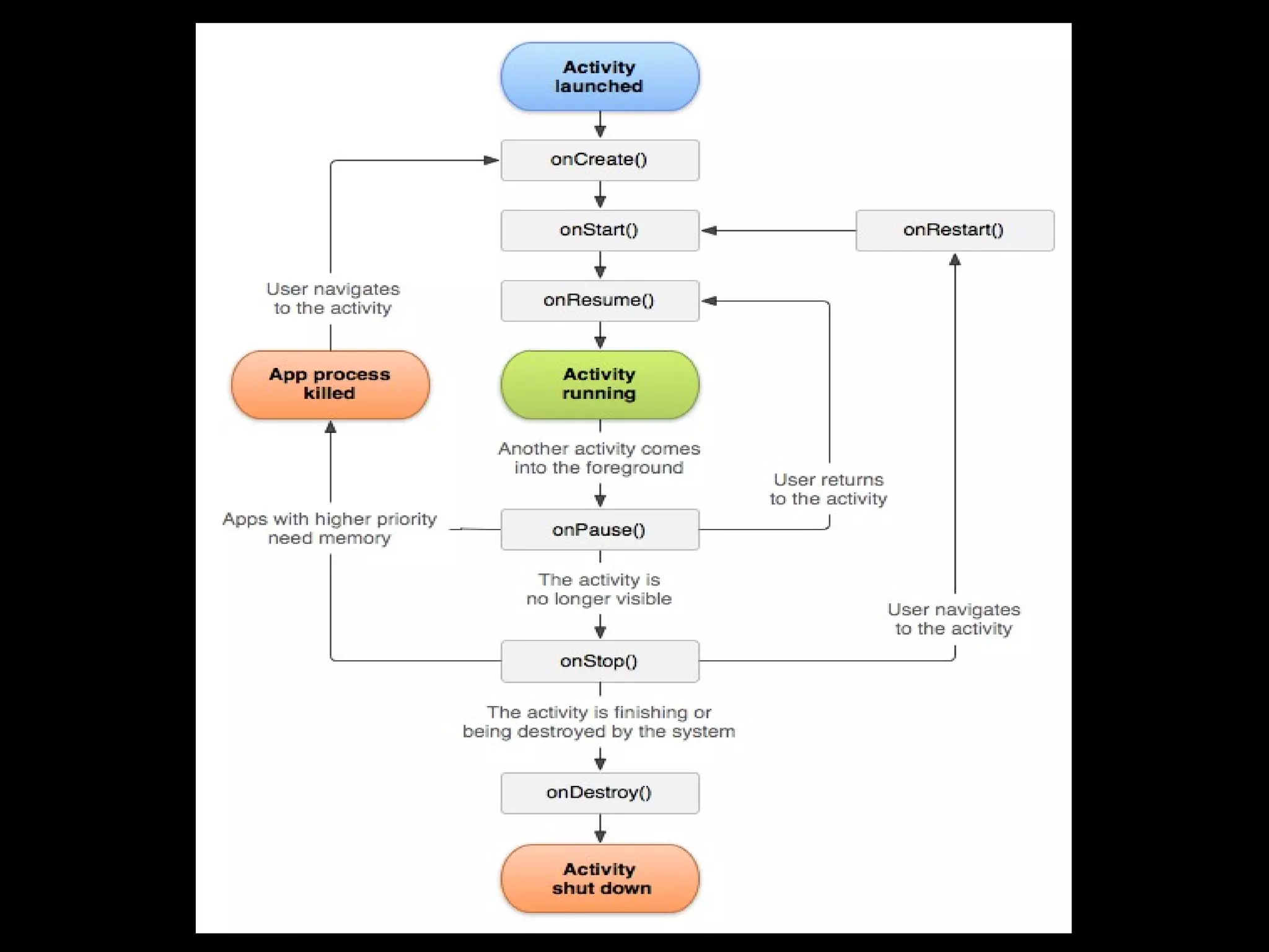
Activity Lifecycle
●   activity can be in different states during it's
    lifecycle:
        –   foreground
        –   visible
        –   stopped
        –   killed
●   when activity state changes a system
    callback is called
Activity callbacks
●   onCreate() - activity created
●   onStart() - becoming visible to the user
●   onResume() - gains user focus
●   onPause() - system resuming previous
    activity
●   onStop() - becoming invisible to the user
●   onDestroy() - before activity destroyed
●   onRestart() - if it was previously stopped,
    prior to onStart()
Intent & Activity
●   starting activity explicitly

●   starting activity implicitly

●   starting activity for result
Configuration changes
●   when configuration changes activities are
    destroyed and recreated by default
        –   place for lots of bugs
●   behaviour can be changes
●   it is preferred to properly handle config
    changes
        –   onSaveInstanceState(Bundle)
User Interface
●   defined by hierarchy of views
●   layouts = containers
       –   LinearLayout
       –   RelativeLayout
       –   FrameLayout
       –   AdapterView – ListView, GridView, Spinner
●   widgets = UI objects
       –   Button, TextView, EditText
       –   WebView
List Widgets
●   displays a list of items (some view)
        –   ListView, Spinner, GridView, Gallery
●   use adapter to bind list to data
Resources
●   drawables – bitmaps, 9-patch png, state-list,
    layer list, shape drawable, ...
●   layouts
●   strings
●   colors
●   menus
●   animations
●   arrays, ids, dimensions, raw, ...
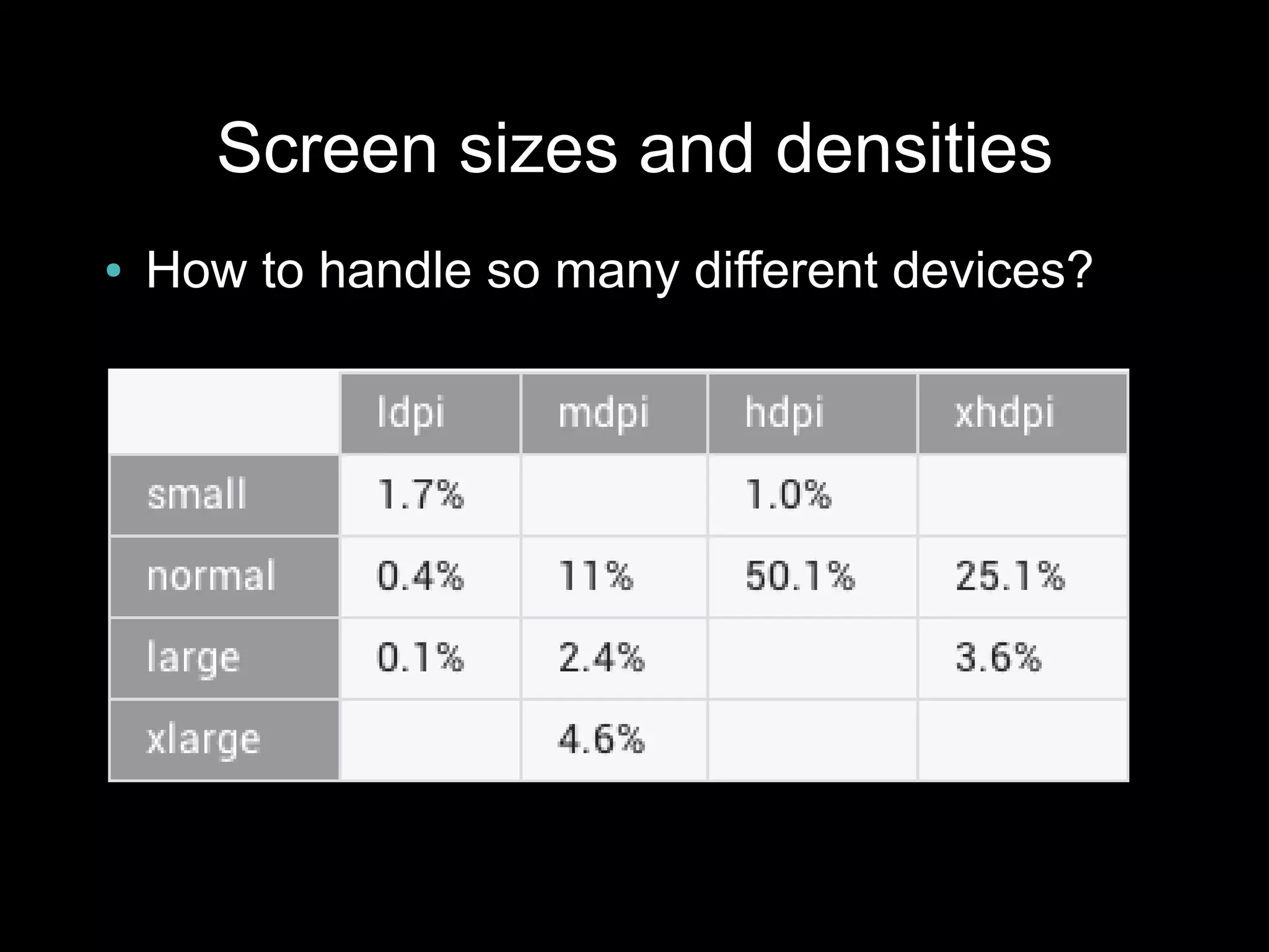
Screen sizes and densities
●   How to handle so many different devices?
Resource units
●   dp/dip – density-independent pixel
●   sp – scale-independent pixel
Resources
●   generated file R.java
●   resource ids
●   makes resources accessible in the code
●


●   resources can be created in several versions
        –   proper resource is selected according to
             current device configuration in runtime
Resource qualifiers
●   screen density – ldpi, mdpi, hdpi, xhdpi
●   screen size – small, normal, large, xlarge
●   screen orientation – port, land
●   language – en, cs, sk, ...
●   version – v11, v14, ...
●   since Android 3.2
        –   w<N>dp – available screen width, w600dp
        –   h<N>dp – available screen height, h720dp
        –   sw<N>dp – smallest width (does not change with
              orientation change)
●   combinations
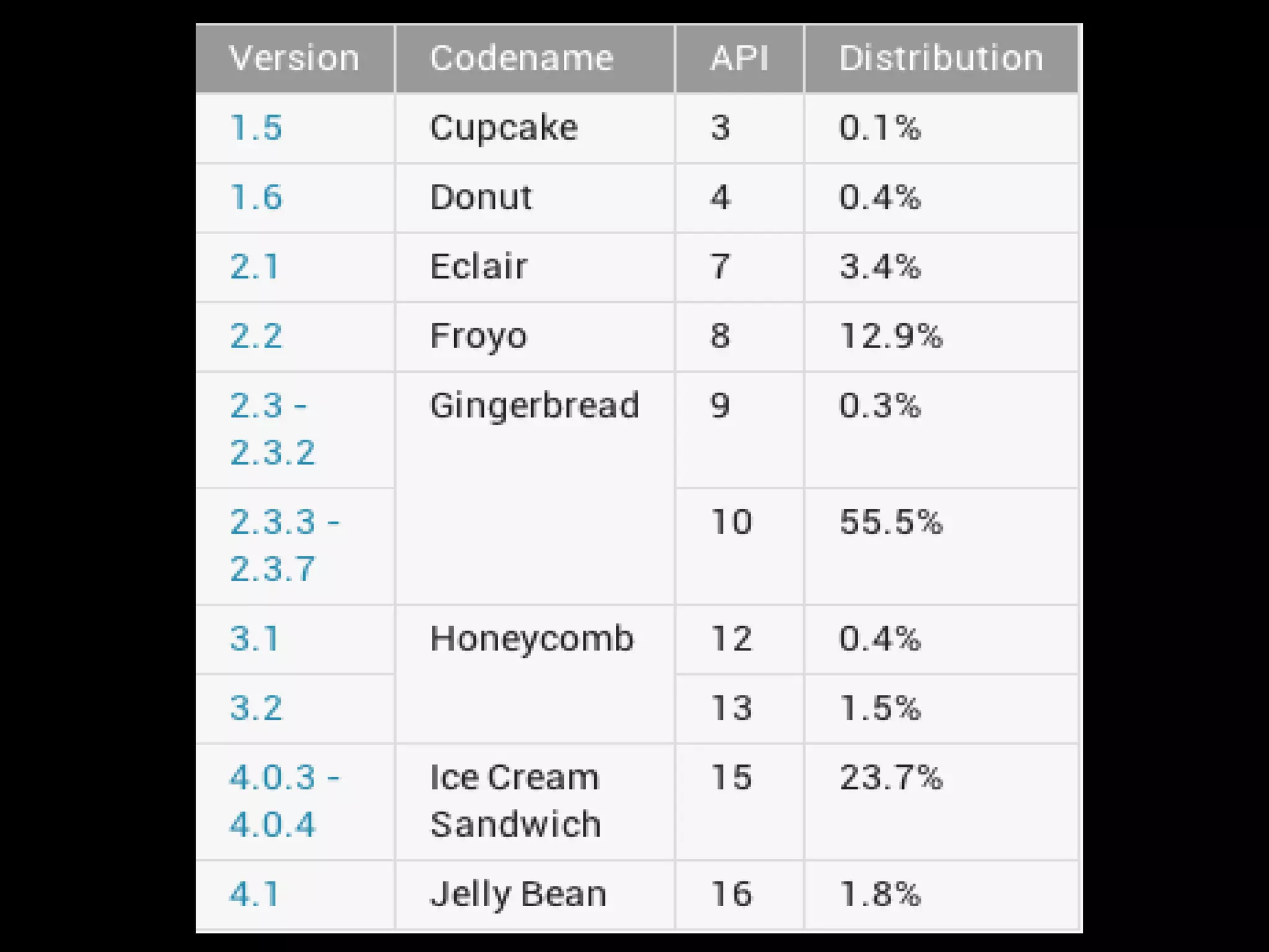
Android version fragmentation
●   How to handle different API levels avialable
    on devices?
●   build target
        –   project.properties
        –   target=android-16
●   AndroidManifest.xml
    <uses-sdk
       android:minSdkVersion="8"
       android:targetSdkVersion="16" />
Android version fragmentation
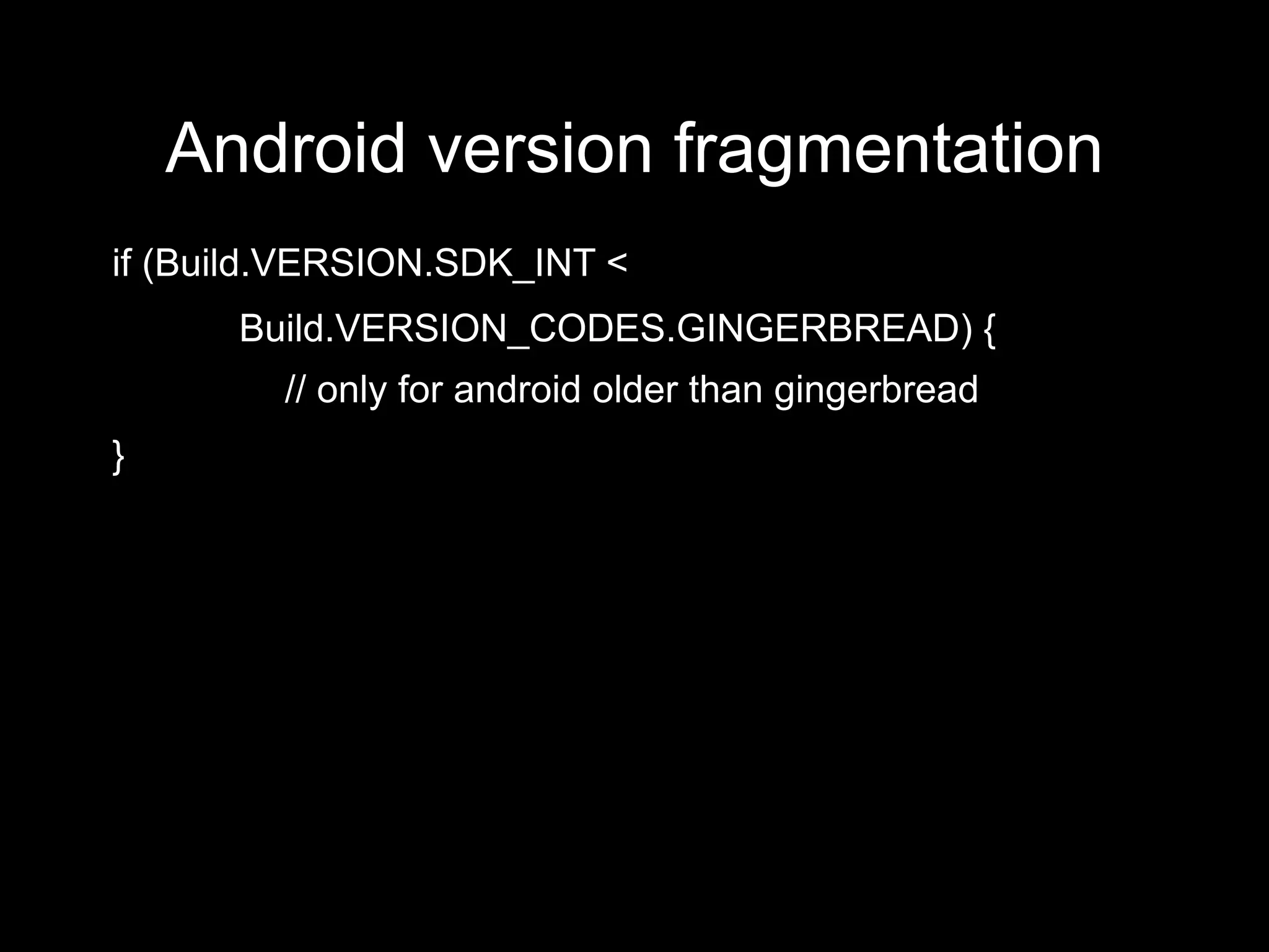
if (Build.VERSION.SDK_INT <
      Build.VERSION_CODES.GINGERBREAD) {
         // only for android older than gingerbread
}
Android version fragmentation
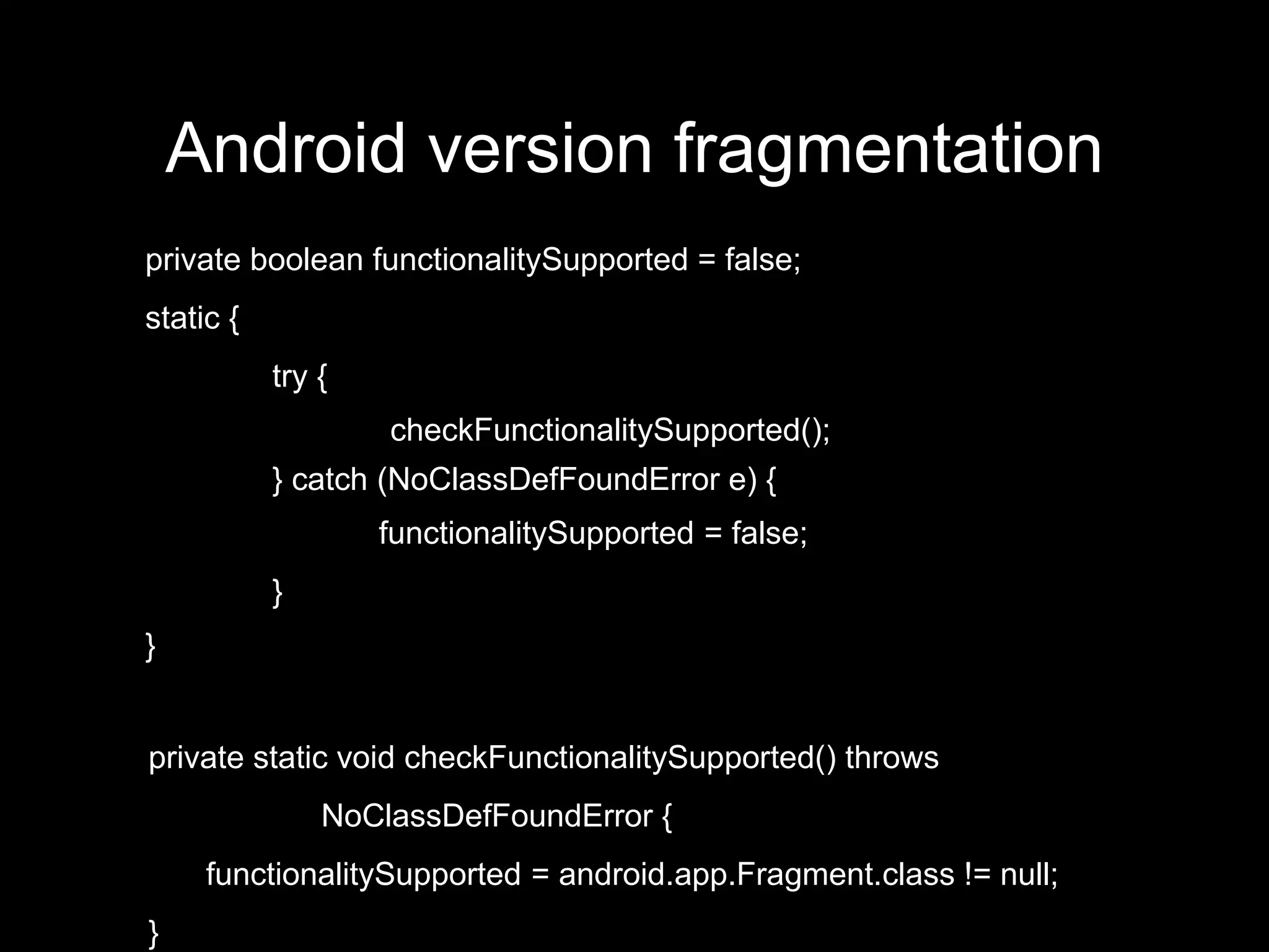
private boolean functionalitySupported = false;
static {
           try {
                   checkFunctionalitySupported();
           } catch (NoClassDefFoundError e) {
                   functionalitySupported = false;
           }
}


private static void checkFunctionalitySupported() throws
               NoClassDefFoundError {
     functionalitySupported = android.app.Fragment.class != null;
}
Fragments
●   a piece of application UI
●   fragment != activity
●   fragments used within activities
●   since Android 3.0
●   support library v4 backports it to Android 1.6+
●   introduced to support more flexible UI –
    phones and tablets together in one app
Threads
●   main thread = UI thread
●   do not block the UI thread
●   use worker threads for time consuming
    operations
●   UI toolkit not thread safe – never manipulate
    UI from a worker thread
Menu
●   Android pre 3.0 – menu hidden under menu
    button
●   Android 3.0+ has ActionBar:
       –   items can be displayed in the action bar
       –   if not enough space the bahaviour depends:
               ●   hidden under menu button, if the device has
                     menu button
               ●   otherwise an overflow icon created in the
                     action bar
●   menu resource
Dialogs and Toasts
●   Dialog – floating window screen
       –   standard dialogs
       –   custom dialogs
       –   since fragments used via DialogFragment


●   Toast – simple non-modal information
    displayed for a short period of time
       –   doesn't have user focus
Notifications
●   a message that can be displayed to the user
    outside your normal UI
●   displayed in notification area
●   user can open notification drawer to see the
    details
●   app can define UI and click action on the
    notification
●   NotificationCompat.Builder
THE END

Android development - the basics, MFF UK, 2012

  • 1.
    Android Development - the basics Tomáš Kypta @TomasKypta
  • 4.
    Outline ● Android platform ● Android ecosystem ● Android SDK and development tools ● Hello World ● building blocks & the manifest file ● activities, widgets, intents ● dialog, toasts, notifications ● fragments
  • 5.
    Android platform ● Linux-based operating system ● open-source ● originally phone OS ● tablet (since Honeycomb, Android 3.0) ● Google TV ● hundreds of devices
  • 6.
    History ● 2003, Android inc. ● 2005 acquired by Google ● Sep 2008 first Android phone – T-Mobile G1 ● since then rapid development of the platform ● May 2010 Froyo ● Feb 2011 Honeycomb ● Oct 2011 Ice Cream Sandwich ● Jul 2012 Jelly Bean
  • 8.
    Android ecosystem ● the world's most popular mobile platform ● 1.3M new devices activated every day ● of that 70k tablets ● total number of devices ~ 500 million ● play.google.com (market.android.com) ● other store – Amazon Appstore for Android, ...
  • 9.
    Google Play ● ~ 675 000 apps in the market ● total downloads > 25 billion ● ~ 70% free apps ● ads, in-app billing ● selling – 15 min return period ● buy – ČR, SR ● sell – ČR ● Google Play contains also music, books – not available in ČR, SR
  • 10.
    Android problems ● fragmentation ● manufacturer/carrier enhancements ● updates & support ● openness – low quality apps in Google Play ● malware - users
  • 11.
    Permissions ● users accept when installing or updating the app ● apps can be installed directly from .apk file
  • 12.
    Sources ● developer.android.com ● android-developers.blogspot.com ● source.android.com ● stackoverflow.com ● youtube.com/androiddevelopers ● svetandroida.cz
  • 13.
    Development ● programming in “Java” ● native apps possible (C++) ● development tools platform friendly ● Windows, Linux, Mac OS X ● IDE support – ADT plugin for Eclipse, Netbeans, IntelliJ IDEA, ... ● you can freely develop on your device
  • 14.
    Android SDK ● android – Android SDK and AVD Manager ● adb – Android Debug Bridge ● ddms – Dalvik Debug Monitor ● emulator ● lint, hierarchyviewer, Traceview ● ProGuard ● docs, samples
  • 15.
    Libraries ● compatibility libraries – v4 – backports lots of newer functionality to android 1.6+ ● licensing, billing libraries ● AdMob ● Google Analytics, Flurry, Crittercism, ... ● C2DM
  • 16.
  • 17.
  • 18.
  • 20.
    Android Building Blocks ● Activity ● Service ● Content provider ● Broadcast receiver ● AndroidManifest.xml
  • 21.
    Activity ● screen with user interface ● the only visual component ● example – an email app can contain: – list of emails – email detail – email composition – preference screen – ...
  • 22.
    Service ● has no UI ● long-running tasks ● examples: – music playback service – download service – sync service
  • 23.
    Content Provider ● manages and shares application data ● data storage doesn't matter – database, web, filesystem ● apps can query and modify data through content provider ● read/write permissions can be defined ● examples: – all system databases – contacts – SMS
  • 24.
    Broadcast Receiver ● responds to broadcasts ● broadcasts are system wide ● can be registered statically or dynamically ● system or custom messages ● examples: – incoming SMS, incoming call – screen turned off – low baterry – removed SD card
  • 25.
    AndroidManifest.xml ● defines what parts the app have ● defines which endpoints are exposed ● minimum/maximum API level ● permissions ● declare hardware and software features ● required configuration
  • 26.
    Intent ● asynchronous message ● binds components together (all of them except ContentProvider) ● starting activities ● starting services and binding to services ● sending broadcasts
  • 27.
    Activity ● a subclass of android.app.Activity ● app usually has many activities ● activities managed in activity stack – newly started activity is place on the top of the stack
  • 28.
    Activity Lifecycle ● activity can be in different states during it's lifecycle: – foreground – visible – stopped – killed ● when activity state changes a system callback is called
  • 29.
    Activity callbacks ● onCreate() - activity created ● onStart() - becoming visible to the user ● onResume() - gains user focus ● onPause() - system resuming previous activity ● onStop() - becoming invisible to the user ● onDestroy() - before activity destroyed ● onRestart() - if it was previously stopped, prior to onStart()
  • 31.
    Intent & Activity ● starting activity explicitly ● starting activity implicitly ● starting activity for result
  • 32.
    Configuration changes ● when configuration changes activities are destroyed and recreated by default – place for lots of bugs ● behaviour can be changes ● it is preferred to properly handle config changes – onSaveInstanceState(Bundle)
  • 33.
    User Interface ● defined by hierarchy of views ● layouts = containers – LinearLayout – RelativeLayout – FrameLayout – AdapterView – ListView, GridView, Spinner ● widgets = UI objects – Button, TextView, EditText – WebView
  • 34.
    List Widgets ● displays a list of items (some view) – ListView, Spinner, GridView, Gallery ● use adapter to bind list to data
  • 35.
    Resources ● drawables – bitmaps, 9-patch png, state-list, layer list, shape drawable, ... ● layouts ● strings ● colors ● menus ● animations ● arrays, ids, dimensions, raw, ...
  • 36.
    Screen sizes anddensities ● How to handle so many different devices?
  • 37.
    Resource units ● dp/dip – density-independent pixel ● sp – scale-independent pixel
  • 38.
    Resources ● generated file R.java ● resource ids ● makes resources accessible in the code ● ● resources can be created in several versions – proper resource is selected according to current device configuration in runtime
  • 39.
    Resource qualifiers ● screen density – ldpi, mdpi, hdpi, xhdpi ● screen size – small, normal, large, xlarge ● screen orientation – port, land ● language – en, cs, sk, ... ● version – v11, v14, ... ● since Android 3.2 – w<N>dp – available screen width, w600dp – h<N>dp – available screen height, h720dp – sw<N>dp – smallest width (does not change with orientation change) ● combinations
  • 40.
    Android version fragmentation ● How to handle different API levels avialable on devices? ● build target – project.properties – target=android-16 ● AndroidManifest.xml <uses-sdk android:minSdkVersion="8" android:targetSdkVersion="16" />
  • 41.
    Android version fragmentation if(Build.VERSION.SDK_INT < Build.VERSION_CODES.GINGERBREAD) { // only for android older than gingerbread }
  • 42.
    Android version fragmentation privateboolean functionalitySupported = false; static { try { checkFunctionalitySupported(); } catch (NoClassDefFoundError e) { functionalitySupported = false; } } private static void checkFunctionalitySupported() throws NoClassDefFoundError { functionalitySupported = android.app.Fragment.class != null; }
  • 43.
    Fragments ● a piece of application UI ● fragment != activity ● fragments used within activities ● since Android 3.0 ● support library v4 backports it to Android 1.6+ ● introduced to support more flexible UI – phones and tablets together in one app
  • 44.
    Threads ● main thread = UI thread ● do not block the UI thread ● use worker threads for time consuming operations ● UI toolkit not thread safe – never manipulate UI from a worker thread
  • 45.
    Menu ● Android pre 3.0 – menu hidden under menu button ● Android 3.0+ has ActionBar: – items can be displayed in the action bar – if not enough space the bahaviour depends: ● hidden under menu button, if the device has menu button ● otherwise an overflow icon created in the action bar ● menu resource
  • 46.
    Dialogs and Toasts ● Dialog – floating window screen – standard dialogs – custom dialogs – since fragments used via DialogFragment ● Toast – simple non-modal information displayed for a short period of time – doesn't have user focus
  • 47.
    Notifications ● a message that can be displayed to the user outside your normal UI ● displayed in notification area ● user can open notification drawer to see the details ● app can define UI and click action on the notification ● NotificationCompat.Builder
  • 48.