Writing testable
Android apps
Tomáš Kypta
@TomasKypta
What does it mean
testable?
What does it mean testable?
• Test it quickly during development
• Test units in isolation
• There’s a way to provide mocks
How Google imagined
unit testing?
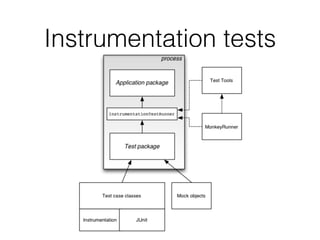
Instrumentation tests
What “standard” Android
app code looks like?
“Standard” Android app
• check Android SDK samples & documentation
• or Google’s iosched app
• business logic in Activities, Fragments, Services, …
• view and presenter effectively mixed together
This is actually the
structure recommended
by Google!
How to make it
testable?
Abstract away from
Android APIs
Android APIs
• difficult to test and mock
• we don’t have creation of Android components
under control
Abstracting Android APIs
• we need some boilerplate to get away
• remove all business logic from Android component
classes
• isolate business logic into presenters, managers,
POJOs, …
• when possible use MVP pattern
Abstracting Android APIs
• further improvements
• avoid or wrap Android API
Clean code
• try to write clean code
• avoid methods having hundreds of lines
• avoid Activities/Fragments having thousands of
lines
And how to test it?
• our presenters, POJOs, managers, providers, etc.
are simple to test
• Android components are stripped off of business
logic
• nothing important to test remains there
Bonus Advantages
• better readability
• better maintainability
Android Unit Tests
Android Unit Tests
• Added rather recently
• You need some work to make them really useful.
• Dependency injection
• Mocking
Dependency Injection
• the main ingredient
• avoid “new” keyword
• Dagger 2 FTW
Dagger 2
• by Google
• evolution of Dagger 1 (by Square)
• no reflection
• generated code in compile time
• constructor and field injection
Dagger 2
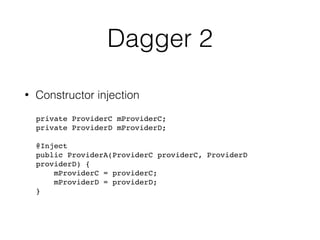
• Constructor injection
private ProviderC mProviderC;

private ProviderD mProviderD;


@Inject

public ProviderA(ProviderC providerC, ProviderD
providerD) {

mProviderC = providerC;

mProviderD = providerD;

}
Dagger 2
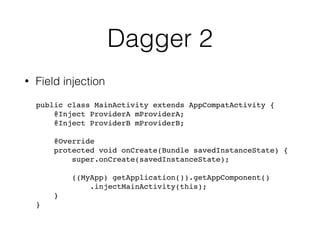
• Field injection
public class MainActivity extends AppCompatActivity {

@Inject ProviderA mProviderA;

@Inject ProviderB mProviderB;
@Override

protected void onCreate(Bundle savedInstanceState) {

super.onCreate(savedInstanceState);


((MyApp) getApplication()).getAppComponent()
.injectMainActivity(this);
}
}
Dagger 2
• prefer constructor injection wherever possible
• you can test the unit in isolation
• providing mocks is a piece of cake
Dagger 2
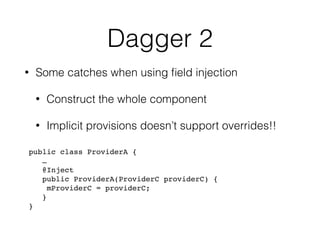
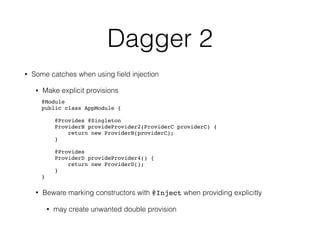
• Some catches when using field injection
• Construct the whole component
• Implicit provisions doesn’t support overrides!!
public class ProviderA {
…
@Inject

public ProviderA(ProviderC providerC) {

mProviderC = providerC;

}
}
Dagger 2
• Some catches when using field injection
• Make explicit provisions
@Module

public class AppModule {


@Provides @Singleton

ProviderB provideProvider2(ProviderC providerC) {

return new ProviderB(providerC);

}


@Provides

ProviderD provideProvider4() {

return new ProviderD();

}

}
• Beware marking constructors with @Inject when providing explicitly
• may create unwanted double provision
Mocking
Mocking
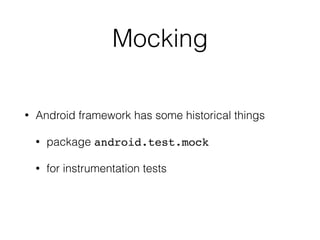
• Android framework has some historical things
• package android.test.mock
• for instrumentation tests
Android APIs & Unit Test
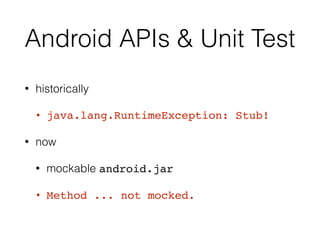
• historically
• java.lang.RuntimeException: Stub!
• now
• mockable android.jar
• Method ... not mocked.
Mocking
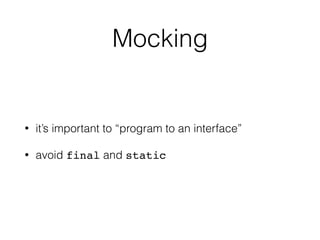
• it’s important to “program to an interface”
• avoid final and static
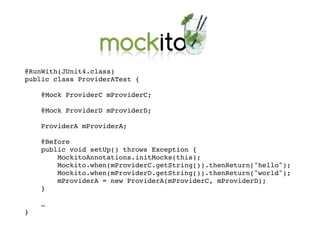
Mocking
@RunWith(JUnit4.class)

public class ProviderATest {


@Mock ProviderC mProviderC;


@Mock ProviderD mProviderD;


ProviderA mProviderA;


@Before

public void setUp() throws Exception {

MockitoAnnotations.initMocks(this);

Mockito.when(mProviderC.getString()).thenReturn("hello");

Mockito.when(mProviderD.getString()).thenReturn("world");

mProviderA = new ProviderA(mProviderC, mProviderD);

}
…
}
Mocking static
methods
Static methods
• avoid it as much as possible
• things like TextUtils.isEmpty() can be painful
• alternatives, e.g. Apache commons
StringUtils.isEmpty()
• PowerMock to the rescue
• still better to avoid static
Negatives of testable
apps?
Negatives?
• increase the number of methods and classes
• duplication of Android interfaces/classes
• bloated constructors with lots of dependencies
Dev App Builds
Dev App Builds
• How to use dev overrides in dev buils?
• utilize Android’s Gradle build
• Product Flavors can be used for that
Recommended
Libraries
Recommended Libraries
• Dagger 2
• Retrofit
• RxJava / RxAndroid
• Mortar
Recommended Libraries
- for testing
Q&A
Thank You

Writing testable Android apps

  • 1.
  • 2.
    What does itmean testable?
  • 3.
    What does itmean testable? • Test it quickly during development • Test units in isolation • There’s a way to provide mocks
  • 4.
  • 5.
  • 6.
  • 7.
    “Standard” Android app •check Android SDK samples & documentation • or Google’s iosched app • business logic in Activities, Fragments, Services, … • view and presenter effectively mixed together
  • 8.
    This is actuallythe structure recommended by Google!
  • 9.
    How to makeit testable?
  • 10.
  • 11.
    Android APIs • difficultto test and mock • we don’t have creation of Android components under control
  • 12.
    Abstracting Android APIs •we need some boilerplate to get away • remove all business logic from Android component classes • isolate business logic into presenters, managers, POJOs, … • when possible use MVP pattern
  • 13.
    Abstracting Android APIs •further improvements • avoid or wrap Android API
  • 14.
    Clean code • tryto write clean code • avoid methods having hundreds of lines • avoid Activities/Fragments having thousands of lines
  • 15.
    And how totest it? • our presenters, POJOs, managers, providers, etc. are simple to test • Android components are stripped off of business logic • nothing important to test remains there
  • 16.
    Bonus Advantages • betterreadability • better maintainability
  • 17.
  • 18.
    Android Unit Tests •Added rather recently • You need some work to make them really useful. • Dependency injection • Mocking
  • 19.
  • 20.
    Dependency Injection • themain ingredient • avoid “new” keyword • Dagger 2 FTW
  • 21.
    Dagger 2 • byGoogle • evolution of Dagger 1 (by Square) • no reflection • generated code in compile time • constructor and field injection
  • 22.
    Dagger 2 • Constructorinjection private ProviderC mProviderC;
 private ProviderD mProviderD;
 
 @Inject
 public ProviderA(ProviderC providerC, ProviderD providerD) {
 mProviderC = providerC;
 mProviderD = providerD;
 }
  • 23.
    Dagger 2 • Fieldinjection public class MainActivity extends AppCompatActivity {
 @Inject ProviderA mProviderA;
 @Inject ProviderB mProviderB; @Override
 protected void onCreate(Bundle savedInstanceState) {
 super.onCreate(savedInstanceState); 
 ((MyApp) getApplication()).getAppComponent() .injectMainActivity(this); } }
  • 24.
    Dagger 2 • preferconstructor injection wherever possible • you can test the unit in isolation • providing mocks is a piece of cake
  • 25.
    Dagger 2 • Somecatches when using field injection • Construct the whole component • Implicit provisions doesn’t support overrides!! public class ProviderA { … @Inject
 public ProviderA(ProviderC providerC) {
 mProviderC = providerC;
 } }
  • 26.
    Dagger 2 • Somecatches when using field injection • Make explicit provisions @Module
 public class AppModule {
 
 @Provides @Singleton
 ProviderB provideProvider2(ProviderC providerC) {
 return new ProviderB(providerC);
 }
 
 @Provides
 ProviderD provideProvider4() {
 return new ProviderD();
 }
 } • Beware marking constructors with @Inject when providing explicitly • may create unwanted double provision
  • 27.
  • 28.
    Mocking • Android frameworkhas some historical things • package android.test.mock • for instrumentation tests
  • 29.
    Android APIs &Unit Test • historically • java.lang.RuntimeException: Stub! • now • mockable android.jar • Method ... not mocked.
  • 30.
    Mocking • it’s importantto “program to an interface” • avoid final and static
  • 31.
  • 32.
    @RunWith(JUnit4.class)
 public class ProviderATest{
 
 @Mock ProviderC mProviderC;
 
 @Mock ProviderD mProviderD;
 
 ProviderA mProviderA;
 
 @Before
 public void setUp() throws Exception {
 MockitoAnnotations.initMocks(this);
 Mockito.when(mProviderC.getString()).thenReturn("hello");
 Mockito.when(mProviderD.getString()).thenReturn("world");
 mProviderA = new ProviderA(mProviderC, mProviderD);
 } … }
  • 33.
  • 34.
    Static methods • avoidit as much as possible • things like TextUtils.isEmpty() can be painful • alternatives, e.g. Apache commons StringUtils.isEmpty() • PowerMock to the rescue • still better to avoid static
  • 35.
  • 36.
    Negatives? • increase thenumber of methods and classes • duplication of Android interfaces/classes • bloated constructors with lots of dependencies
  • 37.
  • 38.
    Dev App Builds •How to use dev overrides in dev buils? • utilize Android’s Gradle build • Product Flavors can be used for that
  • 39.
  • 40.
    Recommended Libraries • Dagger2 • Retrofit • RxJava / RxAndroid • Mortar
  • 41.
  • 42.
  • 43.