Unit Testing Experience on Android
Android apps are difficult to test
Types of Android tests
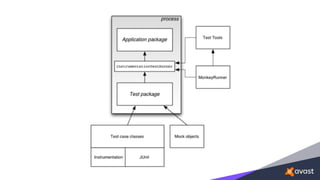
Instrumentation
tests
Local unit
tests
Android test code
• project sources
• ${module}/src/main/java
• instrumentation tests
• ${module}/src/androidTest/java
• unit tests
• ${module}/src/test/java
• full Gradle and Android Studio support
• the essential piece of both instrumentation and unit tests
• alone can be used only for pure Java
• doesn’t provide any mocks or Android APIs
Instrumentation Tests
• running on physical device or emulator
• gradle connectedAndroidTest
• ${module}/build/reports/androidTests/connected/
index.html
Instrumentation Tests
Legacy instrumentation tests
or
Testing Support Library
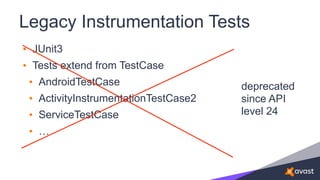
Legacy Instrumentation Tests
• JUnit3
• Tests extend from TestCase
• AndroidTestCase
• ActivityInstrumentationTestCase2
• ServiceTestCase
• …
deprecated
since API
level 24
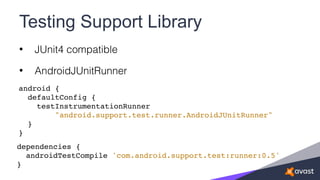
Testing Support Library
• JUnit4 compatible
• AndroidJUnitRunner
android {
defaultConfig {
testInstrumentationRunner
"android.support.test.runner.AndroidJUnitRunner"
}
}
dependencies {
androidTestCompile 'com.android.support.test:runner:0.5'
}
Testing Support Library
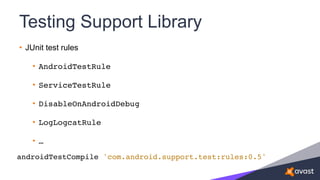
• JUnit test rules
• AndroidTestRule
• ServiceTestRule
• DisableOnAndroidDebug
• LogLogcatRule
• …
androidTestCompile 'com.android.support.test:rules:0.5'
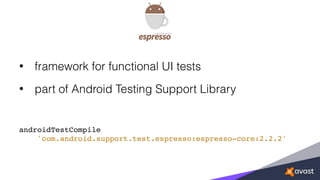
• framework for functional UI tests
• part of Android Testing Support Library
androidTestCompile
'com.android.support.test.espresso:espresso-core:2.2.2'
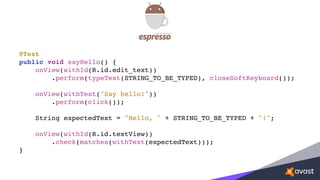
@Test
public void sayHello() {
onView(withId(R.id.edit_text))
.perform(typeText(STRING_TO_BE_TYPED), closeSoftKeyboard());
onView(withText("Say hello!"))
.perform(click());
String expectedText = "Hello, " + STRING_TO_BE_TYPED + "!";
onView(withId(R.id.textView))
.check(matches(withText(expectedText)));
}
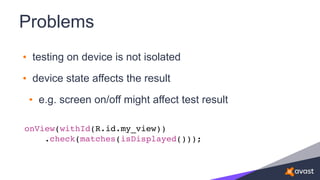
Problems
• testing on device is not isolated
• device state affects the result
• e.g. screen on/off might affect test result
onView(withId(R.id.my_view))
.check(matches(isDisplayed()));
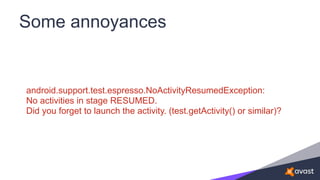
Some annoyances
android.support.test.espresso.NoActivityResumedException:
No activities in stage RESUMED.
Did you forget to launch the activity. (test.getActivity() or similar)?
Instrumentation tests
are
kinda
SLOOOOOW
Unit Tests
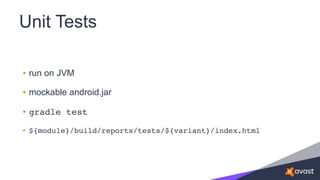
Unit Tests
• run on JVM
• mockable android.jar
• gradle test
• ${module}/build/reports/tests/${variant}/index.html
...
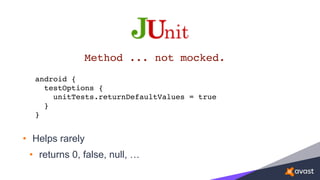
• Helps rarely
• returns 0, false, null, …
Method ... not mocked.
android {

testOptions {

unitTests.returnDefaultValues = true
}

}
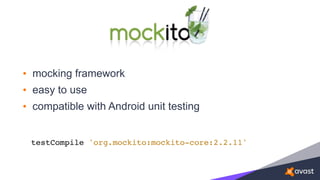
• mocking framework
• easy to use
• compatible with Android unit testing
testCompile 'org.mockito:mockito-core:2.2.11'
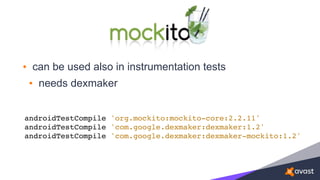
• can be used also in instrumentation tests
• needs dexmaker
androidTestCompile 'org.mockito:mockito-core:2.2.11'
androidTestCompile 'com.google.dexmaker:dexmaker:1.2'
androidTestCompile 'com.google.dexmaker:dexmaker-mockito:1.2'
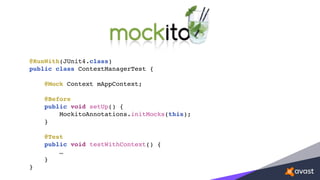
@RunWith(JUnit4.class)
public class ContextManagerTest {
@Mock Context mAppContext;
@Before
public void setUp() {
MockitoAnnotations.initMocks(this);
}
@Test
public void testWithContext() {
…
}
}
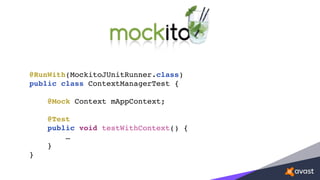
@RunWith(MockitoJUnitRunner.class)
public class ContextManagerTest {
@Mock Context mAppContext;
@Test
public void testWithContext() {
…
}
}
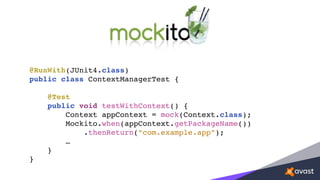
@RunWith(JUnit4.class)
public class ContextManagerTest {
@Test
public void testWithContext() {
Context appContext = mock(Context.class);
Mockito.when(appContext.getPackageName())
.thenReturn(“com.example.app”);
…
}
}
• Mockito.spy()
• wrapping a real object
• Mockito.verify()
• verify that special condition are met
• e.g. method called, method called twice, …
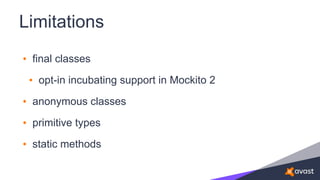
Limitations
• final classes
• opt-in incubating support in Mockito 2
• anonymous classes
• primitive types
• static methods
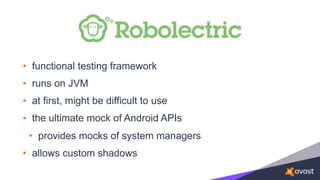
• functional testing framework
• runs on JVM
• at first, might be difficult to use
• the ultimate mock of Android APIs
• provides mocks of system managers
• allows custom shadows
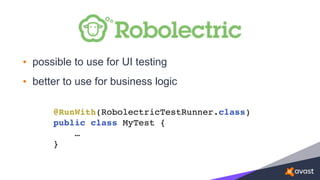
• possible to use for UI testing
• better to use for business logic
@RunWith(RobolectricTestRunner.class)
public class MyTest {
…
}
• Robolectric
• RuntimeEnvironment
• Shadows
• ShadowApplication
• ShadowLooper
Potential problems
• difficult to search for solutions
• long history of bigger API changes
• many obsolete posts
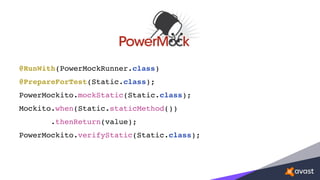
• Can mock static methods
• Can be used together with Mockito
@RunWith(PowerMockRunner.class)
@PrepareForTest(Static.class);
PowerMockito.mockStatic(Static.class);
Mockito.when(Static.staticMethod())
.thenReturn(value);
PowerMockito.verifyStatic(Static.class);
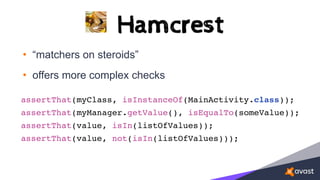
• “matchers on steroids”
• offers more complex checks
assertThat(myClass, isInstanceOf(MainActivity.class));
assertThat(myManager.getValue(), isEqualTo(someValue));
assertThat(value, isIn(listOfValues));
assertThat(value, not(isIn(listOfValues)));
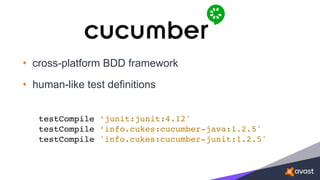
• cross-platform BDD framework
• human-like test definitions
testCompile ‘junit:junit:4.12'
testCompile ‘info.cukes:cucumber-java:1.2.5'
testCompile 'info.cukes:cucumber-junit:1.2.5'
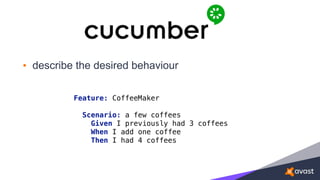
• describe the desired behaviour
Feature: CoffeeMaker


Scenario: a few coffees

Given I previously had 3 coffees

When I add one coffee

Then I had 4 coffees
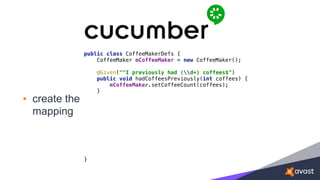
• create the
mapping
public class CoffeeMakerDefs {

CoffeeMaker mCoffeeMaker = new CoffeeMaker();


}
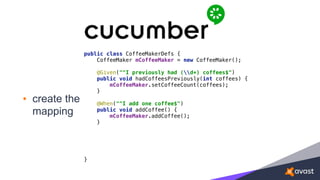
• create the
mapping
public class CoffeeMakerDefs {

CoffeeMaker mCoffeeMaker = new CoffeeMaker();


@Given("^I previously had (d+) coffees$")

public void hadCoffeesPreviously(int coffees) {

mCoffeeMaker.setCoffeeCount(coffees);

}


}
• create the
mapping
public class CoffeeMakerDefs {

CoffeeMaker mCoffeeMaker = new CoffeeMaker();


@Given("^I previously had (d+) coffees$")

public void hadCoffeesPreviously(int coffees) {

mCoffeeMaker.setCoffeeCount(coffees);

}


@When("^I add one coffee$")

public void addCoffee() {

mCoffeeMaker.addCoffee();

}


}
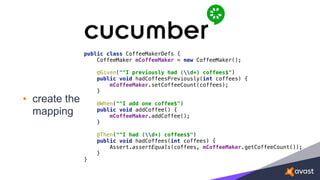
• create the
mapping
public class CoffeeMakerDefs {

CoffeeMaker mCoffeeMaker = new CoffeeMaker();


@Given("^I previously had (d+) coffees$")

public void hadCoffeesPreviously(int coffees) {

mCoffeeMaker.setCoffeeCount(coffees);

}


@When("^I add one coffee$")

public void addCoffee() {

mCoffeeMaker.addCoffee();

}


@Then("^I had (d+) coffees$")

public void hadCoffees(int coffees) {

Assert.assertEquals(coffees, mCoffeeMaker.getCoffeeCount());

}

}
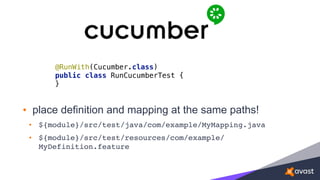
• place definition and mapping at the same paths!
• ${module}/src/test/java/com/example/MyMapping.java
• ${module}/src/test/resources/com/example/
MyDefinition.feature
@RunWith(Cucumber.class)

public class RunCucumberTest {

}
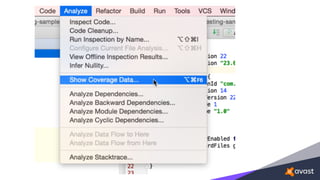
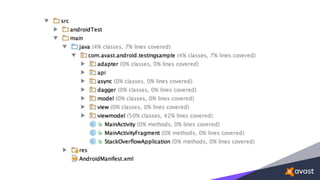
Code Coverage
Code Coverage
• instrumentation tests
• JaCoCo
• EMMA
• obsolete
• unit tests
• JaCoCo
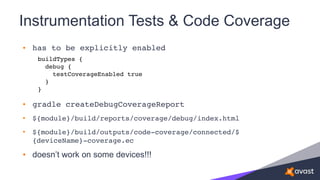
Instrumentation Tests & Code Coverage
• has to be explicitly enabled
• gradle createDebugCoverageReport
• ${module}/build/reports/coverage/debug/index.html
• ${module}/build/outputs/code-coverage/connected/$
{deviceName}-coverage.ec
• doesn’t work on some devices!!!
buildTypes {

debug {

testCoverageEnabled true

}
}
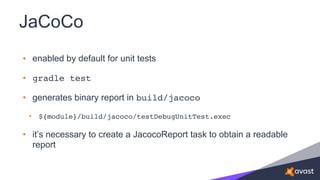
JaCoCo
JaCoCo
• enabled by default for unit tests
• gradle test
• generates binary report in build/jacoco
• ${module}/build/jacoco/testDebugUnitTest.exec
• it’s necessary to create a JacocoReport task to obtain a readable
report
Good tests
Good tests
• run in any order
• run in isolation
• run consistently
• run fast
• are orthogonal
How to write testable apps?
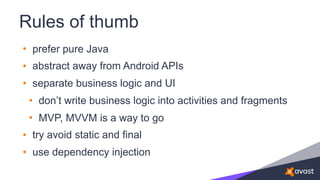
Rules of thumb
• prefer pure Java
• abstract away from Android APIs
• separate business logic and UI
• don’t write business logic into activities and fragments
• MVP, MVVM is a way to go
• try avoid static and final
• use dependency injection
Questions?

Guide to the jungle of testing frameworks

  • 2.
  • 4.
    Android apps aredifficult to test
  • 5.
  • 6.
    Types of Androidtests Instrumentation tests Local unit tests
  • 7.
    Android test code •project sources • ${module}/src/main/java • instrumentation tests • ${module}/src/androidTest/java • unit tests • ${module}/src/test/java • full Gradle and Android Studio support
  • 9.
    • the essentialpiece of both instrumentation and unit tests • alone can be used only for pure Java • doesn’t provide any mocks or Android APIs
  • 10.
  • 11.
    Instrumentation Tests • runningon physical device or emulator • gradle connectedAndroidTest • ${module}/build/reports/androidTests/connected/ index.html
  • 13.
    Instrumentation Tests Legacy instrumentationtests or Testing Support Library
  • 14.
    Legacy Instrumentation Tests •JUnit3 • Tests extend from TestCase • AndroidTestCase • ActivityInstrumentationTestCase2 • ServiceTestCase • … deprecated since API level 24
  • 15.
    Testing Support Library •JUnit4 compatible • AndroidJUnitRunner android { defaultConfig { testInstrumentationRunner "android.support.test.runner.AndroidJUnitRunner" } } dependencies { androidTestCompile 'com.android.support.test:runner:0.5' }
  • 16.
    Testing Support Library •JUnit test rules • AndroidTestRule • ServiceTestRule • DisableOnAndroidDebug • LogLogcatRule • … androidTestCompile 'com.android.support.test:rules:0.5'
  • 18.
    • framework forfunctional UI tests • part of Android Testing Support Library androidTestCompile 'com.android.support.test.espresso:espresso-core:2.2.2'
  • 19.
    @Test public void sayHello(){ onView(withId(R.id.edit_text)) .perform(typeText(STRING_TO_BE_TYPED), closeSoftKeyboard()); onView(withText("Say hello!")) .perform(click()); String expectedText = "Hello, " + STRING_TO_BE_TYPED + "!"; onView(withId(R.id.textView)) .check(matches(withText(expectedText))); }
  • 20.
    Problems • testing ondevice is not isolated • device state affects the result • e.g. screen on/off might affect test result onView(withId(R.id.my_view)) .check(matches(isDisplayed()));
  • 21.
    Some annoyances android.support.test.espresso.NoActivityResumedException: No activitiesin stage RESUMED. Did you forget to launch the activity. (test.getActivity() or similar)?
  • 22.
  • 23.
  • 24.
    Unit Tests • runon JVM • mockable android.jar • gradle test • ${module}/build/reports/tests/${variant}/index.html
  • 25.
  • 27.
    • Helps rarely •returns 0, false, null, … Method ... not mocked. android {
 testOptions {
 unitTests.returnDefaultValues = true }
 }
  • 29.
    • mocking framework •easy to use • compatible with Android unit testing testCompile 'org.mockito:mockito-core:2.2.11'
  • 30.
    • can beused also in instrumentation tests • needs dexmaker androidTestCompile 'org.mockito:mockito-core:2.2.11' androidTestCompile 'com.google.dexmaker:dexmaker:1.2' androidTestCompile 'com.google.dexmaker:dexmaker-mockito:1.2'
  • 31.
    @RunWith(JUnit4.class) public class ContextManagerTest{ @Mock Context mAppContext; @Before public void setUp() { MockitoAnnotations.initMocks(this); } @Test public void testWithContext() { … } }
  • 32.
    @RunWith(MockitoJUnitRunner.class) public class ContextManagerTest{ @Mock Context mAppContext; @Test public void testWithContext() { … } }
  • 33.
    @RunWith(JUnit4.class) public class ContextManagerTest{ @Test public void testWithContext() { Context appContext = mock(Context.class); Mockito.when(appContext.getPackageName()) .thenReturn(“com.example.app”); … } }
  • 34.
    • Mockito.spy() • wrappinga real object • Mockito.verify() • verify that special condition are met • e.g. method called, method called twice, …
  • 35.
    Limitations • final classes •opt-in incubating support in Mockito 2 • anonymous classes • primitive types • static methods
  • 37.
    • functional testingframework • runs on JVM • at first, might be difficult to use • the ultimate mock of Android APIs • provides mocks of system managers • allows custom shadows
  • 38.
    • possible touse for UI testing • better to use for business logic @RunWith(RobolectricTestRunner.class) public class MyTest { … }
  • 39.
    • Robolectric • RuntimeEnvironment •Shadows • ShadowApplication • ShadowLooper
  • 40.
    Potential problems • difficultto search for solutions • long history of bigger API changes • many obsolete posts
  • 42.
    • Can mockstatic methods • Can be used together with Mockito
  • 43.
  • 45.
    • “matchers onsteroids” • offers more complex checks assertThat(myClass, isInstanceOf(MainActivity.class)); assertThat(myManager.getValue(), isEqualTo(someValue)); assertThat(value, isIn(listOfValues)); assertThat(value, not(isIn(listOfValues)));
  • 47.
    • cross-platform BDDframework • human-like test definitions testCompile ‘junit:junit:4.12' testCompile ‘info.cukes:cucumber-java:1.2.5' testCompile 'info.cukes:cucumber-junit:1.2.5'
  • 48.
    • describe thedesired behaviour Feature: CoffeeMaker
 
 Scenario: a few coffees
 Given I previously had 3 coffees
 When I add one coffee
 Then I had 4 coffees
  • 49.
    • create the mapping publicclass CoffeeMakerDefs {
 CoffeeMaker mCoffeeMaker = new CoffeeMaker();


 }
  • 50.
    • create the mapping publicclass CoffeeMakerDefs {
 CoffeeMaker mCoffeeMaker = new CoffeeMaker();
 
 @Given("^I previously had (d+) coffees$")
 public void hadCoffeesPreviously(int coffees) {
 mCoffeeMaker.setCoffeeCount(coffees);
 }
 
 
 }
  • 51.
    • create the mapping publicclass CoffeeMakerDefs {
 CoffeeMaker mCoffeeMaker = new CoffeeMaker();
 
 @Given("^I previously had (d+) coffees$")
 public void hadCoffeesPreviously(int coffees) {
 mCoffeeMaker.setCoffeeCount(coffees);
 }
 
 @When("^I add one coffee$")
 public void addCoffee() {
 mCoffeeMaker.addCoffee();
 }
 
 
 }
  • 52.
    • create the mapping publicclass CoffeeMakerDefs {
 CoffeeMaker mCoffeeMaker = new CoffeeMaker();
 
 @Given("^I previously had (d+) coffees$")
 public void hadCoffeesPreviously(int coffees) {
 mCoffeeMaker.setCoffeeCount(coffees);
 }
 
 @When("^I add one coffee$")
 public void addCoffee() {
 mCoffeeMaker.addCoffee();
 }
 
 @Then("^I had (d+) coffees$")
 public void hadCoffees(int coffees) {
 Assert.assertEquals(coffees, mCoffeeMaker.getCoffeeCount());
 }
 }
  • 53.
    • place definitionand mapping at the same paths! • ${module}/src/test/java/com/example/MyMapping.java • ${module}/src/test/resources/com/example/ MyDefinition.feature @RunWith(Cucumber.class)
 public class RunCucumberTest {
 }
  • 54.
  • 55.
    Code Coverage • instrumentationtests • JaCoCo • EMMA • obsolete • unit tests • JaCoCo
  • 56.
    Instrumentation Tests &Code Coverage • has to be explicitly enabled • gradle createDebugCoverageReport • ${module}/build/reports/coverage/debug/index.html • ${module}/build/outputs/code-coverage/connected/$ {deviceName}-coverage.ec • doesn’t work on some devices!!! buildTypes {
 debug {
 testCoverageEnabled true
 } }
  • 57.
  • 58.
    JaCoCo • enabled bydefault for unit tests • gradle test • generates binary report in build/jacoco • ${module}/build/jacoco/testDebugUnitTest.exec • it’s necessary to create a JacocoReport task to obtain a readable report
  • 61.
  • 62.
    Good tests • runin any order • run in isolation • run consistently • run fast • are orthogonal
  • 63.
    How to writetestable apps?
  • 64.
    Rules of thumb •prefer pure Java • abstract away from Android APIs • separate business logic and UI • don’t write business logic into activities and fragments • MVP, MVVM is a way to go • try avoid static and final • use dependency injection
  • 65.