Android Workshop
Yantra 3.0
Presented By:-
Hem Shrestha
hereshem@gmail.com
Yubaraj Poudel
yubarajpoudel708@gmail.com
Table of Content
● Introduction to Android Platform
● Development Environment
● Hello World!
● Application Fundamentals
● User Interface
● Working with Web Services (JSON)
● Building Interactive Android App
Perquisites
Basic Java
(If else, loops, Data Types, Data structures)
Object Oriented Programming
(Class, Object, Inheritance)
Android Platform Basics
Introduction and history
Android Versions
Android Architecture
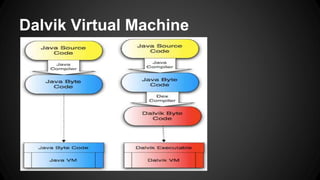
Android Virtual Machine
(Dalvik VM, Ark VM is latest in 4.4)
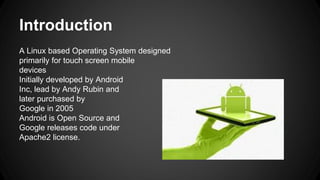
Introduction
A Linux based Operating System designed
primarily for touch screen mobile
devices
Initially developed by Android
Inc, lead by Andy Rubin and
later purchased by
Google in 2005
Android is Open Source and
Google releases code under
Apache2 license.
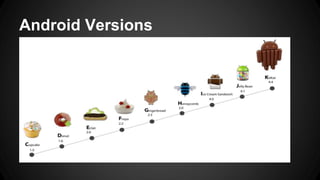
Android Versions
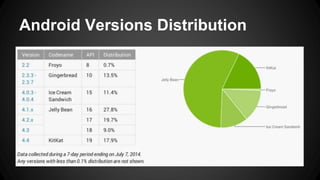
Android Versions Distribution
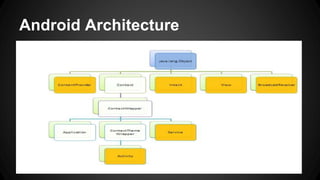
Android Architecture
Dalvik Virtual Machine
Android Development Environment
JDK
Eclipse IDE
ADT Plugin
Android SDK
AVD
Debugging with Android LogCat
Eclipse Perspective – Java/DDMS
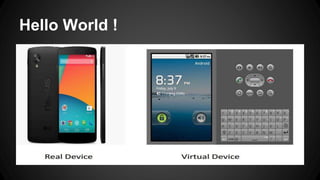
Hello World !
Application Fundamentals
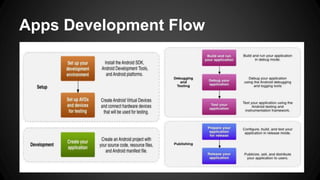
● Apps Development Flow
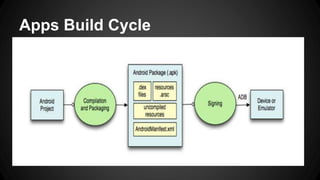
● Build Cycle
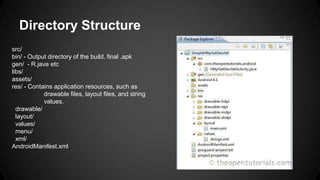
● Directory Structure
● Android Manifest File
● Android Application
Apps Development Flow
Apps Build Cycle
Directory Structure
src/
bin/ - Output directory of the build. final .apk
gen/ - R.java etc
libs/
assets/
res/ - Contains application resources, such as
drawable files, layout files, and string
values.
drawable/
layout/
values/
menu/
xml/
AndroidManifest.xml
App Manifest File (AndroidManifest.xml)
"Starting point" of app
It describes:
• Package name
• Minimum level Android API
• Application name + icon
• Required Permissions
• The components of the application
(activities, services, broadcast receivers, and content providers)
Describes first activity to launch
• Other stuff
Android Application
Components :
1. Activity
2. Service
3. Broadcast Receiver
4. Content Provider
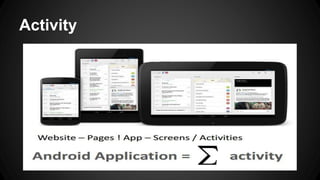
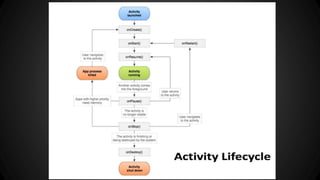
Activity
Android UI - Design
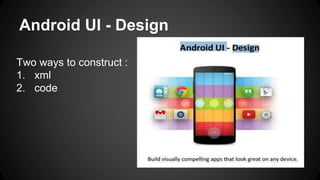
Two ways to construct :
1. xml
2. code
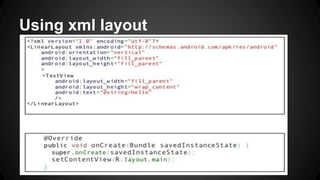
Using xml layout
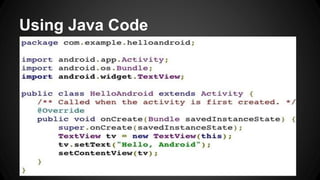
Using Java Code
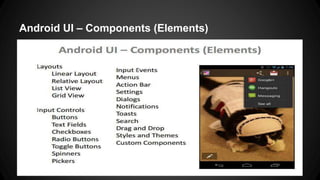
Android UI – Components (Elements)
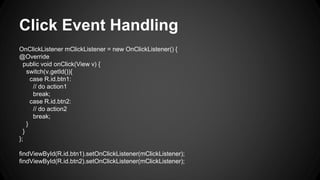
Click Event Handling
OnClickListener mClickListener = new OnClickListener() {
@Override
public void onClick(View v) {
switch(v.getId()){
case R.id.btn1:
// do action1
break;
case R.id.btn2:
// do action2
break;
}
}
};
findViewById(R.id.btn1).setOnClickListener(mClickListener);
findViewById(R.id.btn2).setOnClickListener(mClickListener);
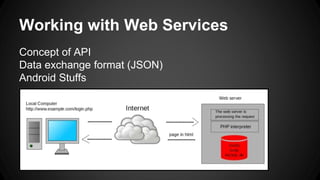
Working with Web Services
Concept of API
Data exchange format (JSON)
Android Stuffs
API Concept
• Application Program Interface
• An interface by software components to communicate
with each other
• A set of routines, protocols, and tools for building
software applications.
• A good API makes it easier to develop a program by
providing all the building blocks.
JSON Data
• JSON (JavaScript Object Notation) is a lightweight text-
based open standard designed for human-readable
data interchange...
• Easy for machines to parse and generate
• Familiar to programmers of the C-family of languages
• JSON Object and JSON Array
• Collection of name/value pairs
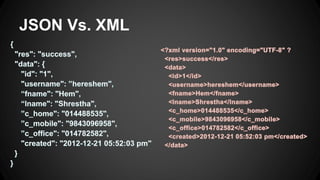
• Alternative: XML
JSON Vs. XML
Android Stuffs
Adding permission
Writing server request file
Check for internet connection
Sync and Async Task
Background and foreground process
Building Apps
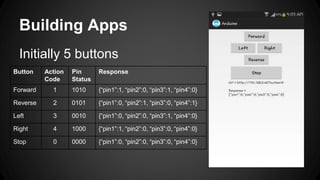
Initially 5 buttons
Button Action
Code
Pin
Status
Response
Forward 1 1010 {“pin1”:1, “pin2”:0, “pin3”:1, “pin4”:0}
Reverse 2 0101 {“pin1”:0, “pin2”:1, “pin3”:0, “pin4”:1}
Left 3 0010 {“pin1”:0, “pin2”:0, “pin3”:1, “pin4”:0}
Right 4 1000 {“pin1”:1, “pin2”:0, “pin3”:0, “pin4”:0}
Stop 0 0000 {“pin1”:0, “pin2”:0, “pin3”:0, “pin4”:0}
Keep on touch
public void showMyContact(){
String username = “hereshem”; // here‘s Hem
Log.i(“GitHub”, “github.com/” + username);
Log.i(“Facebook”, “facebook.com/” + username);
Log.i(“Twitter”, “twitter.com/” + username);
Log.i(“Blog”, username + “.blogspot.com”);
Log.i(“Email”, username + “@gmail.com”);
}
References
http://developer.android.com/
http://www.androidhive.info/
http://www.tutorialspoint.com/android/
More Source code Repositories in
http://github.com/
Thanks !!
Best of luck for the upcoming events
cheers……….

Arduino - Android Workshop Presentation

  • 1.
    Android Workshop Yantra 3.0 PresentedBy:- Hem Shrestha hereshem@gmail.com Yubaraj Poudel yubarajpoudel708@gmail.com
  • 2.
    Table of Content ●Introduction to Android Platform ● Development Environment ● Hello World! ● Application Fundamentals ● User Interface ● Working with Web Services (JSON) ● Building Interactive Android App
  • 3.
    Perquisites Basic Java (If else,loops, Data Types, Data structures) Object Oriented Programming (Class, Object, Inheritance)
  • 4.
    Android Platform Basics Introductionand history Android Versions Android Architecture Android Virtual Machine (Dalvik VM, Ark VM is latest in 4.4)
  • 5.
    Introduction A Linux basedOperating System designed primarily for touch screen mobile devices Initially developed by Android Inc, lead by Andy Rubin and later purchased by Google in 2005 Android is Open Source and Google releases code under Apache2 license.
  • 6.
  • 7.
  • 8.
  • 9.
  • 10.
    Android Development Environment JDK EclipseIDE ADT Plugin Android SDK AVD Debugging with Android LogCat Eclipse Perspective – Java/DDMS
  • 11.
  • 12.
    Application Fundamentals ● AppsDevelopment Flow ● Build Cycle ● Directory Structure ● Android Manifest File ● Android Application
  • 13.
  • 14.
  • 15.
    Directory Structure src/ bin/ -Output directory of the build. final .apk gen/ - R.java etc libs/ assets/ res/ - Contains application resources, such as drawable files, layout files, and string values. drawable/ layout/ values/ menu/ xml/ AndroidManifest.xml
  • 16.
    App Manifest File(AndroidManifest.xml) "Starting point" of app It describes: • Package name • Minimum level Android API • Application name + icon • Required Permissions • The components of the application (activities, services, broadcast receivers, and content providers) Describes first activity to launch • Other stuff
  • 17.
    Android Application Components : 1.Activity 2. Service 3. Broadcast Receiver 4. Content Provider
  • 18.
  • 20.
    Android UI -Design Two ways to construct : 1. xml 2. code
  • 21.
  • 22.
  • 23.
    Android UI –Components (Elements)
  • 24.
    Click Event Handling OnClickListenermClickListener = new OnClickListener() { @Override public void onClick(View v) { switch(v.getId()){ case R.id.btn1: // do action1 break; case R.id.btn2: // do action2 break; } } }; findViewById(R.id.btn1).setOnClickListener(mClickListener); findViewById(R.id.btn2).setOnClickListener(mClickListener);
  • 25.
    Working with WebServices Concept of API Data exchange format (JSON) Android Stuffs
  • 26.
    API Concept • ApplicationProgram Interface • An interface by software components to communicate with each other • A set of routines, protocols, and tools for building software applications. • A good API makes it easier to develop a program by providing all the building blocks.
  • 27.
    JSON Data • JSON(JavaScript Object Notation) is a lightweight text- based open standard designed for human-readable data interchange... • Easy for machines to parse and generate • Familiar to programmers of the C-family of languages • JSON Object and JSON Array • Collection of name/value pairs • Alternative: XML
  • 28.
  • 29.
    Android Stuffs Adding permission Writingserver request file Check for internet connection Sync and Async Task Background and foreground process
  • 30.
    Building Apps Initially 5buttons Button Action Code Pin Status Response Forward 1 1010 {“pin1”:1, “pin2”:0, “pin3”:1, “pin4”:0} Reverse 2 0101 {“pin1”:0, “pin2”:1, “pin3”:0, “pin4”:1} Left 3 0010 {“pin1”:0, “pin2”:0, “pin3”:1, “pin4”:0} Right 4 1000 {“pin1”:1, “pin2”:0, “pin3”:0, “pin4”:0} Stop 0 0000 {“pin1”:0, “pin2”:0, “pin3”:0, “pin4”:0}
  • 31.
    Keep on touch publicvoid showMyContact(){ String username = “hereshem”; // here‘s Hem Log.i(“GitHub”, “github.com/” + username); Log.i(“Facebook”, “facebook.com/” + username); Log.i(“Twitter”, “twitter.com/” + username); Log.i(“Blog”, username + “.blogspot.com”); Log.i(“Email”, username + “@gmail.com”); }
  • 32.
  • 33.
    Thanks !! Best ofluck for the upcoming events cheers……….