Android Development
      - the basics


    Tomáš Kypta
      @TomasKypta
Outline
●   Android platform
●   Android ecosystem
●   Android SDK and development tools
●   Hello World
●   Building blocks & the manifest file
●   Activities, widgets, intents
●   Dialog, toast
Android platform
●   Linux-based operating system
●   open-source
●   originally phone OS
●   tablet (since Honeycomb)
●   Google TV
●   hundreds of devices
History
●   2003, Android inc.
●   2005 acquired by Google
●   2008 first Android phone – T-Mobile G1

●   since then rapid development of the platform
Android ecosystem
●   the world's most popular mobile platform
●   over 850 000 new devices activated each day
●   total number of devices ~ 300 million

●   play.google.com (market.android.com)
●   more than 450 000 applications
●   ~ 70% free apps
Problems
●   fragmentation
●   manufacturer/carrier enhancements
●   updates & support
●   openness – low quality apps
●   malware (users)
Sources
●   developer.android.com
●   android-developers.blogspot.com
●   source.android.com
●   stackoverflow.com
●   youtube.com/androiddevelopers
●   svetandroida.cz
Development
●   programming in “Java”
●   native apps possible (C++)

●   development tools platform friendly
●   Windows, Linux, Mac OS X
●   IDE support – ADT plugin for Eclipse,
    Netbeans, IntelliJ IDEA, ...
Android SDK
●   android – Android SDK and AVD Manager
●   adb – Android Debug Bridge
●   ddms – Dalvik Debug Monitor
●   emulator
●   hierarchyviewer
●   ProGuard
●   Traceview
●   docs
Libraries
●   compatibility libraries
●   licensing library

●   AdMob
●   Google Analytics, Flurry
●   C2DM
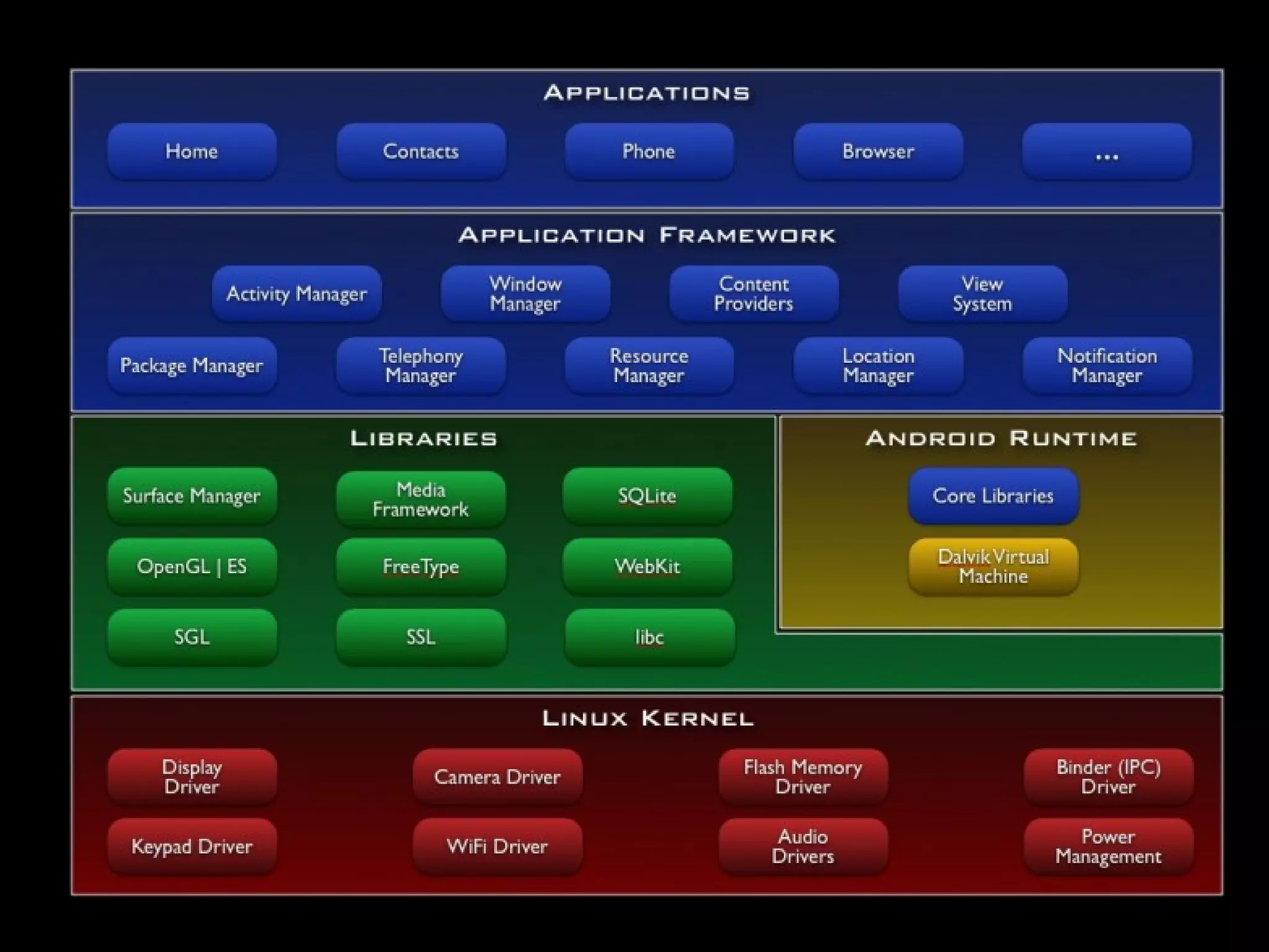
Android internals
Hello World
Android Building Blocks
●   Activity
●   Service
●   Content provider
●   Broadcast receiver

●   AndroidManifest.xml
Activity
●   screen with user interface
●   the only visual component

●   examples:
        –   list of emails
        –   email detail
        –   email composition
Service
●   runs in background
●   long-running tasks

●   examples:
       –   music playback service
       –   download service
       –   sync service
Content Provider
●   manages and shares application data
●   data storage doesn't matter – database, web,
    filesystem
●   apps can query and modify data through
    content provider
●   read/write permissions can be defined
●   examples:
       –   all system databases
       –   contacts
       –   SMS
Broadcast Receiver
●   responds to broadcasts
●   broadcasts are system wide
●   can be registered statically or dynamically
●   system or custom messages
●   examples:
        –   incoming SMS, incoming call
        –   screen turned off
        –   low baterry
        –   removed SD card
AndroidManifest.xml
●   defines what parts the app have
●   defines which endpoints are exposed
●   minimum API level
●   permissions
●   declare hardware and software features
●   required configuration
Intent
●   asynchronous message
●   binds components together (all of them
    except ContentProvider)
●   starting activities
●   starting services and binding to services
●   sending broadcasts
User Interface
●   defined by hierarchy of views
●   layouts = containers
       –   LinearLayout
       –   RelativeLayout
       –   FrameLayout
●   widgets = UI objects
       –   Button, TextView, EditText
       –   WebView
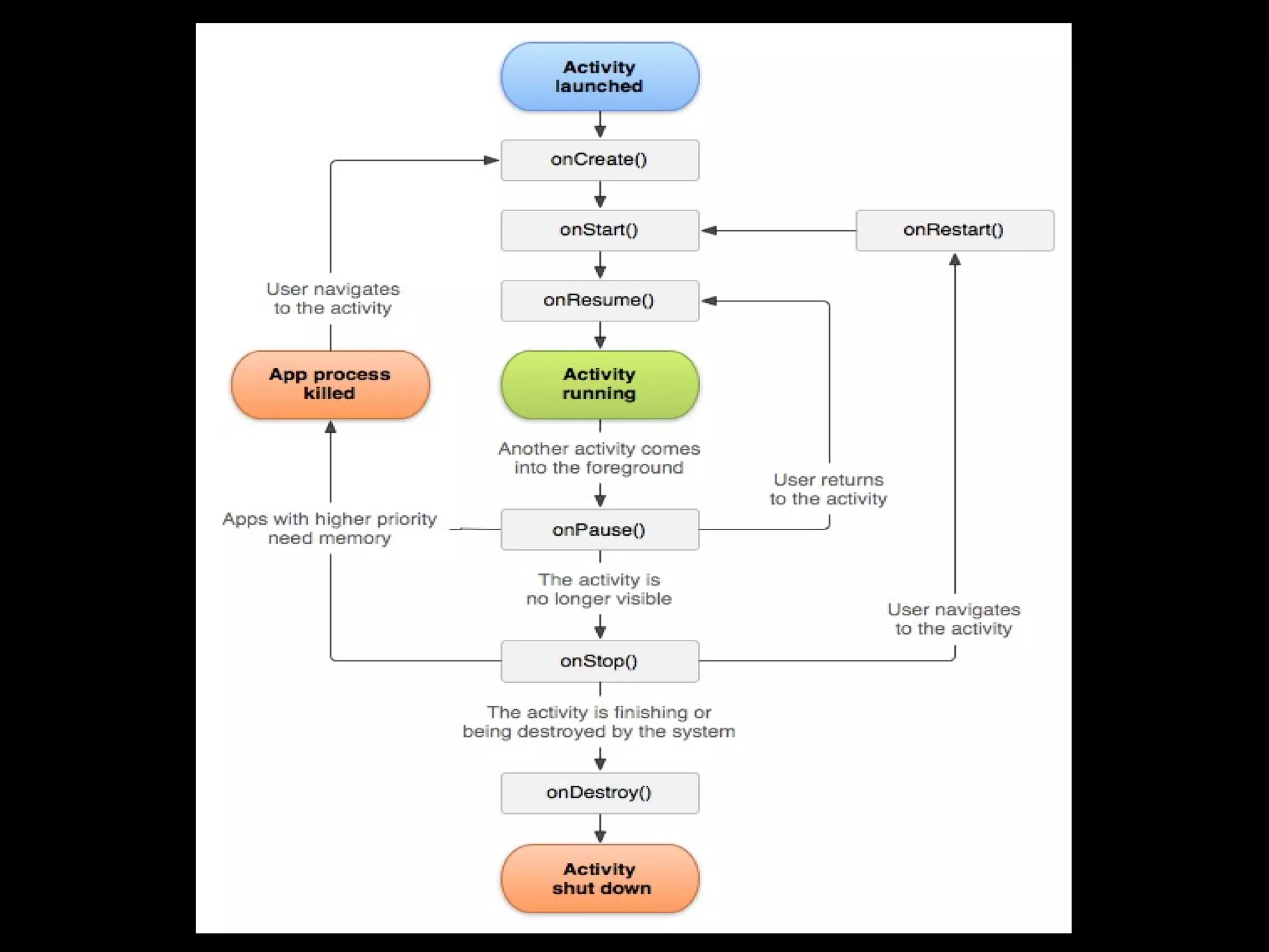
Activity Lifecycle
●   activities managed in a stack
●   activity can be in different states during it's
    lifecycle:
        –   foreground
        –   visible
        –   stopped
        –   killed
Intent & Activity
●   starting activity explicitly

●   starting activity implicitly


●   starting activity for result
List Widgets
●   displays a list of items (some view)
        –   ListView, Spinner, GridView, Gallery
●   use adapter to bind list to data
Dialogs and Toasts
●   Dialog – displays modal information
       –   standard dialogs
       –   custom dialogs
●   Toast – non-modal information
       –   doesn't have user focus
THE END

Android development - the basics, FI MUNI, 2012

  • 1.
    Android Development - the basics Tomáš Kypta @TomasKypta
  • 4.
    Outline ● Android platform ● Android ecosystem ● Android SDK and development tools ● Hello World ● Building blocks & the manifest file ● Activities, widgets, intents ● Dialog, toast
  • 5.
    Android platform ● Linux-based operating system ● open-source ● originally phone OS ● tablet (since Honeycomb) ● Google TV ● hundreds of devices
  • 7.
    History ● 2003, Android inc. ● 2005 acquired by Google ● 2008 first Android phone – T-Mobile G1 ● since then rapid development of the platform
  • 8.
    Android ecosystem ● the world's most popular mobile platform ● over 850 000 new devices activated each day ● total number of devices ~ 300 million ● play.google.com (market.android.com) ● more than 450 000 applications ● ~ 70% free apps
  • 9.
    Problems ● fragmentation ● manufacturer/carrier enhancements ● updates & support ● openness – low quality apps ● malware (users)
  • 10.
    Sources ● developer.android.com ● android-developers.blogspot.com ● source.android.com ● stackoverflow.com ● youtube.com/androiddevelopers ● svetandroida.cz
  • 11.
    Development ● programming in “Java” ● native apps possible (C++) ● development tools platform friendly ● Windows, Linux, Mac OS X ● IDE support – ADT plugin for Eclipse, Netbeans, IntelliJ IDEA, ...
  • 12.
    Android SDK ● android – Android SDK and AVD Manager ● adb – Android Debug Bridge ● ddms – Dalvik Debug Monitor ● emulator ● hierarchyviewer ● ProGuard ● Traceview ● docs
  • 13.
    Libraries ● compatibility libraries ● licensing library ● AdMob ● Google Analytics, Flurry ● C2DM
  • 14.
  • 15.
  • 16.
    Android Building Blocks ● Activity ● Service ● Content provider ● Broadcast receiver ● AndroidManifest.xml
  • 17.
    Activity ● screen with user interface ● the only visual component ● examples: – list of emails – email detail – email composition
  • 18.
    Service ● runs in background ● long-running tasks ● examples: – music playback service – download service – sync service
  • 19.
    Content Provider ● manages and shares application data ● data storage doesn't matter – database, web, filesystem ● apps can query and modify data through content provider ● read/write permissions can be defined ● examples: – all system databases – contacts – SMS
  • 20.
    Broadcast Receiver ● responds to broadcasts ● broadcasts are system wide ● can be registered statically or dynamically ● system or custom messages ● examples: – incoming SMS, incoming call – screen turned off – low baterry – removed SD card
  • 21.
    AndroidManifest.xml ● defines what parts the app have ● defines which endpoints are exposed ● minimum API level ● permissions ● declare hardware and software features ● required configuration
  • 22.
    Intent ● asynchronous message ● binds components together (all of them except ContentProvider) ● starting activities ● starting services and binding to services ● sending broadcasts
  • 23.
    User Interface ● defined by hierarchy of views ● layouts = containers – LinearLayout – RelativeLayout – FrameLayout ● widgets = UI objects – Button, TextView, EditText – WebView
  • 24.
    Activity Lifecycle ● activities managed in a stack ● activity can be in different states during it's lifecycle: – foreground – visible – stopped – killed
  • 26.
    Intent & Activity ● starting activity explicitly ● starting activity implicitly ● starting activity for result
  • 27.
    List Widgets ● displays a list of items (some view) – ListView, Spinner, GridView, Gallery ● use adapter to bind list to data
  • 28.
    Dialogs and Toasts ● Dialog – displays modal information – standard dialogs – custom dialogs ● Toast – non-modal information – doesn't have user focus
  • 29.