Introduction to Android basics
What is Android
• Android is a software platform which includes an
operating system, middleware and key
applications.
• The operating system is based on Linux and it is
developed by Google (Open Handset Alliance).
• The developers write managed code in a Java-like
language that utilizes Google-developed Java
libraries but it does not support programs in
native code.
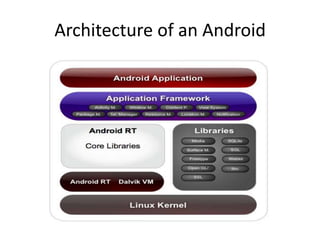
Architecture of an Android
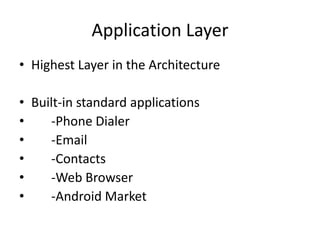
Application Layer
• Highest Layer in the Architecture
• Built-in standard applications
• -Phone Dialer
• -Email
• -Contacts
• -Web Browser
• -Android Market
Framework Layer
• The most important part of the framework are as
follows:
• Activity Manager
• Resource Manager
• Location Manager
• Notification Manager
Difference Between Java and C#
Architecture for Android
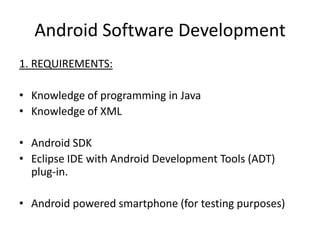
Android Software Development
1. REQUIREMENTS:
• Knowledge of programming in Java
• Knowledge of XML
• Android SDK
• Eclipse IDE with Android Development Tools (ADT)
plug-in.
• Android powered smartphone (for testing purposes)
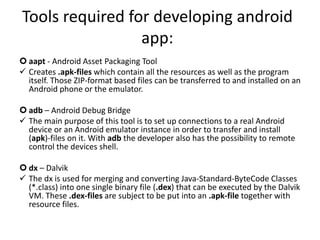
Tools required for developing android
app:
 aapt - Android Asset Packaging Tool
 Creates .apk-files which contain all the resources as well as the program
itself. Those ZIP-format based files can be transferred to and installed on an
Android phone or the emulator.
 adb – Android Debug Bridge
 The main purpose of this tool is to set up connections to a real Android
device or an Android emulator instance in order to transfer and install
(apk)-files on it. With adb the developer also has the possibility to remote
control the devices shell.
 dx – Dalvik
 The dx is used for merging and converting Java-Standard-ByteCode Classes
(*.class) into one single binary file (.dex) that can be executed by the Dalvik
VM. These .dex-files are subject to be put into an .apk-file together with
resource files.
Application Fundamentals
• Application Components
– Activities
– Services
– Broadcast Receivers
– Content Providers
• Intents
Activities
• An activity presents a visual user interface for
one focused endeavor the user can undertake.
• The visual content of the window is provided
by a hierarchy of views.
– objects derived from the base View class.
• A view hierarchy is placed within an activity's
window by the Activity.setContentView()
method.
Services
• A Service does not have a visual interface and
runs in the background.
• Each service extends the Service base class.
• It's possible to connect to an ongoing service
and communicate it through the interface
exposed by that service.
BroadcastReceiver
• A broadcast receiver receive and react to
broadcast announcements.
• All receivers extend the BroadcastReceiver
base class.
• Many broadcasts originate in system code.
• Broadcast receivers do not display a user
interface but they can start an activity or alert
user.
ContentPorvider
• A content provider makes a specific set of the
application's data available to other
applications.
• All content providers extends the
ContentProvider base class.
• Content Providers are accessed through
ContentResolver object.
• Content Providers and Content Resolvers
enable inter-process communication (IPC)
Intent
• Intents are Asynchronous messages used to convey a request or
message.
• An intent is an object of Intent class that holds the content of the
message.
• Activities, Services and Broadcast Receivers are activated through
Intents.
• Intent can contain
• Component name
• Action
• Data
• Category
• Extras
• Flags
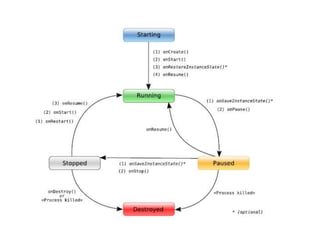
Activity Lifecycle
• An activity has essentially three states
• Active or Running
• Paused
• Stopped
• Activity Lifetime
• Entire Lifetime [onCreate() to onDestroy()]
• Visible Lifetime [onStart() to onStop()]
• Foreground Lifetime [onResume() to onPause()]
• An implementation of any activity lifecycle method
should always first call the superclass version
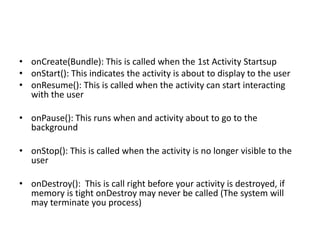
• onCreate(Bundle): This is called when the 1st Activity Startsup
• onStart(): This indicates the activity is about to display to the user
• onResume(): This is called when the activity can start interacting
with the user
• onPause(): This runs when and activity about to go to the
background
• onStop(): This is called when the activity is no longer visible to the
user
• onDestroy(): This is call right before your activity is destroyed, if
memory is tight onDestroy may never be called (The system will
may terminate you process)
Introduction to android basics

Introduction to android basics

  • 1.
  • 2.
    What is Android •Android is a software platform which includes an operating system, middleware and key applications. • The operating system is based on Linux and it is developed by Google (Open Handset Alliance). • The developers write managed code in a Java-like language that utilizes Google-developed Java libraries but it does not support programs in native code.
  • 3.
  • 4.
    Application Layer • HighestLayer in the Architecture • Built-in standard applications • -Phone Dialer • -Email • -Contacts • -Web Browser • -Android Market
  • 5.
    Framework Layer • Themost important part of the framework are as follows: • Activity Manager • Resource Manager • Location Manager • Notification Manager
  • 6.
    Difference Between Javaand C# Architecture for Android
  • 7.
    Android Software Development 1.REQUIREMENTS: • Knowledge of programming in Java • Knowledge of XML • Android SDK • Eclipse IDE with Android Development Tools (ADT) plug-in. • Android powered smartphone (for testing purposes)
  • 8.
    Tools required fordeveloping android app:  aapt - Android Asset Packaging Tool  Creates .apk-files which contain all the resources as well as the program itself. Those ZIP-format based files can be transferred to and installed on an Android phone or the emulator.  adb – Android Debug Bridge  The main purpose of this tool is to set up connections to a real Android device or an Android emulator instance in order to transfer and install (apk)-files on it. With adb the developer also has the possibility to remote control the devices shell.  dx – Dalvik  The dx is used for merging and converting Java-Standard-ByteCode Classes (*.class) into one single binary file (.dex) that can be executed by the Dalvik VM. These .dex-files are subject to be put into an .apk-file together with resource files.
  • 9.
    Application Fundamentals • ApplicationComponents – Activities – Services – Broadcast Receivers – Content Providers • Intents
  • 10.
    Activities • An activitypresents a visual user interface for one focused endeavor the user can undertake. • The visual content of the window is provided by a hierarchy of views. – objects derived from the base View class. • A view hierarchy is placed within an activity's window by the Activity.setContentView() method.
  • 11.
    Services • A Servicedoes not have a visual interface and runs in the background. • Each service extends the Service base class. • It's possible to connect to an ongoing service and communicate it through the interface exposed by that service.
  • 12.
    BroadcastReceiver • A broadcastreceiver receive and react to broadcast announcements. • All receivers extend the BroadcastReceiver base class. • Many broadcasts originate in system code. • Broadcast receivers do not display a user interface but they can start an activity or alert user.
  • 13.
    ContentPorvider • A contentprovider makes a specific set of the application's data available to other applications. • All content providers extends the ContentProvider base class. • Content Providers are accessed through ContentResolver object. • Content Providers and Content Resolvers enable inter-process communication (IPC)
  • 14.
    Intent • Intents areAsynchronous messages used to convey a request or message. • An intent is an object of Intent class that holds the content of the message. • Activities, Services and Broadcast Receivers are activated through Intents. • Intent can contain • Component name • Action • Data • Category • Extras • Flags
  • 15.
    Activity Lifecycle • Anactivity has essentially three states • Active or Running • Paused • Stopped • Activity Lifetime • Entire Lifetime [onCreate() to onDestroy()] • Visible Lifetime [onStart() to onStop()] • Foreground Lifetime [onResume() to onPause()] • An implementation of any activity lifecycle method should always first call the superclass version
  • 17.
    • onCreate(Bundle): Thisis called when the 1st Activity Startsup • onStart(): This indicates the activity is about to display to the user • onResume(): This is called when the activity can start interacting with the user • onPause(): This runs when and activity about to go to the background • onStop(): This is called when the activity is no longer visible to the user • onDestroy(): This is call right before your activity is destroyed, if memory is tight onDestroy may never be called (The system will may terminate you process)