Android Application Development
              Daniel Switkin
   Senior Software Engineer, Google Inc.
Goal

• Get you an idea of how to start developing
  Android applications
• Introduce major Android application concepts
• Walk you through a sample application in the
  development environment
Agenda


•   System architecture

•   Hello World!

•   Application components

•   Practical matters

•   Toolchain
What is Android?

• A free, open source mobile platform
• A Linux-based, multiprocess, multithreaded OS
• Android is not a device or a product
• It’s not even limited to phones - you could build
  a DVR, a handheld GPS, an MP3 player, etc.
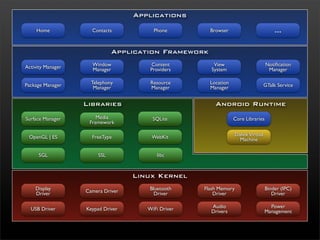
Applications

    Home             Contacts           Phone         Browser                         ...

                              Application Framework

Activity Manager     Window            Content         View                       Notification
                     Manager           Providers      System                       Manager

Package Manager      Telephony         Resource       Location                    GTalk Service
                      Manager          Manager        Manager


                   Libraries                            Android Runtime
Surface Manager        Media            SQLite                   Core Libraries
                    Framework

 OpenGL | ES         FreeType          WebKit                    Dalvik Virtual
                                                                   Machine

      SGL               SSL              libc


                                   Linux Kernel
    Display        Camera Driver      Bluetooth     Flash Memory                  Binder (IPC)
    Driver                              Driver          Driver                       Driver

  USB Driver       Keypad Driver      WiFi Driver     Audio                         Power
                                                      Drivers                     Management
Hello World!
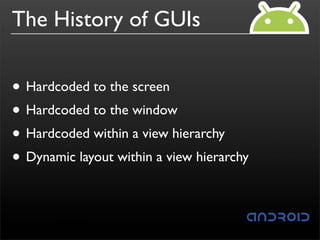
The History of GUIs


• Hardcoded to the screen
• Hardcoded to the window
• Hardcoded within a view hierarchy
• Dynamic layout within a view hierarchy
Generating GUIs
• Two ways to create GUIs: in XML or in code
 • Declarative route via XML has advantages
• A lot of your GUI-related work will take place in:
 •res/layout
 •res/values
•@id/name_for_component gives you
  handle for referencing XML declarations in code
Views

• Views are building blocks
• Examples:
 • Can be as basic as: TextView, EditText, or
    ListView
 • Fancier views: ImageView, MapView, WebView
Layouts
• Controls how Views are laid out
 • FrameLayout : each child a layer
 • LinearLayout : single row or column
 • RelativeLayout : relative to other Views
 • TableLayout : rows and columns
 • AbsoluteLayout : <x,y> coordinates
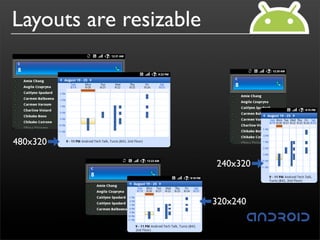
Layouts are resizable


480x320

                        240x320


                        320x240
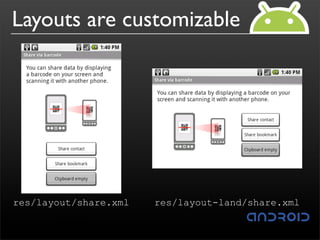
Layouts are customizable


res/layout/share.xml   res/layout-land/share.xml
Layout Parameters
• Specify many aspects of what’s being rendered
• Examples:
 • android:layout_height
 •  android:layout_width

• Tip: start with documentation for a specific View
  or Layout and then look at what’s inherited from
  parent class
Application Components
Basic components
                   UI component typically
    Activities
                   corresponding to one screen.
BroadcastReceivers Respond to broadcast Intents.
                   Faceless tasks that run in the
     Services
                   background.
ContentProviders   Enable applications to share data.
Activities

• Typically correspond to one screen in a UI
• But, they can:
 • be faceless
 • be in a floating window
 • return a value
Intents
• Think of Intents as a verb and object; a
  description of what you want done
 • Examples: VIEW, CALL, PLAY, etc.
• System matches Intent with Activity that can best
  provide that service
• Activities and BroadcastReceivers describe what
  Intents they can service in their IntentFilters (via
  AndroidManifest.xml)
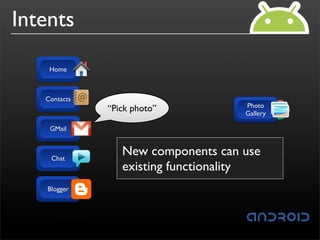
Intents

    Home


   Contacts
                                     Photo
              “Pick photo”           Picasa
                                     Gallery

    GMail


    Chat
                 New components
                 Components can makes
                 System picks best can
                 Client componentbe usea
                 existing any specific
                 replacedfunctionality
                 component for that action
                 request for a time action
   Blogger
BroadcastReceivers

• Components designed to respond to broadcast
  Intents
• Think of them as a way to respond to external
  notifications or alarms
• Applications can invent and broadcast their own
  Intents as well
Services

• Faceless components that run in the background
 • Example: music player, network downlaod, etc.
• Bind your code to a running service via a
  remote-able interface defined in an IDL
• Can run in your own process or separate
  process
ContentProviders
• Enables sharing of data across applications
 • Examples: address book, photo gallery, etc.
• Provides uniform APIs for:
 • querying (returns a Cursor)
 • delete, update, and insert rows
• Content is represented by URI and MIME type
Practical matters
Storage and Persistence

• A couple of different options:
 • Preferences
 • Flat file
 • SQLite
 • ContentProvider
Packaging


• Think of .apk files as Android packages
• Everything needed for an application is bundled
  up therein
• Basically a glorified ZIP file
Resources
• res/layout: declarative layout files
• res/drawable: intended for drawing
• res/anim: bitmaps, animations for transitions
• res/values: externalized values for things like
  strings, colors, styles, etc.

• res/xml: general XML files used at runtime
• res/raw: binary files (e.g. sound)
Assets
• Similar to Resources
• Differences:
 • Read-only
 • InputStream access to assets
• Any kind of file
 • Be mindful of file sizes
Application Lifecycle

• Application lifecycle is managed by the system
• Application start/stop is transparent to the user
• End-user only sees that they are moving between
  screens
• Read documentation for android.app.Activity
Toolchain
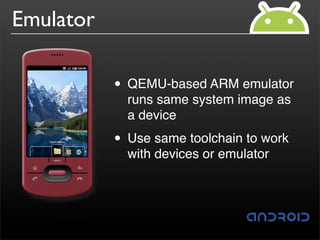
Emulator

           • QEMU-based ARM emulator
             runs same system image as
             a device

           • Use same toolchain to work
             with devices or emulator
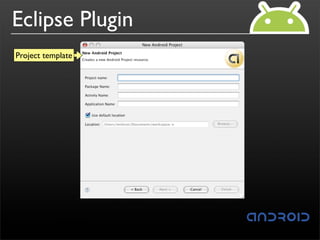
Eclipse Plugin
Project template
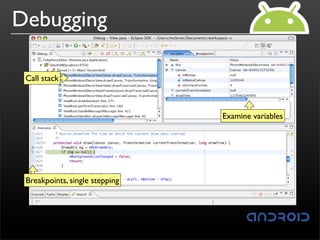
Debugging

 Call stack


                                Examine variables


 Breakpoints, single stepping
Eclipse demo
Q &A

Android application development

  • 1.
    Android Application Development Daniel Switkin Senior Software Engineer, Google Inc.
  • 2.
    Goal • Get youan idea of how to start developing Android applications • Introduce major Android application concepts • Walk you through a sample application in the development environment
  • 3.
    Agenda • System architecture • Hello World! • Application components • Practical matters • Toolchain
  • 4.
    What is Android? •A free, open source mobile platform • A Linux-based, multiprocess, multithreaded OS • Android is not a device or a product • It’s not even limited to phones - you could build a DVR, a handheld GPS, an MP3 player, etc.
  • 5.
    Applications Home Contacts Phone Browser ... Application Framework Activity Manager Window Content View Notification Manager Providers System Manager Package Manager Telephony Resource Location GTalk Service Manager Manager Manager Libraries Android Runtime Surface Manager Media SQLite Core Libraries Framework OpenGL | ES FreeType WebKit Dalvik Virtual Machine SGL SSL libc Linux Kernel Display Camera Driver Bluetooth Flash Memory Binder (IPC) Driver Driver Driver Driver USB Driver Keypad Driver WiFi Driver Audio Power Drivers Management
  • 6.
  • 7.
    The History ofGUIs • Hardcoded to the screen • Hardcoded to the window • Hardcoded within a view hierarchy • Dynamic layout within a view hierarchy
  • 8.
    Generating GUIs • Twoways to create GUIs: in XML or in code • Declarative route via XML has advantages • A lot of your GUI-related work will take place in: •res/layout •res/values •@id/name_for_component gives you handle for referencing XML declarations in code
  • 9.
    Views • Views arebuilding blocks • Examples: • Can be as basic as: TextView, EditText, or ListView • Fancier views: ImageView, MapView, WebView
  • 10.
    Layouts • Controls howViews are laid out • FrameLayout : each child a layer • LinearLayout : single row or column • RelativeLayout : relative to other Views • TableLayout : rows and columns • AbsoluteLayout : <x,y> coordinates
  • 11.
  • 12.
  • 13.
    Layout Parameters • Specifymany aspects of what’s being rendered • Examples: • android:layout_height • android:layout_width • Tip: start with documentation for a specific View or Layout and then look at what’s inherited from parent class
  • 14.
  • 15.
    Basic components UI component typically Activities corresponding to one screen. BroadcastReceivers Respond to broadcast Intents. Faceless tasks that run in the Services background. ContentProviders Enable applications to share data.
  • 16.
    Activities • Typically correspondto one screen in a UI • But, they can: • be faceless • be in a floating window • return a value
  • 17.
    Intents • Think ofIntents as a verb and object; a description of what you want done • Examples: VIEW, CALL, PLAY, etc. • System matches Intent with Activity that can best provide that service • Activities and BroadcastReceivers describe what Intents they can service in their IntentFilters (via AndroidManifest.xml)
  • 18.
    Intents Home Contacts Photo “Pick photo” Picasa Gallery GMail Chat New components Components can makes System picks best can Client componentbe usea existing any specific replacedfunctionality component for that action request for a time action Blogger
  • 19.
    BroadcastReceivers • Components designedto respond to broadcast Intents • Think of them as a way to respond to external notifications or alarms • Applications can invent and broadcast their own Intents as well
  • 20.
    Services • Faceless componentsthat run in the background • Example: music player, network downlaod, etc. • Bind your code to a running service via a remote-able interface defined in an IDL • Can run in your own process or separate process
  • 21.
    ContentProviders • Enables sharingof data across applications • Examples: address book, photo gallery, etc. • Provides uniform APIs for: • querying (returns a Cursor) • delete, update, and insert rows • Content is represented by URI and MIME type
  • 22.
  • 23.
    Storage and Persistence •A couple of different options: • Preferences • Flat file • SQLite • ContentProvider
  • 24.
    Packaging • Think of.apk files as Android packages • Everything needed for an application is bundled up therein • Basically a glorified ZIP file
  • 25.
    Resources • res/layout: declarativelayout files • res/drawable: intended for drawing • res/anim: bitmaps, animations for transitions • res/values: externalized values for things like strings, colors, styles, etc. • res/xml: general XML files used at runtime • res/raw: binary files (e.g. sound)
  • 26.
    Assets • Similar toResources • Differences: • Read-only • InputStream access to assets • Any kind of file • Be mindful of file sizes
  • 27.
    Application Lifecycle • Applicationlifecycle is managed by the system • Application start/stop is transparent to the user • End-user only sees that they are moving between screens • Read documentation for android.app.Activity
  • 28.
  • 29.
    Emulator • QEMU-based ARM emulator runs same system image as a device • Use same toolchain to work with devices or emulator
  • 30.
  • 31.
    Debugging Call stack Examine variables Breakpoints, single stepping
  • 32.
  • 33.