
Analysing Simple Pendulum
using MATLAB
CREATED BY:
AKSHAY MISTRI
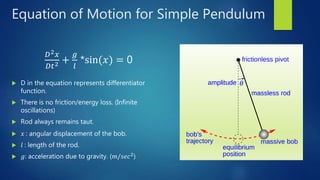
Equation of Motion for Simple Pendulum
𝐷2 𝑥
𝐷𝑡2 +
𝑔
𝑙
*sin(𝑥) = 0
 D in the equation represents differentiator
function.
 There is no friction/energy loss. (Infinite
oscillations)
 Rod always remains taut.
 𝑥 : angular displacement of the bob.
 𝑙 : length of the rod.
 𝑔: acceleration due to gravity. (𝑚/𝑠𝑒𝑐2)
Things to Note
 Matlab can solve linear differential equations much easily. Hence, we will
convert the pendulum equation to linear form and then define it in matlab
code.
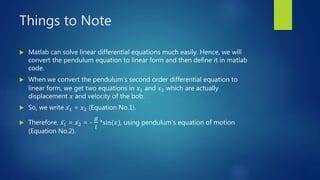
 When we convert the pendulum’s second order differential equation to
linear form, we get two equations in 𝑥1 and 𝑥2 which are actually
displacement 𝑥 and velocity of the bob.
 So, we write 𝑥1 = 𝑥2 (Equation No.1).
 Therefore, 𝑥1 = 𝑥2 = -
𝑔
𝑙
*sin(𝑥), using pendulum’s equation of motion
(Equation No.2).
Defining the two equations in MATLAB
 We define the equations in a script file, which can be called when
running the code.
 To make a script file, first create a folder in matlab using
>>mkdir pendulum and go into that folder using code
>>chdir pendulum. (mkdir: make Directory; chdir: change
Directory).
 Now create a script file using command >>edit func1.m , it will
give you a message that the file does not exist and do you want
to create it? Then click on yes.
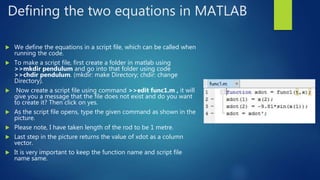
 As the script file opens, type the given command as shown in the
picture.
 Please note, I have taken length of the rod to be 1 metre.
 Last step in the picture returns the value of xdot as a column
vector.
 It is very important to keep the function name and script file
name same.
Getting Outputs
 Use the following command in the Command Window
to get the outputs.
 First code calls func1 and gives the outputs value
matrix [t, x].
 Under the ode45() code, [0 10] gives time of run i.e. 0
to 10 seconds and [7 4.3] gives initial conditions of
𝑥1 (0) = 7 and 𝑥1(0) = 4.3.
 Subplot() command is used to create multiple plots in
the same figure.
 Third code gives the graph for time vs displacement of
the bob.
 Hold on code is used to plot two
plots in one graph.
 xlabel and ylabel codes are use to
label the axes in the graph.
 Second last code gives the phase
trajectory for the pendulum.
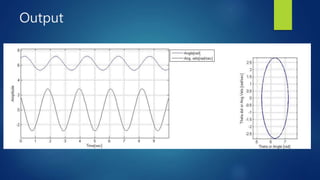
Output
Thank you!

Analysing simple pendulum using matlab

  • 1.
    Analysing Simple Pendulum usingMATLAB CREATED BY: AKSHAY MISTRI
  • 2.
    Equation of Motionfor Simple Pendulum 𝐷2 𝑥 𝐷𝑡2 + 𝑔 𝑙 *sin(𝑥) = 0  D in the equation represents differentiator function.  There is no friction/energy loss. (Infinite oscillations)  Rod always remains taut.  𝑥 : angular displacement of the bob.  𝑙 : length of the rod.  𝑔: acceleration due to gravity. (𝑚/𝑠𝑒𝑐2)
  • 3.
    Things to Note Matlab can solve linear differential equations much easily. Hence, we will convert the pendulum equation to linear form and then define it in matlab code.  When we convert the pendulum’s second order differential equation to linear form, we get two equations in 𝑥1 and 𝑥2 which are actually displacement 𝑥 and velocity of the bob.  So, we write 𝑥1 = 𝑥2 (Equation No.1).  Therefore, 𝑥1 = 𝑥2 = - 𝑔 𝑙 *sin(𝑥), using pendulum’s equation of motion (Equation No.2).
  • 4.
    Defining the twoequations in MATLAB  We define the equations in a script file, which can be called when running the code.  To make a script file, first create a folder in matlab using >>mkdir pendulum and go into that folder using code >>chdir pendulum. (mkdir: make Directory; chdir: change Directory).  Now create a script file using command >>edit func1.m , it will give you a message that the file does not exist and do you want to create it? Then click on yes.  As the script file opens, type the given command as shown in the picture.  Please note, I have taken length of the rod to be 1 metre.  Last step in the picture returns the value of xdot as a column vector.  It is very important to keep the function name and script file name same.
  • 5.
    Getting Outputs  Usethe following command in the Command Window to get the outputs.  First code calls func1 and gives the outputs value matrix [t, x].  Under the ode45() code, [0 10] gives time of run i.e. 0 to 10 seconds and [7 4.3] gives initial conditions of 𝑥1 (0) = 7 and 𝑥1(0) = 4.3.  Subplot() command is used to create multiple plots in the same figure.  Third code gives the graph for time vs displacement of the bob.  Hold on code is used to plot two plots in one graph.  xlabel and ylabel codes are use to label the axes in the graph.  Second last code gives the phase trajectory for the pendulum.
  • 6.
  • 7.