DYNAMIC DEBUGGING IN 8085
MICROPROCESSOR
How does a debugger help in Debugging in Programming ?
1.The debugger allows you to check at the contents of registers and memory locations when the
program execution is in process.
2.Debugging in Programming allows you to change the contents of registers and memory locations
and re execute the program.
3.Some debuggers allow you to stop execution after each instruction so you can check or alter
memory and register contents.
4.A debugger also allows you to set a breakpoint at any point in your program. When you run a
program, the system will execute instructions upto this breakpoint and stop. You can then examine
register and memory contents to see if the results are correct at that point. If the results are correct,
you can move the break point to a later point in your program. If results are not correct, you can
check the program up to that point to find out why they are not correct.
2
DYNAMIC DEBUGGING:
 Checking for logical and syntax errors in the program is called as debugging.
TYPES:
1.STATIC
2.DYNAMIC
3
DYNAMIC DEBUGGING:
STATIC DEBUGGING:
Checking for errors in the program manually using paper and pencil is
known as static debugging.
4
DYNAMIC DEBUGGING:
Checking for errors in the program by observing the execution of instructions is
called as DYNAMIC DEBUGGING.
TOOLS FOR DYNAMIC DEBUGGING:
1. SINGLE STEP
2.REGISTER EXAMINE
3.BREAK POINT
5
SINGLE STEP:
 Allows you to execute one instruction at a time and observe the results of each
instruction.
 A Single step facility is built with a hard wired logic circuit.
 By pressing Single-step key in the microprocessor ,able to observe addresses and
codes as they are executed.
 Single-step technique will be able to spot
 incorrect address
 incorrect jump locations for loops
 incorrect data or missing codes.
 To effectively use this technique reduce the number of loops and delay counts
to minimum number.
 Better to use this technique for short programs.
 This technique helps to infer the flag status by observing the execution of jump
instructions.
6
REGISTER EXAMINE:
 Register Examine Key in the microprocessor allows to examine the contents of the
microprocessor register.
 By pressing appropriate keys, the monitor program displays the contents of the
registers.
 This technique is used in conjunction with either the single step or break point
facilities.
 After executing a block of instructions ,we can examine the register contents of the
program at a critical juncture and compare the contents with the expected
outcomes.
7
BREAK POINT:
 Breakpoint facility is a software routine that allows to execute a program in sections.
 The break point in a program can be set in a program using RST instructions.
 When we push the EXECUTE key, program will be executed until the breakpoint, using
monitor we can check the registers for expected results.
 If the segment of the program found satisfactory ,a second breakpoint can be set at a
subsequent memory address to debug the next segment of the program.
 With Breakpoint facility we can isolate the segment of the program with errors.
 Then that segment of the program can be debugged with the single step facility.
 The break point technique can be used to check out the timing loop, I/O section and
Interrupts.
8
SAMPLE PROGRAMS
9
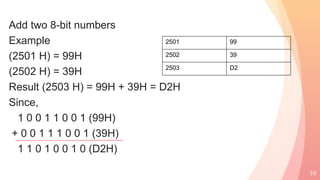
Add two 8-bit numbers
Example
(2501 H) = 99H
(2502 H) = 39H
Result (2503 H) = 99H + 39H = D2H
Since,
1 0 0 1 1 0 0 1 (99H)
+ 0 0 1 1 1 0 0 1 (39H)
1 1 0 1 0 0 1 0 (D2H)
10
2501 99
2502 39
2503 D2
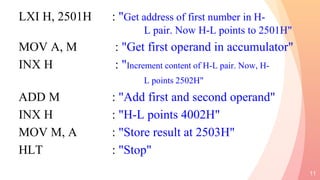
LXI H, 2501H : "Get address of first number in H-
L pair. Now H-L points to 2501H"
MOV A, M : "Get first operand in accumulator"
INX H : "Increment content of H-L pair. Now, H-
L points 2502H"
ADD M : "Add first and second operand"
INX H : "H-L points 4002H"
MOV M, A : "Store result at 2503H"
HLT : "Stop"
11
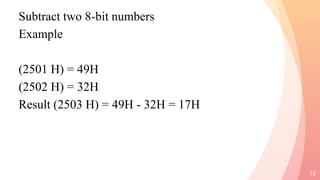
Subtract two 8-bit numbers
Example
(2501 H) = 49H
(2502 H) = 32H
Result (2503 H) = 49H - 32H = 17H
12
Program
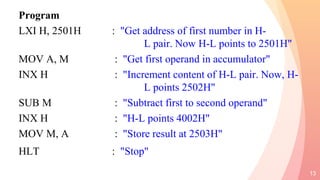
LXI H, 2501H : "Get address of first number in H-
L pair. Now H-L points to 2501H"
MOV A, M : "Get first operand in accumulator"
INX H : "Increment content of H-L pair. Now, H-
L points 2502H"
SUB M : "Subtract first to second operand"
INX H : "H-L points 4002H"
MOV M, A : "Store result at 2503H"
HLT : "Stop"
13
14

Dynamic debugging in 8085 microprocessor

  • 1.
    DYNAMIC DEBUGGING IN8085 MICROPROCESSOR
  • 2.
    How does adebugger help in Debugging in Programming ? 1.The debugger allows you to check at the contents of registers and memory locations when the program execution is in process. 2.Debugging in Programming allows you to change the contents of registers and memory locations and re execute the program. 3.Some debuggers allow you to stop execution after each instruction so you can check or alter memory and register contents. 4.A debugger also allows you to set a breakpoint at any point in your program. When you run a program, the system will execute instructions upto this breakpoint and stop. You can then examine register and memory contents to see if the results are correct at that point. If the results are correct, you can move the break point to a later point in your program. If results are not correct, you can check the program up to that point to find out why they are not correct. 2
  • 3.
    DYNAMIC DEBUGGING:  Checkingfor logical and syntax errors in the program is called as debugging. TYPES: 1.STATIC 2.DYNAMIC 3
  • 4.
    DYNAMIC DEBUGGING: STATIC DEBUGGING: Checkingfor errors in the program manually using paper and pencil is known as static debugging. 4
  • 5.
    DYNAMIC DEBUGGING: Checking forerrors in the program by observing the execution of instructions is called as DYNAMIC DEBUGGING. TOOLS FOR DYNAMIC DEBUGGING: 1. SINGLE STEP 2.REGISTER EXAMINE 3.BREAK POINT 5
  • 6.
    SINGLE STEP:  Allowsyou to execute one instruction at a time and observe the results of each instruction.  A Single step facility is built with a hard wired logic circuit.  By pressing Single-step key in the microprocessor ,able to observe addresses and codes as they are executed.  Single-step technique will be able to spot  incorrect address  incorrect jump locations for loops  incorrect data or missing codes.  To effectively use this technique reduce the number of loops and delay counts to minimum number.  Better to use this technique for short programs.  This technique helps to infer the flag status by observing the execution of jump instructions. 6
  • 7.
    REGISTER EXAMINE:  RegisterExamine Key in the microprocessor allows to examine the contents of the microprocessor register.  By pressing appropriate keys, the monitor program displays the contents of the registers.  This technique is used in conjunction with either the single step or break point facilities.  After executing a block of instructions ,we can examine the register contents of the program at a critical juncture and compare the contents with the expected outcomes. 7
  • 8.
    BREAK POINT:  Breakpointfacility is a software routine that allows to execute a program in sections.  The break point in a program can be set in a program using RST instructions.  When we push the EXECUTE key, program will be executed until the breakpoint, using monitor we can check the registers for expected results.  If the segment of the program found satisfactory ,a second breakpoint can be set at a subsequent memory address to debug the next segment of the program.  With Breakpoint facility we can isolate the segment of the program with errors.  Then that segment of the program can be debugged with the single step facility.  The break point technique can be used to check out the timing loop, I/O section and Interrupts. 8
  • 9.
  • 10.
    Add two 8-bitnumbers Example (2501 H) = 99H (2502 H) = 39H Result (2503 H) = 99H + 39H = D2H Since, 1 0 0 1 1 0 0 1 (99H) + 0 0 1 1 1 0 0 1 (39H) 1 1 0 1 0 0 1 0 (D2H) 10 2501 99 2502 39 2503 D2
  • 11.
    LXI H, 2501H: "Get address of first number in H- L pair. Now H-L points to 2501H" MOV A, M : "Get first operand in accumulator" INX H : "Increment content of H-L pair. Now, H- L points 2502H" ADD M : "Add first and second operand" INX H : "H-L points 4002H" MOV M, A : "Store result at 2503H" HLT : "Stop" 11
  • 12.
    Subtract two 8-bitnumbers Example (2501 H) = 49H (2502 H) = 32H Result (2503 H) = 49H - 32H = 17H 12
  • 13.
    Program LXI H, 2501H: "Get address of first number in H- L pair. Now H-L points to 2501H" MOV A, M : "Get first operand in accumulator" INX H : "Increment content of H-L pair. Now, H- L points 2502H" SUB M : "Subtract first to second operand" INX H : "H-L points 4002H" MOV M, A : "Store result at 2503H" HLT : "Stop" 13
  • 14.