1
EG7102 Modelling, Simulation,
and Virtualization (15 credits)
Workshop 1: Dynamic
systems Modelling using
MATLAB/Simulink
Outline
1.What is Simulink?
2.Creating a simple program in MATLAB
3.Creating an equivalent program in SIMULINK
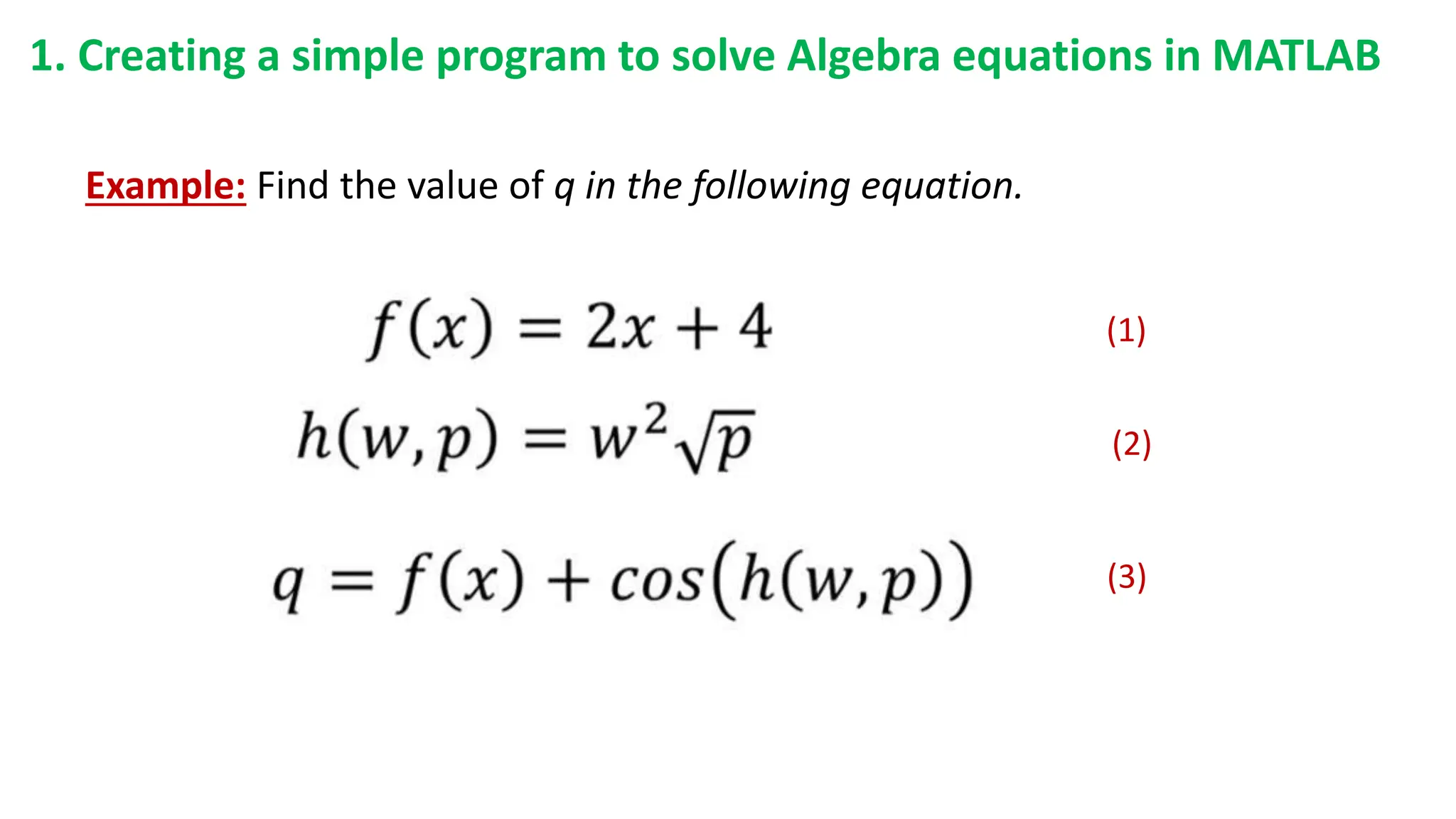
1. Creating a simple program to solve Algebra equations in MATLAB
Example: Find the value of q in the following equation.
(1)
(2)
(3)
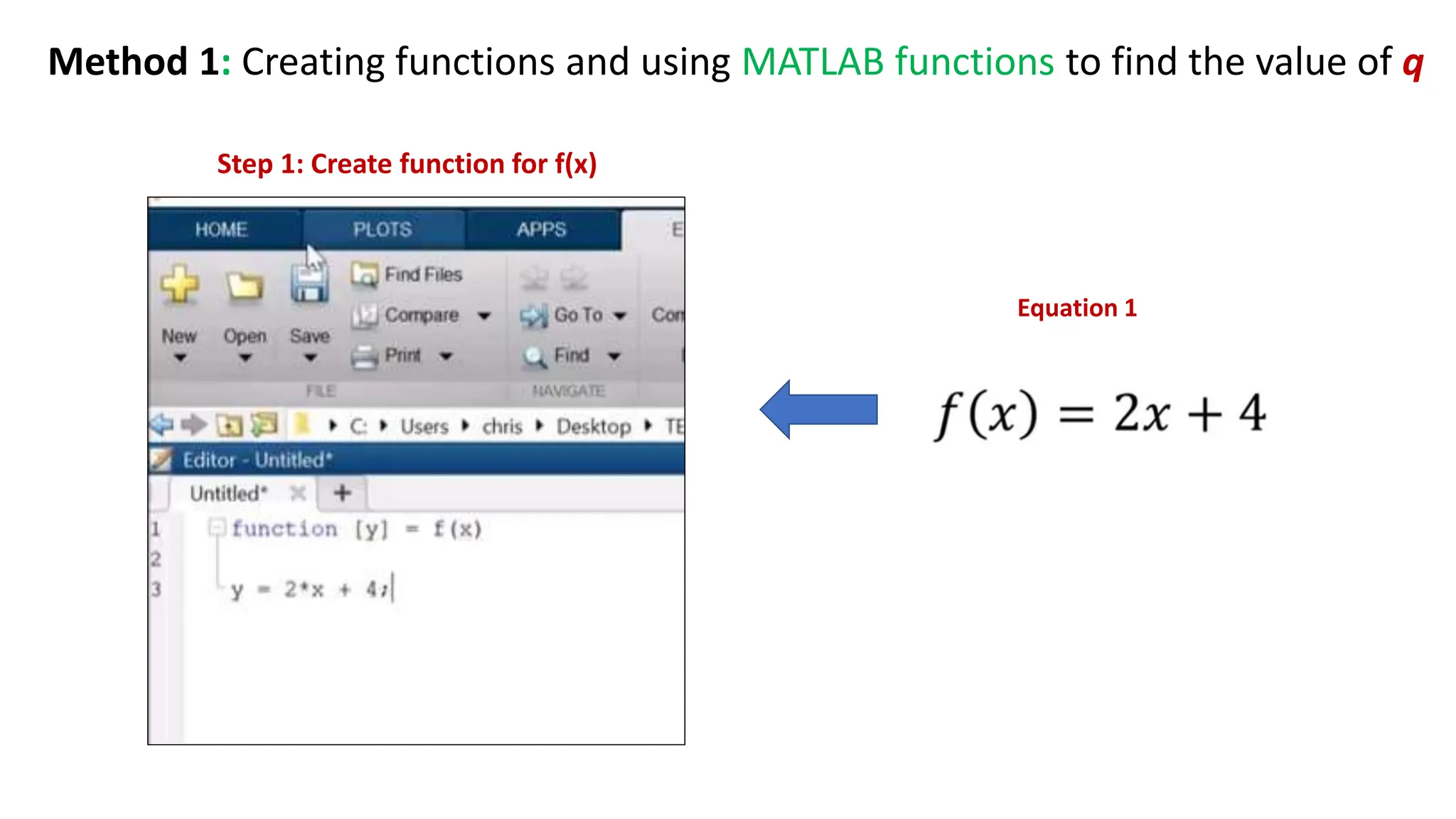
Step 1: Create function for f(x)
Method 1: Creating functions and using MATLAB functions to find the value of q
Equation 1
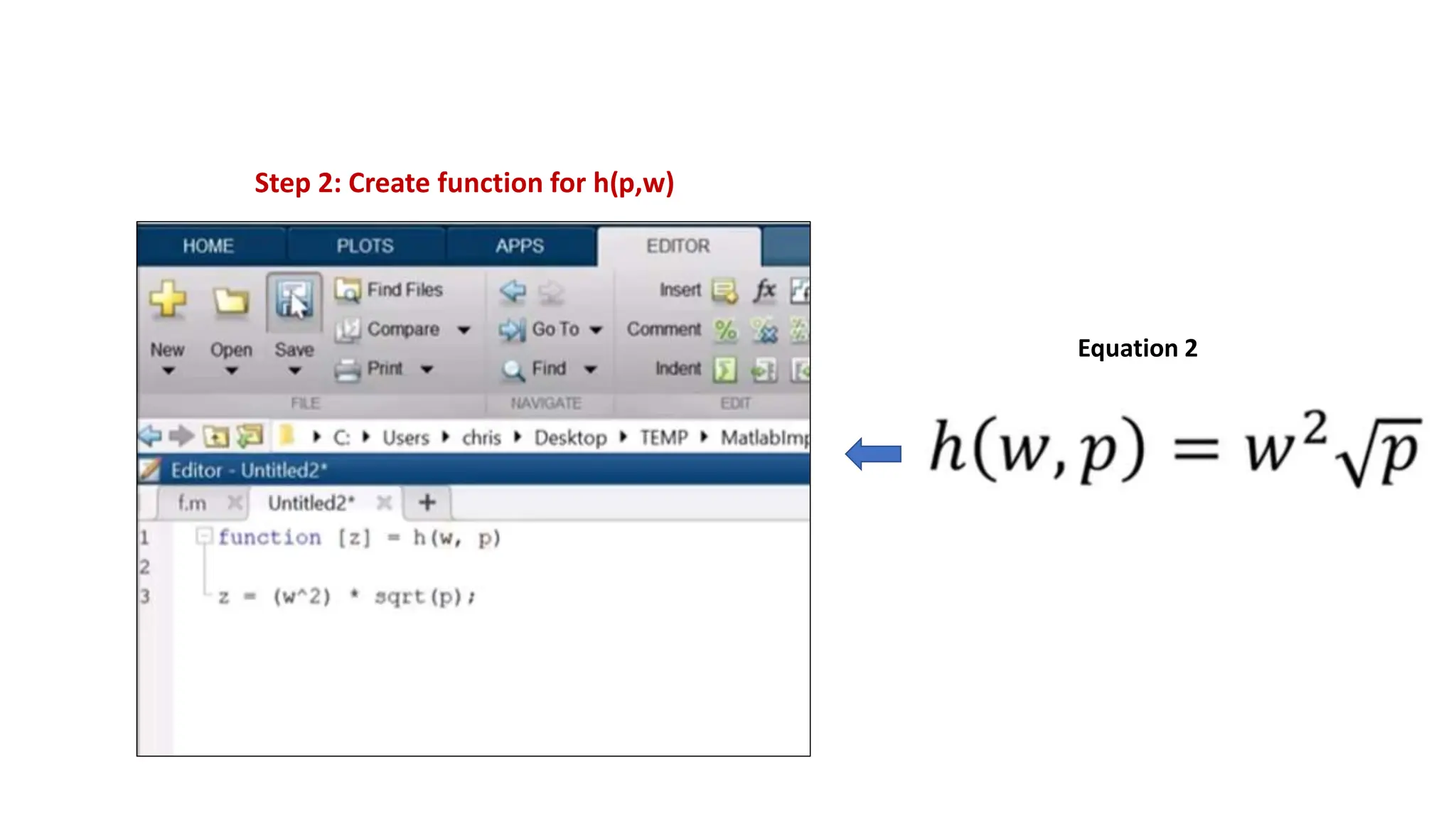
Step 2: Create function for h(p,w)
Equation 2
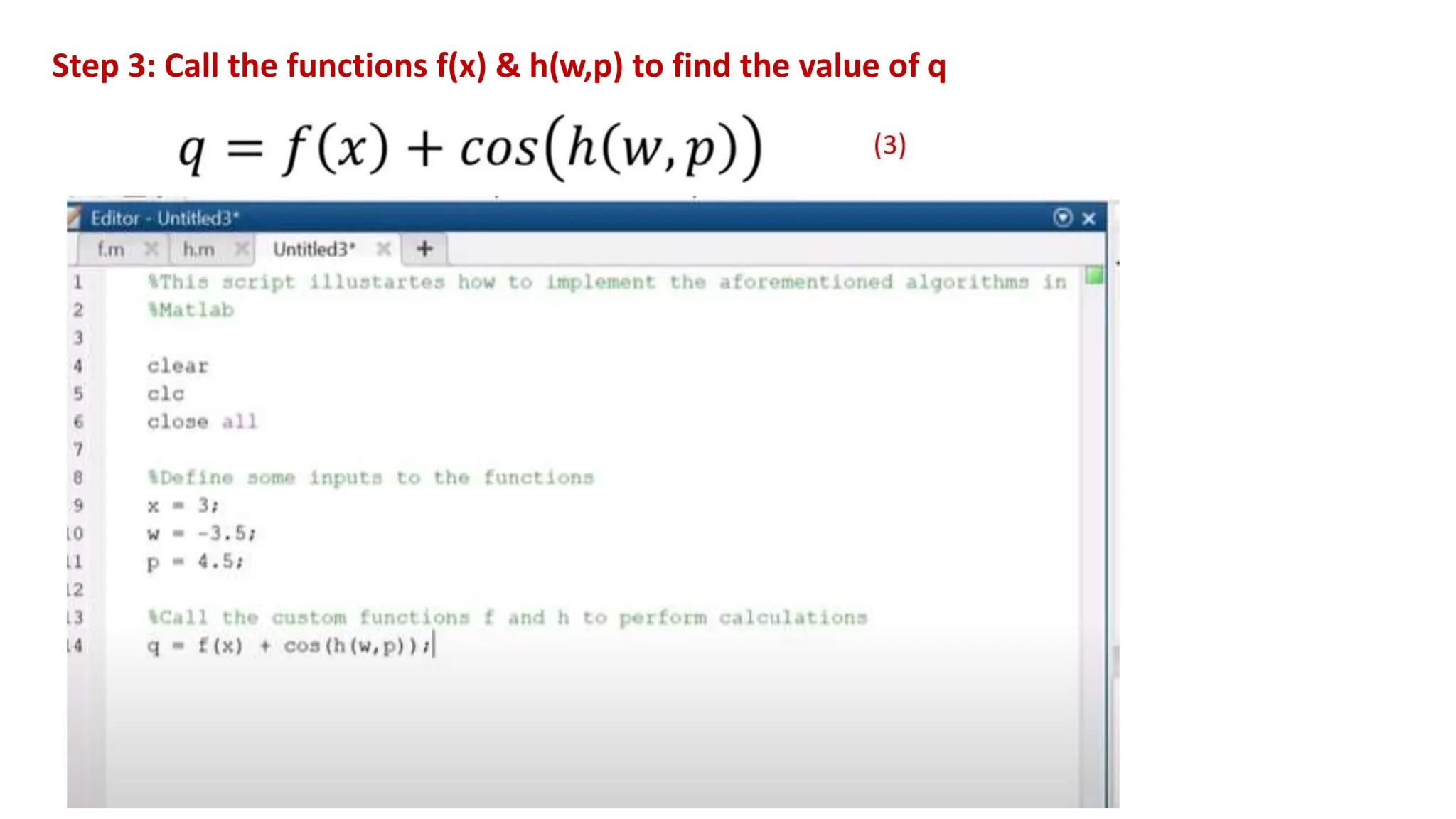
Step 3: Call the functions f(x) & h(w,p) to find the value of q
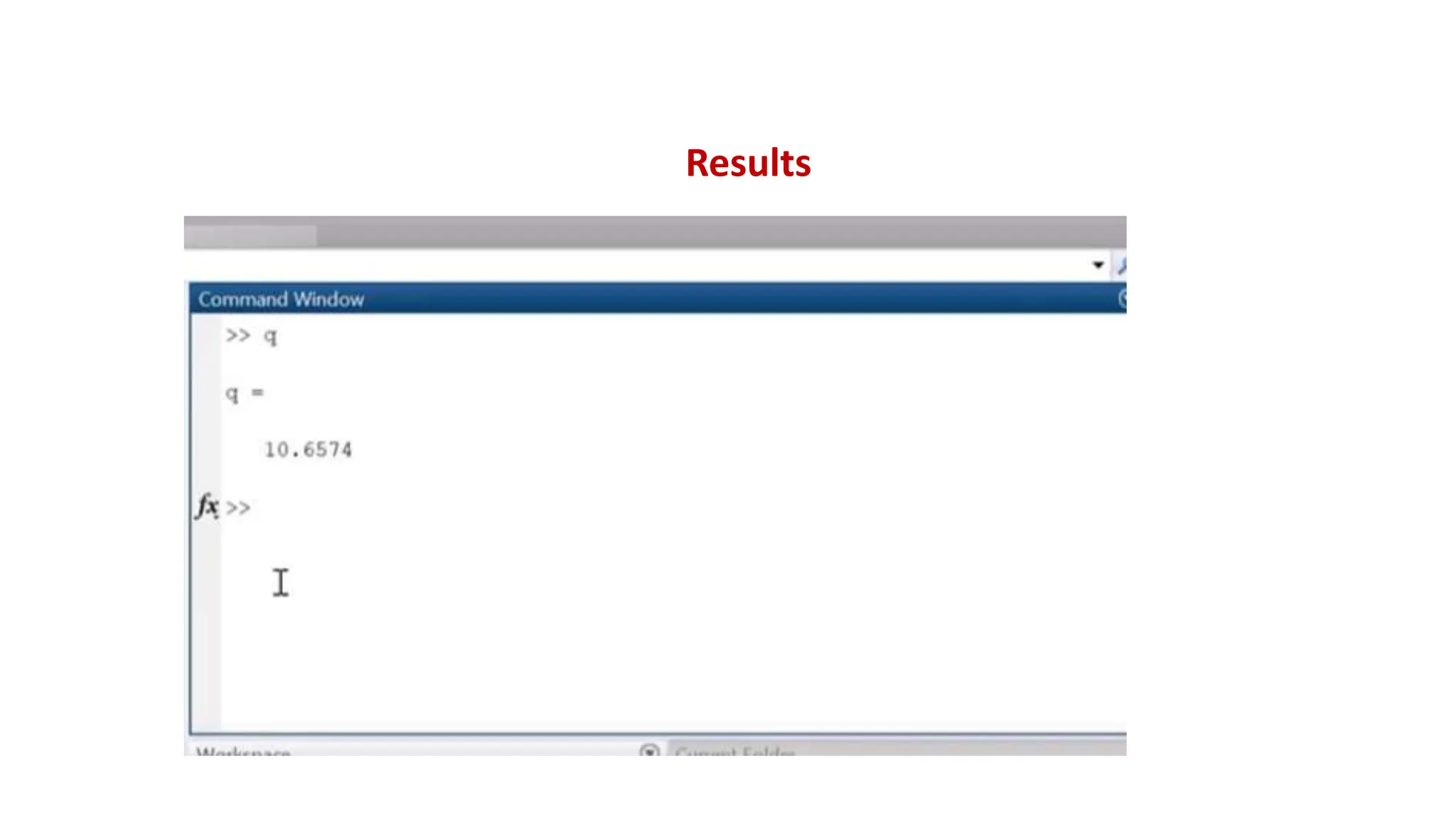
Results
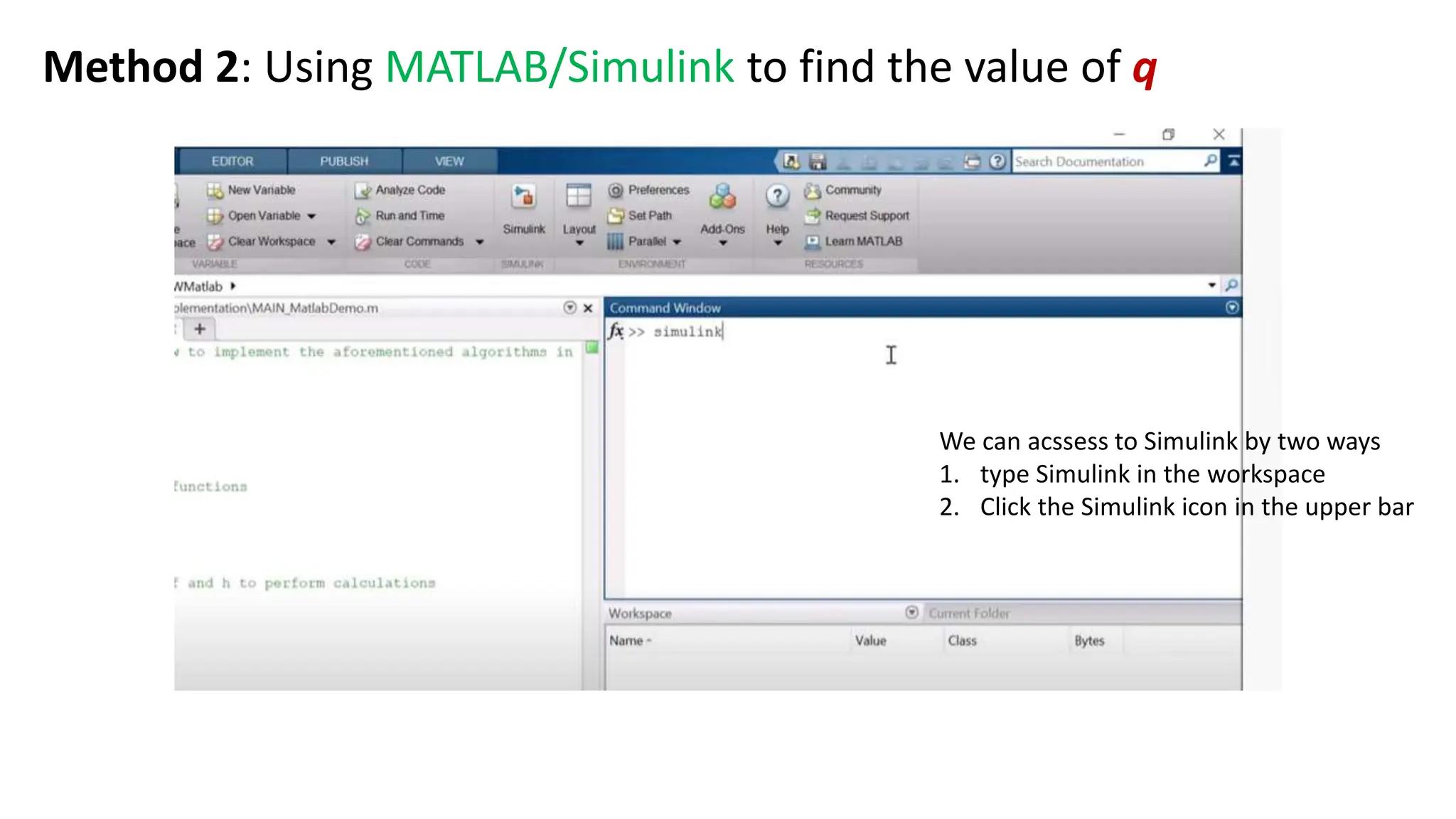
We can acssess to Simulink by two ways
1. type Simulink in the workspace
2. Click the Simulink icon in the upper bar
Method 2: Using MATLAB/Simulink to find the value of q
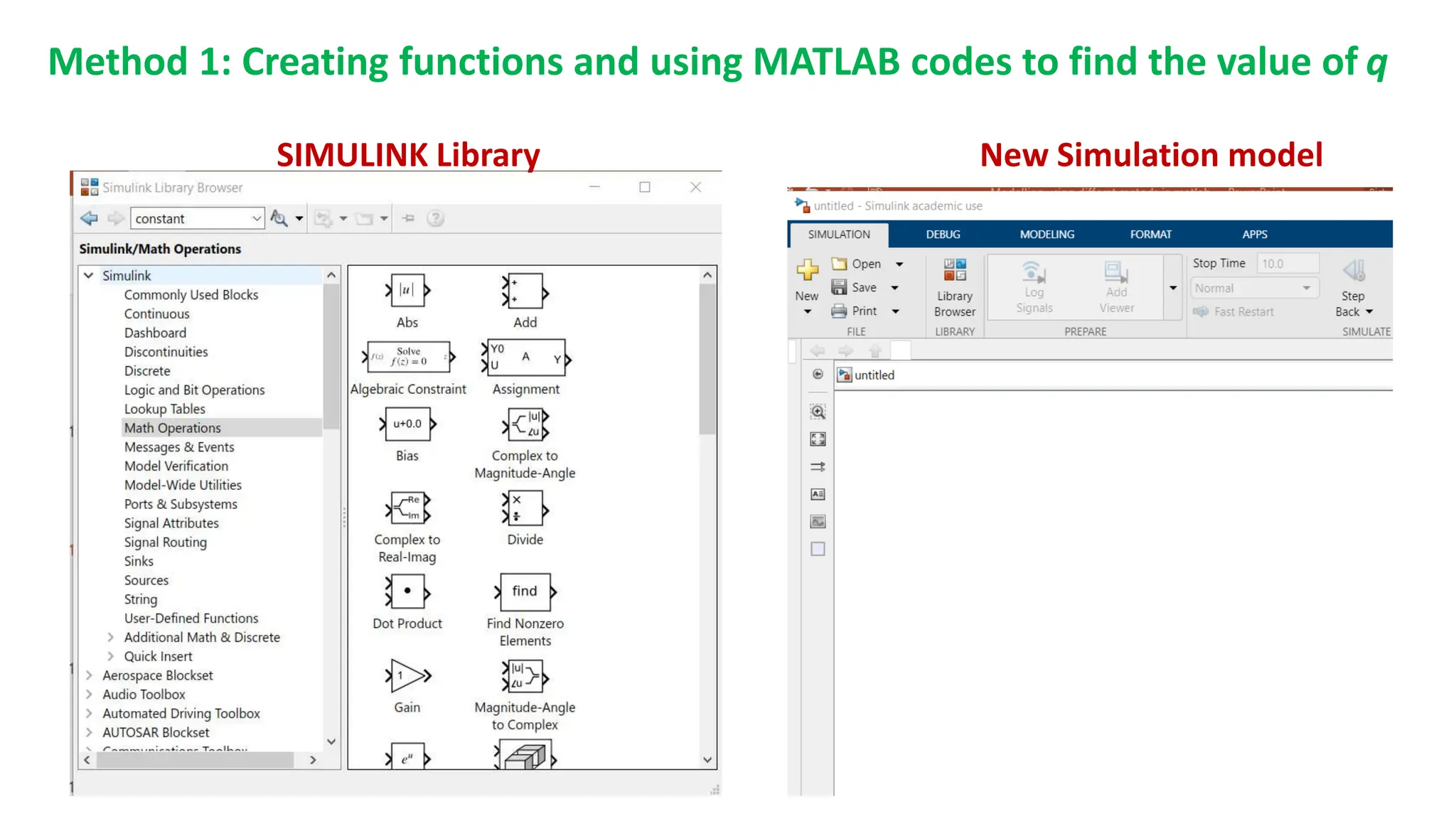
New Simulation model
SIMULINK Library
Method 1: Creating functions and using MATLAB codes to find the value of q
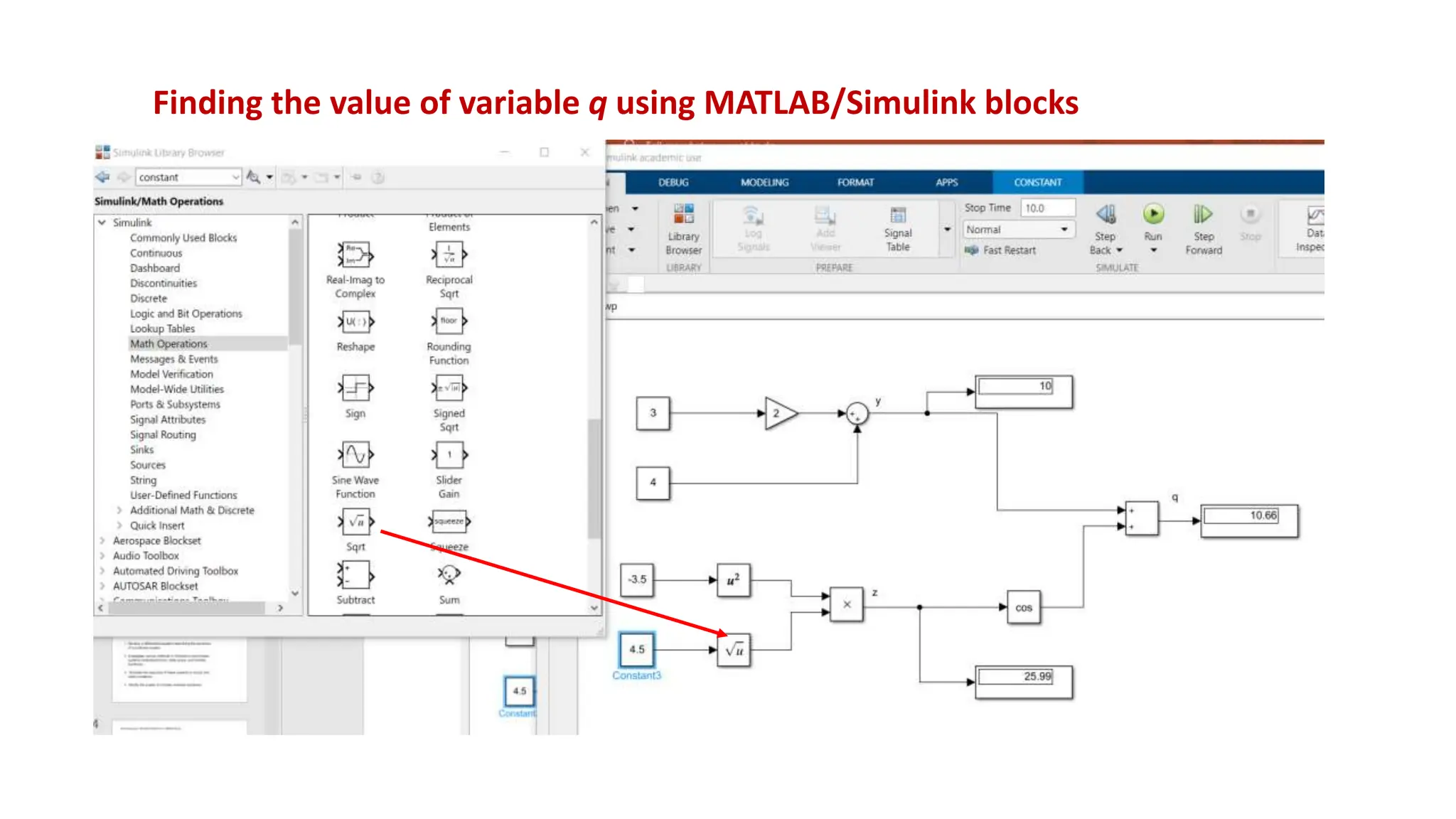
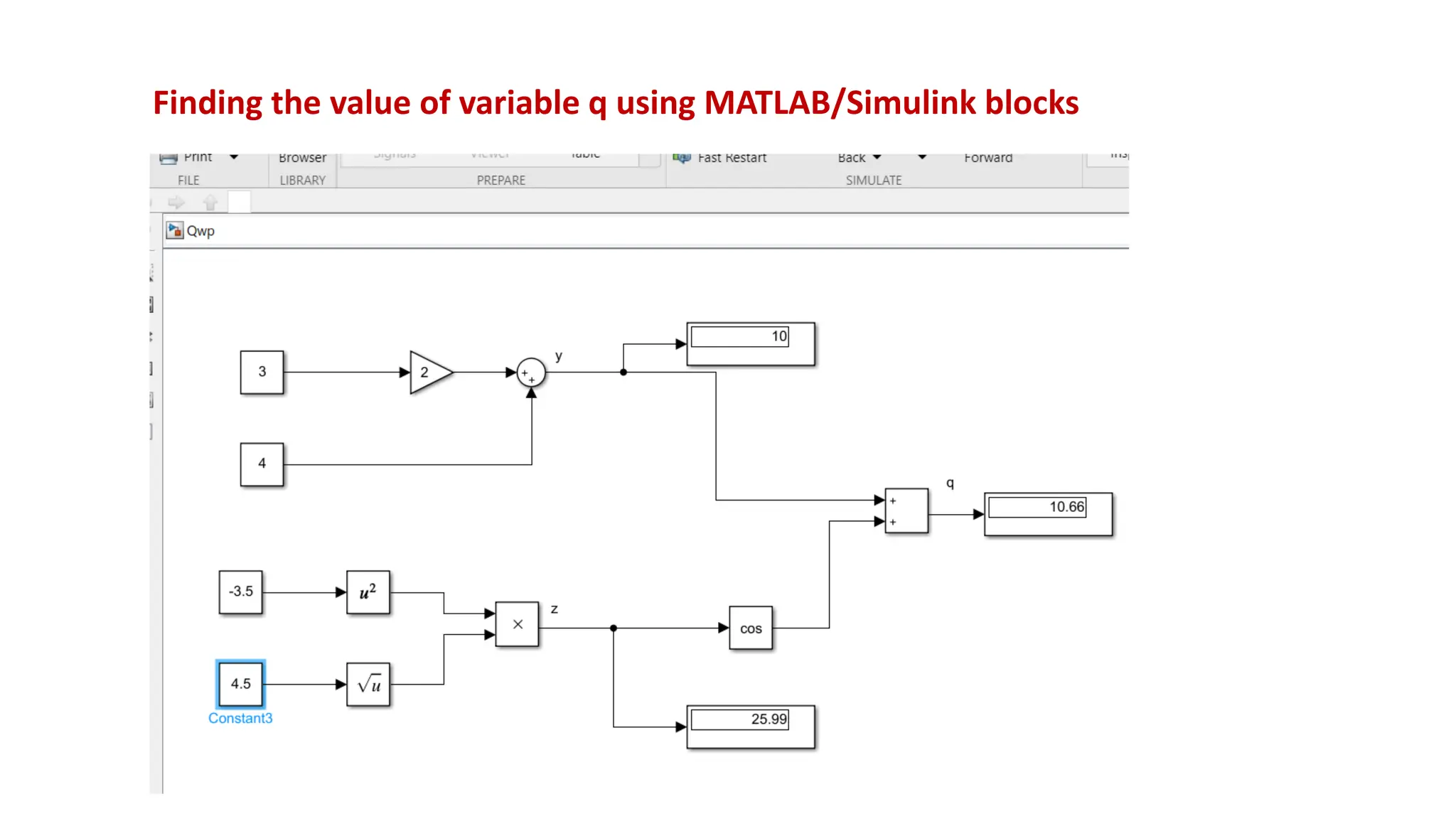
Finding the value of variable q using MATLAB/Simulink blocks
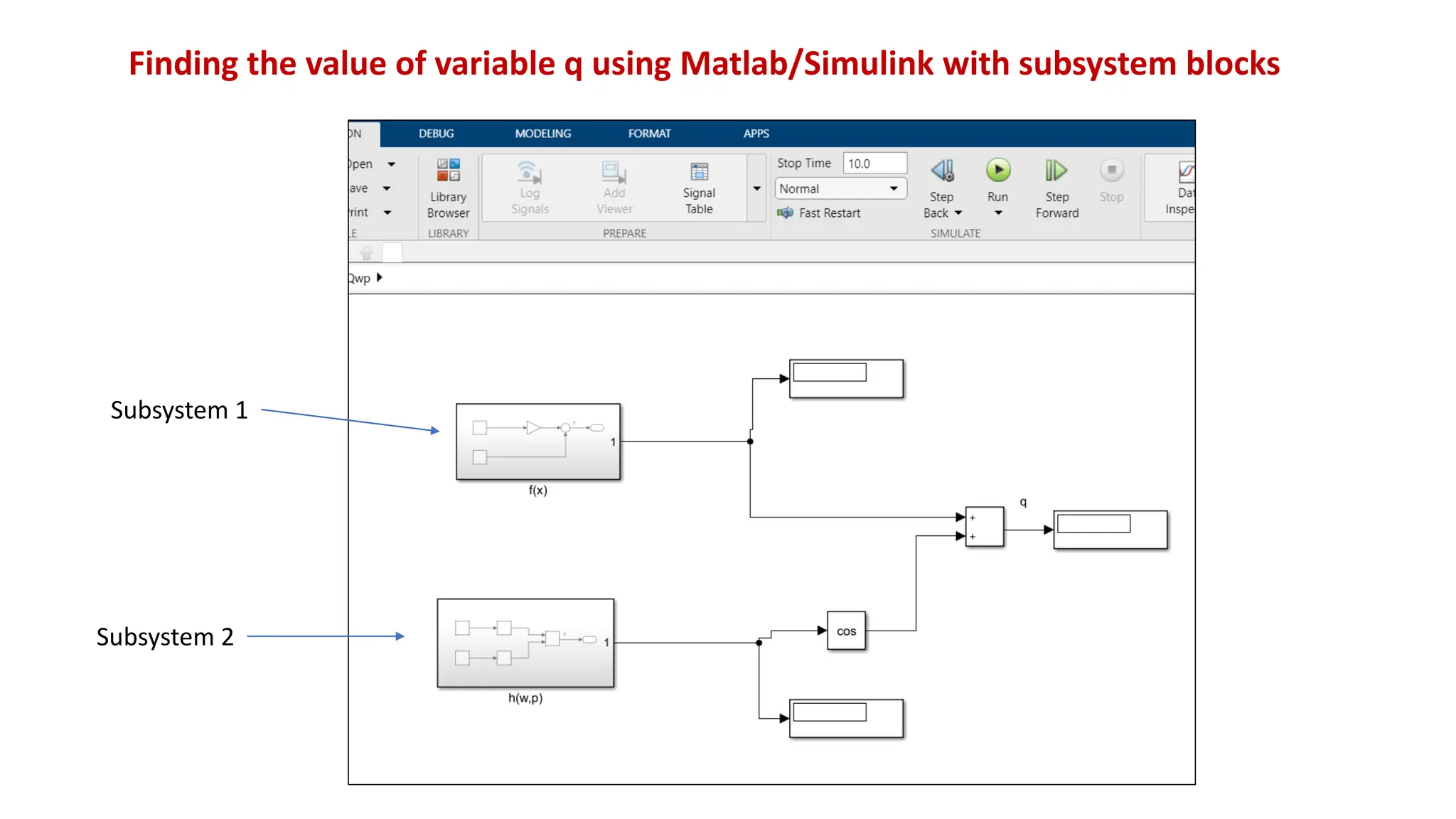
Finding the value of variable q using Matlab/Simulink with subsystem blocks
Subsystem 1
Subsystem 2
1. Develop a differential equation describing the dynamics
of a nonlinear system.
2. Investigate various methods in Simulink to solve these
systems (individual blocks, state space, and transfer
functions).
3. Simulate the response of these systems to inputs and
initial conditions.
4. Modify the system to include nonlinear dynamics.
2. Solving ODEs using MATLAB/SIMULINK toolbox
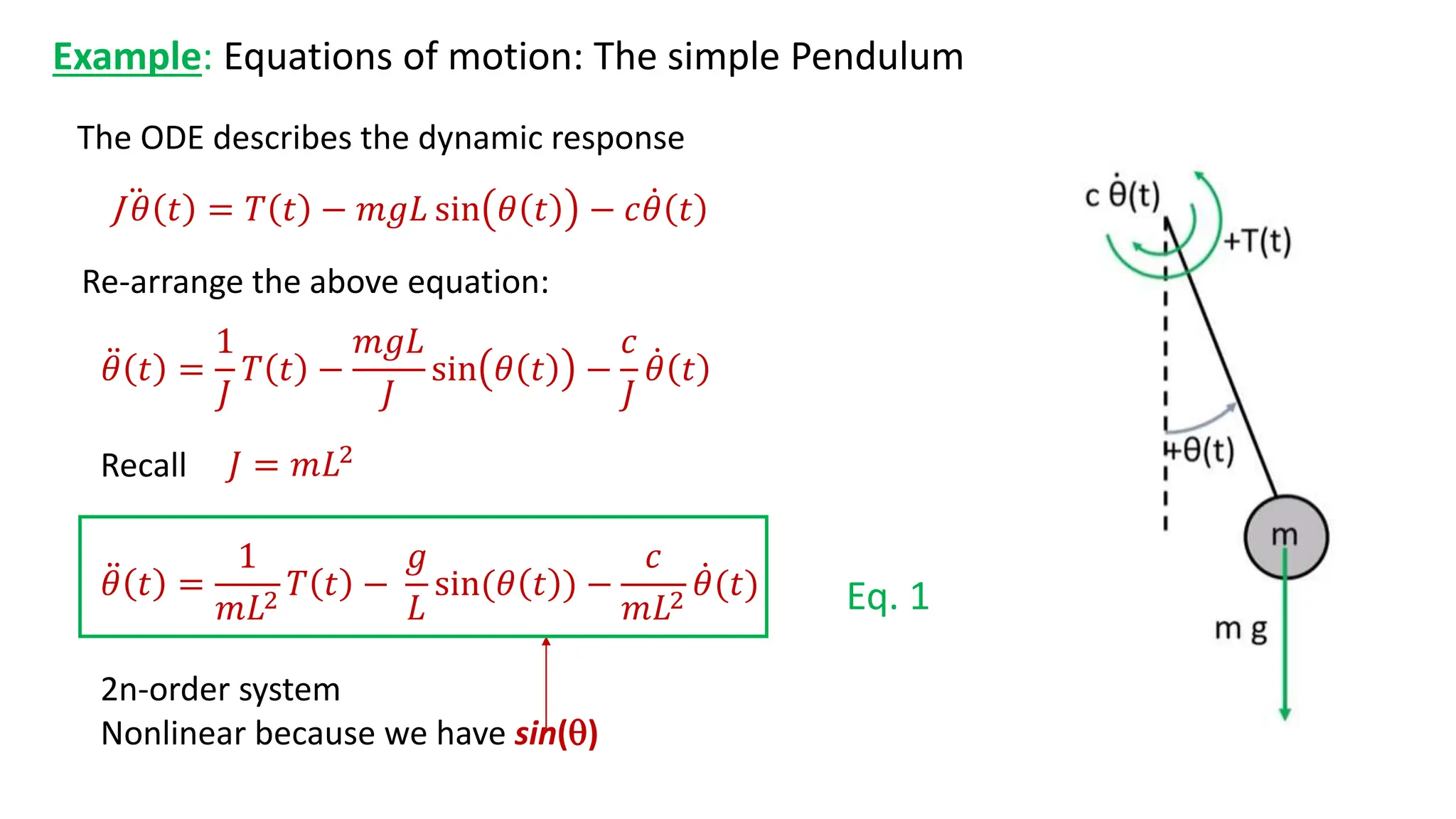
Example: Equations of motion: The simple Pendulum
The ODE describes the dynamic response
2n-order system
Nonlinear because we have sin()
J 𝜃 𝑡 = 𝑇 𝑡 − 𝑚𝑔𝐿 sin 𝜃 𝑡 − 𝑐𝜃 𝑡
𝜃 𝑡 =
1
𝐽
𝑇 𝑡 −
𝑚𝑔𝐿
𝐽
sin 𝜃 𝑡 −
𝑐
𝐽
𝜃 𝑡
Re-arrange the above equation:
𝐽 = 𝑚𝐿2
Recall
𝜃 𝑡 =
1
𝑚𝐿2
𝑇 𝑡 −
𝑔
𝐿
sin(𝜃 𝑡 ) −
𝑐
𝑚𝐿2
𝜃(𝑡) Eq. 1
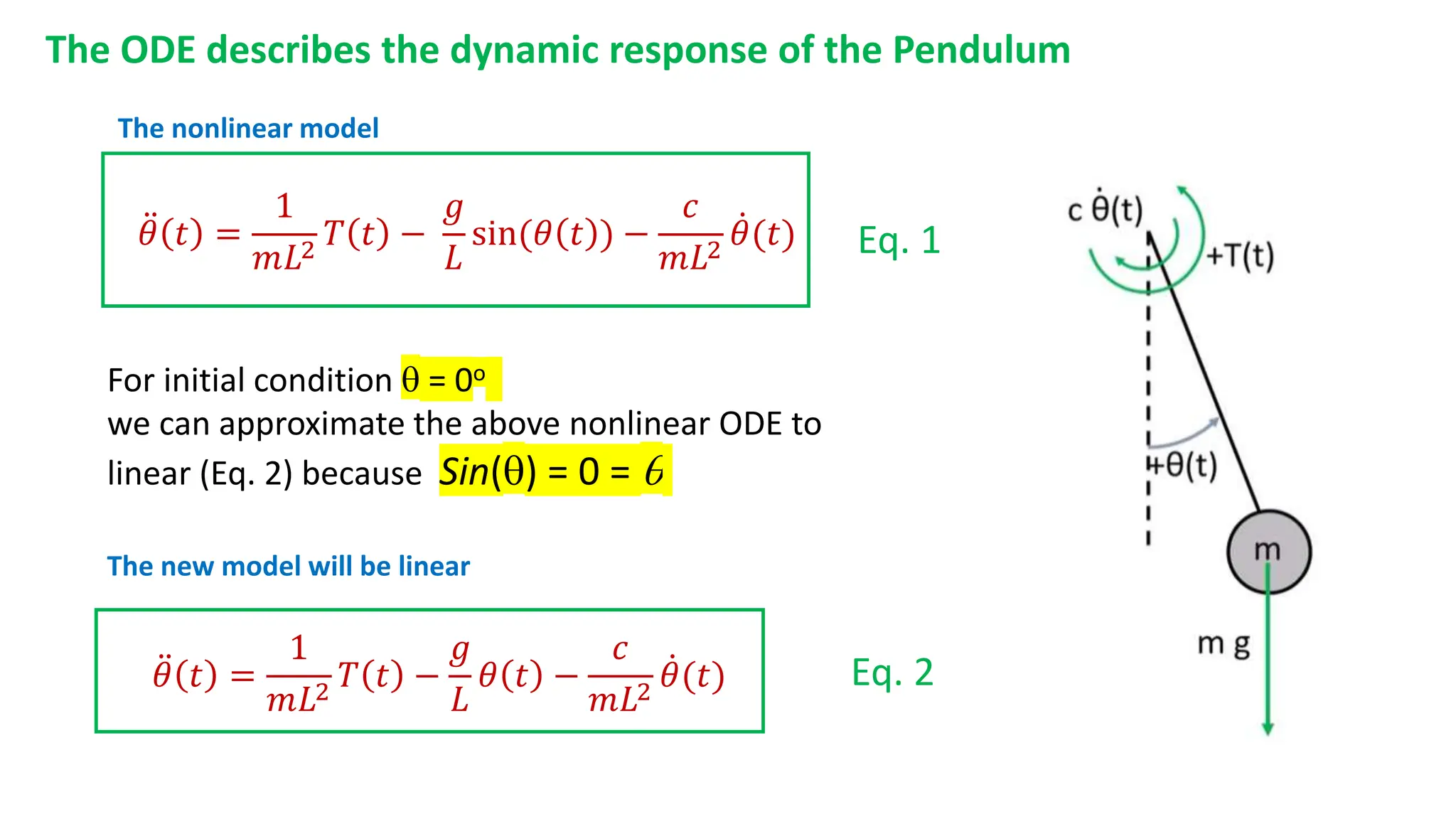
The ODE describes the dynamic response of the Pendulum
For initial condition  = 0o
we can approximate the above nonlinear ODE to
linear (Eq. 2) because Sin() = 0 = 
Eq. 1
Eq. 2
𝜃 𝑡 =
1
𝑚𝐿2
𝑇 𝑡 −
𝑔
𝐿
𝜃 𝑡 −
𝑐
𝑚𝐿2
𝜃(𝑡)
𝜃 𝑡 =
1
𝑚𝐿2
𝑇 𝑡 −
𝑔
𝐿
sin(𝜃 𝑡 ) −
𝑐
𝑚𝐿2
𝜃(𝑡)
The new model will be linear
The nonlinear model
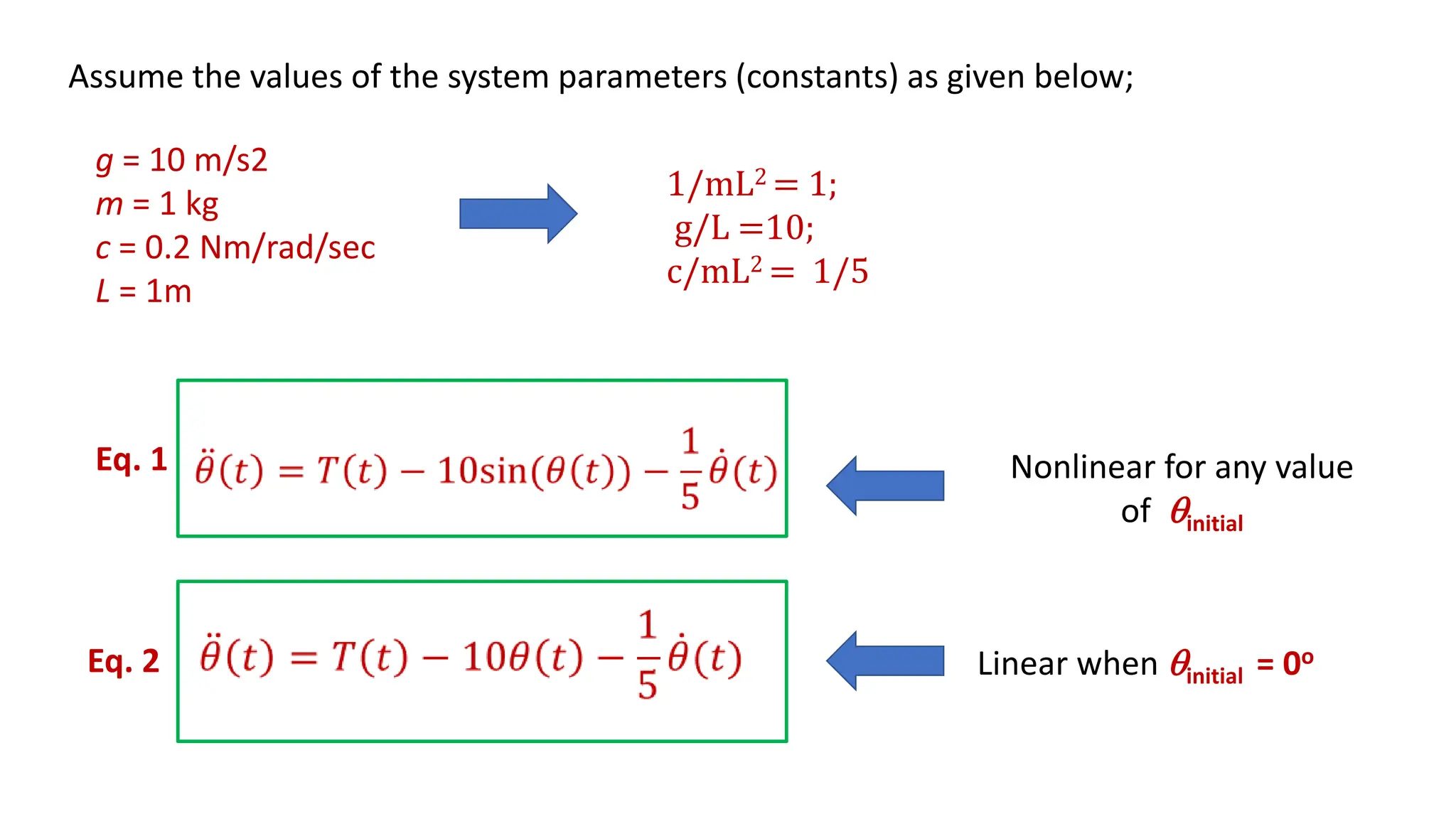
Assume the values of the system parameters (constants) as given below;
g = 10 m/s2
m = 1 kg
c = 0.2 Nm/rad/sec
L = 1m
1/mL2 = 1;
g/L =10;
c/mL2 = 1/5
Eq. 1
Eq. 2
Nonlinear for any value
of initial
Linear when initial = 0o
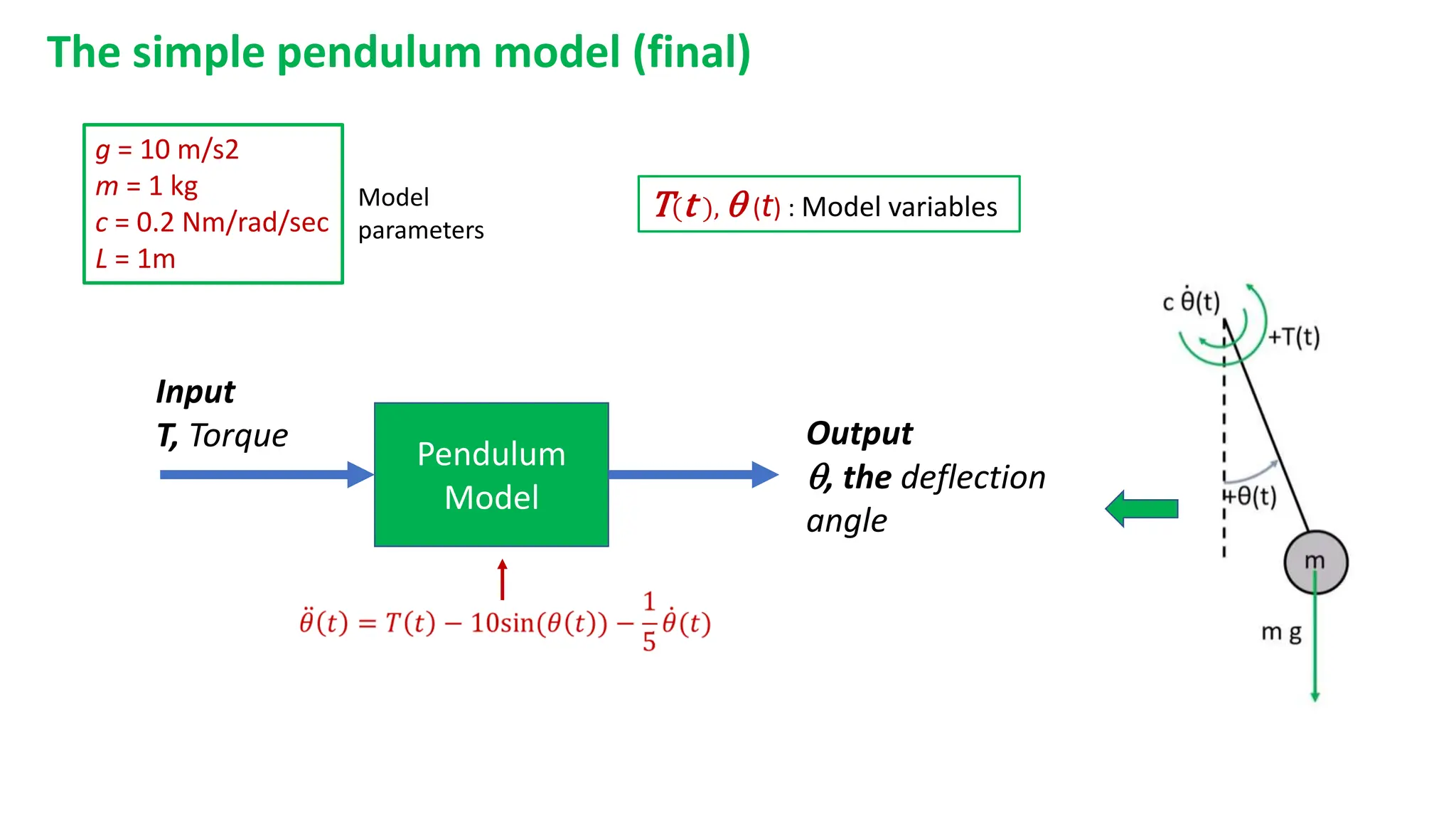
The simple pendulum model (final)
Pendulum
Model
Input
T, Torque Output
, the deflection
angle
g = 10 m/s2
m = 1 kg
c = 0.2 Nm/rad/sec
L = 1m
T(t ),  (t) : Model variables
Model
parameters
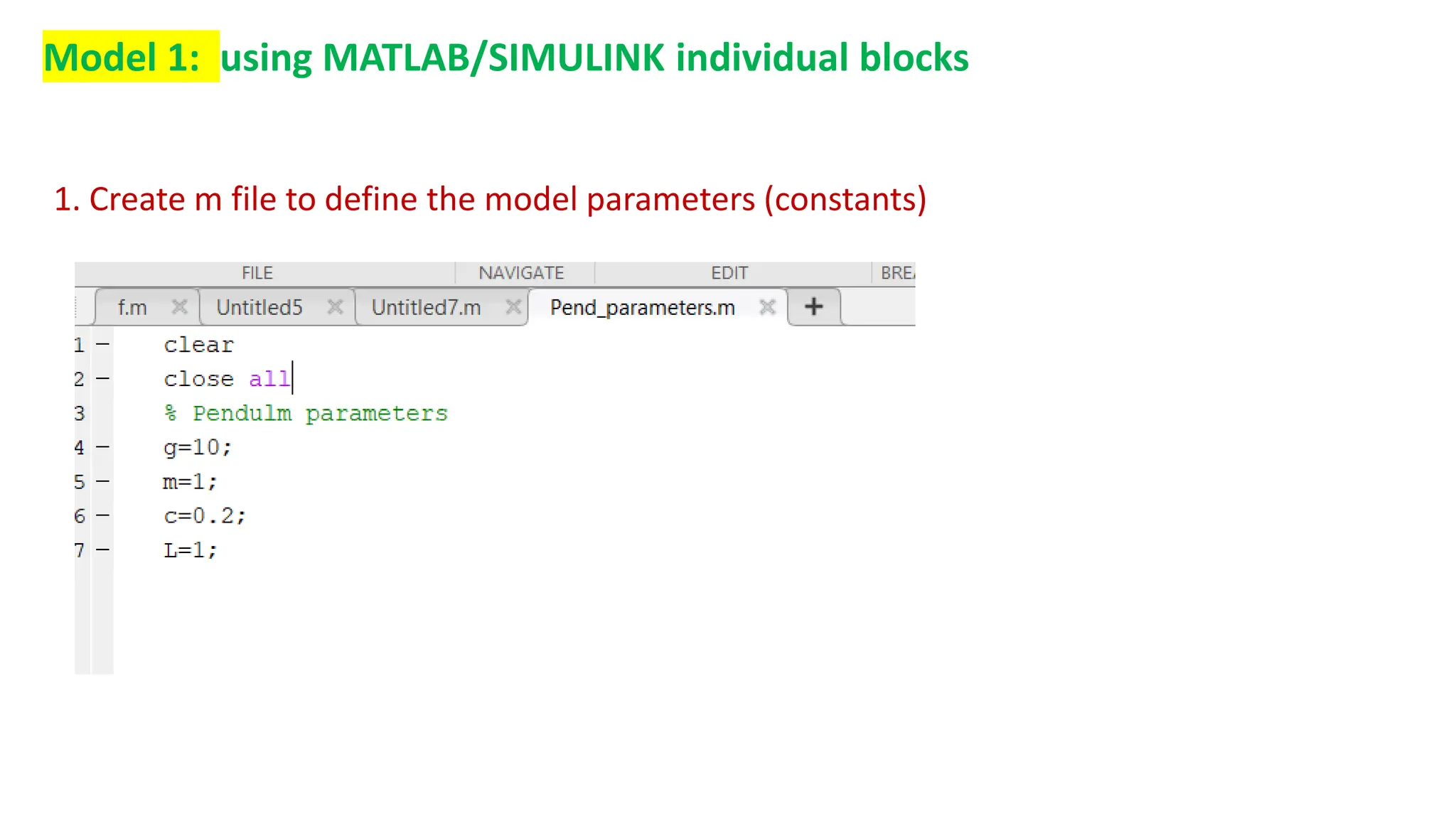
Model 1: using MATLAB/SIMULINK individual blocks
1. Create m file to define the model parameters (constants)
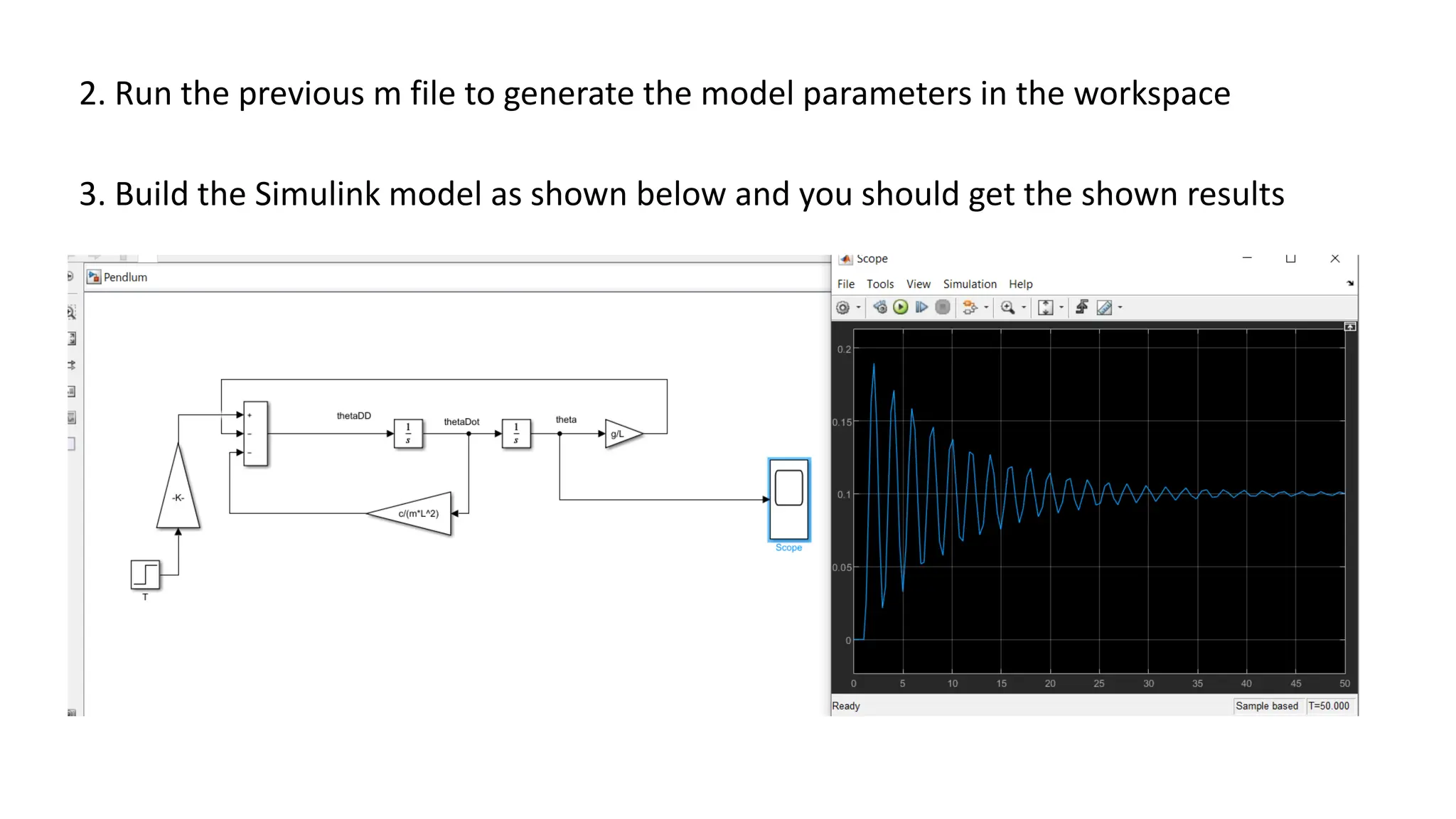
2. Run the previous m file to generate the model parameters in the workspace
3. Build the Simulink model as shown below and you should get the shown results
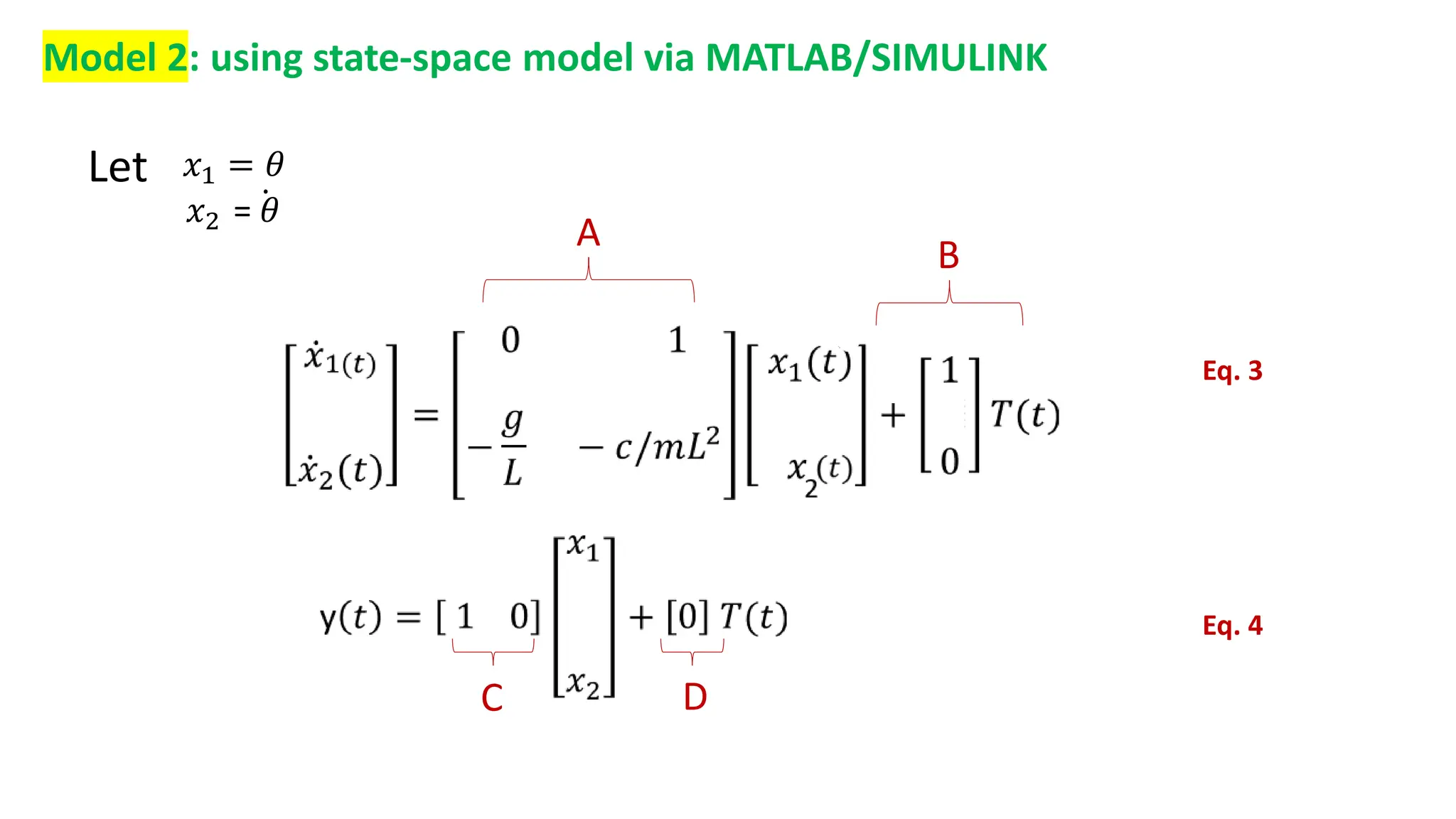
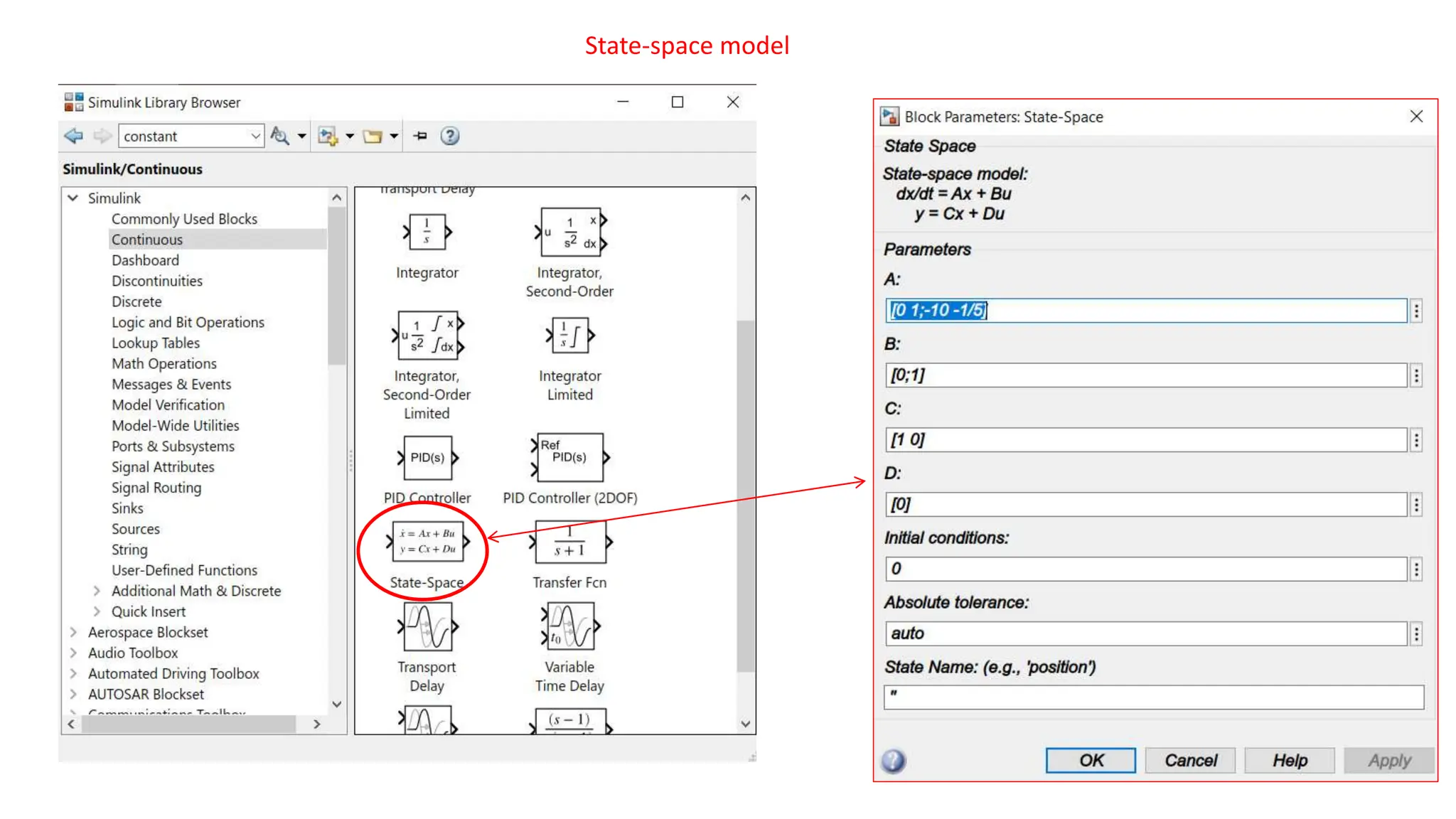
Model 2: using state-space model via MATLAB/SIMULINK
Let 𝑥1 = 𝜃
𝑥2 = 𝜃
A
Eq. 3
Eq. 4
B
C D
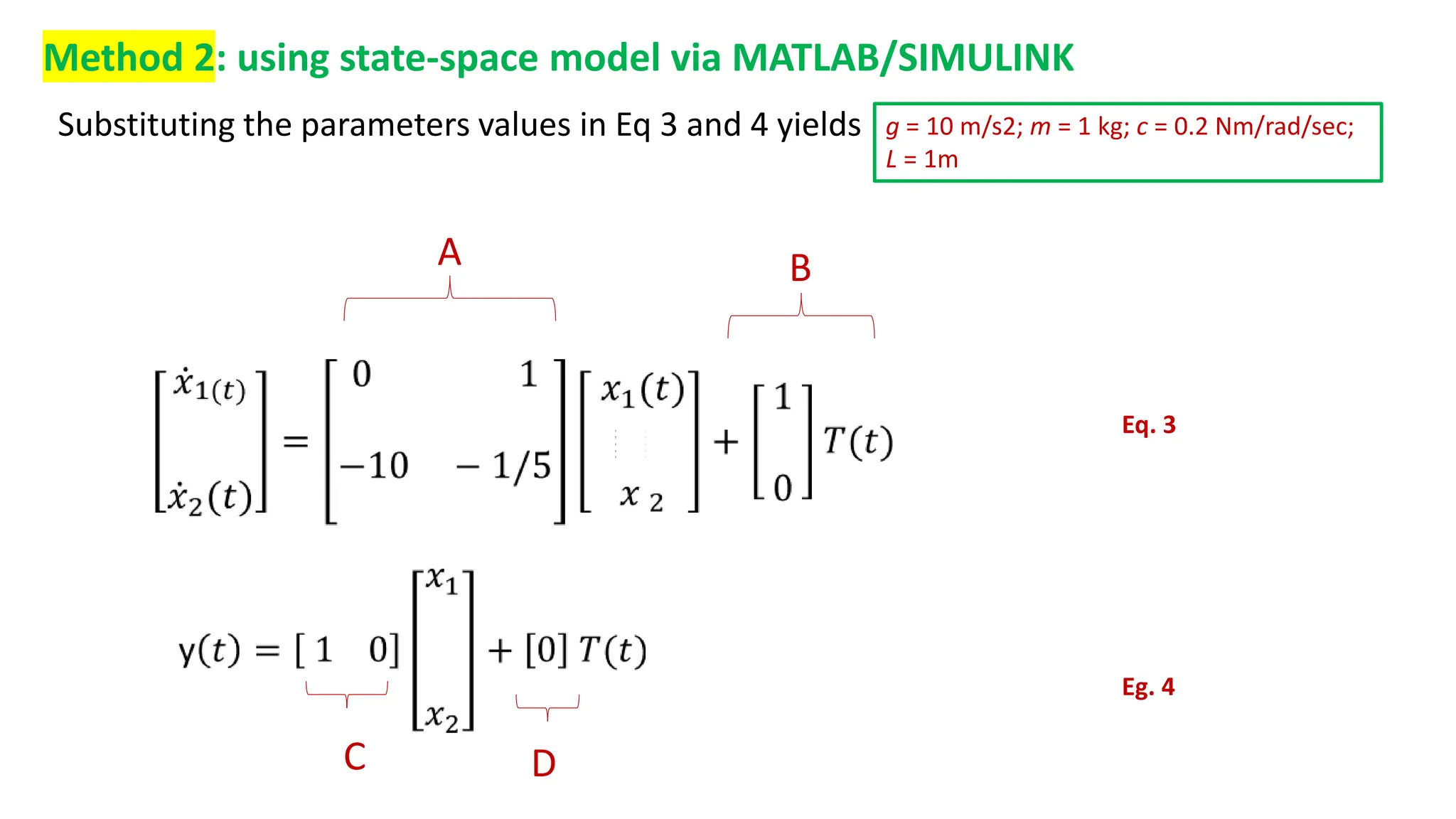
Method 2: using state-space model via MATLAB/SIMULINK
A B
C D
g = 10 m/s2; m = 1 kg; c = 0.2 Nm/rad/sec;
L = 1m
Substituting the parameters values in Eq 3 and 4 yields
Eq. 3
Eg. 4
State-space model
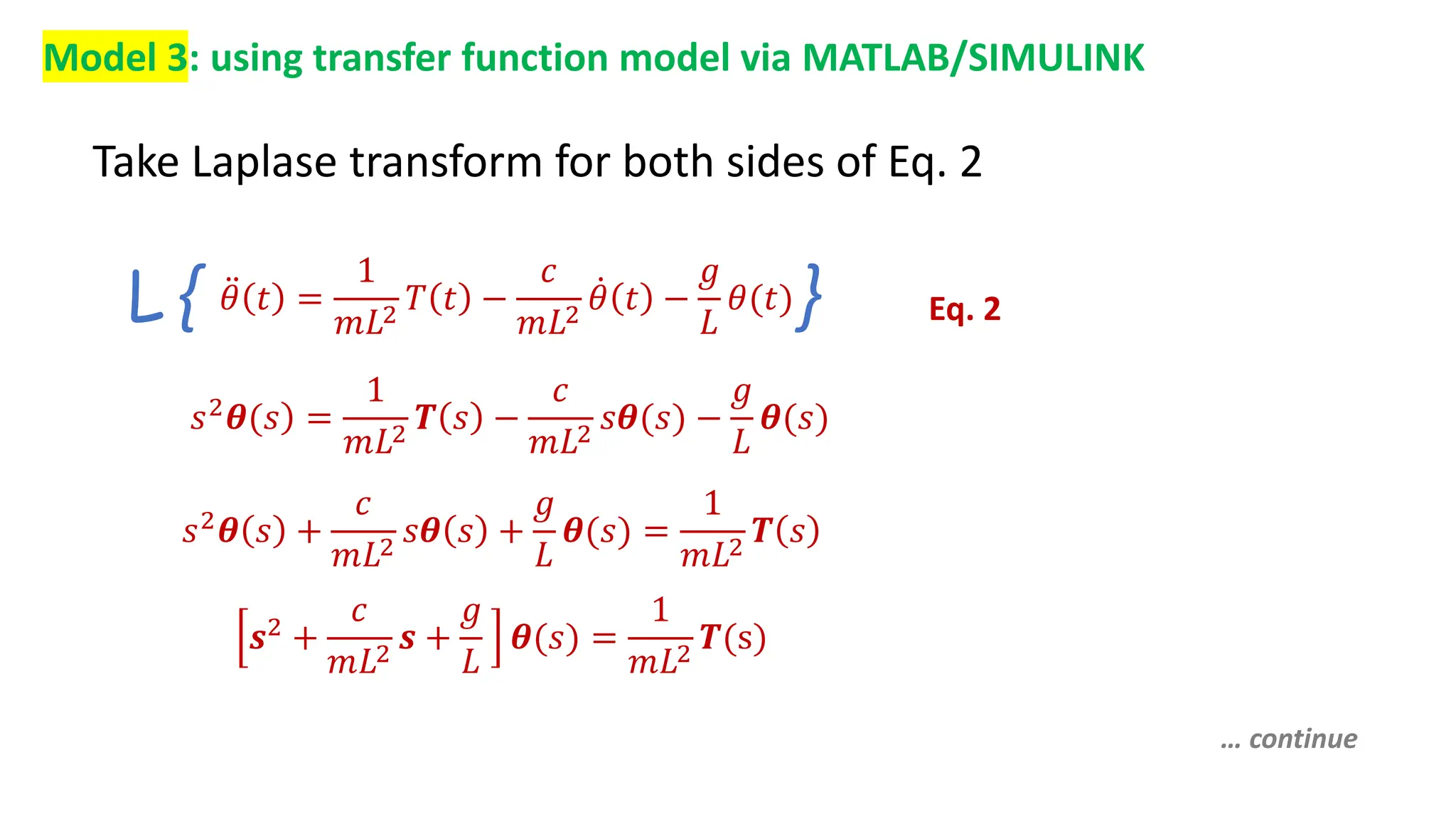
Model 3: using transfer function model via MATLAB/SIMULINK
Take Laplase transform for both sides of Eq. 2
Eq. 2
𝜃 𝑡 =
1
𝑚𝐿2
𝑇 𝑡 −
𝑐
𝑚𝐿2
𝜃 𝑡 −
𝑔
𝐿
𝜃(𝑡)
L { }
𝑠2𝜽(𝑠 =
1
𝑚𝐿2
𝑻 𝑠 −
𝑐
𝑚𝐿2
𝑠𝜽(𝑠) −
𝑔
𝐿
𝜽(𝑠)
𝑠2
𝜽 𝑠 +
𝑐
𝑚𝐿2
𝑠𝜽 𝑠 +
𝑔
𝐿
𝜽(𝑠) =
1
𝑚𝐿2
𝑻 𝑠
𝒔2 +
𝑐
𝑚𝐿2
𝒔 +
𝑔
𝐿
𝜽(𝑠) =
1
𝑚𝐿2
𝑻(s)
… continue
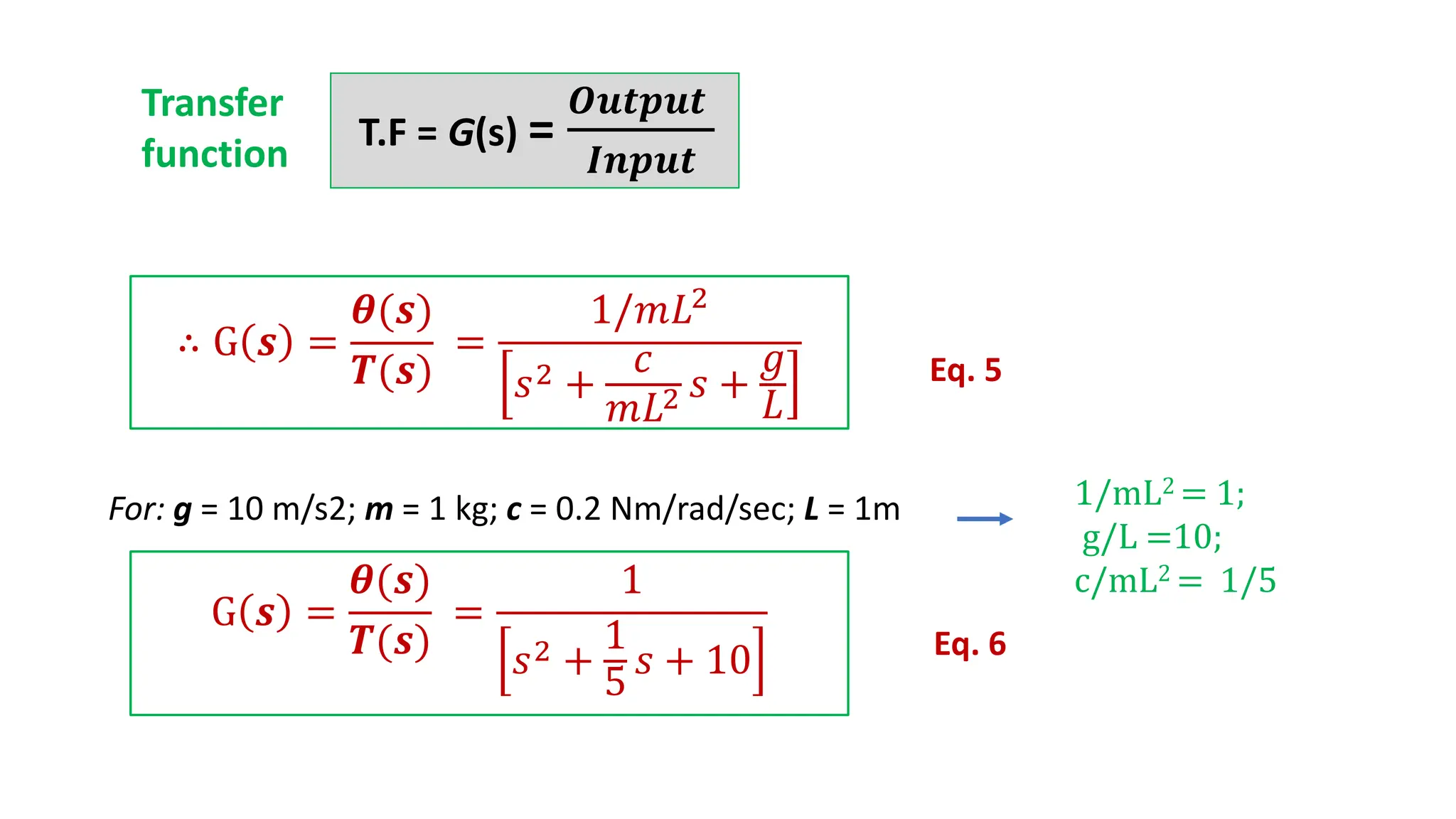
T.F = G(s) =
𝑶𝒖𝒕𝒑𝒖𝒕
𝑰𝒏𝒑𝒖𝒕
For: g = 10 m/s2; m = 1 kg; c = 0.2 Nm/rad/sec; L = 1m 1/mL2 = 1;
g/L =10;
c/mL2 = 1/5
∴ G 𝒔 =
𝜽(𝒔)
𝑻(𝒔)
=
1/𝑚𝐿2
𝑠2 +
𝑐
𝑚𝐿2 𝑠 +
𝑔
𝐿
Eq. 5
G 𝒔 =
𝜽(𝒔)
𝑻(𝒔)
=
1
𝑠2 +
1
5
𝑠 + 10 Eq. 6
Transfer
function
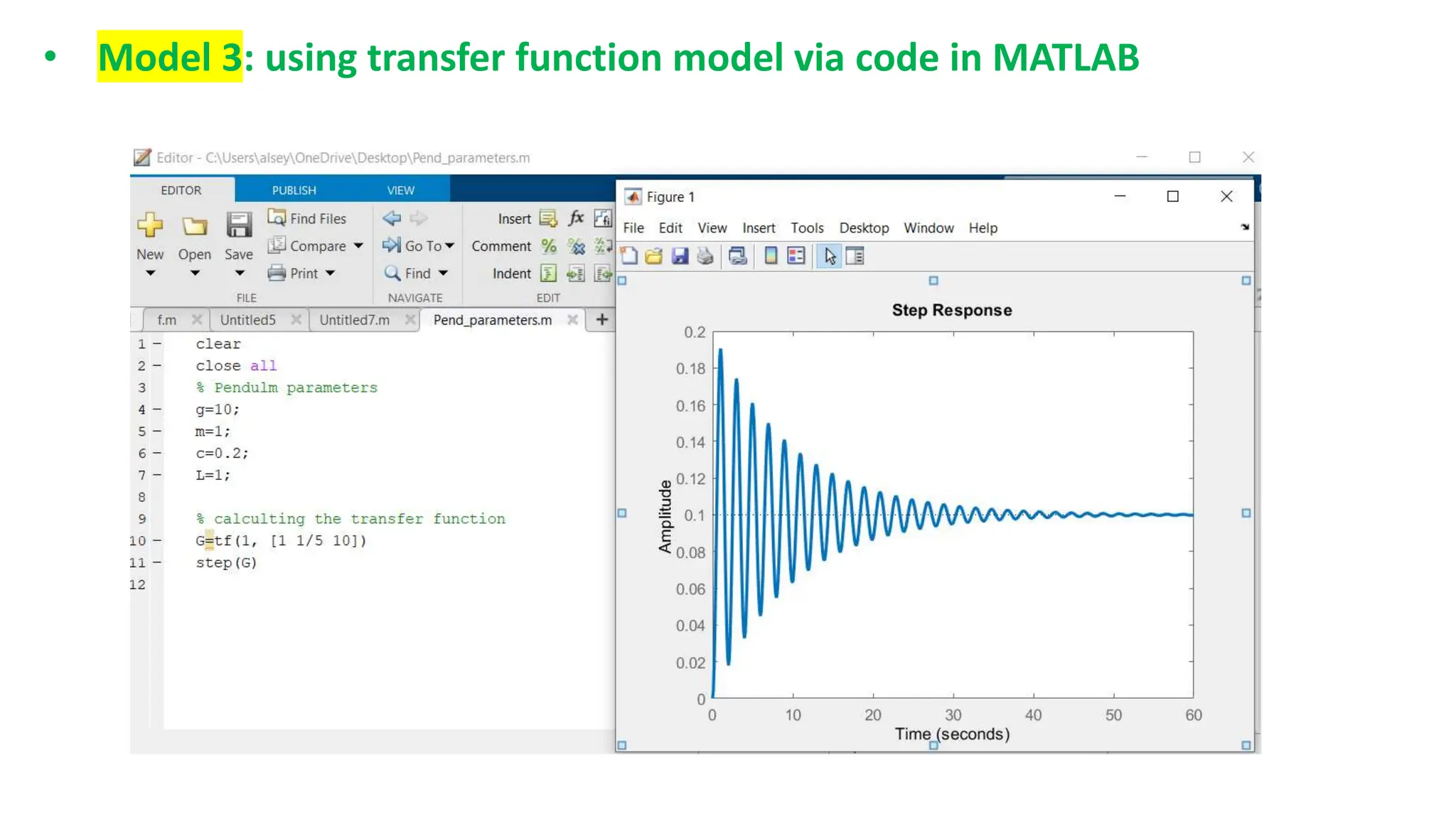
• Model 3: using transfer function model via code in MATLAB
1.
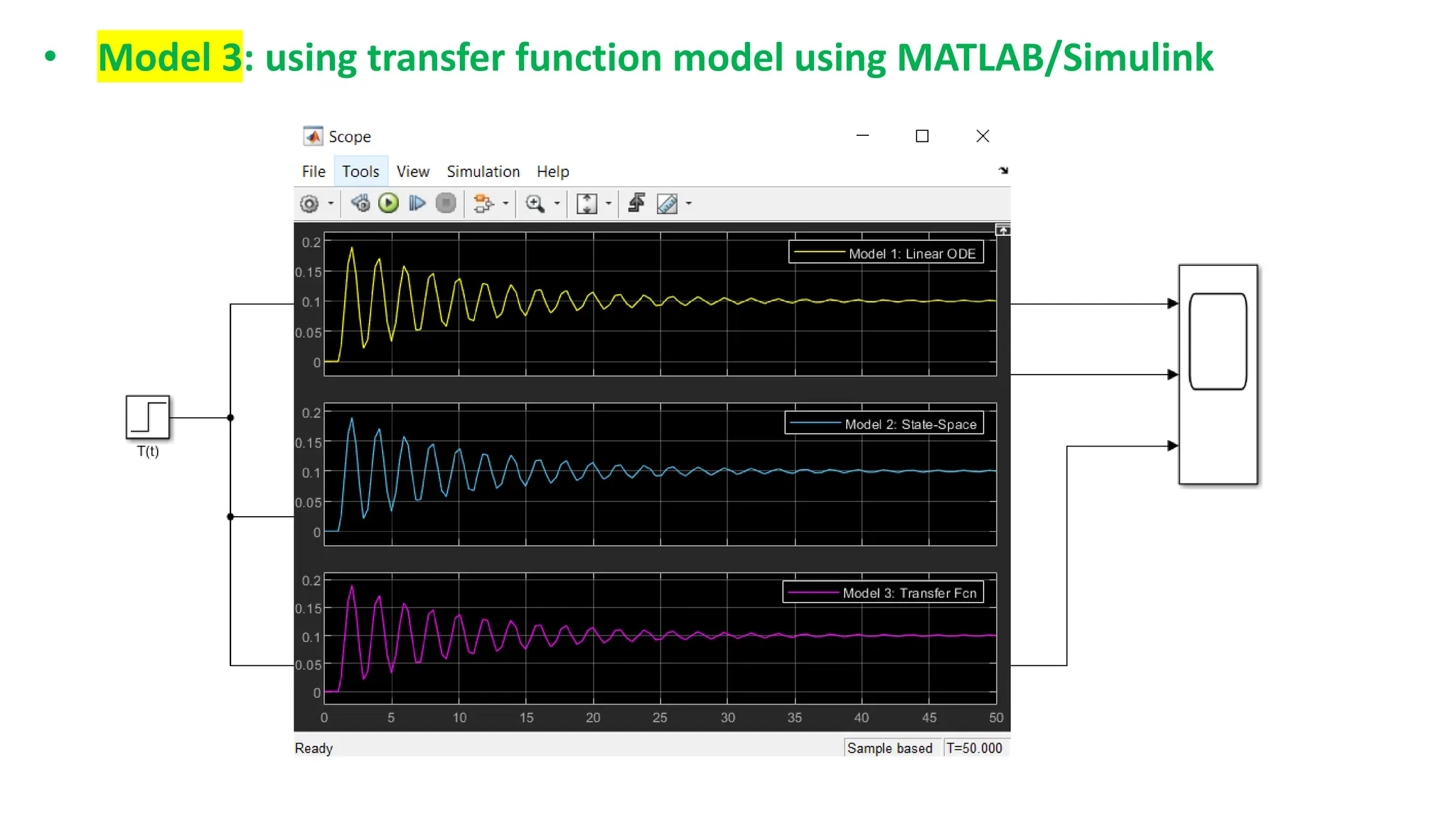
• Model 3: using transfer function model using MATLAB/Simulink
1.
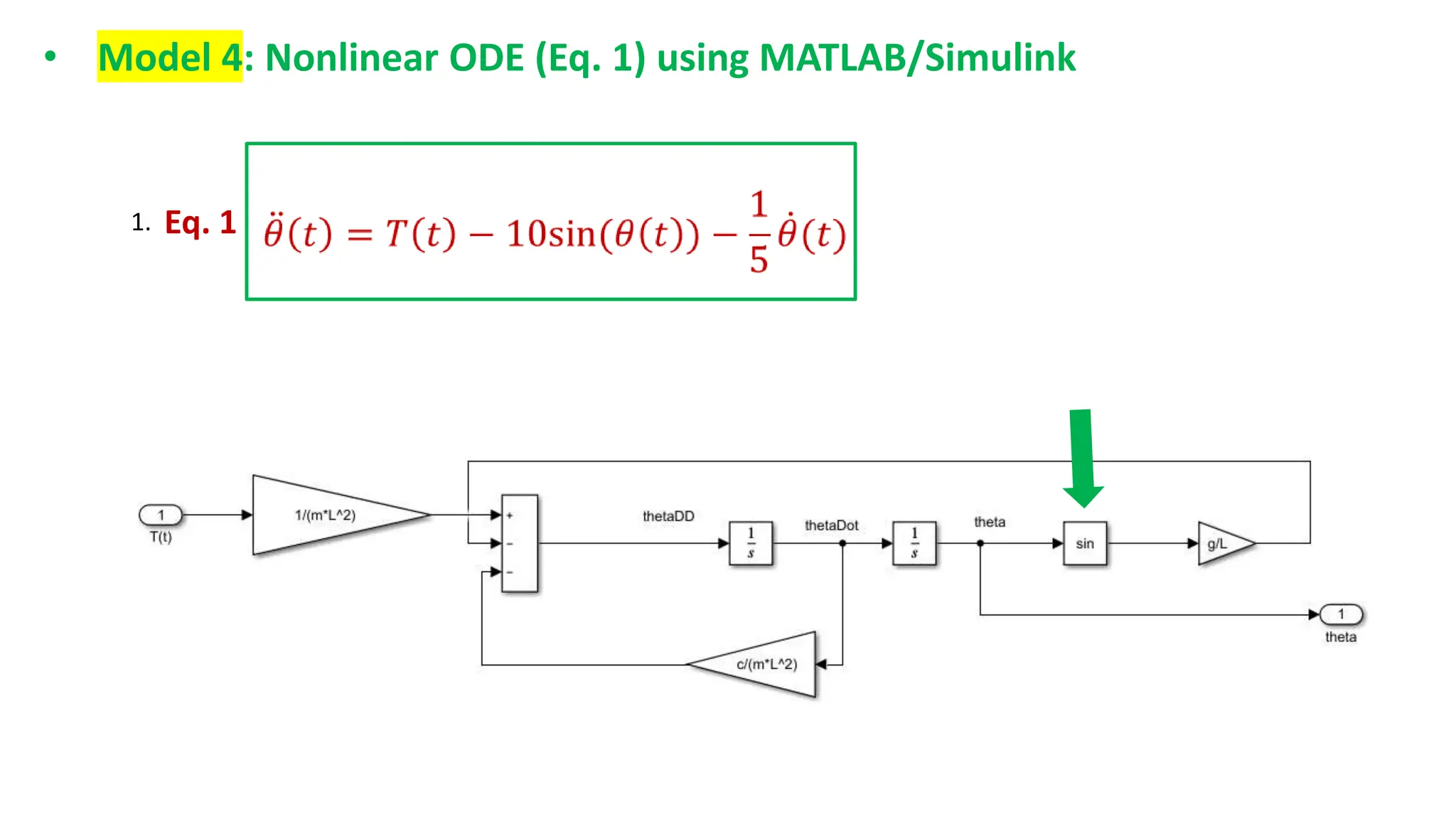
• Model 4: Nonlinear ODE (Eq. 1) using MATLAB/Simulink
1. Eq. 1
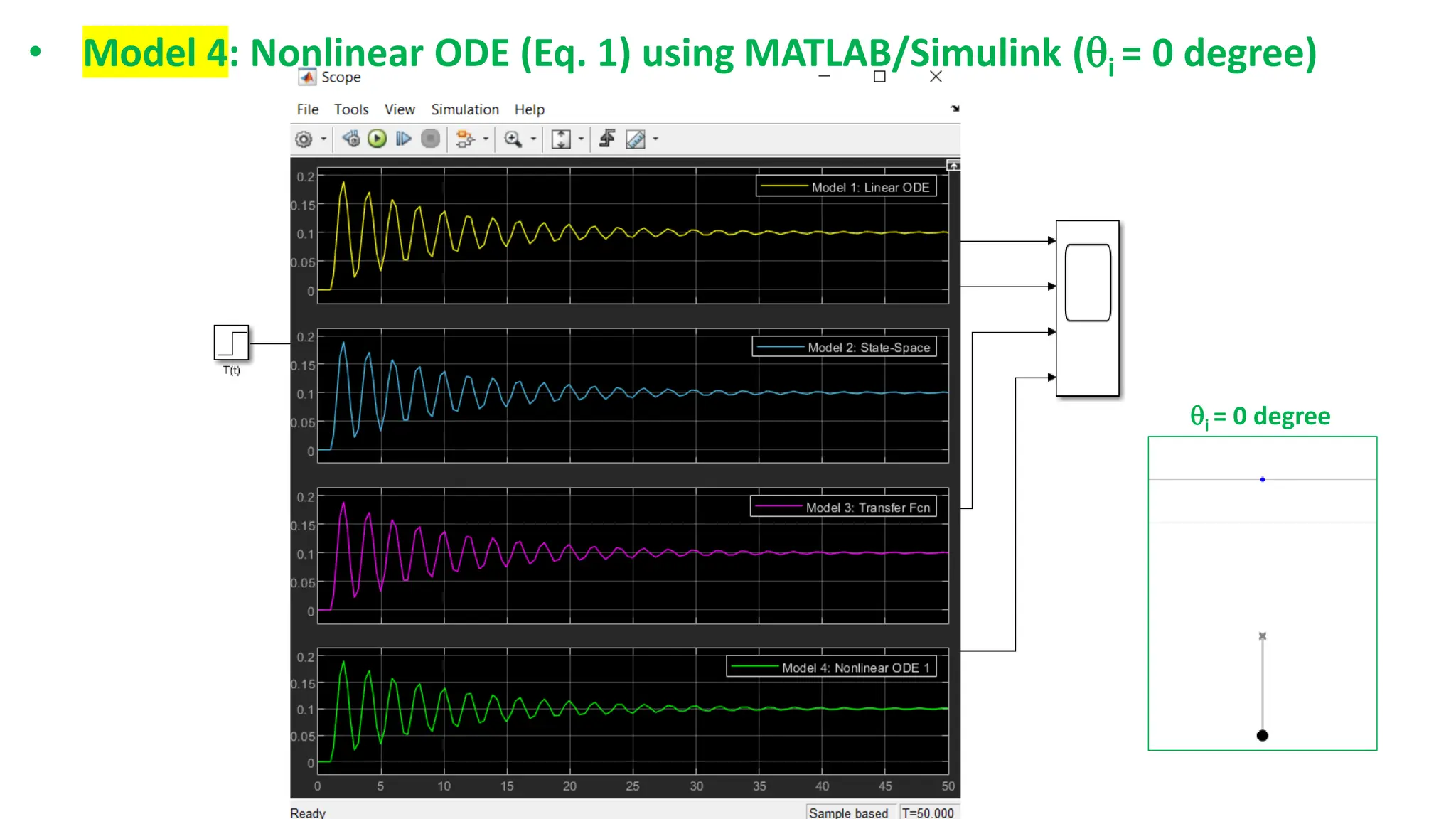
• Model 4: Nonlinear ODE (Eq. 1) using MATLAB/Simulink (i = 0 degree)
i = 0 degree
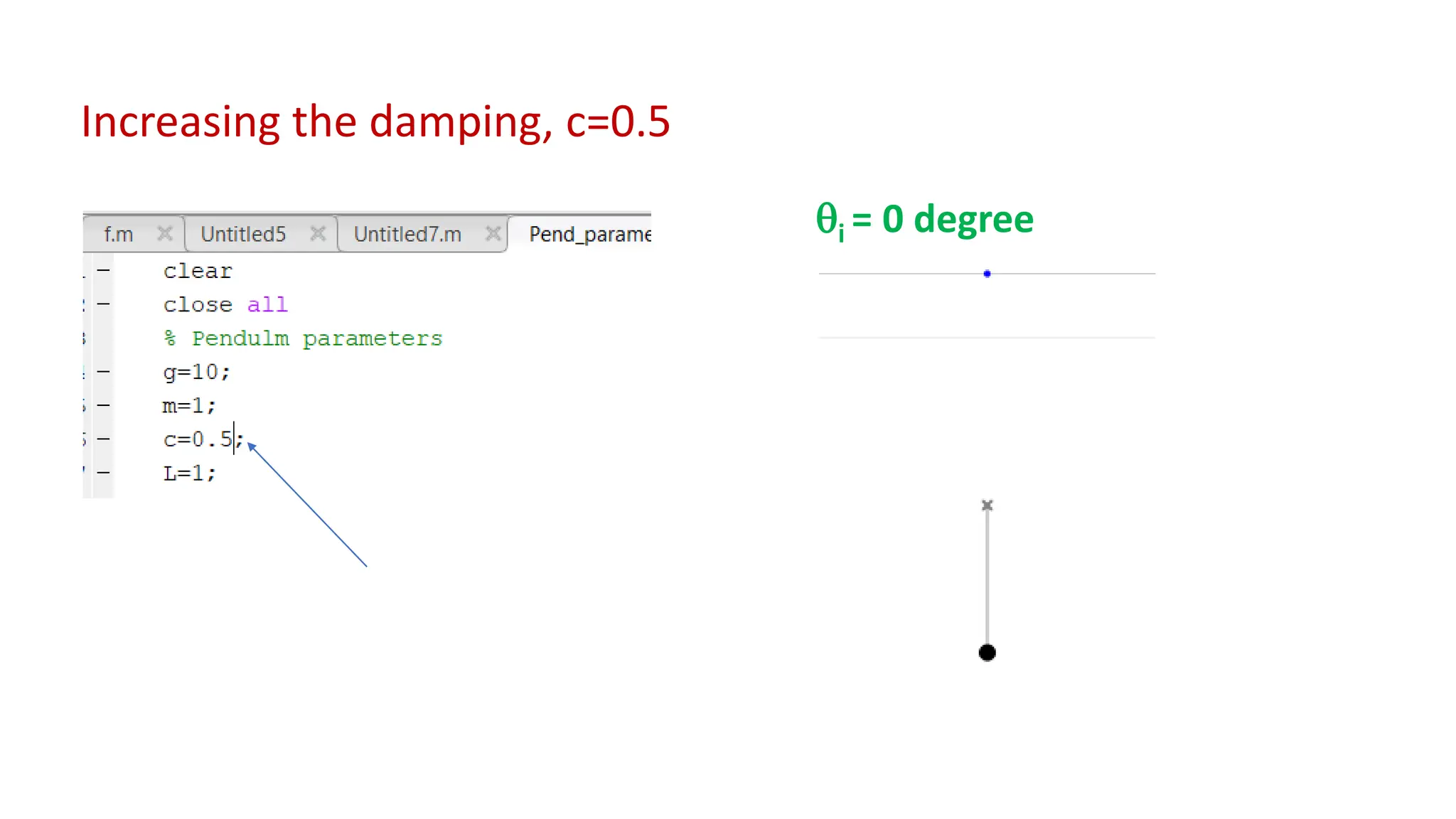
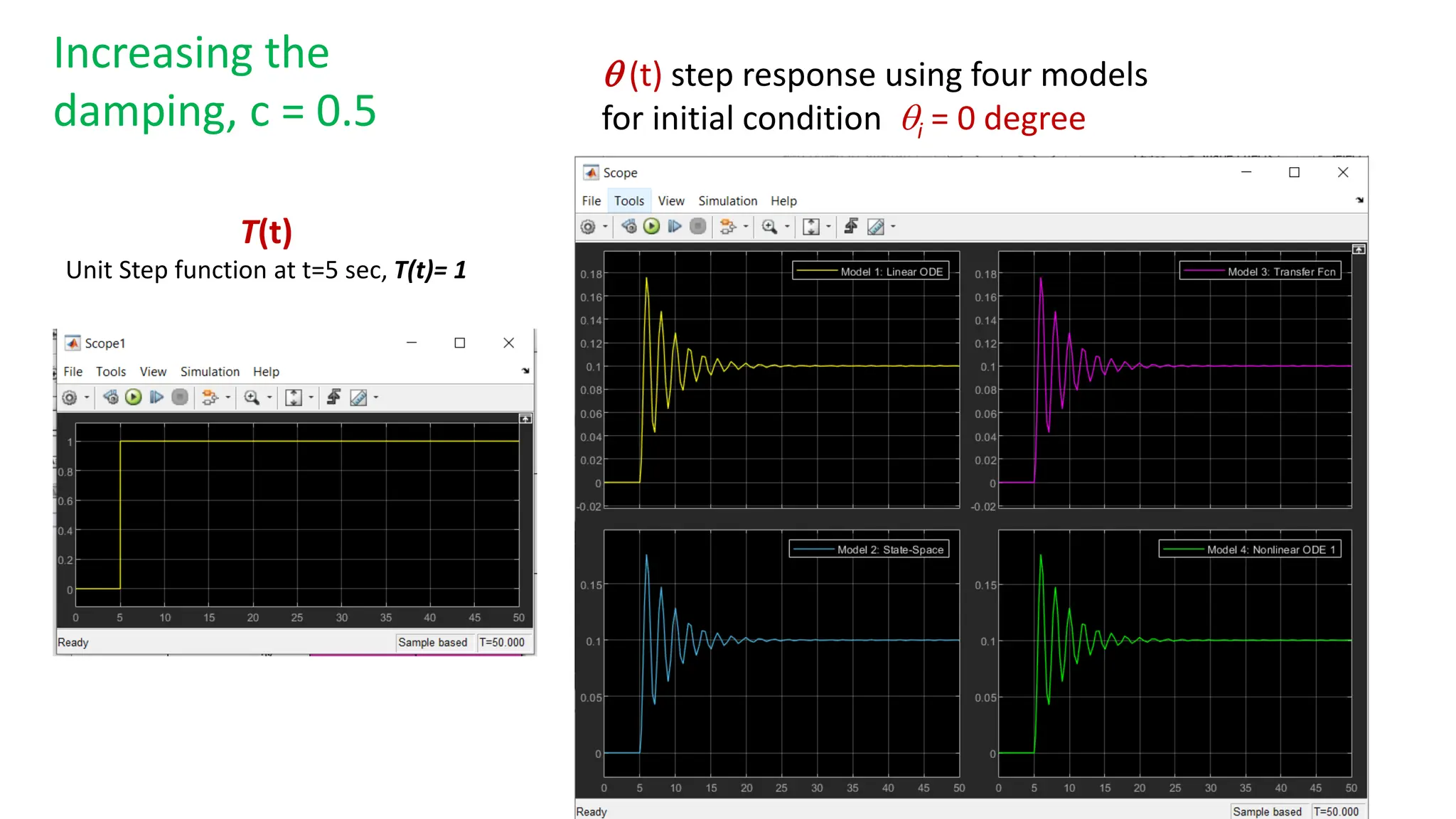
Increasing the damping, c=0.5
i = 0 degree
T(t)
Unit Step function at t=5 sec, T(t)= 1
 (t) step response using four models
for initial condition i = 0 degree
Increasing the
damping, c = 0.5
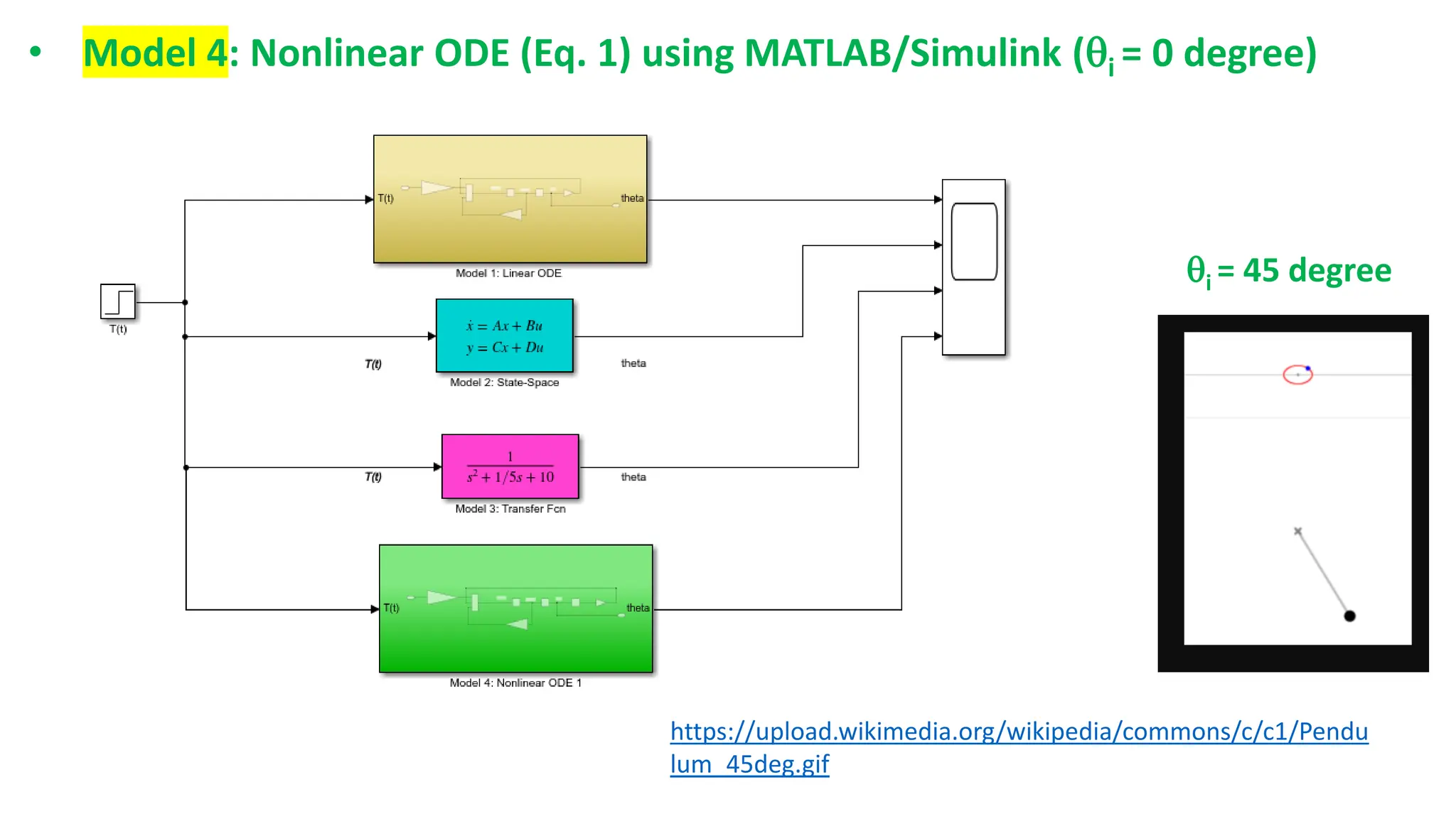
• Model 4: Nonlinear ODE (Eq. 1) using MATLAB/Simulink (i = 0 degree)
i = 45 degree
https://upload.wikimedia.org/wikipedia/commons/c/c1/Pendu
lum_45deg.gif
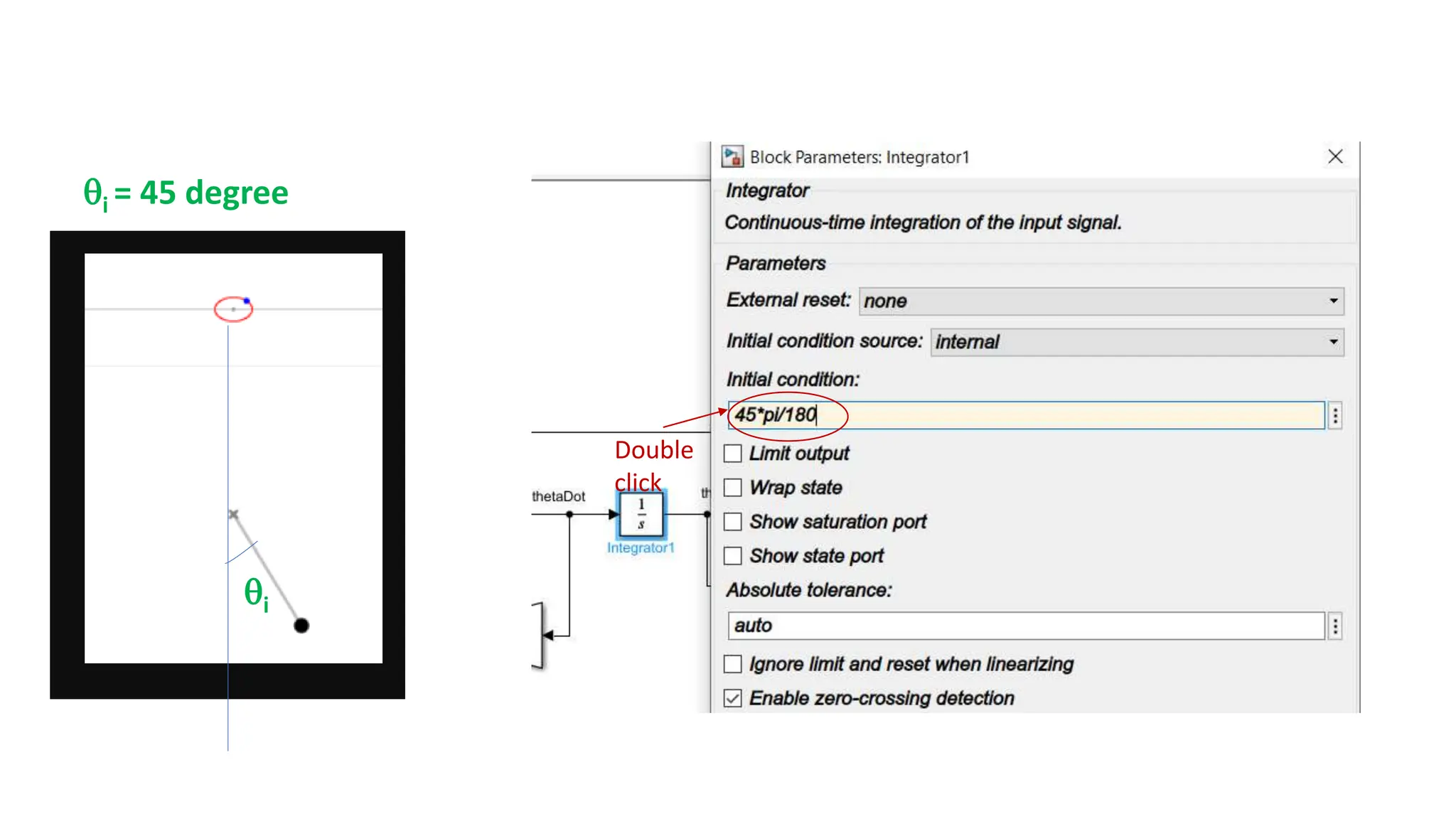
i = 45 degree
i
Double
click
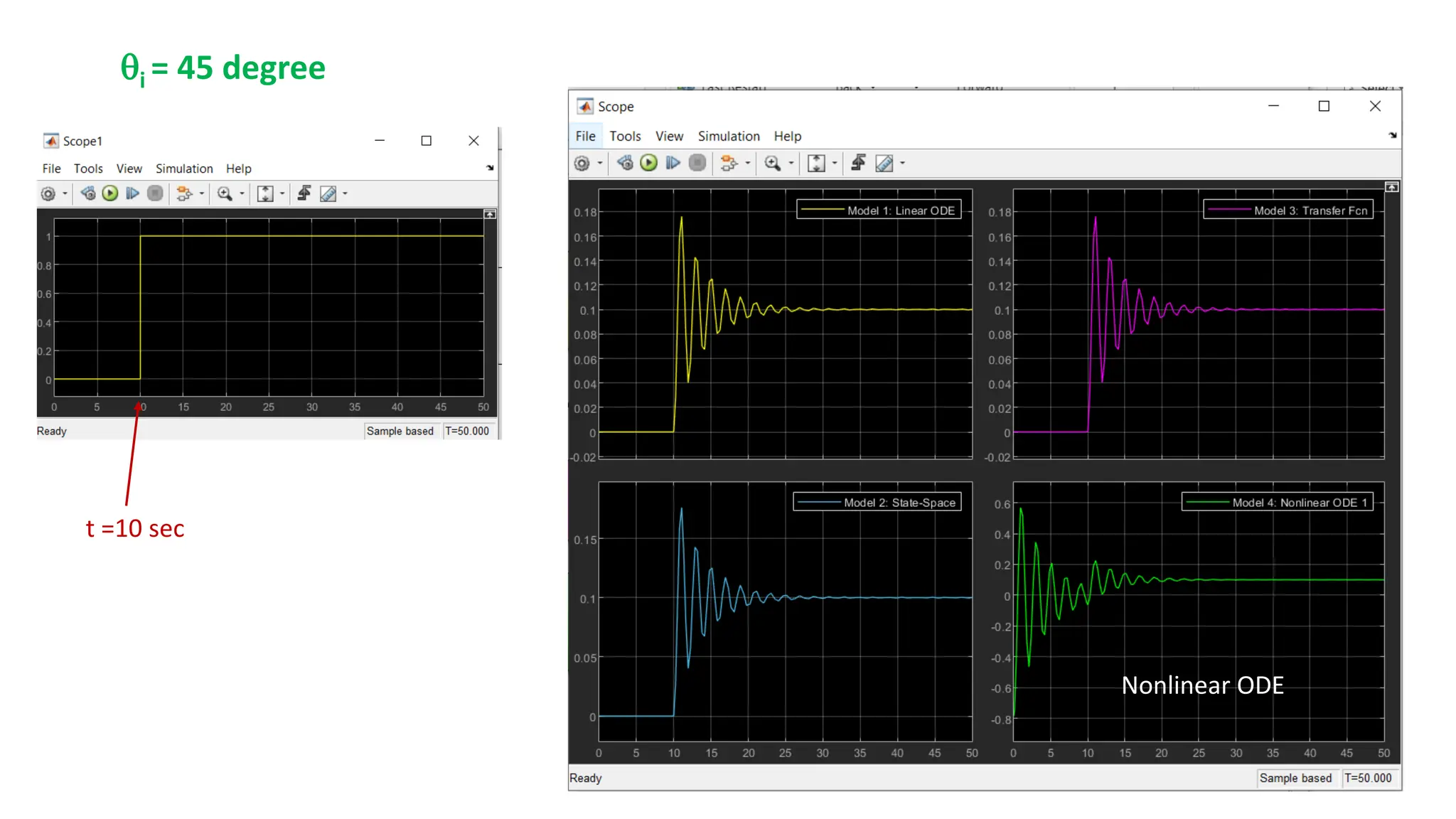
t =10 sec
Nonlinear ODE
i = 45 degree
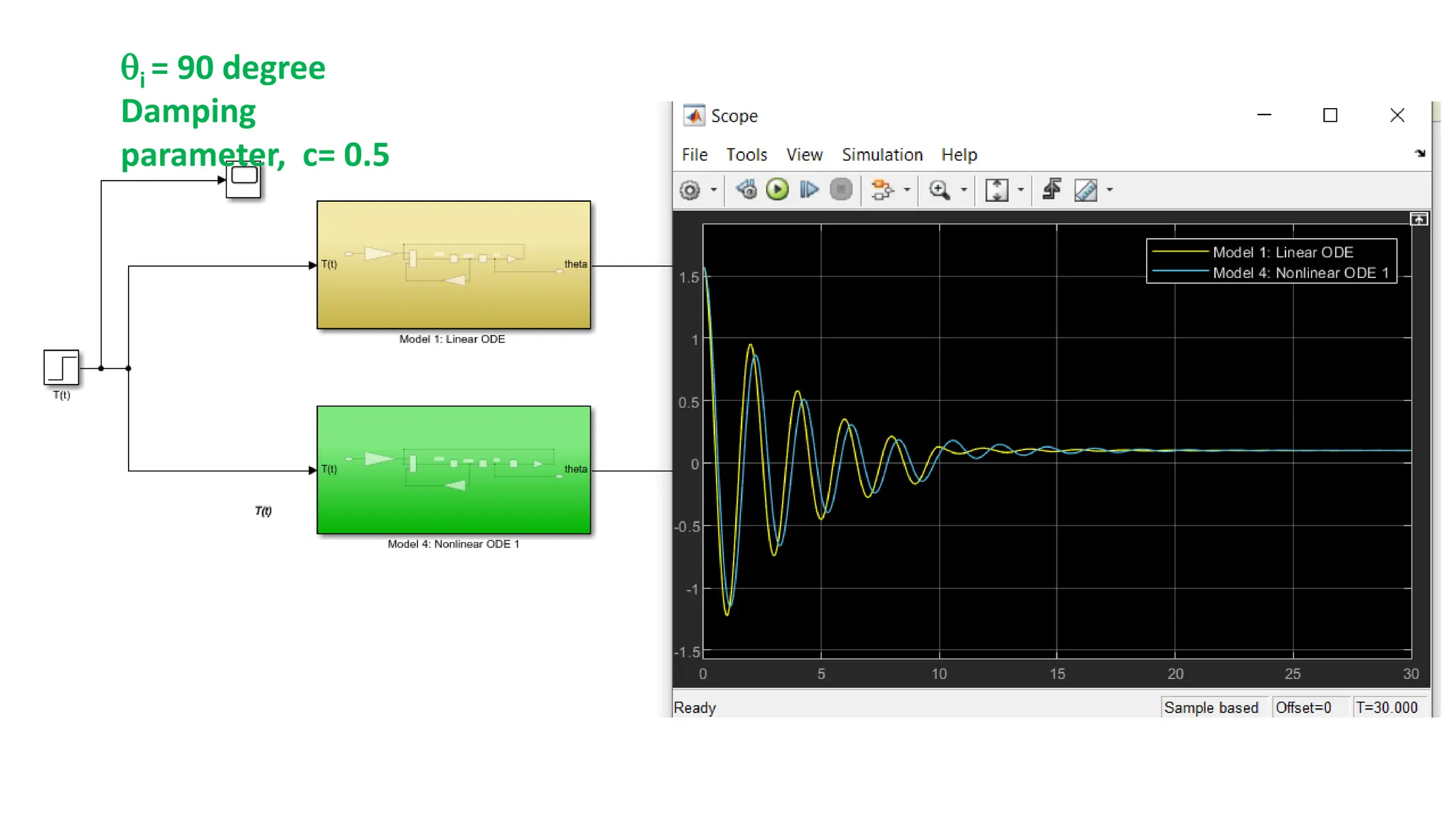
i = 90 degree
Damping
parameter, c= 0.5
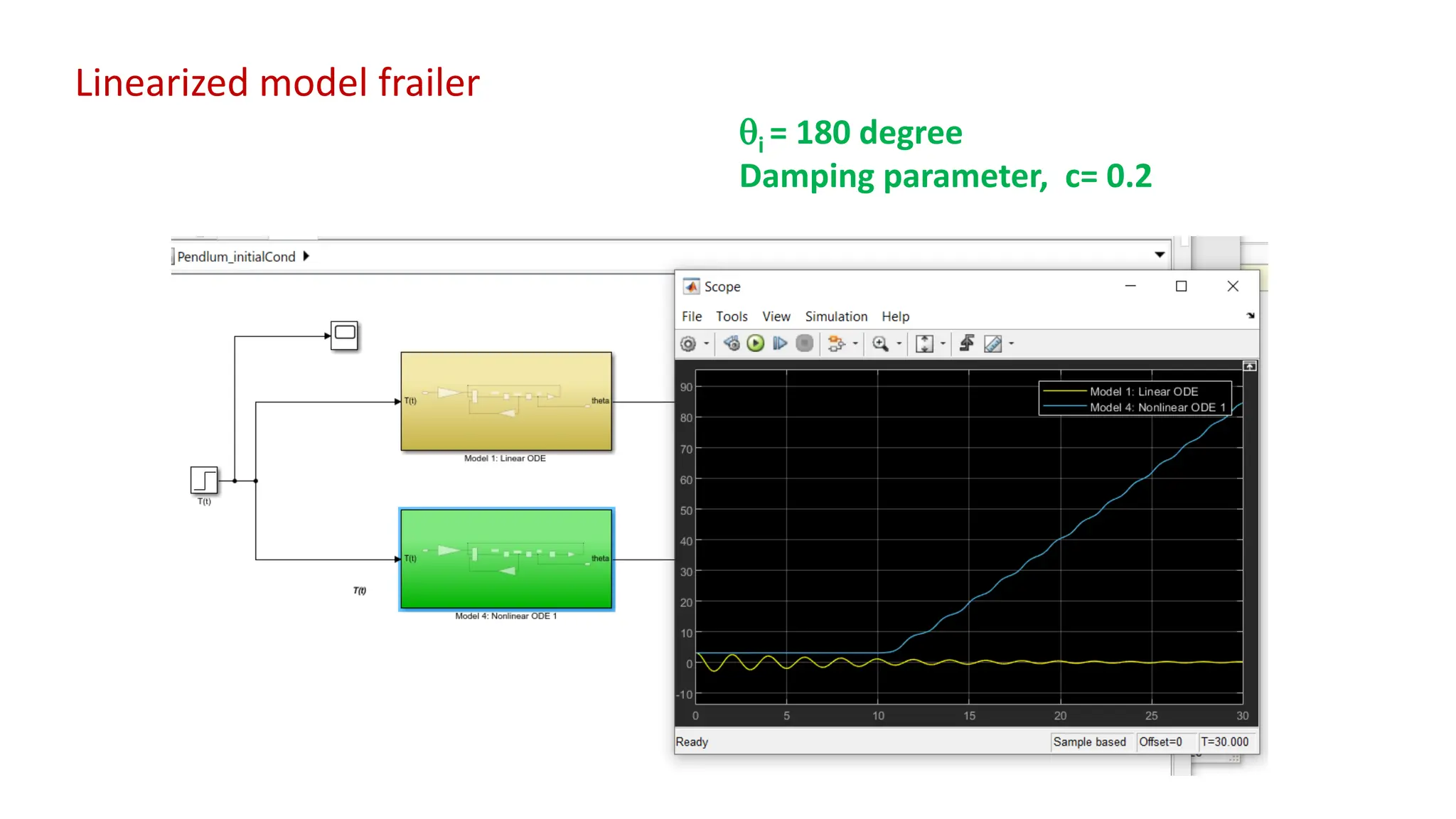
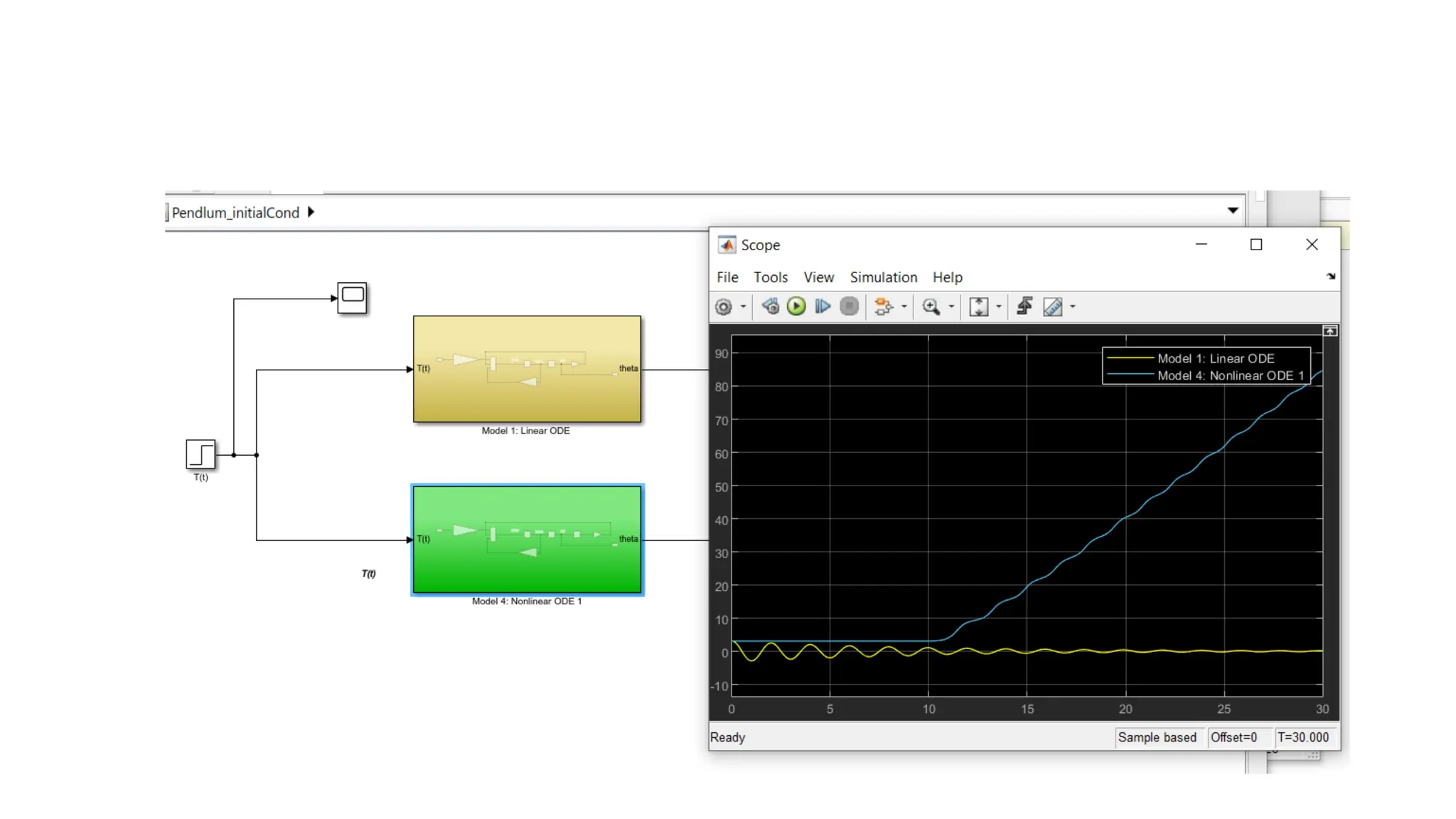
i = 180 degree
Damping parameter, c= 0.2
Linearized model frailer
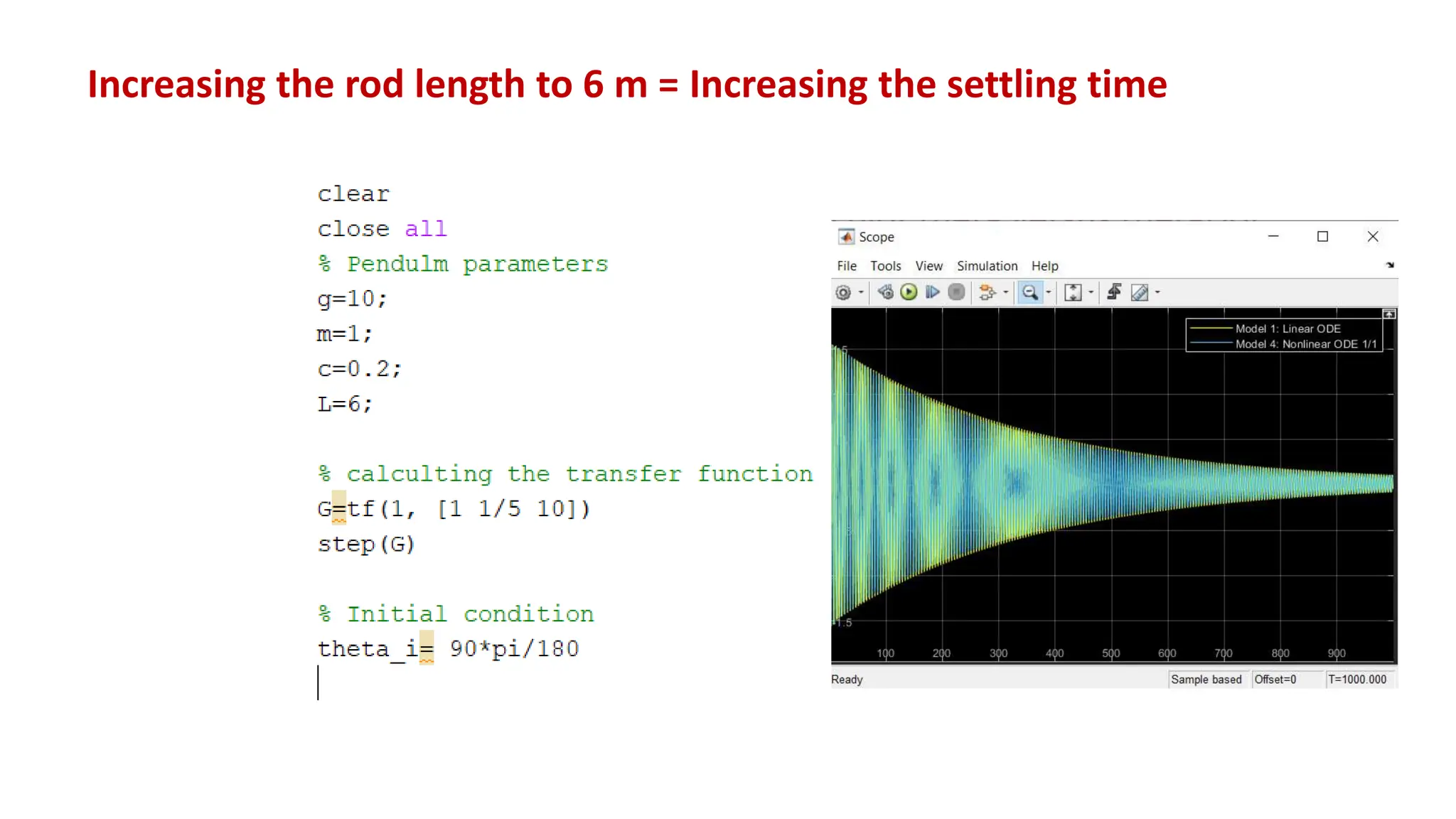
Increasing the rod length to 6 m = Increasing the settling time
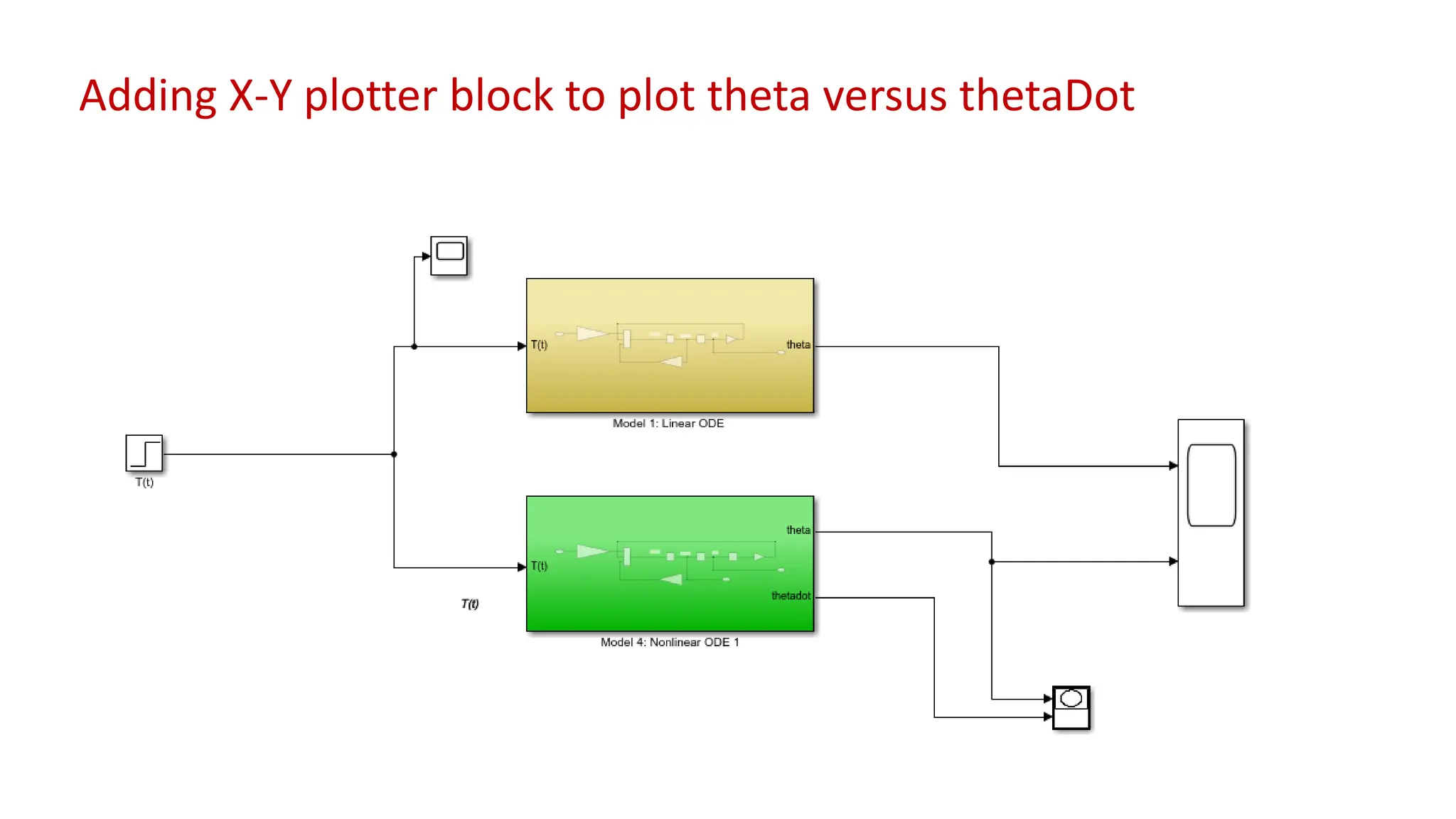
Adding X-Y plotter block to plot theta versus thetaDot
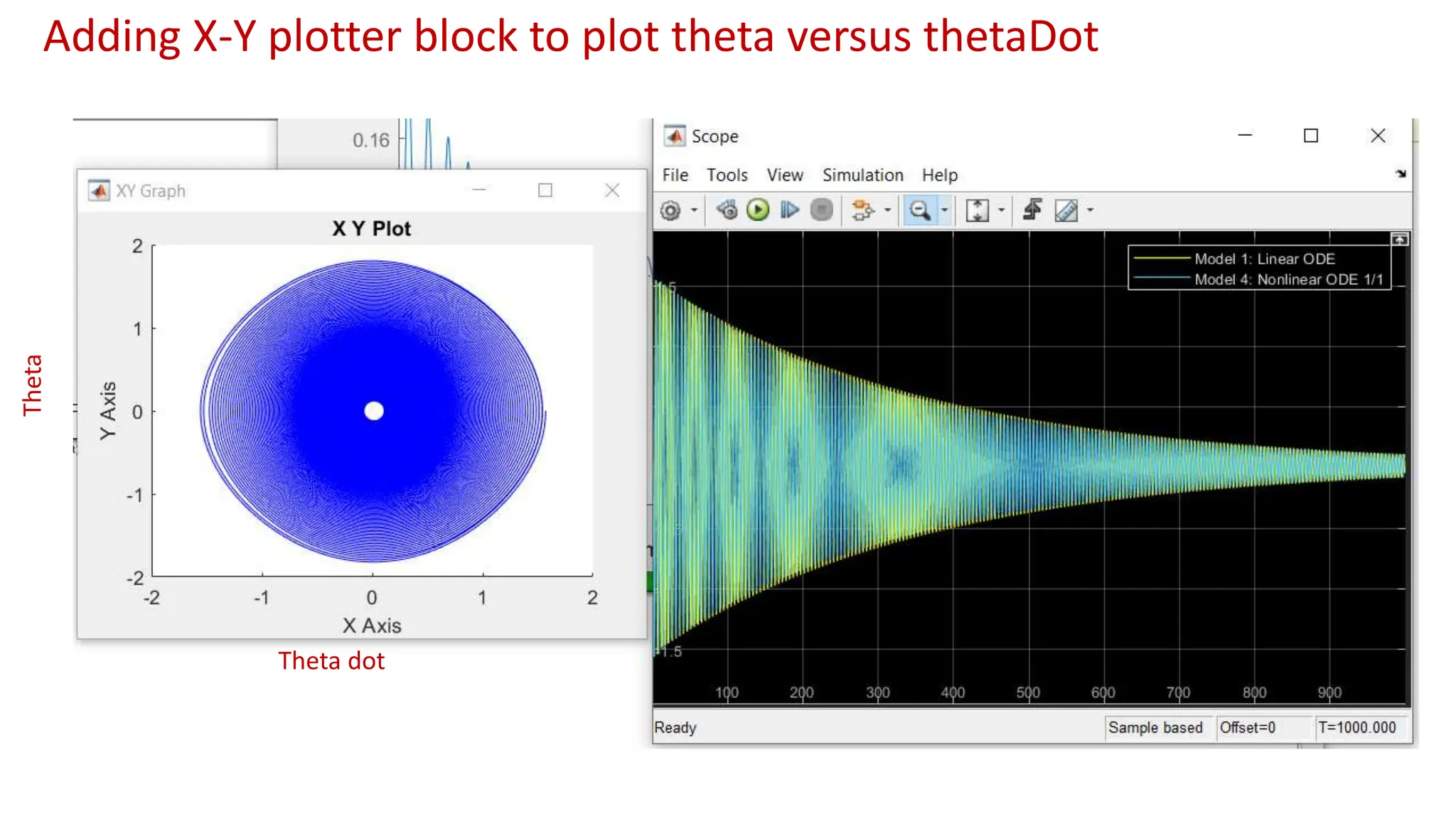
Theta
Theta dot
Adding X-Y plotter block to plot theta versus thetaDot
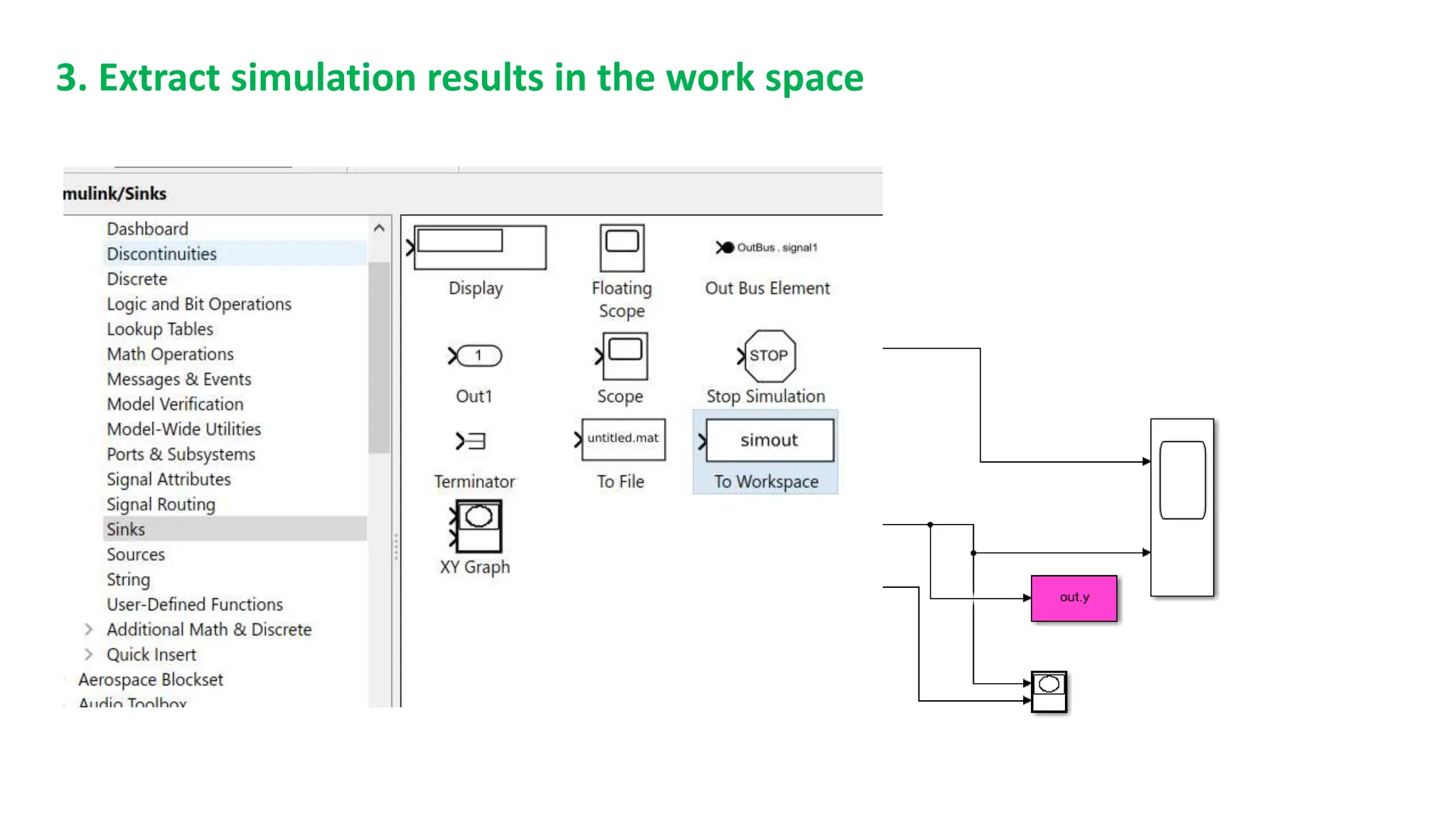
3. Extract simulation results in the work space
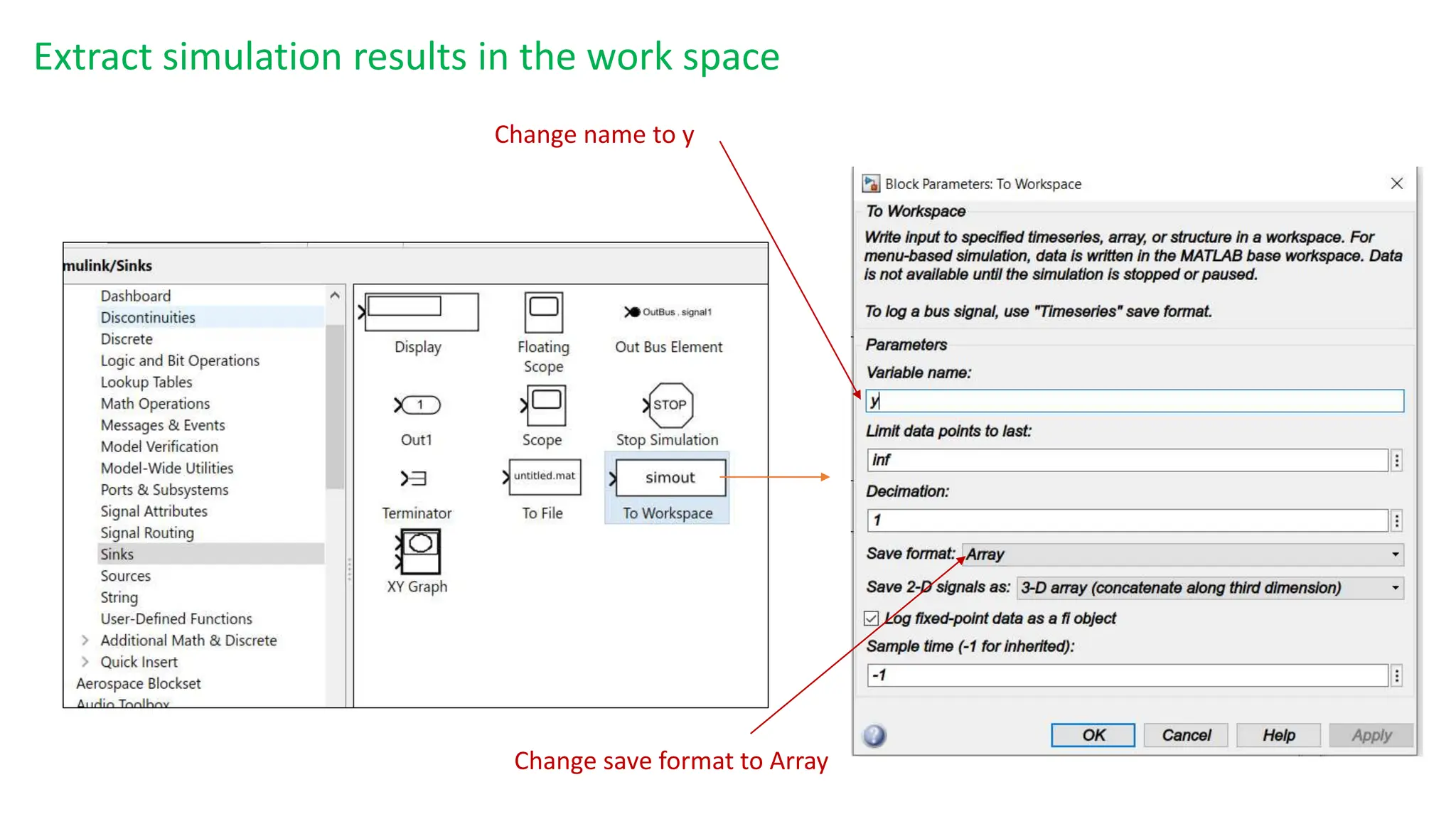
Change name to y
Change save format to Array
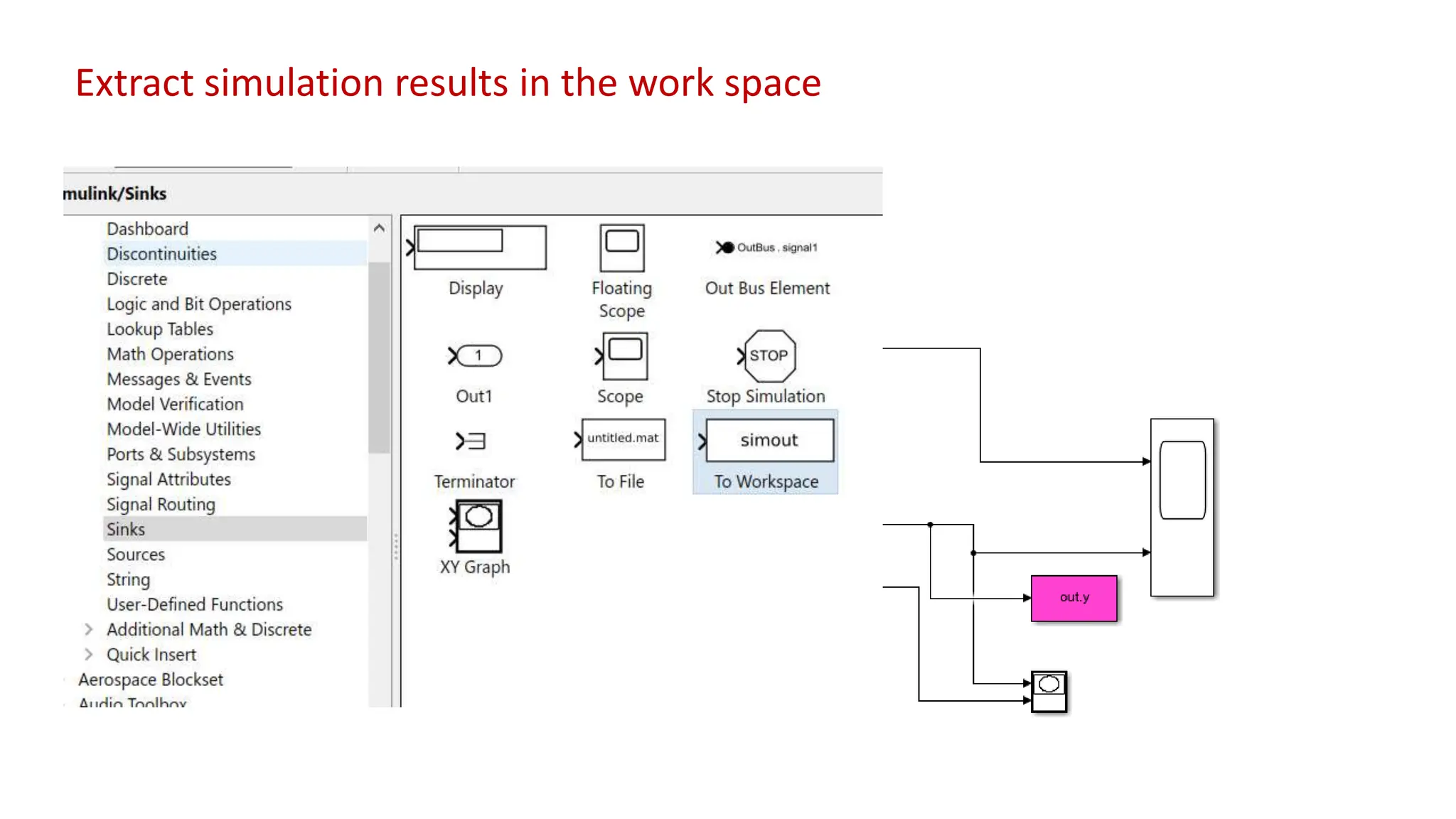
Extract simulation results in the work space
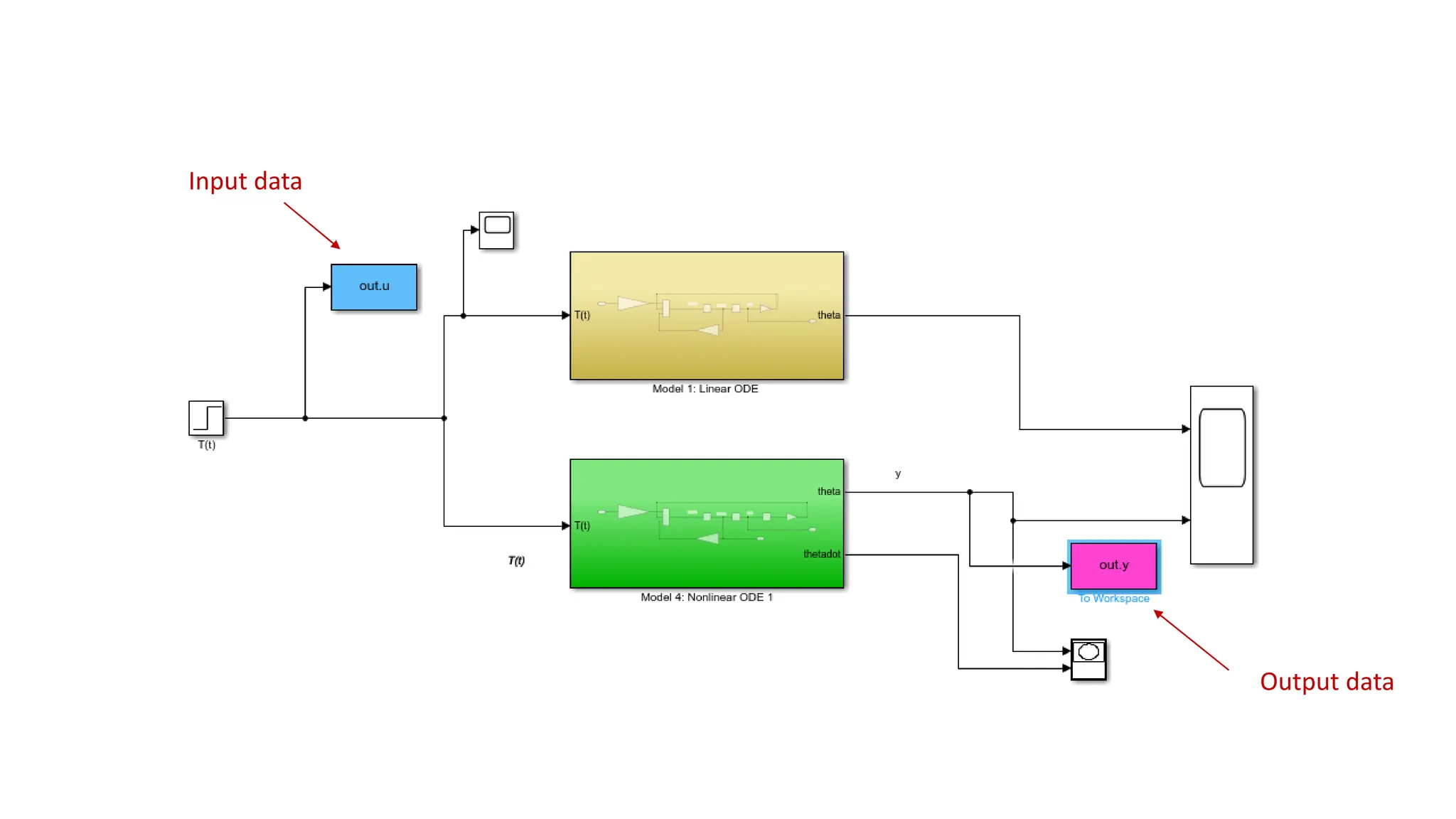
Output data
Input data
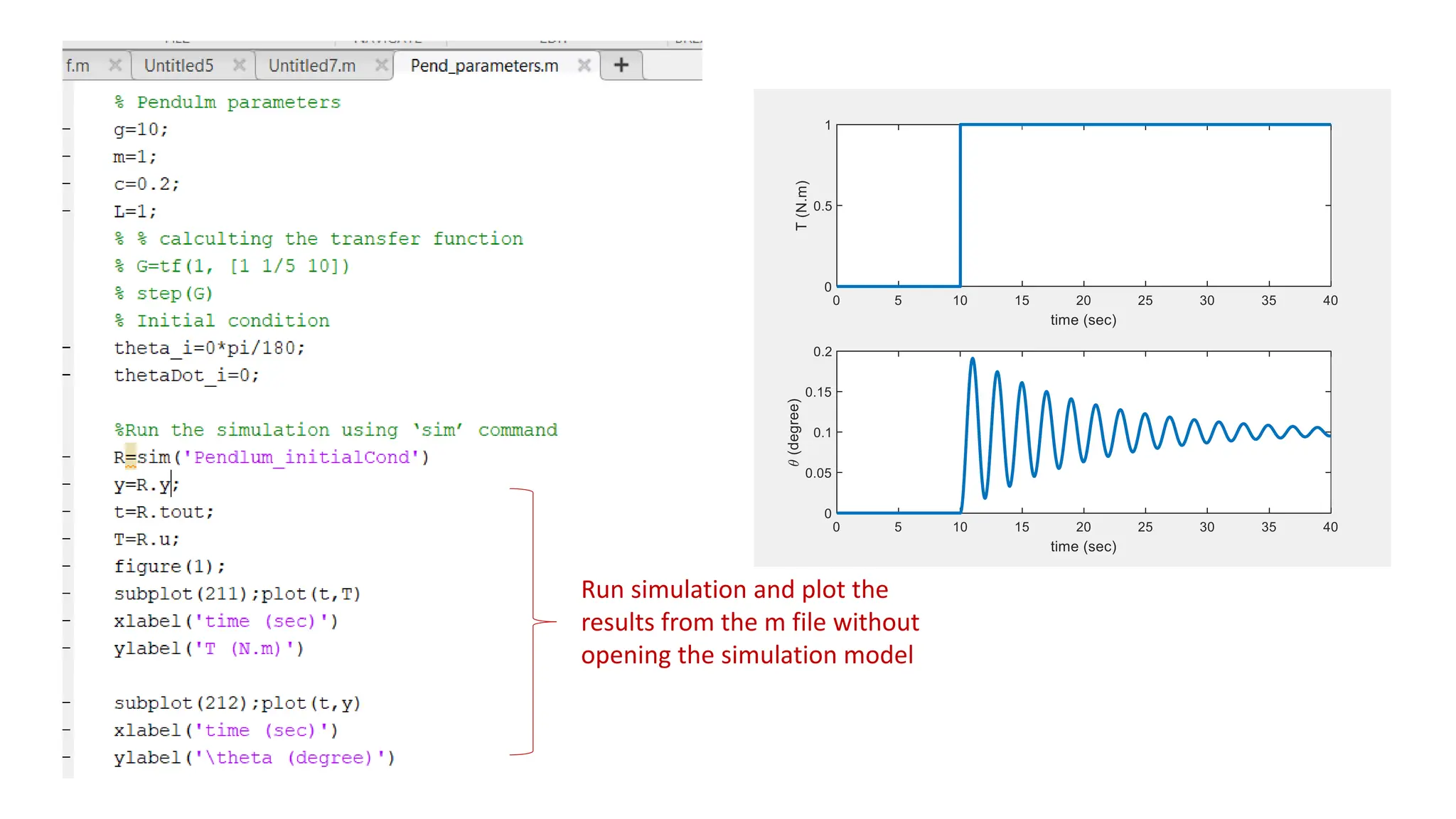
Run simulation and plot the
results from the m file without
opening the simulation model
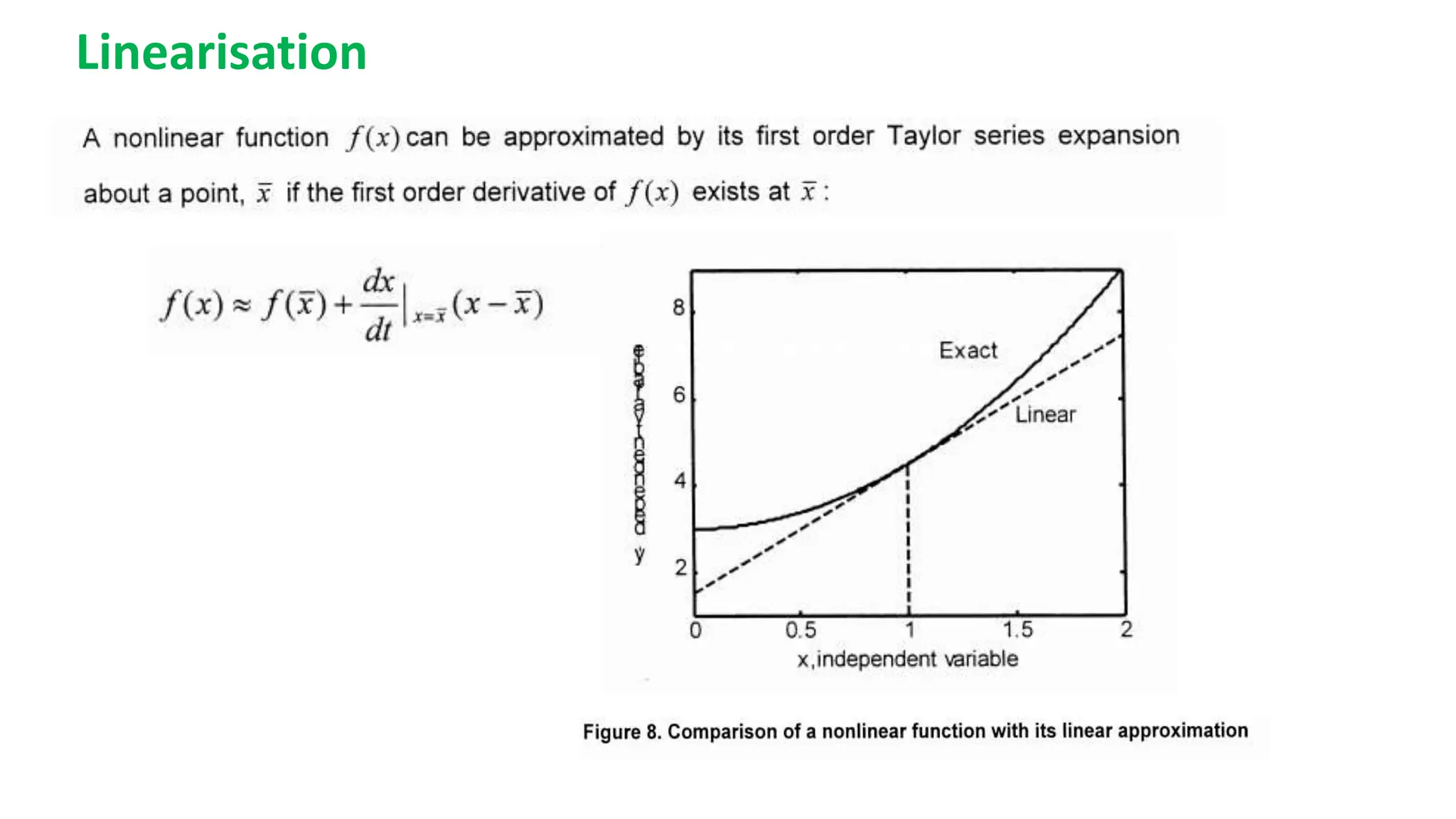
Linearisation
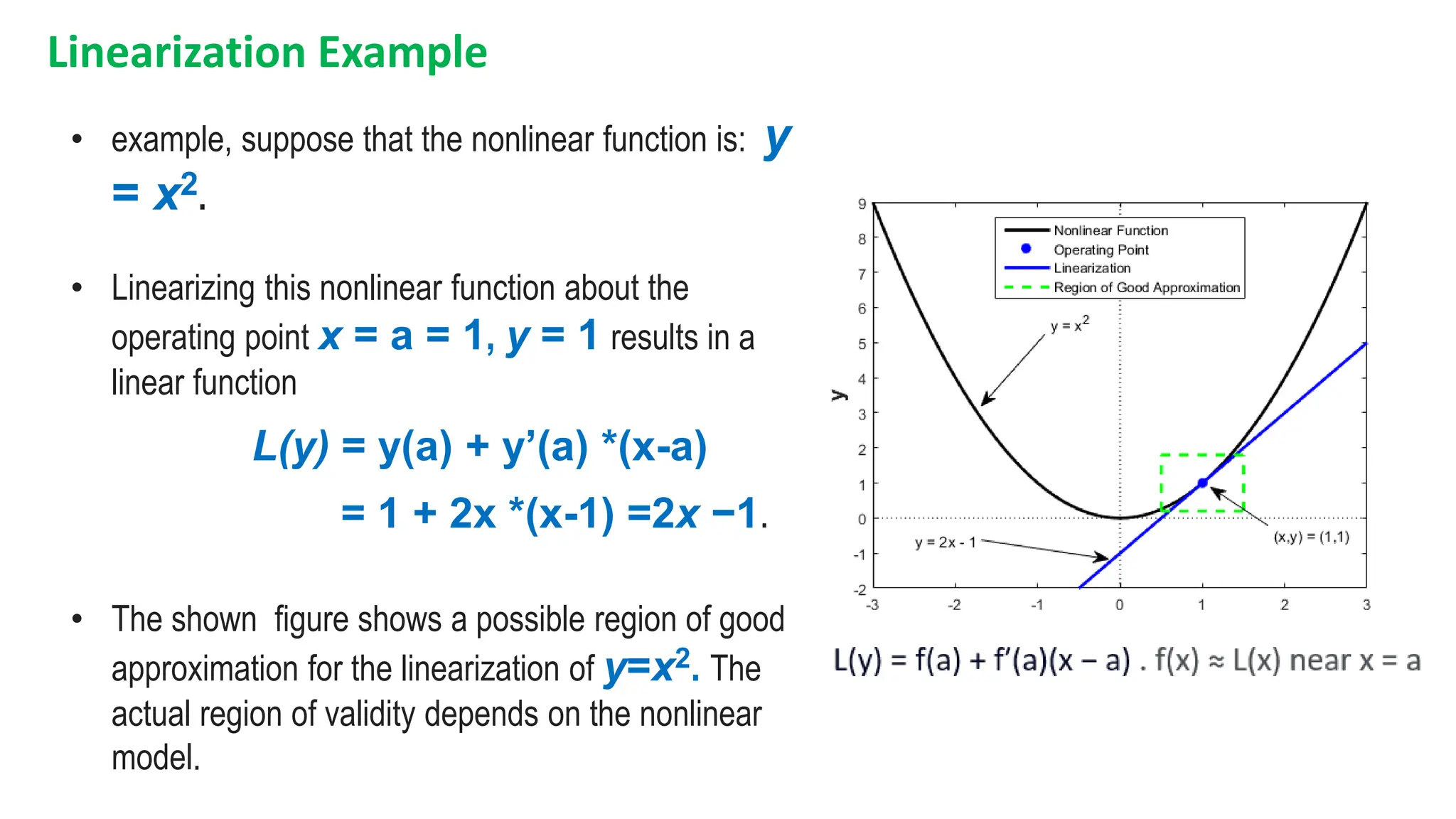
Linearization Example
• example, suppose that the nonlinear function is: y
= x2.
• Linearizing this nonlinear function about the
operating point x = a = 1, y = 1 results in a
linear function
L(y) = y(a) + y’(a) *(x-a)
= 1 + 2x *(x-1) =2x −1.
• The shown figure shows a possible region of good
approximation for the linearization of y=x2. The
actual region of validity depends on the nonlinear
model.
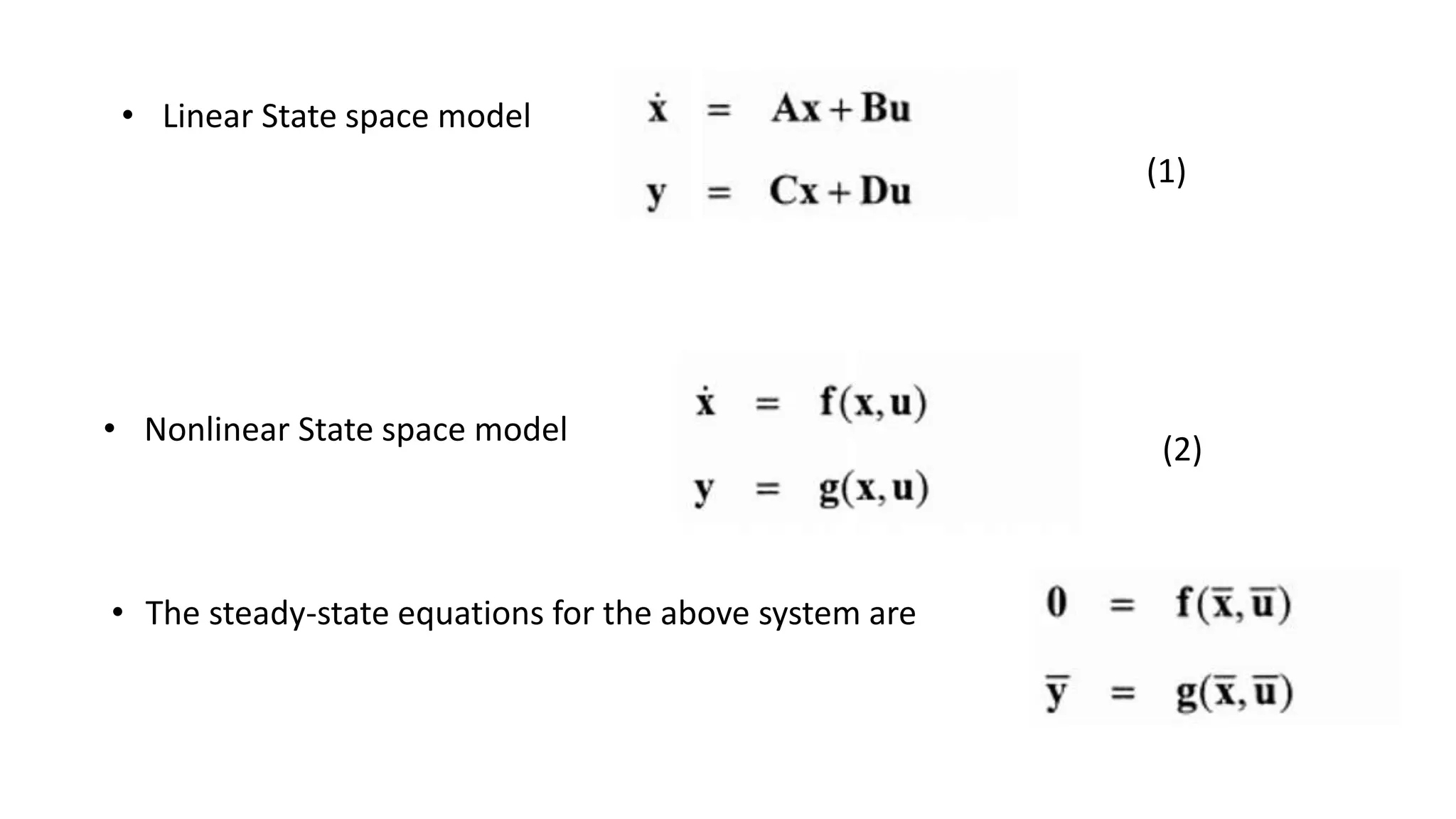
• Linear State space model
• Nonlinear State space model
• The steady-state equations for the above system are
(2)
(1)
(2)
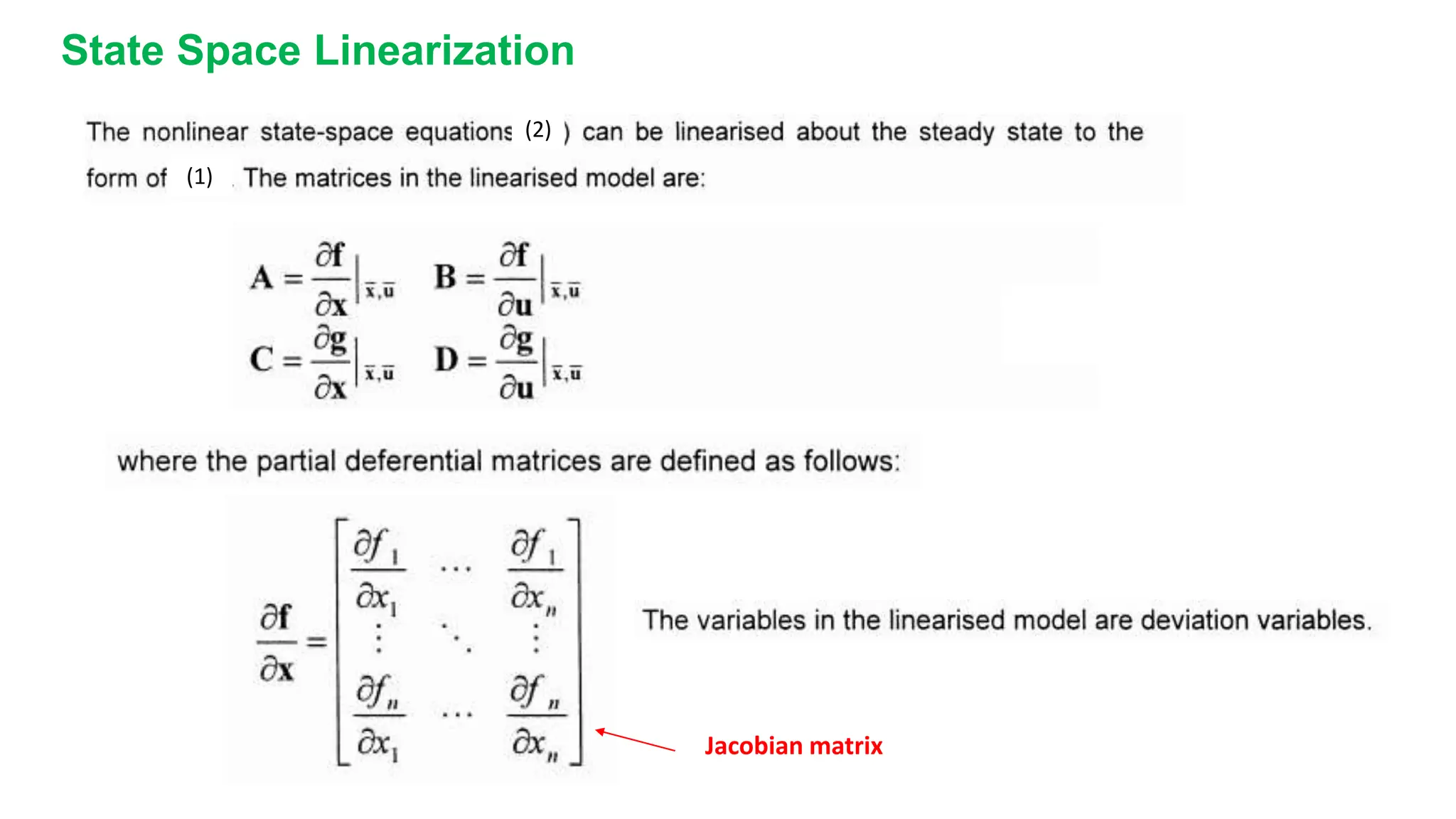
Jacobian matrix
State Space Linearization
(1)
2x1 cos(x2)
0 -3(x2)2
x1=1,x2=0
=
2 1
0 0
A = B =
0
1 C = [1 1], D = 0
;
;
Solution:
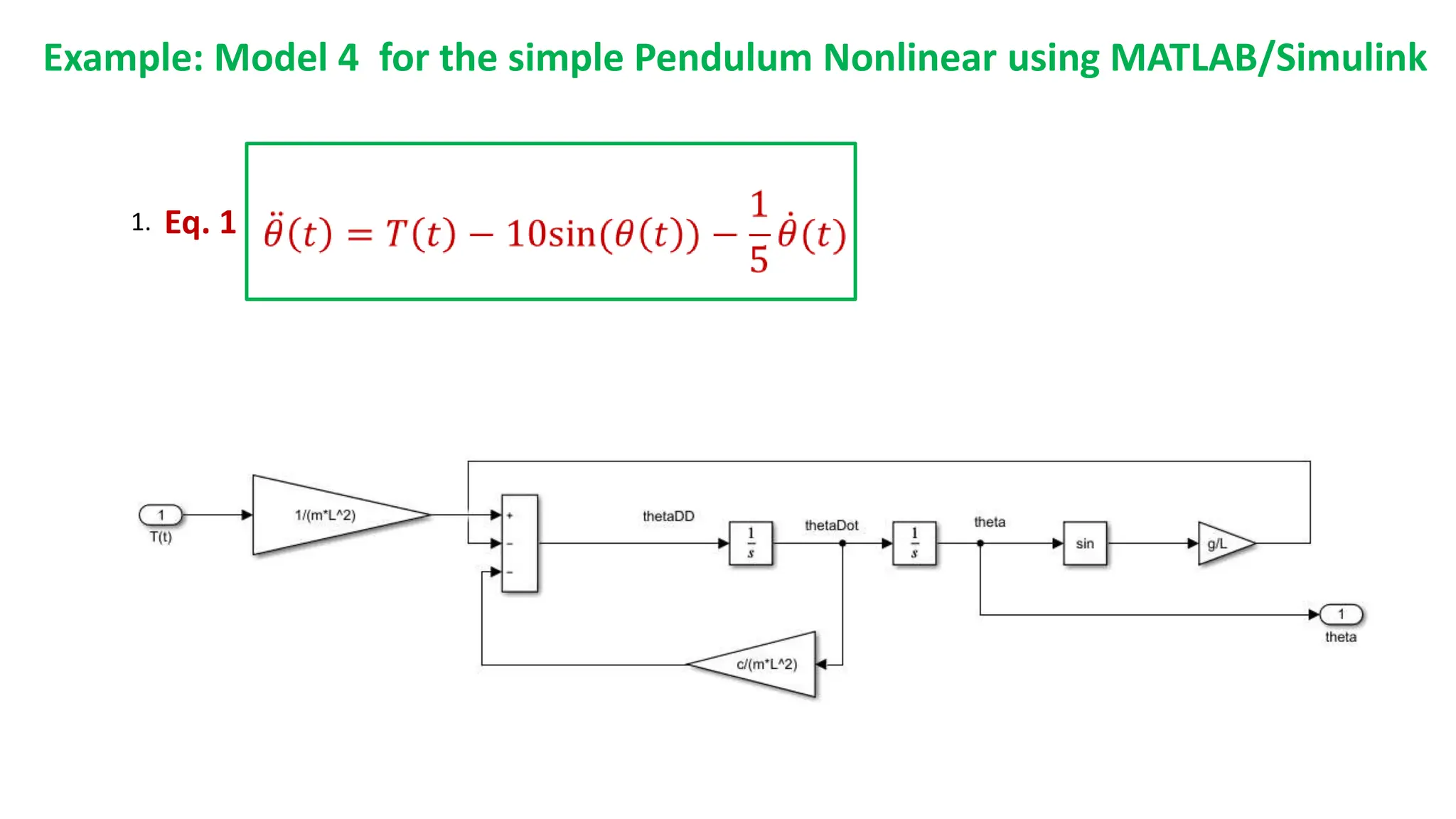
Example: Model 4 for the simple Pendulum Nonlinear using MATLAB/Simulink
1. Eq. 1
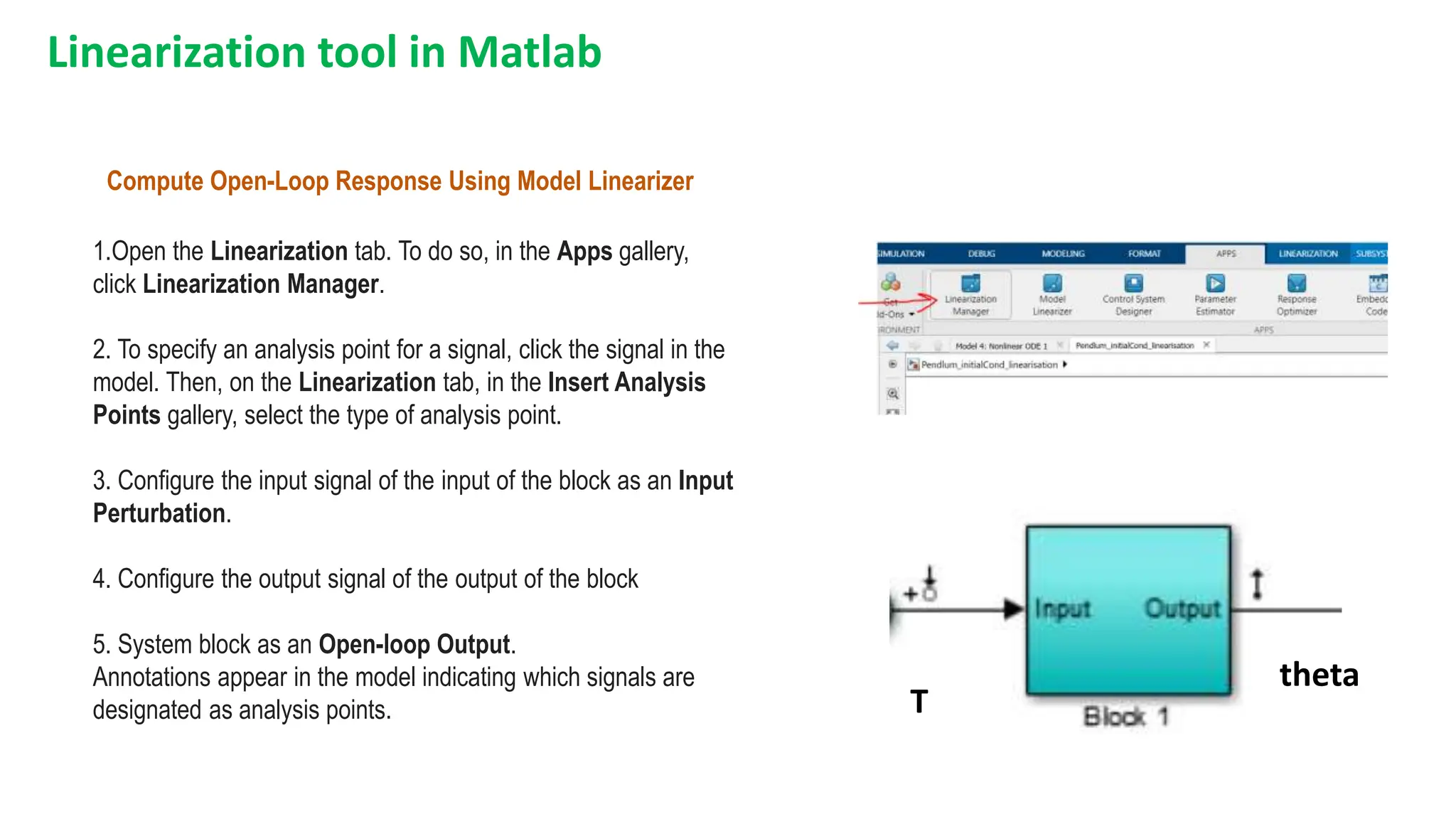
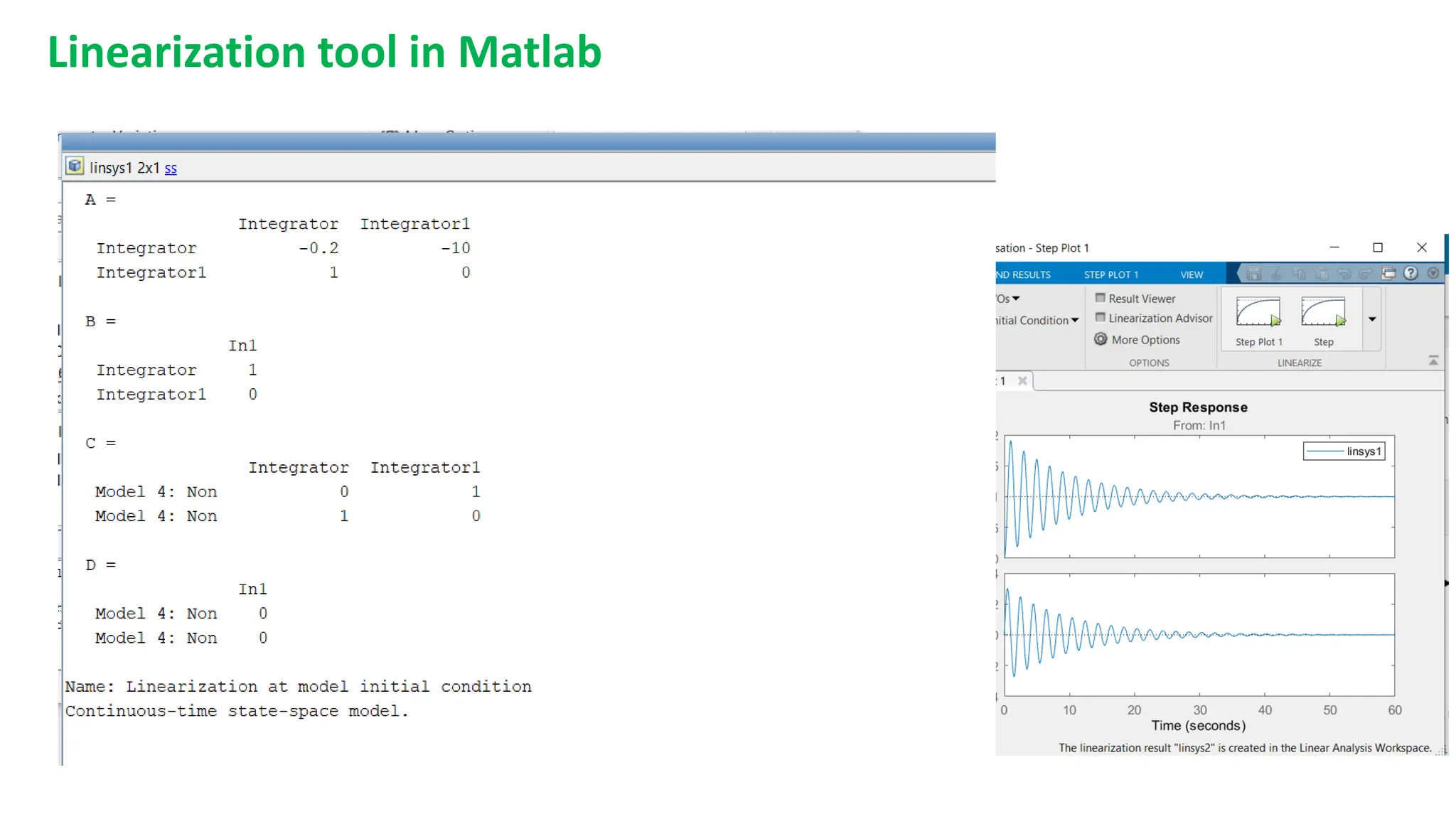
Linearization tool in Matlab
Compute Open-Loop Response Using Model Linearizer
1.Open the Linearization tab. To do so, in the Apps gallery,
click Linearization Manager.
2. To specify an analysis point for a signal, click the signal in the
model. Then, on the Linearization tab, in the Insert Analysis
Points gallery, select the type of analysis point.
3. Configure the input signal of the input of the block as an Input
Perturbation.
4. Configure the output signal of the output of the block
5. System block as an Open-loop Output.
Annotations appear in the model indicating which signals are
designated as analysis points. T
theta
Linearization tool in Matlab
• Click on Step plot 1
• The steady-state model will
appear in the Linear Analysis
Workspace
• Double click on ‘linsys1’
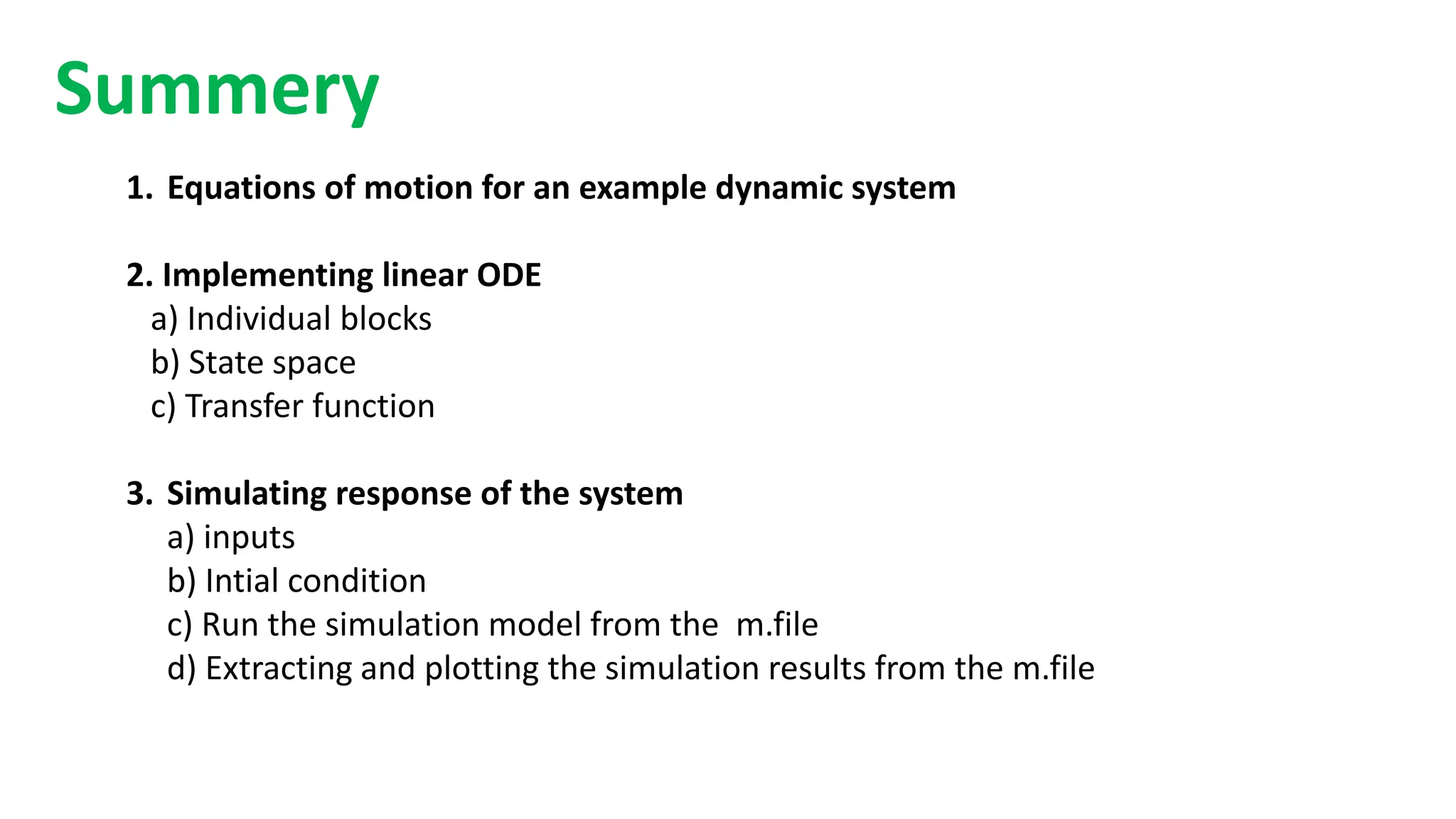
1. Equations of motion for an example dynamic system
2. Implementing linear ODE
a) Individual blocks
b) State space
c) Transfer function
3. Simulating response of the system
a) inputs
b) Intial condition
c) Run the simulation model from the m.file
d) Extracting and plotting the simulation results from the m.file
Summery
Questions

Modelling using differnt metods in matlab2 (2) (2) (2) (4) (1) (1).pptx

  • 1.
    1 EG7102 Modelling, Simulation, andVirtualization (15 credits) Workshop 1: Dynamic systems Modelling using MATLAB/Simulink
  • 2.
    Outline 1.What is Simulink? 2.Creatinga simple program in MATLAB 3.Creating an equivalent program in SIMULINK
  • 3.
    1. Creating asimple program to solve Algebra equations in MATLAB Example: Find the value of q in the following equation. (1) (2) (3)
  • 4.
    Step 1: Createfunction for f(x) Method 1: Creating functions and using MATLAB functions to find the value of q Equation 1
  • 5.
    Step 2: Createfunction for h(p,w) Equation 2
  • 6.
    Step 3: Callthe functions f(x) & h(w,p) to find the value of q
  • 7.
  • 8.
    We can acssessto Simulink by two ways 1. type Simulink in the workspace 2. Click the Simulink icon in the upper bar Method 2: Using MATLAB/Simulink to find the value of q
  • 10.
    New Simulation model SIMULINKLibrary Method 1: Creating functions and using MATLAB codes to find the value of q
  • 11.
    Finding the valueof variable q using MATLAB/Simulink blocks
  • 12.
    Finding the valueof variable q using MATLAB/Simulink blocks
  • 13.
    Finding the valueof variable q using Matlab/Simulink with subsystem blocks Subsystem 1 Subsystem 2
  • 14.
    1. Develop adifferential equation describing the dynamics of a nonlinear system. 2. Investigate various methods in Simulink to solve these systems (individual blocks, state space, and transfer functions). 3. Simulate the response of these systems to inputs and initial conditions. 4. Modify the system to include nonlinear dynamics. 2. Solving ODEs using MATLAB/SIMULINK toolbox
  • 15.
    Example: Equations ofmotion: The simple Pendulum The ODE describes the dynamic response 2n-order system Nonlinear because we have sin() J 𝜃 𝑡 = 𝑇 𝑡 − 𝑚𝑔𝐿 sin 𝜃 𝑡 − 𝑐𝜃 𝑡 𝜃 𝑡 = 1 𝐽 𝑇 𝑡 − 𝑚𝑔𝐿 𝐽 sin 𝜃 𝑡 − 𝑐 𝐽 𝜃 𝑡 Re-arrange the above equation: 𝐽 = 𝑚𝐿2 Recall 𝜃 𝑡 = 1 𝑚𝐿2 𝑇 𝑡 − 𝑔 𝐿 sin(𝜃 𝑡 ) − 𝑐 𝑚𝐿2 𝜃(𝑡) Eq. 1
  • 16.
    The ODE describesthe dynamic response of the Pendulum For initial condition  = 0o we can approximate the above nonlinear ODE to linear (Eq. 2) because Sin() = 0 =  Eq. 1 Eq. 2 𝜃 𝑡 = 1 𝑚𝐿2 𝑇 𝑡 − 𝑔 𝐿 𝜃 𝑡 − 𝑐 𝑚𝐿2 𝜃(𝑡) 𝜃 𝑡 = 1 𝑚𝐿2 𝑇 𝑡 − 𝑔 𝐿 sin(𝜃 𝑡 ) − 𝑐 𝑚𝐿2 𝜃(𝑡) The new model will be linear The nonlinear model
  • 17.
    Assume the valuesof the system parameters (constants) as given below; g = 10 m/s2 m = 1 kg c = 0.2 Nm/rad/sec L = 1m 1/mL2 = 1; g/L =10; c/mL2 = 1/5 Eq. 1 Eq. 2 Nonlinear for any value of initial Linear when initial = 0o
  • 18.
    The simple pendulummodel (final) Pendulum Model Input T, Torque Output , the deflection angle g = 10 m/s2 m = 1 kg c = 0.2 Nm/rad/sec L = 1m T(t ),  (t) : Model variables Model parameters
  • 19.
    Model 1: usingMATLAB/SIMULINK individual blocks 1. Create m file to define the model parameters (constants)
  • 20.
    2. Run theprevious m file to generate the model parameters in the workspace 3. Build the Simulink model as shown below and you should get the shown results
  • 21.
    Model 2: usingstate-space model via MATLAB/SIMULINK Let 𝑥1 = 𝜃 𝑥2 = 𝜃 A Eq. 3 Eq. 4 B C D
  • 22.
    Method 2: usingstate-space model via MATLAB/SIMULINK A B C D g = 10 m/s2; m = 1 kg; c = 0.2 Nm/rad/sec; L = 1m Substituting the parameters values in Eq 3 and 4 yields Eq. 3 Eg. 4
  • 23.
  • 24.
    Model 3: usingtransfer function model via MATLAB/SIMULINK Take Laplase transform for both sides of Eq. 2 Eq. 2 𝜃 𝑡 = 1 𝑚𝐿2 𝑇 𝑡 − 𝑐 𝑚𝐿2 𝜃 𝑡 − 𝑔 𝐿 𝜃(𝑡) L { } 𝑠2𝜽(𝑠 = 1 𝑚𝐿2 𝑻 𝑠 − 𝑐 𝑚𝐿2 𝑠𝜽(𝑠) − 𝑔 𝐿 𝜽(𝑠) 𝑠2 𝜽 𝑠 + 𝑐 𝑚𝐿2 𝑠𝜽 𝑠 + 𝑔 𝐿 𝜽(𝑠) = 1 𝑚𝐿2 𝑻 𝑠 𝒔2 + 𝑐 𝑚𝐿2 𝒔 + 𝑔 𝐿 𝜽(𝑠) = 1 𝑚𝐿2 𝑻(s) … continue
  • 25.
    T.F = G(s)= 𝑶𝒖𝒕𝒑𝒖𝒕 𝑰𝒏𝒑𝒖𝒕 For: g = 10 m/s2; m = 1 kg; c = 0.2 Nm/rad/sec; L = 1m 1/mL2 = 1; g/L =10; c/mL2 = 1/5 ∴ G 𝒔 = 𝜽(𝒔) 𝑻(𝒔) = 1/𝑚𝐿2 𝑠2 + 𝑐 𝑚𝐿2 𝑠 + 𝑔 𝐿 Eq. 5 G 𝒔 = 𝜽(𝒔) 𝑻(𝒔) = 1 𝑠2 + 1 5 𝑠 + 10 Eq. 6 Transfer function
  • 26.
    • Model 3:using transfer function model via code in MATLAB 1.
  • 27.
    • Model 3:using transfer function model using MATLAB/Simulink 1.
  • 28.
    • Model 4:Nonlinear ODE (Eq. 1) using MATLAB/Simulink 1. Eq. 1
  • 29.
    • Model 4:Nonlinear ODE (Eq. 1) using MATLAB/Simulink (i = 0 degree) i = 0 degree
  • 30.
    Increasing the damping,c=0.5 i = 0 degree
  • 31.
    T(t) Unit Step functionat t=5 sec, T(t)= 1  (t) step response using four models for initial condition i = 0 degree Increasing the damping, c = 0.5
  • 32.
    • Model 4:Nonlinear ODE (Eq. 1) using MATLAB/Simulink (i = 0 degree) i = 45 degree https://upload.wikimedia.org/wikipedia/commons/c/c1/Pendu lum_45deg.gif
  • 33.
    i = 45degree i Double click
  • 34.
    t =10 sec NonlinearODE i = 45 degree
  • 35.
    i = 90degree Damping parameter, c= 0.5
  • 36.
    i = 180degree Damping parameter, c= 0.2 Linearized model frailer
  • 37.
    Increasing the rodlength to 6 m = Increasing the settling time
  • 38.
    Adding X-Y plotterblock to plot theta versus thetaDot
  • 39.
    Theta Theta dot Adding X-Yplotter block to plot theta versus thetaDot
  • 41.
    3. Extract simulationresults in the work space
  • 42.
    Change name toy Change save format to Array Extract simulation results in the work space
  • 43.
    Extract simulation resultsin the work space
  • 44.
  • 45.
    Run simulation andplot the results from the m file without opening the simulation model
  • 46.
  • 47.
    Linearization Example • example,suppose that the nonlinear function is: y = x2. • Linearizing this nonlinear function about the operating point x = a = 1, y = 1 results in a linear function L(y) = y(a) + y’(a) *(x-a) = 1 + 2x *(x-1) =2x −1. • The shown figure shows a possible region of good approximation for the linearization of y=x2. The actual region of validity depends on the nonlinear model.
  • 49.
    • Linear Statespace model • Nonlinear State space model • The steady-state equations for the above system are (2) (1)
  • 50.
  • 51.
    2x1 cos(x2) 0 -3(x2)2 x1=1,x2=0 = 21 0 0 A = B = 0 1 C = [1 1], D = 0 ; ; Solution:
  • 52.
    Example: Model 4for the simple Pendulum Nonlinear using MATLAB/Simulink 1. Eq. 1
  • 53.
    Linearization tool inMatlab Compute Open-Loop Response Using Model Linearizer 1.Open the Linearization tab. To do so, in the Apps gallery, click Linearization Manager. 2. To specify an analysis point for a signal, click the signal in the model. Then, on the Linearization tab, in the Insert Analysis Points gallery, select the type of analysis point. 3. Configure the input signal of the input of the block as an Input Perturbation. 4. Configure the output signal of the output of the block 5. System block as an Open-loop Output. Annotations appear in the model indicating which signals are designated as analysis points. T theta
  • 54.
    Linearization tool inMatlab • Click on Step plot 1 • The steady-state model will appear in the Linear Analysis Workspace • Double click on ‘linsys1’
  • 55.
    1. Equations ofmotion for an example dynamic system 2. Implementing linear ODE a) Individual blocks b) State space c) Transfer function 3. Simulating response of the system a) inputs b) Intial condition c) Run the simulation model from the m.file d) Extracting and plotting the simulation results from the m.file Summery
  • 56.