




ALGORITHMS
    &
FLOWCHARTS
      Ashwin Anand V
Algorithm
An Algorithm is just a detailed sequence of simple
steps that are needed to solve a problem


Flowchart
A Flowchart is the graphical representation of
an Algorithm.
Steps to create an algorithm
• First produce a general algorithm

• Refine the algorithm successively to get step by step detailed
  algorithm that is very close to a computer language.

• Pseudo code is an artificial and informal language that helps
  programmers develop algorithms. Pseudo code is very similar
  to everyday English.
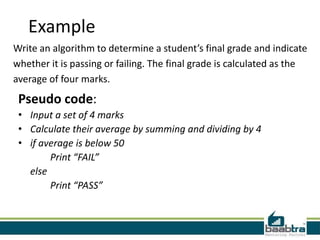
Example
Write an algorithm to determine a student’s final grade and indicate
whether it is passing or failing. The final grade is calculated as the
average of four marks.
 Pseudo code:
 • Input a set of 4 marks
 • Calculate their average by summing and dividing by 4
 • if average is below 50
        Print “FAIL”
   else
        Print “PASS”
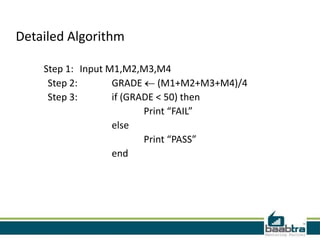
Detailed Algorithm

    Step 1: Input M1,M2,M3,M4
     Step 2:       GRADE (M1+M2+M3+M4)/4
     Step 3:       if (GRADE < 50) then
                          Print “FAIL”
                   else
                          Print “PASS”
                   end
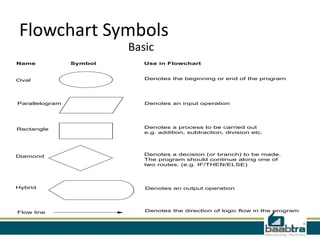
Flowchart Symbols
                         Basic
Name            Symbol      Use in Flowchart


Oval                        Denotes the beginning or end of the program


Parallelogram               Denotes an input operation


Rectangle                   Denotes a process to be carried out
                            e.g. addition, subtraction, division etc.


Diamond                     Denotes a decision (or branch) to be made.
                            The program should continue along one of
                            two routes. (e.g. IF/THEN/ELSE)


Hybrid                      Denotes an output operation


Flow line                   Denotes the direction of logic flow in the program
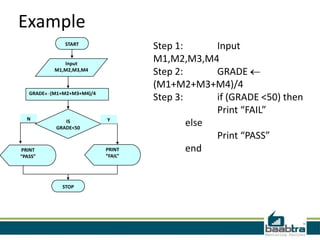
Example
                START
                                      Step 1:      Input
               Input
                                      M1,M2,M3,M4
            M1,M2,M3,M4
                                      Step 2:      GRADE
                                      (M1+M2+M3+M4)/4
   GRADE   (M1+M2+M3+M4)/4
                                      Step 3:      if (GRADE <50) then
                                                   Print “FAIL”
  N                          Y
                IS
             GRADE<50
                                              else
                                                   Print “PASS”
PRINT                        PRINT            end
“PASS”                       “FAIL”


               STOP
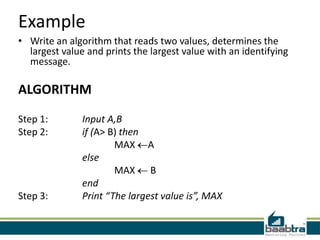
Example
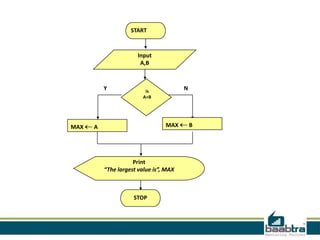
• Write an algorithm that reads two values, determines the
  largest value and prints the largest value with an identifying
  message.

ALGORITHM

Step 1:        Input A,B
Step 2:        if (A> B) then
                       MAX A
               else
                       MAX B
               end
Step 3:        Print “The largest value is”, MAX
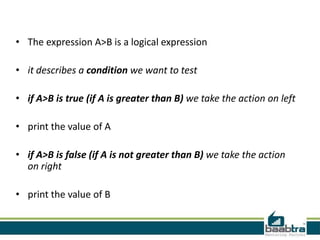
• The expression A>B is a logical expression

• it describes a condition we want to test

• if A>B is true (if A is greater than B) we take the action on left

• print the value of A

• if A>B is false (if A is not greater than B) we take the action
  on right

• print the value of B
START


                       Input
                        A,B


          Y               is
                                        N
                         A>B


MAX   A                          MAX        B


                     Print
          “The largest value is”, MAX


                     STOP
Thank you
Disclaimer: This presentation is prepared by trainees of baabtra as
a part of mentoring program. This is not official document of
baabtra – Mentoring Partner
baabtra – Mentoring Partner is the mentoring division of baabte System Technologies Pvt. Ltd.
Contact Us

Algorithms&flowcharts

  • 2.
    ALGORITHMS & FLOWCHARTS Ashwin Anand V
  • 3.
    Algorithm An Algorithm isjust a detailed sequence of simple steps that are needed to solve a problem Flowchart A Flowchart is the graphical representation of an Algorithm.
  • 4.
    Steps to createan algorithm • First produce a general algorithm • Refine the algorithm successively to get step by step detailed algorithm that is very close to a computer language. • Pseudo code is an artificial and informal language that helps programmers develop algorithms. Pseudo code is very similar to everyday English.
  • 5.
    Example Write an algorithmto determine a student’s final grade and indicate whether it is passing or failing. The final grade is calculated as the average of four marks. Pseudo code: • Input a set of 4 marks • Calculate their average by summing and dividing by 4 • if average is below 50 Print “FAIL” else Print “PASS”
  • 6.
    Detailed Algorithm Step 1: Input M1,M2,M3,M4 Step 2: GRADE (M1+M2+M3+M4)/4 Step 3: if (GRADE < 50) then Print “FAIL” else Print “PASS” end
  • 7.
    Flowchart Symbols Basic Name Symbol Use in Flowchart Oval Denotes the beginning or end of the program Parallelogram Denotes an input operation Rectangle Denotes a process to be carried out e.g. addition, subtraction, division etc. Diamond Denotes a decision (or branch) to be made. The program should continue along one of two routes. (e.g. IF/THEN/ELSE) Hybrid Denotes an output operation Flow line Denotes the direction of logic flow in the program
  • 8.
    Example START Step 1: Input Input M1,M2,M3,M4 M1,M2,M3,M4 Step 2: GRADE (M1+M2+M3+M4)/4 GRADE (M1+M2+M3+M4)/4 Step 3: if (GRADE <50) then Print “FAIL” N Y IS GRADE<50 else Print “PASS” PRINT PRINT end “PASS” “FAIL” STOP
  • 9.
    Example • Write analgorithm that reads two values, determines the largest value and prints the largest value with an identifying message. ALGORITHM Step 1: Input A,B Step 2: if (A> B) then MAX A else MAX B end Step 3: Print “The largest value is”, MAX
  • 10.
    • The expressionA>B is a logical expression • it describes a condition we want to test • if A>B is true (if A is greater than B) we take the action on left • print the value of A • if A>B is false (if A is not greater than B) we take the action on right • print the value of B
  • 11.
    START Input A,B Y is N A>B MAX A MAX B Print “The largest value is”, MAX STOP
  • 12.
  • 13.
    Disclaimer: This presentationis prepared by trainees of baabtra as a part of mentoring program. This is not official document of baabtra – Mentoring Partner baabtra – Mentoring Partner is the mentoring division of baabte System Technologies Pvt. Ltd.
  • 14.