Guess what games!!!
Guess what games? Guess if the
sample outline words is an algorithm
or Pseudocode
 Get value of A
 Get value of B
 C = A + B
 Display the value of C
pseudocode
Guess what games? Guess if the
sample outline words is an algorithm
or Pseudocode
algorithm
 Get the list of names
 Get the name being checked
 Set a counter to 0
 Do the following for each name on the list:
 Compare the name on the list to the name being
checked, and if the names are the same, then add
one to the counter
 Answer is the number indicated by the counter
FLOWCHART
OBJECTIVES
At the end of the lesson the students
can able to;
• Define the flowchart
• Identify the different symbols of
flowchart
• Create flowchart of a given
problem
• Trace the output of the flowchart
Flowchart
 A drawing that shows how a program
will operate, the steps that will be
followed, and the order in which they
will be followed
 is a representation, primarily through
the use of symbols, of the sequence of
activities in a system (process,
operation, function, or activity).
2 Types of Flowchart
1. System flowchart – it is a graphic
representation of the procedures involved in
converting data on input media to data in output
form.
2. Program flowchart – it describes graphically in
detail logical operations and steps within a
program and the sequence in which steps are to
be executed for the transformation of data to
produce the needed output
Flowchart Symbols
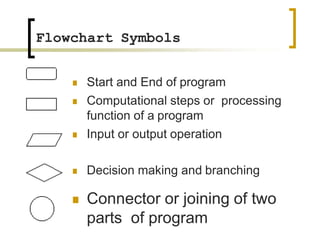
 Start and End of program
 Computational steps or processing
function of a program
 Input or output operation
 Decision making and branching
 Connector or joining of two
parts of program
Flowchart Symbols
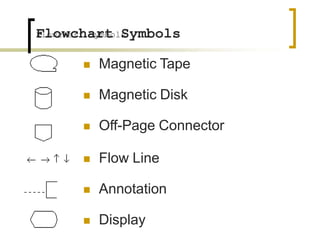
 Magnetic Tape
 Magnetic Disk
 Off-Page Connector
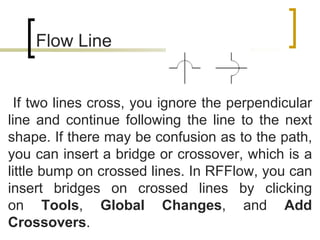
 Flow Line
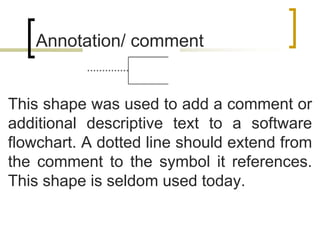
 Annotation
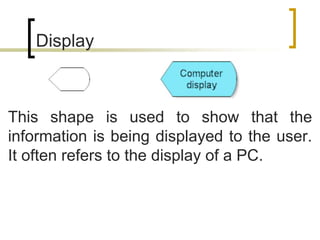
 Display
Flowchart Symbols
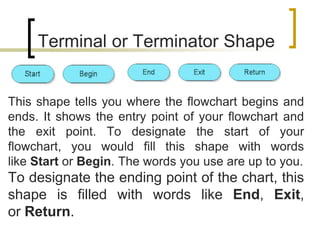
This shape tells you where the flowchart begins and
ends. It shows the entry point of your flowchart and
the exit point. To designate the start of your
flowchart, you would fill this shape with words
like Start or Begin. The words you use are up to you.
To designate the ending point of the chart, this
shape is filled with words like End, Exit,
or Return.
Terminal or Terminator Shape
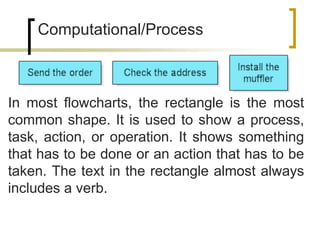
In most flowcharts, the rectangle is the most
common shape. It is used to show a process,
task, action, or operation. It shows something
that has to be done or an action that has to be
taken. The text in the rectangle almost always
includes a verb.
Computational/Process
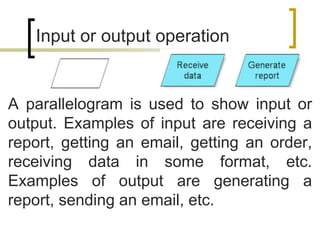
A parallelogram is used to show input or
output. Examples of input are receiving a
report, getting an email, getting an order,
receiving data in some format, etc.
Examples of output are generating a
report, sending an email, etc.
Input or output operation
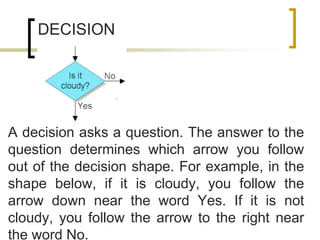
A decision asks a question. The answer to the
question determines which arrow you follow
out of the decision shape. For example, in the
shape below, if it is cloudy, you follow the
arrow down near the word Yes. If it is not
cloudy, you follow the arrow to the right near
the word No.
DECISION
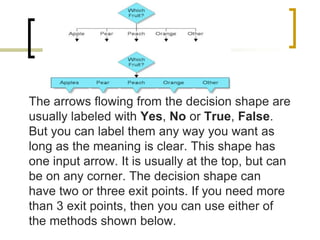
The arrows flowing from the decision shape are
usually labeled with Yes, No or True, False.
But you can label them any way you want as
long as the meaning is clear. This shape has
one input arrow. It is usually at the top, but can
be on any corner. The decision shape can
have two or three exit points. If you need more
than 3 exit points, then you can use either of
the methods shown below.
A decision asks a question. The answer to the
question determines which arrow you follow
out of the decision shape. For example, in the
shape below, if it is cloudy, you follow the
arrow down near the word Yes. If it is not
cloudy, you follow the arrow to the right near
the word No.
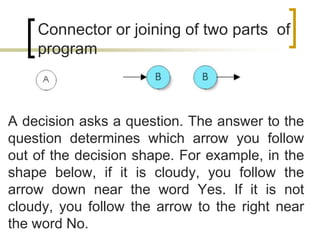
Connector or joining of two parts of
program
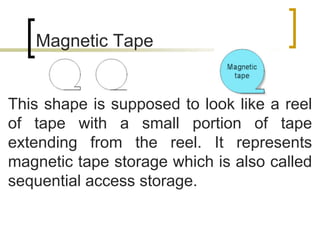
This shape is supposed to look like a reel
of tape with a small portion of tape
extending from the reel. It represents
magnetic tape storage which is also called
sequential access storage.
Magnetic Tape
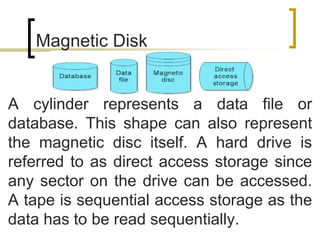
A cylinder represents a data file or
database. This shape can also represent
the magnetic disc itself. A hard drive is
referred to as direct access storage since
any sector on the drive can be accessed.
A tape is sequential access storage as the
data has to be read sequentially.
Magnetic Disk
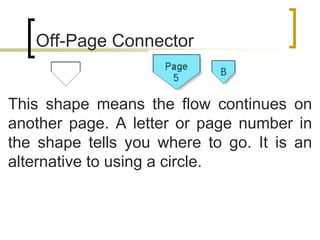
This shape means the flow continues on
another page. A letter or page number in
the shape tells you where to go. It is an
alternative to using a circle.
Off-Page Connector
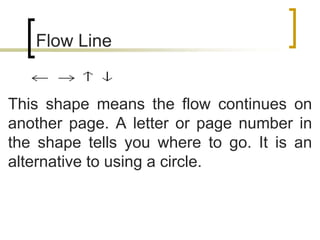
This shape means the flow continues on
another page. A letter or page number in
the shape tells you where to go. It is an
alternative to using a circle.
Flow Line
If two lines cross, you ignore the perpendicular
line and continue following the line to the next
shape. If there may be confusion as to the path,
you can insert a bridge or crossover, which is a
little bump on crossed lines. In RFFlow, you can
insert bridges on crossed lines by clicking
on Tools, Global Changes, and Add
Crossovers.
Flow Line
This shape was used to add a comment or
additional descriptive text to a software
flowchart. A dotted line should extend from
the comment to the symbol it references.
This shape is seldom used today.
Annotation/ comment
This shape is used to show that the
information is being displayed to the user.
It often refers to the display of a PC.
Display
Flowchart Development
1. Sequential
Steps are performed in a strictly
sequential manner, each step being
executed exactly once.
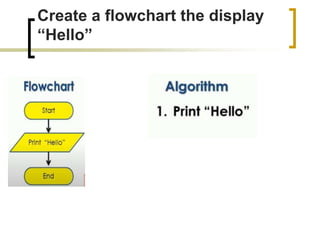
Create a flowchart the display
“Hello”
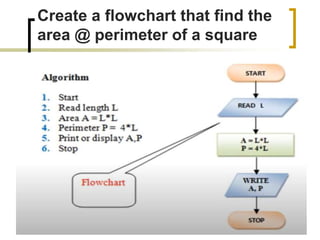
Create a flowchart that find the
area @ perimeter of a square
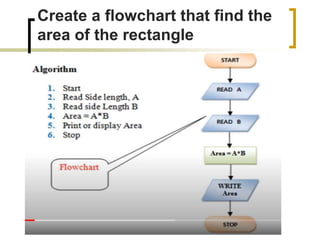
Create a flowchart that find the
area of the rectangle
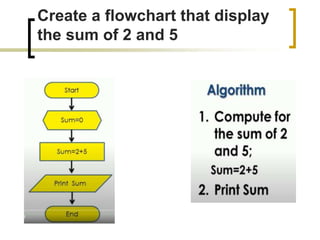
Create a flowchart that display
the sum of 2 and 5
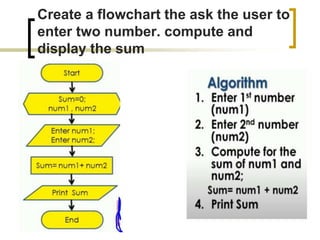
Create a flowchart the ask the user to
enter two number. compute and
display the sum
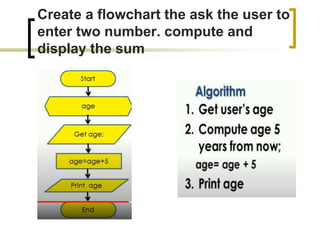
Create a flowchart the ask the user to
enter two number. compute and
display the sum
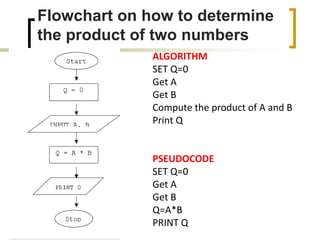
Flowchart on how to determine
the product of two numbers
ALGORITHM
SET Q=0
Get A
Get B
Compute the product of A and B
Print Q
PSEUDOCODE
SET Q=0
Get A
Get B
Q=A*B
PRINT Q
Flowchart Development
2. Selection
One of several alternatives is selected
and executed. It involves the use of
decision based on the given condition. It
uses decision block or the diamond-
shaped block. Alternative actions are
represented by the processing block.
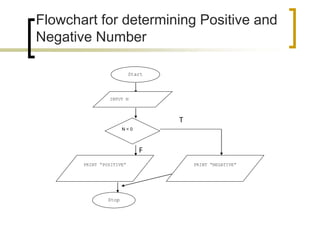
Flowchart for determining Positive and
Negative Number
Start
INPUT N
N < 0
PRINT “POSITIVE” PRINT “NEGATIVE”
Stop
T
F
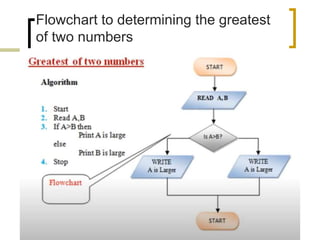
Flowchart to determining the greatest
of two numbers
T
F
Flowchart Development
3. Repetition
One or more steps are performed
repeatedly.
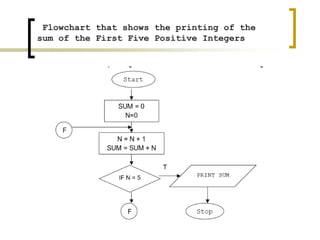
Flowchart that shows the printing of the
sum of the First Five Positive Integers
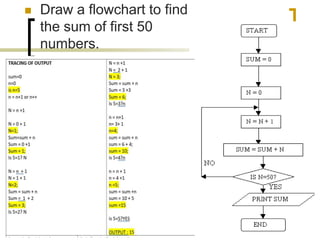
 Draw a flowchart to find
the sum of first 50
numbers.
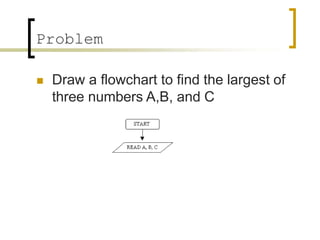
Problem
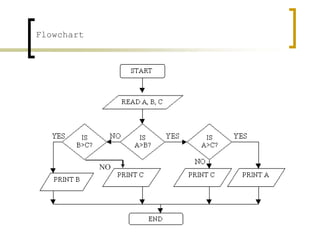
 Draw a flowchart to find the largest of
three numbers A,B, and C
Flowchart
NO
Thank you for watching and
listening!!!

algorithm and Pseudocode

  • 1.
  • 2.
    Guess what games?Guess if the sample outline words is an algorithm or Pseudocode  Get value of A  Get value of B  C = A + B  Display the value of C pseudocode
  • 3.
    Guess what games?Guess if the sample outline words is an algorithm or Pseudocode algorithm  Get the list of names  Get the name being checked  Set a counter to 0  Do the following for each name on the list:  Compare the name on the list to the name being checked, and if the names are the same, then add one to the counter  Answer is the number indicated by the counter
  • 6.
  • 7.
    OBJECTIVES At the endof the lesson the students can able to; • Define the flowchart • Identify the different symbols of flowchart • Create flowchart of a given problem • Trace the output of the flowchart
  • 8.
    Flowchart  A drawingthat shows how a program will operate, the steps that will be followed, and the order in which they will be followed  is a representation, primarily through the use of symbols, of the sequence of activities in a system (process, operation, function, or activity).
  • 9.
    2 Types ofFlowchart 1. System flowchart – it is a graphic representation of the procedures involved in converting data on input media to data in output form. 2. Program flowchart – it describes graphically in detail logical operations and steps within a program and the sequence in which steps are to be executed for the transformation of data to produce the needed output
  • 10.
    Flowchart Symbols  Startand End of program  Computational steps or processing function of a program  Input or output operation  Decision making and branching  Connector or joining of two parts of program
  • 11.
    Flowchart Symbols  MagneticTape  Magnetic Disk  Off-Page Connector  Flow Line  Annotation  Display Flowchart Symbols
  • 12.
    This shape tellsyou where the flowchart begins and ends. It shows the entry point of your flowchart and the exit point. To designate the start of your flowchart, you would fill this shape with words like Start or Begin. The words you use are up to you. To designate the ending point of the chart, this shape is filled with words like End, Exit, or Return. Terminal or Terminator Shape
  • 13.
    In most flowcharts,the rectangle is the most common shape. It is used to show a process, task, action, or operation. It shows something that has to be done or an action that has to be taken. The text in the rectangle almost always includes a verb. Computational/Process
  • 14.
    A parallelogram isused to show input or output. Examples of input are receiving a report, getting an email, getting an order, receiving data in some format, etc. Examples of output are generating a report, sending an email, etc. Input or output operation
  • 15.
    A decision asksa question. The answer to the question determines which arrow you follow out of the decision shape. For example, in the shape below, if it is cloudy, you follow the arrow down near the word Yes. If it is not cloudy, you follow the arrow to the right near the word No. DECISION
  • 16.
    The arrows flowingfrom the decision shape are usually labeled with Yes, No or True, False. But you can label them any way you want as long as the meaning is clear. This shape has one input arrow. It is usually at the top, but can be on any corner. The decision shape can have two or three exit points. If you need more than 3 exit points, then you can use either of the methods shown below.
  • 17.
    A decision asksa question. The answer to the question determines which arrow you follow out of the decision shape. For example, in the shape below, if it is cloudy, you follow the arrow down near the word Yes. If it is not cloudy, you follow the arrow to the right near the word No. Connector or joining of two parts of program
  • 18.
    This shape issupposed to look like a reel of tape with a small portion of tape extending from the reel. It represents magnetic tape storage which is also called sequential access storage. Magnetic Tape
  • 19.
    A cylinder representsa data file or database. This shape can also represent the magnetic disc itself. A hard drive is referred to as direct access storage since any sector on the drive can be accessed. A tape is sequential access storage as the data has to be read sequentially. Magnetic Disk
  • 20.
    This shape meansthe flow continues on another page. A letter or page number in the shape tells you where to go. It is an alternative to using a circle. Off-Page Connector
  • 21.
    This shape meansthe flow continues on another page. A letter or page number in the shape tells you where to go. It is an alternative to using a circle. Flow Line
  • 22.
    If two linescross, you ignore the perpendicular line and continue following the line to the next shape. If there may be confusion as to the path, you can insert a bridge or crossover, which is a little bump on crossed lines. In RFFlow, you can insert bridges on crossed lines by clicking on Tools, Global Changes, and Add Crossovers. Flow Line
  • 23.
    This shape wasused to add a comment or additional descriptive text to a software flowchart. A dotted line should extend from the comment to the symbol it references. This shape is seldom used today. Annotation/ comment
  • 24.
    This shape isused to show that the information is being displayed to the user. It often refers to the display of a PC. Display
  • 25.
    Flowchart Development 1. Sequential Stepsare performed in a strictly sequential manner, each step being executed exactly once.
  • 26.
    Create a flowchartthe display “Hello”
  • 27.
    Create a flowchartthat find the area @ perimeter of a square
  • 28.
    Create a flowchartthat find the area of the rectangle
  • 29.
    Create a flowchartthat display the sum of 2 and 5
  • 30.
    Create a flowchartthe ask the user to enter two number. compute and display the sum
  • 31.
    Create a flowchartthe ask the user to enter two number. compute and display the sum
  • 32.
    Flowchart on howto determine the product of two numbers ALGORITHM SET Q=0 Get A Get B Compute the product of A and B Print Q PSEUDOCODE SET Q=0 Get A Get B Q=A*B PRINT Q
  • 33.
    Flowchart Development 2. Selection Oneof several alternatives is selected and executed. It involves the use of decision based on the given condition. It uses decision block or the diamond- shaped block. Alternative actions are represented by the processing block.
  • 34.
    Flowchart for determiningPositive and Negative Number Start INPUT N N < 0 PRINT “POSITIVE” PRINT “NEGATIVE” Stop T F
  • 35.
    Flowchart to determiningthe greatest of two numbers T F
  • 36.
    Flowchart Development 3. Repetition Oneor more steps are performed repeatedly.
  • 37.
    Flowchart that showsthe printing of the sum of the First Five Positive Integers
  • 38.
     Draw aflowchart to find the sum of first 50 numbers.
  • 39.
    Problem  Draw aflowchart to find the largest of three numbers A,B, and C
  • 40.
  • 41.
    Thank you forwatching and listening!!!

Editor's Notes

  • #13 Usually a flowchart has one starting point. However, a flowchart can have as many ending points as needed. Sometimes you see this shape drawn as an oval as shown below. That is fine.
  • #14 Usually a flowchart has one starting point. However, a flowchart can have as many ending points as needed. Sometimes you see this shape drawn as an oval as shown below. That is fine.
  • #16 Usually a flowchart has one starting point. However, a flowchart can have as many ending points as needed. Sometimes you see this shape drawn as an oval as shown below. That is fine.
  • #18 Usually a flowchart has one starting point. However, a flowchart can have as many ending points as needed. Sometimes you see this shape drawn as an oval as shown below. That is fine.
  • #20 Magnetic Disk-This shape depicts a database of any type such as: Microsoft Access, SQL Server, etc. Direct Access Storage. A cylinder represents Direct Access Storage. A hard drive is referred to as direct access storage since any sector on the drive can be accessed.
  • #27 SET Q=0 Get A Get B Compute the product of A and B Print Q SET Q=0 Get A Get B Q=A*B PRINT Q
  • #28 SET Q=0 Get A Get B Compute the product of A and B Print Q SET Q=0 Get A Get B Q=A*B PRINT Q
  • #29 SET Q=0 Get A Get B Compute the product of A and B Print Q SET Q=0 Get A Get B Q=A*B PRINT Q
  • #30 SET Q=0 Get A Get B Compute the product of A and B Print Q SET Q=0 Get A Get B Q=A*B PRINT Q
  • #31 SET Q=0 Get A Get B Compute the product of A and B Print Q SET Q=0 Get A Get B Q=A*B PRINT Q
  • #32 SET Q=0 Get A Get B Compute the product of A and B Print Q SET Q=0 Get A Get B Q=A*B PRINT Q