WELCOME
TO
COMPUTER
ONLINE CLASS
TERM II
INTRODUCTION
TO MS EXCEL
2010
CHAPTER
07
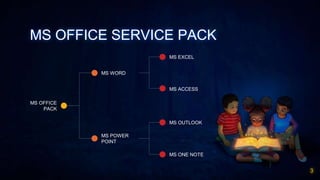
MS OFFICE SERVICE PACK
3
MS EXCEL
MS WORD
MS OFFICE
PACK
MS POWER
POINT
MS ACCESS
MS OUTLOOK
MS ONE NOTE
MS EXCEL
A software program created by
Microsoft that uses spreadsheets
to organize numbers and data
with formulas and
functions. Excel analysis is
ubiquitous around the world and
used by businesses of all sizes to
perform financial analysis.
4
1.
Transition Headline
Let’s start with the first set of slides
“✦ Open Excel Starter with the
Windows Start button.
✦ Click the Start button. . If Excel Starter is not
included among the list of programs you see,
click All Programs, and then click Microsoft
Office Starter.
✦ Click Microsoft Excel Starter 2010.
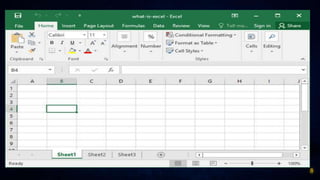
The Excel Starter startup screen appears, and
a blank spreadsheet is displayed.
6
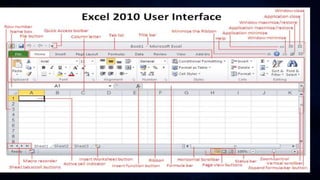
STEPS TO START MS EXCEL
WORKSHEET
✦ A worksheet or sheet is a
single page in a file created
with an electronic
spreadsheet program such
as Microsoft
Excel or Google Sheets.
7
And tables to compare data
A B C
Yellow 10 20 7
Blue 30 15 10
Orange 5 24 16
8
WORKBOOK
A workbook is the name
given to an Excel file and
contains one or more
worksheets. When you open
an electronic spreadsheet
program, it loads an empty
workbook file consisting of
one or more blank
worksheets for you to use
9
HOME
WORK
Do question
exercise A and B
page no 95,96
from chapter
introduction to
MS EXCEL 2010.
10
PRACTICE MAKES
YOU BETTER DAY BY
DAY
11
12
Thanks!
Any questions?
You can find me at:
✦ MS TEAM
✦ Miss Laraib Ali
✦ Meet you in next class.

INTRODUCTION TO MS EXCEL 2010