
Microsoft Excel an extended introduction
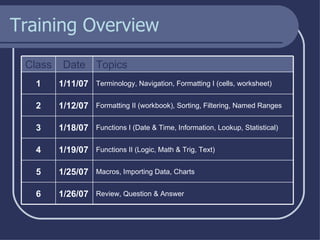
Training Overview Review, Question & Answer 1/26/07 6 Macros, Importing Data, Charts 1/25/07 5 Functions II (Logic, Math & Trig, Text) 1/19/07 4 Functions I (Date & Time, Information, Lookup, Statistical) 1/18/07 3 Formatting II (workbook), Sorting, Filtering, Named Ranges 1/12/07 2 Terminology, Navigation, Formatting I (cells, worksheet) 1/11/07 1 Topics Date Class
Class 1 Terminology Navigation Formatting I (cells) Tips & Tricks
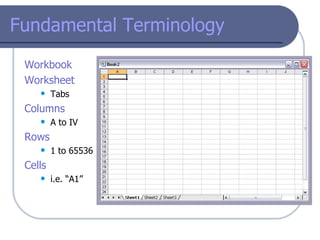
Fundamental Terminology Workbook  Worksheet Tabs Columns A to IV Rows   1 to 65536 Cells i.e. “A1”
Fundamental Terminology Functions Text Date & Time Math Information Logic Always  begins with an equal sign Example: =  sum(A1  + 32)
Fundamental Terminology Macros They are basically mini programs to automatically repeat routine tasks. The easiest way to create them is to use the macro recorder, though they can be created manually.
Fundamental Terminology Add - Ins These are optional functions that allow you to do more complex tasks with Excel.
Navigation
Formatting Format the data type Sets the format of the data in the cell
Formatting Change the alignment Change how the data in a cell aligns, combine cells, etc.
Formatting Change the font Change font, font size, font weight, font color, etc.
Formatting Create a border in the cell(s) This can also be done off the main toolbar
Formatting Change the color or pattern Changes the background color in a cell
Formatting Set the cell protection This is used in conjunction with the workbook/worksheet protection
Tips & Tricks Pressing  Control – Home  will bring you to the top left cell Pressing  Control – End  will bring you to the bottom of your data Pressing  Control – Page Up or Page Down  scrolls through the tabs Go to  Windows > Freeze Panes  to “hold” headers in place Right-click on a tab to change the tab color
Class 2 Formatting II Sorting Filtering Named Ranges
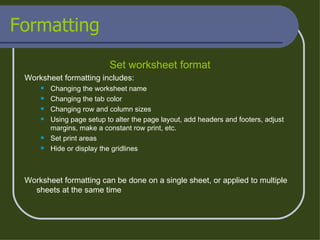
Formatting Set worksheet format Worksheet formatting includes: Changing the worksheet name Changing the tab color Changing row and column sizes Using page setup to alter the page layout, add headers and footers, adjust margins, make a constant row print, etc. Set print areas Hide or display the gridlines Worksheet formatting can be done on a single sheet, or applied to multiple sheets at the same time
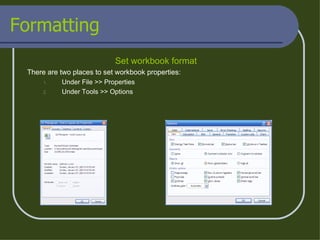
Formatting Set workbook format There are two places to set workbook properties: Under File >> Properties Under Tools >> Options
Sorting
Filtering
Named Ranges
Class 3 Functions 1  Date & Time Information Lookup Statistical
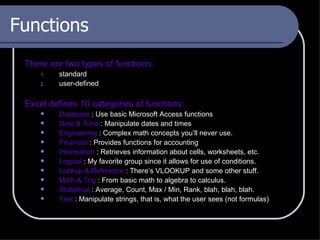
Functions There are two types of functions:  standard  user-defined Excel defines 10 categories of functions: Database  : Use basic Microsoft Access functions  Date & Time  : Manipulate dates and times Engineering  : Complex math concepts you’ll never use. Financial  : Provides functions for accounting Information  : Retrieves information about cells, worksheets, etc. Logical  : My favorite group since it allows for use of conditions. Lookup & Reference  : There’s VLOOKUP and some other stuff. Math & Trig  : From basic math to algebra to calculus. Statistical  : Average, Count, Max / Min, Rank, blah, blah, blah. Text  : Manipulate strings, that is, what the user sees (not formulas)
Functions Logical If() Evaluates an expression and returns either the true or false value And() Evaluates a series of expressions, and returns true if ALL are true Or() Evaluates a series of expressions, and returns true if ANY are true
Functions Math & Trig MRound () Rounds a number UP to the nearest multiple you type in Round() Rounds a number to the number of decimal places you enter SumIf () Sums a column conditionally, based on the value in another column RoundUp()/RoundDown () Rounds a number either UP or DOWN, depending on function used
Functions Text Trim() Trim removes leading and trailing spaces from cells Substitute() Substitute replaces one string with another inside a cell Mid() Mid returns part of a string FROM a start point TO an end point Left() Left returns part of a string FROM the beginning to position X Right() Right returns part of a string FROM position X to the end
Class 4 Functions 2  Logical Math & Trig Text
Functions Date & Time Now() This function returns the current date and time Date() Date returns the current date only Weekday() Returns the number of the day of the week (1 = Sunday, 2 = Monday) NetWorkDays() Returns the number of workdays between two dates WeekNum() Returns the fiscal week number corresponding to a date
Functions Information IsNumber() Evaluates a string and returns TRUE or FALSE IsError() Evaluates a formula and returns TRUE or FALSE
Functions Lookup & Reference VLookup () Looks for a value in a range you define, and returns the column you determine
Functions Statistical Average() Returns the average of a range of numbers CountA() Returns the number of cells with data in them from a given range CountIf() Counts a cell IF if meets certain conditions Rank() Ranks a range of cells either ascending or descending Max() Returns the largest number from a range of cells
Functions Tips & Tricks Use “ $” to lock a cell reference when copying, i.e. a dollar sign before the column means the column doesn’t change. If you click in the formula bar after entering in a formula, the cells referenced will be highlighted Double click the black dot to quickly copy formulas To edit a formula, either click in the formula bar or simply double-click the cell containing the formula Excel can occasionally put in closing parentheses for you
Class 5 Macros Importing Data Charts
Macros There are two types of macros: Automatically recorded Manually written When you turn macro recording ON, every action you do will be recorded until you press STOP on the macro recorder toolbar. When you playback the macro, it will re-enact the exact steps you took, whether it fits on the current spreadsheet or not.
Class 6 Question & Answer

Excel Training

  • 1.
    Microsoft Excel anextended introduction
  • 2.
    Training Overview Review,Question & Answer 1/26/07 6 Macros, Importing Data, Charts 1/25/07 5 Functions II (Logic, Math & Trig, Text) 1/19/07 4 Functions I (Date & Time, Information, Lookup, Statistical) 1/18/07 3 Formatting II (workbook), Sorting, Filtering, Named Ranges 1/12/07 2 Terminology, Navigation, Formatting I (cells, worksheet) 1/11/07 1 Topics Date Class
  • 3.
    Class 1 TerminologyNavigation Formatting I (cells) Tips & Tricks
  • 4.
    Fundamental Terminology Workbook Worksheet Tabs Columns A to IV Rows 1 to 65536 Cells i.e. “A1”
  • 5.
    Fundamental Terminology FunctionsText Date & Time Math Information Logic Always begins with an equal sign Example: = sum(A1 + 32)
  • 6.
    Fundamental Terminology MacrosThey are basically mini programs to automatically repeat routine tasks. The easiest way to create them is to use the macro recorder, though they can be created manually.
  • 7.
    Fundamental Terminology Add- Ins These are optional functions that allow you to do more complex tasks with Excel.
  • 8.
  • 9.
    Formatting Format thedata type Sets the format of the data in the cell
  • 10.
    Formatting Change thealignment Change how the data in a cell aligns, combine cells, etc.
  • 11.
    Formatting Change thefont Change font, font size, font weight, font color, etc.
  • 12.
    Formatting Create aborder in the cell(s) This can also be done off the main toolbar
  • 13.
    Formatting Change thecolor or pattern Changes the background color in a cell
  • 14.
    Formatting Set thecell protection This is used in conjunction with the workbook/worksheet protection
  • 15.
    Tips & TricksPressing Control – Home will bring you to the top left cell Pressing Control – End will bring you to the bottom of your data Pressing Control – Page Up or Page Down scrolls through the tabs Go to Windows > Freeze Panes to “hold” headers in place Right-click on a tab to change the tab color
  • 16.
    Class 2 FormattingII Sorting Filtering Named Ranges
  • 17.
    Formatting Set worksheetformat Worksheet formatting includes: Changing the worksheet name Changing the tab color Changing row and column sizes Using page setup to alter the page layout, add headers and footers, adjust margins, make a constant row print, etc. Set print areas Hide or display the gridlines Worksheet formatting can be done on a single sheet, or applied to multiple sheets at the same time
  • 18.
    Formatting Set workbookformat There are two places to set workbook properties: Under File >> Properties Under Tools >> Options
  • 19.
  • 20.
  • 21.
  • 22.
    Class 3 Functions1 Date & Time Information Lookup Statistical
  • 23.
    Functions There aretwo types of functions: standard user-defined Excel defines 10 categories of functions: Database : Use basic Microsoft Access functions Date & Time : Manipulate dates and times Engineering : Complex math concepts you’ll never use. Financial : Provides functions for accounting Information : Retrieves information about cells, worksheets, etc. Logical : My favorite group since it allows for use of conditions. Lookup & Reference : There’s VLOOKUP and some other stuff. Math & Trig : From basic math to algebra to calculus. Statistical : Average, Count, Max / Min, Rank, blah, blah, blah. Text : Manipulate strings, that is, what the user sees (not formulas)
  • 24.
    Functions Logical If()Evaluates an expression and returns either the true or false value And() Evaluates a series of expressions, and returns true if ALL are true Or() Evaluates a series of expressions, and returns true if ANY are true
  • 25.
    Functions Math &Trig MRound () Rounds a number UP to the nearest multiple you type in Round() Rounds a number to the number of decimal places you enter SumIf () Sums a column conditionally, based on the value in another column RoundUp()/RoundDown () Rounds a number either UP or DOWN, depending on function used
  • 26.
    Functions Text Trim()Trim removes leading and trailing spaces from cells Substitute() Substitute replaces one string with another inside a cell Mid() Mid returns part of a string FROM a start point TO an end point Left() Left returns part of a string FROM the beginning to position X Right() Right returns part of a string FROM position X to the end
  • 27.
    Class 4 Functions2 Logical Math & Trig Text
  • 28.
    Functions Date &Time Now() This function returns the current date and time Date() Date returns the current date only Weekday() Returns the number of the day of the week (1 = Sunday, 2 = Monday) NetWorkDays() Returns the number of workdays between two dates WeekNum() Returns the fiscal week number corresponding to a date
  • 29.
    Functions Information IsNumber()Evaluates a string and returns TRUE or FALSE IsError() Evaluates a formula and returns TRUE or FALSE
  • 30.
    Functions Lookup &Reference VLookup () Looks for a value in a range you define, and returns the column you determine
  • 31.
    Functions Statistical Average()Returns the average of a range of numbers CountA() Returns the number of cells with data in them from a given range CountIf() Counts a cell IF if meets certain conditions Rank() Ranks a range of cells either ascending or descending Max() Returns the largest number from a range of cells
  • 32.
    Functions Tips &Tricks Use “ $” to lock a cell reference when copying, i.e. a dollar sign before the column means the column doesn’t change. If you click in the formula bar after entering in a formula, the cells referenced will be highlighted Double click the black dot to quickly copy formulas To edit a formula, either click in the formula bar or simply double-click the cell containing the formula Excel can occasionally put in closing parentheses for you
  • 33.
    Class 5 MacrosImporting Data Charts
  • 34.
    Macros There aretwo types of macros: Automatically recorded Manually written When you turn macro recording ON, every action you do will be recorded until you press STOP on the macro recorder toolbar. When you playback the macro, it will re-enact the exact steps you took, whether it fits on the current spreadsheet or not.
  • 35.