MATLAB FOR ALL ENGINEERS
ADVANCED WORKSHOP
December-13th-2016
MECHANICAL ENGINEERING DEPARTMENT
Dr. SAEED J. ALMALOWI
COLLEGE OF ENGINEERING
What can you gain from the WORKSHOP ?
Know basics of MATLAB/GUI/Simulink?
know how to solve simple problems?
Know what MATLAB/GUI/Simulink is?
Know how to get started with MATLAB/GUI/Simulink?
Be able to explore MATLAB/GUI & Simulink on your own !
INTRODUCTION TO MATLAB/GUI&SIMULINK
3
Built in functions
Getting Started
Vectors and Matrices
1. INTRODUCTION
2. GRAPHICAL USER INTERFACE
Examples
Introduction to MATLAB
GUI
M–files : script, Plots, Animation, and Functions 3. SIMULINK
Modeling Examples Simulink
CONTENTS
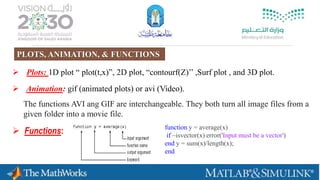
 Plots: 1D plot “ plot(t,x)”, 2D plot, “contourf(Z)’’ ,Surf plot , and 3D plot.
 Animation: gif (animated plots) or avi (Video).
 Functions:
The functions AVI ang GIF are interchangeable. They both turn all image files from a
given folder into a movie file.
function y = average(x)
if ~isvector(x) error('Input must be a vector')
end y = sum(x)/length(x);
end
PLOTS, ANIMATION, & FUNCTIONS
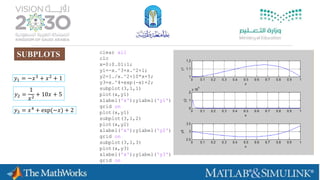
clear all
clc
x=0:0.01:1;
y1=-x.^3+x.^2+1;
y2=1./x.^2+10*x+5;
y3=x.^4+exp(-x)+2;
subplot(3,1,1)
plot(x,y1)
xlabel('x');ylabel('y1')
grid on
plot(x,y1)
subplot(3,1,2)
plot(x,y2)
xlabel('x');ylabel('y2')
grid on
subplot(3,1,3)
plot(x,y3)
xlabel('x');ylabel('y3')
grid on
SUBPLOTS
𝑦1 = −𝑥3
+ 𝑥2
+ 1
𝑦2 =
1
𝑥2 + 10𝑥 + 5
𝑦3 = 𝑥4
+ exp(−𝑥) + 2
frame = getframe(1);
im = frame2im(frame);
[imind,cm] = rgb2ind(im,256);
if k == 1;
imwrite(imind,cm,filename,'gif',
'Loopcount',inf);
else
imwrite(imind,cm,filename,'gif','WriteMode'
,'append');
end
filename = 'upwind.gif'; Open file and
name it!!!
Creating A
frame
Upwind Method (Scheme)
GIF ANIMATED PLOTS
% Clear workspace
clear
clc
clf
% Define variables
N=100; % number of nodes
L=1; % The length of the domain
dx=L/(N);
x=0:dx:L;
ti=0; % Initial time
tf=0.8; % Final time
v=0.5; % Velcoity
dt=dx/v;
% Set Initial condition
uo=exp(-200*(x-0.25).^2);
u=uo;
unp1=uo;
% Loop through the time
nsteps=tf/dt;
t=ti;
filename = 'upwind.gif';
for k=1:nsteps
% BCs
u(1)=u(1);
u(N)=u(N);
% Exact Solution
% Calculate the FOU scheme
for i=2:N-1
unp1(i)=u(i)-v*dt/dx*(u(i)-u(i-1));
end
ua=exp(-200*(x-0.25-v*t).^2);
% Update u and t
t=t+dt;
u=unp1;
% Plot solution
plot(x,u,'bo-',x,ua,'r--')
xlabel('x')
ylabel('u')
shg
axis([ 0 L -0.5 1.5]);
grid on
pause (dt)
title(['Velcoity u (Time in [sec] is
' num2str(t) ')']);
drawnow
frame = getframe(1);
im = frame2im(frame);
[imind,cm] = rgb2ind(im,256);
if k == 1;
imwrite(imind,cm,filename,'gif',
'Loopcount',inf);
else
imwrite(imind,cm,filename,'gif','WriteM
ode','append');
end
end
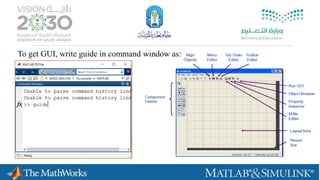
To get GUI, write guide in command window as:
𝑑𝑥2
𝑑𝑡2
+ 3η
𝑑𝑥
𝑑𝑡
+ 4𝑥 = 1
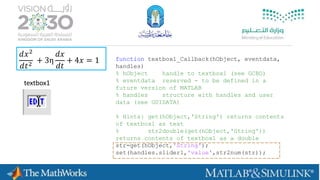
textbox1
function textbox1_Callback(hObject, eventdata,
handles)
% hObject handle to textbox1 (see GCBO)
% eventdata reserved - to be defined in a
future version of MATLAB
% handles structure with handles and user
data (see GUIDATA)
% Hints: get(hObject,'String') returns contents
of textbox1 as text
% str2double(get(hObject,'String'))
returns contents of textbox1 as a double
str=get(hObject,'String');
set(handles.slider1,'value',str2num(str));
𝑑𝑥2
𝑑𝑡2
+ 3η
𝑑𝑥
𝑑𝑡
+ 4𝑥 = 1
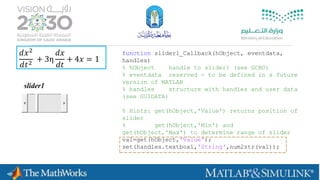
function slider1_Callback(hObject, eventdata,
handles)
% hObject handle to slider1 (see GCBO)
% eventdata reserved - to be defined in a future
version of MATLAB
% handles structure with handles and user data
(see GUIDATA)
% Hints: get(hObject,'Value') returns position of
slider
% get(hObject,'Min') and
get(hObject,'Max') to determine range of slider
val=get(hObject,'Value');
set(handles.textbox1,'String',num2str(val));
slider1
𝑑𝑥2
𝑑𝑡2
+ 3η
𝑑𝑥
𝑑𝑡
+ 4𝑥 = 1
function runsimulation_Callback(hObject, eventdata, handles)
% hObject handle to runsimulation (see GCBO)
% eventdata reserved - to be defined in a future version of
MATLAB
% handles structure with handles and user data (see
GUIDATA)
eta=get(handles.slider1,'value');
G=tf(1,[1,3*eta,4])
time=linspace(0,20,200);
[x]=step(G,time);
axes(handles.axes1);
plot(time,x)
hold on
grid on
xlabel('Time')
ylabel('x')
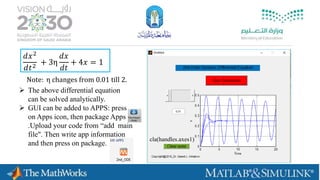
cla(handles.axes1)
𝑑𝑥2
𝑑𝑡2
+ 3η
𝑑𝑥
𝑑𝑡
+ 4𝑥 = 1
Note: η changes from 0.01 till 2.
 The above differential equation
can be solved analytically.
 GUI can be added to APPS: press
on Apps icon, then package Apps
.Upload your code from “add main
file". Then write app information
and then press on package.
13
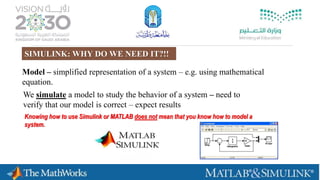
Model – simplified representation of a system – e.g. using mathematical
equation.
We simulate a model to study the behavior of a system – need to
verify that our model is correct – expect results
Knowing how to use Simulink or MATLAB does not mean that you know how to model a
system.
SIMULINK: WHY DO WE NEED IT?!!
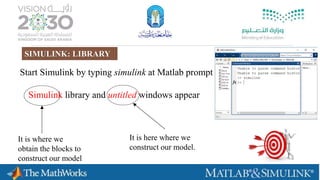
Start Simulink by typing simulink at Matlab prompt
Simulink library and untitled windows appear
It is here where we
construct our model.
It is where we
obtain the blocks to
construct our model
SIMULINK: LIBRARY
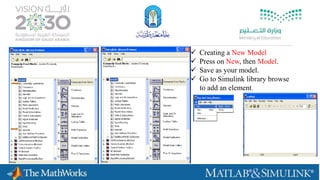
 Creating a New Model
 Press on New, then Model.
 Save as your model.
 Go to Simulink library browse
to add an element.
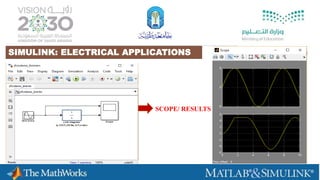
SIMULINK: ELECTRICAL APPLICATIONS
SCOPE/ RESULTS
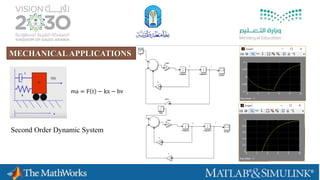
ma = F t − kx − bv
Second Order Dynamic System
MECHANICALAPPLICATIONS
SIMULINK: ELECTRICALAPPLICATIONS
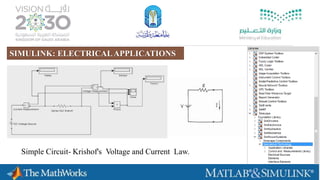
Simple Circuit- Krishof's Voltage and Current Law.
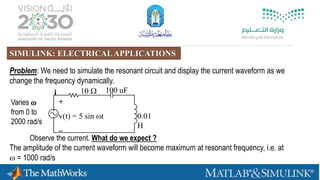
Problem: We need to simulate the resonant circuit and display the current waveform as we
change the frequency dynamically.
i 10  100 uF
0.01
H
Varies 
from 0 to
2000 rad/s
Observe the current. What do we expect ?
The amplitude of the current waveform will become maximum at resonant frequency, i.e. at
 = 1000 rad/s
+
v(t) = 5 sin t
–
SIMULINK: ELECTRICALAPPLICATIONS
 idt
C
1
dt
di
LiRv
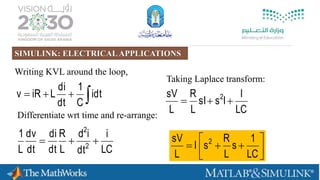
Writing KVL around the loop,
LC
i
dt
id
L
R
dt
di
dt
dv
L
1
2
2

Differentiate wrt time and re-arrange:
Taking Laplace transform:
LC
I
IssI
L
R
L
sV 2






LC
1
s
L
R
sI
L
sV 2
SIMULINK: ELECTRICALAPPLICATIONS
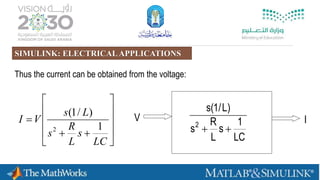
Thus the current can be obtained from the voltage:












LC
s
L
R
s
Ls
VI
1
)/1(
2
LC
1
s
L
R
s
)L/1(s
2

V I
SIMULINK: ELECTRICALAPPLICATIONS
Constructing the model using Simulink:
1
s+1
Transfer Fcn
simout
To WorkspaceSine Wave
‘Drag and drop’ block from the Simulink library window to the untitled window
100s
s +1000s+1e62
Transfer Fcn
v
To Workspace1
i
To WorkspaceSine Wave
THINK !!!
START CREATING
YOUR SIMULINK
SIMULINK: ELECTRICALAPPLICATIONS
talent@taibahu.edu.sa
Contact us
@talent_taibah
QUESTIONS??????

ADVANCED WORKSHOP IN MATLAB

  • 1.
    MATLAB FOR ALLENGINEERS ADVANCED WORKSHOP December-13th-2016 MECHANICAL ENGINEERING DEPARTMENT Dr. SAEED J. ALMALOWI COLLEGE OF ENGINEERING
  • 2.
    What can yougain from the WORKSHOP ? Know basics of MATLAB/GUI/Simulink? know how to solve simple problems? Know what MATLAB/GUI/Simulink is? Know how to get started with MATLAB/GUI/Simulink? Be able to explore MATLAB/GUI & Simulink on your own ! INTRODUCTION TO MATLAB/GUI&SIMULINK
  • 3.
    3 Built in functions GettingStarted Vectors and Matrices 1. INTRODUCTION 2. GRAPHICAL USER INTERFACE Examples Introduction to MATLAB GUI M–files : script, Plots, Animation, and Functions 3. SIMULINK Modeling Examples Simulink CONTENTS
  • 4.
     Plots: 1Dplot “ plot(t,x)”, 2D plot, “contourf(Z)’’ ,Surf plot , and 3D plot.  Animation: gif (animated plots) or avi (Video).  Functions: The functions AVI ang GIF are interchangeable. They both turn all image files from a given folder into a movie file. function y = average(x) if ~isvector(x) error('Input must be a vector') end y = sum(x)/length(x); end PLOTS, ANIMATION, & FUNCTIONS
  • 5.
    clear all clc x=0:0.01:1; y1=-x.^3+x.^2+1; y2=1./x.^2+10*x+5; y3=x.^4+exp(-x)+2; subplot(3,1,1) plot(x,y1) xlabel('x');ylabel('y1') grid on plot(x,y1) subplot(3,1,2) plot(x,y2) xlabel('x');ylabel('y2') gridon subplot(3,1,3) plot(x,y3) xlabel('x');ylabel('y3') grid on SUBPLOTS 𝑦1 = −𝑥3 + 𝑥2 + 1 𝑦2 = 1 𝑥2 + 10𝑥 + 5 𝑦3 = 𝑥4 + exp(−𝑥) + 2
  • 6.
    frame = getframe(1); im= frame2im(frame); [imind,cm] = rgb2ind(im,256); if k == 1; imwrite(imind,cm,filename,'gif', 'Loopcount',inf); else imwrite(imind,cm,filename,'gif','WriteMode' ,'append'); end filename = 'upwind.gif'; Open file and name it!!! Creating A frame Upwind Method (Scheme) GIF ANIMATED PLOTS
  • 7.
    % Clear workspace clear clc clf %Define variables N=100; % number of nodes L=1; % The length of the domain dx=L/(N); x=0:dx:L; ti=0; % Initial time tf=0.8; % Final time v=0.5; % Velcoity dt=dx/v; % Set Initial condition uo=exp(-200*(x-0.25).^2); u=uo; unp1=uo; % Loop through the time nsteps=tf/dt; t=ti; filename = 'upwind.gif'; for k=1:nsteps % BCs u(1)=u(1); u(N)=u(N); % Exact Solution % Calculate the FOU scheme for i=2:N-1 unp1(i)=u(i)-v*dt/dx*(u(i)-u(i-1)); end ua=exp(-200*(x-0.25-v*t).^2); % Update u and t t=t+dt; u=unp1; % Plot solution plot(x,u,'bo-',x,ua,'r--') xlabel('x') ylabel('u') shg axis([ 0 L -0.5 1.5]); grid on pause (dt) title(['Velcoity u (Time in [sec] is ' num2str(t) ')']); drawnow frame = getframe(1); im = frame2im(frame); [imind,cm] = rgb2ind(im,256); if k == 1; imwrite(imind,cm,filename,'gif', 'Loopcount',inf); else imwrite(imind,cm,filename,'gif','WriteM ode','append'); end end
  • 8.
    To get GUI,write guide in command window as:
  • 9.
    𝑑𝑥2 𝑑𝑡2 + 3η 𝑑𝑥 𝑑𝑡 + 4𝑥= 1 textbox1 function textbox1_Callback(hObject, eventdata, handles) % hObject handle to textbox1 (see GCBO) % eventdata reserved - to be defined in a future version of MATLAB % handles structure with handles and user data (see GUIDATA) % Hints: get(hObject,'String') returns contents of textbox1 as text % str2double(get(hObject,'String')) returns contents of textbox1 as a double str=get(hObject,'String'); set(handles.slider1,'value',str2num(str));
  • 10.
    𝑑𝑥2 𝑑𝑡2 + 3η 𝑑𝑥 𝑑𝑡 + 4𝑥= 1 function slider1_Callback(hObject, eventdata, handles) % hObject handle to slider1 (see GCBO) % eventdata reserved - to be defined in a future version of MATLAB % handles structure with handles and user data (see GUIDATA) % Hints: get(hObject,'Value') returns position of slider % get(hObject,'Min') and get(hObject,'Max') to determine range of slider val=get(hObject,'Value'); set(handles.textbox1,'String',num2str(val)); slider1
  • 11.
    𝑑𝑥2 𝑑𝑡2 + 3η 𝑑𝑥 𝑑𝑡 + 4𝑥= 1 function runsimulation_Callback(hObject, eventdata, handles) % hObject handle to runsimulation (see GCBO) % eventdata reserved - to be defined in a future version of MATLAB % handles structure with handles and user data (see GUIDATA) eta=get(handles.slider1,'value'); G=tf(1,[1,3*eta,4]) time=linspace(0,20,200); [x]=step(G,time); axes(handles.axes1); plot(time,x) hold on grid on xlabel('Time') ylabel('x')
  • 12.
    cla(handles.axes1) 𝑑𝑥2 𝑑𝑡2 + 3η 𝑑𝑥 𝑑𝑡 + 4𝑥= 1 Note: η changes from 0.01 till 2.  The above differential equation can be solved analytically.  GUI can be added to APPS: press on Apps icon, then package Apps .Upload your code from “add main file". Then write app information and then press on package.
  • 13.
    13 Model – simplifiedrepresentation of a system – e.g. using mathematical equation. We simulate a model to study the behavior of a system – need to verify that our model is correct – expect results Knowing how to use Simulink or MATLAB does not mean that you know how to model a system. SIMULINK: WHY DO WE NEED IT?!!
  • 14.
    Start Simulink bytyping simulink at Matlab prompt Simulink library and untitled windows appear It is here where we construct our model. It is where we obtain the blocks to construct our model SIMULINK: LIBRARY
  • 15.
     Creating aNew Model  Press on New, then Model.  Save as your model.  Go to Simulink library browse to add an element.
  • 16.
  • 17.
    ma = Ft − kx − bv Second Order Dynamic System MECHANICALAPPLICATIONS
  • 18.
    SIMULINK: ELECTRICALAPPLICATIONS Simple Circuit-Krishof's Voltage and Current Law.
  • 19.
    Problem: We needto simulate the resonant circuit and display the current waveform as we change the frequency dynamically. i 10  100 uF 0.01 H Varies  from 0 to 2000 rad/s Observe the current. What do we expect ? The amplitude of the current waveform will become maximum at resonant frequency, i.e. at  = 1000 rad/s + v(t) = 5 sin t – SIMULINK: ELECTRICALAPPLICATIONS
  • 20.
     idt C 1 dt di LiRv Writing KVLaround the loop, LC i dt id L R dt di dt dv L 1 2 2  Differentiate wrt time and re-arrange: Taking Laplace transform: LC I IssI L R L sV 2       LC 1 s L R sI L sV 2 SIMULINK: ELECTRICALAPPLICATIONS
  • 21.
    Thus the currentcan be obtained from the voltage:             LC s L R s Ls VI 1 )/1( 2 LC 1 s L R s )L/1(s 2  V I SIMULINK: ELECTRICALAPPLICATIONS
  • 22.
    Constructing the modelusing Simulink: 1 s+1 Transfer Fcn simout To WorkspaceSine Wave ‘Drag and drop’ block from the Simulink library window to the untitled window 100s s +1000s+1e62 Transfer Fcn v To Workspace1 i To WorkspaceSine Wave THINK !!! START CREATING YOUR SIMULINK SIMULINK: ELECTRICALAPPLICATIONS
  • 23.