Downloaded 182 times
![Contents
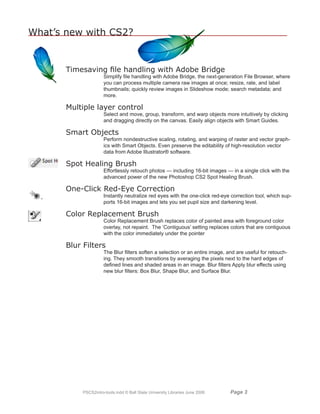
What’s New in CS2.................................................................................... 3
Overview.................................................................................................... 4
Bitmaps versus Objects ............................................................................. 4
Mac vs PC Keyboards ............................................................................... 5
Starting the Photoshop Application............................................................ 5
On-screen image size................................................................................ 5
Color mode and background ..................................................................... 6
Floating Palettes ........................................................................................ 6
The Toolbox - Displaying and working with tools ....................................... 6
Using the Options Bar ............................................................................... 8
Understanding the Selection Process ....................................................... 9
Toolbox Controls ...................................................................................... 10
Using the Color Picker ............................................................................. 10
Tool Descriptions ......................................................................................11
Creating shape layers.............................................................................. 13
Floating Palettes ...................................................................................... 14
Workspaces ............................................................................................. 17
Note on .PSD File Type Pam Stant
Native Photoshop (.psd) - While creating, editing and tweaking images, it is Technical Training Analyst
best to save all your files in Photoshop’s native format, which is the default Technology Training Support Services
file format for newly created images. This encoded format (.psd) is the only Bracken Library, Room 318
format that supports all available Adobe Photoshop image modes (Bitmap, Ball State University
Grayscale, RGB, CMYK, etc.), channels and layers. This lets you use all the Muncie, Indiana 47306
program’s editing tools, commands and filters. It also retains all the data until pstant@bsu.edu
you decide to save a copy of the file in some other format for eventual use. 765 285 8154
A file can be opened in its own format, then converted to a Photoshop (.psd) pstant.iweb.bsu.edu
document by using the SAVE AS command under the FILE menu, then select-
© Copyright Ball State University
ing PHOTOSHOP format. Using a slightly different filename will preserve the Technology Training Support Services
original file and save the copy to Photoshop format for the working process. techtrain@bsu.edu University Libraries
June 2006 All Rights Reserved
Mac vs PC Keyboards
The commands given here are geared toward both Mac the Option key (Mac); CTRL Key (PC) is usually translated
and PC use. The key commands can be translated be- to Command [apple/flower] Key (MAC). [ Macintosh/
tween PC and Mac easily: ALT key (PC) is the same as Windows: Option /ALT Command / Ctrl ]
PSCS2intro-tools.indd © Ball State University Libraries June 2006 Page](https://image.slidesharecdn.com/adobephotoshopcs2toolsbasics-120109064029-phpapp02/85/Adobe-photoshop-cs2-tools-basics-2-320.jpg)
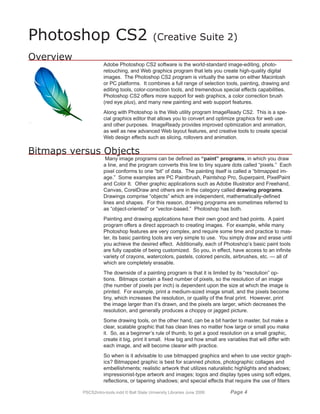
![and color enhancements. Vector graphics are better for more stylized art-
work, such as poster art and other high-contrast graphics; architectural plans,
product designs, or other precise line drawings; business graphics, such as
charts and “infographics”; and traditional logos and text effects that require
crisp, ultrasmooth edges, such as custom letters and symbols.
Mac vs PC Keyboards
The commands given here are geared toward PC (Windows) use, however
the key commands can be translated from PC to Mac easily: The ALT key on
a PC is the same as the Option key on a Mac; The CTRL key on a PC is
usually translated to the Command [apple/flower] key on a Mac.
[ Windows ALT = Mac Option Windows CTRL = Mac Command ]
Starting the Photoshop Application
Once you’ve opened the application by clicking on the Photoshop icon, the
menu changes to the Photoshop menu, and the Toolbox and various float-
ing palettes appear. To create a new image, select FILE then NEW from the
menu bar. (FILE NEW) This opens a dialog box where you should make
some initial decisions as to the name of the file, dimensions (measurement in
pixels, inches, centimeters, millimeters, points, picas, or columns), resolution,
color mode (bitmap, grayscale, RGB color, CMYK color or lab color); and if
you want the beginning file to be filled with white, or the current background
color, or transparent.
Measurement: For the beginner, inches may be easiest to use. Later, you
may find that pixels or points give you a more precise measurement. By
default, Photoshop assigns exactly 72 points per inch and 6 picas per inch,
which equates to one point per screen pixel.
A seventh unit of measure, Column, is available from the Width pop-up
menu. If you want to create an image that fits exactly within a certain num-
ber of columns when it’s imported into a desktop publishing program, select
the Column option. You can specify the width of a column and the gutter
between columns by choosing Preferences Units and Rulers and enter-
ing values into the Column Size option boxes
On-screen image size
Usually, the on-screen dimensions of an image depend on the entries you
make in the Width, Height and Resolution options in the New dialog box.
Let’s say that both the Width
and Height values are 10
inches and Resolution is 72
ppi (pixels per inch), the new
image will measure 720 x 720
pixels. The exception occurs
if you choose pixels as your
unit of measurement. In that
case, the on-screen dimen-
sions depend solely on the
Width and Height options, and
the Resolution value deter-
mines the size at which the
image prints.
PSCS2intro-tools.indd © Ball State University Libraries June 2006 Page](https://image.slidesharecdn.com/adobephotoshopcs2toolsbasics-120109064029-phpapp02/85/Adobe-photoshop-cs2-tools-basics-5-320.jpg)
![Color mode and background
The Mode pop-up menu allows you to specify the number of colors that can appear
in your image. One would choose Bitmap to create a black-and white image, and
Grayscale to use only gray values. RGB (red, green, blue) for the three basic
colors, CMYK (cyan, magenta, yellow, black) - the color mode commonly used for
color separations going to a print shop - and Lab color (for luminosity) all pro-
vide access to the full range of 16 million colors, even though each has a differ-
ent method for doing so. We’ll use RGB until we learn more about color modes.
Other terms that will be used in regard to color are Hue - which is pure color;
Saturation - is the purity of the color. Zero saturation equals gray. Brightness - is
the lightness or darkness or a color. Zero brightness equals black.
Backgrounds allows you to determine or change the background type for the
new image. These choices are white, background color (assuming that the back-
ground color is something other than white), or transparent (no color at all). [The
current background color at any given time is identified by looking at the back-
ground color square in the toolbox palette. See later information on the Toolbox
on how to set and change these colors.] The last one, Transparent, results in
a floating layer with no background image whatsoever, and can be useful when
editing one layer independently of the rest of the image.
For example, transparent is very handy to use when making graphics for
Internet Web pages. Once the image is finished, saved as a Photoshop docu-
ment, then saved as a .GIF-type file, you can use that image on any web page,
and the only background behind the image you will see is the preset background
of the page. This is very useful on web pages that have some sort of graphic as
a repeating background.
Now, name the new window, or just click OK. If you don’t name it now, it’s OK
to wait until you want to save the file, when you’re again prompted to name it if
it hasn’t been named yet. The image window opens and is ready for creation.
Also note the Toolbox and several floating palettes.
Floating Palettes
There are a number of floating palettes. They are called “floating” because you
can click on the top bar of each and drag to move them around on the screen.
These are initiated under the Photoshop menu option of Window. These pal-
ettes can be separated into individual palettes or grouped into multipurpose
palettes. The Show/Hide commands for all the palettes appear directly under
the Window menu. (More later on the various palettes.)
The Toolbox - Displaying and working with tools
The toolbox is a floating palette that provides 22 tool icons, each of which
represents a selection, navigation, drawing, painting or editing tool. To select a
tool, click on its icon, then use it by clicking or dragging with it inside the image
window. Tools can also be selected by typing the appropriate keyboard shortcut
for that tool. (See tool listing for appropriate keyboard shortcuts.)
The next-to-bottom section of the toolbox shows three sets of controls. The
color controls (1) allow you to change the colors with which you paint; the mask
controls (2) let you enter and exit the quick mask mode (masks are an advanced
technique that will be discussed in future classes); and the image window con-
trols (3) let you change the state of the foreground window on the desktop.
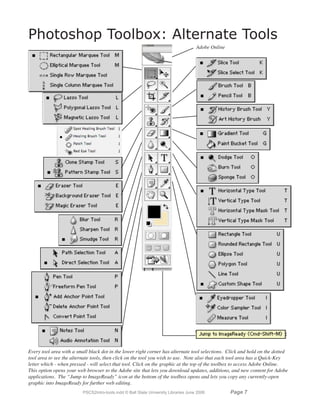
Many of the tools in the toolbox have Alternate Tools, which offer addi-
tional options. To see all the Hidden Tools in any tool that has the tiny right
arrow on it, click and hold the mouse button on that tool. To cycle through
a set of hidden tools, press Alt (Windows) or Option (Mac OS) and click
the visible tool; or hold down Shift and press the visible tool’s shortcut key.
PSCS2intro-tools.indd © Ball State University Libraries June 2006 Page](https://image.slidesharecdn.com/adobephotoshopcs2toolsbasics-120109064029-phpapp02/85/Adobe-photoshop-cs2-tools-basics-6-320.jpg)
![Toolbox Controls
Foreground color: [a] Click on the foreground color icon to bring up the Color
Picker dialog box. Select a color from the huge palette of choices and press OK
to change the foreground color, which is used by all painting tools except the
eraser. ( Press [X] to switch colors , and [D] for default colors, which are black
and white. )
Background color: [b] Click on the background color icon to display the Color
Picker and change the background color, which is used by the eraser and gradi-
ent tools. Photoshop also uses the background color to fill a selected area when
you press the Delete key.
Switch colors: [c] (the quarter-curve with arrows on each end) Click on the
“switch colors” curved arrow icon to exchange the foreground and background
colors. A quick way to make the foreground color white is to click on the default
colors icon and then click on the switch colors icon.
1 2 3
Default colors: [d] (The tiny black box overlapping the tiny white box.) Click
on this icon to automatically change foreground color to black and the back-
ground color to white.
Standard Mode (Marching Ants): [e] In the marching ants mode,
Photoshop represents selection outlines as animated dotted lines that look like
marching ants.
4
Quick Mask: [f] Clicking here enters the quick mask mode, which enables
you to edit selection boundaries using painting tools. Quick Mask mode lets
you view a mask and the image simultaneously. [Masking is a topic that will be
discussed in a later class.]
Standard window: (1) Click here to display the foreground image in a standard win-
dow, with a menu bar at the top and cross bars on the sides. This is the default mode.
Full screen with menu bar: (2) If you can’t see enough of your image inside a
standard window, click on this icon. The title bar and scroll bars disappear, as do
all background windows, but the menu bar and palettes are still visible. Scroll
through the image using the hand tool or the Navigator palette.
Full screen without menu bar: (3) This creates a stark black background which
blanks out everything on the screen but the image and palettes. Thus, no title
bar, menu bar or scroll bars appear. Use the hand tool or the Navigator palette to
scroll through the image.
Jump to ImageReady: (4) Clicking this button lets you
easily jump between Photoshop and ImageReady to use
features in both applications when preparing graphics
for the Web.
Using the Color Picker Window
To use the color picker, first select the range of color
you want by either clicking on or dragging the slider on
the color slider (H).
Next, select the shade of color by dragging your pointer
in the large color block on the left of the screen (A).
Wherever your mouse stops, a tiny circle appears to
indicate that is is the selected shade. Then click OK.
A. Picked color B. Original color C. Adjusted color D. Out-
of-gamut alert icon E. Not Web-safe alert icon F. Web Colors
option G. Color field H. Color slider I. Color values
PSCS2intro-tools.indd © Ball State University Libraries June 2006 Page 10](https://image.slidesharecdn.com/adobephotoshopcs2toolsbasics-120109064029-phpapp02/85/Adobe-photoshop-cs2-tools-basics-10-320.jpg)
![Tool Descriptions
For tool items that have hidden tools, press the Shift key plus the
shortcut keyboard key to access the hidden tools.
Rectangular Marquee: [M ] Drag this tool to enclose a portion of the image in a
marquee, which is a pattern of moving dash marks which indicates the boundary
of a selection. Sometimes called marching ants. Elliptical Marquee: [M ] Drag
with the elliptical marquee tool to enclose a portion of the window in an oval mar-
quee. This tool also has the Single Row (of pixels) and Single Column (of pixels)
selection options
Move: [V] Drag with this tool to move the selected area of the image, whether
you’re dragging inside the selection or not. When the move tool is selected, you
can also move the selected area by using the arrow keys on the keyboard. If no
portion of the image is selected, dragging with the move tool moves the entire layer.
Lasso: [L] Drag and draw with the lasso tool to select portion of the image.
Polygon Lasso tool: [L] Click to set a selection segment point. Magnetic Lasso
tool [L] draws selection borders that cling to the edges of objects.
Magic Wand: [W] Click with this tool to select a contiguous area of similarly col-
ored pixels. To select discontinuous areas, click in one area and then Shift-click
in another.
Cropping: [C] Select (by outlining) a section of the image, then click inside that
area to crop and remove all of the image outside of that section.
The Slice tool [K] creates slices for web pages. The slice selection tool selects the slices.
Use slices to divide a source image into function-
al areas, such as web buttons. When you save
the image as a Web page, each slice is saved as
an independent file that contains its own set-
tings, color palette, links, rollover effects, and
animation effects. Slices achieve faster down-
load speeds, and are useful when working with
images that contain different types of data. I.E.,
if one area of an image needs to be optimized in
GIF format to support an animation, but the rest
of the image is better optimized in JPEG format,
you can isolate the animation using a slice.
The Spot Healing Brush tool (J) removes blemishes and objects.
The Healing Brush tool paints with a sample or pattern to repair imperfections in
a image.
The Patch tool repairs imperfections in a selected area of an image using a
sample or pattern.
The Red Eye tool removes the red reflection caused by a flash.
Paintbrush: [B] Paints strokes like a simple brush, but has lots of brush options.
Pencil: [B] paints hard-edged strokes. Color Replacement Brush: [B] replaces
color of painted area with foreground color overlay, not repaint.
Clone Stamp: [S] The cloning stamp tool, when the Option key/Alt key is clicked,
sets a point on the image where you clicked. Then move the stamp tool to another
place on the image and click-drag to clone the first image as the cursor is dragged.
PSCS2intro-tools.indd © Ball State University Libraries June 2006 Page 11](https://image.slidesharecdn.com/adobephotoshopcs2toolsbasics-120109064029-phpapp02/85/Adobe-photoshop-cs2-tools-basics-11-320.jpg)
![Pattern Stamp: [S] paints a pattern from the copied rectangular selection. For
the pattern stamp tool, use the rectangle marquee tool ( ) on any open image
to select an area to use as a pattern. (This will not work with the elliptical or lasso
selection tools.) Then choose Edit Define Pattern. Reselect the pattern stamp
tool. Drag to paint with the tool. Note: If you are sampling or using a pattern from
one image and applying to another, both images must be in the same color mode.
History Brush: [Y] tool paints with the selected state or snapshot from a previ-
ous history level of the graphic. To use the history brush, open the history palette
and select a previous state of your work on a graphic file. Click in the space to
the left of that state, and a history brush icon appears there. Now select the his-
tory brush and paint from that state to the graphic.
Art History brush: [Y] lets you paint with stylized strokes from a specified his-
tory state or snapshot. Try experimenting with different paint styles, fidelity, size, and
tolerance options to simulate the texture of painting with different colors and styles.
Eraser: [E] erases pixels and restores parts of an image to a previously saved state.
Background Eraser: [E] erases areas to transparency by dragging.
Magic Eraser: [E] erases solid-colored areas to transparency with a single click.
Gradient Fill: [G] Fills an area with a gradual transition between one or more
colors. Drag with the cursor to determine the angle and length of a gradient fill,
which will range from the foreground color to the background color. Gradient
tool choices are: Linear Gradient, Radial, Angle, Reflected and Diamond.
Paint bucket: [G] Fills similarly colored areas with the foreground color.
Blur: [R] The blur tool blurs hard edges in an image.
Sharpen tool: [R] sharpens soft edges. Simulates dragging with wet paint.
Smudge tool: [R] smudges data in an image.
Dodge: [O] Drag to lighten pixels in the image.
Burn: [O] - darkens pixels. Sponge: [O] - decrease the amount of saturation
in an image, which eventually removes the color from the image and leaves only
grayscale.
The path selection tools make shape or segment selections showing anchor
points, direction lines, and direction points.
Pen: [P] Lets you draw smooth-edged paths.
Freeform Pen tool: lets you draw as a pencil on paper. Can be converted to
Magnetic Pen tool.The magnetic pen is an option of the freeform tool that lets you
draw a path that snaps to the edges of defined areas in an image. Similar to the
magnetic lasso, To convert the freeform pen tool to the magnetic pen tool, select
Magnetic in the options bar. Add Anchor Point tool lets you add anchor points to a
path; Delete Anchor Point tool lets you delete anchor points from a path. Convert
Point tool converts straight line segments to curved segments, vice versa.
Type Tool: [T] Select the type tool then click on the image which changes the
cursor to a blinking line. Begin typing text. The Options Bar allows you to select
various type attributes (font, size, etc.) You can reposition the text area with the
move tool. The type tool allows you to enter and edit text directly onto the layer
and set style attributes from the
tool options bar. This allows pre-
cise control by using the charac-
ter and paragraph palettes. With
the vector capabilities, type can
be stretched, twisted, warped.
PSCS2intro-tools.indd © Ball State University Libraries June 2006 Page 1](https://image.slidesharecdn.com/adobephotoshopcs2toolsbasics-120109064029-phpapp02/85/Adobe-photoshop-cs2-tools-basics-12-320.jpg)
![In addition the Styles palette provides an almost unbelievable range of colors and
effects for text. When you type in your text, you must select a “commit” option to
put it on it’s own layer, or use the shortcut of hitting the Return or Enter key. New
text options include word wrap, per-paragraph alignment, auto hyphenation and
full justification.
Shape Tool: [U] makes a variety of editable shapes se-
lected from a shape list. This is one of the most radical and
long-awaited additions to Photoshop. This function allows
the creation of vector shapes, which provide clean, crisp
lines. The shapes are composed of vector lines and points,
which are fully editable.
Creating shape layers
You can create a shape layer using a shape tool or a pen
tool. Technically, a shape layer is a fill layer with a layer
clipping path; the fill layer defines the color of the shape,
while the layer clipping path defines the geometric outline
of the shape. You can change the color and other at-
tributes of a shape by editing its fill layer and applying
layer styles to it. You can change the outline of a shape
by editing its layer clipping path.
To create a new shape layer:
1 Specify a foreground color.
2 Select the rectangle tool ( ), rounded rectangle tool (), ellipse tool ( ), or
line tool (); additionally, in Photoshop, select the polygon tool ( ), custom
shape tool ( ), pen tool ( ), or freeform pen tool ( ).
3 If you’re using a shape tool, drag in the image to draw the shape. If you’re us-
ing a pen tool, click or drag in the image to draw the shape.
4 Each new shape you draw will create its own layer.
5 To create multiple shape components in the same shape layer, hold the Shift
key down and continue drawing shapes or :
• Choose a shape area option to determine what happens at the
intersection of overlapping shapes.
• Select a different tool in the toolbox to switch between drawing tools.
When using a shape tool, you can also select a different shape tool in the
options bar.
6 Click the OK button ( ) in the options bar, or press Enter or Return, to
dismiss the drawing tools.
PSCS2intro-tools.indd © Ball State University Libraries June 2006 Page 1](https://image.slidesharecdn.com/adobephotoshopcs2toolsbasics-120109064029-phpapp02/85/Adobe-photoshop-cs2-tools-basics-13-320.jpg)
![Line: [U] Allows you to draw a line of the foreground color in a straight line.
Holding the shift key while you drag holds the line to 45 degree angles. You can
set the opacity, line width and set arrows on the line, if desired.
The annotations tools
The Notes Tool: [N] make notes that can be attached to an image.
The Audio Annotation Tool: [N] makes voice annotations.
You can add notes and audio annotations anywhere on a Photoshop image can-
vas. When you create a note, a resizable window appears for entering text. When
you record an audio annotation, you must have a microphone plugged into the
audio-in port of your computer. You can import both kinds of annotations from
Photoshop documents saved in PDF or from Acrobat documents saved in PDF or
Form Data Format (FDF).
Eyedropper: [I] Samples colors in an image. Click to lift a color from the image,
which will then display in the “foreground color” box.
Color Sampler: [I] samples up to four locations simultaneously.
Measure tool: [I] measures distances, locations, and angles.
Hand: [H] Drag an image with the hand tool to move an image within its win-
dow so that you can see a different portion of the image. The hand tool differs
from the move tool in that it doesn’t actually move pixels or in any way alter the
image; it simply shifts the on-screen view to another part of the image. Double-
click on the hand tool icon to magnify the image so that it fits on-screen in its
entirety.
Zoom: [Z] Magnifies and reduces the view of an image. The magnifying glass
icon is the cursor when you select the zoom tool. Click on image to magnify.
Win: Alt-click to zoom out, or Ctrl + or - to zoom in and out. Mac: Option-click to
zoom out, or Command + or - to zoom in and out. Double-clicking the zoom tool
sets 100% magnification.
Floating Palettes
There are a number of floating palettes. They are called “floating” because you
can click on the top bar of each and drag to move them around on the screen.
These are initiated under the Photoshop menu option of Window. These pal-
ettes can be separated into fourteen individual palettes or grouped into multipur-
pose palettes. The Show/Hide commands for all the palettes appear directly
under the Window menu.
Additionally, you can make all the palettes disappear with the TAB key.
Repeating the TAB key brings them back.
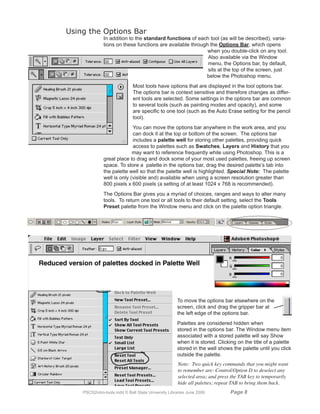
The Options Bar is also a palette, albeit a differently shaped one. Another way
to make the Options Bar appear is to double-click on almost any individual tool
in the toolbox. Most tools have palette options and settings, and many (such as
eraser, brush, pencil, airbrush, clone stamp, blur, sharpen, sponge, burn, dodge)
have their own individual “brushes” settings on the options bar.
Each floating palette has several options. These may include tools, icons, pop-
up menus, slider bars, and more. Many have panel tabs which, when clicked,
switch from one panel to another inside a palette. You can separate and group
panels in palettes as you choose. Click and drag the top tab of one panel into
another palette, then back.
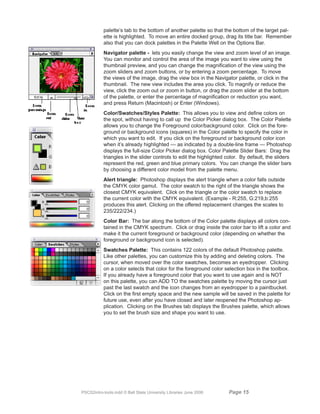
Also, you can dock palettes together which lets you view multiple palettes at the
same time, and move them around as a group. To dock palettes together, drag a
PSCS2intro-tools.indd © Ball State University Libraries June 2006 Page 1](https://image.slidesharecdn.com/adobephotoshopcs2toolsbasics-120109064029-phpapp02/85/Adobe-photoshop-cs2-tools-basics-14-320.jpg)
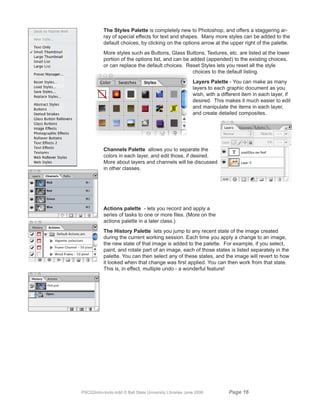
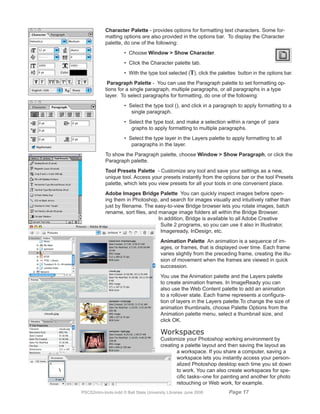

This document provides an overview and introduction to the tools and basics of Adobe Photoshop CS2. It discusses what's new in CS2 like file handling improvements, multiple layer control, smart objects, spot healing brush, and one-click red-eye correction. It also covers bitmap vs objects, color modes, toolboxes, selection processes, color pickers, tool descriptions, shape layers, and workspaces. Keyboard shortcuts for Mac and PC are defined. The document is intended as a training guide for using basic Photoshop CS2 features and tools.


