
Accessibility Testing Approach
Make differently abled to digitally enabled
PART 2 OF 2
Agenda
• What is Accessibility ?
• Examples of Accessibility
• Assistive Technologies
• Accessibility Compliance Law
• Case Studies of Accessibility
• Need for Compliance
• Accessibility Principles
• Accessibility Test Approach – Tool First
• Accessibility Test Approach – Shift Left
• Accessibility Implementation Life Cycle
What is Accessibility ?
Accessibility in the sense considered here refers to the design of products, devices, services, or
environments so as to be usable by people with disabilities
Accessibility is strongly related to universal design which is the process of creating products that are
usable by people with the widest possible range of abilities, operating within the widest possible
range of situations
Accessibility can be viewed as the "ability to access" and benefit from some system
Accessibility can be implemented in software’s, houses, malls, roads, transportation, in daily use
objects
Examples of Accessibility
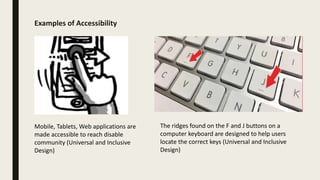
The ridges found on the F and J buttons on a
computer keyboard are designed to help users
locate the correct keys (Universal and Inclusive
Design)
Mobile, Tablets, Web applications are
made accessible to reach disable
community (Universal and Inclusive
Design)
Screen Readers
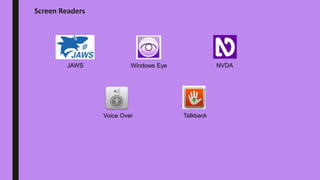
JAWS Windows Eye NVDA
Voice Over Talkback
Open Source Plugins
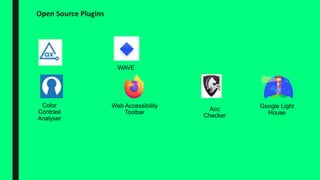
Color
Contrast
Analyser
Google Light
House
Acc
Checker
Web Accessibility
Toolbar
WAVE
Accessibility Compliance Law
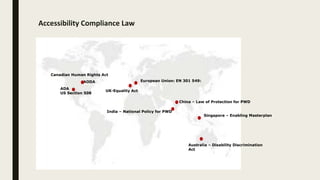
ADA
US Section 508
Canadian Human Rights Act
AODA
UK-Equality Act
European Union: EN 301 549:
Australia – Disability Discrimination
Act
Singapore – Enabling Masterplan
China – Law of Protection for PWD
India – National Policy for PWD
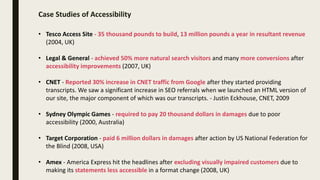
Case Studies of Accessibility
• Tesco Access Site - 35 thousand pounds to build, 13 million pounds a year in resultant revenue
(2004, UK)
• Legal & General - achieved 50% more natural search visitors and many more conversions after
accessibility improvements (2007, UK)
• CNET - Reported 30% increase in CNET traffic from Google after they started providing
transcripts. We saw a significant increase in SEO referrals when we launched an HTML version of
our site, the major component of which was our transcripts. - Justin Eckhouse, CNET, 2009
• Sydney Olympic Games - required to pay 20 thousand dollars in damages due to poor
accessibility (2000, Australia)
• Target Corporation - paid 6 million dollars in damages after action by US National Federation for
the Blind (2008, USA)
• Amex - America Express hit the headlines after excluding visually impaired customers due to
making its statements less accessible in a format change (2008, UK)
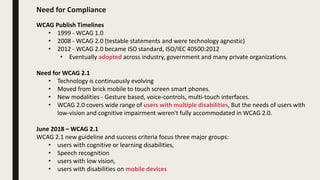
Need for Compliance
WCAG Publish Timelines
• 1999 - WCAG 1.0
• 2008 - WCAG 2.0 (testable statements and were technology agnostic)
• 2012 - WCAG 2.0 became ISO standard, ISO/IEC 40500:2012
• Eventually adopted across industry, government and many private organizations.
Need for WCAG 2.1
• Technology is continuously evolving
• Moved from brick mobile to touch screen smart phones.
• New modalities - Gesture based, voice-controls, multi-touch interfaces.
• WCAG 2.0 covers wide range of users with multiple disabilities, But the needs of users with
low-vision and cognitive impairment weren't fully accommodated in WCAG 2.0.
June 2018 – WCAG 2.1
WCAG 2.1 new guideline and success criteria focus three major groups:
• users with cognitive or learning disabilities,
• Speech recognition
• users with low vision,
• users with disabilities on mobile devices
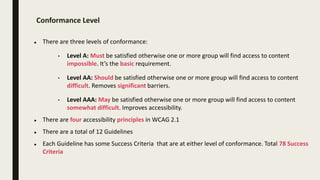
Conformance Level
 There are three levels of conformance:
• Level A: Must be satisfied otherwise one or more group will find access to content
impossible. It’s the basic requirement.
• Level AA: Should be satisfied otherwise one or more group will find access to content
difficult. Removes significant barriers.
• Level AAA: May be satisfied otherwise one or more group will find access to content
somewhat difficult. Improves accessibility.
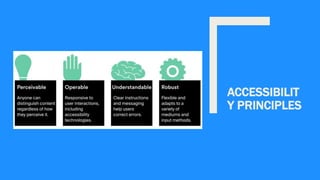
 There are four accessibility principles in WCAG 2.1
 There are a total of 12 Guidelines
 Each Guideline has some Success Criteria that are at either level of conformance. Total 78 Success
Criteria
ACCESSIBILIT
Y PRINCIPLES
Test Approach
Tool First
‘Tool First' used at the end of SDLC
phase in assessment phase. Also
called reactive approach. Accessibility
testing happen at the end of the
entire development cycle, if not after
the delivery date.
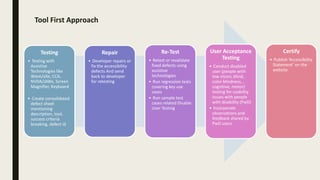
Tool First Approach
Testing
• Testing with
Assistive
Technologies like
Wave/aXe, CCA,
NVDA/JAWs, Screen
Magnifier, Keyboard
• Create consolidated
defect sheet
mentioning
description, tool,
success criteria
breaking, defect id
Repair
• Developer repairs or
fix the accessibility
defects And send
back to developer
for retesting
Re-Test
• Retest or revalidate
fixed defects using
assistive
technologies
• Run regression tests
covering key use
cases
• Run sample test
cases related Disable
User Testing
User Acceptance
Testing
• Conduct disabled
user (people with
low vision, blind,
color blindness, ,
cognitive, motor)
testing for usability
issues with people
with disability (PwD)
• Incorporate
observations and
feedback shared by
PwD users
Certify
• Publish ‘Accessibility
Statement’ on the
website
Test Approach
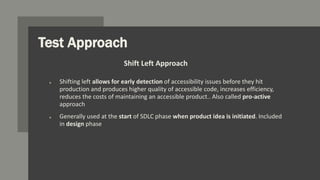
o Shifting left allows for early detection of accessibility issues before they hit
production and produces higher quality of accessible code, increases efficiency,
reduces the costs of maintaining an accessible product.. Also called pro-active
approach
o Generally used at the start of SDLC phase when product idea is initiated. Included
in design phase
Shift Left Approach
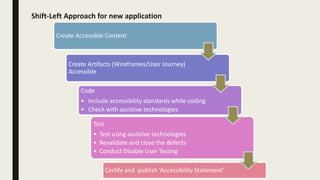
Shift-Left Approach for new application
Create Accessible Content
Create Artifacts (Wireframes/User Journey)
Accessible
Code
• Include accessibility standards while coding
• Check with assistive technologies
Test
• Test using assistive technologies
• Revalidate and close the defects
• Conduct Disable User Testing
Certify and publish ‘Accessibility Statement’
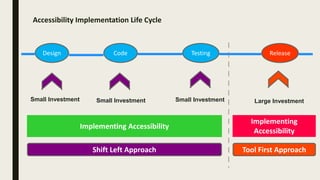
Accessibility Implementation Life Cycle
Design Code Testing Release
Implementing Accessibility
Implementing
Accessibility
Small Investment Large InvestmentSmall InvestmentSmall Investment
Shift Left Approach Tool First Approach
References • https://www.google.com/image
• https://en.wikipedia.org/wiki/Assistive_t
echnology
• https://www.deque.com/
Thank You!
For any queries connect me at jatinkochhar@hotmail.com

Accessibility Testing Approach

  • 1.
    Accessibility Testing Approach Makedifferently abled to digitally enabled PART 2 OF 2
  • 2.
    Agenda • What isAccessibility ? • Examples of Accessibility • Assistive Technologies • Accessibility Compliance Law • Case Studies of Accessibility • Need for Compliance • Accessibility Principles • Accessibility Test Approach – Tool First • Accessibility Test Approach – Shift Left • Accessibility Implementation Life Cycle
  • 3.
    What is Accessibility? Accessibility in the sense considered here refers to the design of products, devices, services, or environments so as to be usable by people with disabilities Accessibility is strongly related to universal design which is the process of creating products that are usable by people with the widest possible range of abilities, operating within the widest possible range of situations Accessibility can be viewed as the "ability to access" and benefit from some system Accessibility can be implemented in software’s, houses, malls, roads, transportation, in daily use objects
  • 4.
    Examples of Accessibility Theridges found on the F and J buttons on a computer keyboard are designed to help users locate the correct keys (Universal and Inclusive Design) Mobile, Tablets, Web applications are made accessible to reach disable community (Universal and Inclusive Design)
  • 5.
    Screen Readers JAWS WindowsEye NVDA Voice Over Talkback
  • 6.
    Open Source Plugins Color Contrast Analyser GoogleLight House Acc Checker Web Accessibility Toolbar WAVE
  • 7.
    Accessibility Compliance Law ADA USSection 508 Canadian Human Rights Act AODA UK-Equality Act European Union: EN 301 549: Australia – Disability Discrimination Act Singapore – Enabling Masterplan China – Law of Protection for PWD India – National Policy for PWD
  • 8.
    Case Studies ofAccessibility • Tesco Access Site - 35 thousand pounds to build, 13 million pounds a year in resultant revenue (2004, UK) • Legal & General - achieved 50% more natural search visitors and many more conversions after accessibility improvements (2007, UK) • CNET - Reported 30% increase in CNET traffic from Google after they started providing transcripts. We saw a significant increase in SEO referrals when we launched an HTML version of our site, the major component of which was our transcripts. - Justin Eckhouse, CNET, 2009 • Sydney Olympic Games - required to pay 20 thousand dollars in damages due to poor accessibility (2000, Australia) • Target Corporation - paid 6 million dollars in damages after action by US National Federation for the Blind (2008, USA) • Amex - America Express hit the headlines after excluding visually impaired customers due to making its statements less accessible in a format change (2008, UK)
  • 9.
    Need for Compliance WCAGPublish Timelines • 1999 - WCAG 1.0 • 2008 - WCAG 2.0 (testable statements and were technology agnostic) • 2012 - WCAG 2.0 became ISO standard, ISO/IEC 40500:2012 • Eventually adopted across industry, government and many private organizations. Need for WCAG 2.1 • Technology is continuously evolving • Moved from brick mobile to touch screen smart phones. • New modalities - Gesture based, voice-controls, multi-touch interfaces. • WCAG 2.0 covers wide range of users with multiple disabilities, But the needs of users with low-vision and cognitive impairment weren't fully accommodated in WCAG 2.0. June 2018 – WCAG 2.1 WCAG 2.1 new guideline and success criteria focus three major groups: • users with cognitive or learning disabilities, • Speech recognition • users with low vision, • users with disabilities on mobile devices
  • 10.
    Conformance Level  Thereare three levels of conformance: • Level A: Must be satisfied otherwise one or more group will find access to content impossible. It’s the basic requirement. • Level AA: Should be satisfied otherwise one or more group will find access to content difficult. Removes significant barriers. • Level AAA: May be satisfied otherwise one or more group will find access to content somewhat difficult. Improves accessibility.  There are four accessibility principles in WCAG 2.1  There are a total of 12 Guidelines  Each Guideline has some Success Criteria that are at either level of conformance. Total 78 Success Criteria
  • 11.
  • 12.
    Test Approach Tool First ‘ToolFirst' used at the end of SDLC phase in assessment phase. Also called reactive approach. Accessibility testing happen at the end of the entire development cycle, if not after the delivery date.
  • 13.
    Tool First Approach Testing •Testing with Assistive Technologies like Wave/aXe, CCA, NVDA/JAWs, Screen Magnifier, Keyboard • Create consolidated defect sheet mentioning description, tool, success criteria breaking, defect id Repair • Developer repairs or fix the accessibility defects And send back to developer for retesting Re-Test • Retest or revalidate fixed defects using assistive technologies • Run regression tests covering key use cases • Run sample test cases related Disable User Testing User Acceptance Testing • Conduct disabled user (people with low vision, blind, color blindness, , cognitive, motor) testing for usability issues with people with disability (PwD) • Incorporate observations and feedback shared by PwD users Certify • Publish ‘Accessibility Statement’ on the website
  • 14.
    Test Approach o Shiftingleft allows for early detection of accessibility issues before they hit production and produces higher quality of accessible code, increases efficiency, reduces the costs of maintaining an accessible product.. Also called pro-active approach o Generally used at the start of SDLC phase when product idea is initiated. Included in design phase Shift Left Approach
  • 15.
    Shift-Left Approach fornew application Create Accessible Content Create Artifacts (Wireframes/User Journey) Accessible Code • Include accessibility standards while coding • Check with assistive technologies Test • Test using assistive technologies • Revalidate and close the defects • Conduct Disable User Testing Certify and publish ‘Accessibility Statement’
  • 16.
    Accessibility Implementation LifeCycle Design Code Testing Release Implementing Accessibility Implementing Accessibility Small Investment Large InvestmentSmall InvestmentSmall Investment Shift Left Approach Tool First Approach
  • 17.
    References • https://www.google.com/image •https://en.wikipedia.org/wiki/Assistive_t echnology • https://www.deque.com/
  • 18.
    Thank You! For anyqueries connect me at jatinkochhar@hotmail.com