Web
Accessibility
Tjaša Dobrilovič,
Dea Omerbegović
Table of content:
1. Accessibility standards and law regulation
2. Users perspective
3. Accessibility for developers
4. Useful tools and links
Web accessibility
means that websites, tools, and technologies
are designed and developed so that people
with disabilities can perceive, understand,
navigate, and interact with them.
3
It is related to user experience and
usability.
Accessibility
standards &
Law regulation
1
WEB ACCESSIBILITY STANDARDS
● W3C - World Wide Web Consortium
● WAI - Web Accessibility Initiative
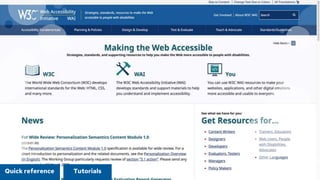
● WCAG (2.0 & 2.1) - Web Content Accessibility Guidelines
● Four principles: perceivable, operable, understandable, and robust
● Guidelines: framework for understanding criteria (13)
● Success criteria: testable criteria for all three levels of conformance
● Levels of conformance: A, AA, AAA
● Sufficient and Advisory Techniques
5WCAG 2.1
6Quick reference Tutorials
LAW REGULATION
USA
● massive increase of lawsuits (by 118% from 2017 to 2018)
● ADA (Americans with Disabilities Act) prohibits discrimination on the
basis of disability for public (Title II) and private sector bodies (Title III)
● Web accessibility is only addressed for public sector bodies - Section
508 (part of Title II)
● The lawsuit trend of the last ten years is indicates that same rules apply
for private sector bodies as well
● Most lawsuits in 2018 - Florida and New York
● Headquarters elsewhere, many even out of the USA borders
7
LAW REGULATION
EUROPE
● 2016 - Web Accessibility Directive
● Public sector bodies (WCAG 2.1 Level AA)
● Member states need to determine the penalties for failure to comply
and can broaden the scope of the directive
● New websites (after September 23, 2018): September 23, 2019
● Older websites (before September 23, 2018): September 23, 2020
● Mobile applications: June 23, 2021
In the future same rules may also apply for private sector as the web and
information on it is becoming more of a necessity rather than a luxury.
8
Users perspective
2
Types of disabilities
Audible
Relay on visual content so
visual alternative must be
available for audio and video
content.
Cognitive and
neurological
Website must be clear,
logical and easy to use with
consistent navigations and
interactive elements.
Visual
Clear and adjustable layout
with sufficient color contrast.
For blind users website must
be adjusted for screen
readers.
10
Physical
Users mostly use keyboard or
other tools that rely on
keyboard functionality.
Speech
Users have a hard time
communicating with a
website through speech -
alternative must be provided.
“
Implementing accessibility
standards is essential for
people with disabilities and
useful for all.
11
How users with disabilities interact with web?
Adjusting the web
● Adjust font size and line height
● Change colors
● Zoom in and out
● Customize keyboard functions
● Using voice commands
● Use High contrast mode
12
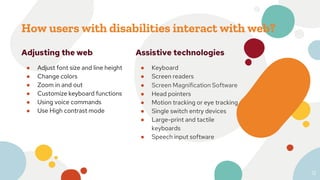
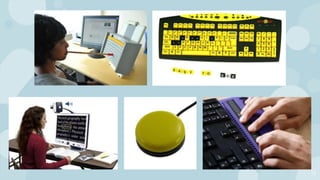
Assistive technologies
● Keyboard
● Screen readers
● Screen Magnification Software
● Head pointers
● Motion tracking or eye tracking
● Single switch entry devices
● Large-print and tactile
keyboards
● Speech input software
13
Accessibility for
developers
3
Developing adjustable website
● As the content is zoomed the smaller screen size media
queries are used (responsive design helps)
● Make sure no fixed positioned content, that cannot be hidden
with a toggle button, is taking up the entire screen
● Make sure no content is cut of (use overflow: auto or scroll)
15
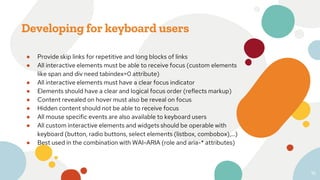
Developing for keyboard users
● Provide skip links for repetitive and long blocks of links
● All interactive elements must be able to receive focus (custom elements
like span and div need tabindex=0 attribute)
● All interactive elements must have a clear focus indicator
● Elements should have a clear and logical focus order (reflects markup)
● Content revealed on hover must also be reveal on focus
● Hidden content should not be able to receive focus
● All mouse specific events are also available to keyboard users
● All custom interactive elements and widgets should be operable with
keyboard (button, radio buttons, select elements (listbox, combobox),...)
● Best used in the combination with WAI-ARIA (role and aria-* attributes)
16
17
WAI-ARIA
● Web Accessibility Initiative - Accessible Rich Internet Applications
● 1.2 is a working draft, 1.1 is recommended since December 2017
● Set of attributes and properties that are used on HTML elements and
serve as a communication tool with assistive technologies
● They should be used in the combination with custom and native
elements to communicate role, states and relationship information
● Document contains all information about different roles and
specifications
● Practice dives deeper and also provides examples and all additional
information you need, including keyboard support description
18WAI-ARIA 1.1 WAI-ARIA 1.2WAI-ARIA 1.1 PRACTICES WAI-ARIA 1.2 PRACTICES
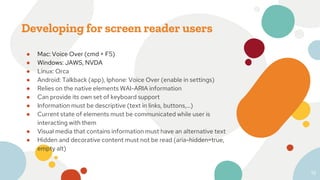
Developing for screen reader users
● Mac: Voice Over (cmd + F5)
● Windows: JAWS, NVDA
● Linux: Orca
● Android: Talkback (app), Iphone: Voice Over (enable in settings)
● Relies on the native elements WAI-ARIA information
● Can provide its own set of keyboard support
● Information must be descriptive (text in links, buttons,...)
● Current state of elements must be communicated while user is
interacting with them
● Visual media that contains information must have an alternative text
● Hidden and decorative content must not be read (aria-hidden=true,
empty alt)
19
20
Use case on AD
site
4
22
Tips, useful tools
and links
5
Tips
● Respect WCAG 2.1 standards
● Refer to the W3C documentation, examples and tutorials
● Start including accessibility from the start of the project
● Review modules and libraries before including them
● Use screen reader and keyboard to check your website
● Use tools for web accessibility evaluation
● Don’t rely on UI and UX designers to know accessibility
standards
24
Useful tools
508 checker
Quickly check a webpage for
508 compliance.
A11Y Color Contrast
Accessibility Validator
Compliance tool that displays
the color contrast issues of a
web page per WCAG.
Accessibility Developer
Tools
Adds an Accessibility audit, and
an Accessibility sidebar pane in
the Elements tab, to your
Chrome Developer Tools.
25
Accessibility Insights for
Web
Is a Chrome extension that
helps developers find and fix
accessibility issues in web apps
and sites.
Visual ARIA
Allows physical observation of
ARIA usage within web
technologies to aid in
development.
AInspector Sidebar
Is a Firefox add-on that
evaluates the DOM of a web
page for WCAG 2.0 Level A and
AA requirements.
Useful links
⦁ WCAG 2.1
https://www.w3.org/WAI/standards-guidelines/wcag
⦁ WCAG 2.1 quick reference
https://www.w3.org/WAI/WCAG21/quickref
⦁ WAI ARIA
https://www.w3.org/TR/wai-aria
⦁ Useful tools
https://www.w3.org/WAI/ER/tools
26
27
Thank you
for you time!
Any questions?

Web accessibility

  • 1.
  • 2.
    Table of content: 1.Accessibility standards and law regulation 2. Users perspective 3. Accessibility for developers 4. Useful tools and links
  • 3.
    Web accessibility means thatwebsites, tools, and technologies are designed and developed so that people with disabilities can perceive, understand, navigate, and interact with them. 3 It is related to user experience and usability.
  • 4.
  • 5.
    WEB ACCESSIBILITY STANDARDS ●W3C - World Wide Web Consortium ● WAI - Web Accessibility Initiative ● WCAG (2.0 & 2.1) - Web Content Accessibility Guidelines ● Four principles: perceivable, operable, understandable, and robust ● Guidelines: framework for understanding criteria (13) ● Success criteria: testable criteria for all three levels of conformance ● Levels of conformance: A, AA, AAA ● Sufficient and Advisory Techniques 5WCAG 2.1
  • 6.
  • 7.
    LAW REGULATION USA ● massiveincrease of lawsuits (by 118% from 2017 to 2018) ● ADA (Americans with Disabilities Act) prohibits discrimination on the basis of disability for public (Title II) and private sector bodies (Title III) ● Web accessibility is only addressed for public sector bodies - Section 508 (part of Title II) ● The lawsuit trend of the last ten years is indicates that same rules apply for private sector bodies as well ● Most lawsuits in 2018 - Florida and New York ● Headquarters elsewhere, many even out of the USA borders 7
  • 8.
    LAW REGULATION EUROPE ● 2016- Web Accessibility Directive ● Public sector bodies (WCAG 2.1 Level AA) ● Member states need to determine the penalties for failure to comply and can broaden the scope of the directive ● New websites (after September 23, 2018): September 23, 2019 ● Older websites (before September 23, 2018): September 23, 2020 ● Mobile applications: June 23, 2021 In the future same rules may also apply for private sector as the web and information on it is becoming more of a necessity rather than a luxury. 8
  • 9.
  • 10.
    Types of disabilities Audible Relayon visual content so visual alternative must be available for audio and video content. Cognitive and neurological Website must be clear, logical and easy to use with consistent navigations and interactive elements. Visual Clear and adjustable layout with sufficient color contrast. For blind users website must be adjusted for screen readers. 10 Physical Users mostly use keyboard or other tools that rely on keyboard functionality. Speech Users have a hard time communicating with a website through speech - alternative must be provided.
  • 11.
    “ Implementing accessibility standards isessential for people with disabilities and useful for all. 11
  • 12.
    How users withdisabilities interact with web? Adjusting the web ● Adjust font size and line height ● Change colors ● Zoom in and out ● Customize keyboard functions ● Using voice commands ● Use High contrast mode 12 Assistive technologies ● Keyboard ● Screen readers ● Screen Magnification Software ● Head pointers ● Motion tracking or eye tracking ● Single switch entry devices ● Large-print and tactile keyboards ● Speech input software
  • 13.
  • 14.
  • 15.
    Developing adjustable website ●As the content is zoomed the smaller screen size media queries are used (responsive design helps) ● Make sure no fixed positioned content, that cannot be hidden with a toggle button, is taking up the entire screen ● Make sure no content is cut of (use overflow: auto or scroll) 15
  • 16.
    Developing for keyboardusers ● Provide skip links for repetitive and long blocks of links ● All interactive elements must be able to receive focus (custom elements like span and div need tabindex=0 attribute) ● All interactive elements must have a clear focus indicator ● Elements should have a clear and logical focus order (reflects markup) ● Content revealed on hover must also be reveal on focus ● Hidden content should not be able to receive focus ● All mouse specific events are also available to keyboard users ● All custom interactive elements and widgets should be operable with keyboard (button, radio buttons, select elements (listbox, combobox),...) ● Best used in the combination with WAI-ARIA (role and aria-* attributes) 16
  • 17.
  • 18.
    WAI-ARIA ● Web AccessibilityInitiative - Accessible Rich Internet Applications ● 1.2 is a working draft, 1.1 is recommended since December 2017 ● Set of attributes and properties that are used on HTML elements and serve as a communication tool with assistive technologies ● They should be used in the combination with custom and native elements to communicate role, states and relationship information ● Document contains all information about different roles and specifications ● Practice dives deeper and also provides examples and all additional information you need, including keyboard support description 18WAI-ARIA 1.1 WAI-ARIA 1.2WAI-ARIA 1.1 PRACTICES WAI-ARIA 1.2 PRACTICES
  • 19.
    Developing for screenreader users ● Mac: Voice Over (cmd + F5) ● Windows: JAWS, NVDA ● Linux: Orca ● Android: Talkback (app), Iphone: Voice Over (enable in settings) ● Relies on the native elements WAI-ARIA information ● Can provide its own set of keyboard support ● Information must be descriptive (text in links, buttons,...) ● Current state of elements must be communicated while user is interacting with them ● Visual media that contains information must have an alternative text ● Hidden and decorative content must not be read (aria-hidden=true, empty alt) 19
  • 20.
  • 21.
    Use case onAD site 4
  • 22.
  • 23.
  • 24.
    Tips ● Respect WCAG2.1 standards ● Refer to the W3C documentation, examples and tutorials ● Start including accessibility from the start of the project ● Review modules and libraries before including them ● Use screen reader and keyboard to check your website ● Use tools for web accessibility evaluation ● Don’t rely on UI and UX designers to know accessibility standards 24
  • 25.
    Useful tools 508 checker Quicklycheck a webpage for 508 compliance. A11Y Color Contrast Accessibility Validator Compliance tool that displays the color contrast issues of a web page per WCAG. Accessibility Developer Tools Adds an Accessibility audit, and an Accessibility sidebar pane in the Elements tab, to your Chrome Developer Tools. 25 Accessibility Insights for Web Is a Chrome extension that helps developers find and fix accessibility issues in web apps and sites. Visual ARIA Allows physical observation of ARIA usage within web technologies to aid in development. AInspector Sidebar Is a Firefox add-on that evaluates the DOM of a web page for WCAG 2.0 Level A and AA requirements.
  • 26.
    Useful links ⦁ WCAG2.1 https://www.w3.org/WAI/standards-guidelines/wcag ⦁ WCAG 2.1 quick reference https://www.w3.org/WAI/WCAG21/quickref ⦁ WAI ARIA https://www.w3.org/TR/wai-aria ⦁ Useful tools https://www.w3.org/WAI/ER/tools 26
  • 27.
    27 Thank you for youtime! Any questions?

Editor's Notes

  • #6 Title III: These are businesses that are generally open to the public and there are 12 categories, including schools, recreation, offices, and medical buildings. Officially, the Web Accessibility Directive applies to public sector bodies. That includes governmental websites such as: State, regional, and local authorities, Bodies governed by public law and financed via public contract, as defined in point (4) of Article 2(1) of Directive 2014/24/EU, Associations formed by those above, if those associations are established for the specific purpose of meeting needs of general interest, and do not have an industrial or commercial character
  • #8 Title III: These are businesses that are generally open to the public and there are 12 categories, including schools, recreation, offices, and medical buildings. Officially, the Web Accessibility Directive applies to public sector bodies. That includes governmental websites such as: State, regional, and local authorities, Bodies governed by public law and financed via public contract, as defined in point (4) of Article 2(1) of Directive 2014/24/EU, Associations formed by those above, if those associations are established for the specific purpose of meeting needs of general interest, and do not have an industrial or commercial character
  • #9 Title III: These are businesses that are generally open to the public and there are 12 categories, including schools, recreation, offices, and medical buildings. Officially, the Web Accessibility Directive applies to public sector bodies. That includes governmental websites such as: State, regional, and local authorities, Bodies governed by public law and financed via public contract, as defined in point (4) of Article 2(1) of Directive 2014/24/EU, Associations formed by those above, if those associations are established for the specific purpose of meeting needs of general interest, and do not have an industrial or commercial character
  • #13 Title III: These are businesses that are generally open to the public and there are 12 categories, including schools, recreation, offices, and medical buildings. Officially, the Web Accessibility Directive applies to public sector bodies. That includes governmental websites such as: State, regional, and local authorities, Bodies governed by public law and financed via public contract, as defined in point (4) of Article 2(1) of Directive 2014/24/EU, Associations formed by those above, if those associations are established for the specific purpose of meeting needs of general interest, and do not have an industrial or commercial character
  • #16 Title III: These are businesses that are generally open to the public and there are 12 categories, including schools, recreation, offices, and medical buildings. Officially, the Web Accessibility Directive applies to public sector bodies. That includes governmental websites such as: State, regional, and local authorities, Bodies governed by public law and financed via public contract, as defined in point (4) of Article 2(1) of Directive 2014/24/EU, Associations formed by those above, if those associations are established for the specific purpose of meeting needs of general interest, and do not have an industrial or commercial character
  • #17 Title III: These are businesses that are generally open to the public and there are 12 categories, including schools, recreation, offices, and medical buildings. Officially, the Web Accessibility Directive applies to public sector bodies. That includes governmental websites such as: State, regional, and local authorities, Bodies governed by public law and financed via public contract, as defined in point (4) of Article 2(1) of Directive 2014/24/EU, Associations formed by those above, if those associations are established for the specific purpose of meeting needs of general interest, and do not have an industrial or commercial character
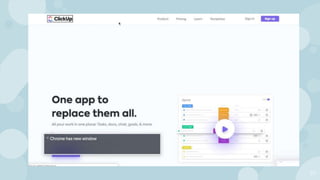
  • #18 https://clickup.com/
  • #19 Title III: These are businesses that are generally open to the public and there are 12 categories, including schools, recreation, offices, and medical buildings. Officially, the Web Accessibility Directive applies to public sector bodies. That includes governmental websites such as: State, regional, and local authorities, Bodies governed by public law and financed via public contract, as defined in point (4) of Article 2(1) of Directive 2014/24/EU, Associations formed by those above, if those associations are established for the specific purpose of meeting needs of general interest, and do not have an industrial or commercial character
  • #20 Title III: These are businesses that are generally open to the public and there are 12 categories, including schools, recreation, offices, and medical buildings. Officially, the Web Accessibility Directive applies to public sector bodies. That includes governmental websites such as: State, regional, and local authorities, Bodies governed by public law and financed via public contract, as defined in point (4) of Article 2(1) of Directive 2014/24/EU, Associations formed by those above, if those associations are established for the specific purpose of meeting needs of general interest, and do not have an industrial or commercial character
  • #21 https://clickup.com/
  • #25 Title III: These are businesses that are generally open to the public and there are 12 categories, including schools, recreation, offices, and medical buildings. Officially, the Web Accessibility Directive applies to public sector bodies. That includes governmental websites such as: State, regional, and local authorities, Bodies governed by public law and financed via public contract, as defined in point (4) of Article 2(1) of Directive 2014/24/EU, Associations formed by those above, if those associations are established for the specific purpose of meeting needs of general interest, and do not have an industrial or commercial character