Accessibility for Content Developer,
Designer, Web Developer and
Tester
Make differently abled to digitally enabled
PART 1 OF 2
Agenda
• What is Accessibility ?
• Accessibility Statistics
• Examples of Accessibility
• Types of Disabilities
• Assistive Technologies
• Accessibility Compliance Laws
• Case Studies of Accessibilities
• Need for Compliance
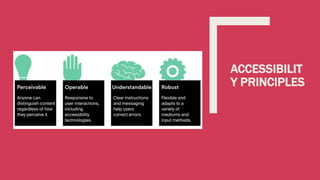
• Accessibility Principles
• Conformance Level
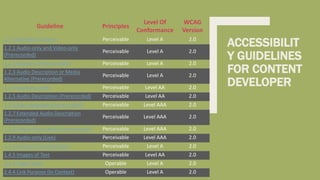
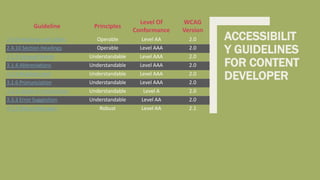
• Accessibility for Content Developer
• Accessibility for Designer
• Accessibility for Code Developer
• Accessibility for Tester
What is Accessibility ?
Accessibility in the sense considered here refers to the design of products, devices, services, or
environments so as to be usable by people with disabilities
Accessibility is strongly related to universal design which is the process of creating products that are
usable by people with the widest possible range of abilities, operating within the widest possible
range of situations
Accessibility can be viewed as the "ability to access" and benefit from some system
Accessibility can be implemented in software’s, houses, malls, roads, transportation, in daily use
objects
Accessibility Statistics
About 15% of the world's population lives with some form of disability, of whom 2-4%
experience significant difficulties in functioning
The number of people with disabilities is growing. This is because populations are ageing –
older people have a higher risk of disability. Aging and Disability are linked
785 million (15.6%) persons 15 years and older live with a disability
Examples of Accessibility
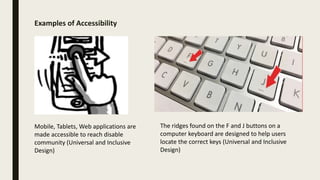
The ridges found on the F and J buttons on a
computer keyboard are designed to help users
locate the correct keys (Universal and Inclusive
Design)
Mobile, Tablets, Web applications are
made accessible to reach disable
community (Universal and Inclusive
Design)
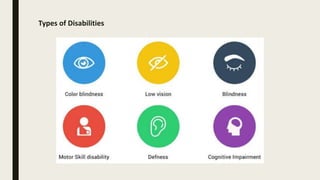
Types of Disabilities
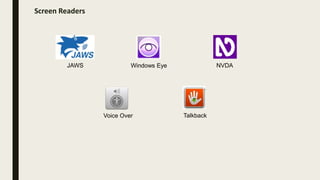
Screen Readers
JAWS Windows Eye NVDA
Voice Over Talkback
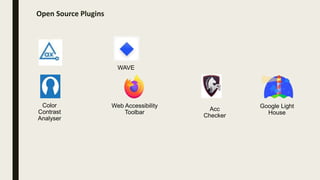
Open Source Plugins
Color
Contrast
Analyser
Google Light
House
Acc
Checker
Web Accessibility
Toolbar
WAVE
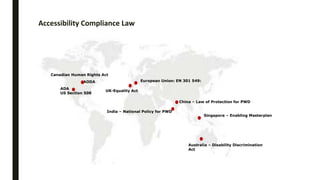
Accessibility Compliance Law
ADA
US Section 508
Canadian Human Rights Act
AODA
UK-Equality Act
European Union: EN 301 549:
Australia – Disability Discrimination
Act
Singapore – Enabling Masterplan
China – Law of Protection for PWD
India – National Policy for PWD
Case Studies of Accessibility
• Tesco Access Site - 35 thousand pounds to build, 13 million pounds a year in resultant revenue
(2004, UK)
• Legal & General - achieved 50% more natural search visitors and many more conversions after
accessibility improvements (2007, UK)
• CNET - Reported 30% increase in CNET traffic from Google after they started providing
transcripts. We saw a significant increase in SEO referrals when we launched an HTML version of
our site, the major component of which was our transcripts. - Justin Eckhouse, CNET, 2009
• Sydney Olympic Games - required to pay 20 thousand dollars in damages due to poor
accessibility (2000, Australia)
• Target Corporation - paid 6 million dollars in damages after action by US National Federation for
the Blind (2008, USA)
• Amex - America Express hit the headlines after excluding visually impaired customers due to
making its statements less accessible in a format change (2008, UK)
Need for Compliance
WCAG Publish Timelines
• 1999 - WCAG 1.0
• 2008 - WCAG 2.0 (testable statements and were technology agnostic)
• 2012 - WCAG 2.0 became ISO standard, ISO/IEC 40500:2012
• Eventually adopted across industry, government and many private organizations.
Need for WCAG 2.1
• Technology is continuously evolving
• Moved from brick mobile to touch screen smart phones.
• New modalities - Gesture based, voice-controls, multi-touch interfaces.
• WCAG 2.0 covers wide range of users with multiple disabilities, But the needs of users with
low-vision and cognitive impairment weren't fully accommodated in WCAG 2.0.
June 2018 – WCAG 2.1
WCAG 2.1 new guideline and success criteria focus three major groups:
• users with cognitive or learning disabilities,
• Speech recognition
• users with low vision,
• users with disabilities on mobile devices
Conformance Level
 There are three levels of conformance:
• Level A: Must be satisfied otherwise one or more group will find access to content
impossible. It’s the basic requirement.
• Level AA: Should be satisfied otherwise one or more group will find access to content
difficult. Removes significant barriers.
• Level AAA: May be satisfied otherwise one or more group will find access to content
somewhat difficult. Improves accessibility.
 There are four accessibility principles in WCAG 2.1
 There are a total of 12 Guidelines
 Each Guideline has some Success Criteria that are at either level of conformance. Total 78 Success
Criteria
ACCESSIBILIT
Y PRINCIPLES
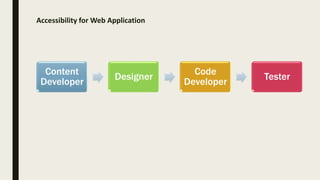
Accessibility for Web Application
Content
Developer
Designer
Code
Developer
Tester
ACCESSIBILIT
Y GUIDELINES
FOR CONTENT
DEVELOPER
Guideline Principles
Level Of
Conformance
WCAG
Version
1.1.1 Non-text Content Perceivable Level A 2.0
1.2.1 Audio-only and Video-only
(Prerecorded)
Perceivable Level A 2.0
1.2.2 Captions (Prerecorded) Perceivable Level A 2.0
1.2.3 Audio Description or Media
Alternative (Prerecorded)
Perceivable Level A 2.0
1.2.4 Captions (Live) Perceivable Level AA 2.0
1.2.5 Audio Description (Prerecorded) Perceivable Level AA 2.0
1.2.6 Sign Language (Prerecorded) Perceivable Level AAA 2.0
1.2.7 Extended Audio Description
(Prerecorded)
Perceivable Level AAA 2.0
1.2.8 Media Alternative (Prerecorded) Perceivable Level AAA 2.0
1.2.9 Audio-only (Live) Perceivable Level AAA 2.0
1.3.3 Sensory Characteristics Perceivable Level A 2.0
1.4.5 Images of Text Perceivable Level AA 2.0
2.4.2 Page Titled Operable Level A 2.0
2.4.4 Link Purpose (In Context) Operable Level A 2.0
ACCESSIBILIT
Y GUIDELINES
FOR CONTENT
DEVELOPER
Guideline Principles
Level Of
Conformance
WCAG
Version
2.4.6 Headings and Labels Operable Level AA 2.0
2.4.10 Section Headings Operable Level AAA 2.0
3.1.3 Unusual Words Understandable Level AAA 2.0
3.1.4 Abbreviations Understandable Level AAA 2.0
3.1.5 Reading Level Understandable Level AAA 2.0
3.1.6 Pronunciation Understandable Level AAA 2.0
3.3.2 Labels or Instructions Understandable Level A 2.0
3.3.3 Error Suggestion Understandable Level AA 2.0
4.1.3 Status Messages Robust Level AA 2.1
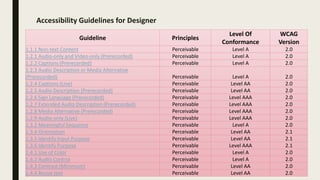
Accessibility Guidelines for Designer
Guideline Principles
Level Of
Conformance
WCAG
Version
1.1.1 Non-text Content Perceivable Level A 2.0
1.2.1 Audio-only and Video-only (Prerecorded) Perceivable Level A 2.0
1.2.2 Captions (Prerecorded) Perceivable Level A 2.0
1.2.3 Audio Description or Media Alternative
(Prerecorded) Perceivable Level A 2.0
1.2.4 Captions (Live) Perceivable Level AA 2.0
1.2.5 Audio Description (Prerecorded) Perceivable Level AA 2.0
1.2.6 Sign Language (Prerecorded) Perceivable Level AAA 2.0
1.2.7 Extended Audio Description (Prerecorded) Perceivable Level AAA 2.0
1.2.8 Media Alternative (Prerecorded) Perceivable Level AAA 2.0
1.2.9 Audio-only (Live) Perceivable Level AAA 2.0
1.3.2 Meaningful Sequence Perceivable Level A 2.0
1.3.4 Orientation Perceivable Level AA 2.1
1.3.5 Identify Input Purpose Perceivable Level AA 2.1
1.3.6 Identify Purpose Perceivable Level AAA 2.1
1.4.1 Use of Color Perceivable Level A 2.0
1.4.2 Audio Control Perceivable Level A 2.0
1.4.3 Contrast (Minimum) Perceivable Level AA 2.0
1.4.4 Resize text Perceivable Level AA 2.0
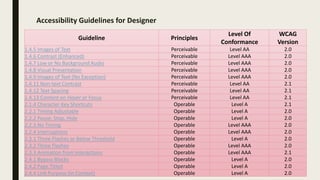
Accessibility Guidelines for Designer
Guideline Principles
Level Of
Conformance
WCAG
Version
1.4.5 Images of Text Perceivable Level AA 2.0
1.4.6 Contrast (Enhanced) Perceivable Level AAA 2.0
1.4.7 Low or No Background Audio Perceivable Level AAA 2.0
1.4.8 Visual Presentation Perceivable Level AAA 2.0
1.4.9 Images of Text (No Exception) Perceivable Level AAA 2.0
1.4.11 Non-text Contrast Perceivable Level AA 2.1
1.4.12 Text Spacing Perceivable Level AA 2.1
1.4.13 Content on Hover or Focus Perceivable Level AA 2.1
2.1.4 Character Key Shortcuts Operable Level A 2.1
2.2.1 Timing Adjustable Operable Level A 2.0
2.2.2 Pause, Stop, Hide Operable Level A 2.0
2.2.3 No Timing Operable Level AAA 2.0
2.2.4 Interruptions Operable Level AAA 2.0
2.3.1 Three Flashes or Below Threshold Operable Level A 2.0
2.3.2 Three Flashes Operable Level AAA 2.0
2.3.3 Animation from Interactions Operable Level AAA 2.1
2.4.1 Bypass Blocks Operable Level A 2.0
2.4.2 Page Titled Operable Level A 2.0
2.4.4 Link Purpose (In Context) Operable Level A 2.0
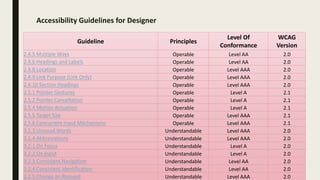
Accessibility Guidelines for Designer
Guideline Principles
Level Of
Conformance
WCAG
Version
2.4.5 Multiple Ways Operable Level AA 2.0
2.4.6 Headings and Labels Operable Level AA 2.0
2.4.8 Location Operable Level AAA 2.0
2.4.9 Link Purpose (Link Only) Operable Level AAA 2.0
2.4.10 Section Headings Operable Level AAA 2.0
2.5.1 Pointer Gestures Operable Level A 2.1
2.5.2 Pointer Cancellation Operable Level A 2.1
2.5.4 Motion Actuation Operable Level A 2.1
2.5.5 Target Size Operable Level AAA 2.1
2.5.6 Concurrent Input Mechanisms Operable Level AAA 2.1
3.1.3 Unusual Words Understandable Level AAA 2.0
3.1.4 Abbreviations Understandable Level AAA 2.0
3.2.1 On Focus Understandable Level A 2.0
3.2.2 On Input Understandable Level A 2.0
3.2.3 Consistent Navigation Understandable Level AA 2.0
3.2.4 Consistent Identification Understandable Level AA 2.0
3.2.5 Change on Request Understandable Level AAA 2.0
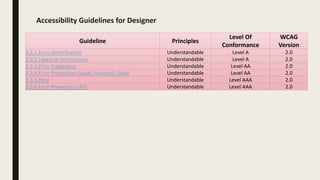
Accessibility Guidelines for Designer
Guideline Principles
Level Of
Conformance
WCAG
Version
3.3.1 Error Identification Understandable Level A 2.0
3.3.2 Labels or Instructions Understandable Level A 2.0
3.3.3 Error Suggestion Understandable Level AA 2.0
3.3.4 Error Prevention (Legal, Financial, Data) Understandable Level AA 2.0
3.3.5 Help Understandable Level AAA 2.0
3.3.6 Error Prevention (All) Understandable Level AAA 2.0
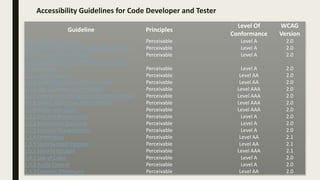
Accessibility Guidelines for Code Developer and Tester
Guideline Principles
Level Of
Conformance
WCAG
Version
1.1.1 Non-text Content Perceivable Level A 2.0
1.2.1 Audio-only and Video-only (Prerecorded) Perceivable Level A 2.0
1.2.2 Captions (Prerecorded) Perceivable Level A 2.0
1.2.3 Audio Description or Media Alternative
(Prerecorded) Perceivable Level A 2.0
1.2.4 Captions (Live) Perceivable Level AA 2.0
1.2.5 Audio Description (Prerecorded) Perceivable Level AA 2.0
1.2.6 Sign Language (Prerecorded) Perceivable Level AAA 2.0
1.2.7 Extended Audio Description (Prerecorded) Perceivable Level AAA 2.0
1.2.8 Media Alternative (Prerecorded) Perceivable Level AAA 2.0
1.2.9 Audio-only (Live) Perceivable Level AAA 2.0
1.3.1 Info and Relationships Perceivable Level A 2.0
1.3.2 Meaningful Sequence Perceivable Level A 2.0
1.3.3 Sensory Characteristics Perceivable Level A 2.0
1.3.4 Orientation Perceivable Level AA 2.1
1.3.5 Identify Input Purpose Perceivable Level AA 2.1
1.3.6 Identify Purpose Perceivable Level AAA 2.1
1.4.1 Use of Color Perceivable Level A 2.0
1.4.2 Audio Control Perceivable Level A 2.0
1.4.3 Contrast (Minimum) Perceivable Level AA 2.0
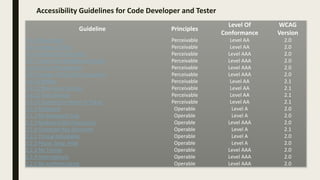
Accessibility Guidelines for Code Developer and Tester
Guideline Principles
Level Of
Conformance
WCAG
Version
1.4.4 Resize text Perceivable Level AA 2.0
1.4.5 Images of Text Perceivable Level AA 2.0
1.4.6 Contrast (Enhanced) Perceivable Level AAA 2.0
1.4.7 Low or No Background Audio Perceivable Level AAA 2.0
1.4.8 Visual Presentation Perceivable Level AAA 2.0
1.4.9 Images of Text (No Exception) Perceivable Level AAA 2.0
1.4.10 Reflow Perceivable Level AA 2.1
1.4.11 Non-text Contrast Perceivable Level AA 2.1
1.4.12 Text Spacing Perceivable Level AA 2.1
1.4.13 Content on Hover or Focus Perceivable Level AA 2.1
2.1.1 Keyboard Operable Level A 2.0
2.1.2 No Keyboard Trap Operable Level A 2.0
2.1.3 Keyboard (No Exception) Operable Level AAA 2.0
2.1.4 Character Key Shortcuts Operable Level A 2.1
2.2.1 Timing Adjustable Operable Level A 2.0
2.2.2 Pause, Stop, Hide Operable Level A 2.0
2.2.3 No Timing Operable Level AAA 2.0
2.2.4 Interruptions Operable Level AAA 2.0
2.2.5 Re-authenticating Operable Level AAA 2.0
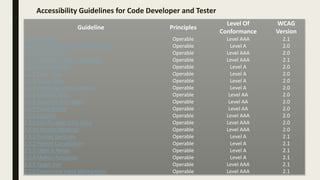
Accessibility Guidelines for Code Developer and Tester
Guideline Principles
Level Of
Conformance
WCAG
Version
2.2.6 Timeouts Operable Level AAA 2.1
2.3.1 Three Flashes or Below Threshold Operable Level A 2.0
2.3.2 Three Flashes Operable Level AAA 2.0
2.3.3 Animation from Interactions Operable Level AAA 2.1
2.4.1 Bypass Blocks Operable Level A 2.0
2.4.2 Page Titled Operable Level A 2.0
2.4.3 Focus Order Operable Level A 2.0
2.4.4 Link Purpose (In Context) Operable Level A 2.0
2.4.5 Multiple Ways Operable Level AA 2.0
2.4.6 Headings and Labels Operable Level AA 2.0
2.4.7 Focus Visible Operable Level AA 2.0
2.4.8 Location Operable Level AAA 2.0
2.4.9 Link Purpose (Link Only) Operable Level AAA 2.0
2.4.10 Section Headings Operable Level AAA 2.0
2.5.1 Pointer Gestures Operable Level A 2.1
2.5.2 Pointer Cancellation Operable Level A 2.1
2.5.3 Label in Name Operable Level A 2.1
2.5.4 Motion Actuation Operable Level A 2.1
2.5.5 Target Size Operable Level AAA 2.1
2.5.6 Concurrent Input Mechanisms Operable Level AAA 2.1
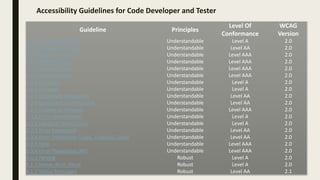
Accessibility Guidelines for Code Developer and Tester
Guideline Principles
Level Of
Conformance
WCAG
Version
3.1.1 Language of Page Understandable Level A 2.0
3.1.2 Language of Parts Understandable Level AA 2.0
3.1.3 Unusual Words Understandable Level AAA 2.0
3.1.4 Abbreviations Understandable Level AAA 2.0
3.1.5 Reading Level Understandable Level AAA 2.0
3.1.6 Pronunciation Understandable Level AAA 2.0
3.2.1 On Focus Understandable Level A 2.0
3.2.2 On Input Understandable Level A 2.0
3.2.3 Consistent Navigation Understandable Level AA 2.0
3.2.4 Consistent Identification Understandable Level AA 2.0
3.2.5 Change on Request Understandable Level AAA 2.0
3.3.1 Error Identification Understandable Level A 2.0
3.3.2 Labels or Instructions Understandable Level A 2.0
3.3.3 Error Suggestion Understandable Level AA 2.0
3.3.4 Error Prevention (Legal, Financial, Data) Understandable Level AA 2.0
3.3.5 Help Understandable Level AAA 2.0
3.3.6 Error Prevention (All) Understandable Level AAA 2.0
4.1.1 Parsing Robust Level A 2.0
4.1.2 Name, Role, Value Robust Level A 2.0
4.1.3 Status Messages Robust Level AA 2.1
References • https://en.wikipedia.org/wiki/Accessibility
• https://www.google.com/image
• https://www.who.int/disabilities/world_report/2011/
report/en/
• https://en.wikipedia.org/wiki/Assistive_technology
• https://www.w3.org/WAI/EO/Drafts/bcase/resources
• https://www.w3.org/WAI/
Thank You!
For any queries connect me at jatinkochhar@hotmail.com

Accessibility for Content Developer, Designer, Code Developer and Tester

  • 1.
    Accessibility for ContentDeveloper, Designer, Web Developer and Tester Make differently abled to digitally enabled PART 1 OF 2
  • 2.
    Agenda • What isAccessibility ? • Accessibility Statistics • Examples of Accessibility • Types of Disabilities • Assistive Technologies • Accessibility Compliance Laws • Case Studies of Accessibilities • Need for Compliance • Accessibility Principles • Conformance Level • Accessibility for Content Developer • Accessibility for Designer • Accessibility for Code Developer • Accessibility for Tester
  • 3.
    What is Accessibility? Accessibility in the sense considered here refers to the design of products, devices, services, or environments so as to be usable by people with disabilities Accessibility is strongly related to universal design which is the process of creating products that are usable by people with the widest possible range of abilities, operating within the widest possible range of situations Accessibility can be viewed as the "ability to access" and benefit from some system Accessibility can be implemented in software’s, houses, malls, roads, transportation, in daily use objects
  • 4.
    Accessibility Statistics About 15%of the world's population lives with some form of disability, of whom 2-4% experience significant difficulties in functioning The number of people with disabilities is growing. This is because populations are ageing – older people have a higher risk of disability. Aging and Disability are linked 785 million (15.6%) persons 15 years and older live with a disability
  • 5.
    Examples of Accessibility Theridges found on the F and J buttons on a computer keyboard are designed to help users locate the correct keys (Universal and Inclusive Design) Mobile, Tablets, Web applications are made accessible to reach disable community (Universal and Inclusive Design)
  • 6.
  • 7.
    Screen Readers JAWS WindowsEye NVDA Voice Over Talkback
  • 8.
    Open Source Plugins Color Contrast Analyser GoogleLight House Acc Checker Web Accessibility Toolbar WAVE
  • 9.
    Accessibility Compliance Law ADA USSection 508 Canadian Human Rights Act AODA UK-Equality Act European Union: EN 301 549: Australia – Disability Discrimination Act Singapore – Enabling Masterplan China – Law of Protection for PWD India – National Policy for PWD
  • 10.
    Case Studies ofAccessibility • Tesco Access Site - 35 thousand pounds to build, 13 million pounds a year in resultant revenue (2004, UK) • Legal & General - achieved 50% more natural search visitors and many more conversions after accessibility improvements (2007, UK) • CNET - Reported 30% increase in CNET traffic from Google after they started providing transcripts. We saw a significant increase in SEO referrals when we launched an HTML version of our site, the major component of which was our transcripts. - Justin Eckhouse, CNET, 2009 • Sydney Olympic Games - required to pay 20 thousand dollars in damages due to poor accessibility (2000, Australia) • Target Corporation - paid 6 million dollars in damages after action by US National Federation for the Blind (2008, USA) • Amex - America Express hit the headlines after excluding visually impaired customers due to making its statements less accessible in a format change (2008, UK)
  • 11.
    Need for Compliance WCAGPublish Timelines • 1999 - WCAG 1.0 • 2008 - WCAG 2.0 (testable statements and were technology agnostic) • 2012 - WCAG 2.0 became ISO standard, ISO/IEC 40500:2012 • Eventually adopted across industry, government and many private organizations. Need for WCAG 2.1 • Technology is continuously evolving • Moved from brick mobile to touch screen smart phones. • New modalities - Gesture based, voice-controls, multi-touch interfaces. • WCAG 2.0 covers wide range of users with multiple disabilities, But the needs of users with low-vision and cognitive impairment weren't fully accommodated in WCAG 2.0. June 2018 – WCAG 2.1 WCAG 2.1 new guideline and success criteria focus three major groups: • users with cognitive or learning disabilities, • Speech recognition • users with low vision, • users with disabilities on mobile devices
  • 12.
    Conformance Level  Thereare three levels of conformance: • Level A: Must be satisfied otherwise one or more group will find access to content impossible. It’s the basic requirement. • Level AA: Should be satisfied otherwise one or more group will find access to content difficult. Removes significant barriers. • Level AAA: May be satisfied otherwise one or more group will find access to content somewhat difficult. Improves accessibility.  There are four accessibility principles in WCAG 2.1  There are a total of 12 Guidelines  Each Guideline has some Success Criteria that are at either level of conformance. Total 78 Success Criteria
  • 13.
  • 14.
    Accessibility for WebApplication Content Developer Designer Code Developer Tester
  • 15.
    ACCESSIBILIT Y GUIDELINES FOR CONTENT DEVELOPER GuidelinePrinciples Level Of Conformance WCAG Version 1.1.1 Non-text Content Perceivable Level A 2.0 1.2.1 Audio-only and Video-only (Prerecorded) Perceivable Level A 2.0 1.2.2 Captions (Prerecorded) Perceivable Level A 2.0 1.2.3 Audio Description or Media Alternative (Prerecorded) Perceivable Level A 2.0 1.2.4 Captions (Live) Perceivable Level AA 2.0 1.2.5 Audio Description (Prerecorded) Perceivable Level AA 2.0 1.2.6 Sign Language (Prerecorded) Perceivable Level AAA 2.0 1.2.7 Extended Audio Description (Prerecorded) Perceivable Level AAA 2.0 1.2.8 Media Alternative (Prerecorded) Perceivable Level AAA 2.0 1.2.9 Audio-only (Live) Perceivable Level AAA 2.0 1.3.3 Sensory Characteristics Perceivable Level A 2.0 1.4.5 Images of Text Perceivable Level AA 2.0 2.4.2 Page Titled Operable Level A 2.0 2.4.4 Link Purpose (In Context) Operable Level A 2.0
  • 16.
    ACCESSIBILIT Y GUIDELINES FOR CONTENT DEVELOPER GuidelinePrinciples Level Of Conformance WCAG Version 2.4.6 Headings and Labels Operable Level AA 2.0 2.4.10 Section Headings Operable Level AAA 2.0 3.1.3 Unusual Words Understandable Level AAA 2.0 3.1.4 Abbreviations Understandable Level AAA 2.0 3.1.5 Reading Level Understandable Level AAA 2.0 3.1.6 Pronunciation Understandable Level AAA 2.0 3.3.2 Labels or Instructions Understandable Level A 2.0 3.3.3 Error Suggestion Understandable Level AA 2.0 4.1.3 Status Messages Robust Level AA 2.1
  • 17.
    Accessibility Guidelines forDesigner Guideline Principles Level Of Conformance WCAG Version 1.1.1 Non-text Content Perceivable Level A 2.0 1.2.1 Audio-only and Video-only (Prerecorded) Perceivable Level A 2.0 1.2.2 Captions (Prerecorded) Perceivable Level A 2.0 1.2.3 Audio Description or Media Alternative (Prerecorded) Perceivable Level A 2.0 1.2.4 Captions (Live) Perceivable Level AA 2.0 1.2.5 Audio Description (Prerecorded) Perceivable Level AA 2.0 1.2.6 Sign Language (Prerecorded) Perceivable Level AAA 2.0 1.2.7 Extended Audio Description (Prerecorded) Perceivable Level AAA 2.0 1.2.8 Media Alternative (Prerecorded) Perceivable Level AAA 2.0 1.2.9 Audio-only (Live) Perceivable Level AAA 2.0 1.3.2 Meaningful Sequence Perceivable Level A 2.0 1.3.4 Orientation Perceivable Level AA 2.1 1.3.5 Identify Input Purpose Perceivable Level AA 2.1 1.3.6 Identify Purpose Perceivable Level AAA 2.1 1.4.1 Use of Color Perceivable Level A 2.0 1.4.2 Audio Control Perceivable Level A 2.0 1.4.3 Contrast (Minimum) Perceivable Level AA 2.0 1.4.4 Resize text Perceivable Level AA 2.0
  • 18.
    Accessibility Guidelines forDesigner Guideline Principles Level Of Conformance WCAG Version 1.4.5 Images of Text Perceivable Level AA 2.0 1.4.6 Contrast (Enhanced) Perceivable Level AAA 2.0 1.4.7 Low or No Background Audio Perceivable Level AAA 2.0 1.4.8 Visual Presentation Perceivable Level AAA 2.0 1.4.9 Images of Text (No Exception) Perceivable Level AAA 2.0 1.4.11 Non-text Contrast Perceivable Level AA 2.1 1.4.12 Text Spacing Perceivable Level AA 2.1 1.4.13 Content on Hover or Focus Perceivable Level AA 2.1 2.1.4 Character Key Shortcuts Operable Level A 2.1 2.2.1 Timing Adjustable Operable Level A 2.0 2.2.2 Pause, Stop, Hide Operable Level A 2.0 2.2.3 No Timing Operable Level AAA 2.0 2.2.4 Interruptions Operable Level AAA 2.0 2.3.1 Three Flashes or Below Threshold Operable Level A 2.0 2.3.2 Three Flashes Operable Level AAA 2.0 2.3.3 Animation from Interactions Operable Level AAA 2.1 2.4.1 Bypass Blocks Operable Level A 2.0 2.4.2 Page Titled Operable Level A 2.0 2.4.4 Link Purpose (In Context) Operable Level A 2.0
  • 19.
    Accessibility Guidelines forDesigner Guideline Principles Level Of Conformance WCAG Version 2.4.5 Multiple Ways Operable Level AA 2.0 2.4.6 Headings and Labels Operable Level AA 2.0 2.4.8 Location Operable Level AAA 2.0 2.4.9 Link Purpose (Link Only) Operable Level AAA 2.0 2.4.10 Section Headings Operable Level AAA 2.0 2.5.1 Pointer Gestures Operable Level A 2.1 2.5.2 Pointer Cancellation Operable Level A 2.1 2.5.4 Motion Actuation Operable Level A 2.1 2.5.5 Target Size Operable Level AAA 2.1 2.5.6 Concurrent Input Mechanisms Operable Level AAA 2.1 3.1.3 Unusual Words Understandable Level AAA 2.0 3.1.4 Abbreviations Understandable Level AAA 2.0 3.2.1 On Focus Understandable Level A 2.0 3.2.2 On Input Understandable Level A 2.0 3.2.3 Consistent Navigation Understandable Level AA 2.0 3.2.4 Consistent Identification Understandable Level AA 2.0 3.2.5 Change on Request Understandable Level AAA 2.0
  • 20.
    Accessibility Guidelines forDesigner Guideline Principles Level Of Conformance WCAG Version 3.3.1 Error Identification Understandable Level A 2.0 3.3.2 Labels or Instructions Understandable Level A 2.0 3.3.3 Error Suggestion Understandable Level AA 2.0 3.3.4 Error Prevention (Legal, Financial, Data) Understandable Level AA 2.0 3.3.5 Help Understandable Level AAA 2.0 3.3.6 Error Prevention (All) Understandable Level AAA 2.0
  • 21.
    Accessibility Guidelines forCode Developer and Tester Guideline Principles Level Of Conformance WCAG Version 1.1.1 Non-text Content Perceivable Level A 2.0 1.2.1 Audio-only and Video-only (Prerecorded) Perceivable Level A 2.0 1.2.2 Captions (Prerecorded) Perceivable Level A 2.0 1.2.3 Audio Description or Media Alternative (Prerecorded) Perceivable Level A 2.0 1.2.4 Captions (Live) Perceivable Level AA 2.0 1.2.5 Audio Description (Prerecorded) Perceivable Level AA 2.0 1.2.6 Sign Language (Prerecorded) Perceivable Level AAA 2.0 1.2.7 Extended Audio Description (Prerecorded) Perceivable Level AAA 2.0 1.2.8 Media Alternative (Prerecorded) Perceivable Level AAA 2.0 1.2.9 Audio-only (Live) Perceivable Level AAA 2.0 1.3.1 Info and Relationships Perceivable Level A 2.0 1.3.2 Meaningful Sequence Perceivable Level A 2.0 1.3.3 Sensory Characteristics Perceivable Level A 2.0 1.3.4 Orientation Perceivable Level AA 2.1 1.3.5 Identify Input Purpose Perceivable Level AA 2.1 1.3.6 Identify Purpose Perceivable Level AAA 2.1 1.4.1 Use of Color Perceivable Level A 2.0 1.4.2 Audio Control Perceivable Level A 2.0 1.4.3 Contrast (Minimum) Perceivable Level AA 2.0
  • 22.
    Accessibility Guidelines forCode Developer and Tester Guideline Principles Level Of Conformance WCAG Version 1.4.4 Resize text Perceivable Level AA 2.0 1.4.5 Images of Text Perceivable Level AA 2.0 1.4.6 Contrast (Enhanced) Perceivable Level AAA 2.0 1.4.7 Low or No Background Audio Perceivable Level AAA 2.0 1.4.8 Visual Presentation Perceivable Level AAA 2.0 1.4.9 Images of Text (No Exception) Perceivable Level AAA 2.0 1.4.10 Reflow Perceivable Level AA 2.1 1.4.11 Non-text Contrast Perceivable Level AA 2.1 1.4.12 Text Spacing Perceivable Level AA 2.1 1.4.13 Content on Hover or Focus Perceivable Level AA 2.1 2.1.1 Keyboard Operable Level A 2.0 2.1.2 No Keyboard Trap Operable Level A 2.0 2.1.3 Keyboard (No Exception) Operable Level AAA 2.0 2.1.4 Character Key Shortcuts Operable Level A 2.1 2.2.1 Timing Adjustable Operable Level A 2.0 2.2.2 Pause, Stop, Hide Operable Level A 2.0 2.2.3 No Timing Operable Level AAA 2.0 2.2.4 Interruptions Operable Level AAA 2.0 2.2.5 Re-authenticating Operable Level AAA 2.0
  • 23.
    Accessibility Guidelines forCode Developer and Tester Guideline Principles Level Of Conformance WCAG Version 2.2.6 Timeouts Operable Level AAA 2.1 2.3.1 Three Flashes or Below Threshold Operable Level A 2.0 2.3.2 Three Flashes Operable Level AAA 2.0 2.3.3 Animation from Interactions Operable Level AAA 2.1 2.4.1 Bypass Blocks Operable Level A 2.0 2.4.2 Page Titled Operable Level A 2.0 2.4.3 Focus Order Operable Level A 2.0 2.4.4 Link Purpose (In Context) Operable Level A 2.0 2.4.5 Multiple Ways Operable Level AA 2.0 2.4.6 Headings and Labels Operable Level AA 2.0 2.4.7 Focus Visible Operable Level AA 2.0 2.4.8 Location Operable Level AAA 2.0 2.4.9 Link Purpose (Link Only) Operable Level AAA 2.0 2.4.10 Section Headings Operable Level AAA 2.0 2.5.1 Pointer Gestures Operable Level A 2.1 2.5.2 Pointer Cancellation Operable Level A 2.1 2.5.3 Label in Name Operable Level A 2.1 2.5.4 Motion Actuation Operable Level A 2.1 2.5.5 Target Size Operable Level AAA 2.1 2.5.6 Concurrent Input Mechanisms Operable Level AAA 2.1
  • 24.
    Accessibility Guidelines forCode Developer and Tester Guideline Principles Level Of Conformance WCAG Version 3.1.1 Language of Page Understandable Level A 2.0 3.1.2 Language of Parts Understandable Level AA 2.0 3.1.3 Unusual Words Understandable Level AAA 2.0 3.1.4 Abbreviations Understandable Level AAA 2.0 3.1.5 Reading Level Understandable Level AAA 2.0 3.1.6 Pronunciation Understandable Level AAA 2.0 3.2.1 On Focus Understandable Level A 2.0 3.2.2 On Input Understandable Level A 2.0 3.2.3 Consistent Navigation Understandable Level AA 2.0 3.2.4 Consistent Identification Understandable Level AA 2.0 3.2.5 Change on Request Understandable Level AAA 2.0 3.3.1 Error Identification Understandable Level A 2.0 3.3.2 Labels or Instructions Understandable Level A 2.0 3.3.3 Error Suggestion Understandable Level AA 2.0 3.3.4 Error Prevention (Legal, Financial, Data) Understandable Level AA 2.0 3.3.5 Help Understandable Level AAA 2.0 3.3.6 Error Prevention (All) Understandable Level AAA 2.0 4.1.1 Parsing Robust Level A 2.0 4.1.2 Name, Role, Value Robust Level A 2.0 4.1.3 Status Messages Robust Level AA 2.1
  • 25.
    References • https://en.wikipedia.org/wiki/Accessibility •https://www.google.com/image • https://www.who.int/disabilities/world_report/2011/ report/en/ • https://en.wikipedia.org/wiki/Assistive_technology • https://www.w3.org/WAI/EO/Drafts/bcase/resources • https://www.w3.org/WAI/
  • 26.
    Thank You! For anyqueries connect me at jatinkochhar@hotmail.com